WebSocket APIs: How to Build a Real-Time Notification System
Some applications need to know about an event as soon as it happens. A stock price can change, an order can move to a new status, or a system can raise an alert. With a traditional REST API, the client usually has to ask the server for updates again and again. This tutorial starts from that problem, explains how WebSockets and broadcast delivery solve it, then shows how to expose a sample notification backend as a WebSocket API proxy on WSO2 API Platform.
Why real-time notifications?
When an event matters the moment it occurs, waiting for the next client request is already too late for many products. Live dashboards, trading screens, fulfillment boards, and ops consoles all share the same need: the application should learn about the change when the backend produces it, not when a timer happens to fire.
A common REST approach is polling. The client repeatedly asks whether anything new exists:
Client → "Any update?"
Server → "No"

Client → "Any update?"
Server → "No"

Client → "Any update?"
Server → "Yes, here's the update."
Polling is easy to understand and works when updates are rare or delay is acceptable. Its limitation is structural: the client must keep asking, including when the answer is still "No." That adds latency (you only learn about an event on the next poll) and load (many clients ask the same empty question).
What is a WebSocket?
WebSockets provide a persistent connection between a client and a server. After the connection is established, either side can send messages when they have something to say. The server does not have to wait for another HTTP request before it can push an update.
WebSocket looks like one open channel:
Client ═════════════════ Server

          ← Update
          ← Update
          ← Update
The important distinction:
- REST polling: the client asks for updates.
- WebSocket: the server can push updates.
REST remains a strong fit for on-demand reads and commands. WebSockets fit when the producer generates events on its own schedule and connected clients should receive them promptly.
What is a WebSocket API?
A WebSocket API exposes a WebSocket-based backend to clients through an API gateway. Unlike a typical REST API call, the connection stays open so messages can flow whenever they are available.
On WSO2 API Platform, that gateway surface is a WebSocket API proxy. Clients connect to the proxy. The proxy connects to your backend. You manage the API (contract, target, deployment, testing) in the Platform console instead of giving every consumer a raw backend URL.
How does broadcast delivery work?
A WebSocket connection allows a server to send messages to clients whenever an event occurs. When multiple clients are connected to the same WebSocket channel, the backend can broadcast an event to all of them.
For example, the sample backend might generate the following stock-price update:
{
  "symbol": "AAPL",
  "price": 245.32
}
If two clients are connected when this event is generated, both clients receive the same notification. This is called broadcast delivery. The tutorial uses two WebSocket Console connections to verify this behavior. If both connections receive the same stock symbol, price, and timestamp, you can confirm that the notification was delivered to both clients through the WebSocket API proxy.
The proxy does not generate the notifications itself. The backend generates each event, and the proxy relays it to the connected clients.
What is AsyncAPI?
A WebSocket API still needs a contract: which channel clients use, and which messages they should expect. AsyncAPI provides that contract for event-driven APIs, much as OpenAPI provides a contract for REST APIs.
| REST | WebSocket |
|---|---|
| OpenAPI | AsyncAPI |
| HTTP requests and responses | Persistent connection and messages |
| Client usually initiates requests | Server can push messages |
Paths such as /orders | Channels and messages |
You do not need the whole AsyncAPI specification for this tutorial. The parts that matter here are the channel (for example /) and the message payload the subscriber receives. WSO2 API Platform can import that document to create a WebSocket API proxy instead of describing the stream only in prose.
The sample contract used later declares a subscribe operation on / and a stock-notification message with fields such as symbol, price, change_percent, and timestamp. The full file lives with the companion sample.
Tutorial: Create, deploy, and verify a WebSocket notification proxy
In this tutorial, you use an AsyncAPI definition to create a WebSocket API proxy in WSO2 API Platform Cloud. The proxy connects API consumers to a sample WebSocket backend that generates simulated stock-price notifications.
- What you will build: A WebSocket API proxy that fronts a public stock-notification backend, created from AsyncAPI and verified with two concurrent WebSocket Console connections.
- What you will learn: How to import AsyncAPI as a WebSocket API, point Target at a public
wss://backend, deploy, and confirm broadcast delivery without writing a client. - Prerequisites: A WSO2 API Platform Cloud account; a publicly reachable WebSocket backend; Node.js 18 or later and npm if you run the companion sample locally before exposing it.
Step 1: Prepare your organization and project
Sign in to the API Platform Console. Create an organization and project if you do not already have them. For a first-time console walkthrough, see the API proxy quick start guide, then return here.
Expected result: You can open a project home page and create components.
Step 2: Make a notification backend available as public wss://
Creating the API definition is not enough. The proxy must call a backend the cloud gateway can reach. That means a public wss:// URL.
Use the official sample as the producer: every few seconds it picks a sample symbol, builds a simulated price payload, and sends that JSON to every client it currently holds. Get server.js and package.json from the websocket-notification-system sample.
- In a project folder, run
npm install, then optionallynpm startto confirm ticks locally (ws://localhost:8080by default). - Deploy or tunnel that process so it has a public
wss://address the internet can open (for example a hosted Node service, or a tunnel in front of your local port). - Copy the public
wss://URL. You will paste it as Target in the next step.
Expected result: A working public WebSocket backend URL. Keep that process running while you create, deploy, and test the proxy.
If you later reuse this pattern for orders or alerts, this is where your own publisher replaces the stock sample.
Step 3: Create the WebSocket API proxy (import AsyncAPI)
You are ready for the Platform UI: import the contract, then attach your backend.
-
On the project home page, click + Create if the project already has components; otherwise continue.
-
Select API Proxy, then Import API Contract.
-
Set API Type to WebSocket.
-
Choose URL and use the sample AsyncAPI:
https://raw.githubusercontent.com/wso2/api-platform/refs/heads/main/samples/websocket-notification-system/asyncapi.yaml -
Click Next. Set Target to the public
wss://URL from Step 2, and fill:Field Value Name Stock Notifications APIIdentifier stock-notifications-apiDescription Streams real-time stock price notifications to every connected client -
Click Create and wait until setup finishes.
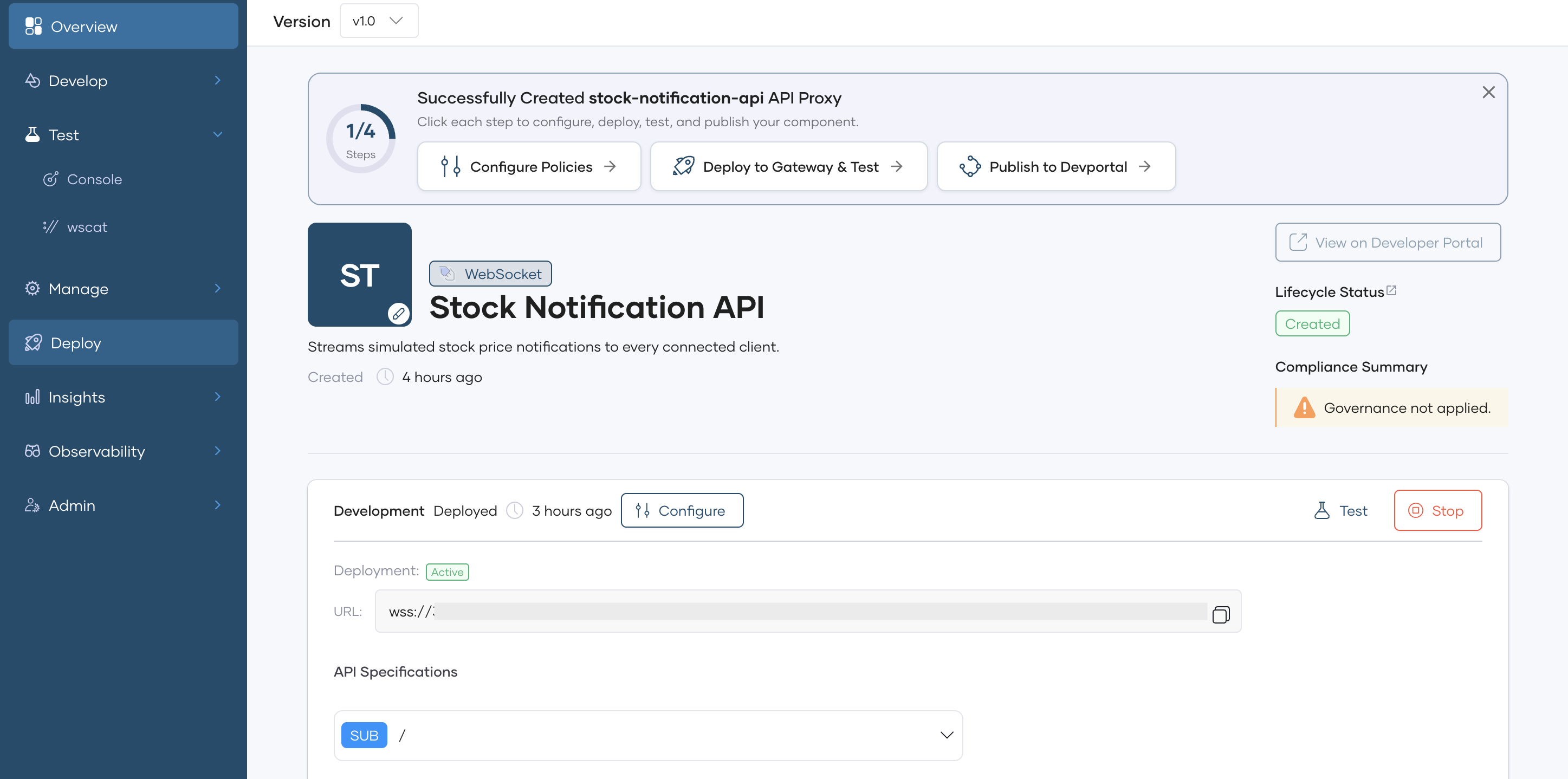
Expected result: A WebSocket API proxy whose channel comes from AsyncAPI and whose Target points at your notification backend.
Step 4: Deploy the API
Creating the API makes it available for configuration and management. Clients still need a deployed endpoint before they can establish WebSocket connections through the Platform.
Importing from a contract deploys to Development automatically. Redeploy when you change configuration (including Target).
- In the left navigation, open Deploy.
- In the Build Area, click Deploy.
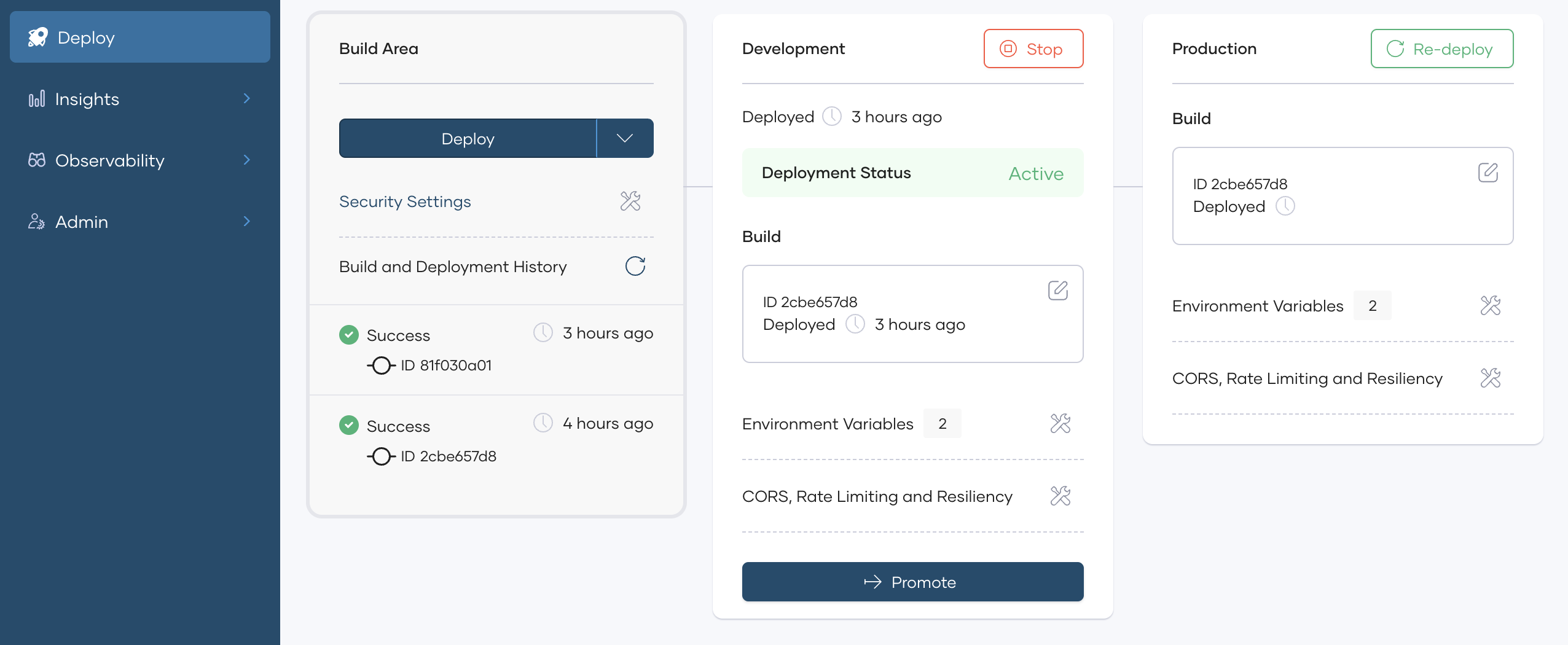
Expected result: Deployment status shows Active.
Step 5: Test real-time broadcasts with two connections
This is the payoff: prove that one backend publication reaches multiple open clients through the proxy.
Connection 1 ─┐
              ├── WSO2 WebSocket API ── Backend
Connection 2 ─┘
You do not need to send a client message. The sample backend pushes on its own schedule.
- Go to Test → Console.
- Expand the
/channel and click Connect (connection 1). - Open a second browser tab to the same Console page and Connect again (connection 2).
- Wait a few seconds for the next backend tick.
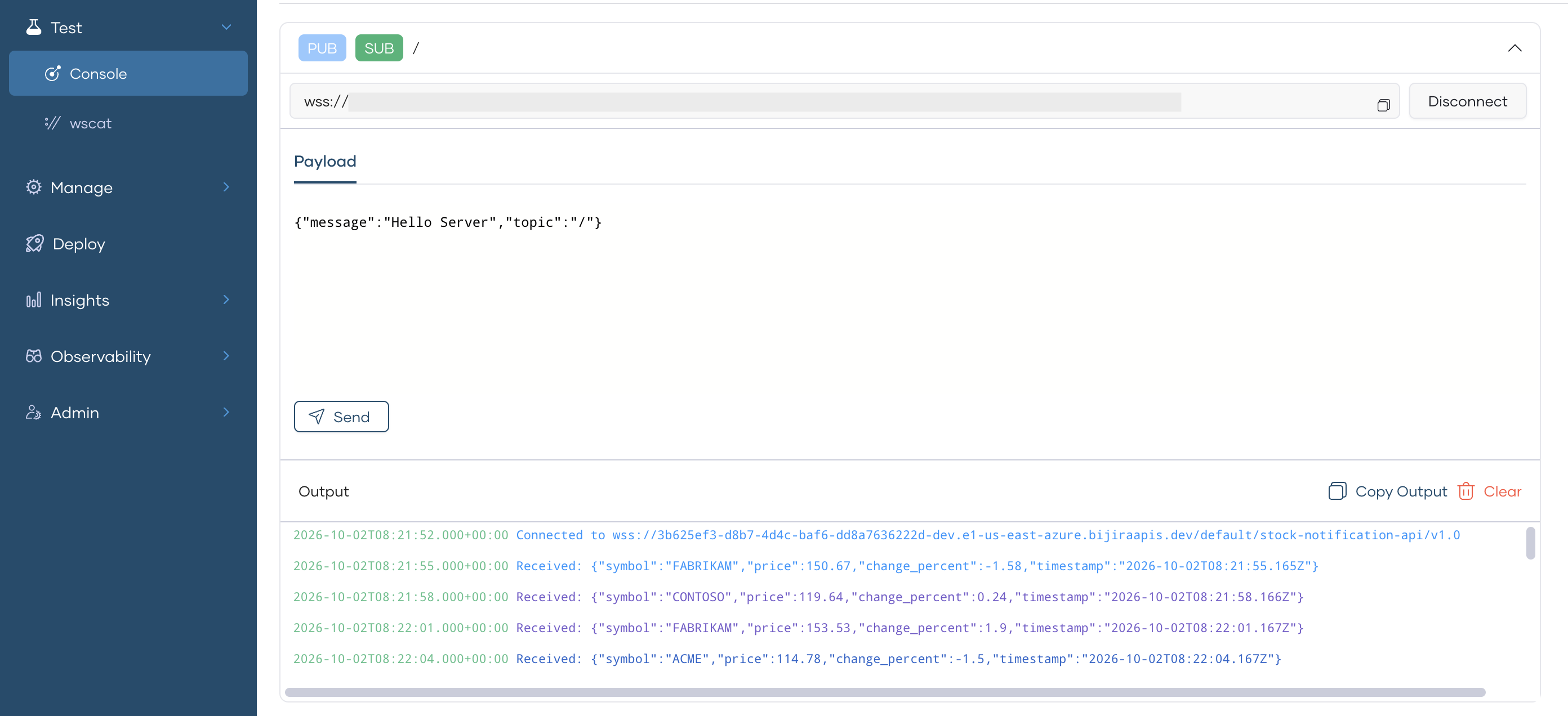
Verify all of the following:
- Both connections remain open.
- Notifications arrive without manually requesting them.
- The same notification (same symbol, price, and timestamp) appears in both tabs.
- New notifications continue as the backend generates them.
If Connect fails, confirm the sample and public tunnel or host are still up, Target is the current wss:// URL, and the proxy was redeployed after the last Target change.
Where can this pattern be used?
Stock prices are only one demo. Use the same real-time push and broadcast pattern whenever several clients should learn about an event as soon as it happens, without polling for empty results.
In general, it fits workloads such as:
- Shared live state : Many users or services watch the same stream of changes (prices, scores, inventory levels, presence, or collaboration updates).
- Status and progress feeds : A workflow advances through stages and connected UIs should reflect each transition immediately.
- Operational signals : Monitoring, incident, or health systems publish alerts that dashboards and on-call tools should receive together.
- Activity and metrics surfaces : Live dashboards, admin consoles, and control rooms display values that change often enough that repeated REST polls become noisy or slow.
- Fan-out messaging : Chat rooms, notifications hubs, and multiplayer or multi-viewer sessions deliver one publication to everyone currently connected to a channel.
Common concrete examples include order tracking, system error or outage alerts, delivery or logistics updates, IoT event monitoring, sports scores, and customer or ops dashboards that must stay current.
Frequently asked questions
Why not use a REST API? REST works well when the client requests data. WebSockets are useful when the server needs to push updates without waiting for another request. Many systems use both: REST for commands and queries, WebSocket for live notifications.
Does a WebSocket connection stay open? Yes. The connection normally remains open until the client, server, or network closes it.
Does every client receive every message? That depends on how the backend and application are designed. In this tutorial, the backend broadcasts each notification to the clients connected at that moment.
Why use two connections in the test? To verify that a single backend notification is delivered to multiple connected clients through the WebSocket API proxy.
Why use AsyncAPI instead of OpenAPI? AsyncAPI is designed to describe asynchronous, event-driven communication, including message-based APIs such as WebSockets. OpenAPI targets request-response HTTP APIs.
Conclusion
Real-time notification design starts with a simple need: receive an update when something happens, without empty polls. WebSockets keep a channel open so the server can push; broadcast delivers one backend event to every connected client; AsyncAPI describes that channel and message shape; a WebSocket API proxy on WSO2 API Platform is how you expose and verify the pattern before you build production clients.

