Building and Managing an API Catalog
Have you ever needed an API and had no idea where to find it? You know someone in your company already built a customer lookup API, but you can't find its docs. You ask in a team chat, wait for a reply, and get a link to a spec that might be two versions old. In the end, building your own feels faster. Now imagine an AI agent trying to do the same thing. It can't ask anyone in chat.
An API catalog fixes this by giving every API one trusted record. This article explains what an API catalog is, how it differs from an API portal and an API registry, and what a good entry contains. It then shows you how to build one in WSO2 API Platform that both developers and AI agents can use.
What is an API catalog?
An API catalog is a central, searchable inventory of every API an organization owns. Each entry records what the API does, who owns it, which version is current, how to get access, whether it meets governance rules, and where its OpenAPI spec lives. It acts as the system of record that portals, gateways, and AI agents read from.
Think of a library catalog. It doesn't hold the books. It tells you which books exist, where to find them, and whether you can borrow them.
API catalog vs. API portal vs. API registry
These three terms get mixed up because they all help people find APIs. Each one does a different job.
| What it is | The question it answers | Who uses it | |
|---|---|---|---|
| API catalog | The system of record for every API | What APIs do we have, and who owns them? | Platform and governance teams, portals, and AI agents |
| API portal | The website where developers browse, try, and subscribe to APIs | How do I start using this API? | Application developers and partners |
| API registry | A runtime lookup of where services are running | Where do I send this request right now? | Services, load balancers, and gateways |
- The catalog is the source. It holds the metadata, and other tools read from it.
- The portal is a view of the catalog. It shows published entries to developers and adds features such as subscriptions and API keys.
- The registry is usually about runtime. In its narrow sense, a registry tracks where services are running so they can find each other. It rarely holds owners, docs, or governance status. Some teams also use "registry" to mean a catalog.
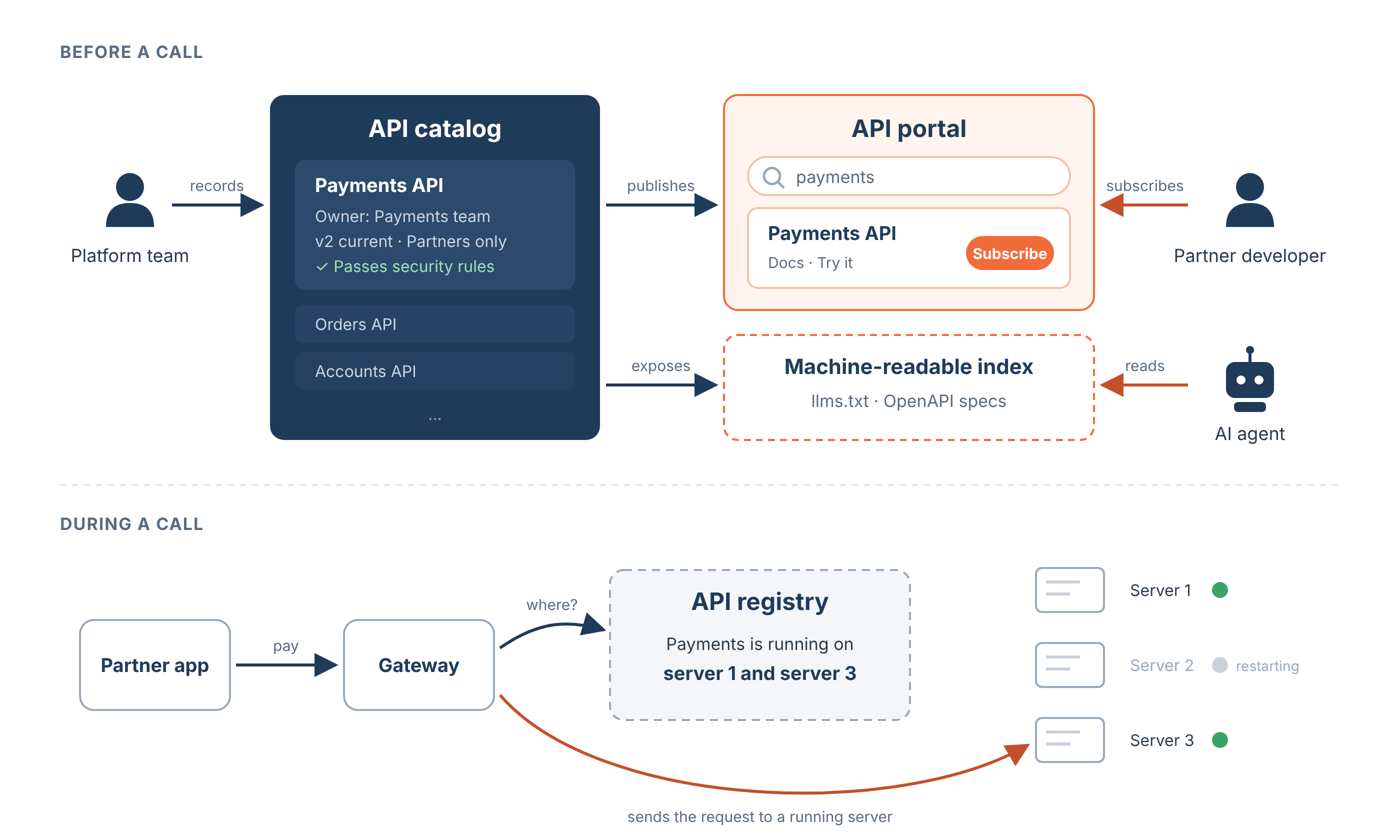
Many platforms ship the catalog and the portal together, which is why the terms blur. The difference still matters, because one catalog can feed more than one surface. A portal serves people, and a machine-readable index serves AI agents.
Why catalogs become necessary
- API sprawl. Microservices, partner integrations, and AI projects add APIs faster than anyone can track them. Without one inventory, nobody knows how many APIs exist or which ones are still in use.
- Shadow APIs. These are APIs that run in production without documentation, an owner, or governance. Nobody reviews or patches them, so they become a security risk.
- Duplicated work. When teams can't find an existing API, they build a new one. Two teams end up maintaining two customer lookup APIs that do almost the same thing.
- Slow onboarding. New developers spend days asking who owns what instead of building.
What belongs in a catalog entry
Use this checklist as the minimum for every entry.
- Documentation. A short description of what the API does, a getting started guide, and authentication steps.
- Owner. A named team and a contact, so consumers know who to ask when something breaks.
- Version status. The current version and its lifecycle state, such as pre-released, published, deprecated, or retired.
- Tags. Business domain and labels, such as
paymentsorinternal, so people can filter and search. - Access level. Whether the API is public, partner only, or internal, and which subscription plans are available.
- Governance status. Whether the API passes your design, security, and documentation rules.
- OpenAPI spec. A machine-readable contract that describes every endpoint, parameter, and response. REST APIs use the OpenAPI Specification.
Once every API has these fields, you can add more, such as service level targets or cost.
How to build an API catalog
- Discover what already exists. Don't rely on teams filling in spreadsheets. Pull API definitions automatically from your gateways, code repositories, and cloud accounts. This is also the fastest way to find shadow APIs.
- Set a minimum metadata standard at publish time. Make the checklist fields required before an API can be published, and check each spec against your governance rules automatically. An incomplete entry doesn't get published.
- Give every API a clear owner. Assign a team rather than a person, so ownership survives job changes. Review APIs without an owner regularly.
- Build it into the API lifecycle. Update the catalog as part of creating, publishing, deprecating, and retiring an API, not as a separate task. The catalog then stays current with no extra effort.
API catalogs are now built for AI agents too
Developers are no longer the only readers. AI agents, such as coding assistants and automated workflows, now look for APIs to call on their own. They can't click through a portal, so they need the catalog in a format they can read.
These standards help agents find and use APIs.
- RFC 9727. Published by the IETF in June 2025, RFC 9727 defines a standard address,
/.well-known/api-catalog, where an organization lists its APIs. Each entry links to the API's machine-readable spec and its human-readable docs. - llms.txt. A plain text file at a known address that gives AI models a short index of a site. API portals use it to list the APIs an agent can use. To learn more, see llmstxt.org.
- OpenAPI. After an agent finds an API, the OpenAPI spec tells it which endpoints exist and what inputs each one needs.
This changes what a good catalog needs.
- Descriptions matter more. An agent decides whether an API is relevant from its description, so a vague description means the API gets missed or misused.
- Specs must be complete. Clear operation names, summaries, and response schemas help agents call the API correctly.
- Visibility needs a setting. Some APIs should be visible to people but not to agents.
To learn more about preparing APIs for agents, see AI Agent API Integration: Patterns & Best Practices.
How WSO2 helps you build and maintain an API catalog
In WSO2 API Platform, the catalog is core Developer Portal functionality, not an add-on. You manage each API in the API Platform Console, and the Developer Portal (API Portal & MCP Hub) shows the published catalog to developers.
- Catalog in the Developer Portal. Every published API gets an entry with its spec, documents, version, lifecycle state, and subscription plans. Developers search by name, type, version, or description.
- An entry point for AI agents. The 19 August 2026 release added an
llms.txtentry point to the Developer Portal. It reads from the same catalog that people browse, so agents and developers always see the same APIs. Each API also has a Markdown page and a spec file that agents can read without a browser. - One catalog across many gateways. Gateway federation discovers APIs that run on third-party gateways, starting with AWS API Gateway, and adds them to the same catalog. Calls continue to go directly to the original gateway. To try it, see Discover APIs from AWS API Gateway.
- Governance built in. Governance policies check each API against your rules, and the compliance dashboard shows which rules each API passes.
- MCP Hub for agent tools. MCP Hub applies the same catalog idea to MCP servers. To learn more, see MCP Registry: How to Build a Governed Catalog for MCP Servers.
Posti Group, a Nordic and Baltic logistics company, uses the WSO2 Developer Portal as a unified catalog with documentation and testing in one place. This improved API discovery and shortened onboarding for its teams. Read the Posti Group story.
Tutorial: Build an API catalog entry that developers and AI agents can use
In this tutorial, you add an API to your organization's catalog in WSO2 API Platform and check what developers and AI agents see.
What you will build
- A REST API created from an OpenAPI definition, with supporting documents.
- A published entry in the Developer Portal catalog.
- An
llms.txtlisting that AI agents can read.
What you will learn
- How to add the details a good catalog entry needs.
- How to publish an API to the catalog.
- How to check what developers and AI agents see.
Prerequisites
- A WSO2 API Platform account.
Step 1: Create an API from a sample definition
-
Sign in to WSO2 API Platform. If this is your first time, create an organization.
-
On the organization home page, click + Create Project, enter a name, and click Create.
-
On the project home page, click + Create.
-
Keep API Proxy selected, then click Import API Contract under My APIs (Ingress).
-
Click Try with Sample URL, or paste the following URL. The console fetches the Reading List API definition and shows its endpoints.
https://raw.githubusercontent.com/wso2/bijira-samples/refs/heads/main/reading-list-api/openapi.yaml -
Click Next.
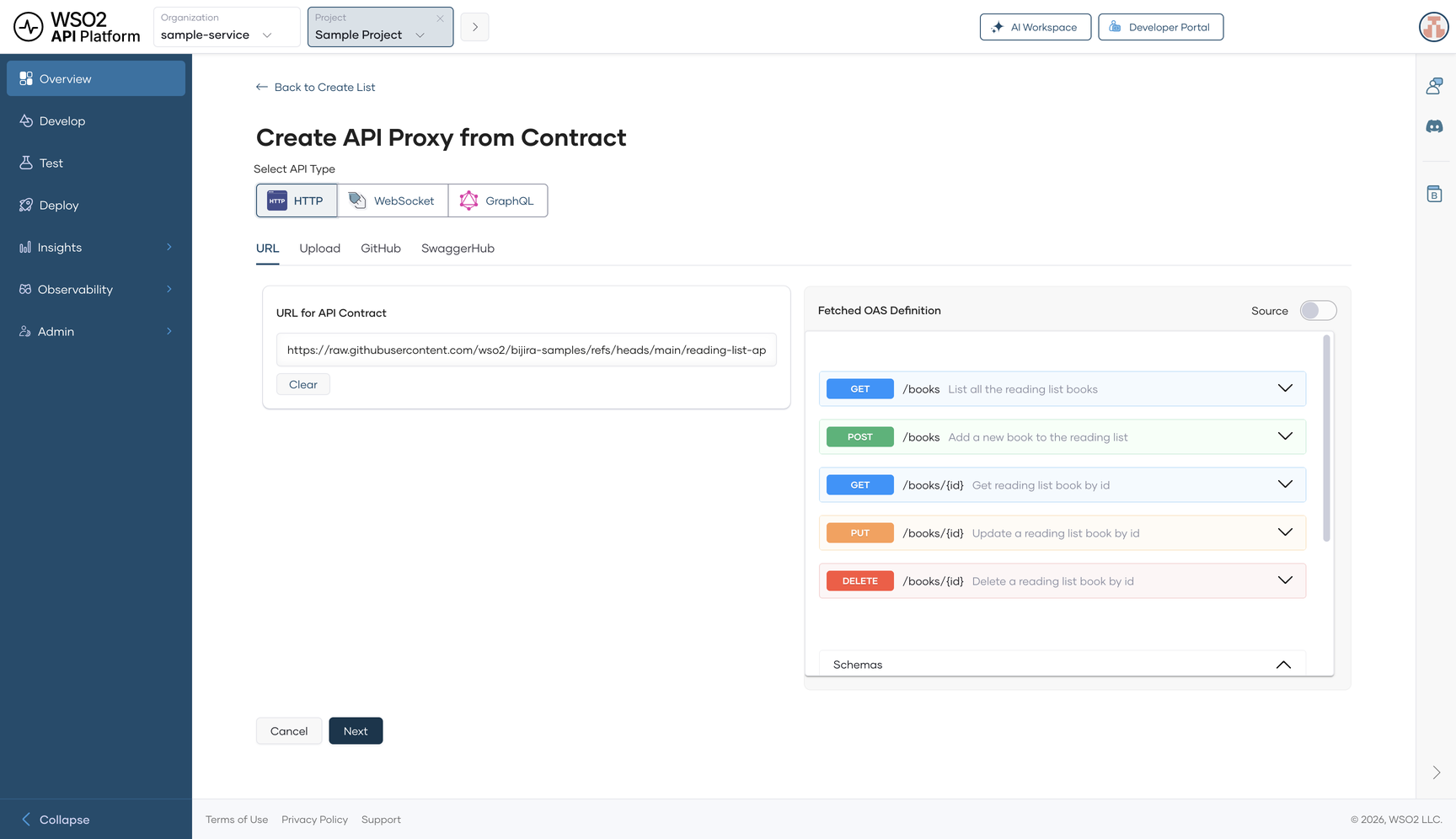
- Check the name, version, and description. The description is what developers and AI agents read first, so make sure it says what the API does.
- Under Gateway Type, select WSO2 Managed Gateway, then click Create.
The console creates the API and deploys it to the development environment.
Step 2: Add documentation
- In the left navigation menu, click Develop, then click Documents.
- Click Create Document.
- Enter a name, choose a Document Type, and write the content in Markdown.
- Click Create.
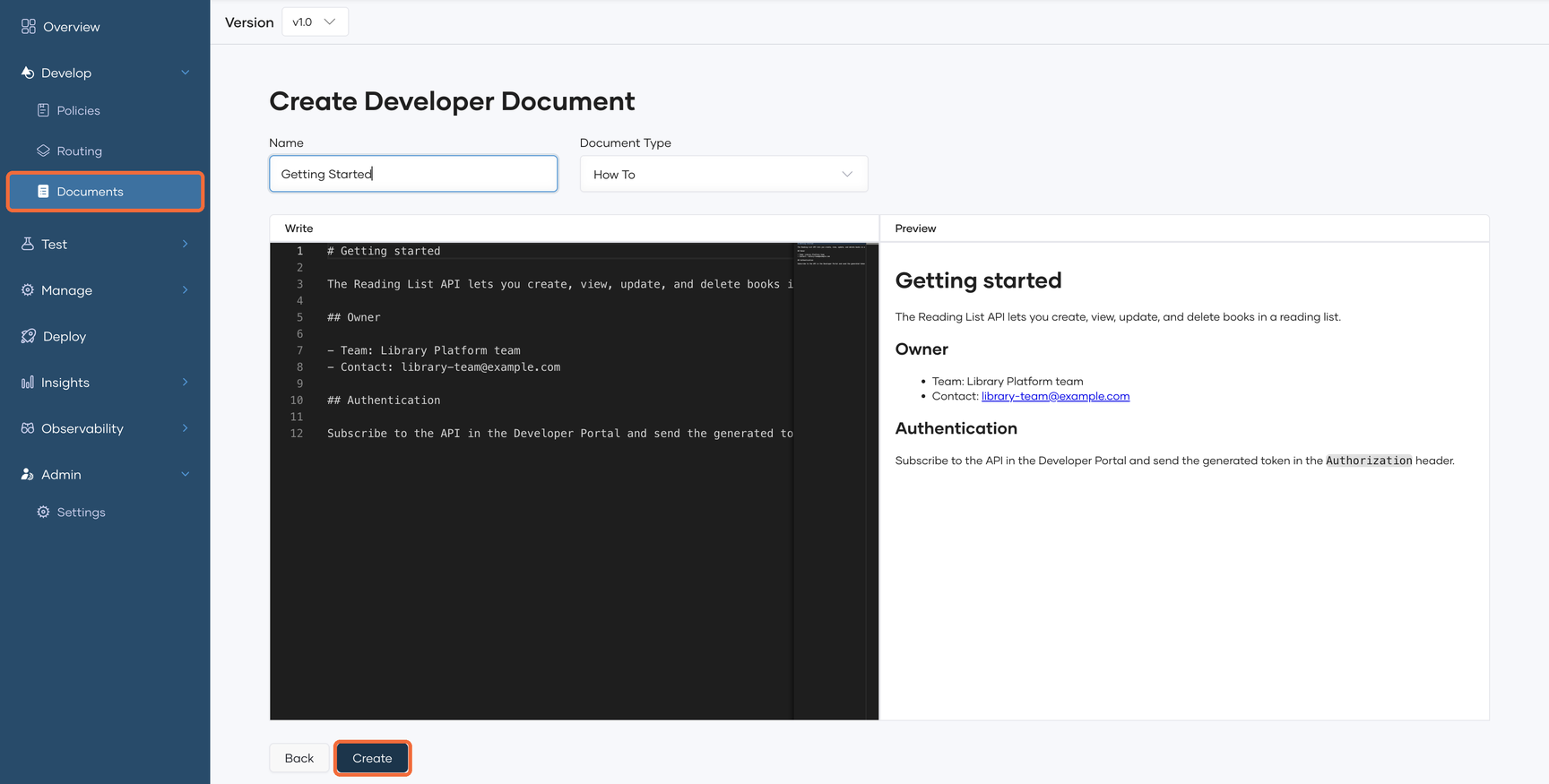
Add at least a getting started guide that covers authentication. Include the owning team and a contact so consumers know who to ask. For example:
# Getting started

The Reading List API lets you create, view, update, and delete books in a reading list.

## Owner

- Team: Library Platform team
- Contact: [email protected]

## Authentication

Subscribe to the API in the Developer Portal and send the generated token in the `Authorization` header.
Step 3: Check governance status
The API's Overview page shows a Compliance Summary. When your organization has governance policies, open Insights > Compliance to see which rules the API passes, and fix any errors before you publish. Admins set up policies under Admin > Governance.
To learn more, see Govern API proxies.
Step 4: Promote the API to production
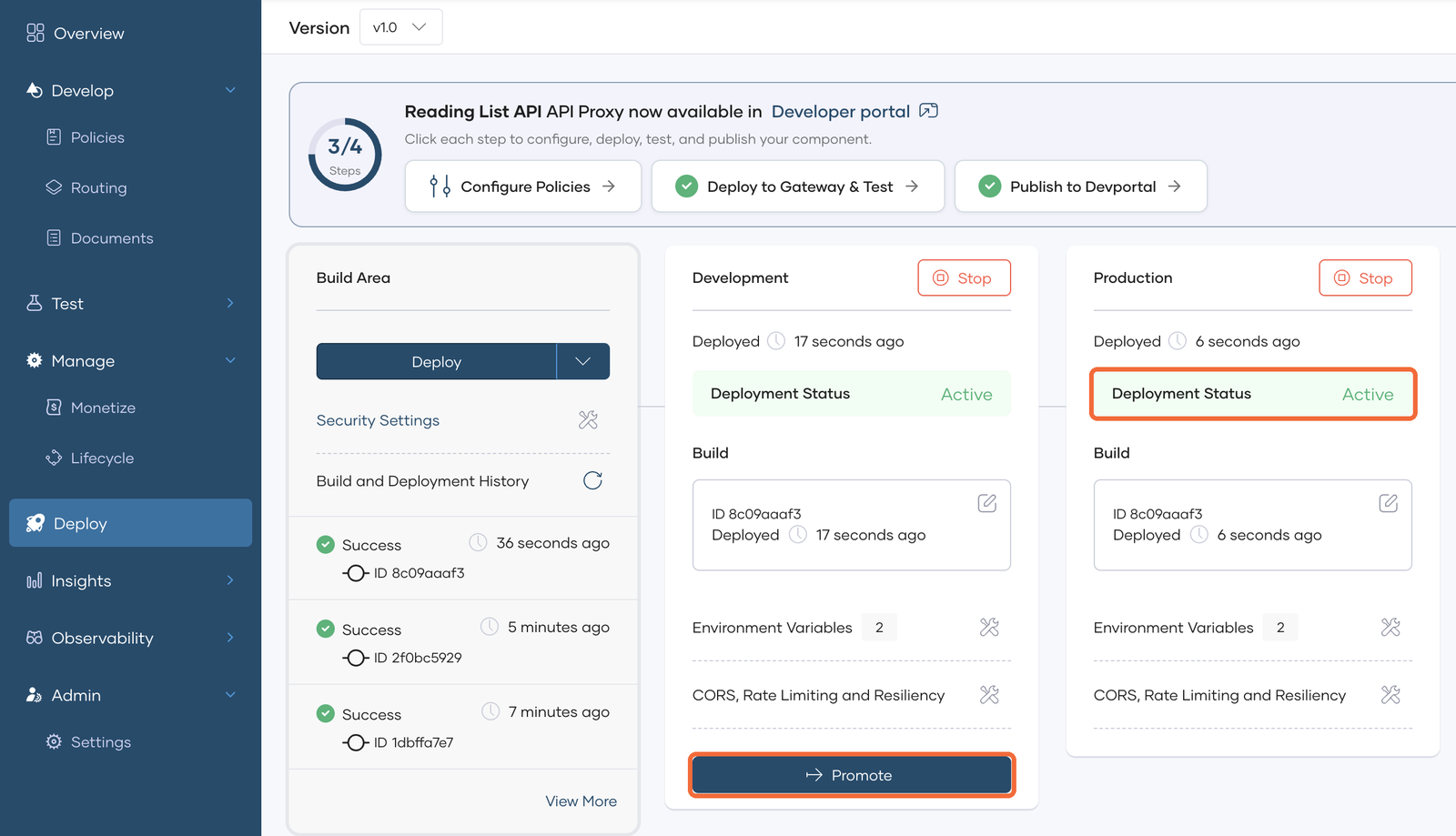
- In the left navigation menu, click Deploy.
- On the Development card, click Promote.
When the Production card shows Active, the API is ready to publish.
Step 5: Publish the API to the catalog
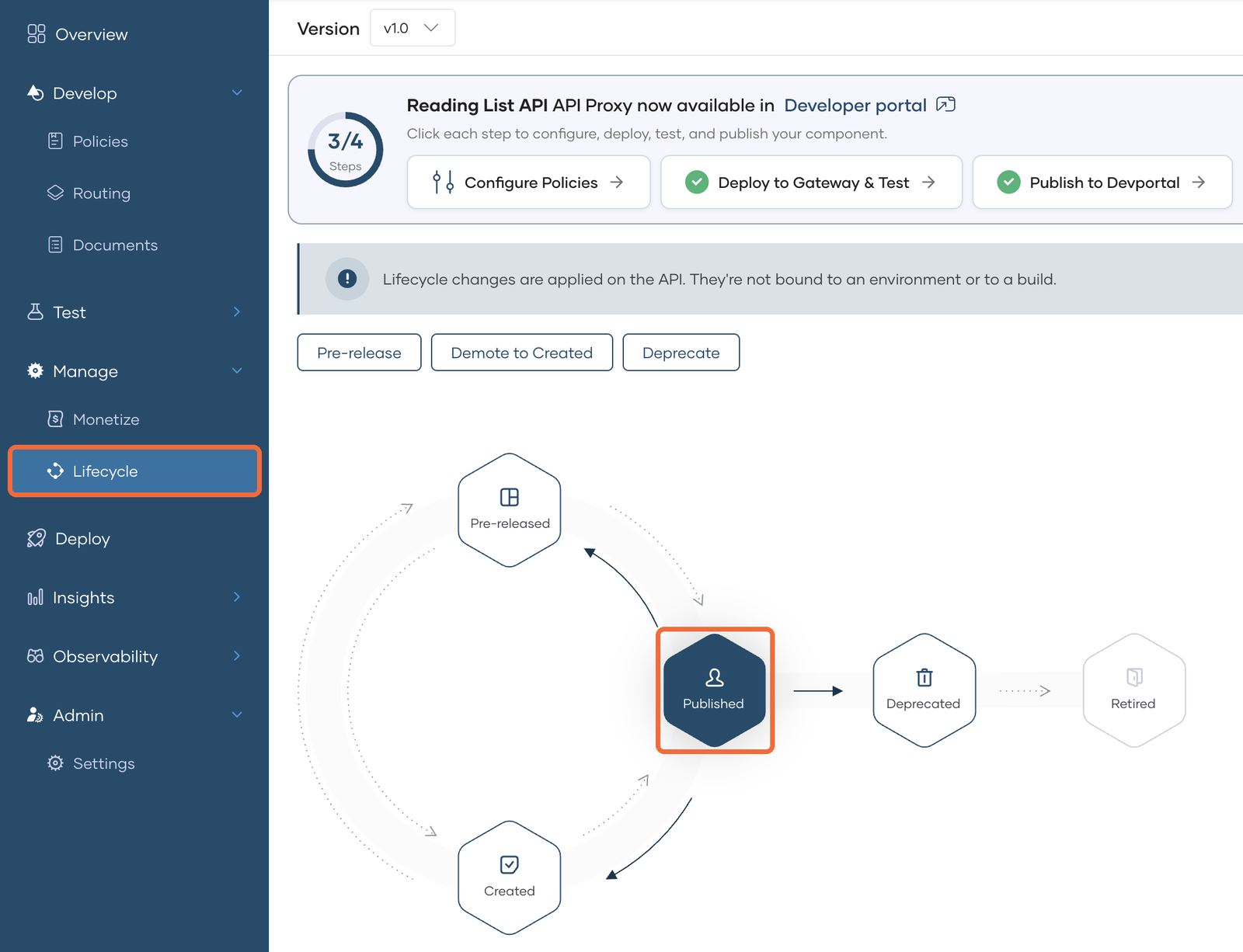
- In the left navigation menu, click Manage, then click Lifecycle.
- Click Publish.
- In the Publish API dialog, check the display name and the production endpoint URL.
- Keep Make this API discoverable by AI agents turned on, then click Confirm.
- Go to Develop > Documents and click Publish To Developer Portal so your documents appear with the API.
The lifecycle state changes to Published, and the API is now part of your catalog.
Step 6: Find the API in the Developer Portal
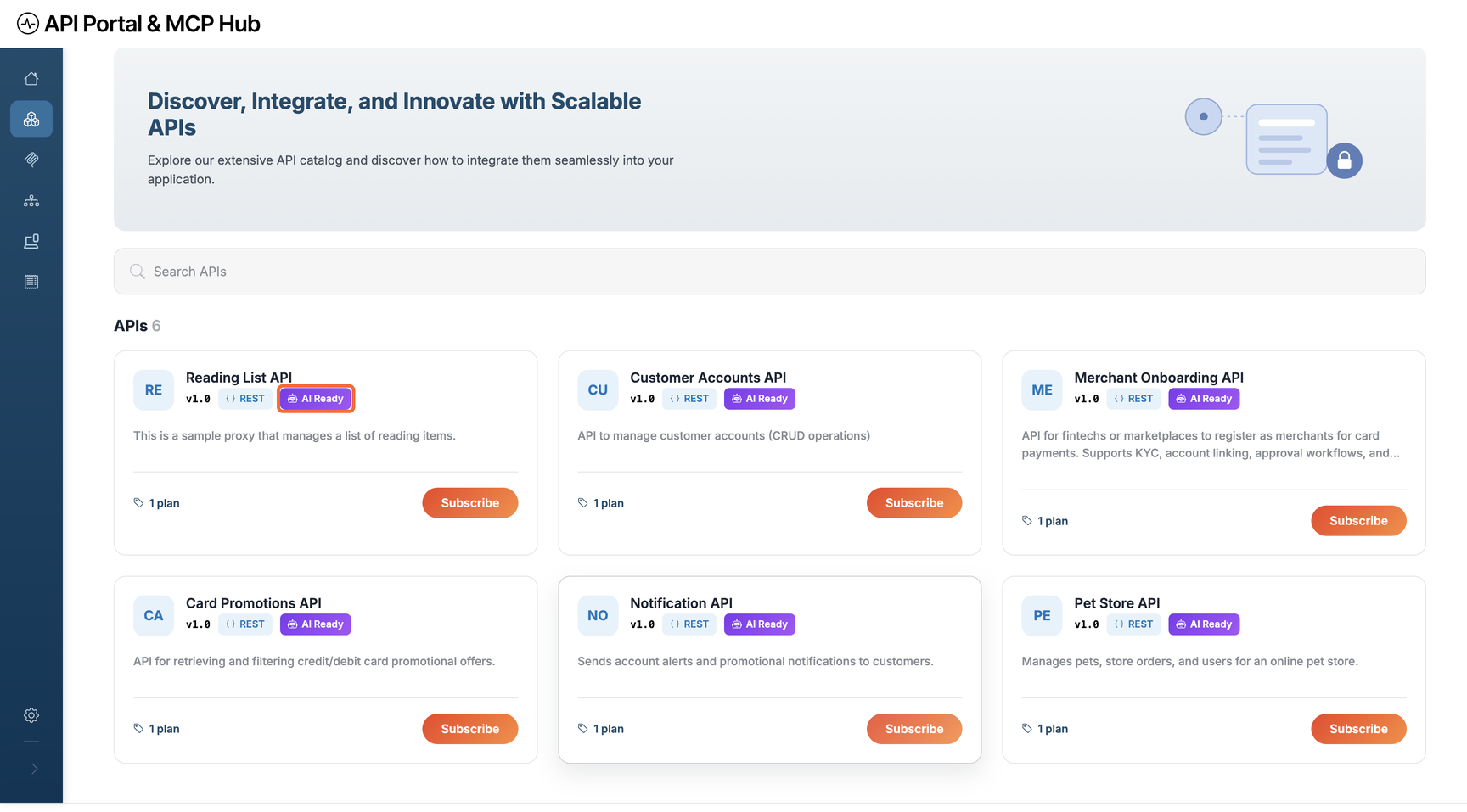
- Click Developer Portal at the top of the console.
- Click APIs in the sidebar. Your API appears in the catalog with an AI Ready label.
- Search for the API by name, type, version, or description, then open it to see its overview and spec.
Step 7: Check what AI agents see
-
In the Developer Portal, click the Settings icon at the bottom of the sidebar, then click LLM Instructions.
-
Make sure Portal is AI-discoverable is turned on. It shows the path to your portal's
llms.txtfile. -
Optionally, add a portal name and description. They appear at the top of
llms.txt. -
Open your
llms.txtfile in a browser. Replace<org-handle>with the organization name in your Developer Portal URL.https://devportal.bijira.dev/<org-handle>/views/default/llms.txt
Your API is listed under APIs, with its name and description.
## APIs

- [Reading List API v1.0](/<org-handle>/views/default/api/reading-list-api-v1.0.md) — This is a sample proxy that manages a list of reading items.
Each link opens a Markdown page with the API's endpoints, authentication steps, and OpenAPI spec. Agents follow these links to learn how to call the API.
Frequently asked questions
What is an API catalog? A central, searchable inventory of every API an organization owns. Each entry records the API's docs, owner, version, tags, access level, governance status, and OpenAPI spec.
What is the difference between an API catalog and an API portal? The catalog is the system of record for all your APIs. The portal is the website that shows published catalog entries to developers and lets them subscribe and get keys.
Is an API registry the same as an API catalog? No. A registry tracks where services are running so requests can reach them at runtime. A catalog records what each API is, who owns it, and whether it is approved for use.
How do AI agents use an API catalog? Agents read a machine-readable index, such as llms.txt or the /.well-known/api-catalog address defined in RFC 9727. They then fetch each API's OpenAPI spec to learn how to call it.
Does WSO2 API Platform include an API catalog? Yes. The catalog is core Developer Portal functionality. It also serves an llms.txt entry point for agents and can include APIs from third-party gateways such as AWS API Gateway.
Conclusion
A catalog gives every API one trusted record, so teams stop rebuilding what already exists and shadow APIs come to light. Keeping the portal and the agent index on the same catalog means developers and AI agents always see the same approved APIs.
To build your own catalog, explore WSO2 API Platform. To apply the same idea to agent tools, see MCP Registry: How to Build a Governed Catalog for MCP Servers.

