Knowledge Bases
A Knowledge Base is a managed store of documents that your integration can index and query. It provides a consistent interface for adding content, retrieving the most relevant chunks for a given query, and removing stale content — regardless of the underlying storage technology.
In WSO2 Integrator, a Knowledge Base is the single object the RAG ingest, retrieve, and delete-by-filter nodes talk to. It uses three pluggable parts (a Vector Store, an Embedding Provider, and a Chunker) and exposes a small surface for indexing chunks and retrieving the most relevant ones.
Available actions
Every Knowledge Base exposes the same three actions in the right-side Knowledge Bases panel.
| Action | What it does | Required parameters | Optional parameters |
|---|---|---|---|
| Ingest | Takes documents (or chunks), runs them through the configured Chunker, embeds each chunk via the Embedding Provider, and persists the vectors in the Vector Store. | Documents (a single document, an array of documents, or an array of chunks). | None. |
| Retrieve | Returns the chunks most similar to a query, optionally filtered by metadata. The everyday read action. | Query (the search text). | Top K (default 10, use -1 for all). Filters (metadata filter). |
| Delete By Filter | Removes every chunk whose metadata matches the given filter. The standard way to evict an old version of a document before re-ingesting. | Filters (the metadata filter). | None. |
Each Retrieve result has the matched chunk and a similarityScore. RAG flows usually pass the result list straight to ai:augmentUserQuery, which packages it together with the user's question into a single message ready for generate.
Where to find knowledge bases
Two places, both equivalent:
- Add Node panel > AI > RAG > Knowledge Base.
- Right-side Knowledge Bases panel > + Add Knowledge Base.
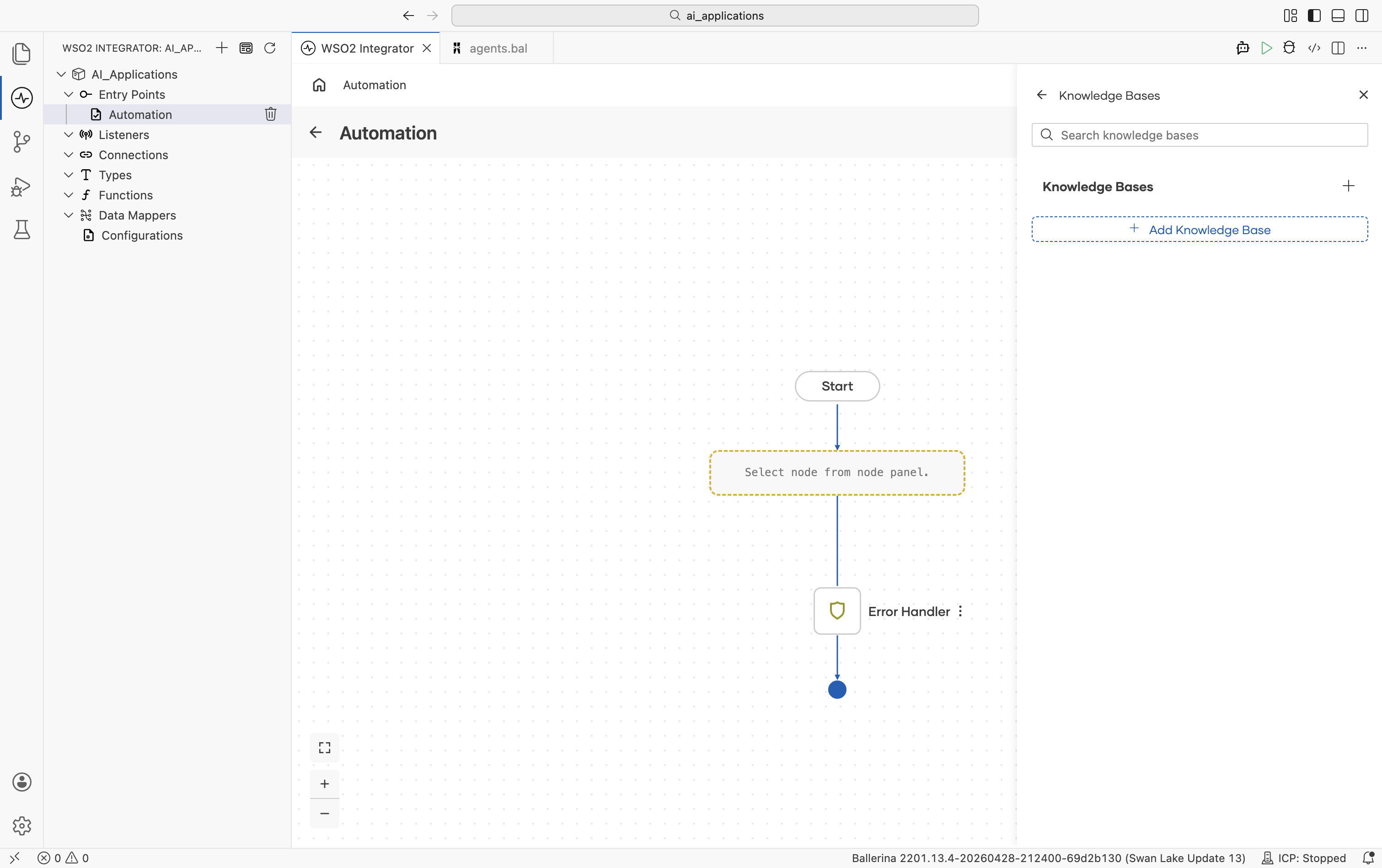
Click + Add Knowledge Base and the Select Knowledge Base picker opens:
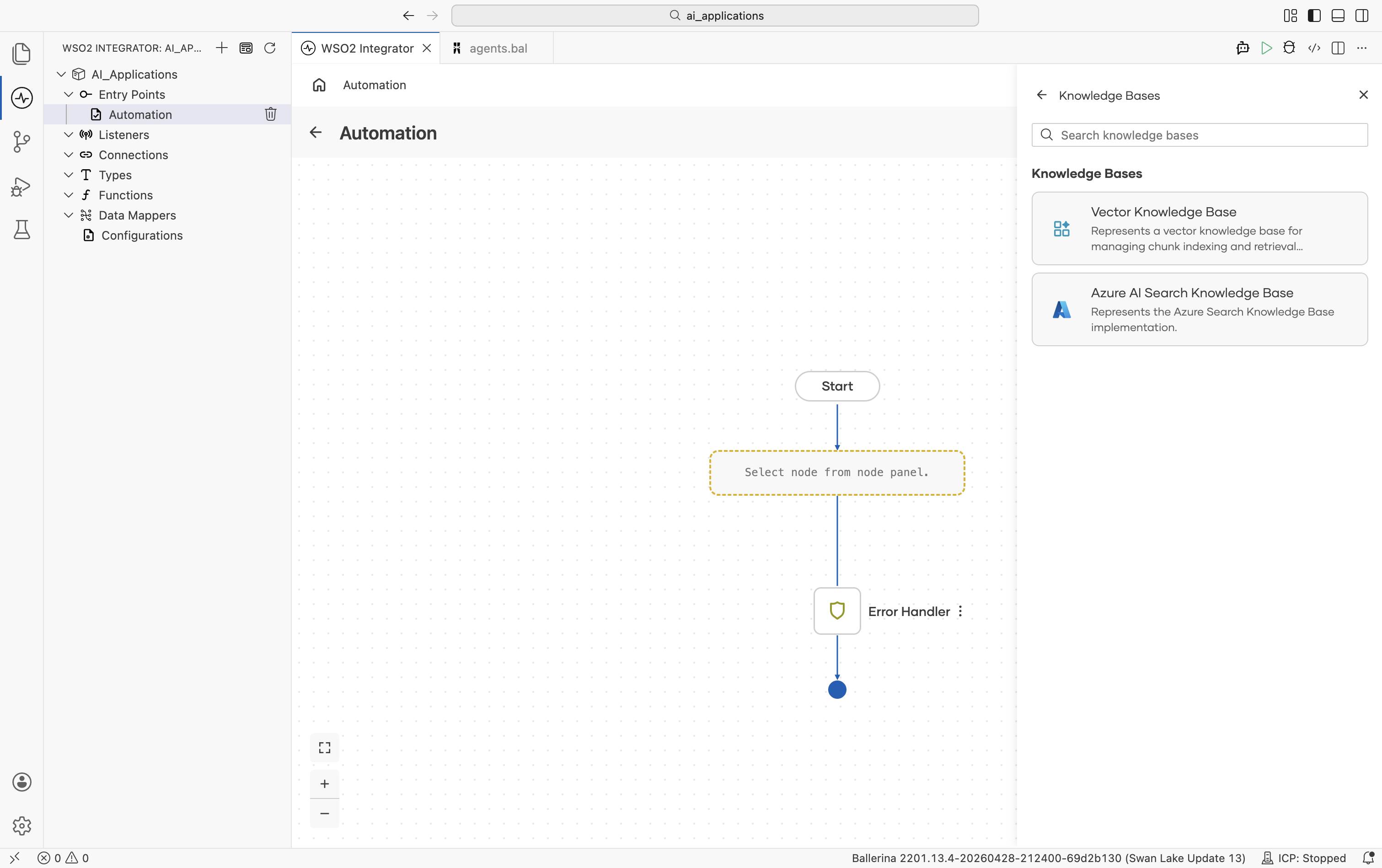
Implementations overview
| Knowledge Base | Module | Storage |
|---|---|---|
| Vector Knowledge Base | ballerina/ai | Any Vector Store |
| Azure AI Search Knowledge Base | ballerinax/ai.azure | Azure AI Search index |
Vector Knowledge Base
The default implementation. You combine a Vector Store, an Embedding Provider, and a Chunker into a single connection that the rest of your RAG flows share.
Create form
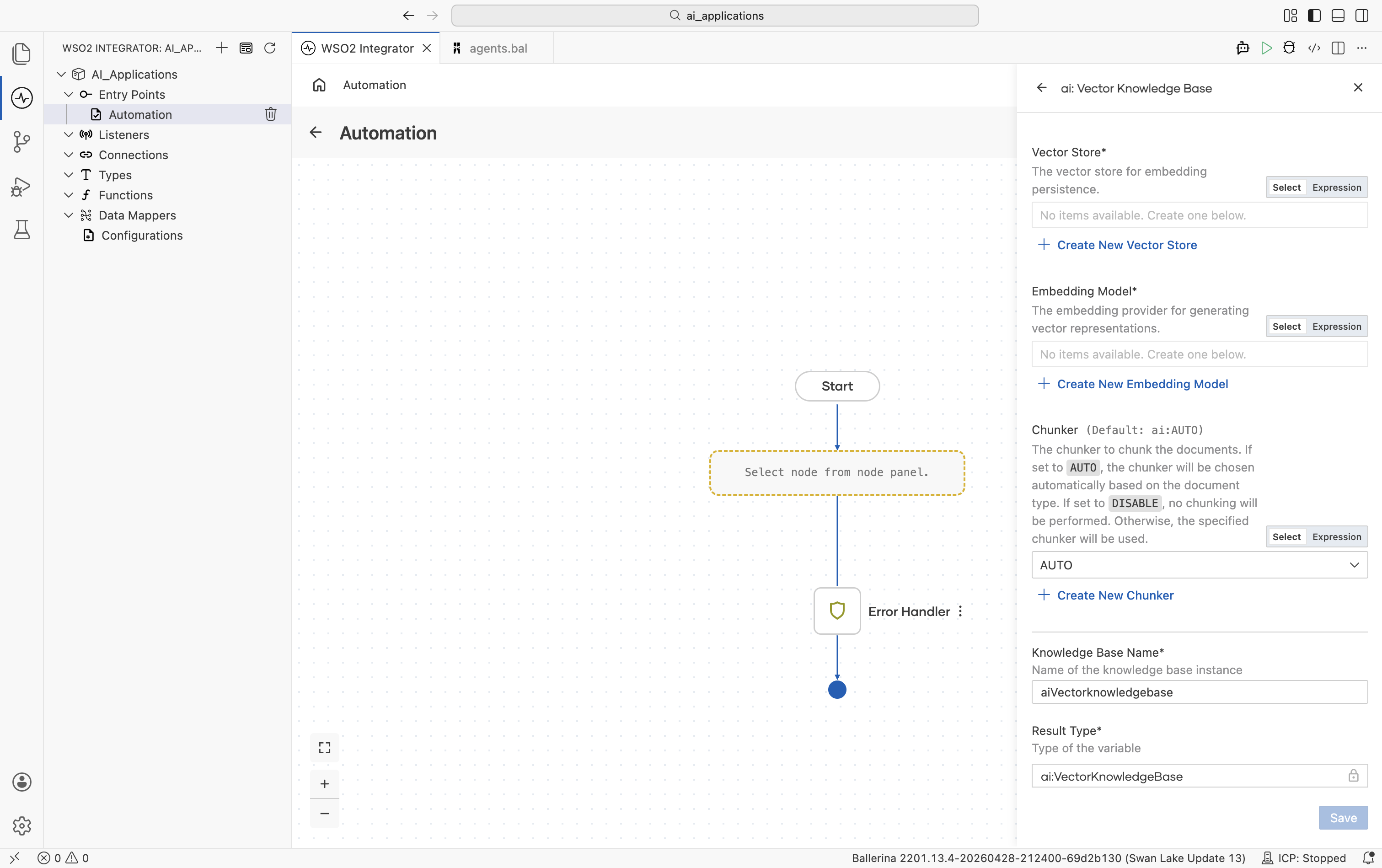
| Field | Required | Default | Available values |
|---|---|---|---|
| Vector Store | Yes | — | Any saved Vector Store connection. Click + Create New Vector Store to make one inline. |
| Embedding Model | Yes | — | Any saved Embedding Provider connection. Use the same provider on ingest and retrieve. Embeddings from different providers are not interchangeable. |
| Chunker | No | ai:AUTO | ai:AUTO (chunker chosen automatically based on document type), ai:DISABLE (no chunking; each document becomes one chunk), or any saved Chunker connection. |
There are no Advanced Configurations on the Vector Knowledge Base itself. Every knob lives on the underlying Vector Store, Embedding Provider, or Chunker connection.
Azure AI Search Knowledge Base
A Knowledge Base that stores chunks directly in Azure AI Search and uses Azure's hybrid (vector + keyword + semantic) retrieval. Use this when your team already runs Azure AI Search or when you want Azure's semantic ranker on top of vector search.
Official website: Azure AI Search.
Unlike the Vector Knowledge Base, this one talks to Azure AI Search directly. There is no separate Vector Store connection. The Embedding Provider is optional because Azure can do its own integrated vectorization.
Create form
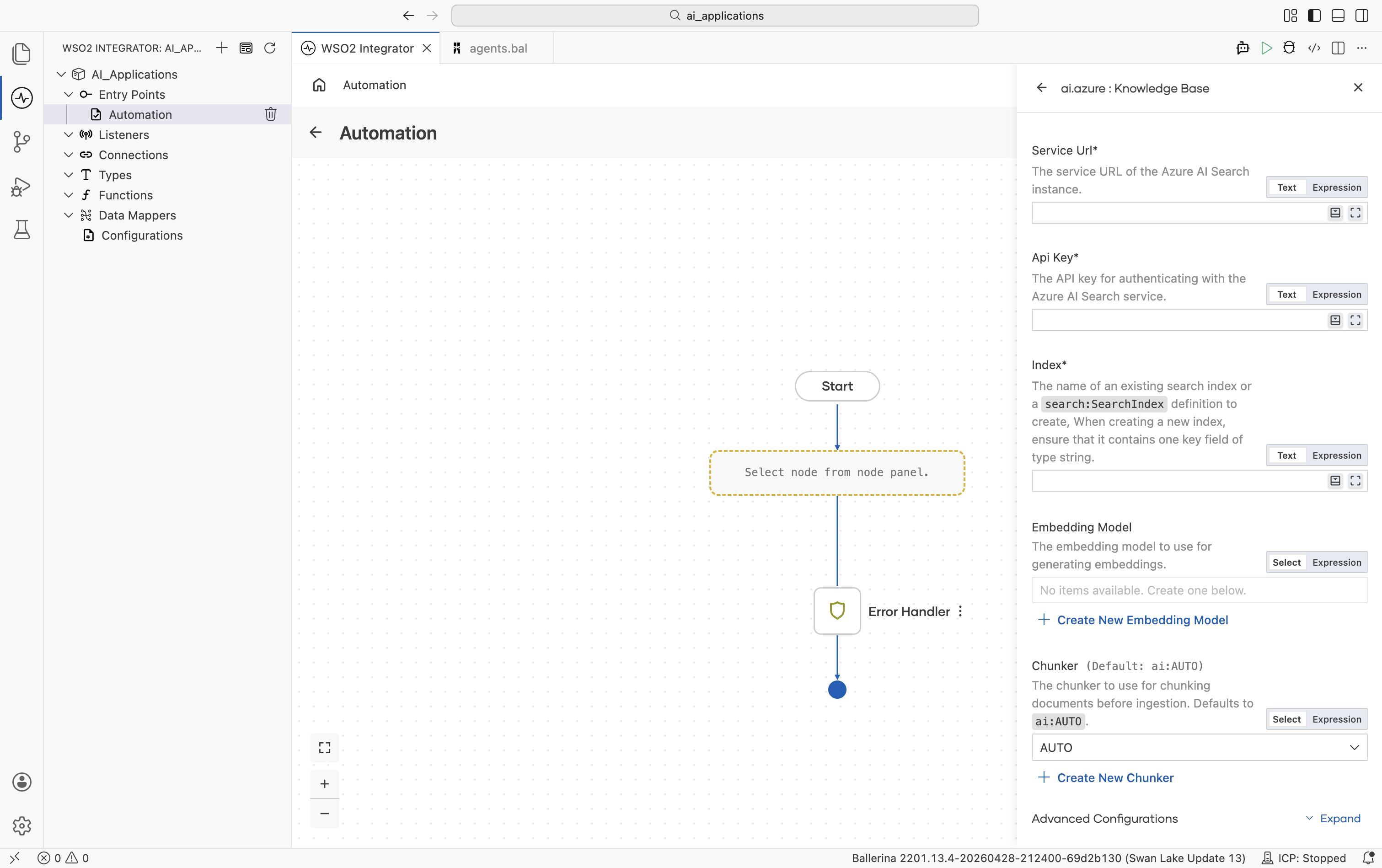
| Field | Required | Default | Available values |
|---|---|---|---|
| Service URL | Yes | — | Service URL of your Azure AI Search instance. |
| API Key | Yes | — | API key for authenticating with the Azure AI Search service. |
| Index | Yes | — | The name of an existing search index, or a search:SearchIndex definition (a record describing the index schema). When creating a new index, ensure it contains one key field of type string. |
| Embedding Model | No | () | Any saved Embedding Provider connection. Used for query and ingest if provided. Leave empty to rely on Azure AI Search's integrated vectorization. |
| Chunker | No | ai:AUTO | ai:AUTO, ai:DISABLE, or any saved Chunker connection. |
Advanced configurations
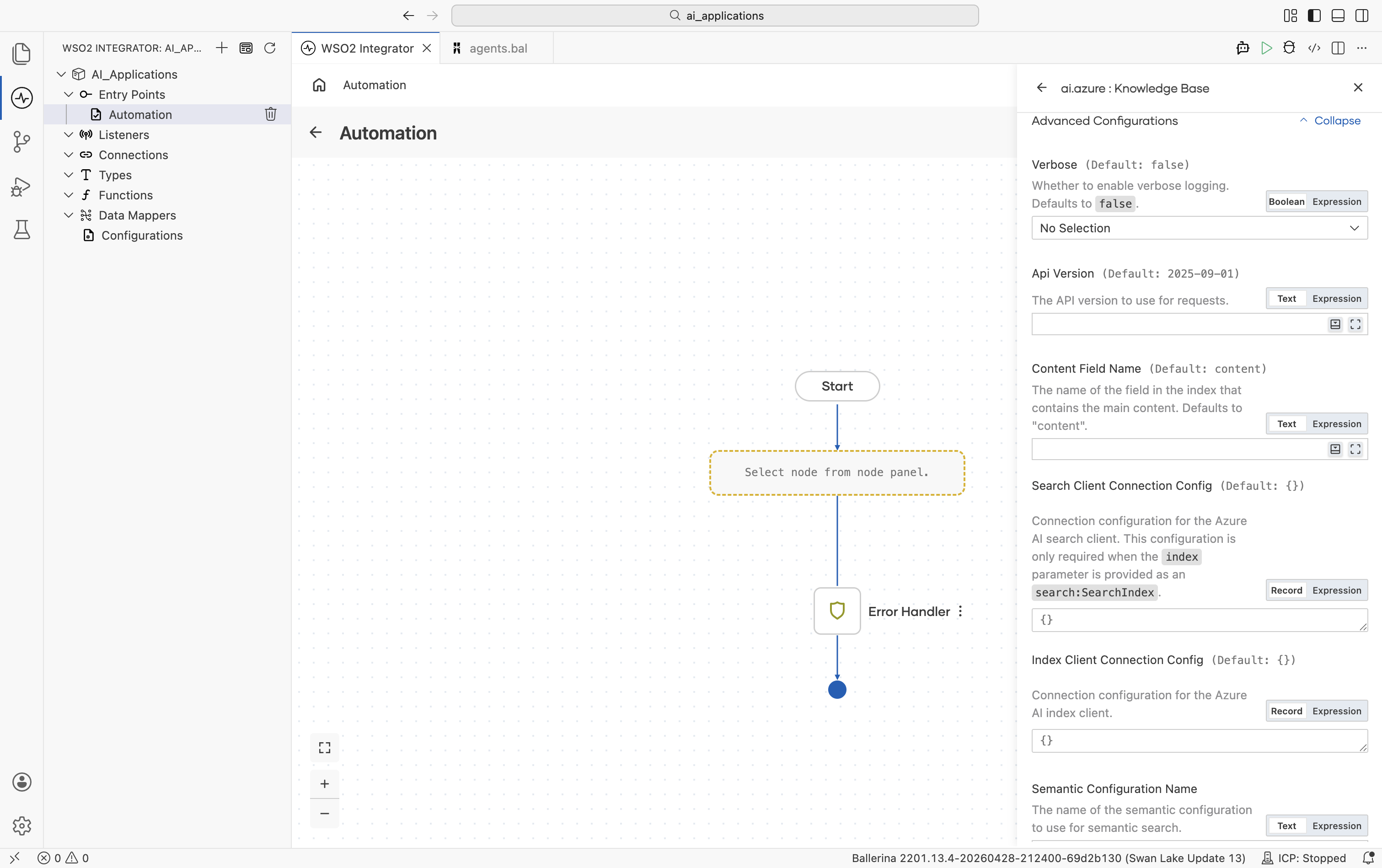
| Field | Default | Available values | What it controls |
|---|---|---|---|
| Verbose | false | true, false | Whether to enable verbose logging during ingest and retrieve. Useful when debugging. |
| API Version | 2025-09-01 | Azure AI Search API version string | The Azure AI Search REST API version to use. |
| Content Field Name | "content" | String | The name of the field in the index that contains the main chunk content. |
| Search Client Connection Config | {} | Record | Connection configuration for the Azure AI Search service client. Required only when Index is provided as a search:SearchIndex definition (i.e. when the connector creates the index for you). See Standard HTTP Advanced Configurations for available knobs. |
| Index Client Connection Config | {} | Record | Connection configuration for the Azure AI Search index client. See Standard HTTP Advanced Configurations for available knobs. |
| Semantic Configuration Name | () | String or empty | The name of the semantic configuration to use for semantic search. Leave empty for plain vector / keyword search. |
The connector analyzes the index schema on init: it identifies the key field, every vector field, and verifies the content field exists. If you use Azure AI Search's integrated vectorization, you don't need to provide an Embedding Model.
Selecting a knowledge base
| Situation | Recommended |
|---|---|
| Most projects, especially new ones | Vector Knowledge Base with In-Memory (dev) or Pinecone / Pgvector / Weaviate / Milvus (prod). |
| Already running Azure AI Search; need keyword + vector + semantic ranker | Azure AI Search Knowledge Base. |
| Need a custom retrieval source (search engine, graph DB, hand-rolled) | Implement the ai:KnowledgeBase contract yourself; the rest of the integration won't change. |
What's next
- Chunkers — How documents are split before ingest.
- Direct LLM Calls — One-shot generate calls without an agent loop.
- Natural Functions — Ballerina functions whose body is plain English, evaluated at runtime by an LLM.