WSDL Tool
The bal wsdl tool generates Ballerina client code from Web Services Description Language (WSDL) files. It creates type-safe SOAP client connectors, request/response record types, and XML serialization logic, enabling you to call legacy SOAP web services from your Ballerina integrations without manually constructing XML envelopes.
Prerequisites
The WSDL tool is included with the Ballerina distribution:
bal wsdl --help
Example WSDL
The following example uses a Calculator WSDL that defines four arithmetic operations — Add, Subtract, Multiply, and Divide — with both SOAP 1.1 and SOAP 1.2 bindings:
calculator.wsdl
<wsdl:definitions xmlns:soap="http://schemas.xmlsoap.org/wsdl/soap/"
    xmlns:tns="http://tempuri.org/"
    xmlns:s="http://www.w3.org/2001/XMLSchema"
    xmlns:soap12="http://schemas.xmlsoap.org/wsdl/soap12/"
    xmlns:wsdl="http://schemas.xmlsoap.org/wsdl/"
    targetNamespace="http://tempuri.org/">
    <wsdl:types>
        <s:schema elementFormDefault="qualified" targetNamespace="http://tempuri.org/">
            <s:element name="Add">
                <s:complexType>
                    <s:sequence>
                        <s:element minOccurs="1" maxOccurs="1" name="intA" type="s:int"/>
                        <s:element minOccurs="1" maxOccurs="1" name="intB" type="s:int"/>
                    </s:sequence>
                </s:complexType>
            </s:element>
            <s:element name="AddResponse">
                <s:complexType>
                    <s:sequence>
                        <s:element minOccurs="1" maxOccurs="1" name="AddResult" type="s:int"/>
                    </s:sequence>
                </s:complexType>
            </s:element>
            <s:element name="Subtract">
                <s:complexType>
                    <s:sequence>
                        <s:element minOccurs="1" maxOccurs="1" name="intA" type="s:int"/>
                        <s:element minOccurs="1" maxOccurs="1" name="intB" type="s:int"/>
                    </s:sequence>
                </s:complexType>
            </s:element>
            <s:element name="SubtractResponse">
                <s:complexType>
                    <s:sequence>
                        <s:element minOccurs="1" maxOccurs="1" name="SubtractResult" type="s:int"/>
                    </s:sequence>
                </s:complexType>
            </s:element>
            <s:element name="Multiply">
                <s:complexType>
                    <s:sequence>
                        <s:element minOccurs="1" maxOccurs="1" name="intA" type="s:int"/>
                        <s:element minOccurs="1" maxOccurs="1" name="intB" type="s:int"/>
                    </s:sequence>
                </s:complexType>
            </s:element>
            <s:element name="MultiplyResponse">
                <s:complexType>
                    <s:sequence>
                        <s:element minOccurs="1" maxOccurs="1" name="MultiplyResult" type="s:int"/>
                    </s:sequence>
                </s:complexType>
            </s:element>
            <s:element name="Divide">
                <s:complexType>
                    <s:sequence>
                        <s:element minOccurs="1" maxOccurs="1" name="intA" type="s:int"/>
                        <s:element minOccurs="1" maxOccurs="1" name="intB" type="s:int"/>
                    </s:sequence>
                </s:complexType>
            </s:element>
            <s:element name="DivideResponse">
                <s:complexType>
                    <s:sequence>
                        <s:element minOccurs="1" maxOccurs="1" name="DivideResult" type="s:int"/>
                    </s:sequence>
                </s:complexType>
            </s:element>
        </s:schema>
    </wsdl:types>
    <wsdl:message name="AddSoapIn">
        <wsdl:part name="parameters" element="tns:Add"/>
    </wsdl:message>
    <wsdl:message name="AddSoapOut">
        <wsdl:part name="parameters" element="tns:AddResponse"/>
    </wsdl:message>
    <wsdl:message name="SubtractSoapIn">
        <wsdl:part name="parameters" element="tns:Subtract"/>
    </wsdl:message>
    <wsdl:message name="SubtractSoapOut">
        <wsdl:part name="parameters" element="tns:SubtractResponse"/>
    </wsdl:message>
    <wsdl:message name="MultiplySoapIn">
        <wsdl:part name="parameters" element="tns:Multiply"/>
    </wsdl:message>
    <wsdl:message name="MultiplySoapOut">
        <wsdl:part name="parameters" element="tns:MultiplyResponse"/>
    </wsdl:message>
    <wsdl:message name="DivideSoapIn">
        <wsdl:part name="parameters" element="tns:Divide"/>
    </wsdl:message>
    <wsdl:message name="DivideSoapOut">
        <wsdl:part name="parameters" element="tns:DivideResponse"/>
    </wsdl:message>
    <wsdl:portType name="CalculatorSoap">
        <wsdl:operation name="Add">
            <wsdl:input message="tns:AddSoapIn"/>
            <wsdl:output message="tns:AddSoapOut"/>
        </wsdl:operation>
        <wsdl:operation name="Subtract">
            <wsdl:input message="tns:SubtractSoapIn"/>
            <wsdl:output message="tns:SubtractSoapOut"/>
        </wsdl:operation>
        <wsdl:operation name="Multiply">
            <wsdl:input message="tns:MultiplySoapIn"/>
            <wsdl:output message="tns:MultiplySoapOut"/>
        </wsdl:operation>
        <wsdl:operation name="Divide">
            <wsdl:input message="tns:DivideSoapIn"/>
            <wsdl:output message="tns:DivideSoapOut"/>
        </wsdl:operation>
    </wsdl:portType>
    <wsdl:binding name="CalculatorSoap12" type="tns:CalculatorSoap">
        <soap12:binding transport="http://schemas.xmlsoap.org/soap/http"/>
        <wsdl:operation name="Add">
            <soap12:operation soapAction="http://tempuri.org/Add" style="document"/>
            <wsdl:input><soap12:body use="literal"/></wsdl:input>
            <wsdl:output><soap12:body use="literal"/></wsdl:output>
        </wsdl:operation>
        <wsdl:operation name="Subtract">
            <soap12:operation soapAction="http://tempuri.org/Subtract" style="document"/>
            <wsdl:input><soap12:body use="literal"/></wsdl:input>
            <wsdl:output><soap12:body use="literal"/></wsdl:output>
        </wsdl:operation>
        <wsdl:operation name="Multiply">
            <soap12:operation soapAction="http://tempuri.org/Multiply" style="document"/>
            <wsdl:input><soap12:body use="literal"/></wsdl:input>
            <wsdl:output><soap12:body use="literal"/></wsdl:output>
        </wsdl:operation>
        <wsdl:operation name="Divide">
            <soap12:operation soapAction="http://tempuri.org/Divide" style="document"/>
            <wsdl:input><soap12:body use="literal"/></wsdl:input>
            <wsdl:output><soap12:body use="literal"/></wsdl:output>
        </wsdl:operation>
    </wsdl:binding>
    <wsdl:service name="Calculator">
        <wsdl:port name="CalculatorSoap12" binding="tns:CalculatorSoap12">
            <soap12:address location="http://www.dneonline.com/calculator.asmx"/>
        </wsdl:port>
    </wsdl:service>
</wsdl:definitions>
Generating a client from WSDL
- Visual Designer
- Ballerina Code
The following example shows how to generate a Calculator SOAP client from a WSDL specification and invoke the Add operation.
Step 1: Add a connection
-
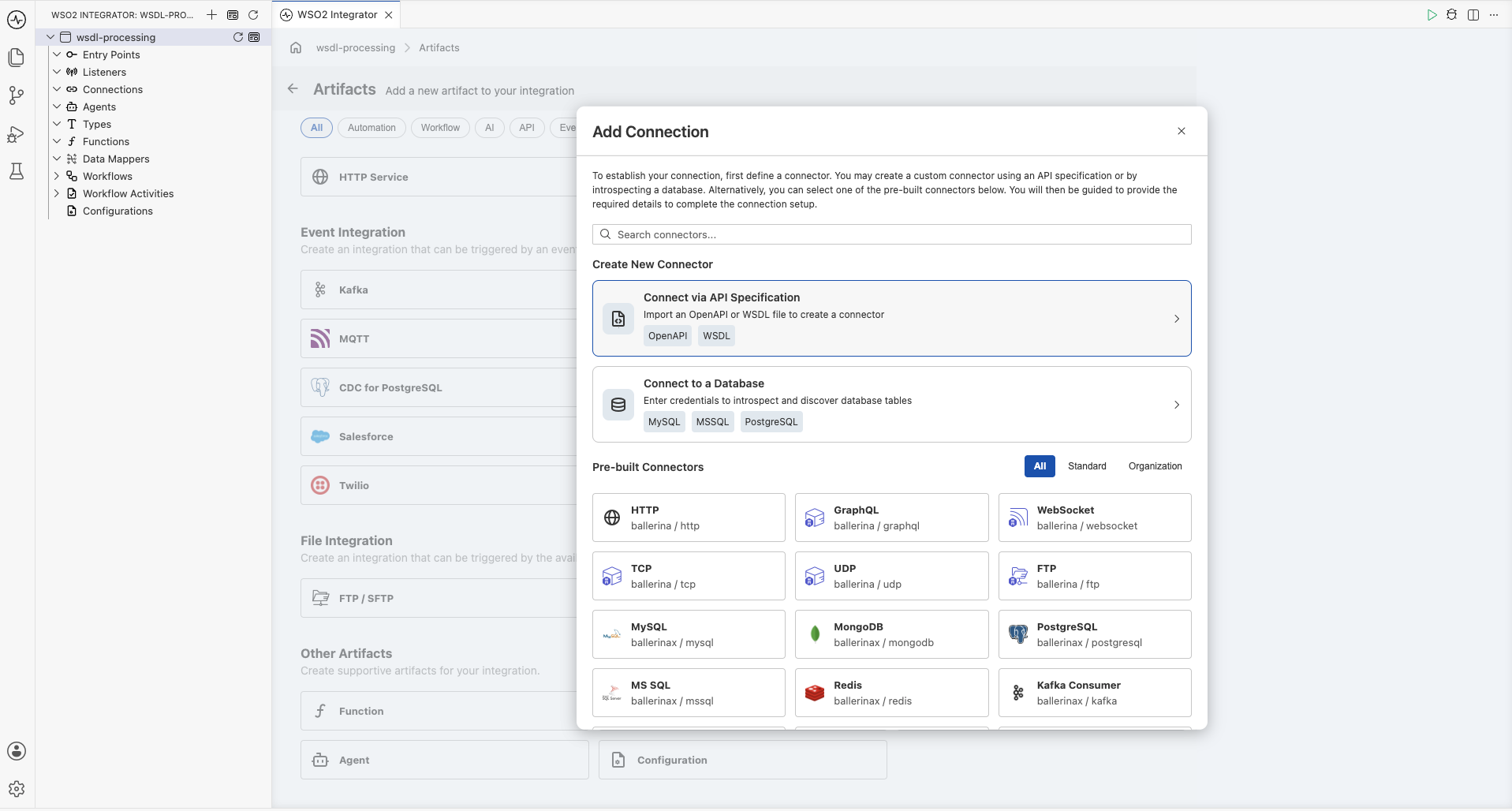
Click the + button in the canvas to open the Artifacts panel.
-
Under Other Artifacts, select Connection.
-
In the Add Connection dialog, select Connect via API Specification.
Step 2: Import the WSDL specification
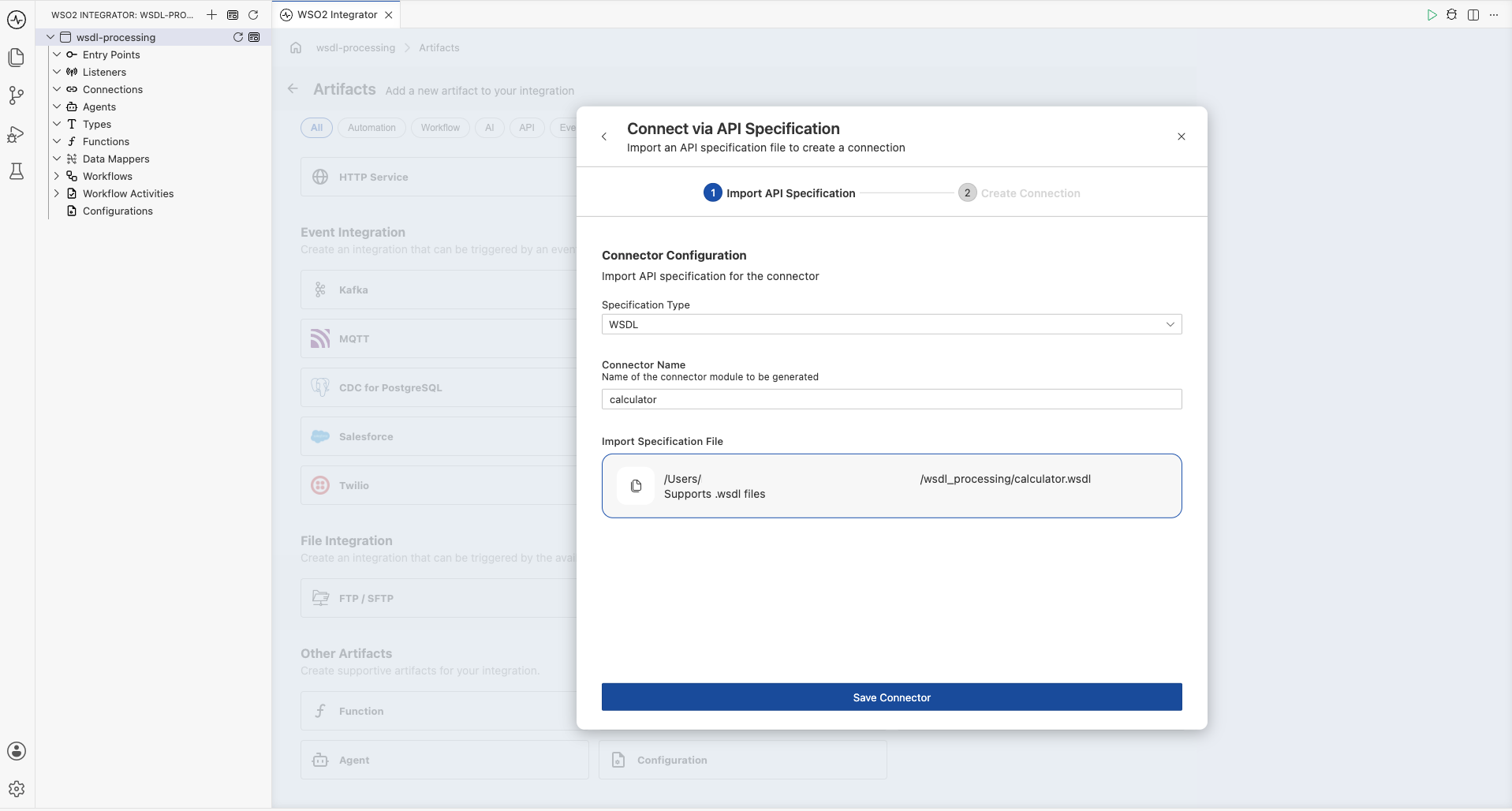
-
Set the Specification Type to WSDL.
-
Enter a Connector Name (for example,
calculator). -
Import the WSDL file (for example,
calculator.wsdl). -
Click Save Connector.
Step 3: Configure the connection
-
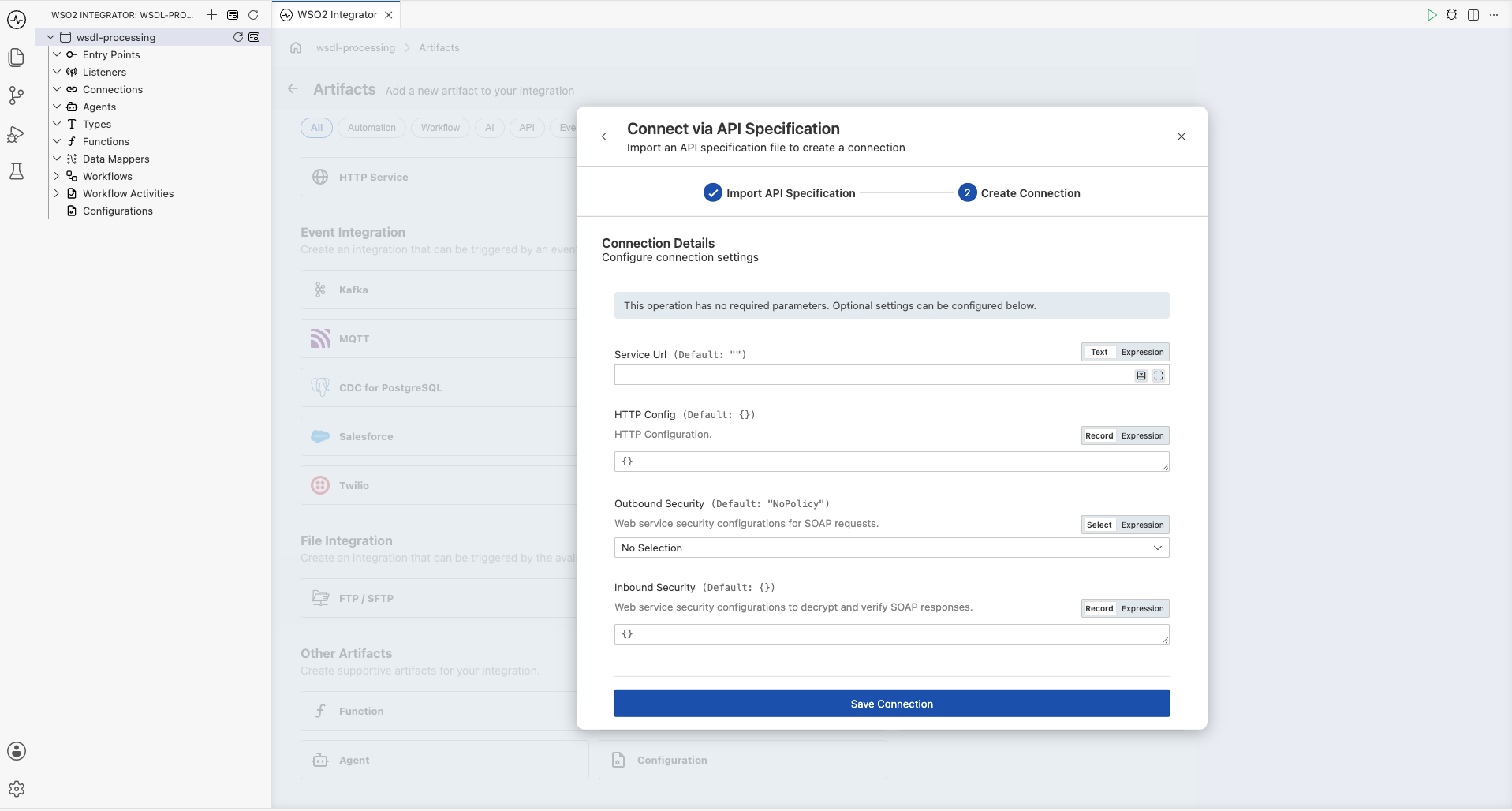
In the Create Connection step, configure the connection details. You can set the following optional fields:
- Service Url: Override the default endpoint URL defined in the WSDL.
- HTTP Config: HTTP configuration settings for the connection.
- Outbound Security: Web service security configurations for SOAP requests.
- Inbound Security: Web service security configurations to decrypt and verify SOAP responses.
-
Click Save Connection.
WSO2 Integrator generates a type-safe SOAP client connector (for example,
calculatorCalculatorsoap12client) with methods for each WSDL operation, along with request/response record types.
Step 4: Add an automation and invoke an operation
-
Add an Automation entry point to the project. The generated connection appears in the side panel under the connector name.
-
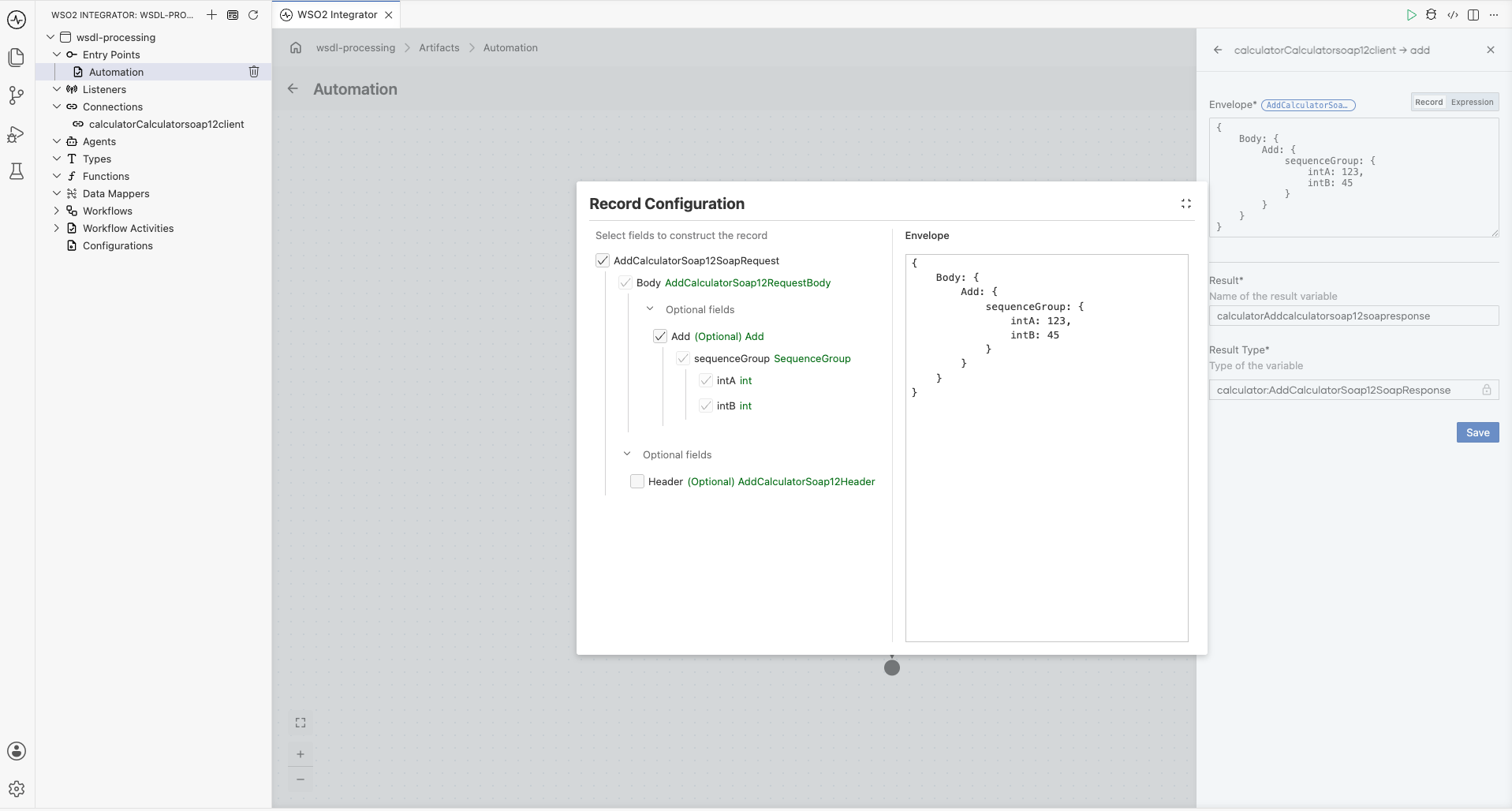
From the node panel on the right, select the operation you want to invoke (for example, Add under
calculatorCalculatorsoap12client).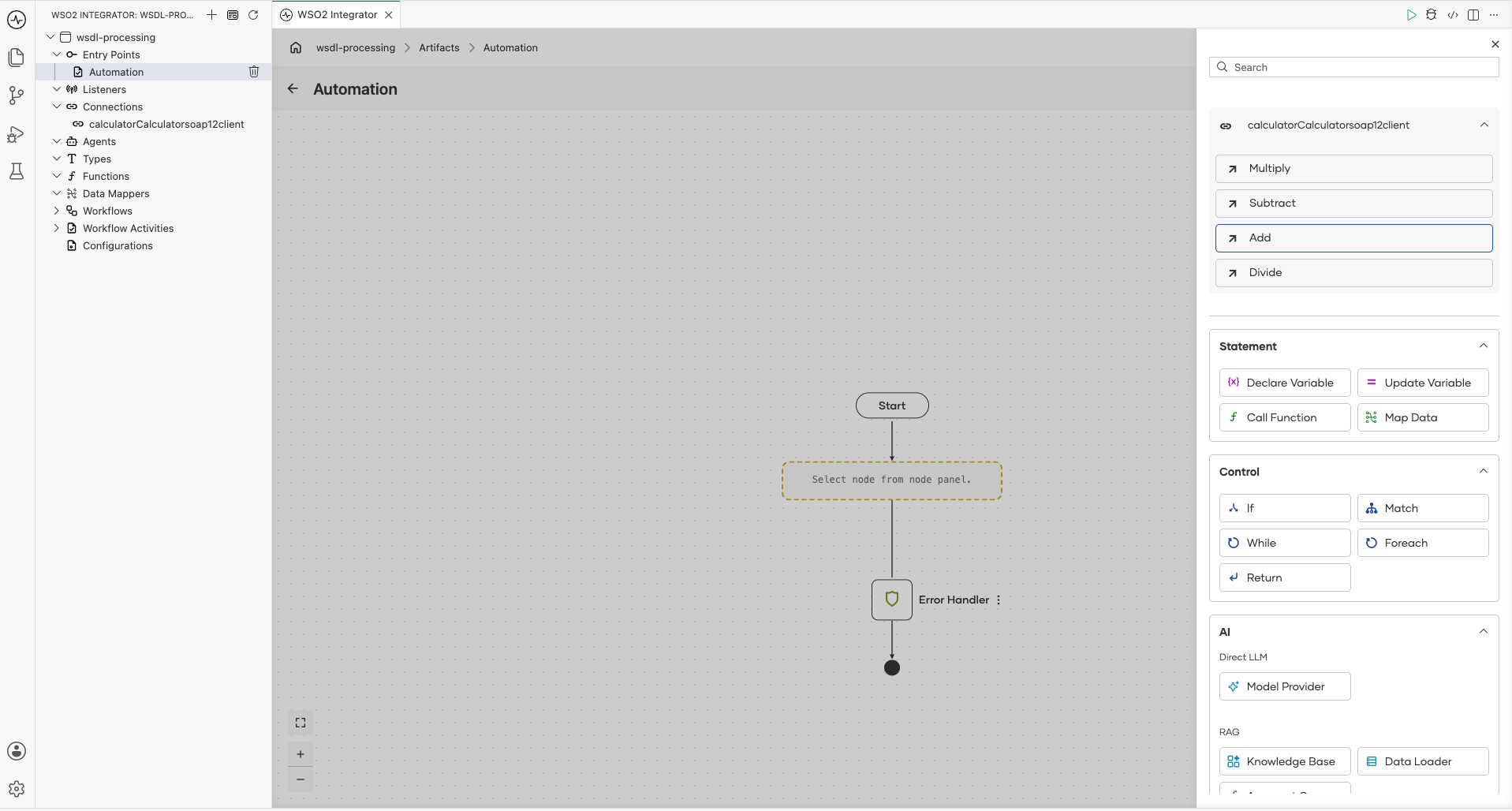
-
In the Record Configuration dialog, configure the request parameters for the selected operation and click Save.
Step 5: Use the response
-
Add an
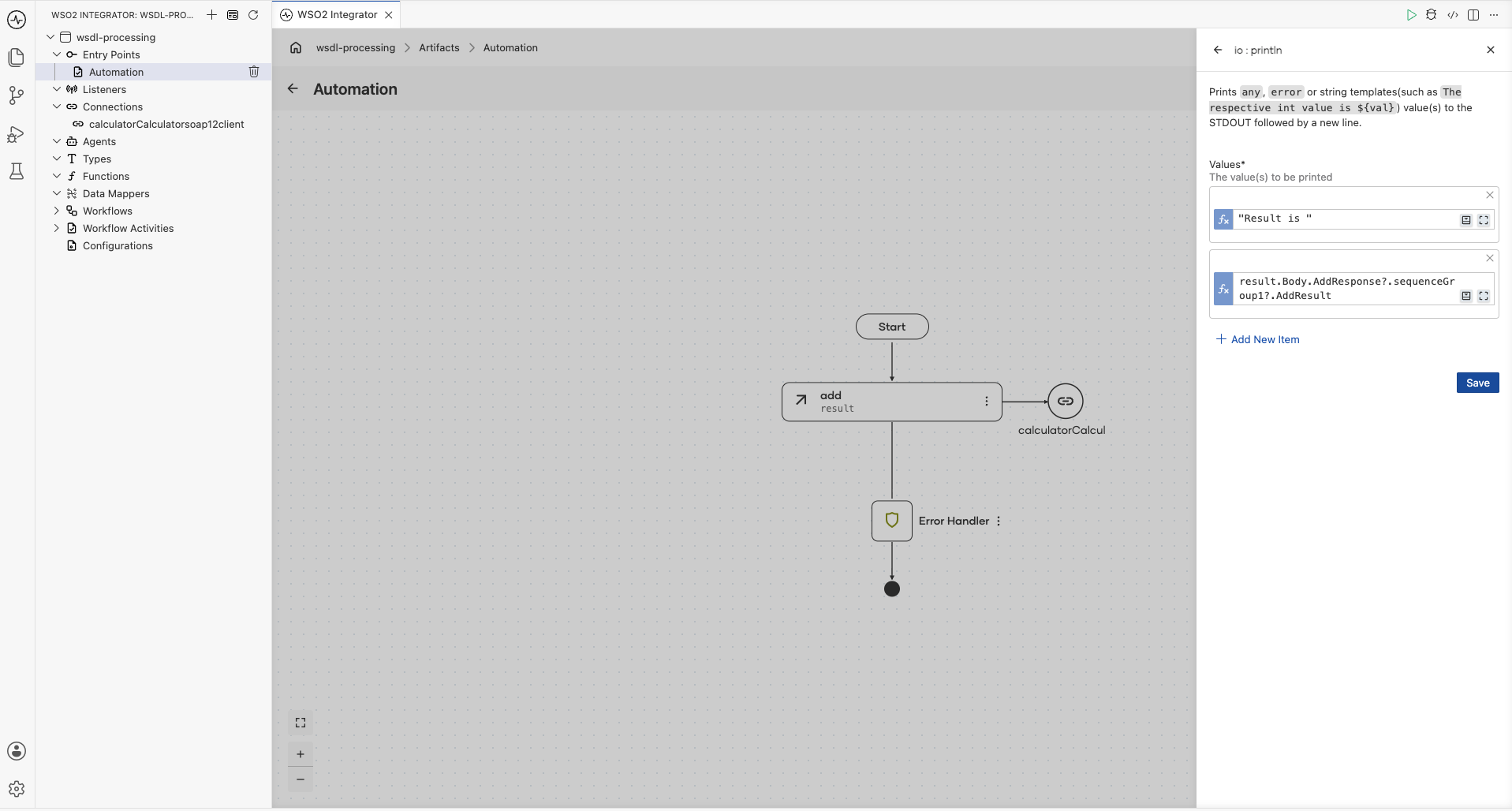
io:printlnstatement to print the result. Navigate through the response variable to select the result field (for example,result.Body.AddResponse?.sequenceGroup1?.AddResult).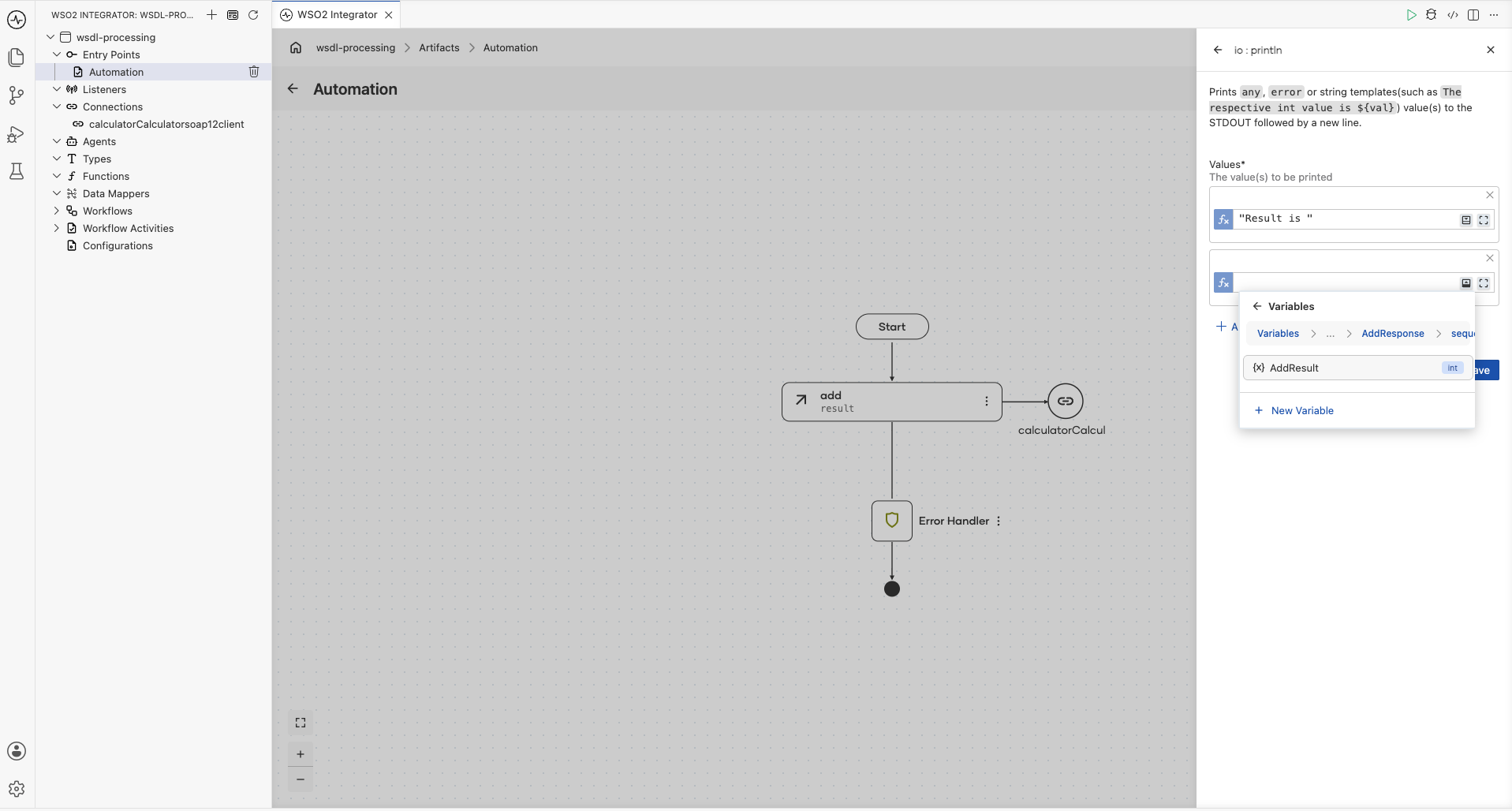
-
Click Save to complete the configuration.
Basic usage
# Generate a Ballerina SOAP client from a WSDL file
bal wsdl calculator.wsdl

# Generate into a specific module
bal wsdl calculator.wsdl --module calculator

# Generate only specific operations
bal wsdl calculator.wsdl --operations http://tempuri.org/Add,http://tempuri.org/Subtract

# Generate for a specific port
bal wsdl calculator.wsdl --port CalculatorSoap12
Running bal wsdl calculator.wsdl --module calculator generates the following structure:
modules/calculator/
├── client.bal         # SOAP client connector
└── types.bal          # Request/response record types
Generated client
import ballerina/data.xmldata;
import ballerina/soap;
import ballerina/soap.soap12;

public isolated client class CalculatorSoap12Client {
    final soap12:Client clientEp;

    public isolated function init(string serviceUrl = "http://www.dneonline.com/calculator.asmx",
            *soap:ClientConfig config) returns error? {
        self.clientEp = check new (serviceUrl, config);
    }

    remote isolated function add(AddCalculatorSoap12SoapRequest envelope)
            returns AddCalculatorSoap12SoapResponse|error {
        xml result = check self.clientEp->sendReceive(check xmldata:toXml(envelope),
                "http://tempuri.org/Add");
        return xmldata:parseAsType(result);
    }

    remote isolated function subtract(SubtractCalculatorSoap12SoapRequest envelope)
            returns SubtractCalculatorSoap12SoapResponse|error {
        xml result = check self.clientEp->sendReceive(check xmldata:toXml(envelope),
                "http://tempuri.org/Subtract");
        return xmldata:parseAsType(result);
    }

    remote isolated function multiply(MultiplyCalculatorSoap12SoapRequest envelope)
            returns MultiplyCalculatorSoap12SoapResponse|error {
        xml result = check self.clientEp->sendReceive(check xmldata:toXml(envelope),
                "http://tempuri.org/Multiply");
        return xmldata:parseAsType(result);
    }

    remote isolated function divide(DivideCalculatorSoap12SoapRequest envelope)
            returns DivideCalculatorSoap12SoapResponse|error {
        xml result = check self.clientEp->sendReceive(check xmldata:toXml(envelope),
                "http://tempuri.org/Divide");
        return xmldata:parseAsType(result);
    }
}
Generated types
The tool generates SOAP envelope types for each operation. The following shows the types generated for the Add operation (other operations follow the same pattern):
@xmldata:Namespace {prefix: "soap", uri: "http://www.w3.org/2003/05/soap-envelope"}
public type AddCalculatorSoap12Header record {
};

@xmldata:Namespace {prefix: "soap", uri: "http://www.w3.org/2003/05/soap-envelope"}
public type AddCalculatorSoap12RequestBody record {
    Add Add?;
};

@xmldata:Name {value: "Envelope"}
@xmldata:Namespace {prefix: "soap", uri: "http://www.w3.org/2003/05/soap-envelope"}
public type AddCalculatorSoap12SoapRequest record {
    @xmldata:Namespace {prefix: "soap", uri: "http://www.w3.org/2003/05/soap-envelope"}
    AddCalculatorSoap12Header Header?;
    @xmldata:Namespace {prefix: "soap", uri: "http://www.w3.org/2003/05/soap-envelope"}
    AddCalculatorSoap12RequestBody Body;
};

public type AddCalculatorSoap12ResponseBody record {
    AddResponse AddResponse?;
};

@xmldata:Name {value: "Envelope"}
public type AddCalculatorSoap12SoapResponse record {
    AddCalculatorSoap12ResponseBody Body;
};
Using the generated client
Basic client usage
import wsdl_processing.calculator;

import ballerina/io;
import ballerina/log;

public function main() returns error? {
    do {
        calculator:AddCalculatorSoap12SoapResponse result =
                check calculatorCalculatorsoap12client->add({
            Body: {
                Add: {
                    sequenceGroup: {
                        intA: 123,
                        intB: 45
                    }
                }
            }
        });
        io:println("Result is ", result.Body.AddResponse?.sequenceGroup1?.AddResult);
    } on fail error e {
        log:printError("Error occurred", 'error = e);
        return e;
    }
}
Bridging SOAP to REST
A common integration pattern is exposing a SOAP service as a REST API:
import wsdl_processing.calculator;

import ballerina/http;

configurable int servicePort = 8090;

final calculator:CalculatorSoap12Client soapClient = check new ();

service /api on new http:Listener(servicePort) {

    resource function get add(int intA, int intB)
            returns json|error {
        calculator:AddCalculatorSoap12SoapResponse result =
                check soapClient->add({
            Body: {
                Add: {sequenceGroup: {intA, intB}}
            }
        });
        return {result: result.Body.AddResponse?.sequenceGroup1?.AddResult};
    }

    resource function get subtract(int intA, int intB)
            returns json|error {
        calculator:SubtractCalculatorSoap12SoapResponse result =
                check soapClient->subtract({
            Body: {
                Subtract: {sequenceGroup: {intA, intB}}
            }
        });
        return {result: result.Body.SubtractResponse?.sequenceGroup1?.SubtractResult};
    }
}
Authentication
WS-Security with username token
final calculator:CalculatorSoap12Client secureClient = check new (
    config = {
        outboundSecurity: {
            username: wsUsername,
            password: wsPassword
        }
    }
);
Mutual TLS
final calculator:CalculatorSoap12Client mtlsClient = check new (
    config = {
        secureSocket: {
            key: {
                certFile: "/certs/client.crt",
                keyFile: "/certs/client.key"
            },
            cert: "/certs/ca.crt"
        }
    }
);
Command reference
| Command | Description |
|---|---|
bal wsdl <file.wsdl> | Generate clients and types from a WSDL file |
-m, --module <name> | Output module name for the generated code |
-p, --port <port-name> | Generate a client for a specific port only |
--operations <uri1,uri2> | Generate only specified operation action URIs |
What's next
- XSD Tool -- Generate record types from XML Schema definitions
- OpenAPI Tool -- Generate REST services and clients
- Configuration Management -- Manage SOAP endpoint configuration per environment