Data Loaders
A Data Loader reads documents from a source and returns them as ai:Document values, ready to be chunked, embedded, and indexed by a Knowledge Base. It is the entry point of the RAG ingestion pipeline.
Available actions
Every data loader exposes one action.
| Action | What it does | Required parameters |
|---|---|---|
| Load | Reads the configured source and returns the documents. | None. |
load returns a single ai:Document when exactly one document is resolved, and an ai:Document[] otherwise.
Where to find data loaders
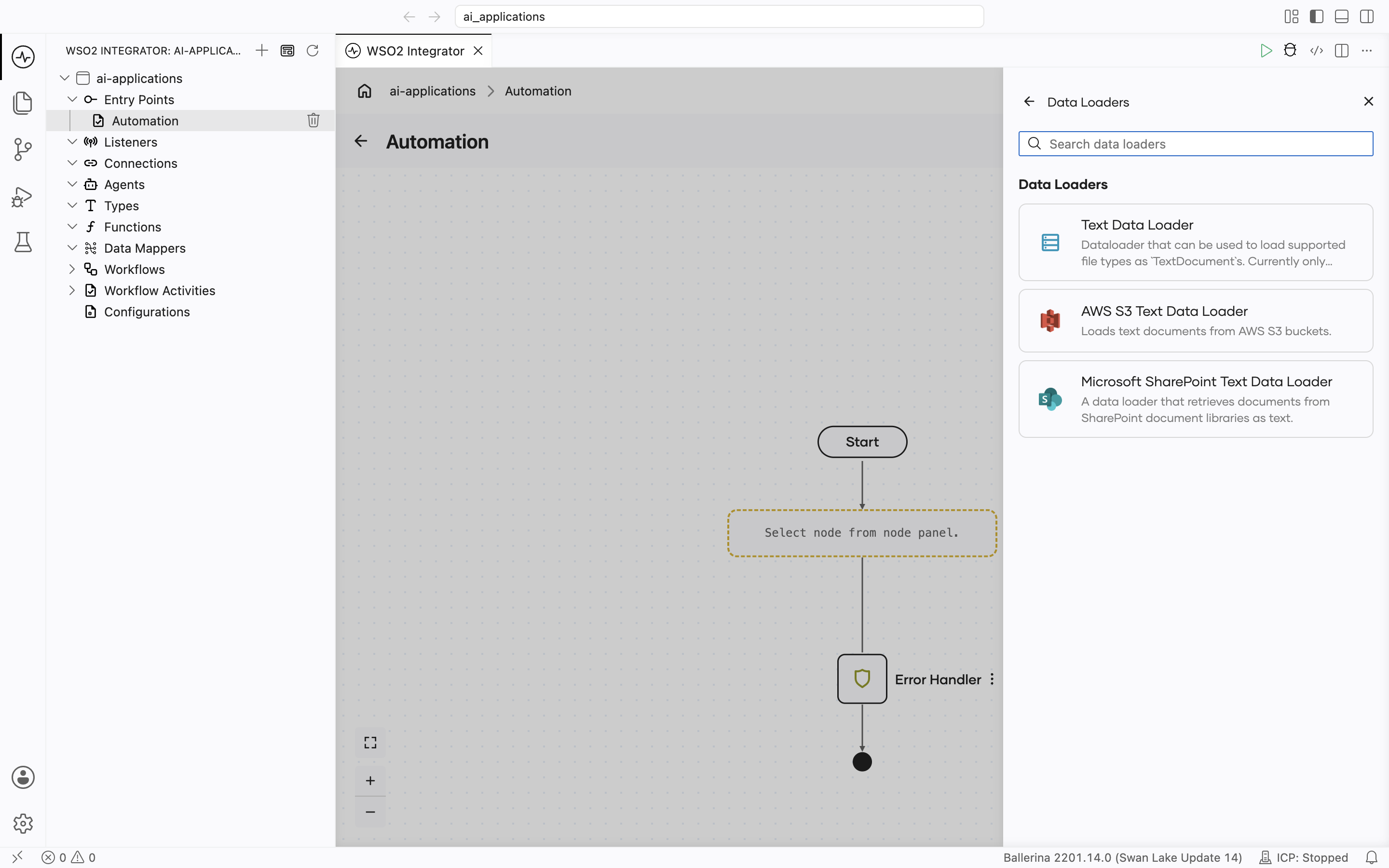
In the flow editor, open the Add Node panel and go to AI > RAG > Data Loader, then click + Add Data Loader. The Data Loaders picker lists the available types.
Supported data loaders
| Data Loader | Module | Reads from | Result type |
|---|---|---|---|
| Text Data Loader | ballerina/ai | Files on the local file system. | ai:TextDataLoader |
| AWS S3 Text Data Loader | ballerinax/ai.aws.s3 | Objects in Amazon S3 general purpose buckets. | s3:TextDataLoader |
| Microsoft SharePoint Text Data Loader | ballerinax/ai.microsoft.sharepoint | SharePoint document libraries and site pages, via the Microsoft Graph API. | sharepoint:TextDataLoader |
Text Data Loader
Reads files from the local file system and wraps their content as ai:Document values. It loads supported file types as ai:TextDocument values.
Create form
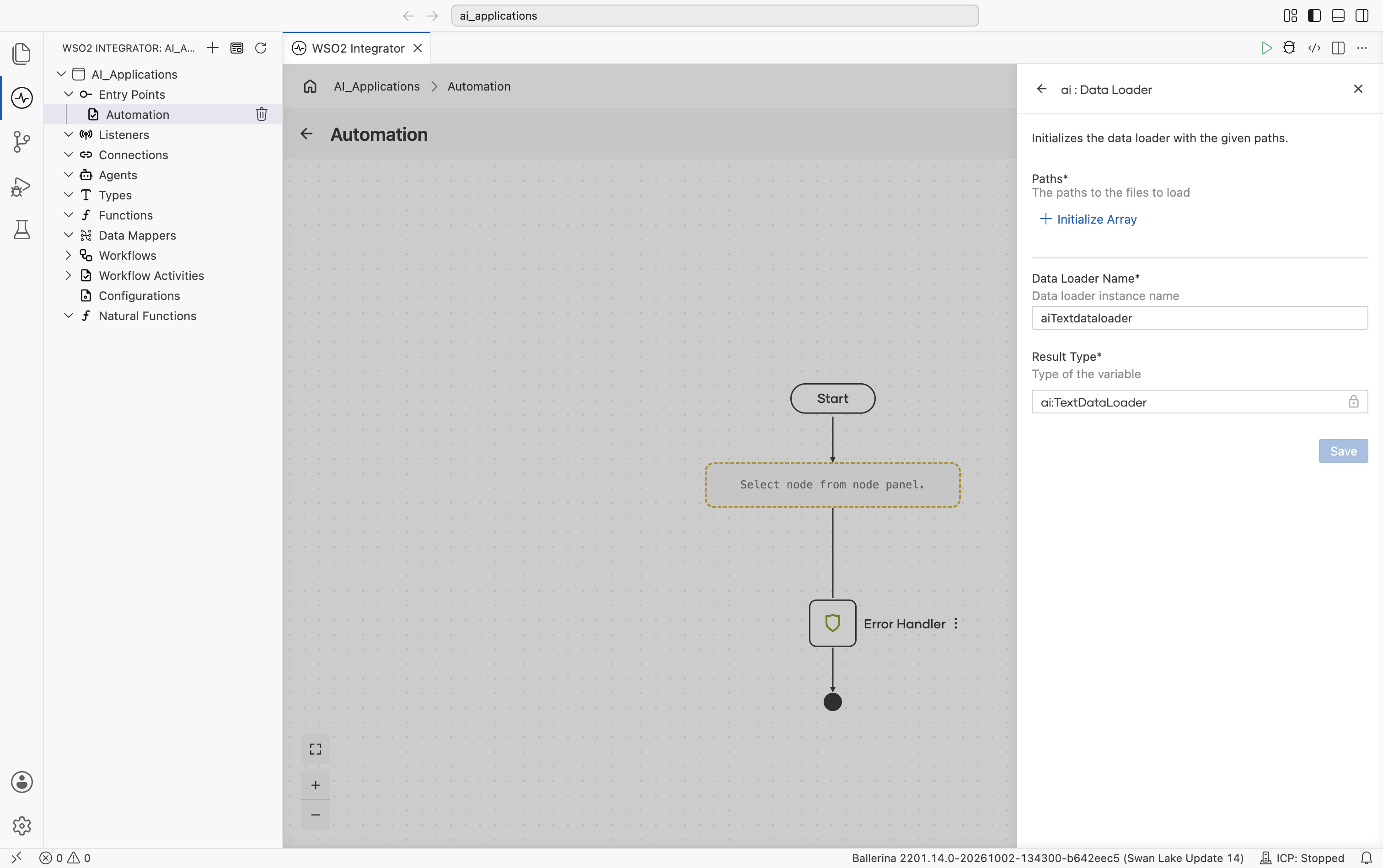
| Field | Required | Description |
|---|---|---|
| Paths | Yes | One or more paths to the files to load. |
| Data Loader Name | Yes | The variable name for the loader instance. |
| Result Type | Yes | The variable type, set to ai:TextDataLoader. |
For an end-to-end example of wiring this loader into an ingestion pipeline, see RAG ingestion: add a text data loader.
AWS S3 Text Data Loader
Reads objects from Amazon S3 buckets and returns them as text. A single loader instance can read from several buckets in the same region, and from whole buckets, key prefixes (optionally recursively), or individual object keys.
Each object is returned as an ai:TextDocument based on its extension. For a key named directly in paths without a recognized extension, the object's Content-Type is used instead.
- Textual files (
txt,text,md,markdown,html,htm,csv,tsv,json,xml,yaml,yml,log,ini,conf,properties,css,js) are decoded as UTF-8. Markup is kept as is. pdf,docx,pptx, andxlsxfiles have their text extracted in memory. Nothing is written to disk. Anxlsxsheet is returned as tab-separated cells, one row per line, under the sheet name.- The older Office formats
doc,ppt, andxlsare not supported. Convert them todocx,pptx,xlsx, or PDF. - Other files (for example, images and archives) are skipped with a logged warning. Naming such a file explicitly as a key is an error.
Before you start
-
Bucket region. Every bucket that one loader reads must be in the region set on the connection. A bucket in another region fails with an S3
PermanentRedirecterror. Use one loader per region. -
IAM permissions. The loader only reads. The identity it runs as needs
s3:ListBucketon the bucket ands3:GetObjecton the objects in it:{
"Version": "2012-10-17",
"Statement": [
{
"Effect": "Allow",
"Action": "s3:ListBucket",
"Resource": "arn:aws:s3:::amzn-s3-demo-bucket"
},
{
"Effect": "Allow",
"Action": "s3:GetObject",
"Resource": "arn:aws:s3:::amzn-s3-demo-bucket/*"
}
]
}To limit access to one prefix, narrow the
s3:GetObjectresource (for example,arn:aws:s3:::amzn-s3-demo-bucket/reports/*) and add ans3:prefixcondition to thes3:ListBucketstatement. See Identity-based policy examples for Amazon S3.
Create form
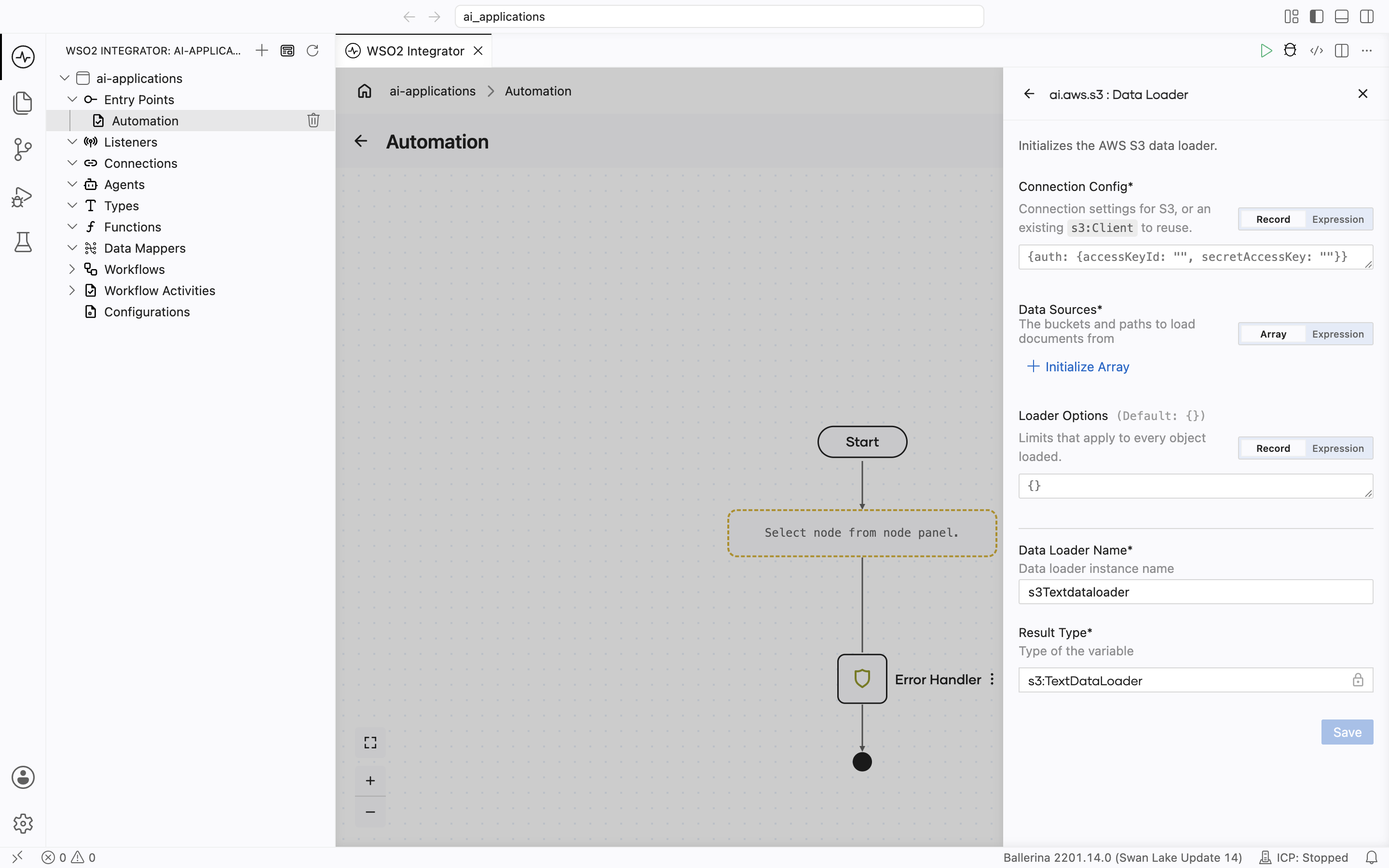
| Field | Required | Description |
|---|---|---|
| Connection Config | Yes | How to reach S3: a connection record, or an existing S3 client switched in with Expression. See Connection config. |
| Data Sources | Yes | One or more buckets, each with the paths to load. At least one is required. See S3 data sources. |
| Loader Options | No | Loader-wide options. Defaults to {}. See Loader options. |
| Data Loader Name | Yes | The variable name for the loader instance. |
| Result Type | Yes | The variable type, set to s3:TextDataLoader. |
Connection Config is prefilled with empty static access keys. When the integration runs on AWS, use DEFAULT_CREDENTIALS instead so that no long-lived keys are kept in the integration.
Connection config
Connection Config takes the ConnectionConfig record of the ballerinax/aws.s3 connector. The loader builds its S3 client from it. To share one client across several loaders, switch the field to Expression and pass an existing aws.s3 Client instead.
| Field | Type | Default | Description |
|---|---|---|---|
| auth | auth:AuthConfig | N/A | DEFAULT_CREDENTIALS, or one of the credential records in AWS credential options. |
| region | aws:Region | string | us-east-1 | The AWS region of the buckets, for example eu-west-1. |
| endpoint | aws:EndpointConfig | () | Optional endpoint settings: fips (FIPS endpoint), dualstack (IPv4 and IPv6 endpoint), or customEndpoint (a full endpoint URL that overrides the other two). |
S3 FIPS endpoints are available only in the US, Canada, and AWS GovCloud (US) regions. Dual-stack endpoints are available in every region. See Amazon S3 endpoints.
Data sources
Data Sources is an array of Source records, each naming one bucket. Documents are returned in the order the sources and paths are listed.
Source
| Field | Type | Default | Description |
|---|---|---|---|
| bucket | string | N/A | The bucket name. It must be in the connection's region. |
| paths | string[] | Omitted | Object keys or key prefixes to load, for example ["reports/2026/", "policies/handbook.md"]. Omit it, or include "", to load the whole bucket. An empty list is an error. |
| recursive | boolean | false | Whether prefixes are traversed into nested prefixes. Applies to every path in the source. |
| includeExtensions | string[]? | () | Case-insensitive extension allowlist applied while walking a prefix (for example, ["pdf", ".docx"]); a leading dot is optional. () or [] loads all supported types. A key listed explicitly in paths is always loaded, even if its extension is not in the list. |
To use different recursive or includeExtensions settings for different prefixes in the same bucket, add them as separate sources.
How paths are resolved
S3 has no real folders, only keys that may contain /. Each path is resolved as follows:
- A path ending in
/is a prefix. - Any other path is tried as an exact key first. If no object has that key, or the object is a zero-byte file of an unsupported type (a folder marker that some tools create), it is treated as the prefix
<path>/. If a bucket has both an objectreportsand objects underreports/, the pathreportsloads only the single object; usereports/for the prefix. - Zero-byte keys ending in
/(the folder objects that the S3 console creates) are skipped. - With recursive set to
false, only keys directly under the prefix are loaded.
Paths are not de-duplicated. If two paths in a source match the same object, for example reports/ and reports/q1.pdf, it is loaded twice. Keep paths from overlapping.
Loader options
| Field | Type | Default | Description |
|---|---|---|---|
| maxObjectSize | int | 104857600 (100 MiB) | The largest object, in bytes, that is read into memory. While walking a prefix, a larger object is skipped with a logged warning. A larger object named explicitly as a key is an error. |
Document metadata
Every loaded document carries fileName, mimeType, fileSize, and modifiedAt, plus bucket, key, and eTag (the object's S3 entity tag).
Behavior and limits
- Everything is loaded into memory.
loadreturns every matching object at once, with no limit on the number of documents. Narrow paths for very large buckets. - Problem objects found while walking a prefix are skipped, with a warning in the log. This covers unsupported types, objects larger than maxObjectSize, text files that are not valid UTF-8, PDF and Office files that can't be parsed, objects deleted after they were listed, and objects in the S3 Glacier Flexible Retrieval or S3 Glacier Deep Archive storage classes, which must be restored before they can be read. The same problems on a key named explicitly are errors.
loadreturns no count of skipped objects. - Failures that affect every object fail the whole load. For example, missing permissions or a connection error.
- A listing is not a snapshot. S3 lists up to 1,000 keys per page. Objects written or deleted while a large prefix is being paged through can be missed or loaded twice.
- Not supported: directory buckets (S3 Express One Zone), requester-pays buckets, and reading a specific object version. The loader always reads the current version.
Microsoft SharePoint Text Data Loader
Retrieves documents from SharePoint document libraries and site pages and returns them as text, accessed through the Microsoft Graph API. A single loader instance can read from multiple sites and libraries, individual files, entire folders (optionally recursively), and modern site pages.
Each file is returned as an ai:TextDocument based on its MIME type / extension:
- Inherently textual files (e.g.
txt,md,html,json,csv,xml) are decoded directly. pdffiles have their text extracted.- Other files that cannot be represented as text (e.g. images, audio, archives) are skipped with a logged warning. Naming such a file explicitly as a path is an error.
Create form
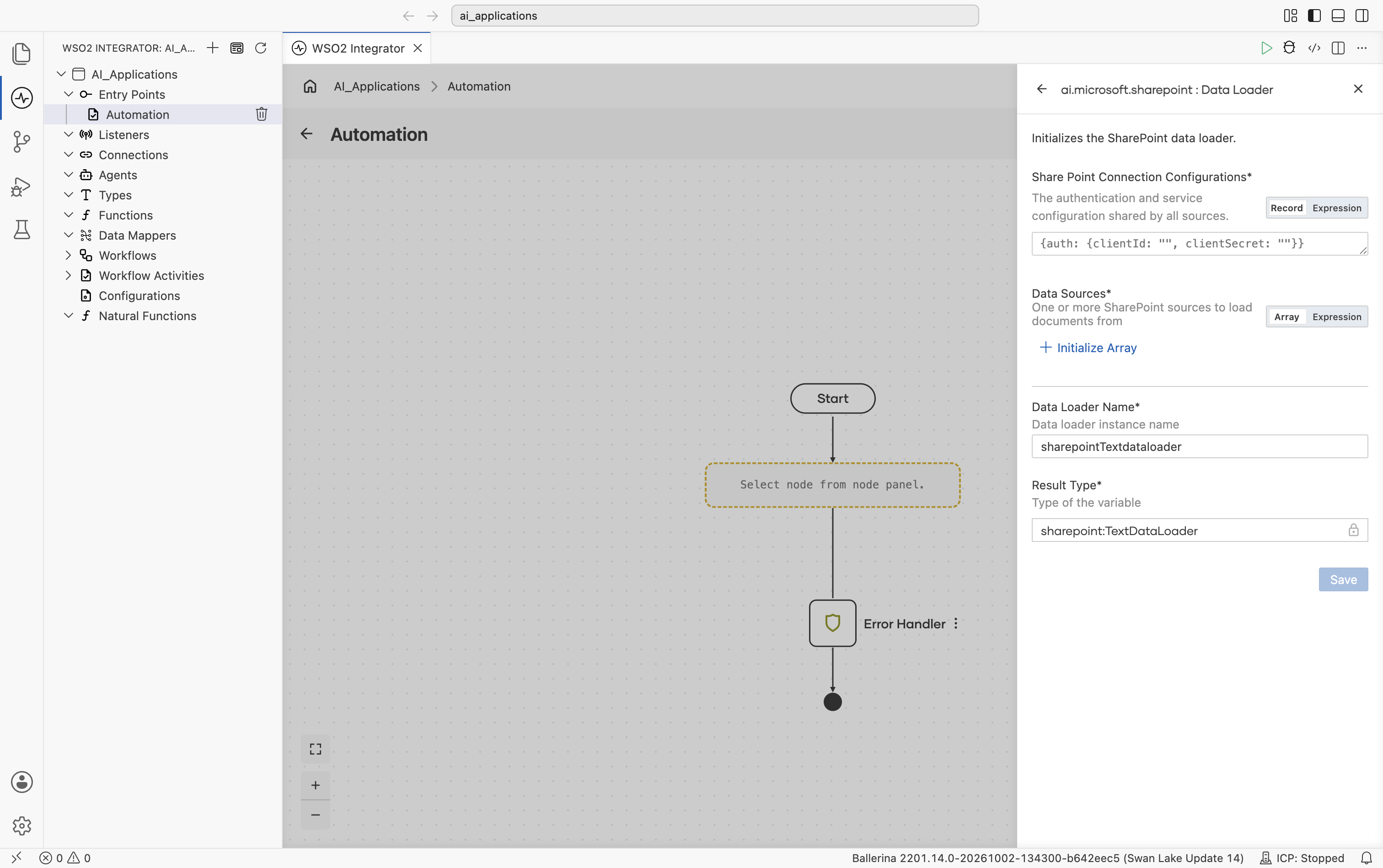
| Field | Required | Description |
|---|---|---|
| SharePoint Connection Configurations | Yes | The authentication and service configuration shared by all sources. See Connection configurations. |
| Data Sources | Yes | One or more SharePoint sources to load documents from. At least one is required. See Data sources. |
| Data Loader Name | Yes | The variable name for the loader instance. |
| Result Type | Yes | The variable type, set to sharepoint:TextDataLoader. |
Connection configurations
The connection configuration is shared by every source.
| Field | Type | Default | Description |
|---|---|---|---|
| auth | OAuth2ClientCredentialsGrantConfig | OAuth2RefreshTokenGrantConfig | http:BearerTokenConfig | N/A | Authentication configuration for the Microsoft Graph API. |
| serviceUrl | string | https://graph.microsoft.com/v1.0 | The base URL of the Microsoft Graph service. |
Plus the Standard HTTP advanced configurations, which tune the underlying HTTP client and are forwarded to the Graph sites and pages clients.
Data sources
Data Sources is an array of Source records, each describing one SharePoint site to read from.
Source
| Field | Type | Default | Description |
|---|---|---|---|
| siteId | string | N/A | The Microsoft Graph site id. Accepts the composite id ({hostname},{spsite-guid},{spweb-guid}) or the path form ({hostname}:/sites/{site-name}). |
| libraries | Library[] | [{}] | Document libraries to read from, each with its own paths and options. The default loads the whole of the site's default document library; [] loads no document-library content. |
| pages | string[]? | () | Site pages to load as text, matched by name, title, or id. Use ["*"] for all pages; () for none. |
Library
| Field | Type | Default | Description |
|---|---|---|---|
| name | string | Documents | Display name of the document library, as shown in SharePoint. The default Documents is the English name; localized tenants use a translated name (e.g. Dokumente, Documentos). Use "*" for every library on the site. |
| paths | string[] | ["/"] | File and/or folder paths relative to this library's root (e.g. /Reports). The default loads the entire library; [] loads nothing from it. |
| recursive | boolean | false | Whether folder paths are traversed into sub-folders. |
| includeExtensions | string[]? | () | Case-insensitive extension allowlist applied to folder contents (e.g. ["pdf"]); a leading dot is optional. () loads all types. A file listed explicitly in paths is always loaded, even if its extension is not in the list. |
What's next
- RAG ingestion - Wire a data loader into an ingestion pipeline.
- Knowledge Bases - Combine a chunker, embedding provider, and vector store to ingest the loaded documents.
- Chunkers - Control how loaded documents are split before embedding.