Model Providers for LLMs
A Large Language Model (LLM) is a neural network trained on large text corpora. You send it a prompt (a text instruction) and it generates a response. LLMs power natural language tasks such as answering questions, summarizing content, extracting structured data, and planning and executing tool calls.
A Model Provider is WSO2 Integrator's unified abstraction over LLMs. It wraps the provider-specific API behind a consistent interface, so Direct LLM Calls, Natural Functions, the RAG generate node, and AI agents all work the same way regardless of which LLM you choose. Pick a provider, fill in the form, and click Save.
Every model provider exposes the same two actions, so switching LLMs is a connection-level swap that leaves the rest of your flow unchanged.
Available actions
Every model provider exposes the following actions.
| Action | What it does | Required parameters | Optional parameters |
|---|---|---|---|
| Generate | Sends a prompt to the model and binds the response to a typed Ballerina value. The everyday action behind a generate node, a Natural Function, or RAG ai:generate. | Prompt (the instruction template), Expected Type (the type the response is parsed into) | None per call. Anything you want to tune (temperature, max tokens) lives on the connection. |
| Chat | Sends a list of chat messages and (optionally) tool definitions; returns the model's reply, including any tool calls. Used by Agents. | Messages (the conversation), Tools (tool definitions for tool calling) | Stop (a stop sequence). |
Per-call overrides are not exposed in the form. Anything that varies per request belongs in the prompt; anything that varies across the project is set once on the connection (see Standard HTTP advanced configurations below).
Where to find model providers for LLM
- Add Node panel > AI > Direct LLM > Model Provider
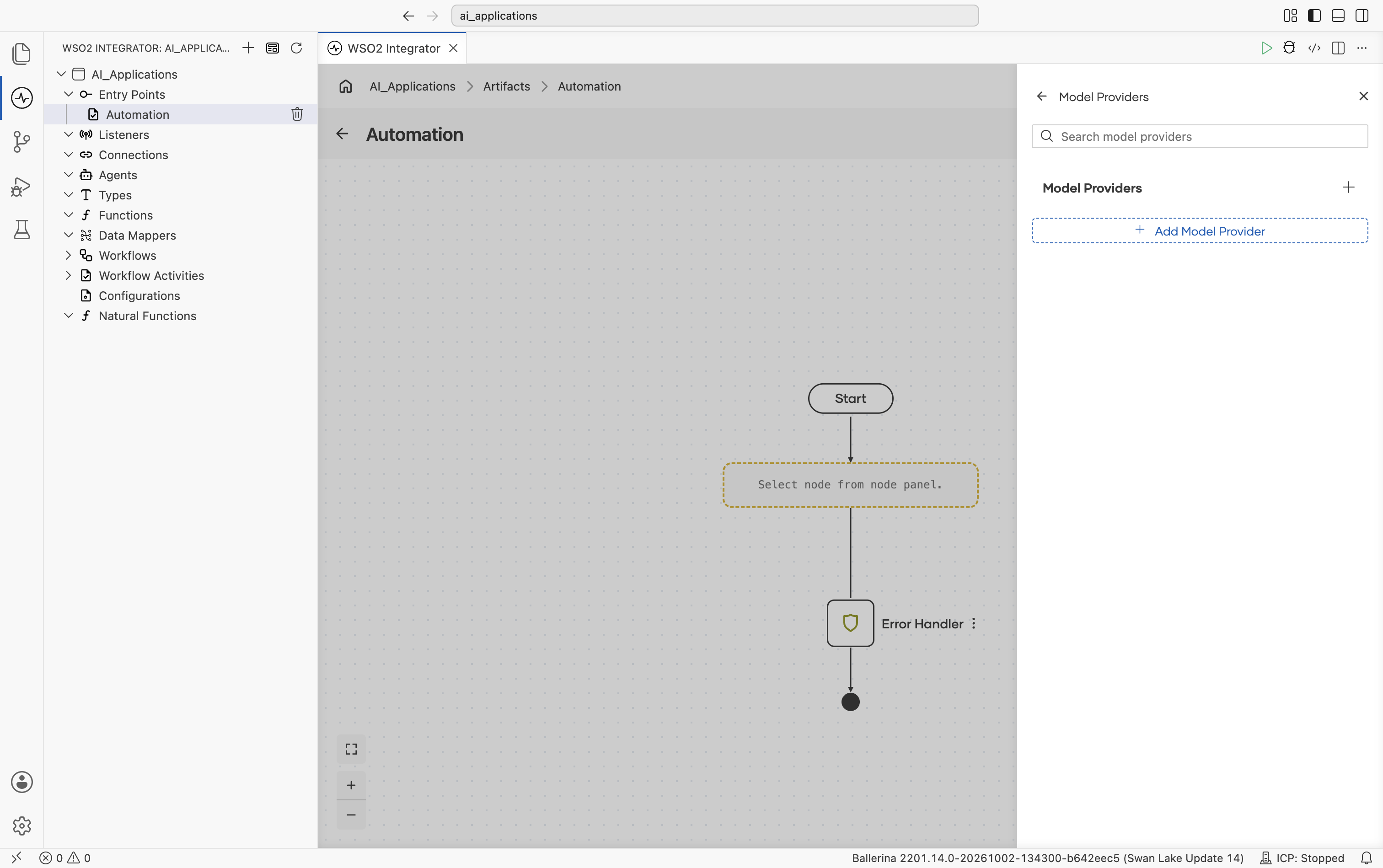
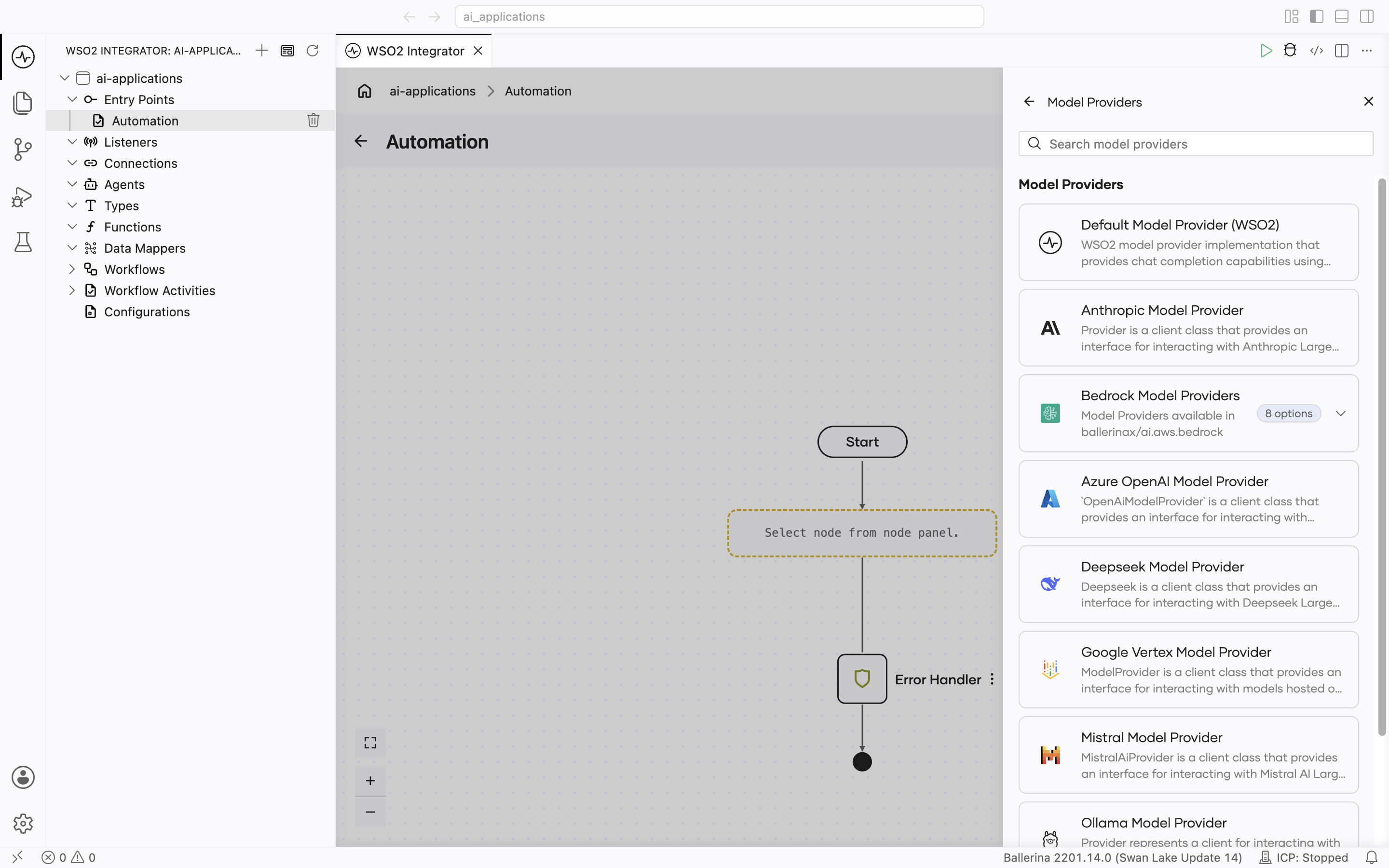
- Click + Add Model Provider and the Select Model Provider picker opens with a card for each provider type:
Scroll to see the remaining options:
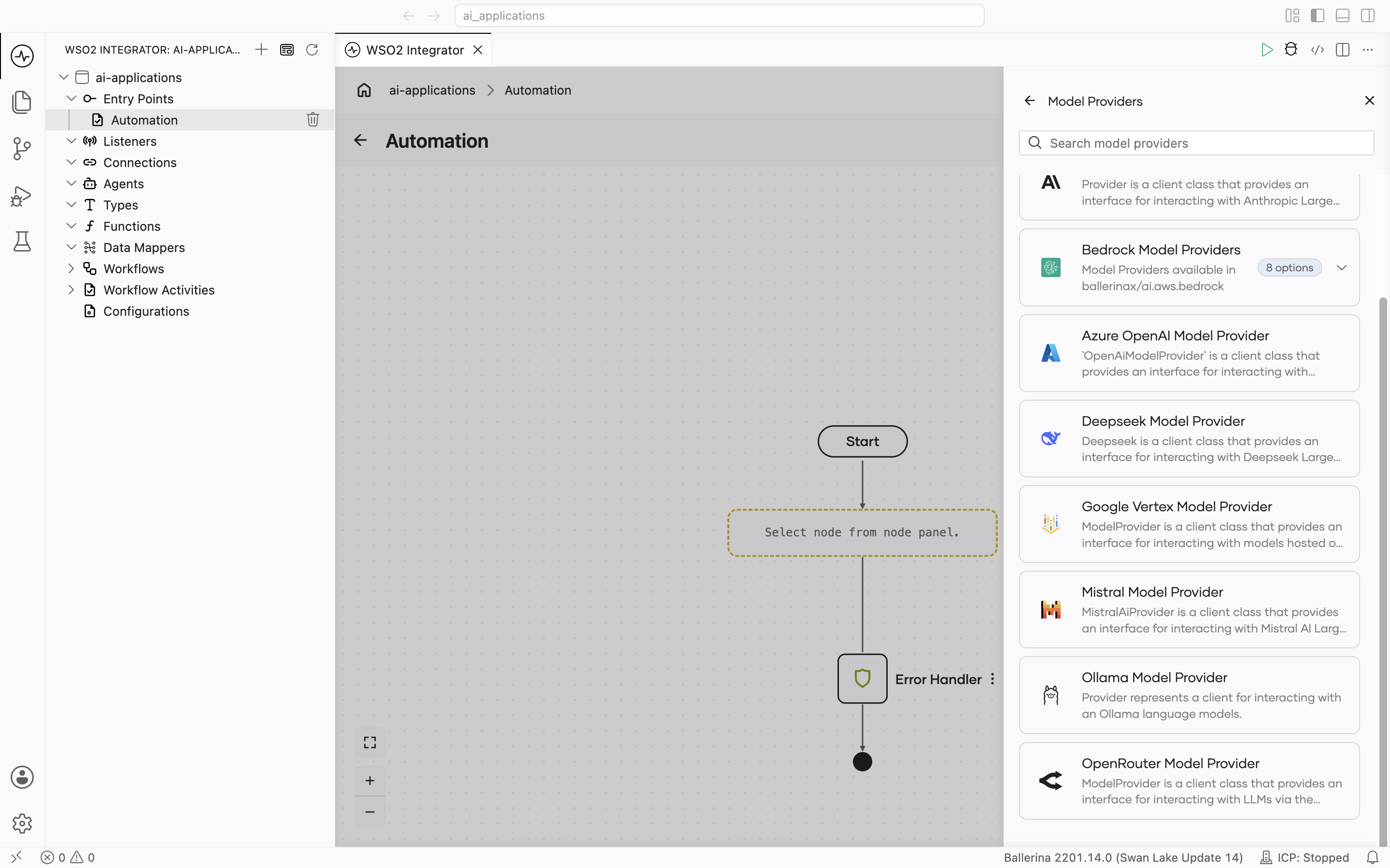
Supported model providers
| Provider | Module | API key required? | Has embedding provider? |
|---|---|---|---|
| Default WSO2 | ballerina/ai | No (signed-in via WSO2) | Yes. See Default WSO2 Embedding Provider |
| Anthropic | ballerinax/ai.anthropic | Yes | No |
| AWS Bedrock | ballerinax/ai.aws.bedrock | AWS credentials or a Bedrock API key | Yes |
| Azure OpenAI | ballerinax/ai.azure | Yes | Yes |
| DeepSeek | ballerinax/ai.deepseek | Yes | No |
| Google Vertex | ballerinax/ai.googleapis.vertex | OAuth2 / service account | Yes |
| Mistral | ballerinax/ai.mistral | Yes | No |
| Ollama | ballerinax/ai.ollama | No (local) | No |
| OpenAI | ballerinax/ai.openai | Yes | Yes |
| OpenRouter | ballerinax/ai.openrouter | Yes | Yes |
Standard HTTP advanced configurations
Every provider with a hosted endpoint (all providers except the Default WSO2 provider, which is preconfigured) shares the same HTTP-level configurations. They tune the underlying HTTP client and apply to every request the provider makes. These are split across two parts of the Create form, and this split and these exact fields are identical on every provider's form. The per-provider sections below don't repeat the screenshots, they just note where the provider's own fields sit relative to this standard set.
Shown directly on the form, below the provider-specific fields:
| Field | Default | Available values | What it controls |
|---|---|---|---|
| Service URL | provider-specific | URL string | Override the provider's API base URL - useful for OpenAI-compatible gateways or self-hosted endpoints. |
| Maximum Tokens | 512 | Any positive integer | Hard cap on the response length. |
| Temperature | 0.7 | 0.0-2.0 (provider-dependent) | Sampling temperature. Lower = more deterministic, higher = more creative. Use 0.0 for the most reproducible results. |
| HTTP Version | HTTP_2_0 | HTTP_1_1, HTTP_2_0 | The HTTP version used for requests. |
| Timeout | 60 (seconds) | Any positive number | Per-request timeout. |
| Forwarded | "disable" | "disable", "enable", "transient" | Whether to set Forwarded / X-Forwarded-For headers when behind a proxy. |
| Compression | AUTO | AUTO, ALWAYS, NEVER | accept-encoding handling. |
| Payload Validation | true | true, false | Inbound payload validation. |
Behind the collapsed Advanced Configurations toggle, further down the same form:
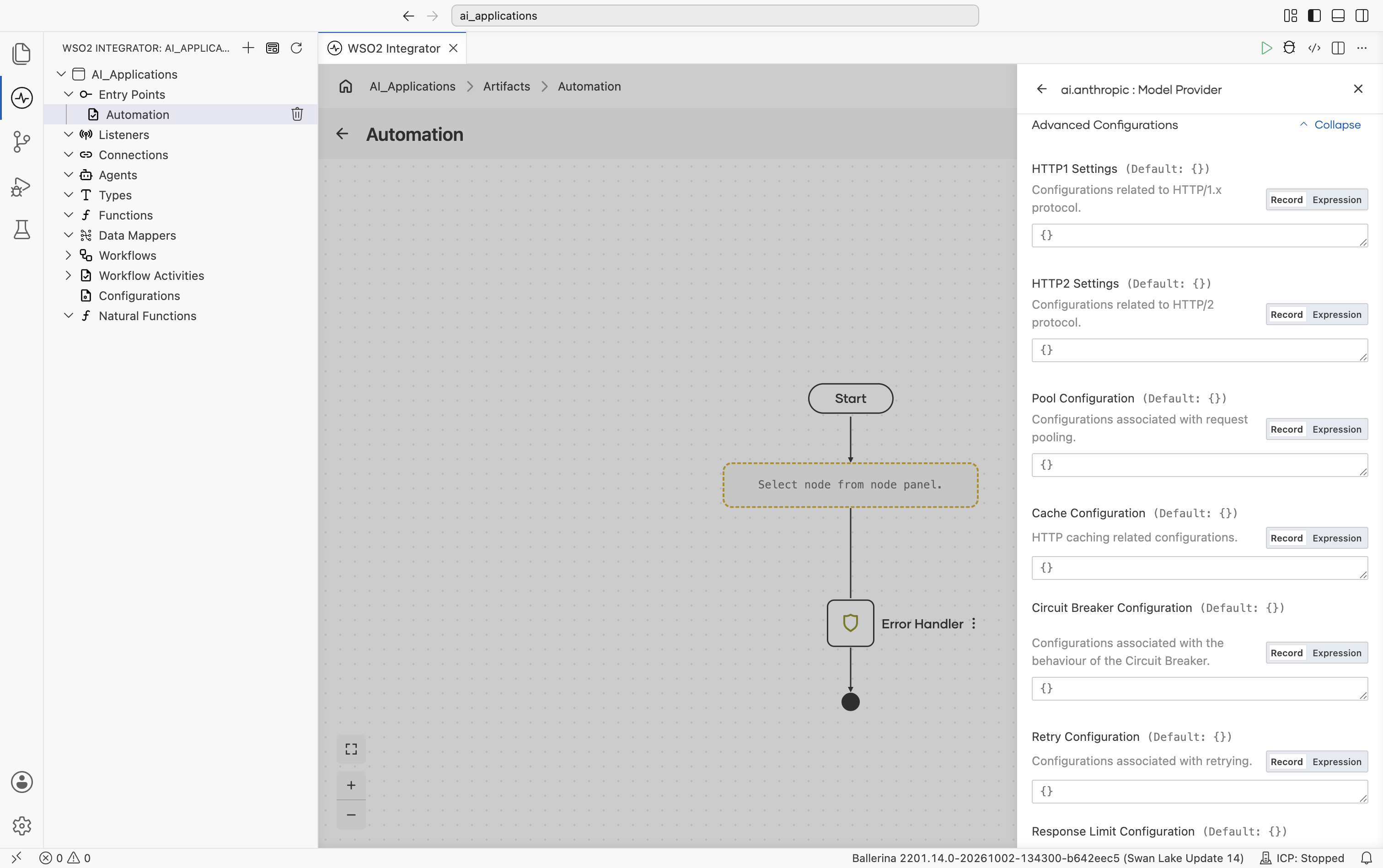
| Field | Default | Available values | What it controls |
|---|---|---|---|
| HTTP1 Settings | {} | Record (keep-alive, version, chunking) | HTTP/1.x protocol settings. |
| HTTP2 Settings | {} | Record | HTTP/2 protocol settings. |
| Pool Configuration | {} | Record (max active, idle time) | Request pool settings. |
| Cache Configuration | {} | Record | HTTP response caching. |
| Circuit Breaker Configuration | {} | Record (rollingWindow, failureThreshold, resetTime, statusCodes) | Open the breaker on repeated failures so calls fail fast and recover. |
| Retry Configuration | {} | Record (count, interval, backOffFactor, maxWaitInterval, statusCodes) | Retry on failure. |
| Response Limit Configuration | {} | Record (max body, max headers) | Maximum inbound response size. |
| Secure Socket Configuration | () | Record (trust store, key store, client auth) | TLS / SSL options. |
| Proxy Configuration | () | Record (host, port, userName, password) | HTTP proxy settings. |
Scrolling further down the expanded section shows Retry Configuration, Response Limit Configuration, Secure Socket Configuration, and Proxy Configuration, followed by the always-visible Model Provider Name and Result Type fields (see the Default WSO2 model provider form below):
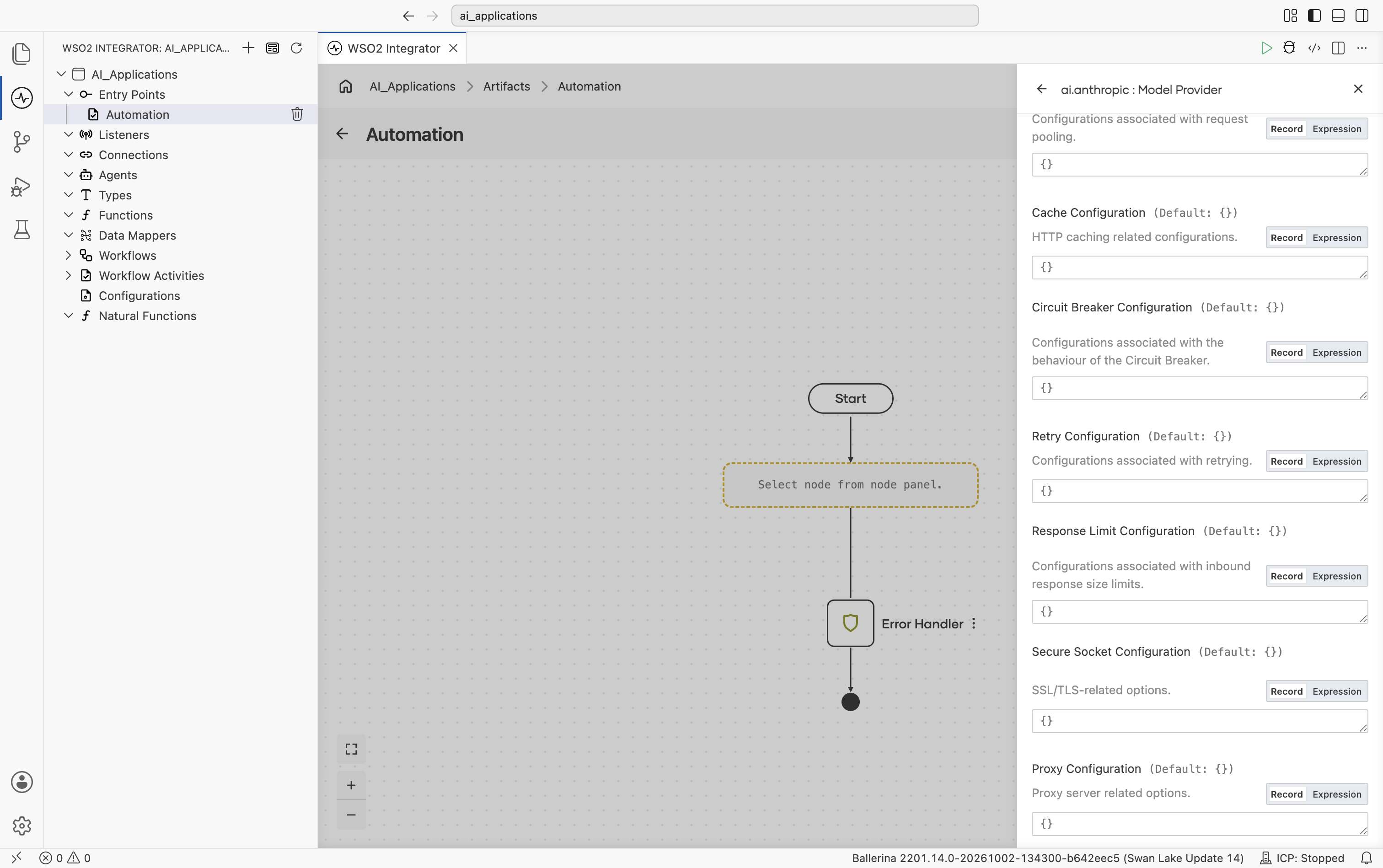
This is the one Advanced Configurations screenshot in this page. Every provider's Create form shows this exact same panel. Where a provider section below says "see Standard HTTP advanced configurations," it means expanding Advanced Configurations on that provider's form looks exactly like the two screenshots above, with no provider-specific additions.
Default WSO2 model provider
Provided by the core ballerina/ai package. Routes through the WSO2 intelligence service. No API key in your source. A one-time WSO2 sign-in writes the credentials into your project's Config.toml. The fastest way to get an LLM running while you're prototyping.
Create form
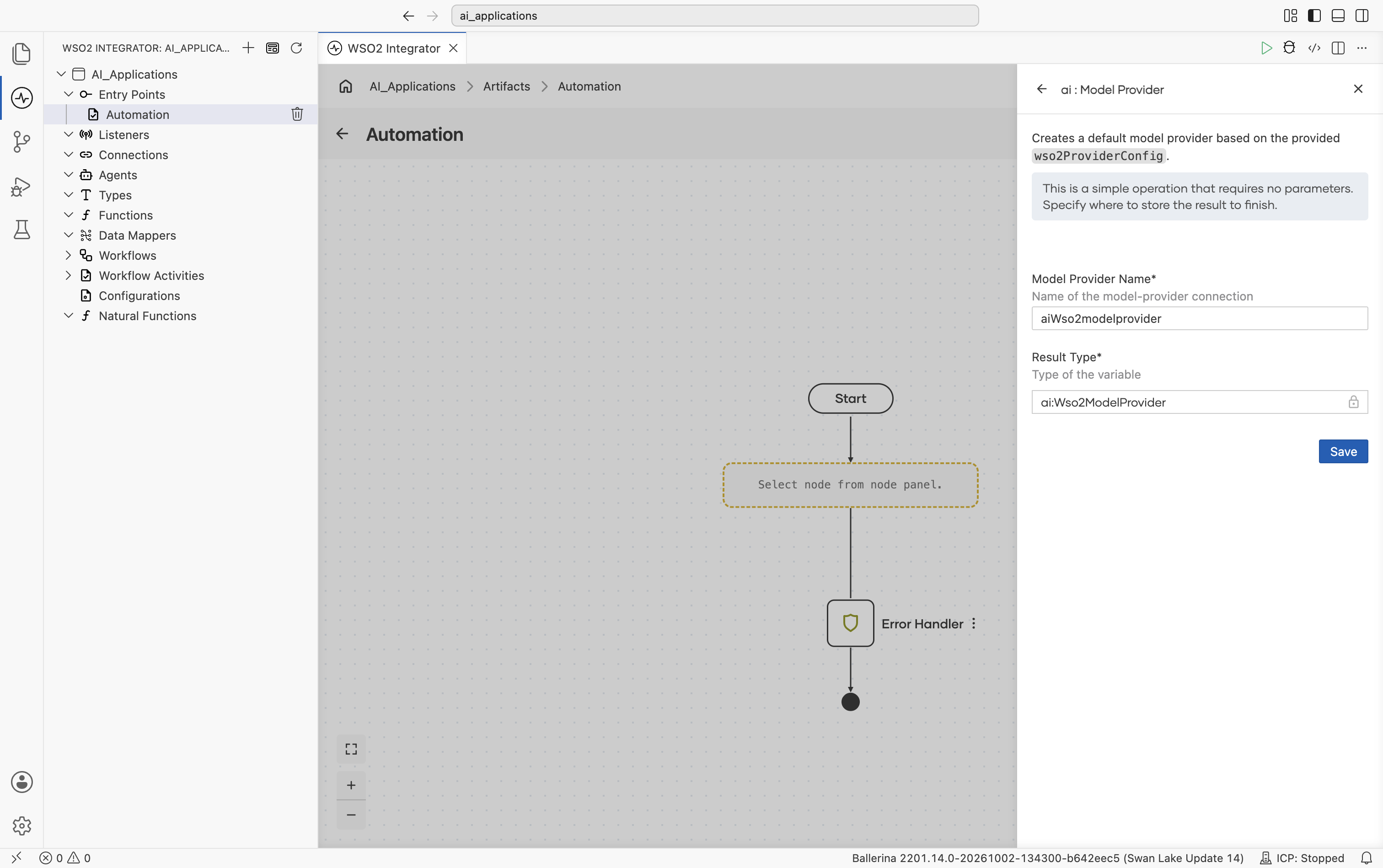
No provider-specific fields. Sign in with your WSO2 account and WSO2 Integrator handles the rest. There are no advanced configurations on this provider.
When you click Save, the Command Palette opens with Ballerina: Configure default WSO2 model provider. Sign in once and the credentials are written to Config.toml automatically. You can re-run the command at any time to refresh.
Anthropic
Anthropic's Claude family includes three model tiers: Opus, Sonnet, and Haiku.
Official website: anthropic.com.
Create form
The form opens with API Key and Model Type, followed directly by the standard inline fields (Service URL defaulting to https://api.anthropic.com/v1, Maximum Tokens, Temperature, HTTP Version, Timeout, Forwarded, Compression, Payload Validation. No need to expand anything to see these):
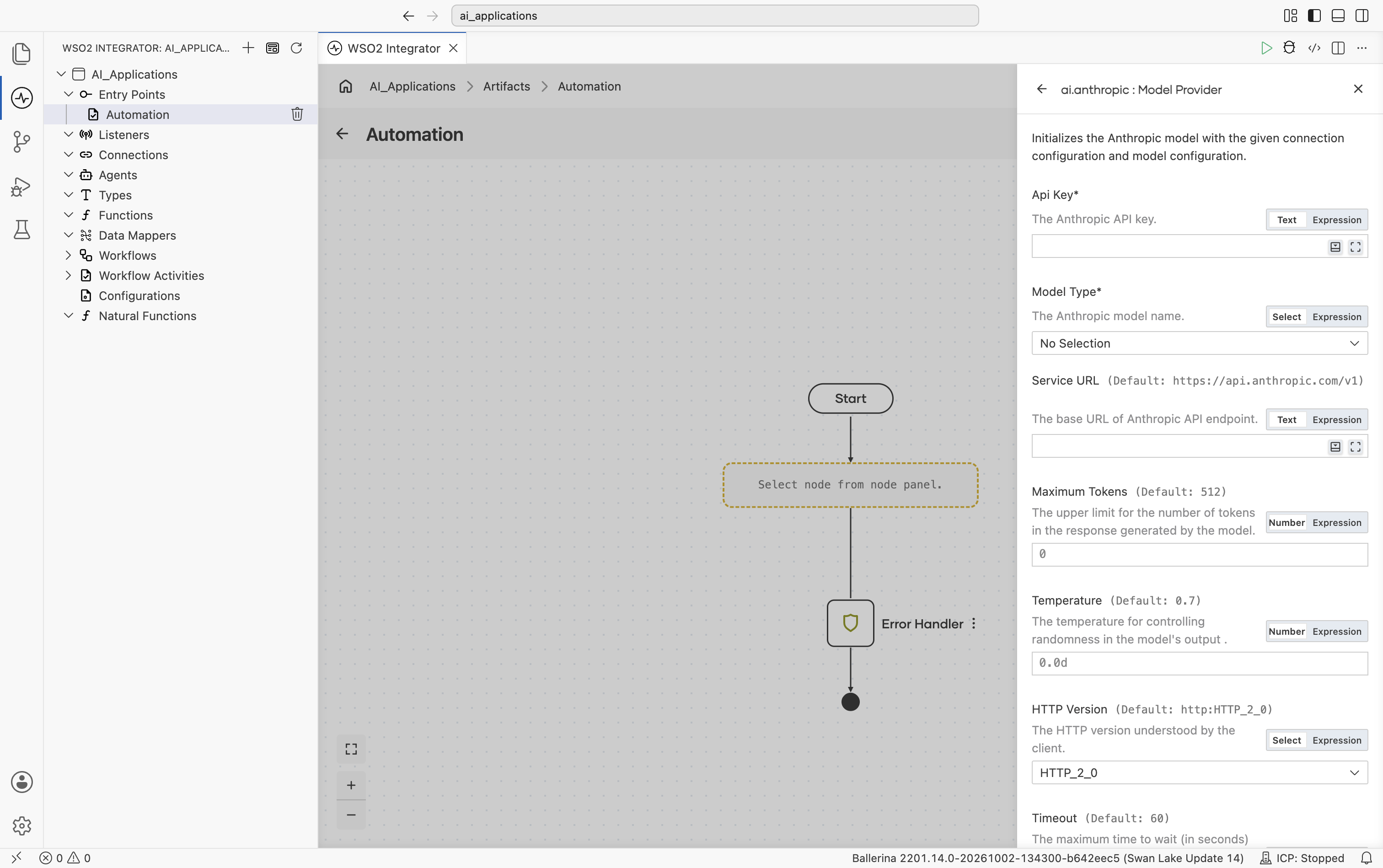
| Field | Required | Default | Available values |
|---|---|---|---|
| API Key | Yes | - | Anthropic API key. |
| Model Type | Yes | - | claude-sonnet-4-5, claude-sonnet-4-5-20250929, claude-haiku-4-5, claude-haiku-4-5-20251001, claude-opus-4-5, claude-opus-4-5-20251101, claude-opus-4-6, claude-sonnet-4-6, claude-opus-4-1-20250805, claude-opus-4-20250514, claude-sonnet-4-20250514, claude-3-7-sonnet-20250219, claude-3-5-haiku-20241022, claude-3-5-sonnet-20241022, claude-3-5-sonnet-20240620, claude-3-opus-20240229, claude-3-sonnet-20240229, claude-3-haiku-20240307. |
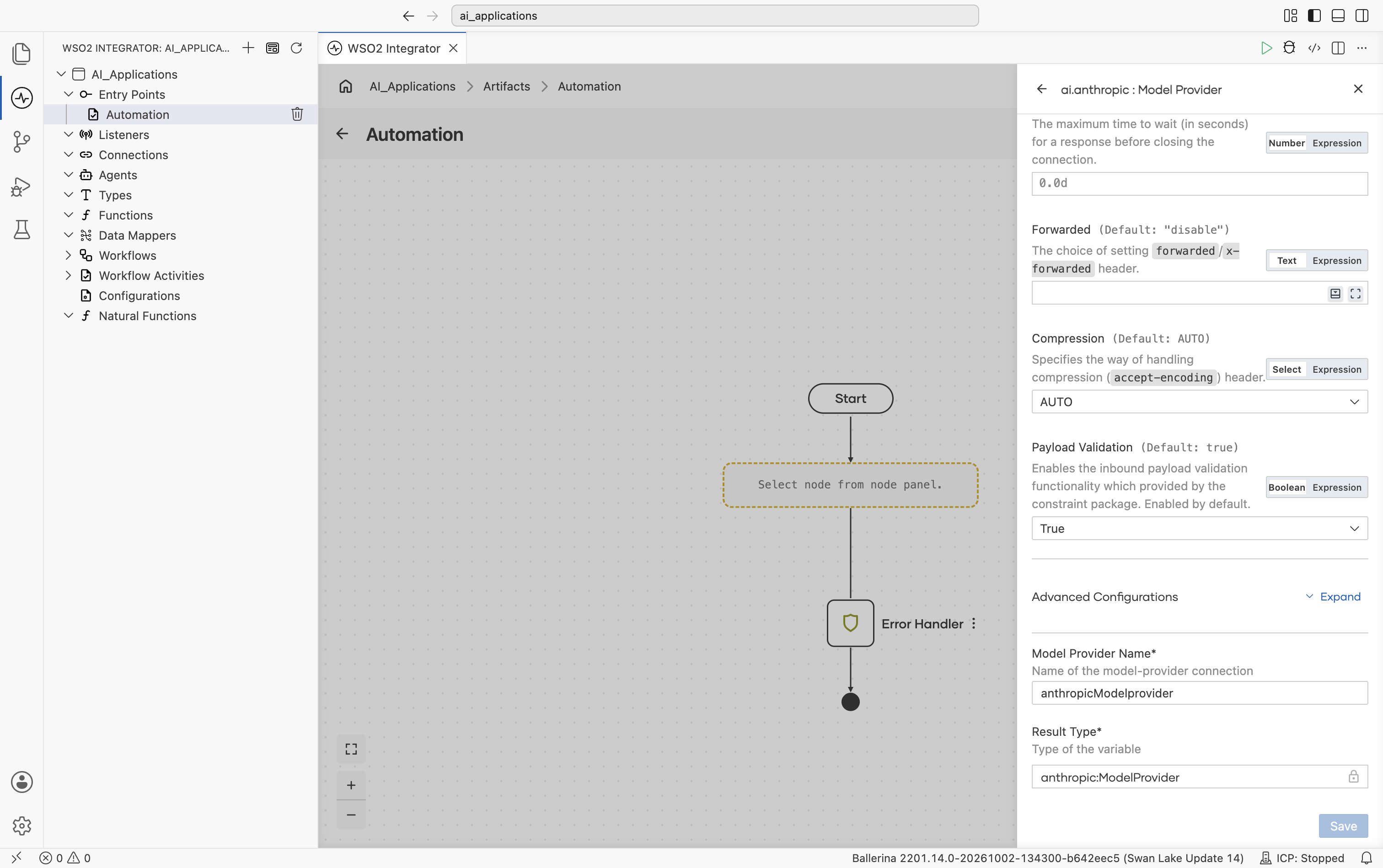
Scrolling further shows Forwarded, Compression, and Payload Validation, then the collapsed Advanced Configurations toggle, and finally Model Provider Name and Result Type:
Advanced configurations
Expanding Advanced Configurations shows the exact same panel as the Standard HTTP advanced configurations section above. Anthropic adds no provider-specific fields here. One thing worth noting: Anthropic always sends Maximum Tokens on every call, so the connection always carries a default of 512 even if you don't set one explicitly.
AWS Bedrock
Amazon Bedrock serves models from many vendors, including Anthropic, OpenAI, Amazon, Mistral, Qwen, Google, and DeepSeek, from your own AWS account and region.
Official website: aws.amazon.com/bedrock.
The package ships eight model providers, all on the Bedrock Runtime endpoint. In the Select Model Provider picker they are grouped under one Bedrock Model Providers card. Expand it to choose one:
| Model provider | When to use |
|---|---|
| Bedrock Converse Model Provider | Any Bedrock model that supports the Converse API. Use it for vendors that have no provider of their own, such as Meta, Writer, xAI, Moonshot AI, MiniMax, NVIDIA, and Z.AI. |
| Bedrock Runtime Anthropic Model Provider | Claude models. Adds Claude's thinking and effort settings. |
| Bedrock Runtime OpenAI Model Provider | GPT models. Adds reasoning effort. |
| Bedrock Runtime Amazon Model Provider | Amazon Nova models. |
| Bedrock Runtime Mistral Model Provider | Mistral models. |
| Bedrock Runtime Qwen Model Provider | Qwen models. Adds Qwen3 thinking mode. |
| Bedrock Runtime Google Model Provider | Google Gemma models. |
| Bedrock Runtime DeepSeek Model Provider | DeepSeek models. |
The vendor providers also let you choose which Bedrock API each request uses (see API Type below). Every provider needs the bedrock:InvokeModel IAM permission.
Create form
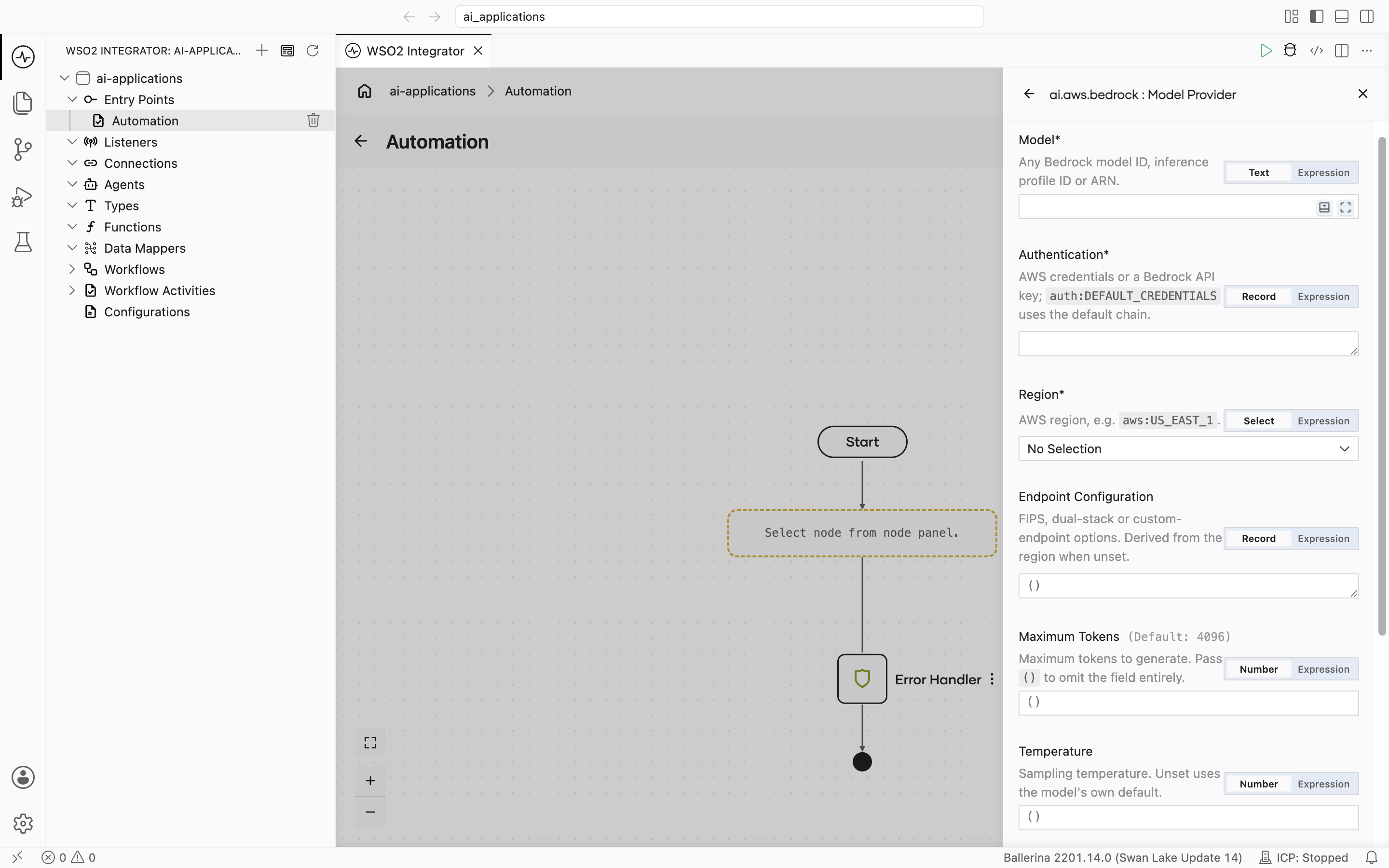
Every AWS Bedrock model provider has the same main fields; the vendor providers add API Type, and the model IDs each one suggests differ.
| Field | Required | Default | Available values |
|---|---|---|---|
| Model | Yes | - | A Bedrock model ID, such as one from the table below, or any other ID Bedrock Runtime serves. This can also be a cross-region inference profile ID (for example us.anthropic.claude-sonnet-4-6) or a provisioned-throughput, custom-model-deployment, or inference-profile ARN. |
| Authentication | Yes | - | auth:DEFAULT_CREDENTIALS, one of the AWS credential records, or a Bedrock API key. See AWS authentication options. |
| Region | Yes | - | The AWS region to call. Select one, for example US_EAST_1, or enter the region code as an expression, for example "us-east-1". There is no default. If Model is an ARN, the ARN's region is used. |
| API Type | No | CONVERSE | The Bedrock API each request uses. Vendor providers only; the Converse provider always uses CONVERSE. See the values below. |
| Endpoint Configuration | No | () (derived from Region) | fips, dualstack, or customEndpoint, for example a VPC endpoint URL. |
| Maximum Tokens | No | 4096 | Any positive integer. Enter () to leave the field out of the request and use the model's own limit. On the Anthropic provider this field is required and also covers thinking tokens. |
| Temperature | No | () (model's default) | Model-specific range. |
API Type values per provider:
| Provider | API Type values |
|---|---|
| Anthropic | CONVERSE, INVOKE, MESSAGES |
| OpenAI | CONVERSE, INVOKE, CHAT_COMPLETIONS, RESPONSES |
| Amazon | CONVERSE, INVOKE |
| Mistral, Qwen, Google, DeepSeek | CONVERSE, INVOKE, CHAT_COMPLETIONS |
Model IDs each provider suggests:
| Provider | Model IDs |
|---|---|
| Anthropic | us.anthropic.claude-opus-5-5, us.anthropic.claude-opus-5, us.anthropic.claude-opus-4-8, us.anthropic.claude-opus-4-7, us.anthropic.claude-sonnet-5, us.anthropic.claude-sonnet-4-6, us.anthropic.claude-haiku-4-5-20251001-v1:0, us.anthropic.claude-fable-5, us.anthropic.claude-fable-5-1 |
| OpenAI | openai.gpt-oss-120b-1:0, openai.gpt-oss-20b-1:0, us.openai.gpt-6-astra, us.openai.gpt-6-sol, us.openai.gpt-6-luna |
| Amazon | amazon.nova-pro-v1:0, amazon.nova-lite-v1:0, amazon.nova-micro-v1:0 |
| Mistral | mistral.mistral-large-3-675b-instruct, mistral.mistral-large-2407-v1:0, mistral.mistral-large-2402-v1:0, mistral.mistral-7b-instruct-v0:2 |
| Qwen | qwen.qwen3-32b-v1:0, qwen.qwen3-coder-480b-a35b-v1:0 |
google.gemma-3-4b-it, google.gemma-3-12b-it, google.gemma-3-27b-it | |
| DeepSeek | us.deepseek.r1-v1:0, deepseek.v3.2 |
| Converse | Any model ID |
These models are Legacy on Bedrock, with an end-of-life date of March 30, 2027: google.gemma-3-4b-it, google.gemma-3-12b-it, google.gemma-3-27b-it, mistral.mistral-7b-instruct-v0:2, qwen.qwen3-coder-480b-a35b-v1:0, and us.deepseek.r1-v1:0.
IDs that start with us. are US cross-region inference profiles and work only when Region is a US region. In other regions, type the profile ID for your geography instead, for example eu.anthropic.claude-haiku-4-5-20251001-v1:0 or global.anthropic.claude-haiku-4-5-20251001-v1:0. Most current Claude models on Bedrock Runtime are served only through these profiles, and AWS rejects the bare anthropic. ID. A few accept the bare ID in specific regions only; check the model's card in Amazon Bedrock models.
Advanced configurations
Every AWS Bedrock model provider has the same advanced fields, and some vendor providers add their own. For example, the Anthropic provider adds Thinking and Effort:
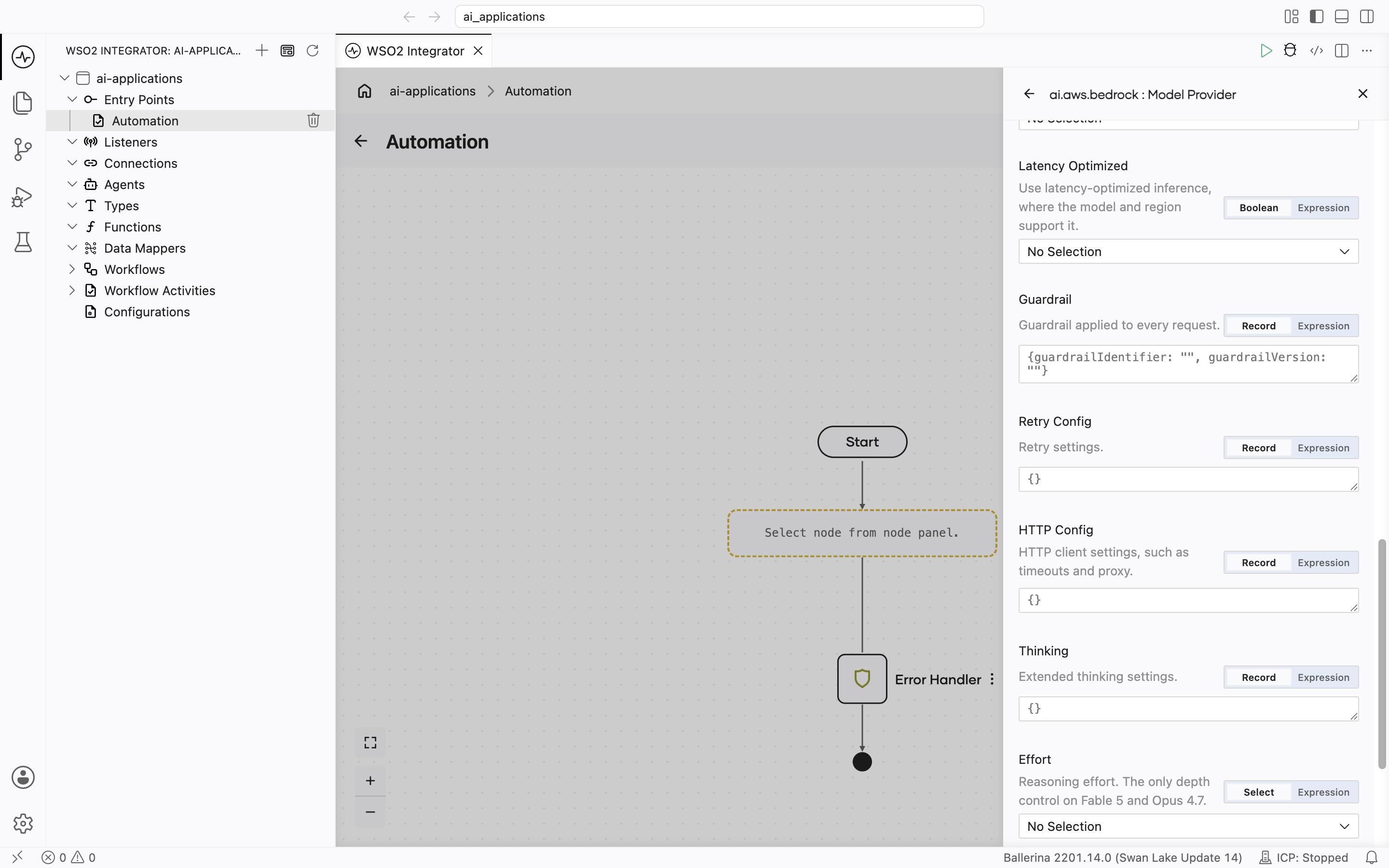
| Field | Default | Available values | What it controls |
|---|---|---|---|
| Stop Sequences | () | String array | Stop sequences for every call. A per-call Stop overrides these. Not supported on the RESPONSES API. |
| Additional Model Request Fields | () | Open record, for example {"top_p": 0.9} | Extra request fields sent to Bedrock unchanged. |
| Service Tier | () | TIER_DEFAULT, TIER_PRIORITY, TIER_FLEX, TIER_RESERVED | Bedrock processing tier. |
| Latency Optimized | () | true, false | Requests latency-optimized inference where the model and region support it. |
| Guardrail | () | guardrailIdentifier, guardrailVersion | Applies an Amazon Bedrock guardrail to every request. |
| Retry Config | maxRetries 3, initialDelay 1.0, maxDelay 20.0, backoffFactor 2.0 | Record | Backoff for throttling and transient errors (408, 429, 500, 502, 503, 504). |
| HTTP Config | {} | Record | The Standard HTTP advanced configurations, grouped in one record. The request timeout defaults to 300 seconds, because reasoning models can take minutes; set Timeout here to change it. There is no Service URL; use Endpoint Configuration. |
Provider-specific fields:
| Provider | Field | Available values | What it controls |
|---|---|---|---|
| Anthropic | Thinking | mode (ADAPTIVE, ENABLED, DISABLED; default ADAPTIVE), budgetTokens | Claude extended thinking. budgetTokens applies to ENABLED only: at least 1024 and less than Maximum Tokens. |
| Anthropic | Effort | EFFORT_LOW, EFFORT_MEDIUM, EFFORT_HIGH, EFFORT_XHIGH, EFFORT_MAX | How much reasoning Claude spends. Supported values vary by model. |
| OpenAI | Reasoning Effort | REASONING_NONE, REASONING_MINIMAL, REASONING_LOW, REASONING_MEDIUM, REASONING_HIGH, REASONING_XHIGH, REASONING_MAX | Reasoning depth for GPT models. |
| Qwen | Enable Thinking | true, false | Qwen3 thinking mode. Leave empty to use the model's default. |
AWS authentication options
| Auth type | Fields | When to use |
|---|---|---|
| Default credentials | auth:DEFAULT_CREDENTIALS | Uses the standard AWS credential chain (environment variables, shared config file, SSO, EKS, ECS, and EC2 roles). On AWS compute such as EC2, ECS, EKS, or Lambda, it picks up the attached IAM role, so nothing else needs to be set. |
| Static keys | accessKeyId, secretAccessKey, optional sessionToken | IAM user access keys or temporary STS credentials. |
| Named profile | optional profileName (default default), optional credentialsFilePath (default ~/.aws/credentials) | A profile from a shared credentials file. |
| Assume role | roleArn, optional externalId, roleSessionName, duration, stsRegion, stsEndpoint, sourceCredentials | Cross-account access through an IAM role. |
| Web identity | roleArn, webIdentityTokenFile, optional roleSessionName, stsRegion, stsEndpoint | OIDC web identity tokens. |
| SSO | ssoStartUrl, ssoRegion, accountId, roleName, optional ssoSessionName, ssoEndpoint, ssoOidcEndpoint | IAM Identity Center. |
| Credential process | command | An external program that prints credentials. |
| Bedrock API key | apiKey | A Bedrock API key. The key's identity needs bedrock:CallWithBearerToken. See API key permissions. |
Generate with a non-string Expected Type is not supported when API Type is INVOKE for mistral.mistral-7b-instruct-v0:2, mistral.mistral-large-2402-v1:0, and DeepSeek R1, because those use a text-completion format with no tool calling. Use CONVERSE instead. Chat works on every API.
Chat also accepts images (PNG, JPEG, GIF, and WebP) on the CONVERSE API, on the Anthropic provider's MESSAGES and INVOKE APIs, and on the Amazon provider's INVOKE API. On other APIs, a message with an image returns an error. Send images as bytes; an image URL returns an error.
The AWS Bedrock package also ships Embedding Providers (Titan and Cohere). See Embedding providers.
Azure OpenAI
Same family of models as OpenAI (including the GPT-5 family), hosted on Azure with per-resource deployments. Like the OpenAI provider, it can call either the Chat Completions API (the default) or the Responses API, and it supports both Azure's newer v1 endpoint and the legacy date-based api-version endpoints. For details on the two API surfaces and their URL and api-version requirements, see the Azure OpenAI API version lifecycle documentation.
Official website: Azure OpenAI Service.
Create form
The form opens with Service URL, API Key, Deployment ID, and API Version:
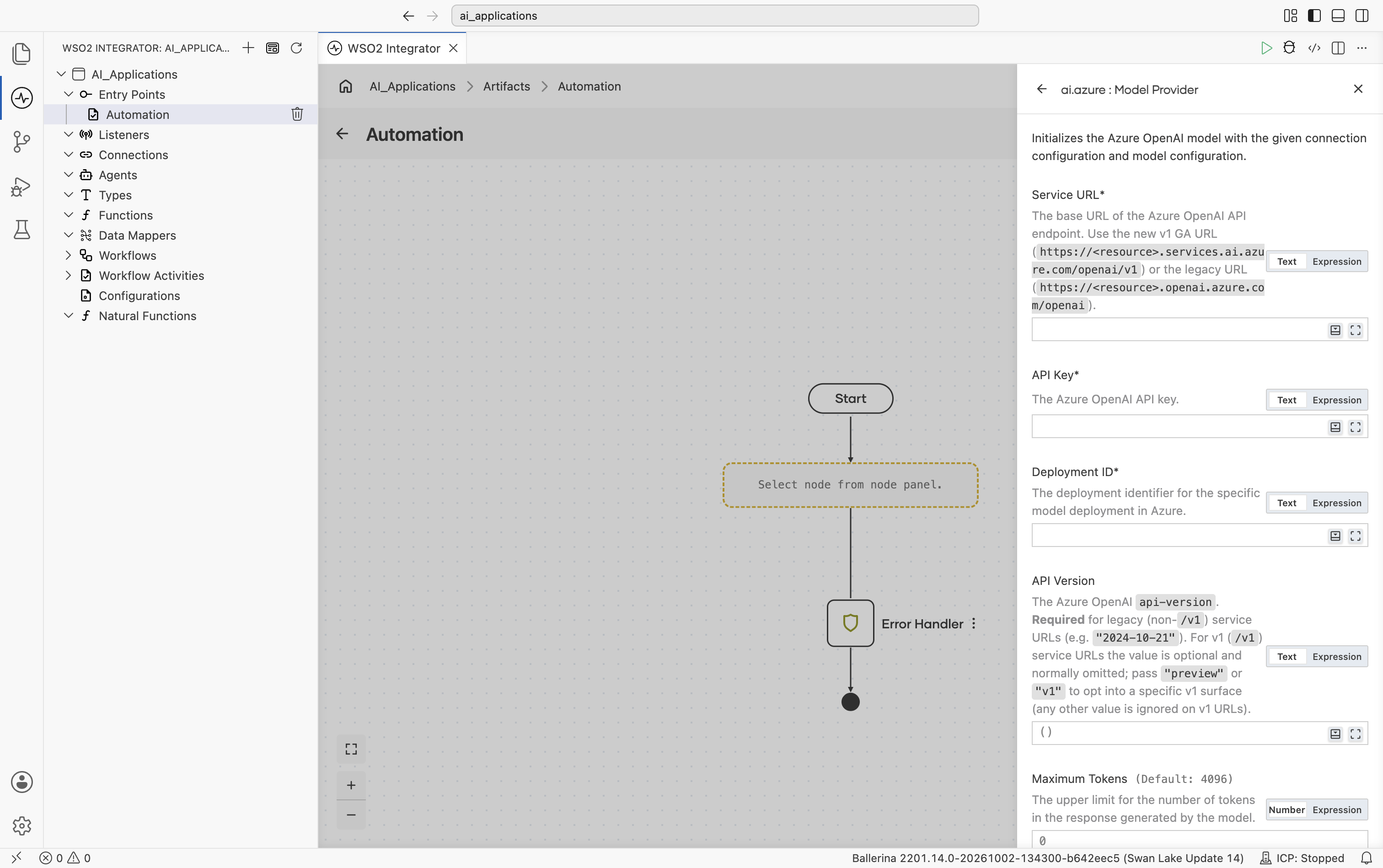
| Field | Required | Default | Available values |
|---|---|---|---|
| Service URL | Yes | - | Base URL of your Azure OpenAI resource. Use the v1 URL (ends with /v1, e.g. https://your-resource.services.ai.azure.com/openai/v1) or the legacy URL (e.g. https://your-resource.openai.azure.com). See the Azure OpenAI API version lifecycle documentation. |
| API Key | Yes | - | Azure OpenAI API key. |
| Deployment ID | Yes | - | The deployment identifier you created in the Azure portal (the model name is implicit in the deployment). |
| API Version | No | () | Required for legacy (non-/v1) service URLs: a date-based version, e.g. 2024-10-21. Optional on /v1 URLs and normally omitted; pass preview or v1 to opt into a specific v1 surface (date-based values are ignored on /v1 URLs, with a warning). |
Continuing the scroll, Maximum Tokens, Temperature, Reasoning Effort, API Type, HTTP Version, and the start of Timeout are all shown directly on the form (not behind the Advanced Configurations toggle):
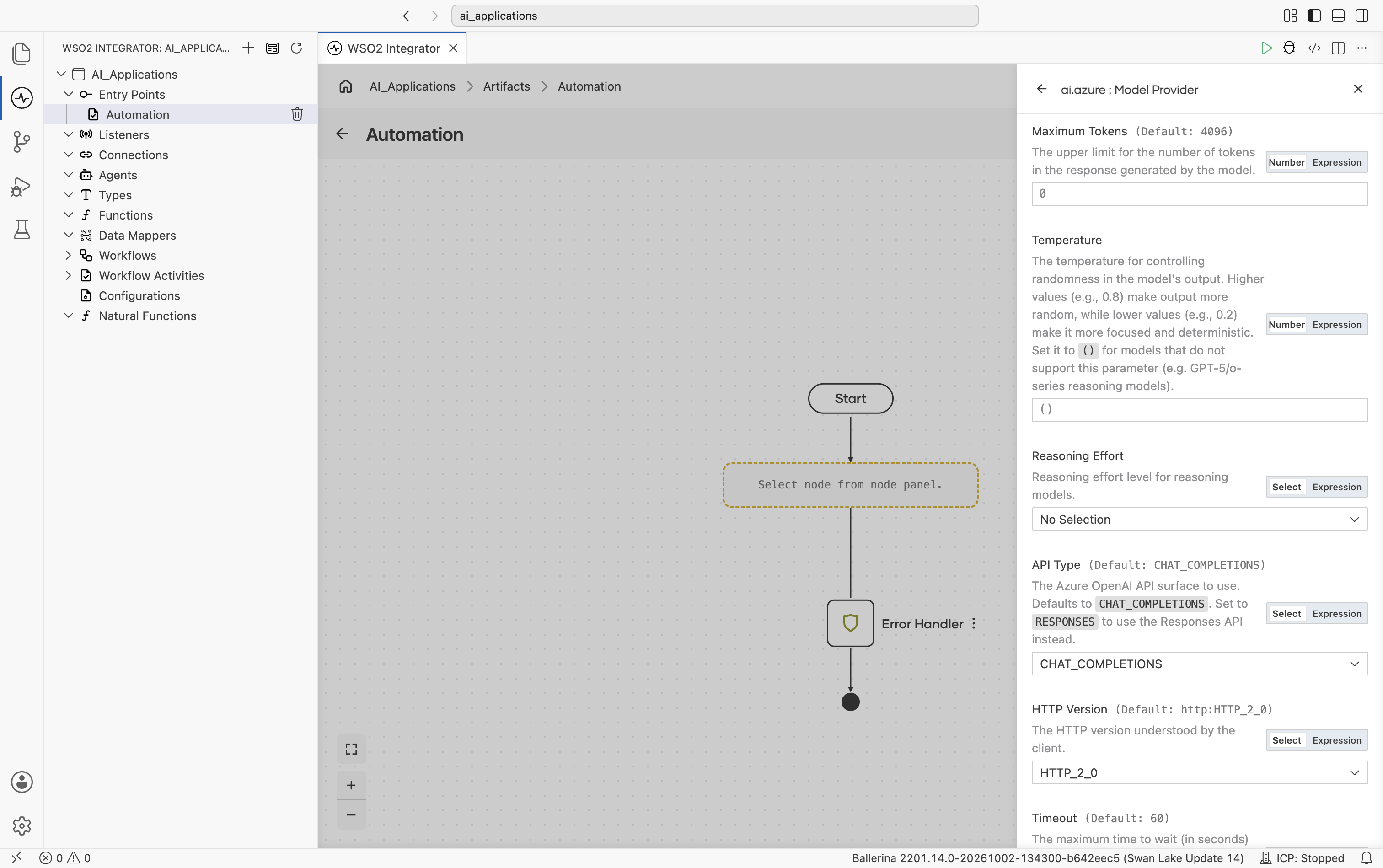
| Field | Default | Available values | What it controls |
|---|---|---|---|
| Maximum Tokens | 4096 | Any positive integer | Hard cap on response length. |
| Temperature | () (omitted) | 0.0-2.0 or empty | Sampling temperature. Leave empty for deployments of models that reject the parameter (the GPT-5 and o-series reasoning models). |
| Reasoning Effort | () (omitted) | none, minimal, low, medium, high, xhigh | Effort spent on reasoning by reasoning-capable models. Not every model accepts every value (for example, minimal only on the original gpt-5 reasoning models, none from gpt-5.1 onward, xhigh from gpt-5.1-codex-max onward). Because the model is implicit in the deployment, the value is validated by the Azure service rather than at initialization; an unsupported value fails on the first call. |
| API Type | CHAT_COMPLETIONS | CHAT_COMPLETIONS, RESPONSES | The Azure OpenAI API surface to use. Same semantics as the OpenAI provider. See Chat Completions vs Responses API. |
Scrolling further shows Timeout, Forwarded, Compression, Payload Validation, then the collapsed Advanced Configurations toggle, and finally Model Provider Name and Result Type:
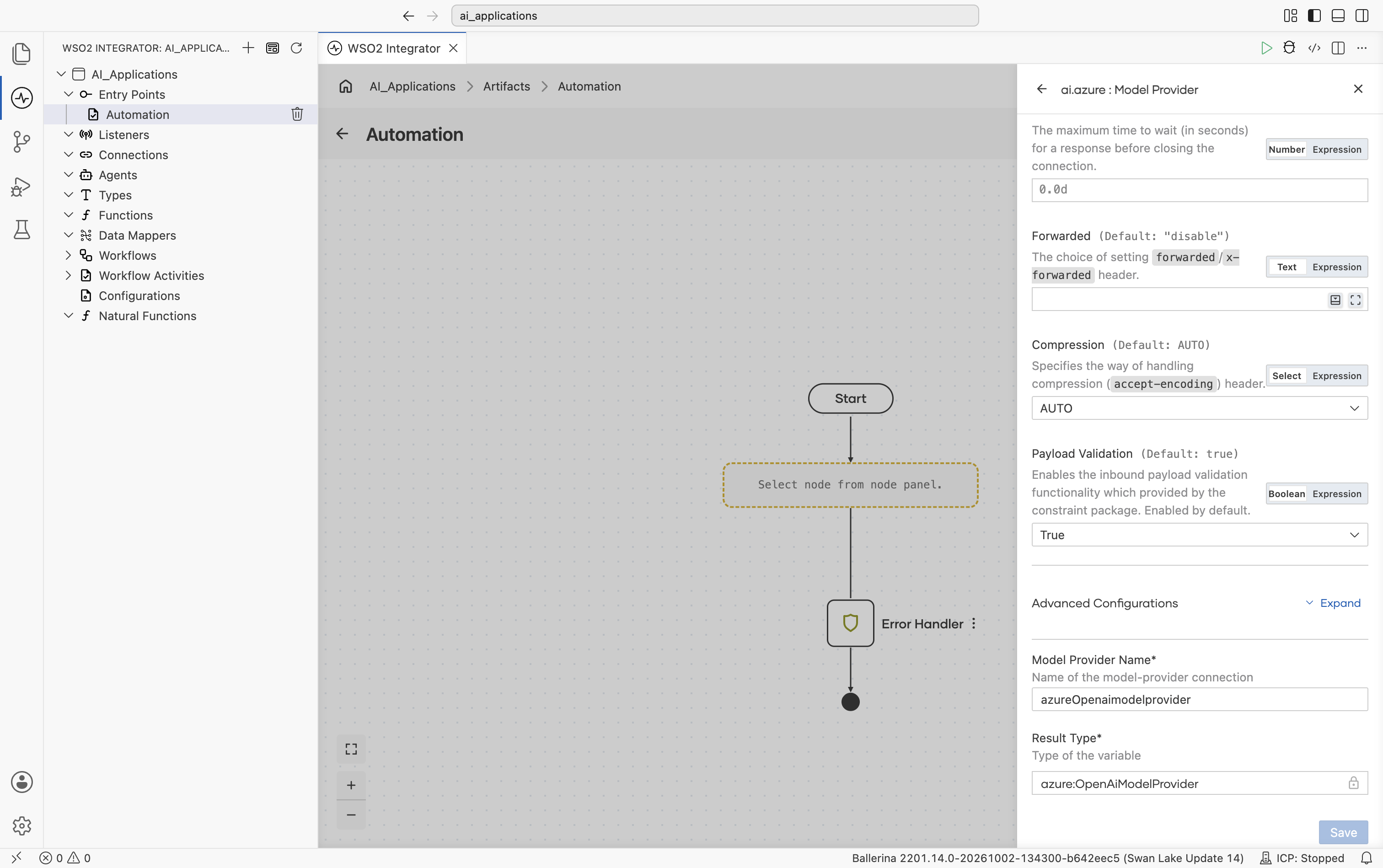
Advanced configurations
Expanding Advanced Configurations shows the exact same panel as the Standard HTTP advanced configurations section above. Azure OpenAI adds no further provider-specific fields here.
The Azure package also ships an Embedding Provider and the Azure AI Search Knowledge Base. See Azure OpenAI and Azure AI Search.
DeepSeek
DeepSeek's chat and reasoning models.
Official website: deepseek.com.
Create form
The form opens with API Key, followed directly by the provider-specific and standard inline fields (Model Type, Service URL, Maximum Token, Temperature, HTTP Version, Timeout. No need to expand anything to see these):
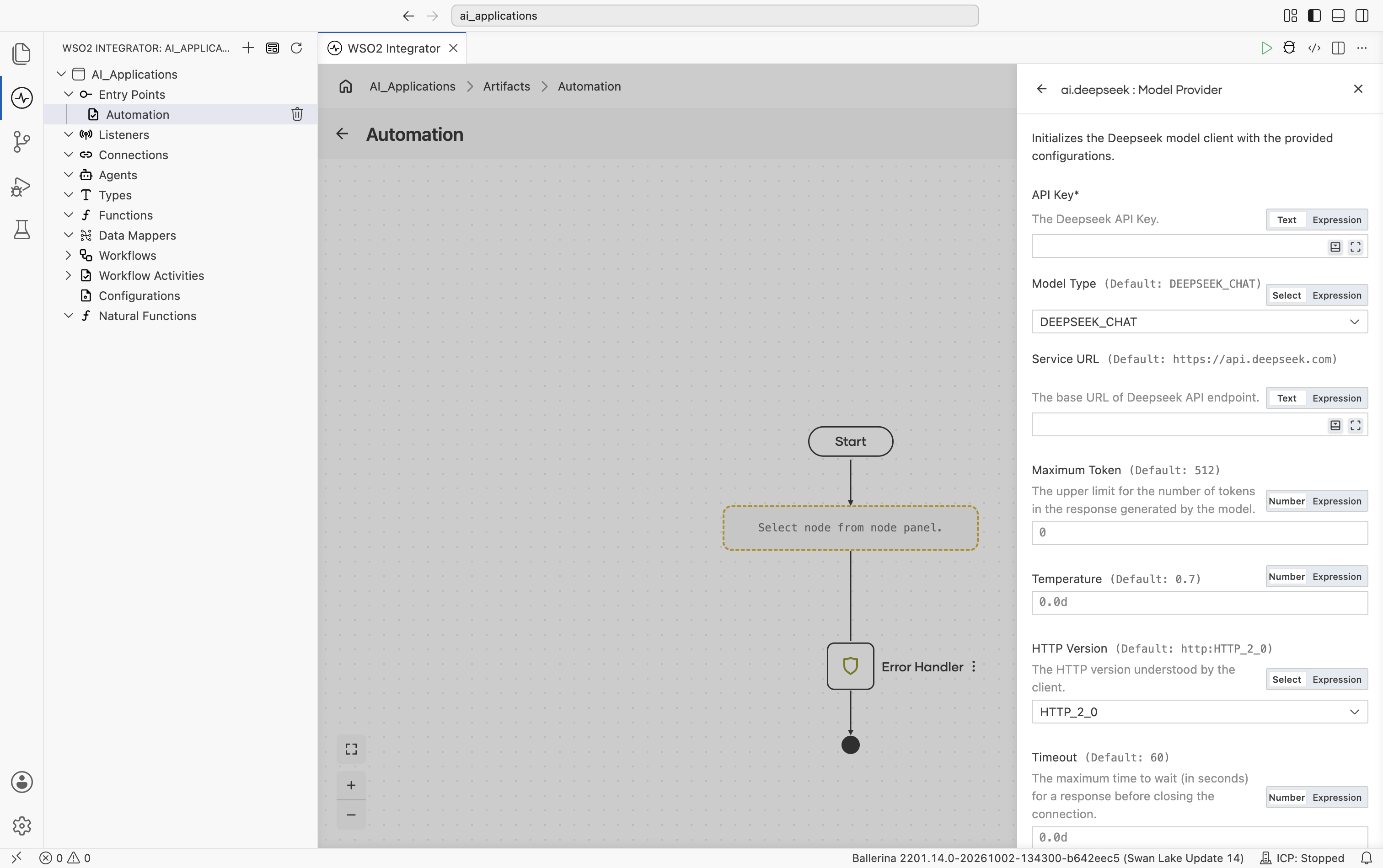
| Field | Required | Default | Available values |
|---|---|---|---|
| API Key | Yes | - | DeepSeek API key. |
| Model Type | No | deepseek-chat (shown as DEEPSEEK_CHAT) | deepseek-chat, deepseek-reasoner |
Scrolling further shows Forwarded, Compression, and Payload Validation, then the collapsed Advanced Configurations toggle, and finally Model Provider Name and Result Type:
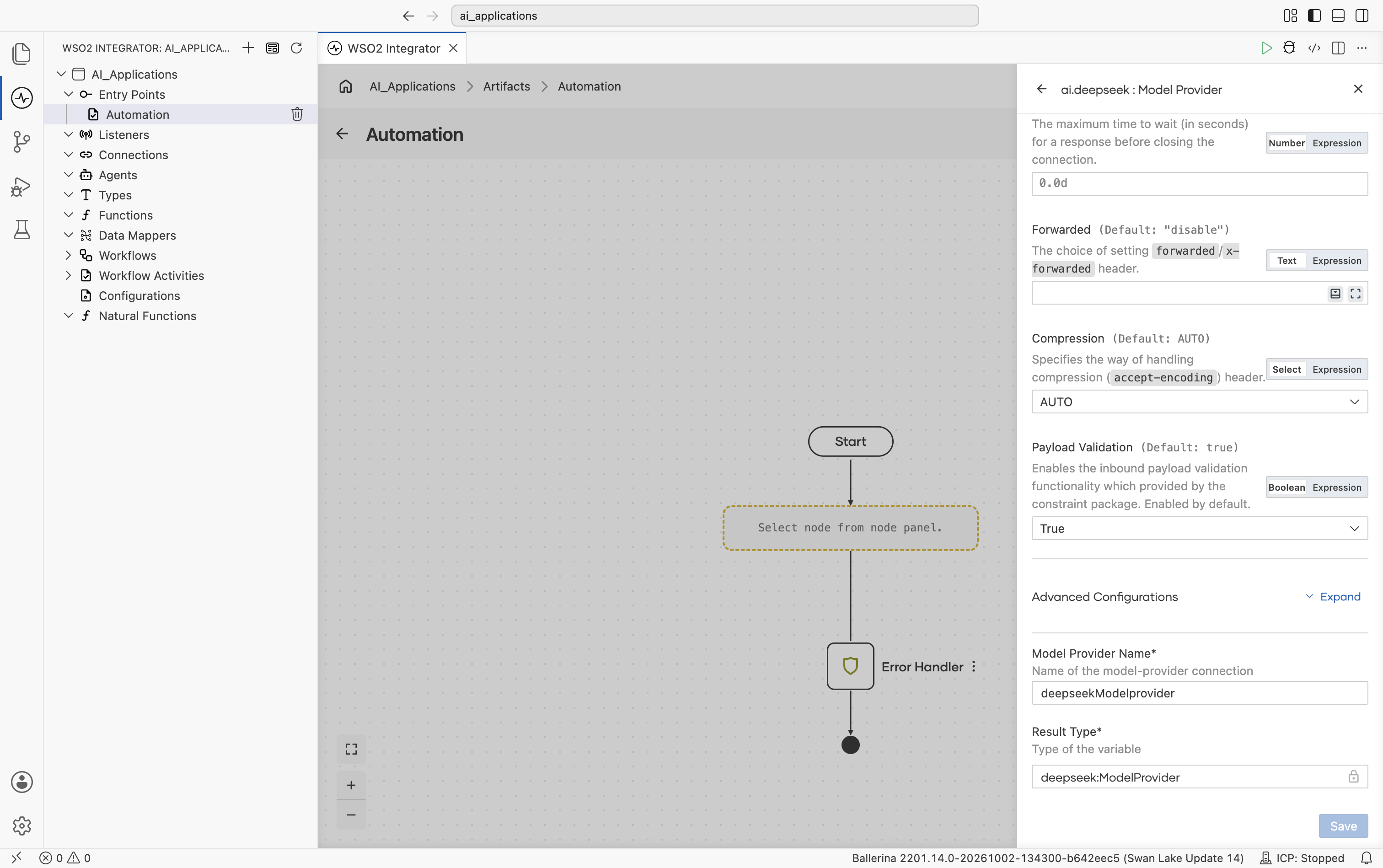
Advanced configurations
Expanding Advanced Configurations shows the exact same panel as the Standard HTTP advanced configurations section above. DeepSeek adds no provider-specific fields here.
Google Vertex AI
Vertex AI exposes Google's Gemini models alongside hosted Anthropic, Mistral, Meta, DeepSeek, and other open-weight models.
Official website: Vertex AI.
Create form
The form opens with Auth, Project ID, and Model:
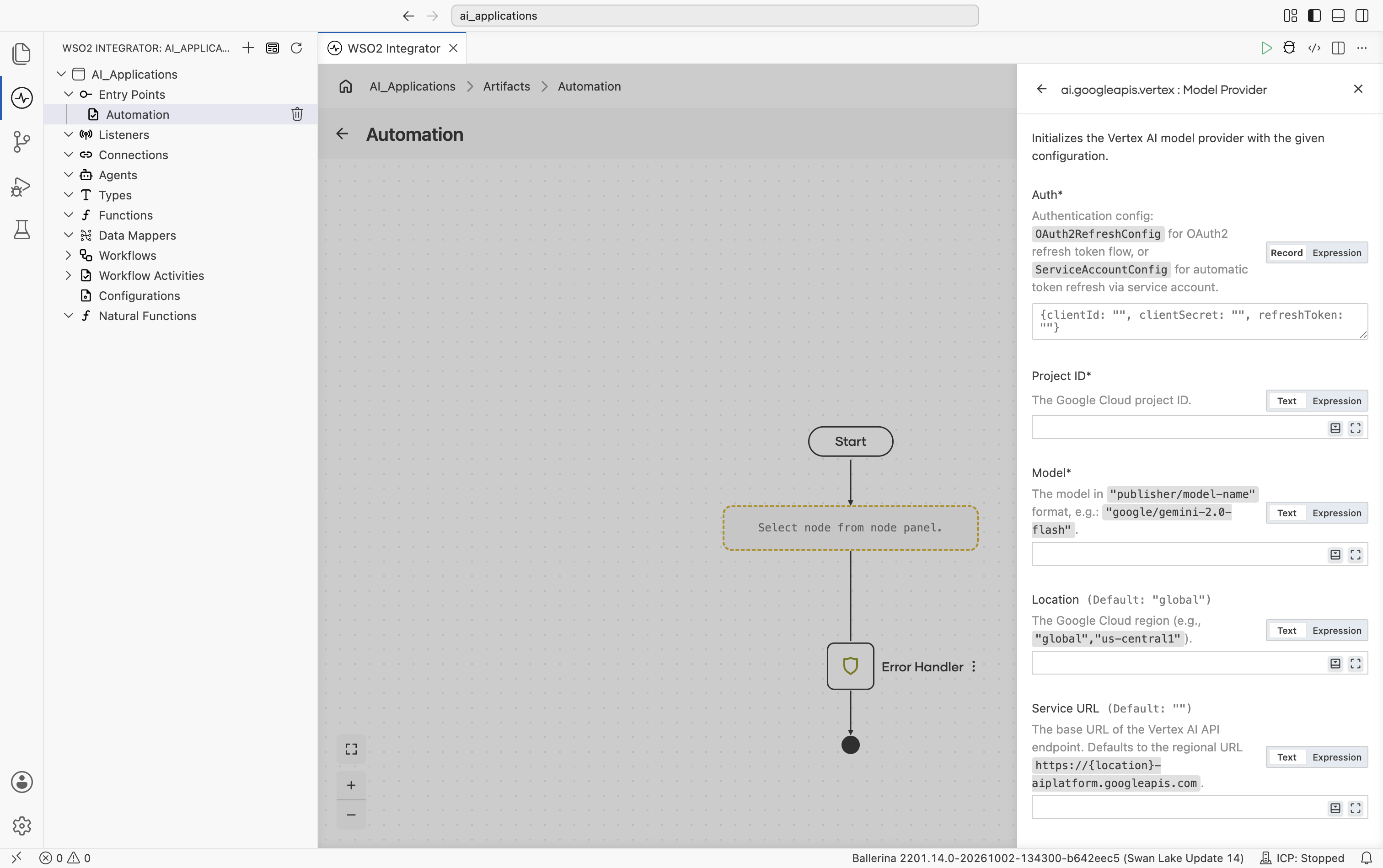
| Field | Required | Default | Available values |
|---|---|---|---|
| Auth | Yes | - | OAuth2 refresh-token record, a service-account record, or a path to a service-account JSON file. See auth options below. |
| Project ID | Yes | - | Your Google Cloud project ID. |
| Model | Yes | - | Publisher-prefixed model name. Examples: google/gemini-2.0-flash, anthropic/claude-sonnet-4-6, mistralai/mistral-medium-3, meta/llama-4-maverick-17b-128e-instruct-maas, deepseek-ai/deepseek-v3-0324, qwen/qwen3-235b-a22b, kimi/kimi-k2, minimax/minimax-m2. |
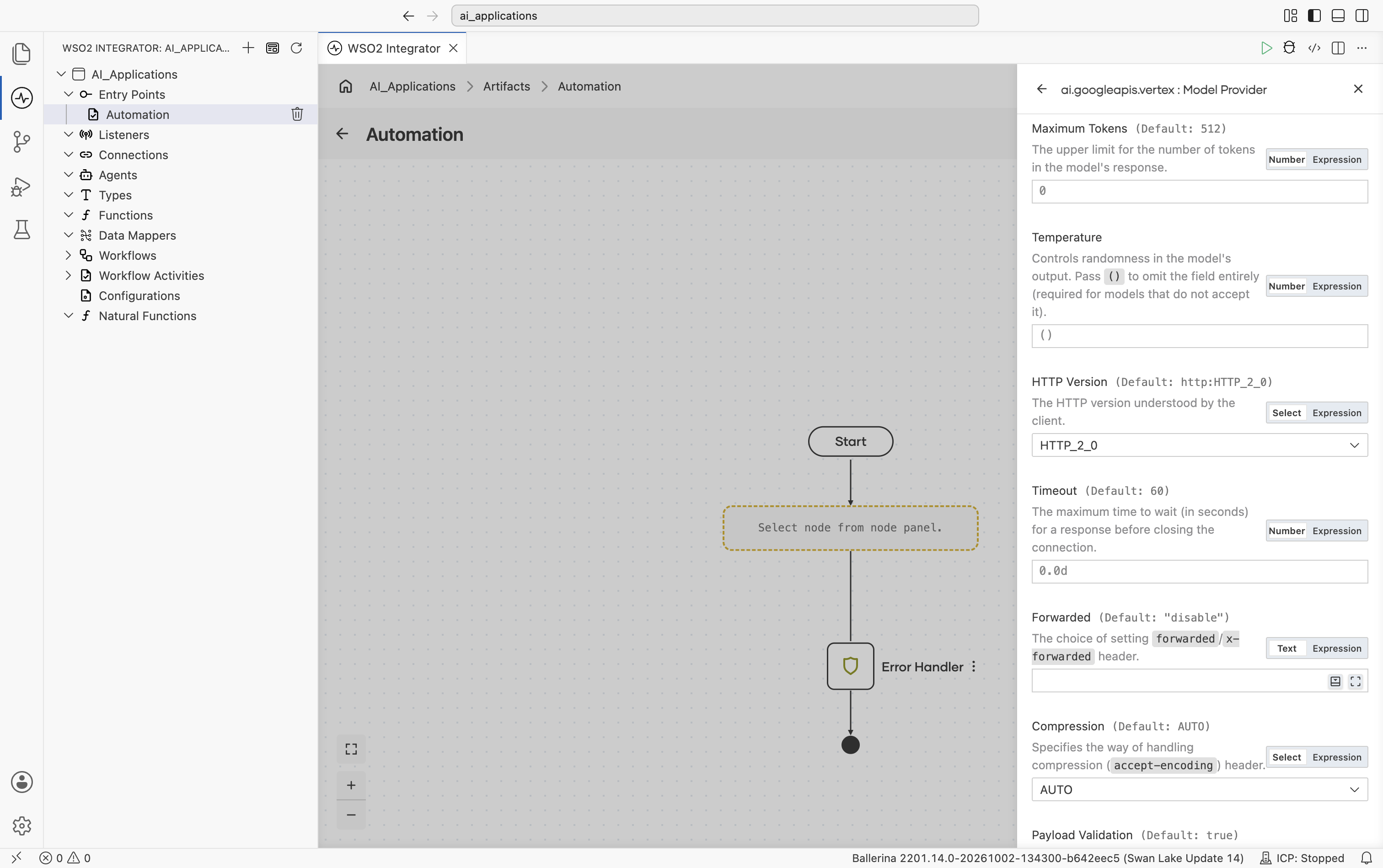
Scrolling further shows Maximum Tokens, Temperature, HTTP Version, and the start of Timeout:
| Field | Default | Available values | What it controls |
|---|---|---|---|
| Location | global | global, us-central1, europe-west1, etc. | Google Cloud region. |
| Service URL | "" (auto-derived from Location) | URL string | Override the regional endpoint. Defaults to https://\{location\}-aiplatform.googleapis.com. |
| Maximum Tokens | 512 | Any positive integer | Hard cap on response length. |
| Temperature | () (omitted from request) | 0.0-2.0 or empty | Sampling temperature. Leave empty for models that reject the field (e.g. some Anthropic-on-Vertex calls). |
Scrolling further shows Timeout, Forwarded, Compression, Payload Validation, then the collapsed Advanced Configurations toggle, and finally Model Provider Name and Result Type:
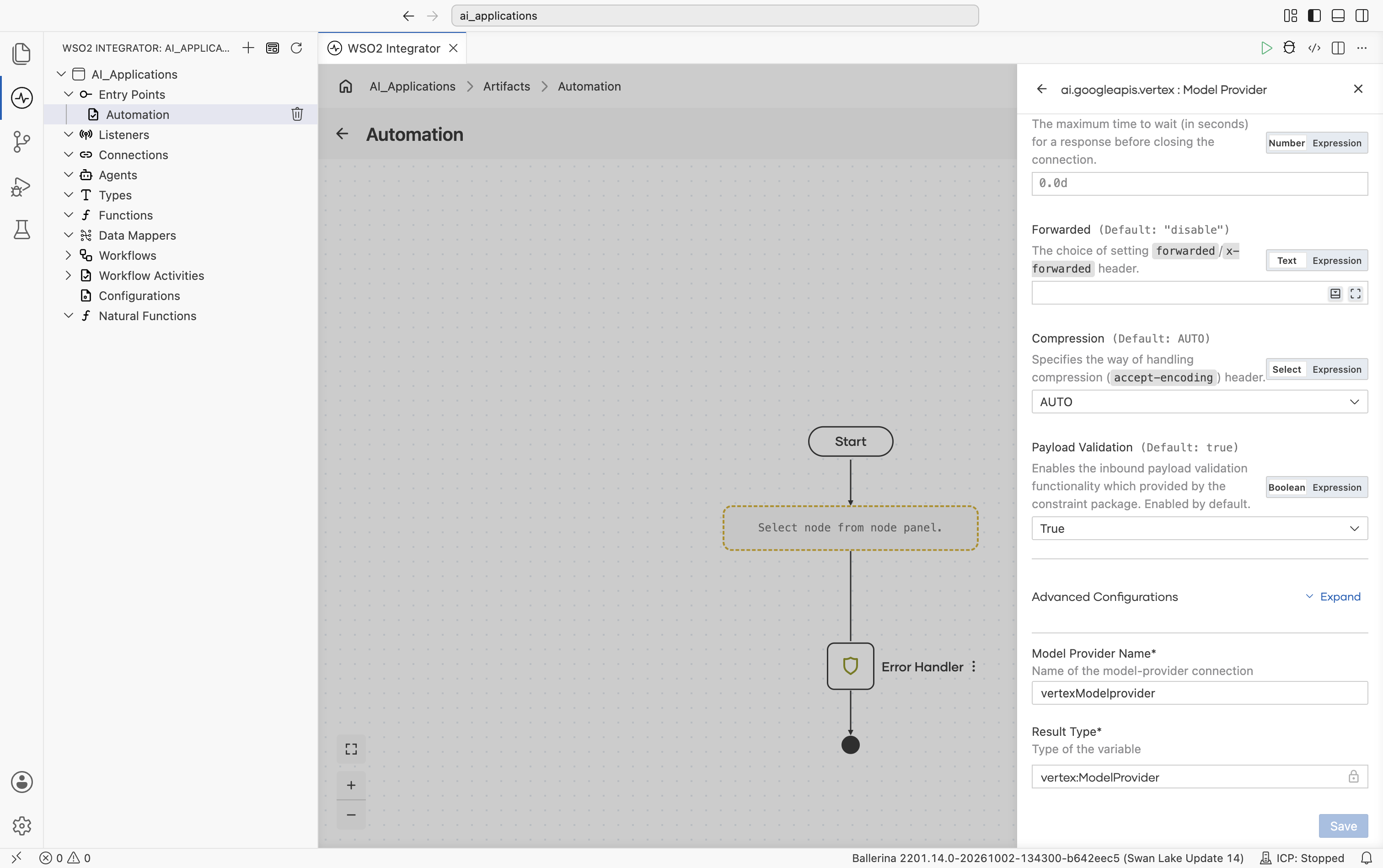
Advanced configurations
Expanding Advanced Configurations shows the exact same panel as the Standard HTTP advanced configurations section above. Vertex adds no provider-specific fields here.
Vertex auth options
| Auth type | Fields | When to use |
|---|---|---|
| OAuth2 refresh config | clientId, clientSecret, refreshToken, optional refreshUrl | Already have OAuth2 refresh-token credentials. |
| Service account config | clientEmail, privateKey, optional scopes | Want explicit credentials in source. |
| Service account JSON path | A file path string | Easiest - point at the downloaded service-account JSON file from the Google Cloud console. The connector reads client_email and private_key automatically and refreshes the token. |
Vertex also ships an Embedding Provider. See Google Vertex.
Mistral
EU-hosted Mistral and Mixtral models, including Codestral and Pixtral.
Official website: mistral.ai.
Create form
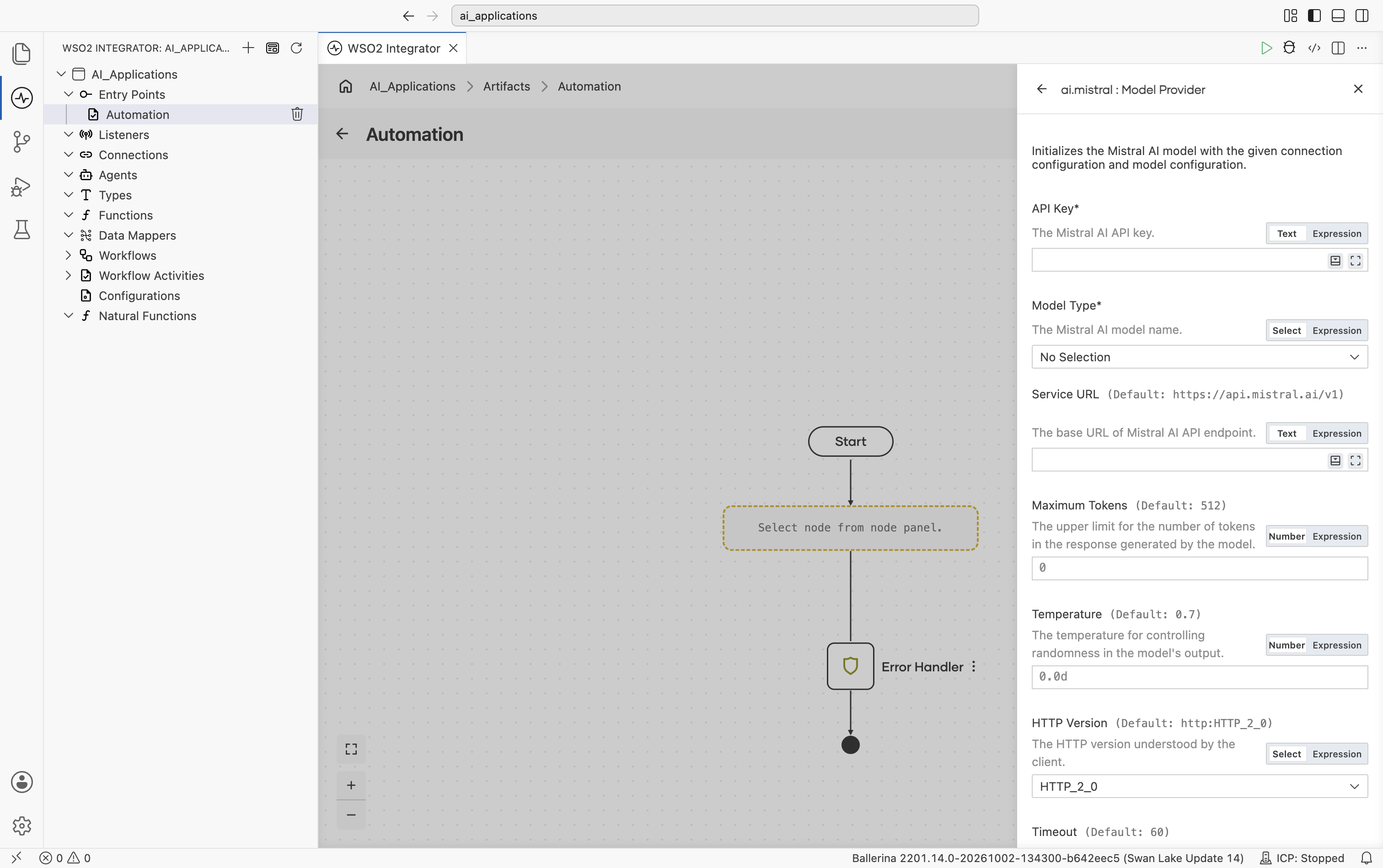
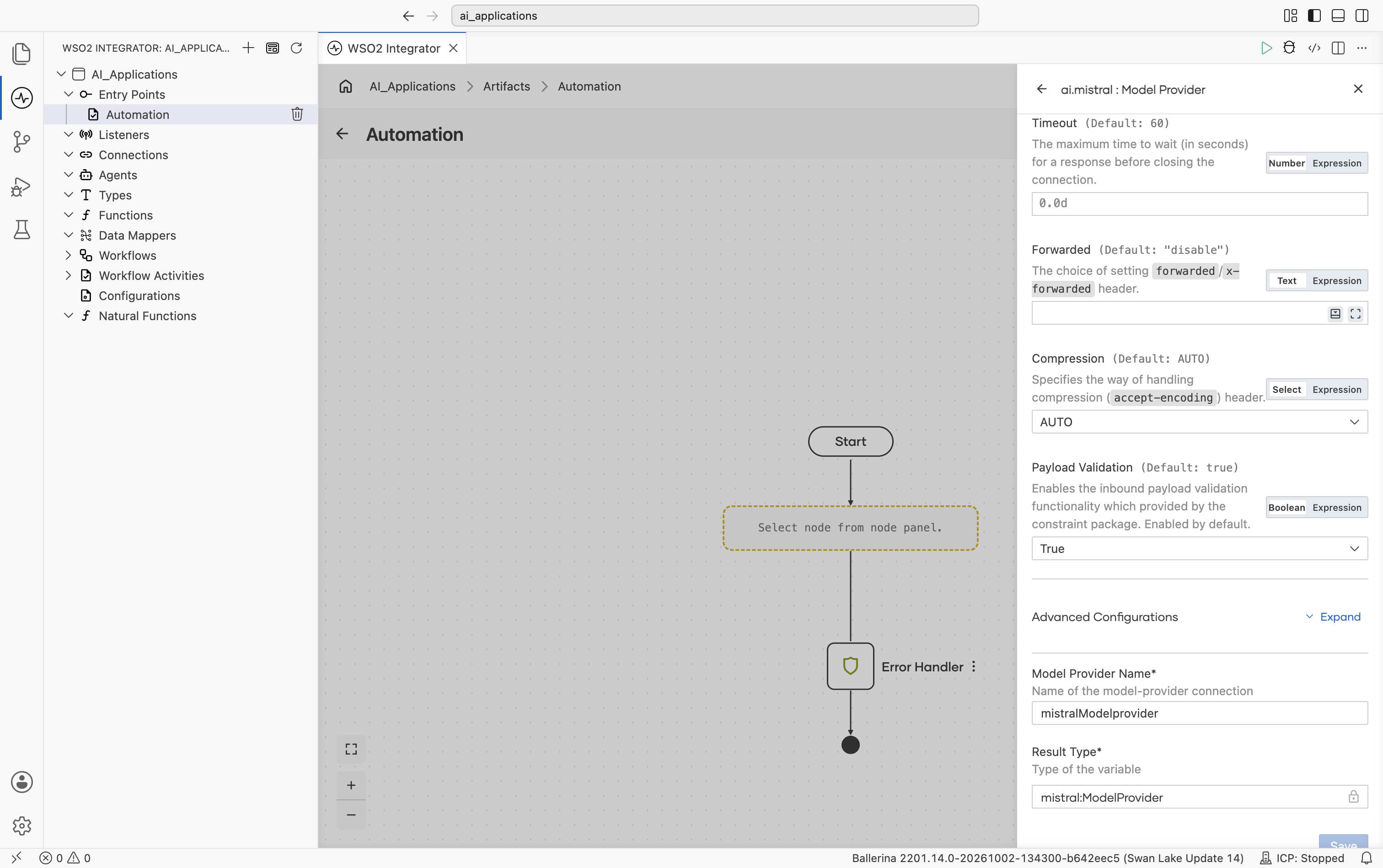
The form opens with API Key and Model Type, followed directly by the standard inline fields (Service URL defaulting to https://api.mistral.ai/v1, Maximum Tokens, Temperature, HTTP Version, Timeout. No need to expand anything to see these):
| Field | Required | Default | Available values |
|---|---|---|---|
| API Key | Yes | - | Mistral AI API key. |
| Model Type | Yes | - | mistral-large-latest, mistral-medium-latest, mistral-small-latest, codestral-latest, ministral-8b-latest, ministral-3b-latest, pixtral-large-latest, devstral-small-latest, mistral-saba-latest, open-mistral-7b, open-mistral-nemo, open-mixtral-8x7b, open-mixtral-8x22b, pixtral-12b-2409, open-codestral-mamba, codestral-mamba-2407. Date-pinned variants (e.g. mistral-large-2411, mistral-medium-2505, mistral-small-2501, ministral-3b-2410, ministral-8b-2410, codestral-2405, codestral-2501, mistral-saba-2502) are also available. |
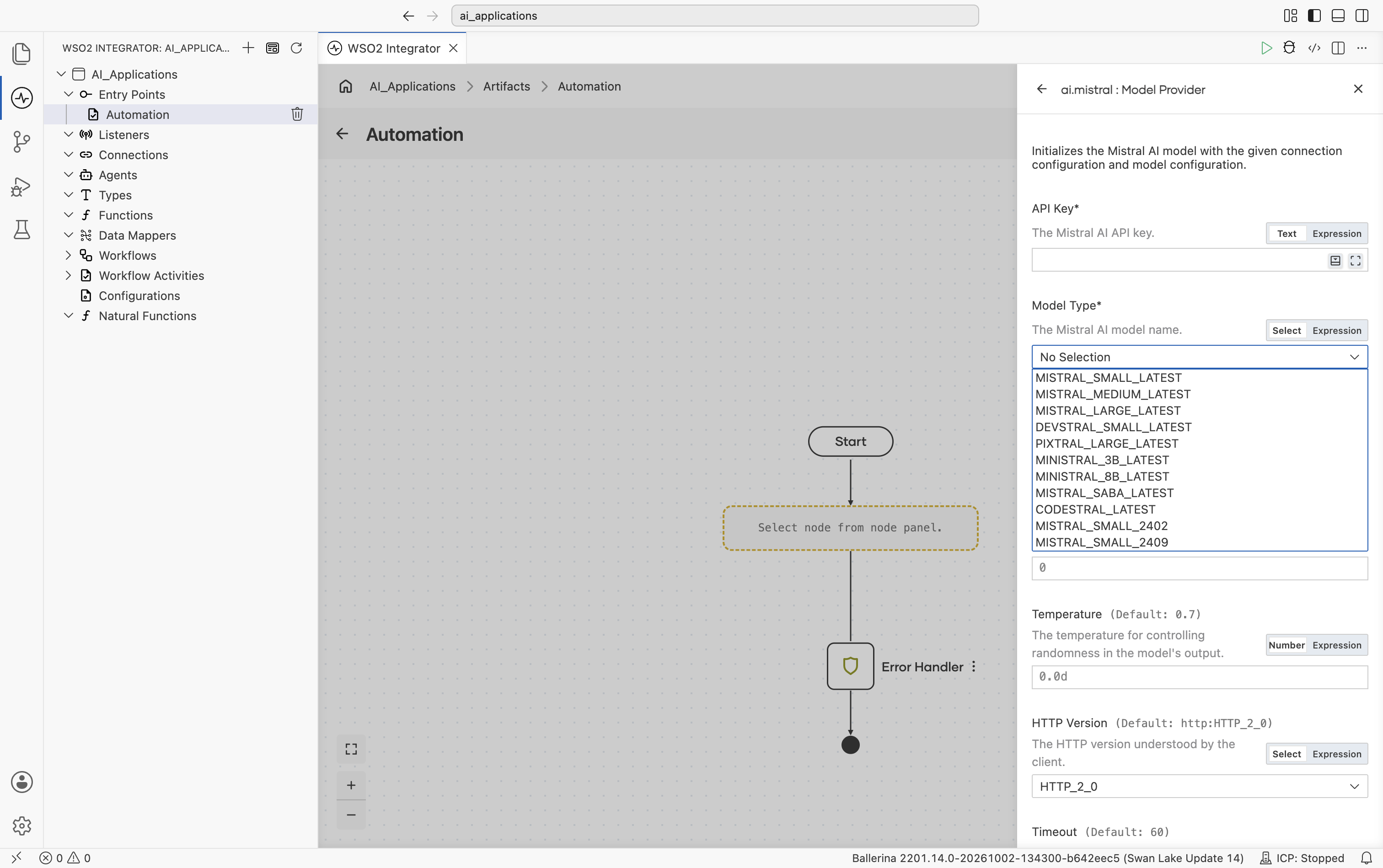
Scrolling further shows Timeout, Forwarded, Compression, Payload Validation, then the collapsed Advanced Configurations toggle, and finally Model Provider Name and Result Type:
Advanced configurations
Expanding Advanced Configurations shows the exact same panel as the Standard HTTP advanced configurations section above. Mistral adds no provider-specific fields here.
Ollama
Local model runner. Nothing leaves the machine. It is useful for offline development, privacy-sensitive flows, and any model Ollama supports.
Official website: ollama.com.
Create form
The form opens with Model Type as a free-text field (there's no fixed model list - Ollama accepts anything the daemon has pulled), followed directly by Service URL and Ollama's decoding controls, all shown inline without expanding anything. Ollama exposes Mirostat sampling and other decoding controls that the hosted providers don't.
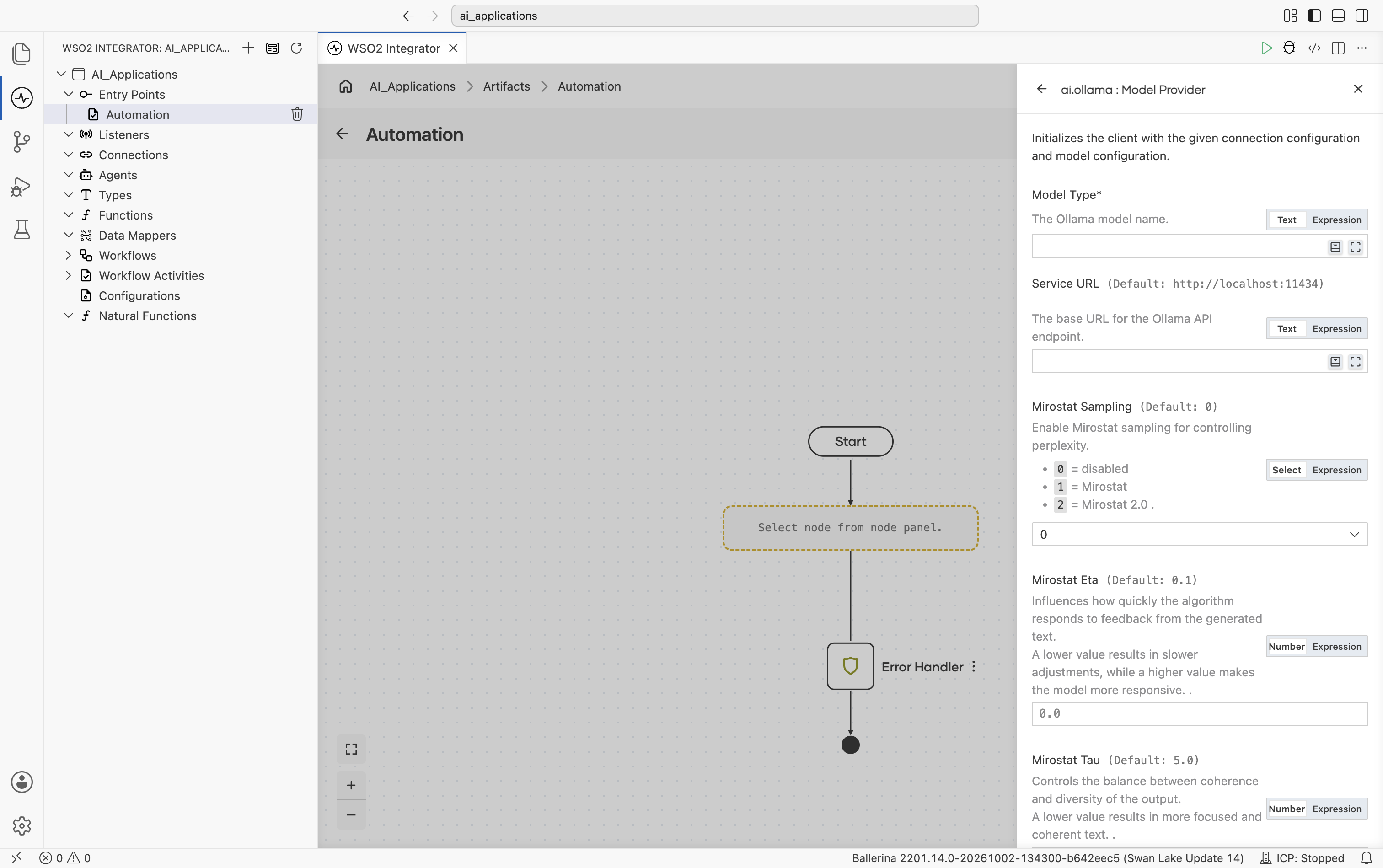
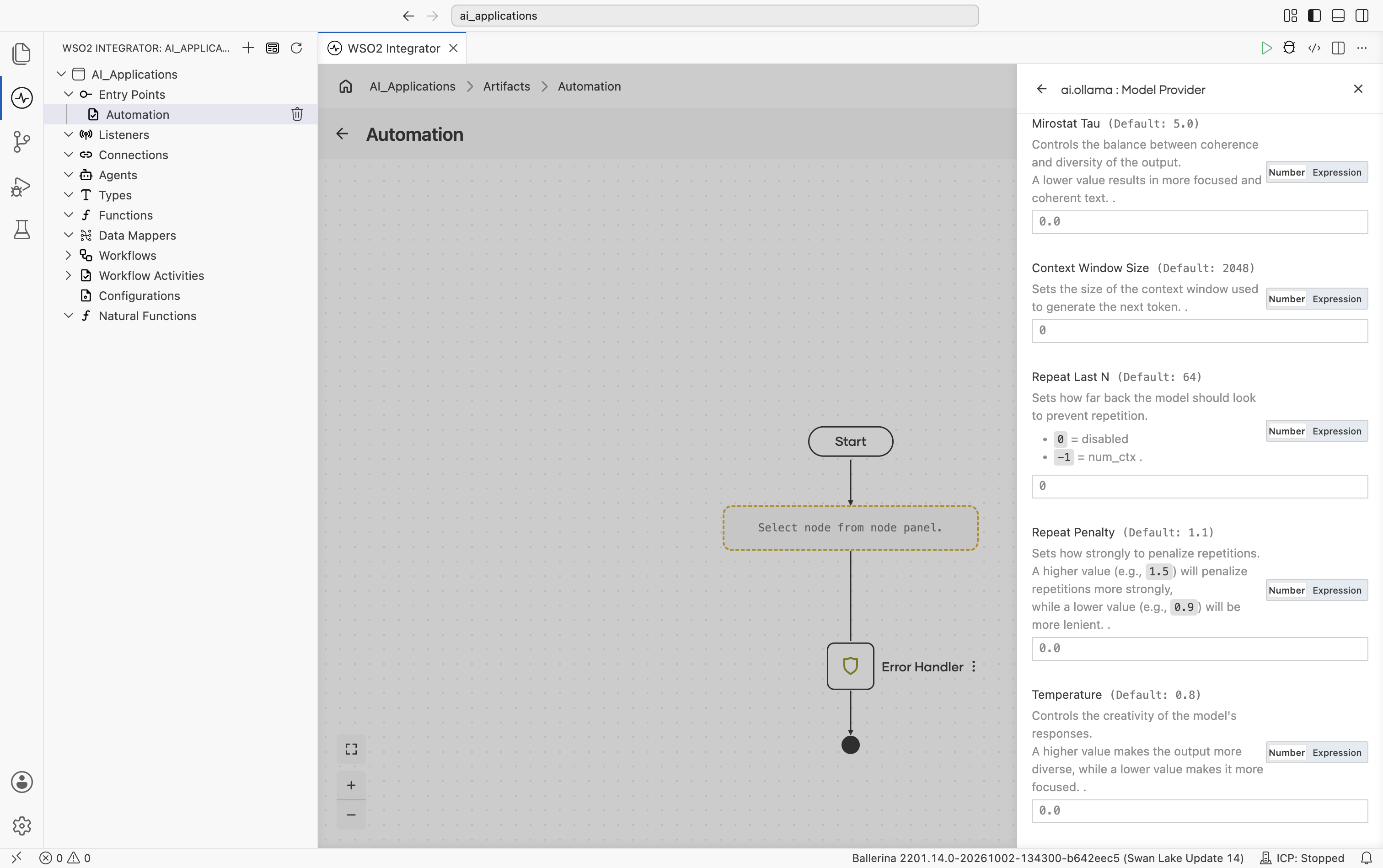
Scrolling further shows Mirostat Tau, Context Window Size, Repeat Last N, Repeat Penalty, and Temperature:
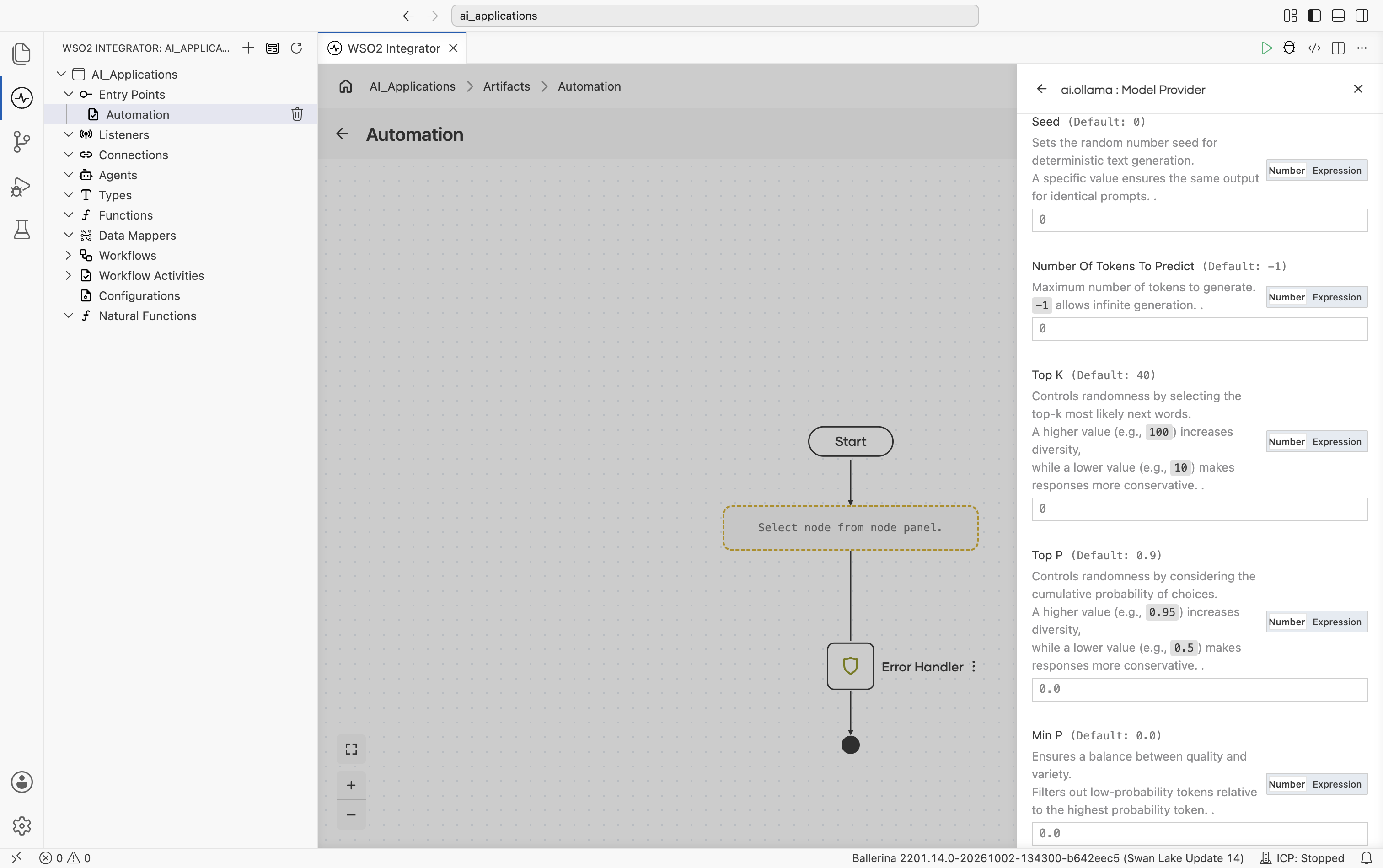
Scrolling further shows Seed, Number Of Tokens To Predict, Top K, Top P, and Min P:
| Field | Required | Default | Available values |
|---|---|---|---|
| Model Type | Yes | - | Anything ollama pull can fetch (e.g. llama3.2, mistral, qwen2.5). |
| Service URL | No | http://localhost:11434 | URL of the local Ollama daemon. |
| Mirostat Sampling | No | 0 | 0 (disabled), 1 (Mirostat), 2 (Mirostat 2.0) - whether to use Mirostat sampling for controlling perplexity. |
| Mirostat Eta | No | 0.1 | Mirostat learning rate. Higher = more responsive to feedback. |
| Mirostat Tau | No | 5.0 | Mirostat target perplexity. Lower = more focused, more coherent. |
| Context Window Size | No | 2048 | Context window in tokens. |
| Repeat Last N | No | 64 | 0 (disabled), -1 (=context window), or a positive integer - look-back window for repetition penalty. |
| Repeat Penalty | No | 1.1 | Repetition penalty strength. Higher = stronger penalty. |
| Temperature | No | 0.8 | Sampling temperature. |
| Seed | No | 0 | Random seed for deterministic generation. |
| Number Of Tokens To Predict | No | -1 | -1 (unlimited) or any positive integer - maximum tokens to generate. |
| Top K | No | 40 | Top-K sampling. |
| Top P | No | 0.9 | Top-P (nucleus) sampling, 0.0-1.0. |
| Min P | No | 0.0 | Minimum probability filter relative to the top token, 0.0-1.0. |
Scrolling further shows the standard inline fields (HTTP Version, Timeout, Forwarded, Compression, Payload Validation), then the collapsed Advanced Configurations toggle, and finally Model Provider Name and Result Type:
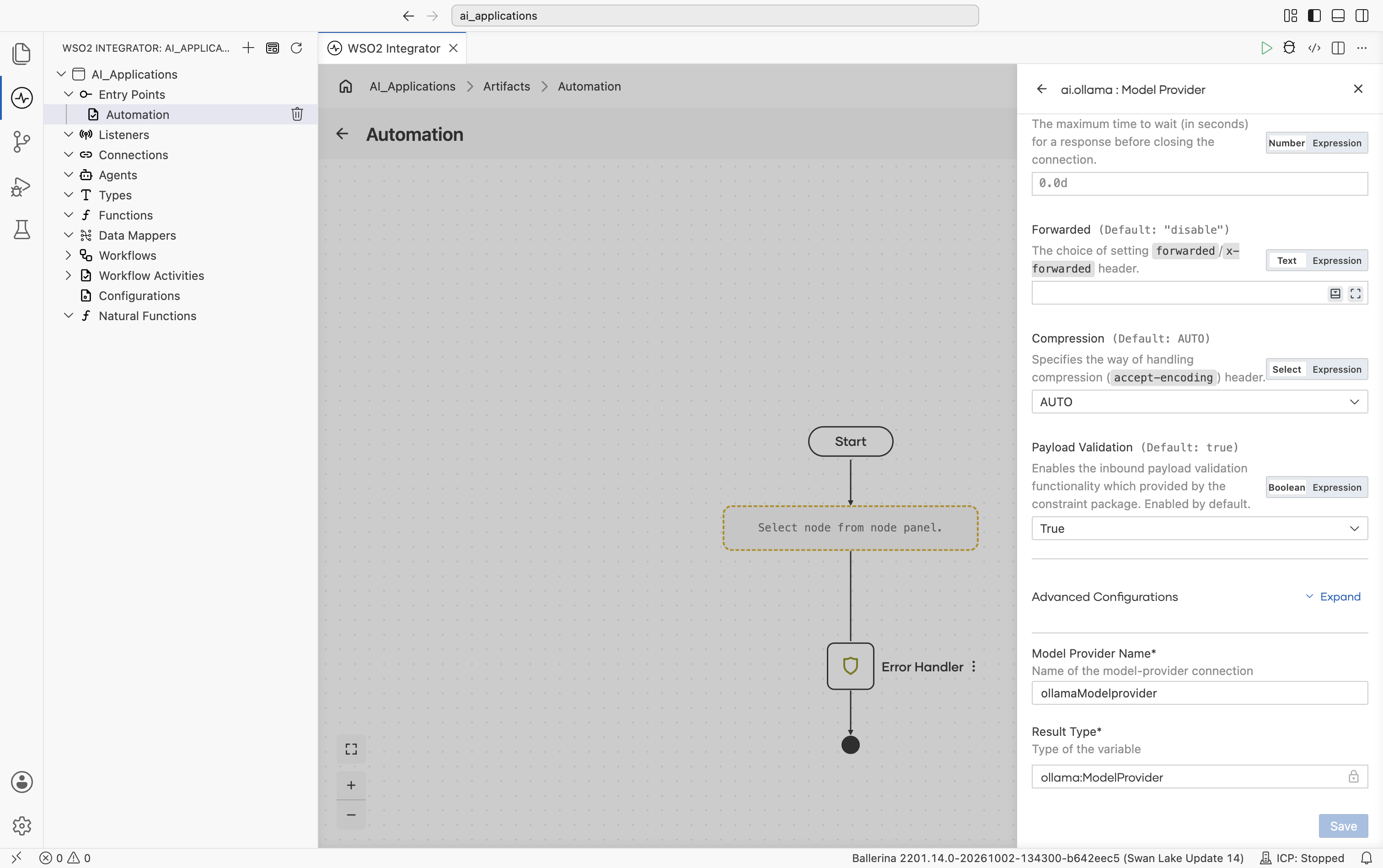
Advanced configurations
Expanding Advanced Configurations shows the exact same panel as the Standard HTTP advanced configurations section above. Ollama adds no provider-specific fields here.
Ollama is the only provider with no API key. Authentication is implicit because the daemon trusts callers on localhost.
OpenAI
Connects to OpenAI's hosted models (the GPT-5 family, GPT-4o, GPT-4.1, and the o-series reasoning models). The provider can call either the Chat Completions API (the default) or the newer Responses API, selected with the API Type advanced configuration. See Chat Completions vs Responses API.
Official website: platform.openai.com.
Create form
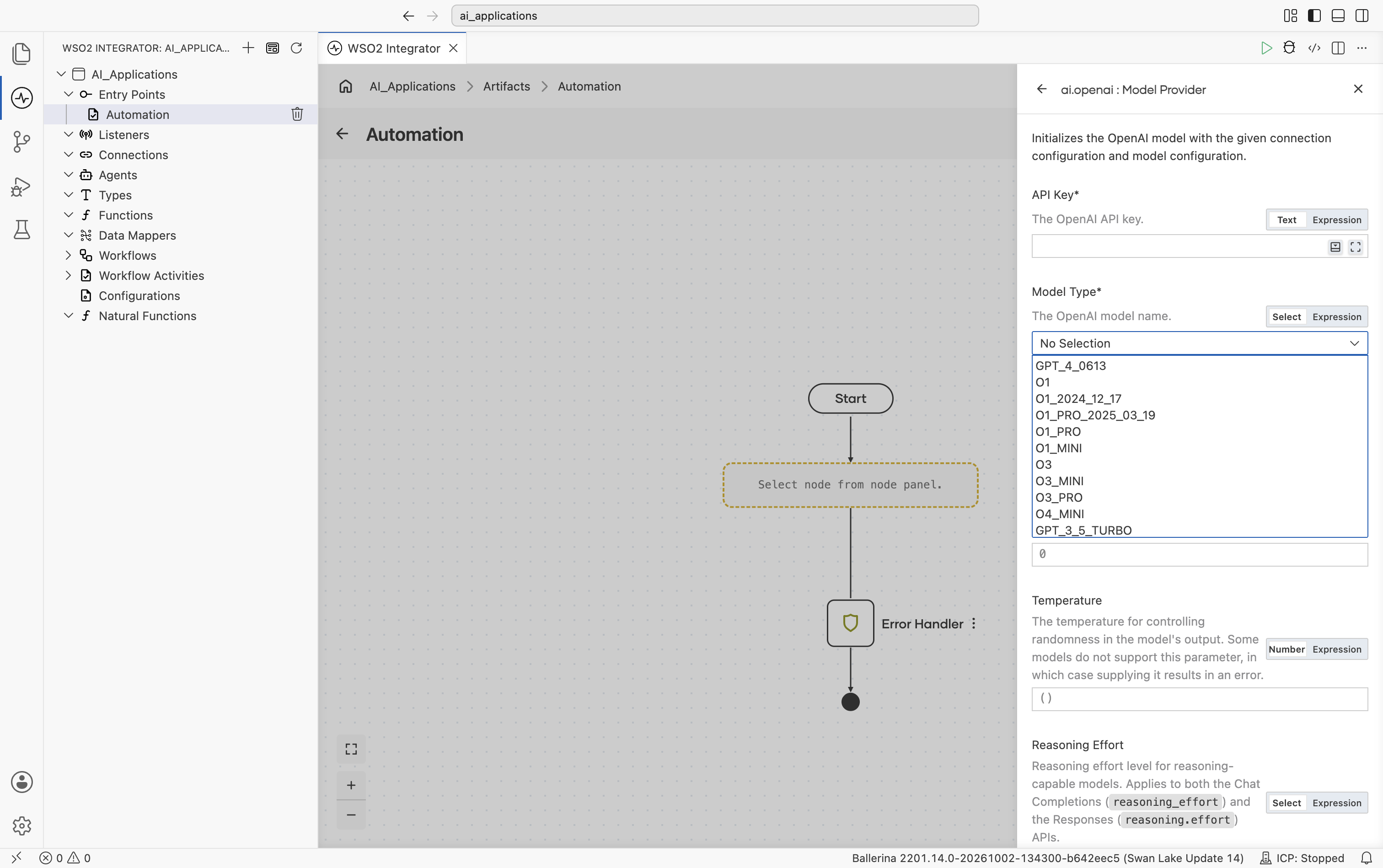
| Field | Required | Default | Available values |
|---|---|---|---|
| API Key | Yes | - | Your OpenAI API key (starts with sk-…). Reference a configurable in production. |
| Model Type | Yes | - | gpt-5, gpt-5-mini, gpt-5-nano, gpt-5-pro, gpt-5.1, gpt-5.2, gpt-5.2-pro, gpt-5.4, gpt-5.4-mini, gpt-5.4-nano, gpt-5.4-pro, gpt-5.5, gpt-5.5-pro, gpt-5.6, gpt-4.1, gpt-4.1-mini, gpt-4.1-nano, gpt-3.5-turbo, o1, o1-pro, o3, o3-mini, o3-pro, o4-mini, gpt-4-0613, chatgpt-4o-latest, gpt-4o-audio-preview, computer-use-preview. Chat-tuned (gpt-5-chat, gpt-5.1-chat, gpt-5.2-chat), Codex (gpt-5-codex, gpt-5.1-codex, gpt-5.1-codex-mini, gpt-5.1-codex-max, gpt-5.2-codex, gpt-5.3-codex, codex-mini-latest), and date-pinned variants (e.g. o1-2024-12-17, o1-pro-2025-03-19, gpt-4.1-2025-04-14, gpt-4.1-mini-2025-04-14, gpt-4.1-nano-2025-04-14, gpt-3.5-turbo-16k, gpt-3.5-turbo-1106, gpt-3.5-turbo-0125) are also available. gpt-5.6 is an alias that always routes to the latest gpt-5.6-sol snapshot; gpt-5.6-sol, gpt-5.6-terra, and gpt-5.6-luna pin a specific snapshot. |
The gpt-4o and gpt-4o-mini chat models and gpt-4-turbo are not available as Model Type options in this provider. gpt-4o-audio-preview and chatgpt-4o-latest are the only members of the GPT-4o family in the list.
Provider-specific inline fields
Like the standard inline fields (Service URL, Maximum Tokens, Temperature, and so on), these OpenAI-specific fields are shown directly on the form without expanding anything:
| Field | Default | Available values | What it controls |
|---|---|---|---|
| Reasoning Effort | () (omitted) | none, minimal, low, medium, high, xhigh | Effort spent on reasoning by reasoning-capable models. Lower effort returns faster and spends fewer reasoning tokens. Each model accepts only a subset of the values; the combination is validated when the provider is created, so an unsupported pairing fails at initialization with a descriptive error. See Reasoning effort support by model. |
| API Type | CHAT_COMPLETIONS | CHAT_COMPLETIONS, RESPONSES | The OpenAI endpoint the provider calls. See Chat Completions vs Responses API. |
Also note:
| Field | Default | What it controls |
|---|---|---|
| Service URL | https://api.openai.com/v1 | OpenAI API base URL. Override only for OpenAI-compatible gateways. |
| Maximum Tokens | 4096 | Hard cap on response length (sent as max_completion_tokens on the Chat Completions API and max_output_tokens on the Responses API). |
| Temperature | () (omitted) | Sampling temperature. Leave empty for models that reject the parameter (the GPT-5 and o-series reasoning models). |
Advanced configurations
Expanding Advanced Configurations shows the exact same panel as the Standard HTTP advanced configurations section above.
Chat Completions vs Responses API
The API Type setting selects which OpenAI endpoint the provider talks to. Everything else in your flow stays the same: both endpoints support the same Generate and Chat actions, tool calling, and typed responses, so switching is a connection-level change.
| API Type | Endpoint | Notes |
|---|---|---|
CHAT_COMPLETIONS (default) | POST /chat/completions | OpenAI's long-standing chat API. |
RESPONSES | POST /responses | OpenAI's newer API surface. System prompts are sent as top-level instructions, and tool calls travel as typed input/output items. Requests are sent with store: false, so OpenAI does not retain them for later retrieval. |
Reasoning effort support by model
Reasoning effort applies only to reasoning models. The chat-tuned variants (gpt-5-chat, gpt-5.1-chat, gpt-5.2-chat) are not reasoning models and reject the parameter.
| Model | Accepted values |
|---|---|
gpt-5, gpt-5-mini, gpt-5-nano | minimal, low, medium, high |
gpt-5-pro | high |
gpt-5.1 | none, low, medium, high |
gpt-5.2 | none, low, medium, high, xhigh |
gpt-5.2-pro, gpt-5.4-pro, gpt-5.5-pro | medium, high, xhigh |
gpt-5.3-codex | low, medium, high, xhigh |
gpt-5.4, gpt-5.4-mini, gpt-5.4-nano, gpt-5.5, and the gpt-5.6 family | none, low, medium, high, xhigh |
o-series (o1, o1-pro, o3, o3-mini, o3-pro, o4-mini) and the Codex models | Accepted; the value is passed through without a per-model restriction list. |
The OpenAI package also ships an Embedding Provider. See OpenAI.
OpenRouter
OpenRouter routes a single API across many model providers (OpenAI, Anthropic, Mistral, Meta, Cohere, and others). Use it when you want one key and the freedom to swap models by string.
Official website: openrouter.ai.
Create form
The form opens with API Key and Model Type, followed directly by the standard and provider-specific inline fields (Service URL defaulting to https://openrouter.ai/api/v1, Site URL, Site Name, Maximum Tokens, Temperature. No need to expand anything to see these):
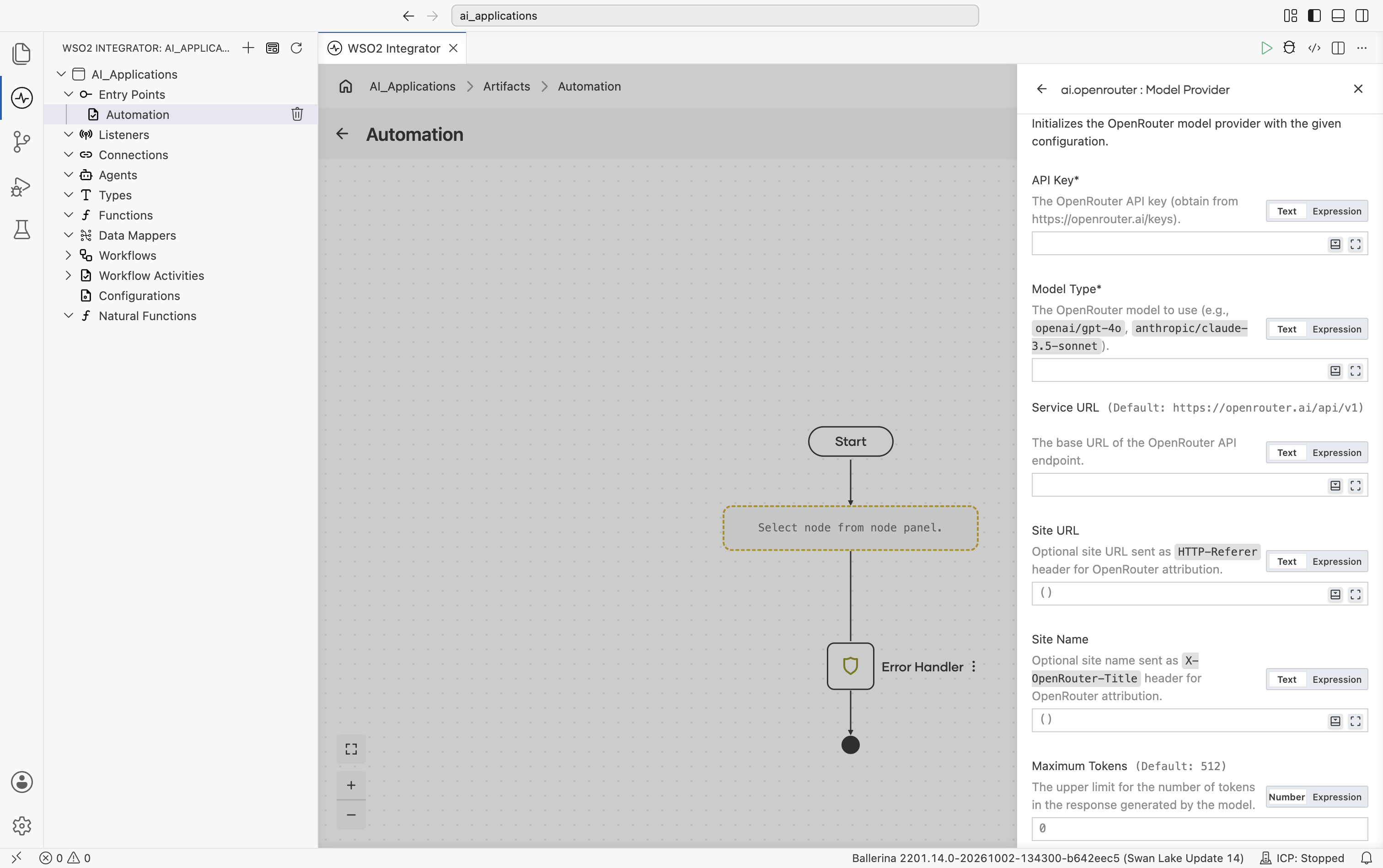
| Field | Required | Default | Available values |
|---|---|---|---|
| API Key | Yes | - | OpenRouter API key. Get one from openrouter.ai/keys. |
| Model Type | Yes | - | Qualified model name. Examples: openai/gpt-4o, anthropic/claude-3.5-sonnet, mistralai/mistral-large, meta-llama/llama-3.1-70b-instruct. See OpenRouter's model list. |
| Site URL | No | () | URL string or empty - optional site URL sent as the HTTP-Referer header. Used by OpenRouter for site attribution and leaderboards. |
| Site Name | No | () | String or empty - optional site name sent as the X-OpenRouter-Title header. |
Scrolling further shows Temperature, HTTP Version, Timeout, Forwarded, Compression, and Payload Validation:
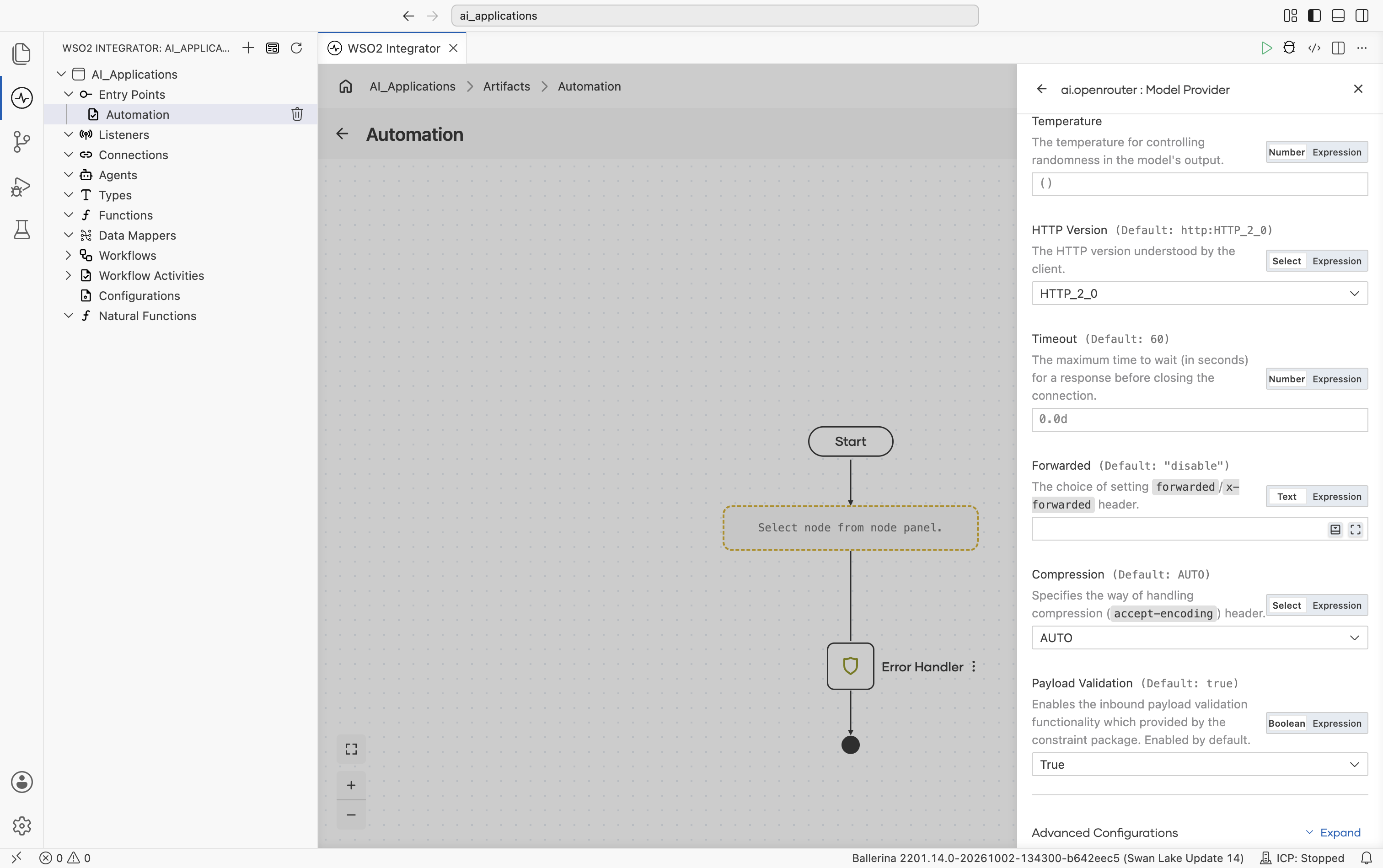
Scrolling further shows Timeout, Forwarded, Compression, Payload Validation, then the collapsed Advanced Configurations toggle, and finally Model Provider Name and Result Type:
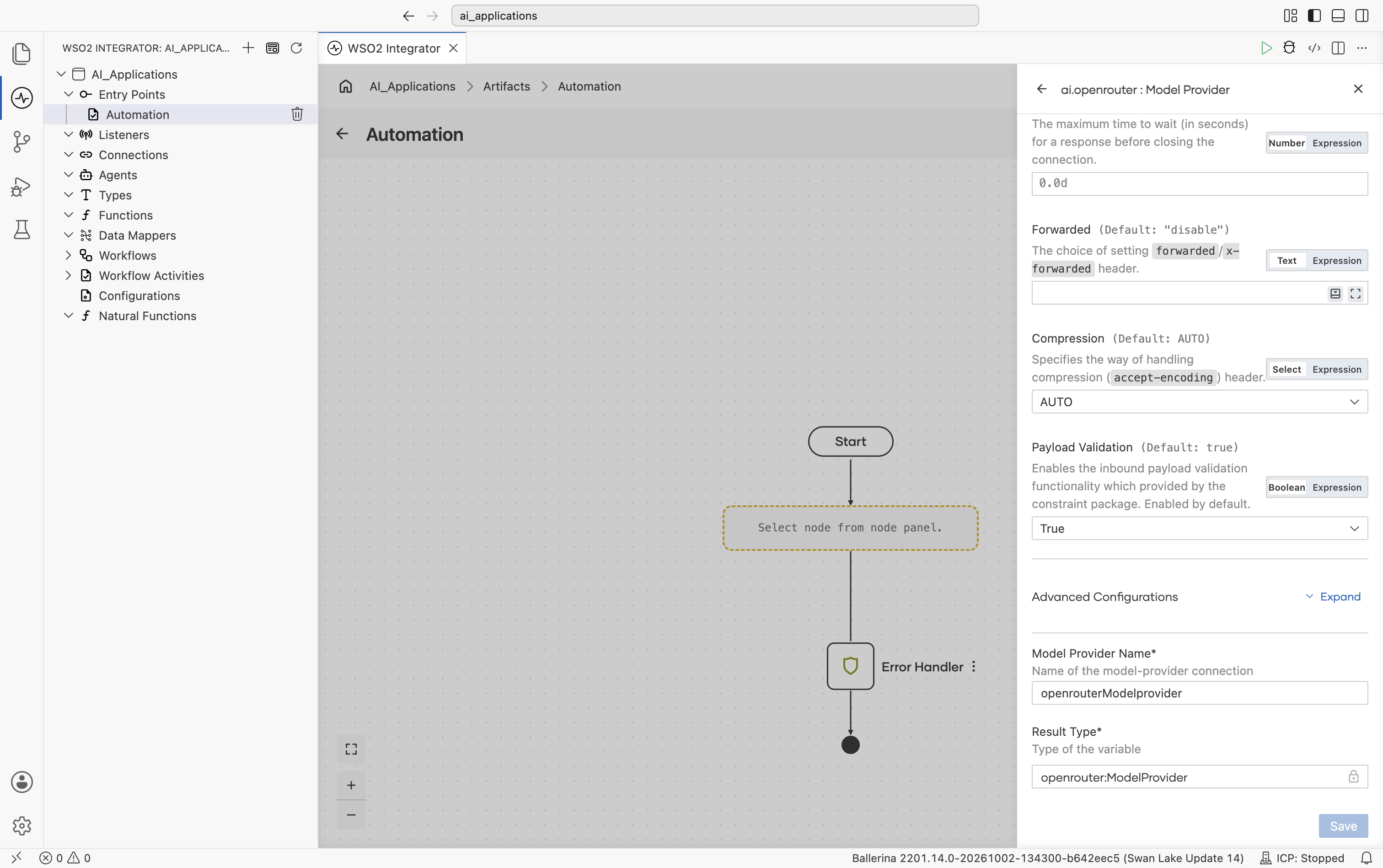
Advanced configurations
Expanding Advanced Configurations shows the exact same panel as the Standard HTTP advanced configurations section above. OpenRouter adds no provider-specific fields here.
The OpenRouter package also ships an Embedding Provider. See OpenRouter.
Model provider connections
Once you save a model provider, it becomes a reusable project connection that can be accessed throughout your integration and AI flows.
The saved model provider appears in multiple places:
-
In the Connections tree on the left side of the project explorer, where all project-level connections are listed (for example,
wso2ModelProvideroropenaiModelProvider). -
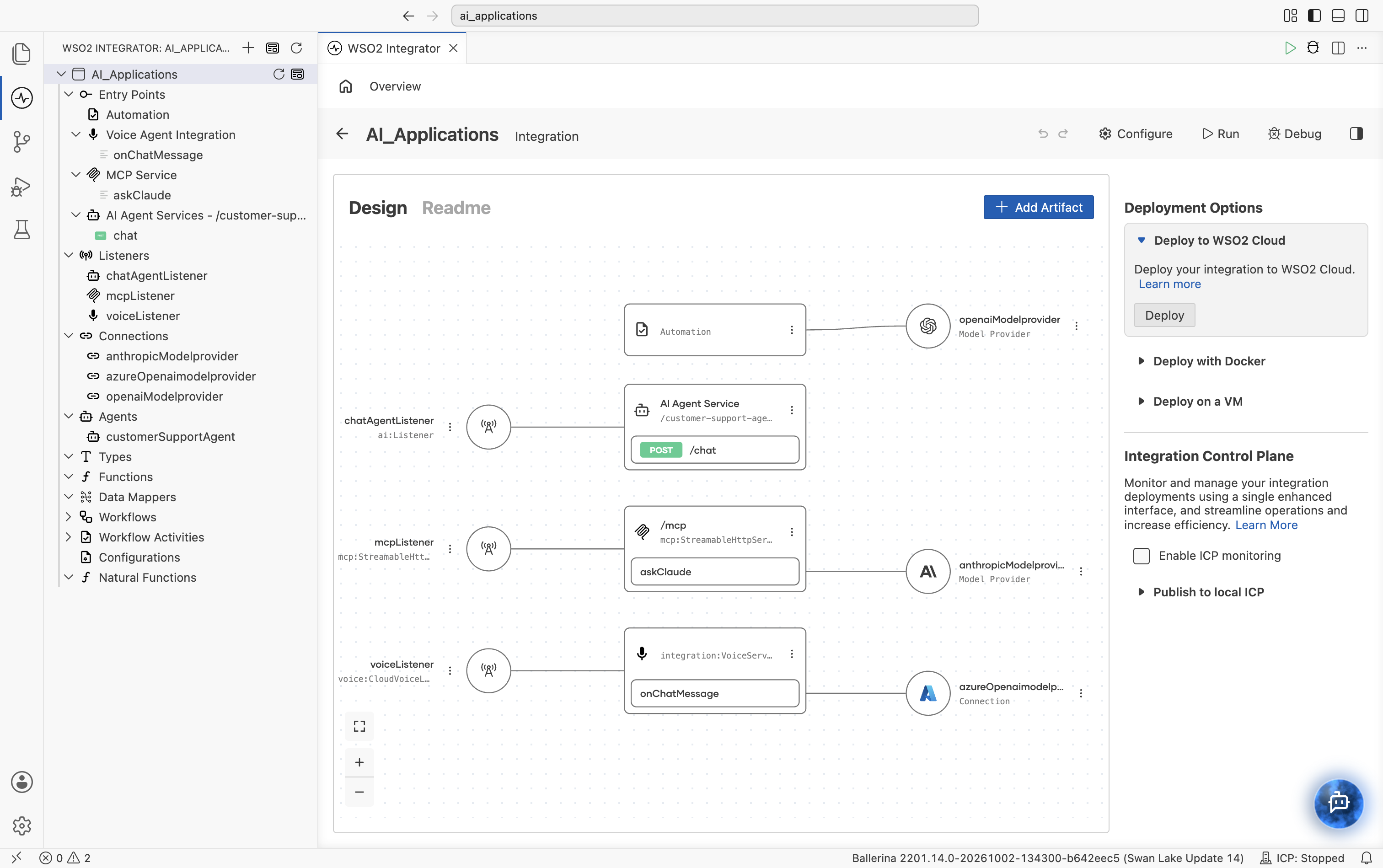
The integration project's Design view wires each artifact to the provider it depends on:
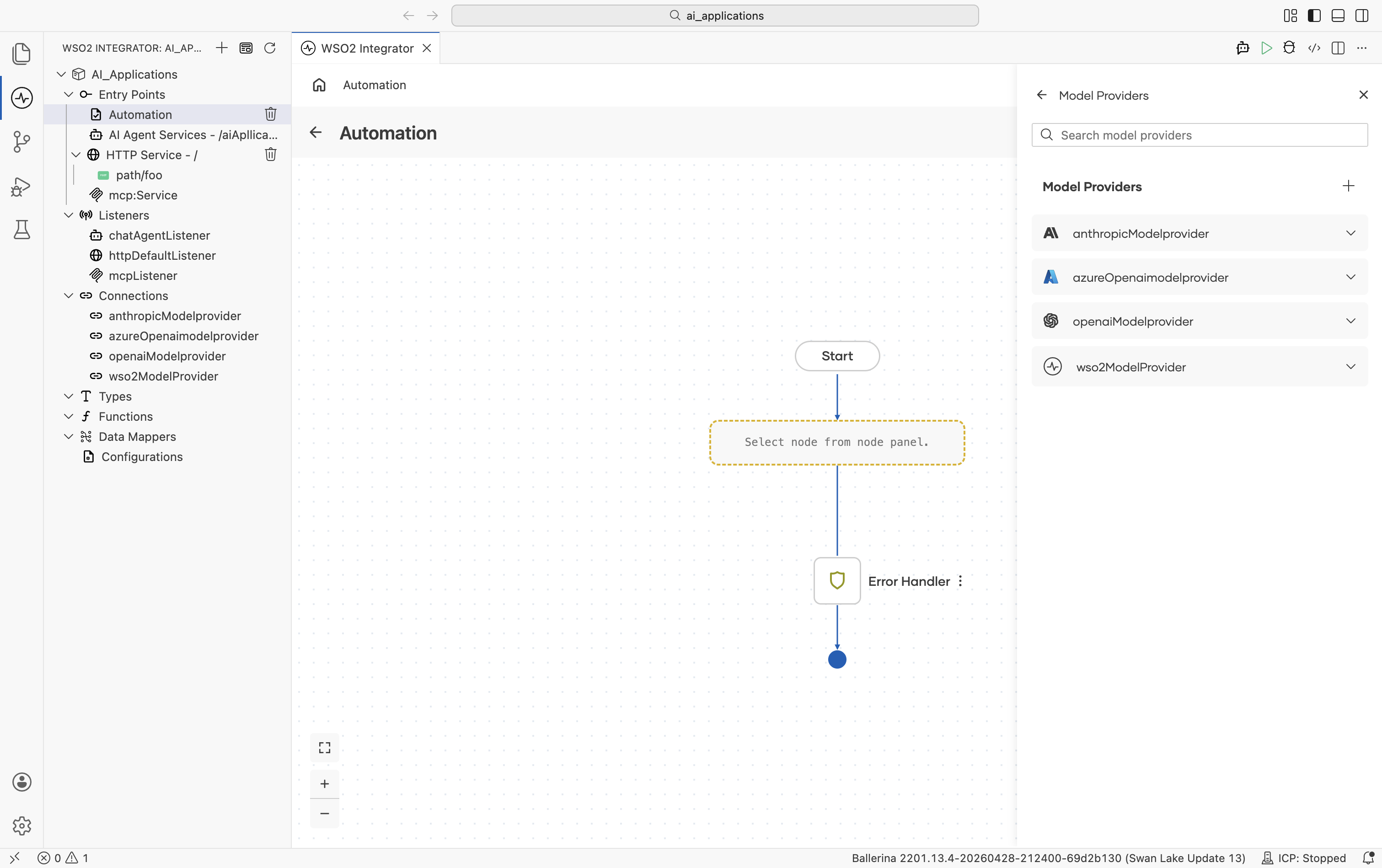
- The Model Providers panel lists every model provider connection available in the project. Use the + button to add a new provider connection, or expand a provider to view its available actions.
Editing or replacing a model provider
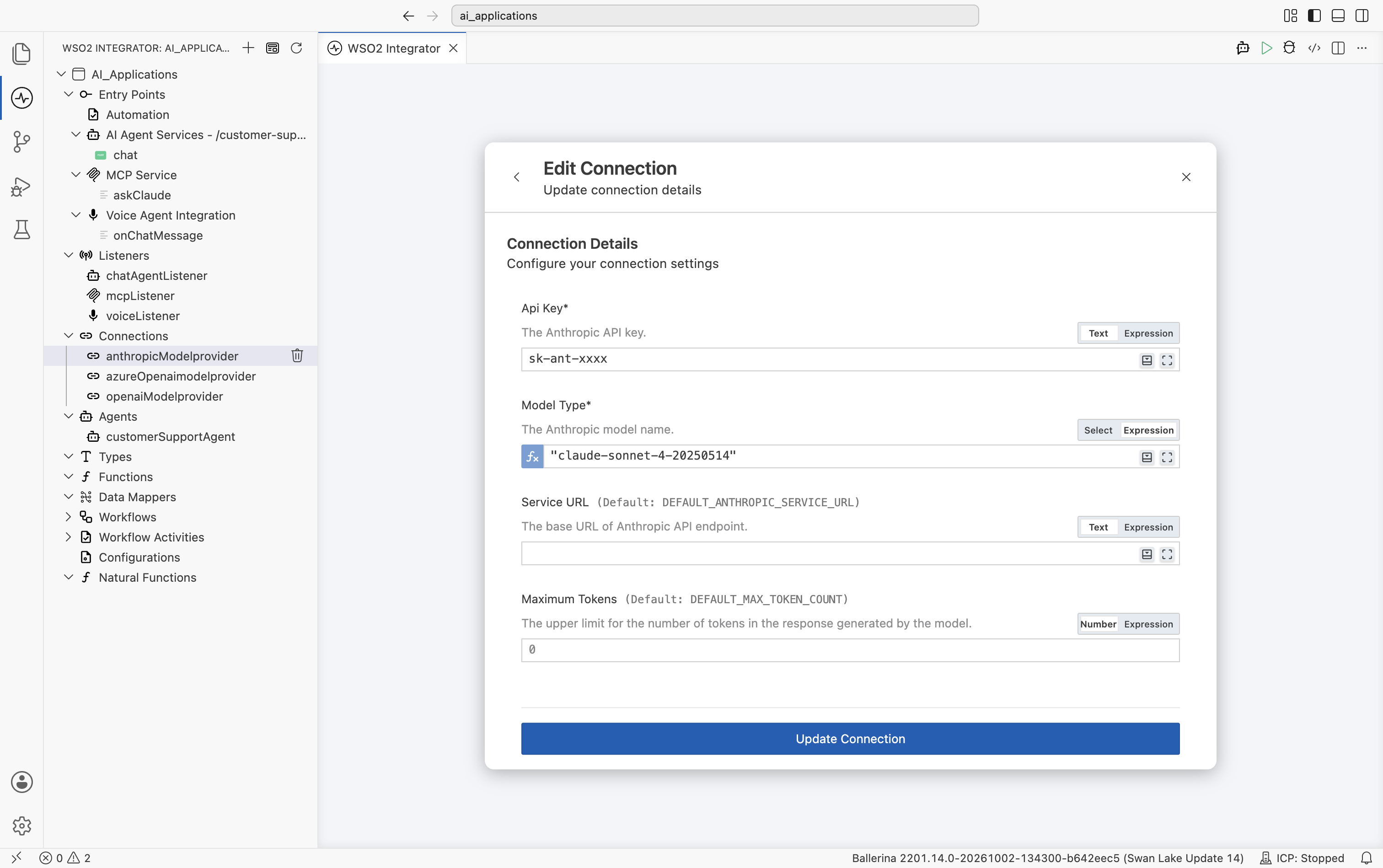
To change a provider's API key, model name, or any other field after it's been created, click the provider name in the left Connections tree. The Edit Connection modal opens pre-filled with that connection's own fields - here, an Anthropic connection showing API Key, Model Type, Service URL, and Maximum Tokens:
| Field | What it does |
|---|---|
| Connection fields | The same fields shown on the Create form for that provider (API Key, Model Type, Service URL, and so on), pre-filled with the connection's current values. Any field can be switched to an expression. |
| Advanced Configurations | Expand to edit the HTTP-level and provider-specific advanced parameters. |
| Update Connection | Save the change. Existing nodes that referenced the connection continue to work. |
Editing a connection follows the same pattern for every component type. Embedding providers, vector stores, knowledge bases, and chunkers all use the same Edit Connection modal.
What's next
- Embedding providers — Vector embeddings for RAG. The OpenAI, Azure, AWS Bedrock, Vertex, OpenRouter, and Default WSO2 packages also ship embedding providers.
- Vector stores — Persist and query embeddings using Pinecone, Weaviate, Qdrant, pgvector, and other backends.
- Knowledge bases — Managed retrieval sources, including Azure AI Search, that plug directly into RAG flows.
- Chunkers — Split documents into chunks before embedding for ingestion into a vector store.