Vector Stores
A vector database stores vector embeddings and enables similarity search over them, forming the foundation for semantic search and RAG applications.
A Vector Store is WSO2 Integrator's abstraction over these databases, exposing a common interface for every supported backend.
It is the storage half of a Knowledge Base. The Embedding Provider produces the vectors, and the Vector Store abstracts where and how they are persisted and retrieved at query time.
Available actions
Every vector store exposes the same three actions. You don't usually call them directly. The Knowledge Base uses them under the hood.
| Action | What it does | Required parameters |
|---|---|---|
| Add | Persists vector entries (embeddings + their source chunks). Replaces existing entries with the same id. | Entries (the vectors to add). |
| Query | Returns the most similar entries for a given query embedding and/or metadata filter. | Query (an embedding and/or filters, plus topK). |
| Delete | Deletes entries by id. | IDs (a single id or list). |
Query input fields
When something calls Query on a vector store, the request carries these fields:
| Field | Default | Available values | What it controls |
|---|---|---|---|
| Embedding | optional | A vector | The vector to use for similarity search. If omitted, the search returns by filter only. |
| Filters | optional | Metadata filters | Restrict the search by metadata fields. See Metadata filters. |
| Top K | 10 | Any positive integer or -1 (all) | Max number of items to return. |
Metadata filters
Most stores support filtering vectors by their metadata using standard operators:
| Operator | Meaning |
|---|---|
== | Equal |
!= | Not equal |
> < >= <= | Greater than / less than (and equal) |
in | Value is in the given list |
nin | Value is not in the given list |
Multiple filters can be combined with AND or OR. Each connector handles the exact wire-format mapping (Pinecone and Amazon S3 Vectors use $eq, pgvector compiles to JSONB, Weaviate uses GraphQL Equal, and Milvus has its own filter syntax). You write filters the same way regardless of store.
Query modes
Some stores support more than just dense vector search. The mode you pick when you create the store determines what kind of embeddings it accepts:
| Mode | When to use | Supported by |
|---|---|---|
DENSE | Standard semantic search using dense vectors. The default everywhere. | All stores |
SPARSE | Keyword/lexical-style search using sparse vectors. | Pinecone, pgvector |
HYBRID | Combine dense and sparse vectors. | Pinecone |
Similarity metrics
Local stores let you choose the metric. Hosted stores manage it themselves (you pick when you create the index/collection in their UI).
| Metric | Measures |
|---|---|
COSINE | Cosine of the angle between vectors. Most common for semantic search. |
EUCLIDEAN | Straight-line distance between vector points. |
DOT_PRODUCT | Directional similarity, magnitude-sensitive. Not supported on pgvector. |
MANHATTAN | Sum of absolute differences (pgvector only). |
Where to find vector stores
- Add Node panel > AI > RAG > Knowledge Base.
- Click + Add Knowledge Base, then select Vector Knowledge Base from the Knowledge Bases picker.
- In the Create Vector Knowledge Base form, click + Create New Vector Store.
- The Select Vector Store picker opens, listing all supported stores with a search bar at the top:
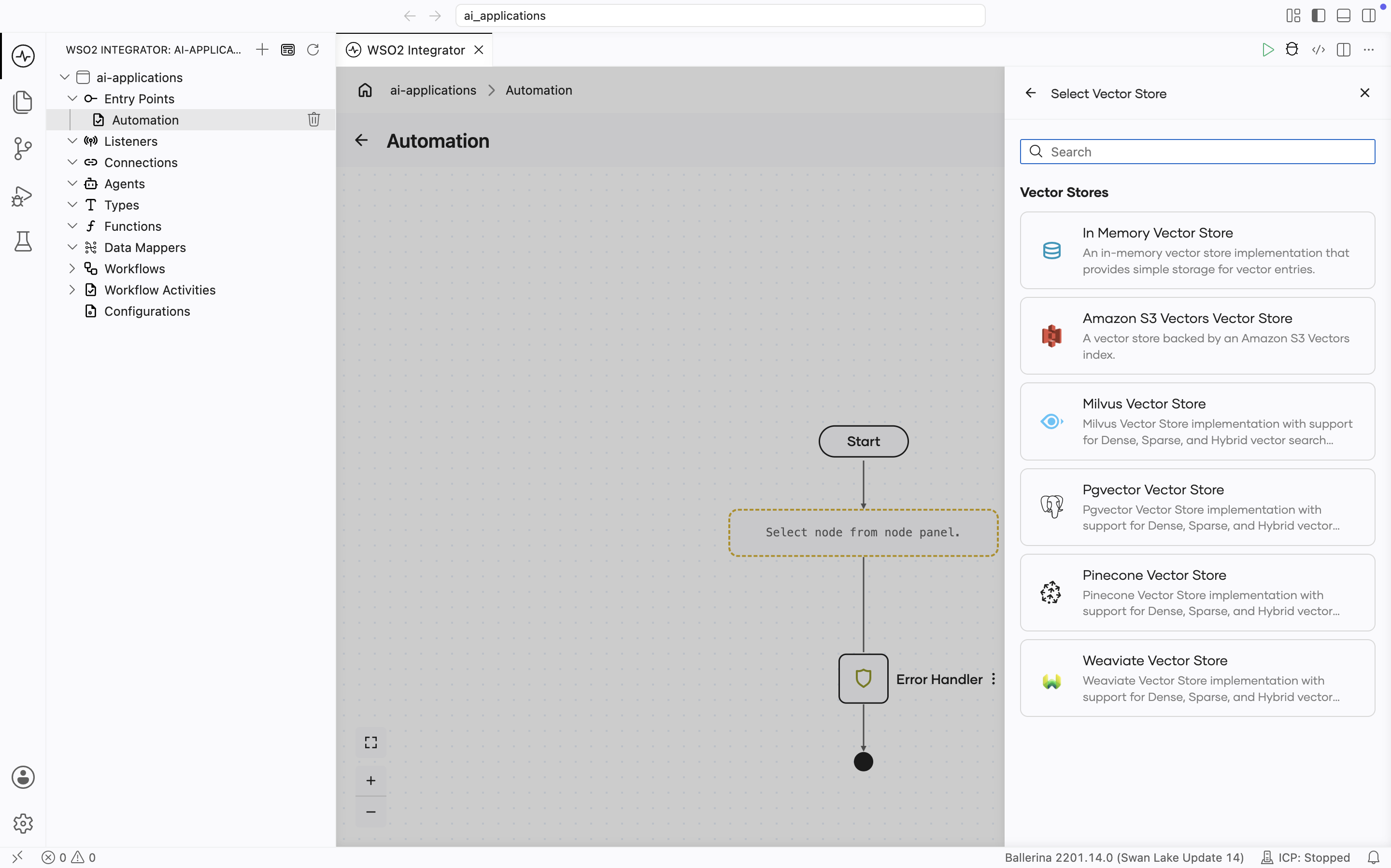
Supported vector stores
| Store | Module | Modes supported | Hosted/local |
|---|---|---|---|
| In-Memory | ballerina/ai | DENSE | Local (process memory) |
| Amazon S3 Vectors | ballerinax/ai.aws.s3 | DENSE | Hosted (AWS) |
| Milvus | ballerinax/ai.milvus | DENSE | Hosted or self-hosted |
| pgvector | ballerinax/ai.pgvector | DENSE, SPARSE | Self-hosted PostgreSQL |
| Pinecone | ballerinax/ai.pinecone | DENSE, SPARSE, HYBRID | Hosted |
| Weaviate | ballerinax/ai.weaviate | DENSE | Hosted or self-hosted |
In-memory vector store
Embeddings live in the running integration's process memory. The store loses all data on restart, so it is not durable. Use it for development, testing, and small datasets.
Create form
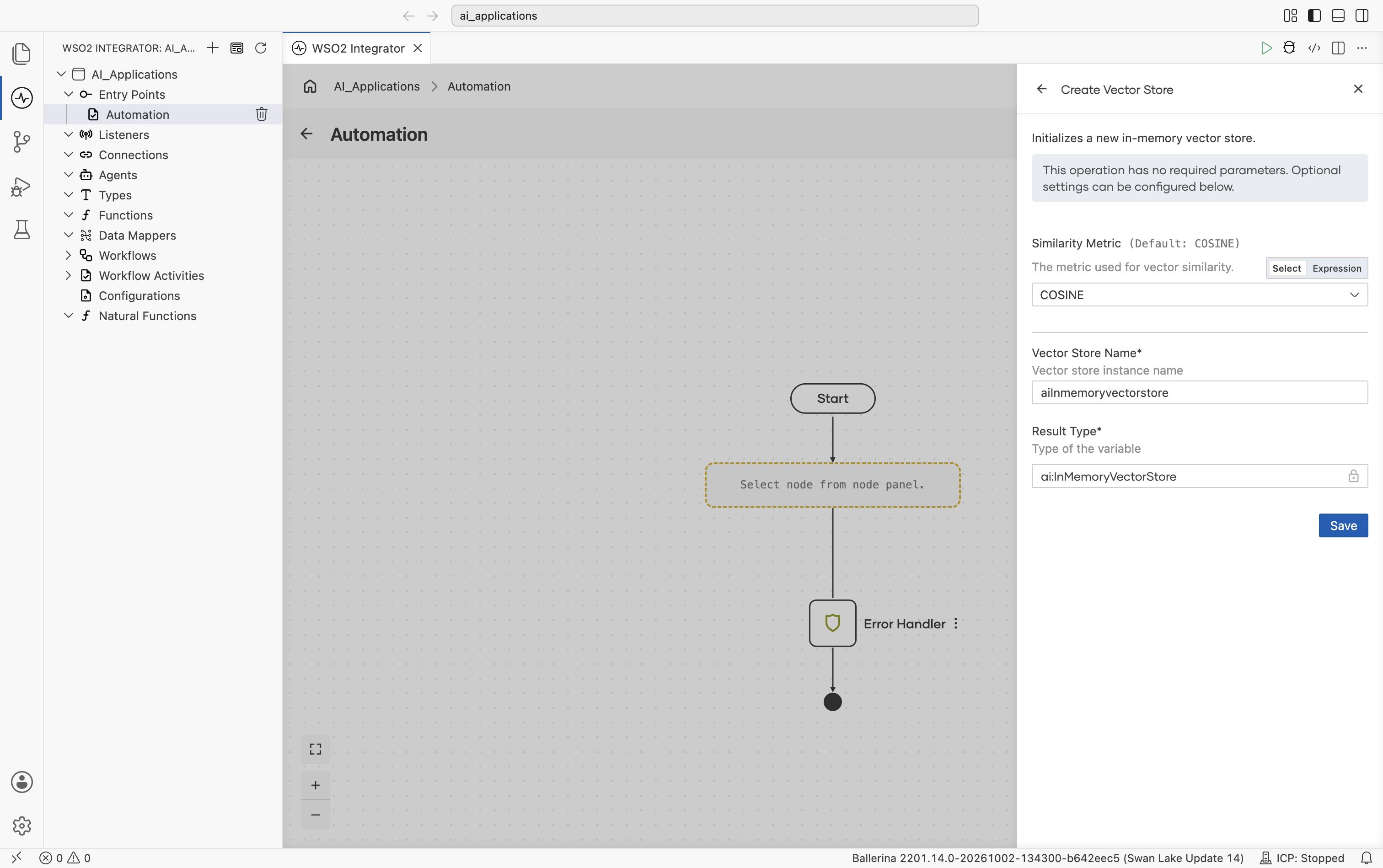
No required fields. Similarity Metric is shown directly on the form:
| Field | Default | Available values | What it controls |
|---|---|---|---|
| Similarity Metric | COSINE | COSINE, EUCLIDEAN, DOT_PRODUCT | Metric used for vector similarity. |
Supports dense vectors only. Adding sparse or hybrid vectors raises an error.
Amazon S3 Vectors
Amazon S3 Vectors stores vectors in a vector index inside an S3 vector bucket, and searches them with an approximate nearest neighbor query. It is a separate AWS service from S3 object storage, with its own endpoint and its own s3vectors IAM actions. The store ships in the same package as the AWS S3 Text Data Loader, so one package covers loading documents from S3 and storing their vectors in S3 Vectors.
Official website: Amazon S3 Vectors.
To have Amazon Bedrock chunk and embed the documents and query S3 Vectors for you, use the Bedrock Self-Managed Knowledge Base instead of a Vector Knowledge Base with this store.
Before you start
Create the vector bucket and index first. The store doesn't create them. Three index settings matter, and AWS doesn't let you change any of them after the index is created:
- Dimension must match your embedding provider's output dimension (1 to 4,096).
- Distance metric is
cosineoreuclidean. - Non-filterable metadata keys must include
content. The store keeps each chunk's text in this metadata key. AWS limits filterable metadata to 2 KB per vector, which chunk text easily exceeds, while non-filterable metadata can use the rest of the 40 KB per vector. If you set a different contentKey (see Vector store config), declare that key instead.
See Creating a vector index in a vector bucket.
Use a region where S3 Vectors is available. It isn't offered in every AWS region. See S3 Vectors AWS Regions and endpoints.
Grant the IAM permissions. The identity the store runs as needs these actions on the index:
| Action | Needed for |
|---|---|
s3vectors:GetIndex | Checking the index when the store is created. Not needed when validateIndexOnInit is false. |
s3vectors:PutVectors | Add. |
s3vectors:QueryVectors | Query with an embedding. |
s3vectors:ListVectors | Query without an embedding, which the Vector Knowledge Base's Delete By Filter uses. |
s3vectors:GetVectors | Every Query. AWS requires it whenever a query returns metadata or uses a filter, and the store always reads the chunk from metadata. Without it, Query fails with 403. |
s3vectors:DeleteVectors | Delete. |
{
  "Version": "2012-10-17",
  "Statement": [
    {
      "Effect": "Allow",
      "Action": [
        "s3vectors:GetIndex",
        "s3vectors:PutVectors",
        "s3vectors:QueryVectors",
        "s3vectors:ListVectors",
        "s3vectors:GetVectors",
        "s3vectors:DeleteVectors"
      ],
      "Resource": "arn:aws:s3vectors:us-east-1:111122223333:bucket/amzn-s3-demo-vector-bucket/index/idx"
    }
  ]
}
See the permissions sections of QueryVectors and ListVectors.
Create form
In the Select Vector Store picker, this store is listed as Amazon S3 Vectors Vector Store.
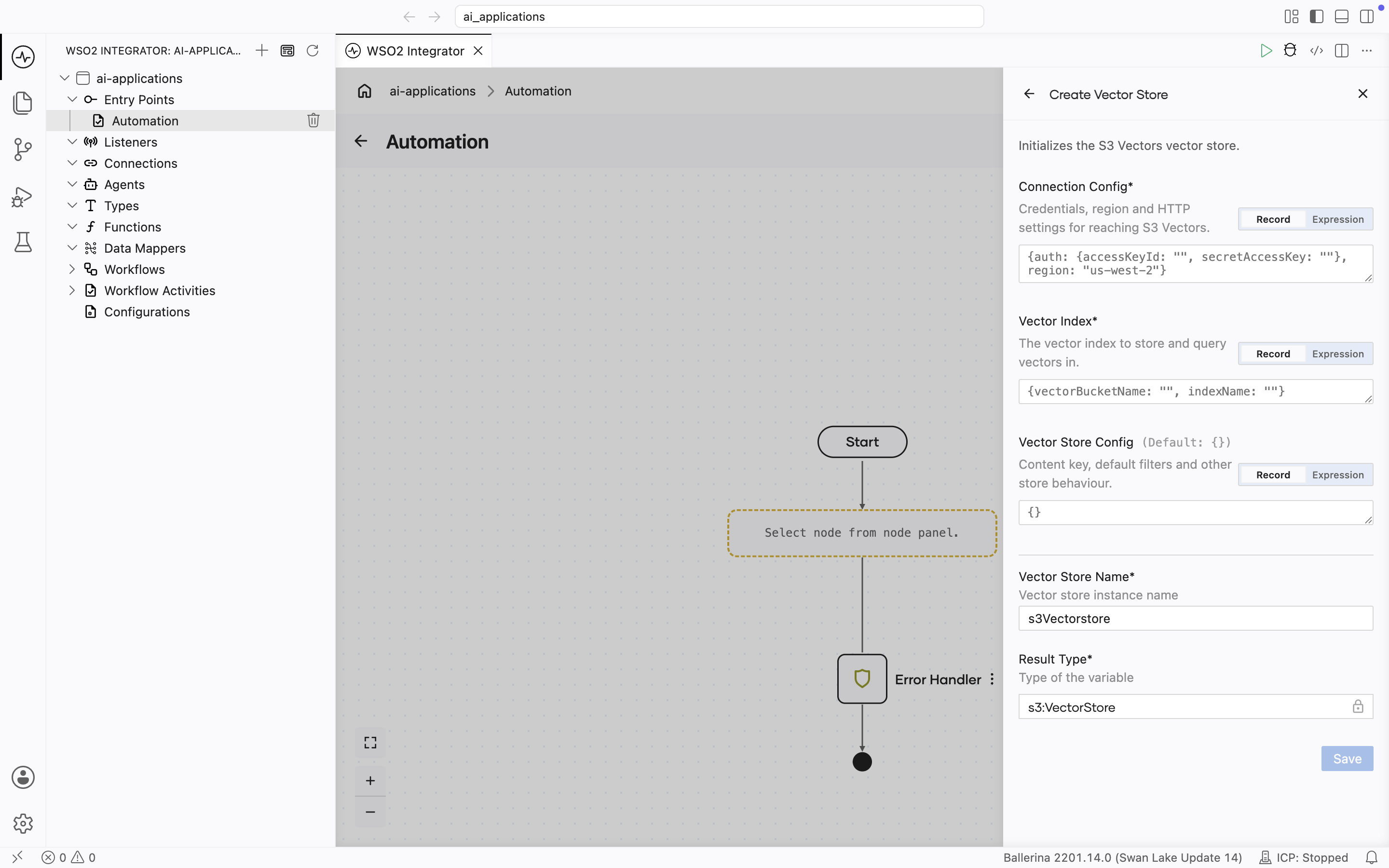
| Field | Required | Default | Available values |
|---|---|---|---|
| Connection Config | Yes | N/A | How to reach S3 Vectors. See Connection config. |
| Vector Index | Yes | N/A | The target index, as one of two records: VectorBucketIndex, with the bucket and index name, for example {vectorBucketName: "amzn-s3-demo-vector-bucket", indexName: "idx"}, or IndexArn, for example {indexArn: "arn:aws:s3vectors:us-east-1:111122223333:bucket/amzn-s3-demo-vector-bucket/index/idx"}. Use the ARN for an index in another AWS account, because bucket and index names are looked up in your own account. |
| Vector Store Config | No | {} | Store behavior. See Vector store config. |
Connection Config is prefilled with empty static access keys and the region us-west-2. Set region to the region of your vector bucket. When the integration runs on AWS, use DEFAULT_CREDENTIALS instead so that no long-lived keys are kept in the integration.
Connection config
| Field | Type | Default | Description |
|---|---|---|---|
| auth | auth:AuthConfig | N/A | DEFAULT_CREDENTIALS, or one of the credential records in AWS credential options. |
| region | aws:Region | string | N/A | The region of the vector bucket. |
| endpoint | aws:EndpointConfig | () (derived from region) | Only customEndpoint is useful here: a full endpoint URL, including the scheme, that replaces the derived one. fips must stay false; AWS lists no FIPS endpoint for S3 Vectors, so true fails when the store is created. dualstack is ignored, because every S3 Vectors endpoint is already dual-stack (s3vectors.<region>.api.aws). |
| httpConfig | http:ClientConfiguration | {} | The Standard HTTP advanced configurations, with three exceptions: the store always uses HTTP/1.1 without chunked request bodies, because S3 Vectors rejects both HTTP/2 and chunked bodies, and it ignores Retry Config, because it retries failed requests on its own. |
For an interface VPC endpoint, enable private DNS on the endpoint and leave endpoint empty.
Vector store config
| Field | Type | Default | Description |
|---|---|---|---|
| contentKey | string | "content" | The metadata key that holds the chunk text, up to 63 characters. It must be a non-filterable key on the index. |
| filters | ai:MetadataFilters | () | Filters applied to every Query, combined with the query's own filters using AND. |
| queryMode | QueryMode | () (the index's own mode) | How filters are applied in a Query with an embedding. CLASSIC applies them during the search, so a filtered query can return fewer than Top K matches. ENHANCED applies them before the search. AWS rejects CLASSIC on an ENHANCED index. |
| returnVectorData | boolean | false | Whether Query returns each match's embedding. For a query with an embedding, S3 Vectors doesn't return embeddings from the search, so the store makes extra GetVectors calls (up to 100 keys each). A query without an embedding gets them from the ListVectors listing. When false, the embedding of each match is empty. |
| maxListScan | int | 100000 | The most vectors that a Query without an embedding reads before it fails. See Behavior and limits. |
| validateIndexOnInit | boolean | true | Whether the store reads the index with GetIndex when it is created. This catches a missing index and a filterable content key at startup, and lets Add check each vector's dimension before sending it. |
Behavior and limits
- Dense vectors and text chunks only. S3 Vectors has no sparse or hybrid index, and the chunk text is stored as metadata, so chunk content must be a
string. - Large adds and deletes aren't atomic. The store sends up to 500 vectors per request. If a request fails, the earlier requests are already applied.
similarityScoreis converted from the S3 Vectors distance so that higher means more similar:1 - distancefor acosineindex, and1 / (1 + distance)for aeuclideanindex.- Two metadata keys are reserved. The store saves the chunk text under contentKey and the chunk type under
_chunkType, so Add rejects a chunk whose own metadata uses either key. - Range filters need numbers. The store saves
createdAtandmodifiedAtas epoch seconds, because S3 Vectors range filters accept only numbers. A filter on them can use atime:Utcvalue or epoch seconds. - Filtered queries on a
CLASSICindex can return fewer than Top K matches. Indexes in vector buckets created on or after September 30, 2026 areENHANCEDand filter before searching. To filter first on an older index, set queryMode toENHANCED. See Changing a vector index's mode. - A query without an embedding scans the index with
ListVectorsand checks the filters in the integration. The Vector Knowledge Base's Delete By Filter sends this kind of query, so it reads the whole index, and fails after more than maxListScan vectors.
Milvus
Milvus is an open-source vector database optimized for very large datasets. The collection (and its schema and index) must exist before the connector can use it.
Official website: Milvus documentation.
Create form
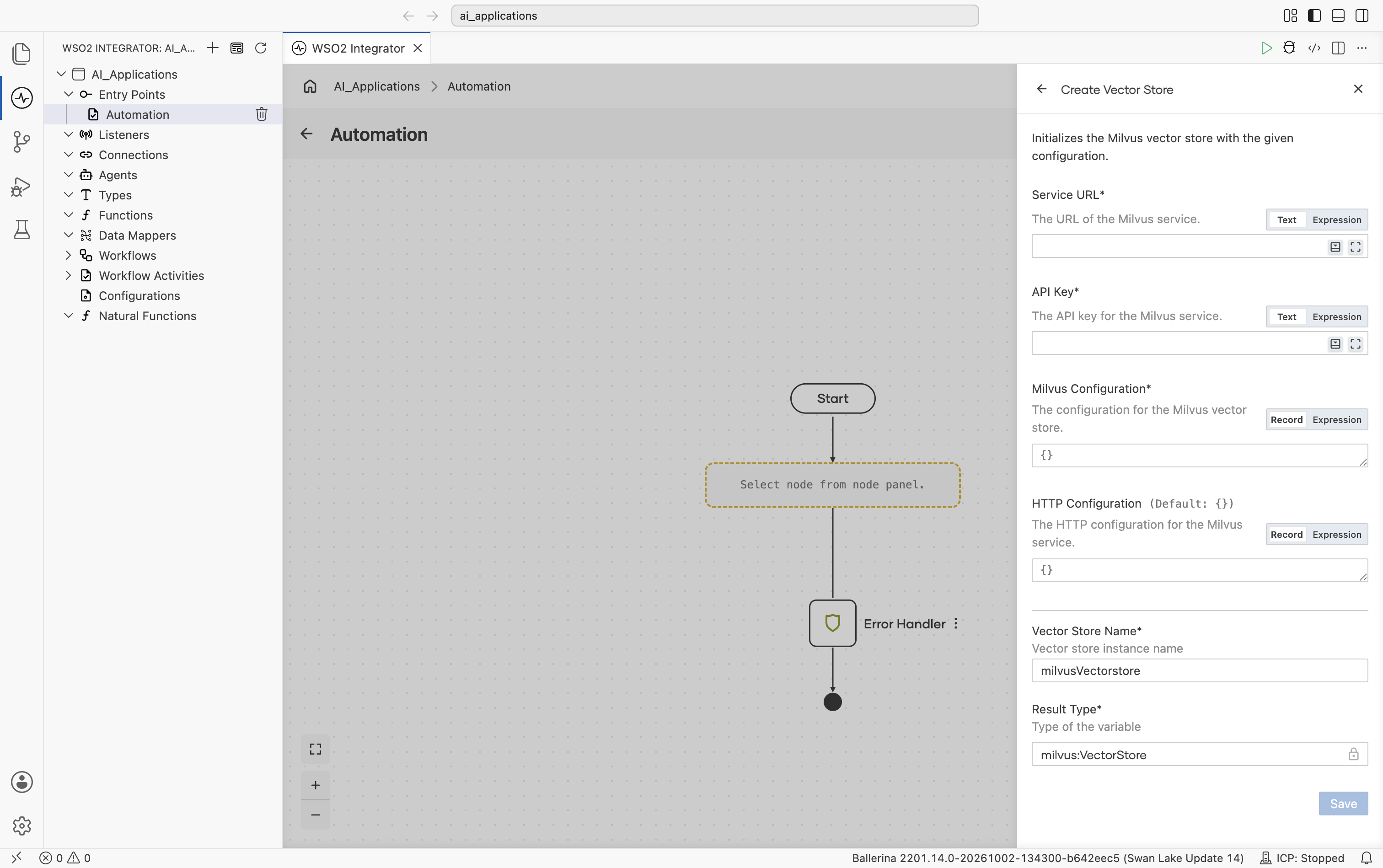
| Field | Required | Default | Available values |
|---|---|---|---|
| Service URL | Yes | N/A | The Milvus service URL. |
| API Key | Yes | N/A | Milvus API key (sent as a bearer token). |
| Milvus Configuration | Yes | {} | Record with collection settings. Collection Name (default "default"): the Milvus collection to use. Chunk Field Name (optional): the field on the collection that holds the chunk content. Primary Key Field (default "id"): the collection's primary-key field. Additional Fields (default []): extra fields to include in search results, on top of content, type, vector, metadata. |
| HTTP Configuration | No | {} | Record. Standard HTTP knobs. Same fields as Standard HTTP advanced configurations. Shown directly on the form. |
The connector loads the collection into memory automatically before each search. Milvus converts IDs to integers for the primary key field.
pgvector
The pgvector extension enables vector search inside PostgreSQL. The connector creates the table and an HNSW index automatically on first use.
Official website: pgvector on GitHub.
Create form
The form opens with Host Name, Username, Password, Database Name, Table Name, and the start of Port Number:
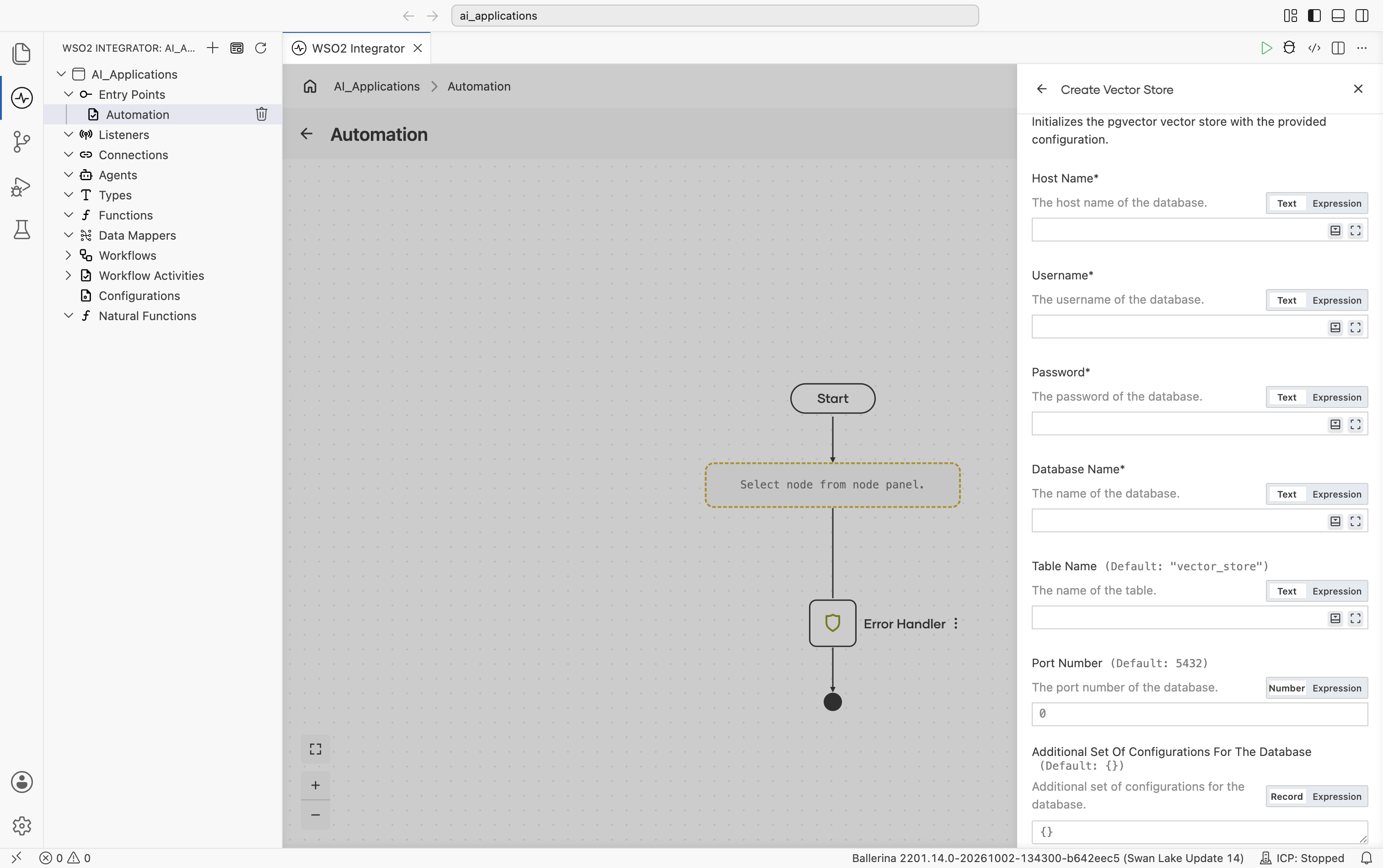
| Field | Required | Default | Available values |
|---|---|---|---|
| Host Name | Yes | N/A | Database host, for example localhost. |
| Username | Yes | N/A | Database user. |
| Password | Yes | N/A | Database password. |
| Database Name | Yes | N/A | PostgreSQL database name. |
| Table Name | No | "vector_store" | Table to store vectors in. Created on first use if missing. |
| Port Number | No | 5432 | Any positive integer. Database port. |
Scrolling further shows Additional Set Of Configurations For The Database, Properties To Configure Connection Pool, Configurations For The Vector Store, then Vector Store Name and Result Type:
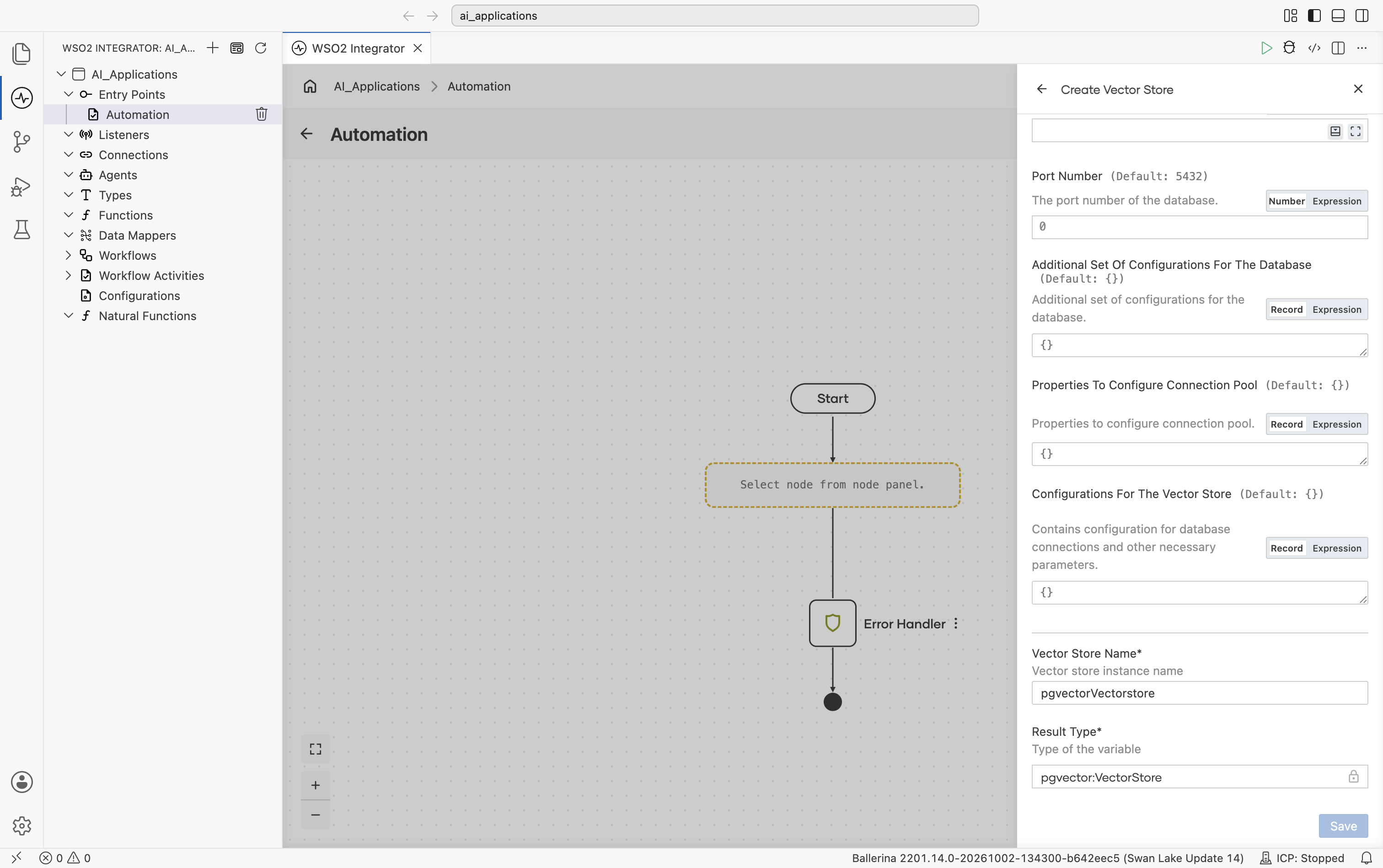
| Field | Default | Available values | What it controls |
|---|---|---|---|
| Additional Set Of Configurations For The Database | {} | Record | Extra PostgreSQL options (SSL mode, connect timeout, and so on). |
| Properties To Configure Connection Pool | {} | Record | Connection pool settings. |
| Configurations For The Vector Store | {} | Record (embeddingType, vectorDimension, similarityMetric) | Embedding Type: ai:DENSE (default) or ai:SPARSE. Picks the column type (vector vs sparsevec). Vector Dimension: 1536 by default; must match your embedding provider's output dimension. Similarity Metric: COSINE (default), EUCLIDEAN, or MANHATTAN. |
Auto-created table schema: id VARCHAR PRIMARY KEY, content TEXT, embedding vector|sparsevec, metadata JSONB. The connector creates an HNSW index automatically for fast similarity search.
Pinecone
Pinecone is a hosted vector database with native dense, sparse, and hybrid support. It provides multi-tenancy through namespaces.
Official website: Pinecone documentation.
Create form
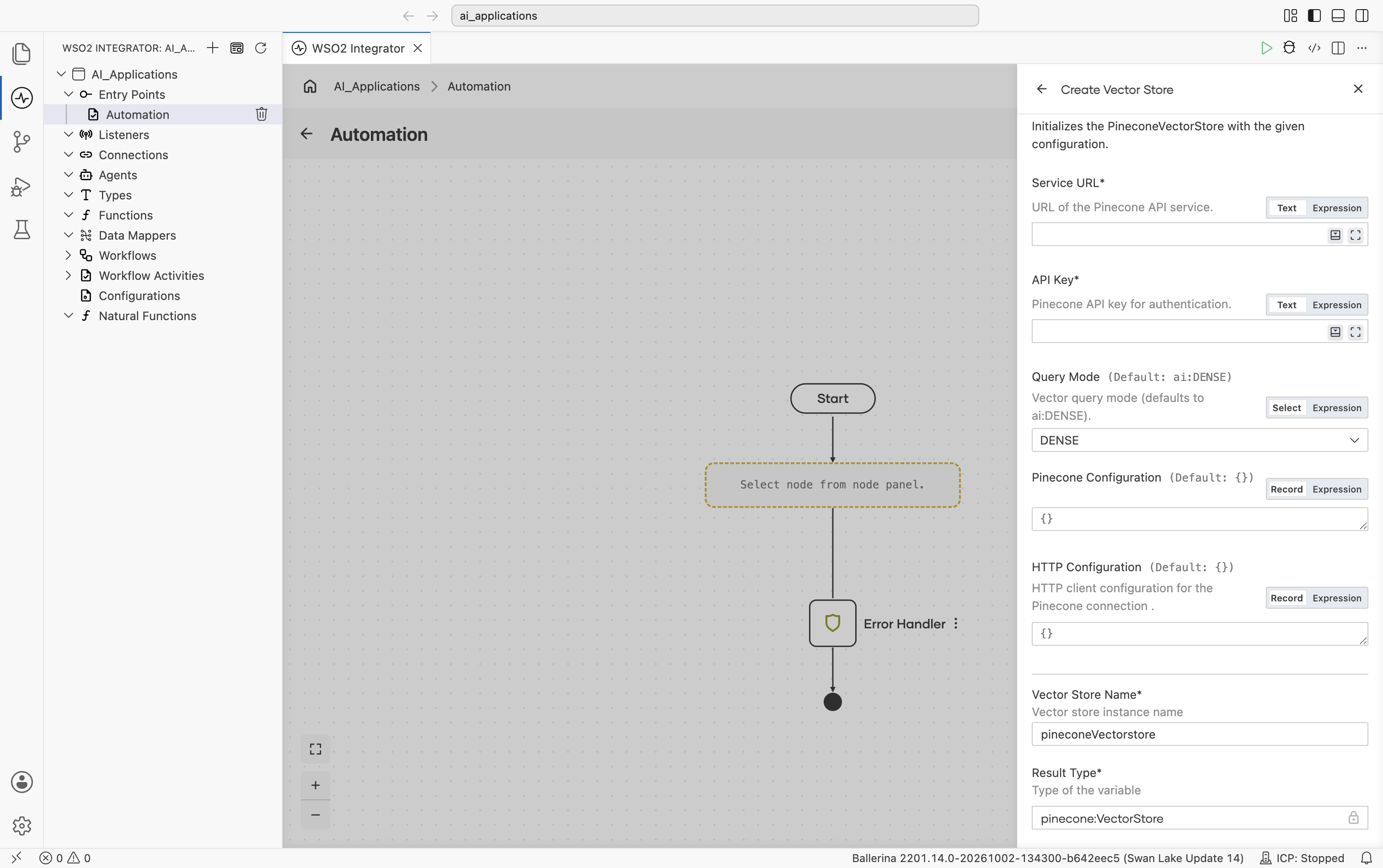
| Field | Required | Default | Available values |
|---|---|---|---|
| Service URL | Yes | N/A | URL of the Pinecone index endpoint. |
| API Key | Yes | N/A | Pinecone API key. |
| Query Mode | No | ai:DENSE | ai:DENSE, ai:SPARSE, ai:HYBRID. Search mode. |
| Pinecone Configuration | No | {} | Record (namespace, filters, sparseVector). Pinecone-specific settings. Namespace isolates vectors for multi-tenancy. Filters sets default metadata filters applied on every query. Sparse Vector is needed for hybrid search. |
| HTTP Configuration | No | {} | Record. Standard HTTP knobs. Same fields as Standard HTTP advanced configurations. |
topK must be in the range 1–10000.
Weaviate
Weaviate is an open-source vector database with structured filtering and a GraphQL query layer. The connector queries pre-existing collections. Create the collection (with its schema) in Weaviate before connecting.
Official website: Weaviate documentation.
Create form
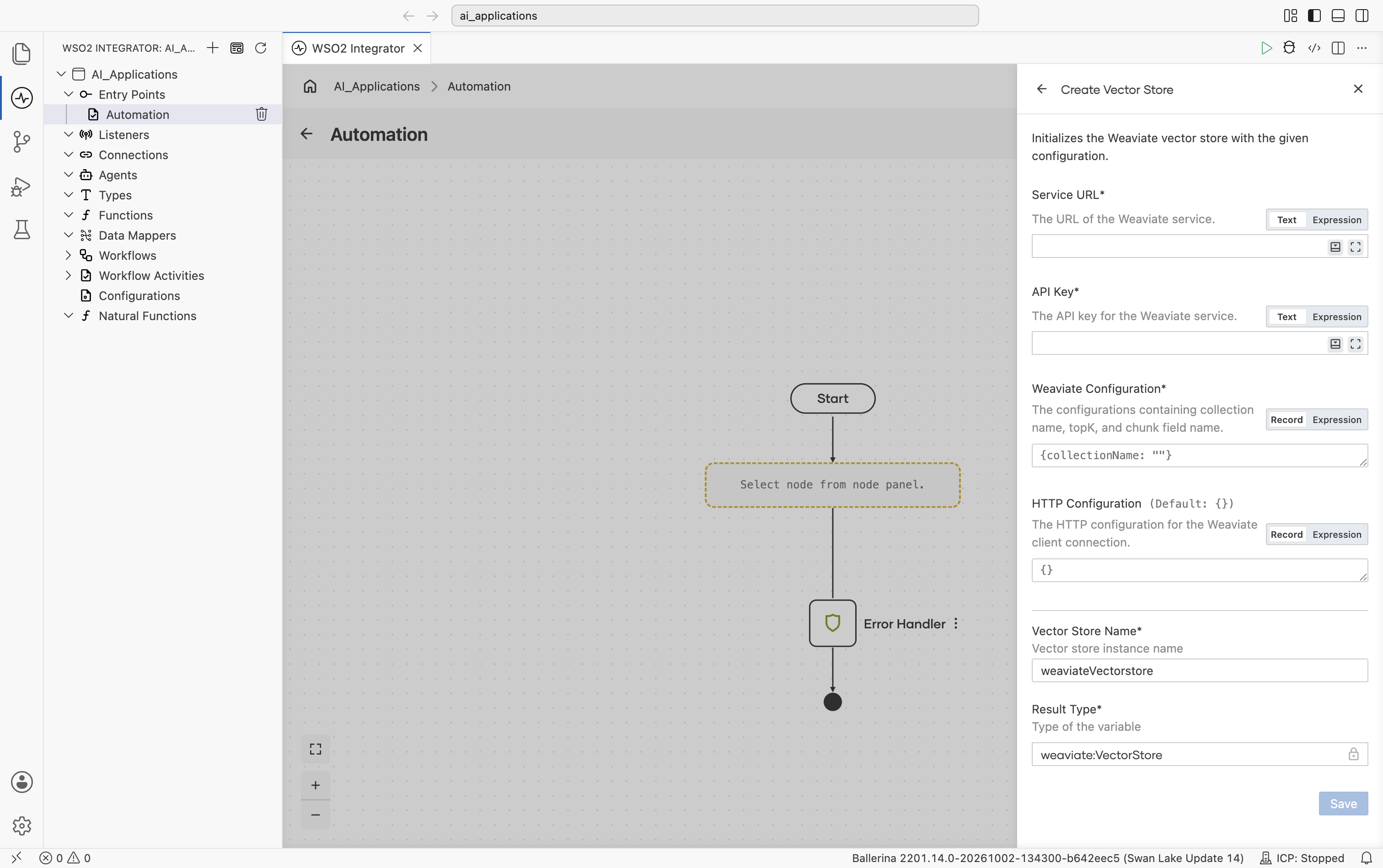
| Field | Required | Default | Available values |
|---|---|---|---|
| Service URL | Yes | N/A | The Weaviate endpoint URL. |
| API Key | Yes | N/A | Weaviate API key (sent as a bearer token). |
| Weaviate Configuration | Yes | {collectionName: ""} | Record with collection-level config. Collection Name (required): the Weaviate collection to use; must already exist. Chunk Field Name (optional, default "content"): the field on the collection that holds the chunk content. |
| HTTP Configuration | No | {} | Record. Standard HTTP knobs. Same fields as Standard HTTP advanced configurations. |
This connector supports dense vectors only. Weaviate maps the certainty score to the similarityScore field in the response.
Selecting a store
| Situation | Recommended |
|---|---|
| Prototyping; tiny dataset; tests | In-Memory. No infrastructure required. |
| Already on AWS; don't want to run a vector database | Amazon S3 Vectors. |
| Already running PostgreSQL | pgvector. Keeps vectors next to your existing data. |
| Want hosted, multi-tenant by default | Pinecone. |
| Want open-source plus rich filtering & GraphQL | Weaviate. |
| Very large datasets, k8s-native | Milvus. |
Selection is based on operational concerns (where your data already lives, what your team already runs). All six satisfy the same Vector Store contract. The rest of the project does not change when you swap.
What's next
- Knowledge Bases — Combine a vector store with an embedding provider and a chunker.
- Chunkers — Split documents into chunks before embedding for ingestion into a vector store.
- RAG — Visual designer walkthrough for RAG ingestion and query in WSO2 Integrator.