What Is a REST API? A Plain-English Guide
If you've been given a task that mentions "hitting the API" or "calling a REST endpoint" and nodded along without quite knowing what that means, you're not alone. REST APIs are everywhere in modern software, and most explanations either assume you already know the jargon or bury the useful part under a wall of architecture theory.
This guide skips the assumptions. It defines a REST API in plain terms, walks through exactly what happens when one is called, and uses a single running example throughout, so the pieces connect instead of floating on their own. By the end, you'll be able to read a REST API request and understand what it's asking for, whether you're debugging one, documenting one, or just trying to follow a conversation with an engineering team.
What Is a REST API?
A REST API is an interface that lets one piece of software ask another for data, or to take an action, over the web, following a specific set of rules called REST. REST stands for Representational State Transfer, an architectural style first described by computer scientist Roy Fielding in his 2000 doctoral dissertation at UC Irvine.
In practice, a REST API is how your phone's weather app gets today's forecast, how a checkout page charges a credit card, or how a project management tool pulls in your latest commits from GitHub. Each of those is a REST API doing the same basic job: receiving a request, doing something with it, and sending back a response.
Imagine you're building a small online bookstore. You need a way for your website's front end (what customers see in their browser) to ask your backend server (where the book data actually lives) for a list of books, or to add a new one to the inventory. A REST API is the contract that makes that conversation possible, whatever programming language each side is written in.
What's the Difference Between an API and a REST API?
An API, or application programming interface, is the broader term for any defined way two pieces of software can talk to each other. It doesn't say how that conversation has to happen.
A REST API is one specific, popular way to build that conversation. It uses standard web technology (HTTP, the same protocol your browser uses to load pages) and a consistent set of rules for how requests and responses are structured.
Other API styles exist too. SOAP APIs use a stricter, XML-based message format with more built-in rules around security and transactions. GraphQL APIs typically expose a single HTTP endpoint and let the client specify exactly which fields it wants back in one request. REST sits in the middle: structured enough to be predictable, and flexible enough to be easy to build and debug, which is a big part of why it became the default choice for web services.
| API (general term) | REST API (specific style) | |
|---|---|---|
| Scope | Any interface that lets two programs communicate | One particular way to build that interface |
| Transport | Not defined; could be anything | Standard HTTP |
| Data format | Not defined | Usually JSON, sometimes XML or plain text |
| Structure | Varies by implementation | Follows a consistent set of constraints, covered next |
Think of "API" as the category and "REST API" as one well-defined member of it, in the same way that "vehicle" is the category and "sedan" is one specific, well-understood kind of vehicle.
The Core Principles That Make an API "RESTful"
Not every API that uses HTTP automatically counts as RESTful. Fielding's dissertation sets out six constraints in total: client-server separation, statelessness, cacheability, a layered system, an optional code-on-demand capability that most everyday REST APIs skip, and a uniform interface, which itself breaks down into four smaller rules covered below. Together, they make REST APIs predictable enough that a developer who has never seen your bookstore API can still guess how it probably works.
1. Uniform Interface
Every resource, whether it's a single book, a customer, or the whole catalog, gets its own predictable address, and working with it looks the same whichever resource it is. In our bookstore, /books always refers to the collection of books, and /books/482 always refers to the specific book with ID 482. A developer doesn't need special instructions for each type of resource, because the pattern repeats.
Predictable addresses are only one of the four rules, though:
- Resources have their own addresses, as described above.
- Clients work with representations. The client receives a representation of the resource, not the book's actual database row.
- Messages are self-descriptive. Each response makes sense on its own, mainly through its status code, headers, and body taken together.
- Responses can link to related actions. In its fullest form, a response includes links, so a client could follow one from a book straight to its reviews without hardcoding that address in advance.
Most everyday REST APIs, including the bookstore's, rely on the first three and treat links as a nice-to-have rather than a strict requirement.
2. Statelessness
Every request has to carry all the information the server needs to handle it. That doesn't mean the server forgets everything: it still stores the book catalog, customer accounts, and order history in its database. What it doesn't keep is a private memory of your particular conversation from one request to the next.
If your bookstore app asks for book 482 and then for book 483, the server treats those as two independent requests, even if they came from the same customer a second apart, and each one has to identify what it needs by itself. That's what makes it much easier to add more servers behind the scenes, because any server can pick up any request without needing to know what a different server handled a moment earlier.
There's a practical consequence worth knowing early. If your bookstore needs to remember that a customer is logged in, that information has to travel with each request, usually as a token in the request headers, rather than living on the server as a saved session. It's a small adjustment for beginners coming from simpler scripting patterns, but it's what lets a REST API scale by adding identical, interchangeable servers behind a load balancer, instead of tying each customer to one particular machine that "remembers" them.
3. Client-Server Separation
The bookstore's front end and backend don't need to know the details of how the other works. The team building the website's checkout flow can redesign it completely without touching the server, and the team running the book database can switch to a different database engine without breaking the website, as long as the API contract between them stays the same.
4. Cacheability
Responses can be marked as safe to reuse, following the caching rules in RFC 9111. If a hundred customers request the same list of bestsellers within a minute, the server, or something in front of it, can serve a cached copy to most of them instead of rebuilding the list from scratch each time. That's a meaningful performance and cost lever at scale, although the actual savings depend on how cacheable your particular data is.
5. Layered System
A client talking to the bookstore API doesn't necessarily know, or need to know, whether it's talking directly to the application server or to something in between, such as a security layer or a load balancer spreading traffic across several servers. Those intermediate layers can be added or changed without the client noticing, which gives a growing system room to add capacity or security controls later without a rewrite.
Fielding builds REST by combining these constraints, several of them borrowed from earlier network architecture styles, and he singles out the uniform interface, with its four sub-constraints, as the central feature that distinguishes REST from other styles.
How a REST API Request Actually Works
This is where the running example earns its keep. Say your bookstore's website needs to display the details of book 482.
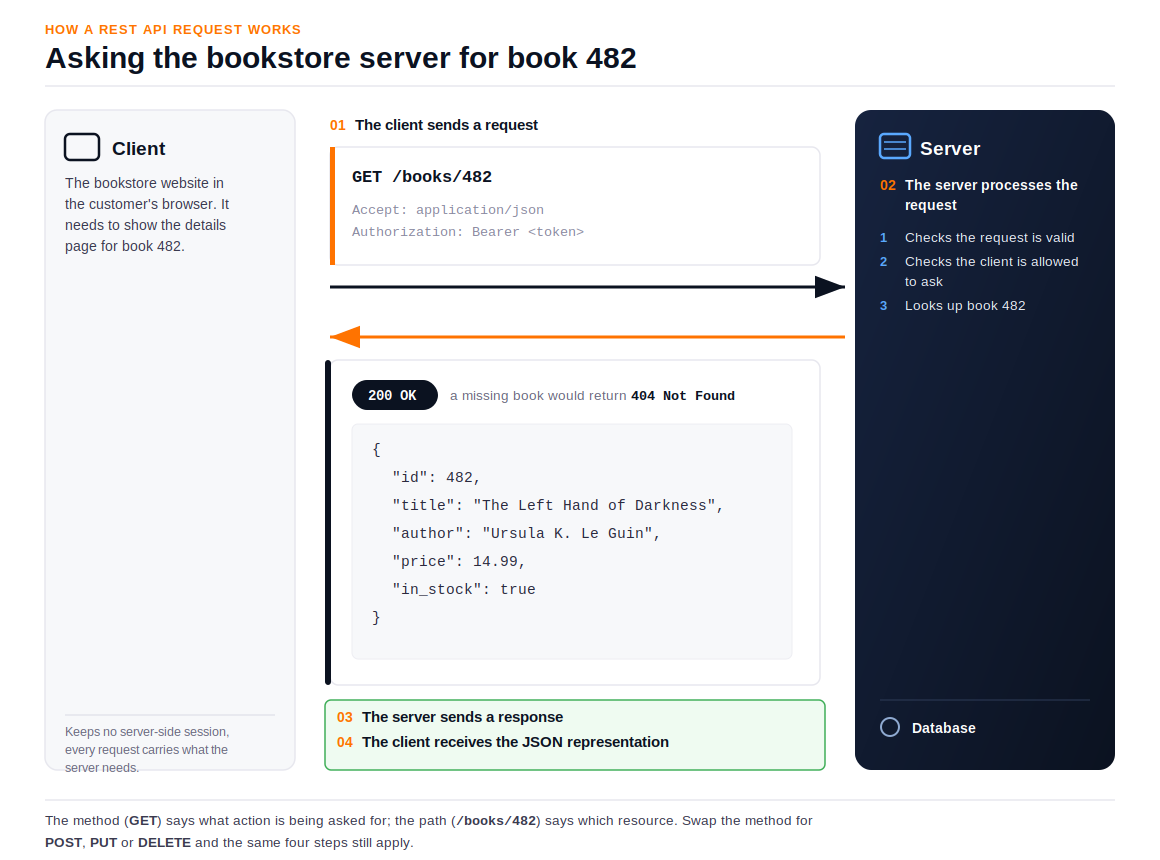
- The client sends a request. Your browser (the client) sends an HTTP request to a specific address, or endpoint, on the server, such as
GET /books/482. Along with the method and address, the request carries headers, which are extra metadata such as the format the client can accept the response in or an authentication token proving who's asking, and sometimes a body with additional data. - The server processes the request. The server receives the request, checks that it's valid and that the client is allowed to make it, and then looks up book 482 in its database.
- The server sends a response. The server replies with an HTTP status code summarizing what happened, plus the data itself. A successful lookup returns
200 OKwith the book's details. A book that doesn't exist returns404 Not Foundinstead. - The client receives the representation. The data comes back as a "representation" of the book's current state, almost always formatted as JSON (JavaScript Object Notation), because it's lightweight and easy for both people and machines to read. For book 482, it might look like this:
{
  "id": 482,
  "title": "The Left Hand of Darkness",
  "author": "Ursula K. Le Guin",
  "price": 14.99,
  "in_stock": true
}
The action you're asking for is signaled by the HTTP method, not just the address. These are the four you'll meet constantly:
| Method | What it does in the bookstore example |
|---|---|
GET | Retrieves a book or a list of books, without changing anything |
POST | Adds a new book to the catalog |
PUT | Replaces a book's entire record with new details |
DELETE | Removes a book from the catalog |
GET, PUT, and DELETE are idempotent, which means sending the same request twice has the same end result as sending it once. Sending DELETE /books/482 a second time doesn't do anything more, because the book is already gone. POST is different: sending the same "add a book" request twice usually creates two separate books, because the server has no way of knowing you meant to submit it only once.
That distinction matters when you're building retry logic. It's safe to automatically retry a failed GET, but not a failed POST, without checking first.
Status codes also fall into predictable groups, which is worth knowing so you're not just memorizing individual numbers. Codes starting with 2 mean the request succeeded. Codes starting with 4 mean something about the request itself was the problem, such as asking for a book that doesn't exist or lacking permission. Codes starting with 5 mean the server ran into trouble handling an otherwise valid request.
The first digit tells you roughly where to start looking, on the client side or the server side. A 4xx can still reflect a policy decision or a misconfiguration rather than a simple mistake, though, so treat it as a starting point for diagnosis, not a final verdict.
Real-World REST API Examples
The bookstore example is useful for seeing the moving parts, but REST APIs appear in a wide range of everyday products:
- A public weather API. A weather app sends a
GETrequest with a location, and the server responds with the current temperature, conditions, and forecast, with no account or backend of your own required. - A payment API. An e-commerce checkout page sends a
POSTrequest with an order amount and payment details, and the payment provider's server responds with a status: approved, declined, or pending further verification. - GitHub's REST API. Developer tools use it to pull in commit history, open issues, or pull request status for a repository: the same pattern of
GETrequests returning JSON that powers the bookstore example.
Each of these does the same fundamental thing as the bookstore. A client asks for something, or asks to change something, using a standard HTTP method and a predictable address, and gets back a structured response. Once you can see that pattern in one API, it's much easier to recognize in the next, even when the resource looks nothing like a book, a forecast, or a payment.
Is REST API Still the Right Choice?
Yes, for most standard web and mobile applications, REST is still the default, and for good reason. It's well understood, works with virtually every programming language, and needs no special client software beyond something that can make an HTTP request. If you're building a typical CRUD-style backend, like the bookstore API in this guide, REST is a safe, well-supported place to start.
REST isn't the only option, though, and it isn't always the best fit. Suppose your client needs several different, deeply nested pieces of data in one round trip, such as a bookstore storefront that needs a book's details, its reviews, and related titles all at once. A GraphQL API can reduce the number of requests you'd otherwise make with REST, and return the data shaped to match exactly what the client asked for in a single response. If you're connecting internal services that need very fast, strongly typed communication, gRPC is often a better match.
Neither replaces REST outright. They solve for different constraints, and plenty of production systems use more than one style side by side, depending on which part of the system is talking.
Conclusion
A REST API is a set of rules for how applications talk to each other over HTTP. It's organized around resources, stateless between requests, and consistent enough that the same handful of patterns (GET, POST, PUT, DELETE, and JSON responses) show up whether you're looking at a bookstore, a weather service, or GitHub's own API.
Once the basics click, the natural next question is how to design one well, covering things like resource naming, versioning, and error handling, rather than just how to read one. Our complete guide to REST API design walks through that in detail, from choosing sensible resource names to handling errors consistently across every endpoint you build.
And if you eventually find yourself managing a growing set of REST APIs at scale, alongside the AI services increasingly sitting next to them, the WSO2 API Platform is worth a look when you get there.
Frequently Asked Questions
What is the difference between a REST API and an API?
An API is any interface that lets software communicate. A REST API is a specific, HTTP-based style of API that follows the REST architectural constraints described above, such as statelessness and a uniform interface.
Can you give me an example of a REST API?
A weather service that responds to a GET request with the current forecast for a given location is a simple, common example. The bookstore catalog API used throughout this guide, which lists, adds, updates, and removes books, is another.
Is REST API difficult to learn?
The core ideas (resources, HTTP methods, and status codes) are straightforward to pick up, especially because REST reuses the same HTTP that already powers the web. Getting comfortable with real-world concerns like authentication and pagination takes a bit more practice, but the basics in this guide will have you reading and writing simple REST requests quickly.
What is a REST API, in the simplest terms?
It's a way for one application to ask another for information or an action, by sending a request to a specific web address with a method like GET or POST, and getting back a structured response, usually in JSON.

