Exposing a Service as MCP
An MCP service is a WSO2 Integrator artifact that publishes a set of tools over the Model Context Protocol. Any MCP-compatible client (Claude Desktop, GitHub Copilot, or another AI agent) can connect, discover the tools, and call them. This page covers the configuration options for the listener, service, and tools, including how to handle sessions and dynamic tool definitions.
Creating an MCP service
- Visual Designer
- Ballerina Code
-
In the design view, select Add Artifact.
-
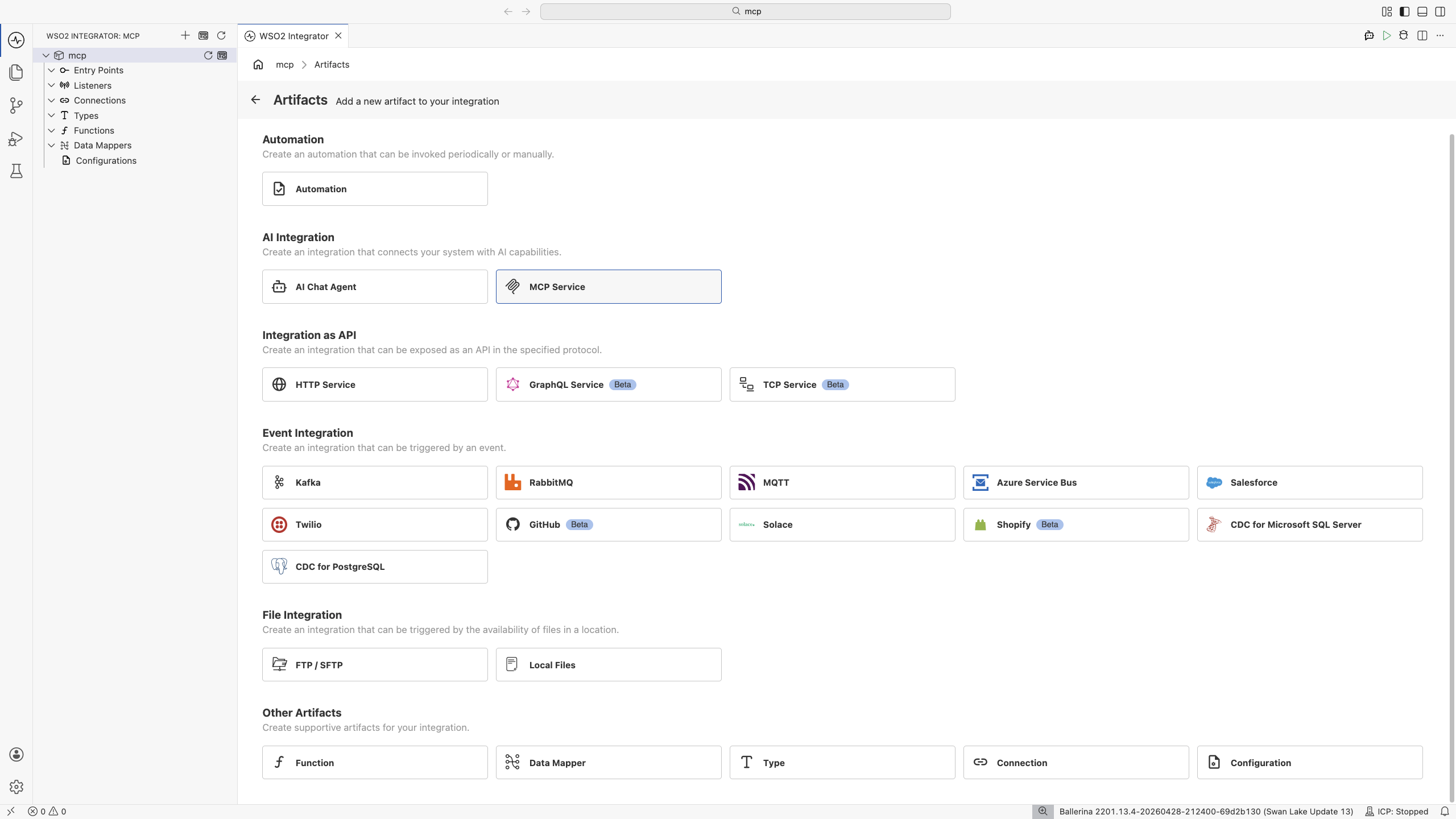
Under the AI Integration category, select MCP Service.
-
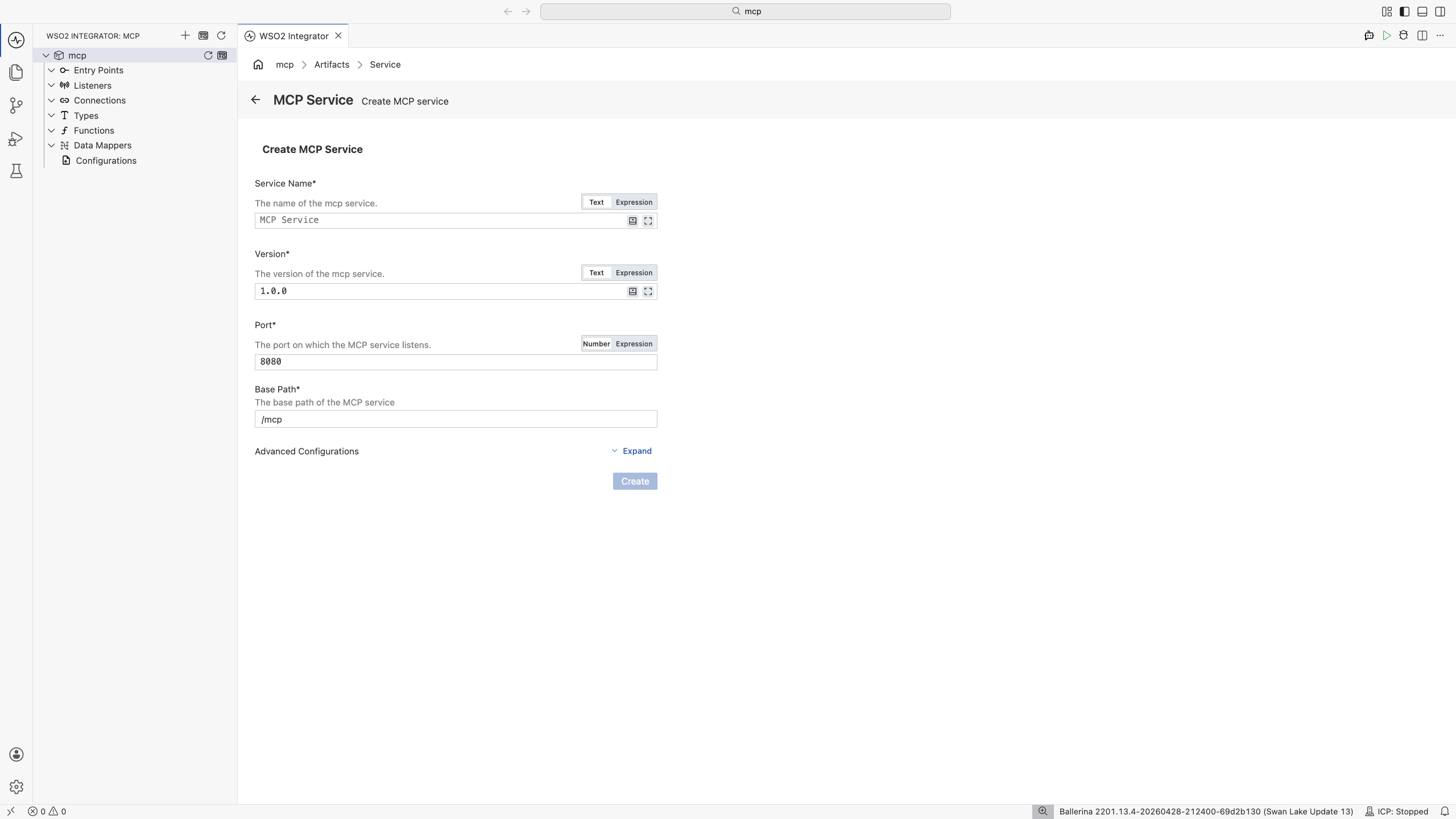
Fill in the creation form fields and click Create.
| Field | Description |
|---|---|
| Service Name | Display name advertised to MCP clients (for example, MCP Service). |
| Version | Service version string (for example, 1.0.0). Sent to clients during initialization. |
| Port | Listening port for the MCP listener. Defaults to 8080. |
| Base Path | URL prefix for the MCP service (for example, /mcp). |
| Advanced Configurations | Expand to attach the service to an existing listener instead of creating a new one. |
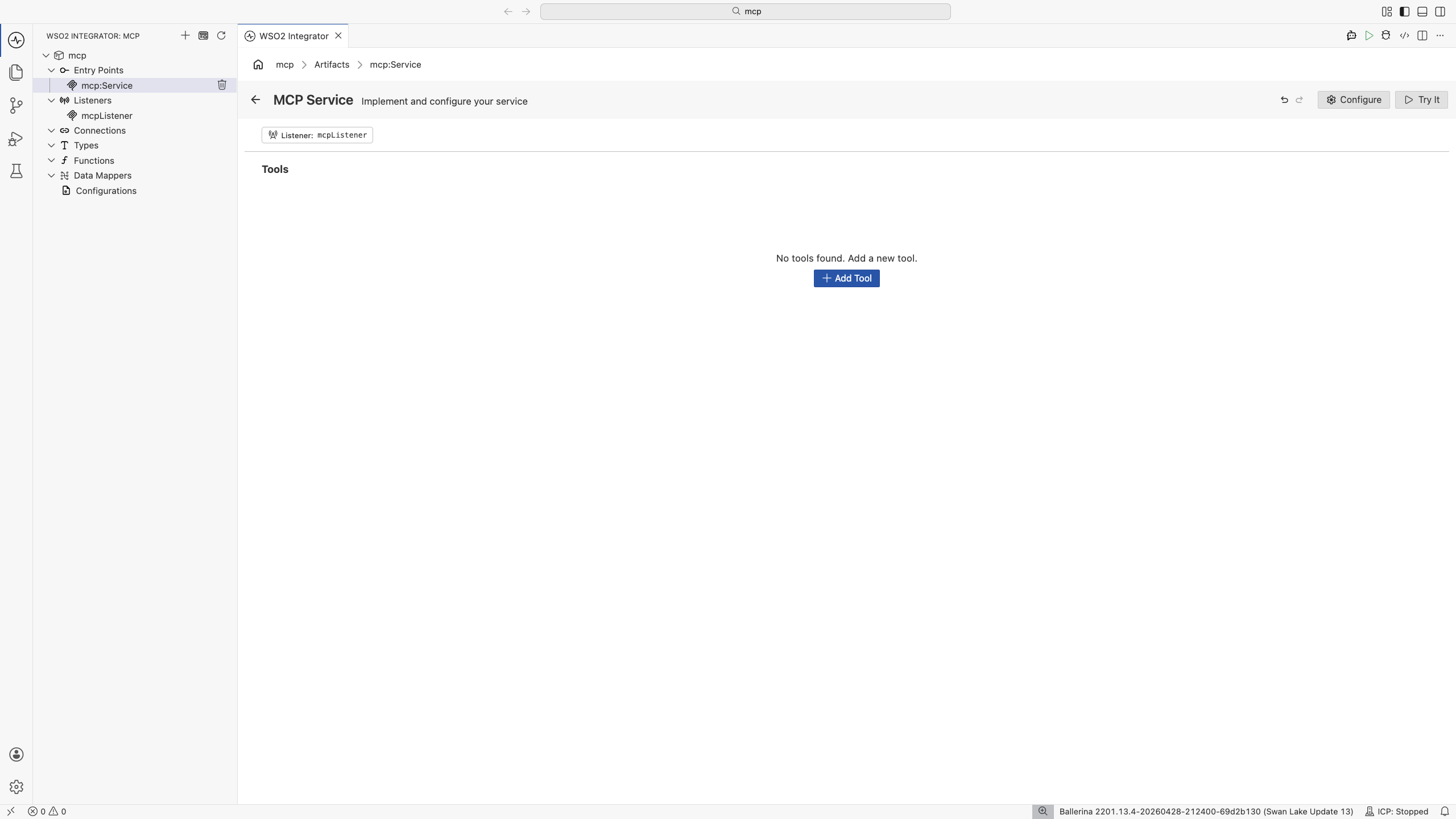
After clicking Create, WSO2 Integrator opens the service in the MCP Service Editor. The header shows the attached listener pill, a Tools section, and Configure / Try It buttons in the top-right.
| Element | What it does |
|---|---|
| Listener | The mcp:Listener the service runs on. Click the chip to swap it or edit its settings. |
| Tools | The tools the service exposes. Empty by default; click + Add Tool to add one. |
| Configure | Service-level settings: base path, server info, session mode, HTTP options. |
| Try It | Send sample MCP requests to the service from inside the editor. |
The following is a complete, runnable Ballerina program. It exposes a single add tool over MCP on port 9090.
import ballerina/mcp;

listener mcp:Listener mcpListener = check new (9090);

service mcp:Service /mcp on mcpListener {

    # Add two numbers.
    #
    # + a - First number
    # + b - Second number
    # + return - Sum of the two numbers
    remote function add(int a, int b) returns int {
        return a + b;
    }
}
Save this as main.bal, then run bal run from the project directory. The service is now reachable at http://localhost:9090/mcp.
The function name becomes the tool name. The doc comment becomes the tool description. The parameter doc lines become parameter descriptions. The return type becomes the output schema.
Service configuration
Service configuration controls the base path, the server identity advertised to clients, the session management mode, and HTTP-level options such as CORS and authentication.
- Visual Designer
- Ballerina Code
In the MCP Service Editor, click Configure in the header to open the MCP Service Configuration form. The form has two parts: the Base Path field at the top, and a Service Configuration record editor for advanced settings.
| Field | Description |
|---|---|
| Base Path | URL prefix for the MCP endpoint (for example, /mcp). Required. |
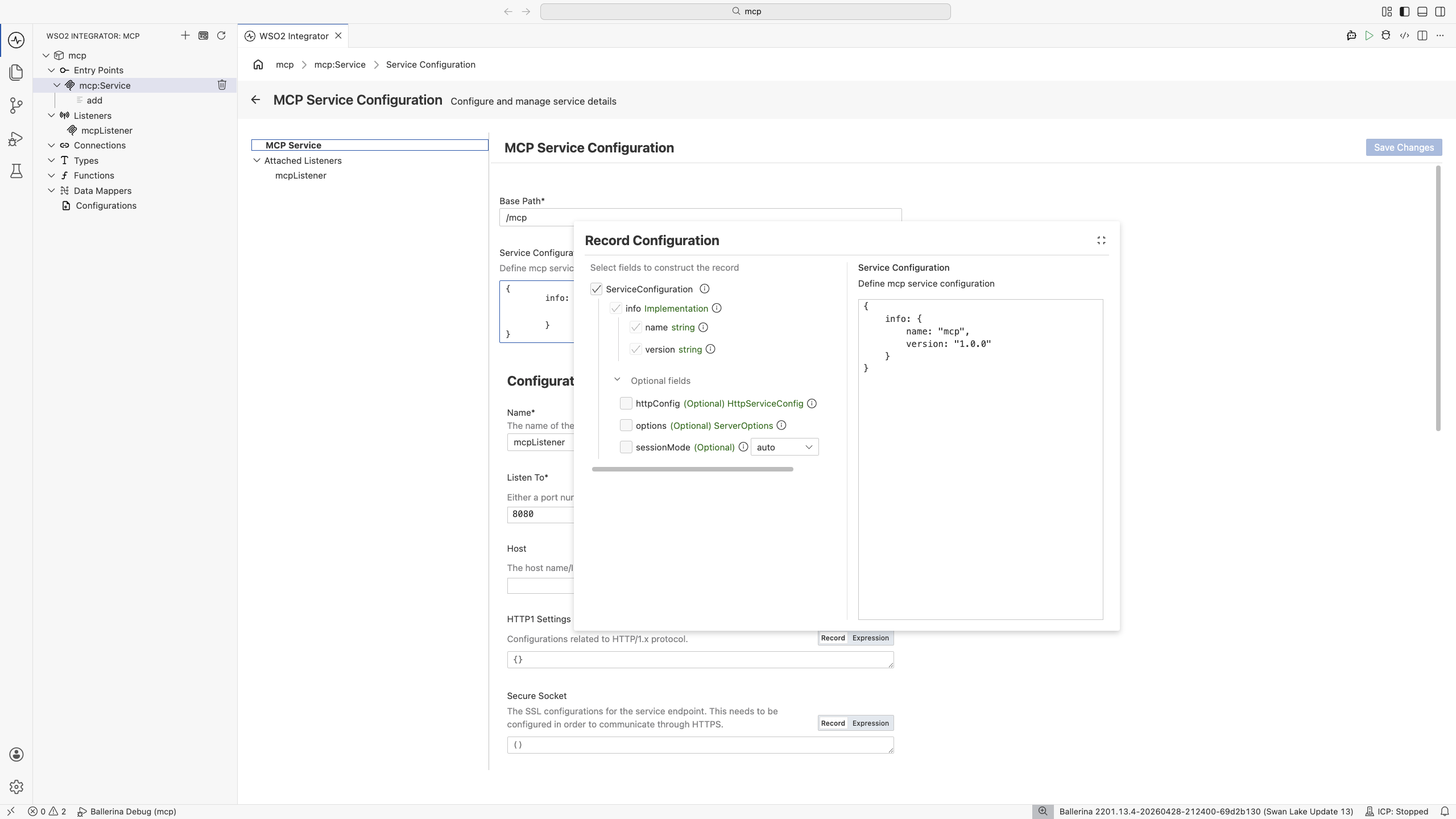
Click the edit icon on the Service Configuration record to open the record editor.
| Field | Description |
|---|---|
| info.name | Name of your server implementation (for example, MCP Weather Server). Sent to clients as serverInfo.name during initialization. Required. |
| info.version | Version of your server implementation (for example, 1.0.0). Sent as serverInfo.version. This is the version of your service, not the MCP protocol version; the protocol version is negotiated by the runtime. Required. |
| sessionMode | Session management mode. Options: AUTO (default), STATEFUL, STATELESS. See Session modes. |
| httpConfig | HTTP service configuration (CORS, auth, compression, validation, and so on). Same fields as the HTTP service @http:ServiceConfig. |
| options.capabilities | Capabilities the server advertises during initialization. Defaults to {tools: {}}. |
Service-level settings map to the @mcp:ServiceConfig annotation placed before the service declaration.
import ballerina/mcp;

listener mcp:Listener mcpListener = check new (9090);

@mcp:ServiceConfig {
    info: {
        name: "MCP Weather Server",
        version: "1.0.0"
    },
    sessionMode: mcp:AUTO,
    httpConfig: {
        cors: {
            allowOrigins: ["https://app.example.com"],
            allowMethods: ["GET", "POST"]
        }
    }
}
service mcp:Service /mcp on mcpListener {
    // Tools defined as remote functions.
}
All @mcp:ServiceConfig fields:
| Field | Description |
|---|---|
| info.name | Name of your server implementation. Sent to clients as serverInfo.name during initialization. Required. |
| info.version | Version of your server implementation. Sent as serverInfo.version. Distinct from the MCP protocol version, which is negotiated by the runtime. Required. |
| sessionMode | Session management mode. Options: mcp:AUTO (default), mcp:STATEFUL, mcp:STATELESS. |
| httpConfig | An http:HttpServiceConfig record. Controls CORS, auth, compression, payload validation, and other HTTP-level concerns. |
| options.capabilities | Capabilities advertised during initialization. Defaults to {tools: {}}. |
Session modes
| Mode | Use when… |
|---|---|
mcp:AUTO (default) | Mode is decided automatically based on how the client initializes. Recommended for most services. |
mcp:STATEFUL | The transport tracks session IDs and your tools need per-session state (for example, a shopping cart). Tools can declare an mcp:Session first parameter to read and write session-scoped data. |
mcp:STATELESS | Each request is independent. Use for pure functions and read-only lookups. |
Listener configuration
The listener binds to a port and handles incoming MCP connections over Streamable HTTP.
- Visual Designer
- Ballerina Code
In the MCP Service Configuration panel, select the listener under Attached Listeners to configure it.
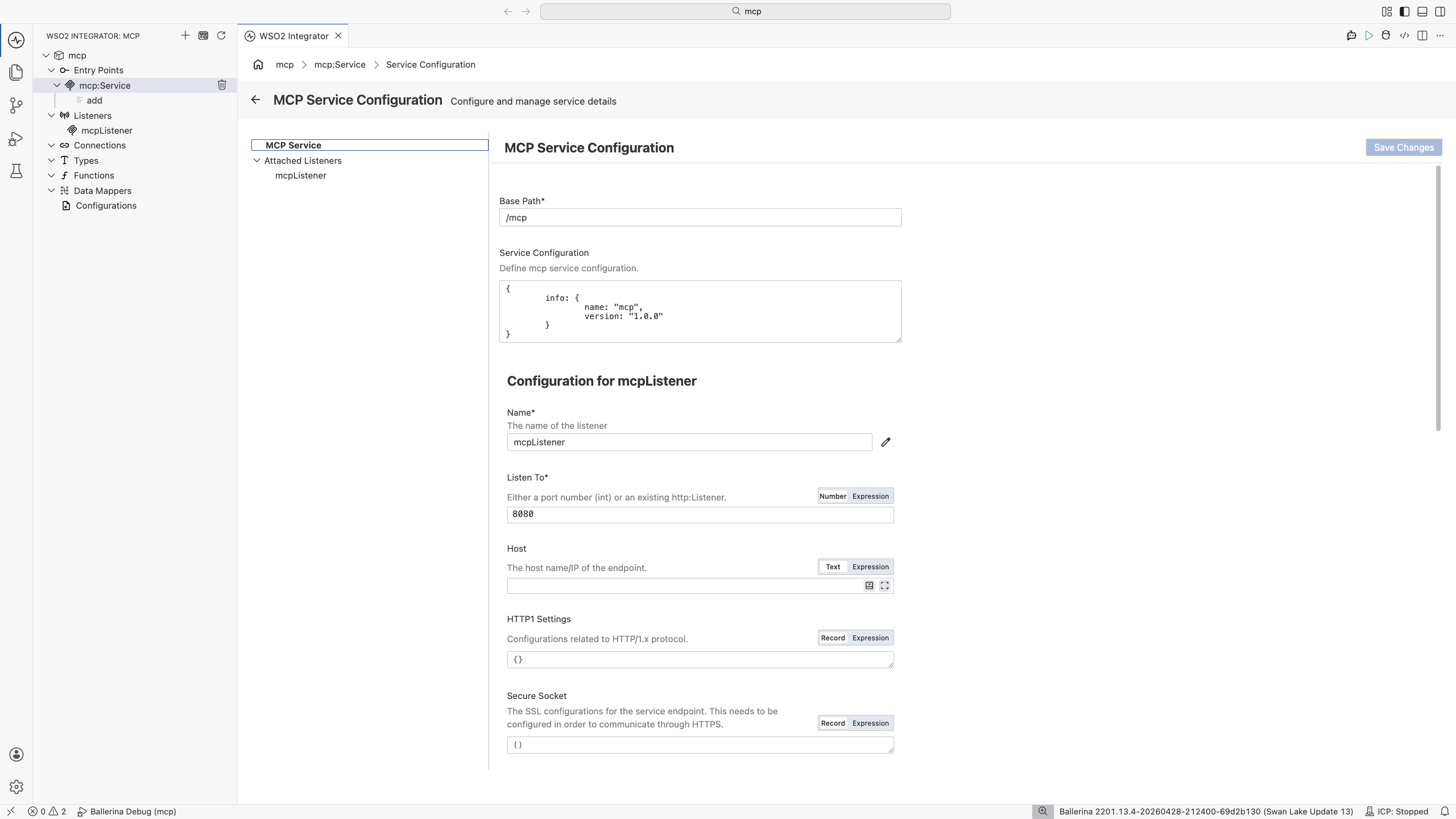
For standard HTTP setups, only Listen To (the port) is required. Configure Secure Socket to enable HTTPS.
| Field | Description | Default |
|---|---|---|
| Name | Identifier for the listener (for example, mcpListener). | |
| Listen To | Listening port (or an existing http:Listener reference). Required. | |
| Host | Host name or IP address the listener binds to. | 0.0.0.0 |
| HTTP1 Settings | HTTP/1.x protocol settings (keep-alive, max pipelined requests). | {} |
| Secure Socket | TLS/SSL configuration. Configure this to enable HTTPS. | () |
| HTTP Version | Highest HTTP version the endpoint supports. | HTTP/2.0 |
| Timeout | Read/write timeout in seconds. Set to 0 to disable. | 60 |
| Request Limits | Inbound size limits for URI, headers, and request body. | {} |
| Graceful Stop Timeout | Grace period in seconds before the listener force-stops. | 0 |
mcp:ListenerConfiguration is an alias for http:ListenerConfiguration, so every HTTP listener field applies to MCP listeners as well.
Inline listener with a port
import ballerina/mcp;

listener mcp:Listener mcpListener = check new (9090);

service mcp:Service /mcp on mcpListener {
    // Tools…
}
Listener with custom configuration
import ballerina/mcp;

listener mcp:Listener mcpListener = check new (9090, {
    host: "0.0.0.0",
    timeout: 60,
    secureSocket: {
        key: {
            certFile: "/path/to/cert.pem",
            keyFile: "/path/to/key.pem"
        }
    }
});

service mcp:Service /mcp on mcpListener {
    // Tools…
}
Reusing an existing HTTP listener
mcp:Listener can be initialized from an existing http:Listener, which lets MCP and HTTP services share a port.
import ballerina/http;
import ballerina/mcp;

listener http:Listener httpListener = new (9090);
listener mcp:Listener mcpListener = check new (httpListener);

service mcp:Service /mcp on mcpListener {
    // Tools…
}
Tools
Tools are the operations the MCP service exposes. Each tool has a name, a description, typed parameters, and a typed return value. The framework derives the JSON Schema sent to clients automatically from the Ballerina types.
- Visual Designer
- Ballerina Code
Click + Add Tool in the editor to open the Tool Configuration panel.
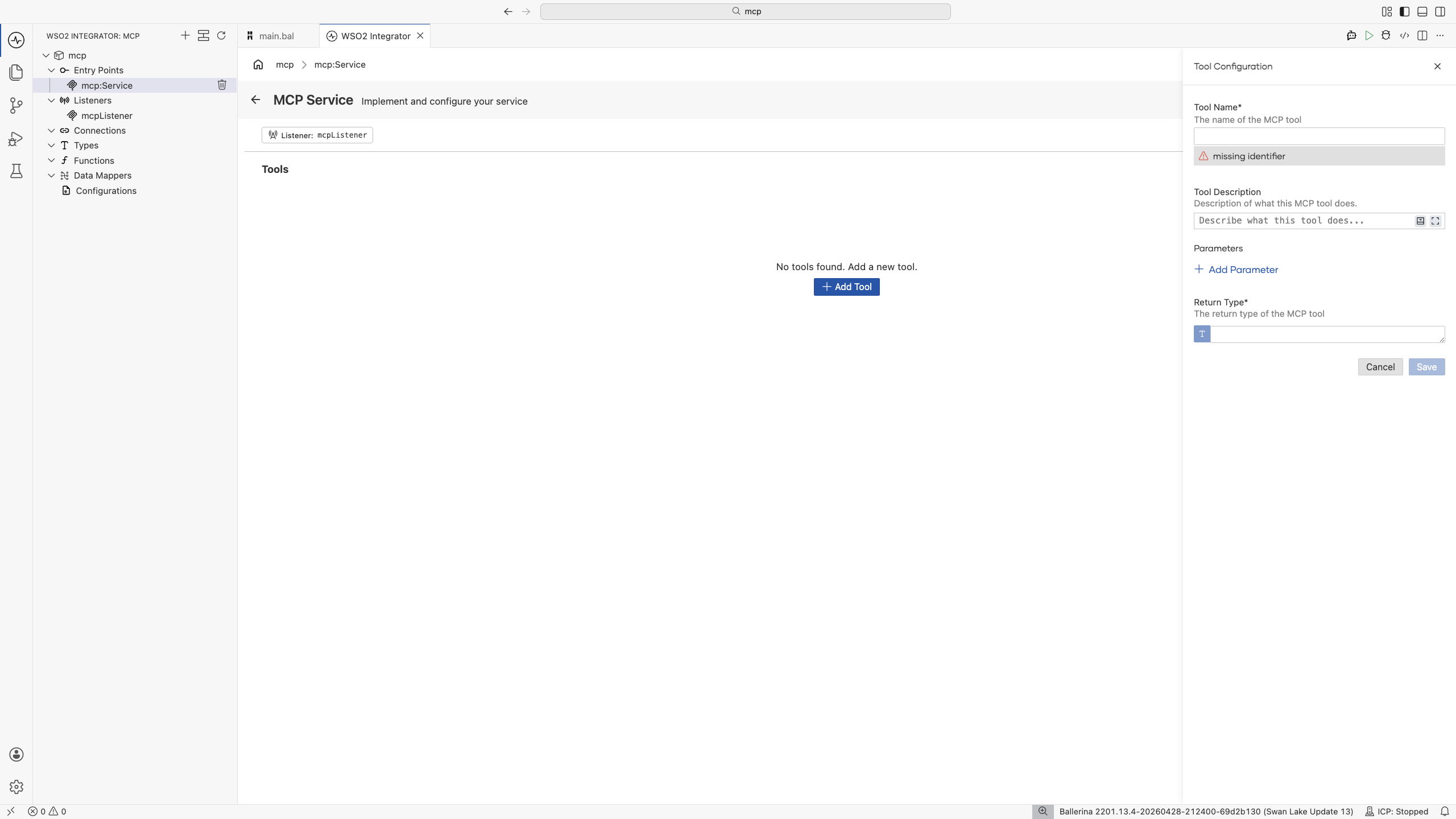
| Field | Required | Description |
|---|---|---|
| Tool Name | Yes | Name MCP clients will see. Use camel-case and be descriptive: getOrderStatus, searchProducts. |
| Tool Description | Yes | What the tool does and when the assistant should use it. The single most important field for tool discoverability. See Writing a good tool description. |
| Parameters | No | Each parameter has a name, type, and description. Descriptions are included in the schema sent to the client. |
| Return Type | Yes | Ballerina type returned. The output schema is generated from this. |
After clicking Save, the tool appears as a row under Tools in the editor and WSO2 Integrator generates a remote function within the service.
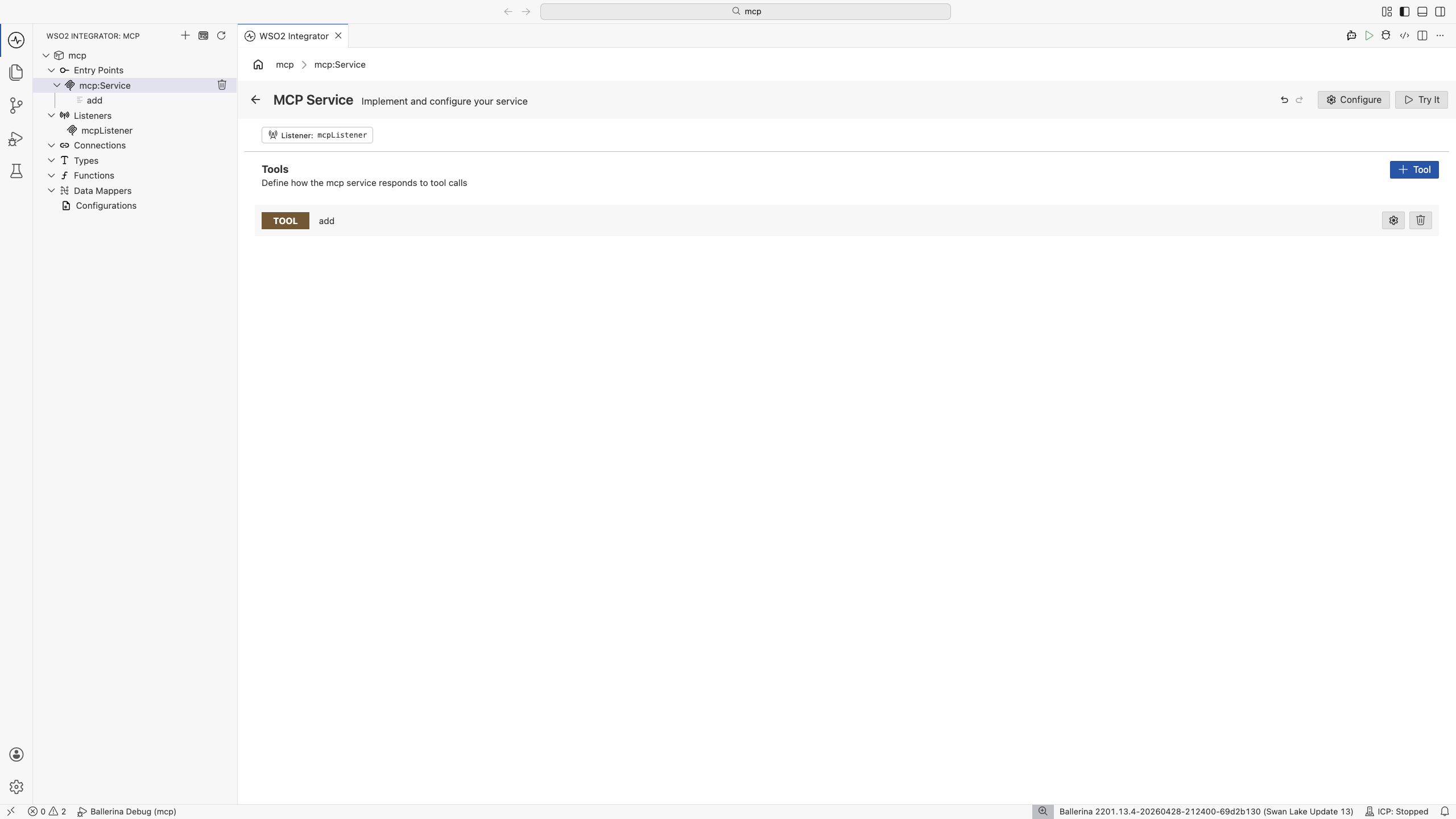
Each remote function on an mcp:Service becomes one tool. The function name becomes the tool name, the doc comment becomes the description, parameter doc lines become parameter descriptions, and the return type becomes the output schema.
import ballerina/mcp;

listener mcp:Listener mcpListener = check new (9090);

service mcp:Service /mcp on mcpListener {

    # Get the current status of a customer order by order ID.
    #
    # + orderId - Customer order identifier (format ORD-XXXXX)
    # + return - Current status, ETA, and tracking number
    remote function getOrderStatus(string orderId) returns OrderStatus|error {
        return check orderApi->/orders/[orderId]/status;
    }
}
Constraints
- Parameter types must be subtypes of
anydata. - The return type must be a subtype of
anydata|error. - The first parameter may optionally be
mcp:Sessionfor stateful tools (see below).
Overriding the description or schema with @mcp:Tool
When you want explicit control over the description or input schema, use the @mcp:Tool annotation. The annotation has two fields, both optional:
| Field | Description |
|---|---|
| description | Tool description sent to clients. Overrides the function's doc comment. |
| schema | A map<json> JSON Schema for the tool's parameters. Overrides the schema WSO2 Integrator derives from parameter types. Use when you need richer schema metadata (enums, defaults, custom validation) than Ballerina types can express. |
@mcp:Tool {
    description: "Get current weather conditions for a location"
}
remote function getCurrentWeather(string city) returns Weather|error {
    return check weatherApi->/current/[city];
}
Stateful tools with mcp:Session
When the service is configured with sessionMode: mcp:STATEFUL, tools can take mcp:Session as the first parameter to read and write per-client session state.
@mcp:Tool {
    description: "Add an item to the shopping cart"
}
remote function addToCart(mcp:Session session, string productName, decimal price)
        returns string|error {
    CartItem[] cart = session.hasKey("cart")
        ? check session.getWithType("cart")
        : [];
    cart.push({productName, price});
    session.set("cart", cart);
    return string `Added ${productName}. Total items: ${cart.length()}`;
}
Writing a good tool description
The tool description is what the AI client reads to decide whether and when to call the tool. Two patterns matter most:
Be explicit about scope
"Search the product catalog by keyword. Returns up to 10 matching products with name, price, and availability. Use for general product discovery questions."
"Retrieves a single product by its exact SKU. Use only when the user provides a SKU."
These two are clearly distinct, and the AI will not confuse them.
Bake in safety rules
"Cancel a customer order. IMPORTANT: Always confirm with the customer before calling this tool. This action cannot be undone."
The AI client will follow it most of the time. For deterministic enforcement, also keep server-side checks.
Don't leave it generic
"Customer endpoint." ❌
A generic description leads to bad tool selection downstream. If you can't write a useful one-liner, the tool is probably too vague to be useful.
Advanced: mcp:AdvancedService
When tool definitions need to come from configuration, a database, or some runtime source (not from compile-time remote functions), use mcp:AdvancedService. You implement two callbacks:
onListTools(): return the list of tools advertised to clients.onCallTool(params, session): dispatch a tool call by name.
import ballerina/mcp;

listener mcp:Listener mcpListener = check new (9090);

@mcp:ServiceConfig {
    info: {
        name: "MCP Crypto Server",
        version: "1.0.0"
    },
    sessionMode: mcp:STATELESS
}
service mcp:AdvancedService /mcp on mcpListener {

    remote isolated function onListTools()
            returns mcp:ListToolsResult|mcp:ServerError {
        return {
            tools: [
                {
                    name: "hashText",
                    description: "Generate a hash for the given text.",
                    inputSchema: {
                        "type": "object",
                        "properties": {
                            "text": {"type": "string", "description": "Text to hash"},
                            "algorithm": {
                                "type": "string",
                                "enum": ["md5", "sha1", "sha256"],
                                "default": "sha256"
                            }
                        },
                        "required": ["text"]
                    }
                }
            ]
        };
    }

    remote isolated function onCallTool(mcp:CallToolParams params, mcp:Session? session)
            returns mcp:CallToolResult|mcp:ServerError {
        match params.name {
            "hashText" => {
                return self.handleHashText(params.arguments ?: {});
            }
            _ => {
                return error mcp:ServerError(string `Unknown tool: ${params.name}`);
            }
        }
    }

    private isolated function handleHashText(record {} arguments)
            returns mcp:CallToolResult|mcp:ServerError {
        // Implementation…
        return {content: [{'type: "text", text: "..."}]};
    }
}
Use mcp:Service when… | Use mcp:AdvancedService when… |
|---|---|
Tools map cleanly to compile-time remote functions. | Tools are dynamic (defined in configuration, a database, or another service). |
| You want WSO2 Integrator to derive schemas automatically. | You want hand-crafted JSON schemas or extra validation. |
| You want the simplest possible MCP server. | You want a dispatch-table architecture. |
In onCallTool, content items use the field name 'type (with a leading quote) because type is a reserved keyword in Ballerina.
Error handling
Tools should return informative errors so AI clients can recover or suggest alternatives. The framework propagates the error message back to the client as a tool-call error.
- Visual Designer
- Ballerina Code
When you build a tool flow in the visual designer, errors returned or propagated with check from the flow are sent back to the client automatically. To return a custom error message, use a Return node with an error value:
return error(string `Invalid invoice ID '${invoiceId}'. Expected format INV-XXXXX.`);
The error message is what the AI client will read, so make it actionable. Avoid bare error() with no message; the assistant has nothing to reason about.
For mcp:Service, return error from the tool function. The framework converts it into an MCP tool-call error containing the error message.
remote function getInvoice(string invoiceId) returns Invoice|error {
    if !invoiceId.startsWith("INV-") {
        return error(string `Invalid invoice ID '${invoiceId}'. Expected format INV-XXXXX.`);
    }
    return check billingApi->/invoices/[invoiceId];
}
For mcp:AdvancedService, return mcp:ServerError from onCallTool when a call cannot be served:
return error mcp:ServerError(string `Unknown tool: ${params.name}`);
Avoid bare error() with no message. The AI client will pass the error message back into its reasoning loop, so a good message helps it suggest the right next step to the user.
Configuring an MCP client
Once your service is running, MCP clients connect by URL.
Claude Desktop
{
  "mcpServers": {
    "wso2-integrator": {
      "url": "http://localhost:9090/mcp"
    }
  }
}
Another agent inside WSO2 Integrator — see Consuming MCP from an Agent.
Operational notes
- Keep the tool list small. Fewer, better-described tools beat dozens of overlapping ones.
- Authenticate. Anything you expose over MCP is, by default, accessible to whoever connects. Configure auth on
httpConfig.auth(JWT, OAuth2, basic). - Log tool calls. Just like any other API surface; knowing who called what is essential for debugging and audit.
- Version explicitly. When tool shapes change, prefer adding a new tool over silently changing an existing one. AI clients depend on stable schemas.
What's next
- Consuming MCP from an Agent — the other half of the MCP picture.
- Tools (in AI Agents) — local-tool reference; the same description-quality rules apply.
- HTTP service — for the HTTP-level options exposed through
httpConfig.