HTTP Service
HTTP services expose your integration logic as REST endpoints that clients can call over HTTP. Use them when you need to receive requests, respond with data, or build webhooks. This page covers the configuration options for the listener, service, and resources, including how to define response schemas.
Creating an HTTP service
- Visual Designer
- Ballerina Code
- Select + Add Artifact in the design view, or + next to Entry Points in the sidebar.
- Select HTTP Service under Integration as API.
- Fill in the creation form fields and select Create.
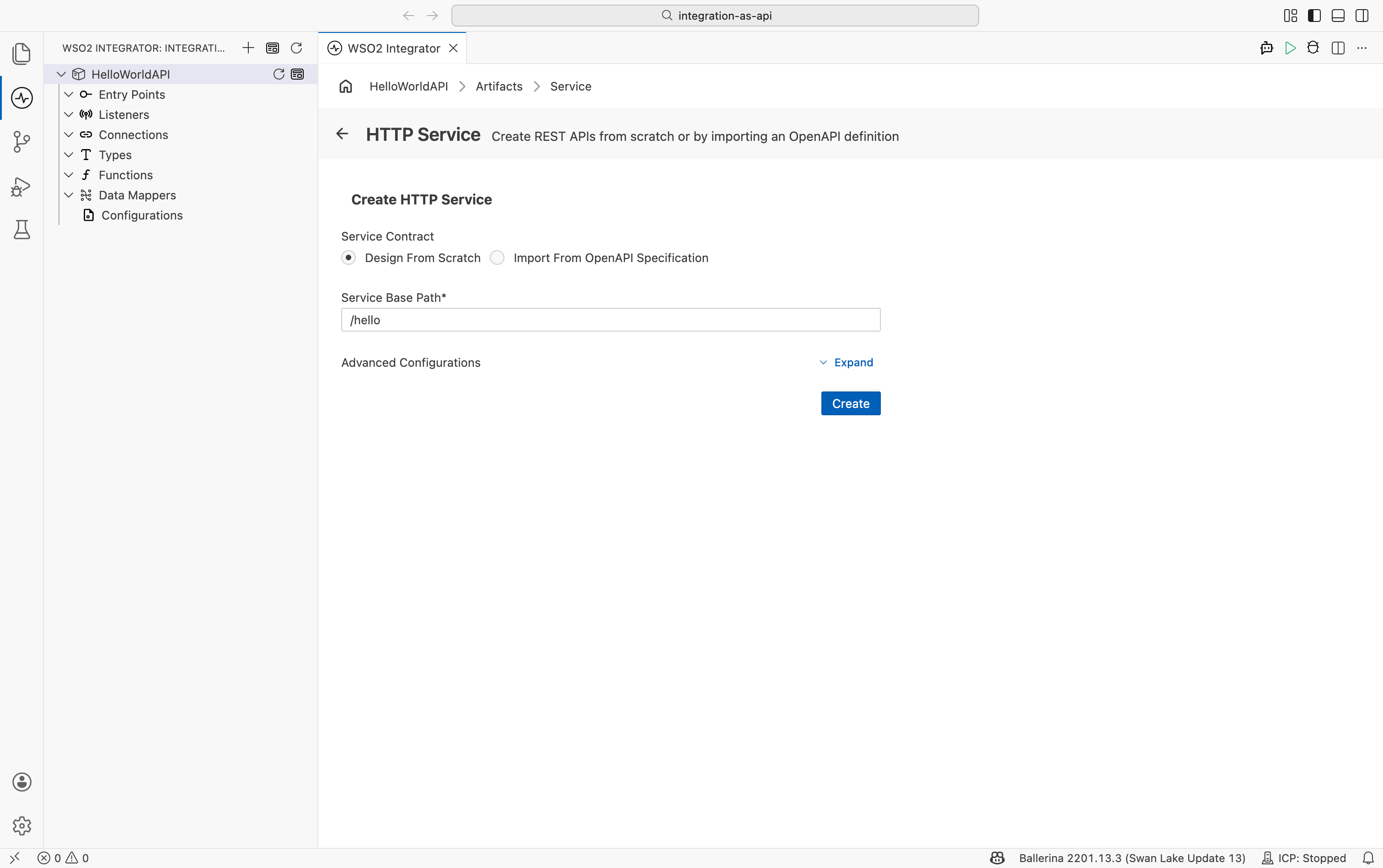
Service Contract
| Option | Description |
|---|---|
| Design From Scratch | Creates a new service with empty resources. Default selection. |
| Import From OpenAPI Specification | Generates service stubs from an existing OpenAPI (Swagger) file or URL. Use this when you have an existing API contract. |
Service Base Path
| Field | Description |
|---|---|
| Service Base Path | URL prefix for all resources in this service (for example, /api). Must not end with / unless it is the bare root /. |
Advanced Configurations
Expand Advanced Configurations to choose the HTTP listener:
| Option | Description |
|---|---|
| Shared Listener (Port 9090) | Attaches the service to the project's shared HTTP listener on port 9090. Use this when multiple services share the same port. |
| Custom Listener | Creates a dedicated listener for this service. Enter the port in the Listener Port field that appears. Use this when the service needs its own port or TLS configuration. |
After selecting Create, WSO2 Integrator opens the service in the Service Designer. The header shows the attached listener pill and the service base path. Select + Add Resource to add HTTP endpoints and then select any resource row to open it in the flow designer and build the integration logic.
The following complete, runnable Ballerina program creates an HTTP service.
import ballerina/http;

listener http:Listener httpDefaultListener = http:getDefaultListener();

service /hello on httpDefaultListener {

    resource function get greeting() returns json|error {
        do {
            return "Hello, World!";
        } on fail error err {
            // handle error
            return error("unhandled error", err);
        }
    }
}
Save this as main.bal, then run bal run from the project directory. Send a request with curl http://localhost:9090/hello/greeting to verify the Hello, World! response.
Service configuration
Service configuration controls the base path and advanced service-level settings such as CORS policy, authentication, and payload validation.
- Visual Designer
- Ballerina Code
In the Service Designer, select Configure in the service header to open the HTTP Service Configuration form. The form has two parts: the Base Path field at the top, and an expandable Service Configuration section for advanced settings.
| Field | Description |
|---|---|
| Base Path | URL prefix for all resources in this service (for example, /api). Changing this field updates the service declaration in the code. Required. |
Expand Service Configuration and select the edit icon to open the record editor. Settings configured here apply to all resources in the service unless a resource overrides them. See Service configuration fields below for the full list.
Service-level settings map to the @http:ServiceConfig annotation placed before the service declaration. Settings applied here affect all resources in the service unless overridden at the resource level.
import ballerina/http;

@http:ServiceConfig {
    cors: {
        allowOrigins: ["https://app.example.com"],
        allowMethods: ["GET", "POST", "PUT", "DELETE"],
        allowHeaders: ["Content-Type", "Authorization"],
        maxAge: 3600
    }
}
service /api on new http:Listener(8090) {
    // Resources inherit CORS configuration.
}
See Service configuration fields below for the full list of @http:ServiceConfig fields.
Service configuration fields
| Field | Description |
|---|---|
| host | Virtual host name used to identify this service when multiple services share the same listener. |
| compression | Controls response compression. Configure the compression algorithm and which content types to compress. |
| chunking | Chunked transfer encoding mode for responses. Options: AUTO (default), ALWAYS, NEVER. |
| cors | CORS policy applied to all resources in this service. Configure allowed origins, methods, and headers. |
| auth | Authentication handlers applied at the service level. All resources inherit this setting unless overridden. |
| mediaTypeSubtypePrefix | Custom prefix added to the media type subtype in the Content-Type response header. |
| treatNilableAsOptional | When enabled (default), nilable-typed parameters are treated as optional in the request. |
| openApiDefinition | Inline OpenAPI definition attached to the service for documentation and validation purposes. |
| validation | When enabled (default), validates inbound request payloads against the declared schema. |
| serviceType | Overrides the default service dispatch behavior. Use for advanced routing scenarios. |
| basePath | Override the base path declared on the service, useful when attaching the service to a different path at runtime. |
| laxDataBinding | When enabled, allows data binding to succeed even if the payload contains extra fields not in the schema. |
Listener configuration
The listener binds to a port and handles incoming HTTP connections.
- Visual Designer
- Ballerina Code
In the HTTP Service Configuration panel, select Http Listener under Attached Listeners to configure the listener.
When your service is attached to the shared HTTP default listener, listener settings are managed through configurable variables rather than the listener panel. To configure them:
- In the sidebar, select Configurations.
- Under Imported libraries, select ballerina/http.
- Scroll to the defaultListenerConfig section.
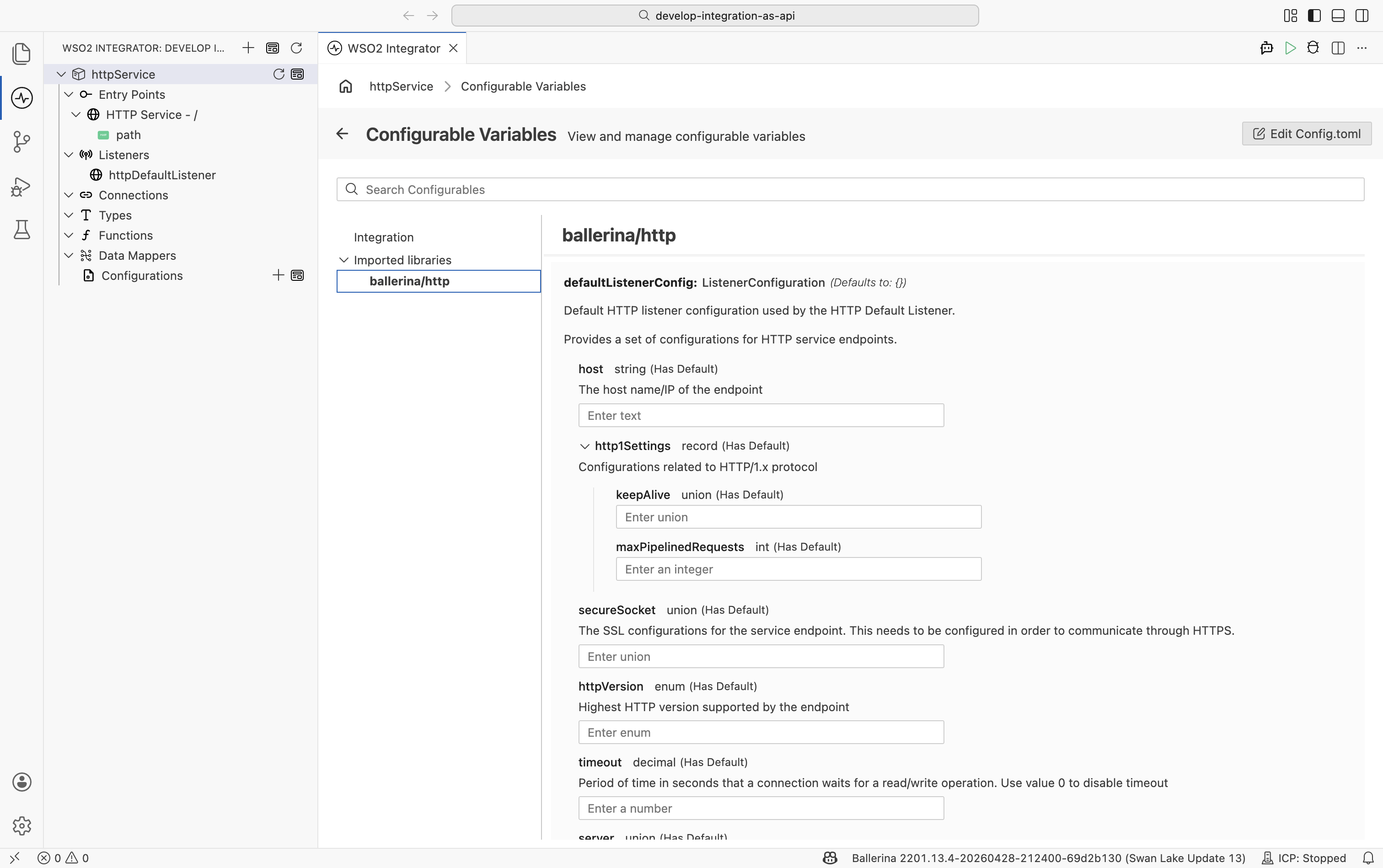
For standard HTTP setups, only Port is required. Configure Secure Socket to enable HTTPS. See Listener configuration fields below for the full list.
Select + Attach Listener at the bottom of the panel to attach an additional listener or to select an existing named listener.
Inline listener
An inline listener is created with the service declaration. Use configurable to allow the port to be set via Config.toml or an environment variable without changing source code.
import ballerina/http;

configurable int port = 8090;

service /api on new http:Listener(port) {
    resource function get greeting() returns string {
        return "Hello!";
    }
}
Named listener
Declare the listener at module level and attach multiple services to it. Use this when multiple services share the same port, or when you need a single TLS configuration for all services on that listener.
import ballerina/http;

listener http:Listener httpListener = new (8090, {
    host: "0.0.0.0",
    httpVersion: http:HTTP_2_0,
    timeout: 60,
    secureSocket: {
        key: {
            certFile: "/path/to/cert.pem",
            keyFile: "/path/to/key.pem"
        }
    }
});

service /api on httpListener {
    resource function get greeting() returns string {
        return "Hello!";
    }
}

service /health on httpListener {
    resource function get .() returns json {
        return {status: "ok"};
    }
}
See Listener configuration fields below for the full list of http:ListenerConfiguration fields.
Listener configuration fields
| Field | Description | Default |
|---|---|---|
| Port | Listening port of the HTTP service listener. Required. | |
| Host | Host name or IP address the listener binds to. | 0.0.0.0 |
| HTTP1 Settings | HTTP/1.x protocol settings (keep-alive, max pipelined requests). | {} |
| Secure Socket | TLS/SSL configuration. Configure this to enable HTTPS. | () |
| HTTP Version | Highest HTTP version the endpoint supports. | HTTP/2.0 |
| Timeout | Read/write timeout in seconds. Set to 0 to disable. | 60 |
| Server | Value for the Server response header. | () |
| Request Limits | Inbound size limits for URI, headers, and request body. | {} |
| Graceful Stop Timeout | Grace period in seconds before the listener force-stops. | 0 |
| Socket Config | Server socket settings (e.g., soBackLog queue length). | {} |
| HTTP2 Initial Window Size | Initial HTTP/2 flow-control window size in bytes. | 65535 |
| Min Idle Time In Stale State | Minimum seconds to hold an HTTP/2 connection open after GOAWAY. Set to -1 to close after all in-flight streams finish. | 300 |
| Time Between Stale Eviction | Interval in seconds between HTTP/2 stale connection eviction runs. | 30 |
Resources
Resources define the HTTP endpoints of a service. Each resource maps an HTTP method and path to the request inputs it accepts and the responses it can return.
- Visual Designer
- Ballerina Code
Defining inputs
Select + Add Resource in the Service Designer to open the resource creation form. Set the HTTP method and path, then add the parameters the resource accepts. Select Save to add the resource to the service. Select the resource row to open it in the flow designer.
| Field | Description |
|---|---|
| HTTP Method | HTTP verb the resource responds to. Options: GET, POST, PUT, DELETE, PATCH, HEAD, OPTIONS. |
| Resource Path | Path segment appended to the service base path (for example, orders gives the full path /api/orders). Use . to match the service base path itself. |
| Path Param | Adds a variable segment to the URL path. The client supplies the value inline in the URL (for example, /orders/{id}). Each path param becomes a typed parameter in the resource function. Supported types: string, int, float, boolean, decimal. |
| Query Parameter | Adds a named URL query parameter extracted from the request URI (for example, ?artist=Coltrane). Can be optional (nilable type) or given a default value so the resource can be called without it. |
| Header | Binds a specific request header to a named parameter. The parameter name must match the header name. |
| Define Payload | Defines the expected schema for the request body. Available for POST, PUT, PATCH, DELETE, and DEFAULT methods. |
When you open an existing resource for editing, the Advanced Parameters section becomes available. These are low-level abstractions that underpin data binding, header mapping, and query parameter mapping. In most cases, the named parameters above (path params, query params, headers, payload) are sufficient. Reach for Request or Caller only for advanced scenarios such as gateways, proxy services, or multipart handling.
| Parameter | Description |
|---|---|
| Request | The complete http:Request object. Provides access to all headers, the raw body stream, query parameters, and request metadata. Use for advanced scenarios where named parameters are not enough. Typical examples: reading a streaming body, handling multipart payloads, and forwarding requests in a proxy or gateway. |
| Headers | All request headers as a structured http:Headers collection. Use when you need to read or iterate over headers dynamically rather than binding individual named headers. |
| Caller | The http:Caller for sending responses imperatively. When present, the resource return type is constrained to error?. Use for scenarios such as sending 100 Continue before processing, or performing work after the response is already dispatched to the client. |
Defining response schemas
The Responses panel declares every HTTP response the resource can return. Defining responses explicitly gives you compiler validation on the return values and produces an accurate OpenAPI specification. Select + Response to open the Response Configuration form for a new entry, or select the edit icon on an existing row.
| Field | Description |
|---|---|
| Status Code | HTTP status code for this response (for example, 200 - Ok, 201 - Created, 404 - Not Found). |
| Response Body Schema | Data type of the response body. Leave empty for responses with no body (for example, 204 No Content). |
| Content Type | Value for the Content-Type response header. When left empty, the type is inferred from the body schema: application/json for records and maps, text/plain for strings, and application/octet-stream for byte arrays. |
| Headers | Additional response headers to include in this response. Select + Add to define each header name and type. |
| Make This Response Reusable | When checked, this response definition is extracted as a shared type that other resources in the service can reference. |
When multiple response entries are defined, the resource selects which one to return at runtime based on the integration logic.
- Standard status codes: select any standard HTTP status code from the dropdown (for example,
200 - Ok,201 - Created,404 - Not Found). ForPOSTresources, the framework defaults to201 Created. For all other methods, it defaults to200 OK. - Error type: select error as the response type to map unhandled Ballerina errors to
500 Internal Server Errorautomatically. - Dynamic response: at the end of the dropdown, Response type lets you define the status code, body, and headers dynamically inside the flow instead of fixing them at design time. Use this when the response shape varies based on runtime conditions.
Advanced configurations
Select Advanced Configurations in the resource edit panel to configure settings specific to this resource. These settings override the service-level defaults for this resource only.
| Field | Description |
|---|---|
| name | Custom name for this resource, used for display and documentation purposes. |
| consumes | Media types the resource accepts in the request body (for example, application/json, application/xml). Requests with a different Content-Type are rejected. |
| produces | Media types the resource can return in the response body. |
| cors | CORS policy specific to this resource, overriding the service-level CORS setting. |
| auth | Authentication configuration for this resource, overriding the service-level authentication setting. |
| transactionInfectable | When enabled, allows a client-initiated distributed transaction to propagate into this resource. |
| linkedTo | Links this resource to related resources for navigation and documentation purposes. |
Select Add more resources before selecting Save to add another resource without closing the form.
The examples in this section share the following type definition and data:
import ballerina/http;

type Album record {|
    string title;
    string artist;
|};

table<Album> key(title) albums = table [];
Service paths and routing
The base path is defined in the service declaration and the resource path in the resource method definition. Each resource is invoked using the base path, resource path, and resource accessor (HTTP method).
import ballerina/http;

// The `base path` represents the absolute path to the service.
// If the `base path` is omitted, then it defaults to `/`.
// It can be represented by both identifiers and string literals. E.g., `/music-info`, `"/music-info"`.
service /info on new http:Listener(9090) {

    // The `resource path` represents the relative path to the resource, and the `resource accessor`
    // represents the HTTP method used to access the resource.
    // Here, the resource path is `/albums`, and the resource accessor is `get`.
    // This means the resource is invoked when an HTTP GET request is made to `/info/albums`.
    // The `resource path` can be set as `.` to represent a resource with the `service path`
    // that is `/info`.
    resource function get albums() returns Album[] {
        return albums.toArray();
    }
}
Path parameters
Path parameters are mandatory, variable parts of a resource URL. Define them in the resource path using the syntax [type name] (for example, albums/[string title]). Supported types are string, int, float, boolean, and decimal.
import ballerina/http;

service / on new http:Listener(9090) {

    // The path param is defined as a part of the resource path within brackets
    // along with the type and it is extracted from the request URI.
    resource function get albums/[string title]() returns Album|http:NotFound {
        return album;
    }
}
Query parameters
A resource method argument without any annotation is treated as a query parameter extracted from the request URI. The argument name becomes the query key. Supported types are string, int, float, boolean, decimal, and array types of these. Query parameters can be nilable (string? artist) to make them optional, or defaultable (string artist = "Unknown") to provide a fallback value.
import ballerina/http;

service / on new http:Listener(9090) {

    // The `artist` resource method argument is considered as the query parameter
    // which is extracted from the request URI.
    resource function get albums(string artist) returns Album[] {
        return from Album album in albums
            where album.artist == artist
            select album;
    }
}
Header parameters
Use the @http:Header annotation to bind a request header value to a resource parameter. The parameter name must match the header name (case-insensitive). If the names differ, specify the actual header name in the annotation configuration. The parameter can be a simple type or an array type for multi-value headers. When the parameter is not nilable, the framework returns 400 Bad Request if the header is absent.
import ballerina/http;
import ballerina/mime;

service / on new http:Listener(9090) {

    // The `accept` argument with `@http:Header` annotation takes the value of the `Accept` request header.
    resource function get albums(@http:Header string accept) returns Album[]|http:NotAcceptable {
        if !string:equalsIgnoreCaseAscii(accept, mime:APPLICATION_JSON) {
            return http:NOT_ACCEPTABLE;
        }
        return albums.toArray();
    }
}
Payload data binding
Payload data binding gives direct access to the request body from the resource method signature. Parameters of type map, array, tuple, table, record, or xml are automatically bound to the payload without annotation. For all other types, use @http:Payload explicitly. This feature applies to the POST, PUT, PATCH, DELETE, and DEFAULT accessors. If binding fails, the framework returns 400 Bad Request to the client.
import ballerina/http;

service / on new http:Listener(9090) {

    // The `album` parameter represents the entity body of the inbound request.
    // Record types are automatically bound to the payload — no annotation required.
    resource function post albums(Album album) returns Album {
        albums.add(album);
        return album;
    }
}
Low-level request and response
http:Request and http:Response are low-level abstractions that underpin data binding, header mapping, and query parameter mapping. They can be used on both the client side and the service side. They are useful when implementing advanced scenarios such as gateways, proxy services, or handling multipart requests. In most cases, http:Request and http:Response are not needed. The high-level abstractions handle the same things with less code.
import ballerina/http;

service / on new http:Listener(9090) {

    // The request is defined in the signature parameter.
    resource function post albums(http:Request request) returns http:Response|error {
        json payload = check request.getJsonPayload();
        Album album = check payload.cloneWithType();
        albums.add(album);

        // Create a response and populate the headers/payload.
        http:Response response = new;
        response.setPayload(album);
        response.setHeader("x-music-genre", "Jazz");
        return response;
    }
}
Sending responses
Returning an anydata value from a resource method sends an HTTP response where the value becomes the body. The Content-Type header is inferred from the return type. The status code is 201 Created for POST resources and 200 OK for all others.
import ballerina/http;

service / on new http:Listener(9090) {

    // The resource returns the `Album` typed array value.
    // The framework serializes it as JSON and sets `Content-Type: application/json` automatically.
    resource function get albums() returns Album[] {
        return albums.toArray();
    }
}
Status codes without payload
Subtypes of http:StatusCodeResponse represent specific HTTP status codes. To send a response with no body or headers, return the relevant constant value (for example, http:CONFLICT) and declare the corresponding type (for example, http:Conflict) in the return signature.
import ballerina/http;

service / on new http:Listener(9090) {

    // The resource returns the `409 Conflict` status code using the `StatusCodeResponse` constant.
    // This constant does not have a body or headers.
    resource function post albums(Album album) returns Album|http:Conflict {
        if albums.hasKey(album.title) {
            return http:CONFLICT;
        }
        albums.add(album);
        return album;
    }
}
Status codes with payload
Create a subtype of an http:StatusCodeResponse record to include a custom body or headers in the response. Override the body field with a typed record for compiler validation, better tooling support, and a more accurate OpenAPI specification.
import ballerina/http;

// Represents the subtype of http:Conflict status code record.
// The `body` field overrides the default body type with a custom record.
type AlbumConflict record {|
    *http:Conflict;
    record {
        string message;
    } body;
|};

service / on new http:Listener(9090) {

    // The resource returns the `409 Conflict` status code with a body using the built-in `StatusCodeResponse`.
    resource function post albums(Album album) returns Album|AlbumConflict {
        if albums.hasKey(album.title) {
            return {body: {message: "album already exists"}};
        }
        albums.add(album);
        return album;
    }
}
http:Caller
http:Caller represents the client endpoint that sent the request. Use it to send a response imperatively from within the resource. For example, send a 100 Continue status before processing the body, or do work after the response is already dispatched to the client. When http:Caller is present in the resource signature, the return type is constrained to error?. In most cases, returning a value from the resource method is simpler and preferred.
import ballerina/http;

service / on new http:Listener(9090) {

    // Caller is defined in the signature parameter.
    resource function get albums(http:Caller caller) returns error? {
        http:Response response = new;
        response.setPayload(albums.toArray());
        response.setHeader("x-music-genre", "Jazz");

        // Sending the response using the caller functions.
        check caller->respond(response);
    }
}
HTTP status code return types
| Return type | HTTP status | Body sent |
|---|---|---|
string, json, record, byte[] | 200 OK | Yes, value as body |
nil | 202 Accepted | No |
http:Created | 201 Created | No |
http:Accepted | 202 Accepted | No |
http:NoContent | 204 No Content | No |
http:BadRequest | 400 Bad Request | No |
http:Unauthorized | 401 Unauthorized | No |
http:Forbidden | 403 Forbidden | No |
http:NotFound | 404 Not Found | No |
http:NotAcceptable | 406 Not Acceptable | No |
http:Conflict | 409 Conflict | No |
http:InternalServerError | 500 Internal Server Error | No |
error | 500 Internal Server Error | Error message |
Error handling
HTTP resource functions communicate errors through typed return values. Declare status code response types in the function signature to make error contracts explicit.
- Visual Designer
- Ballerina Code
Use the Responses panel to declare the error responses a resource can return. The framework handles two categories of errors automatically:
- Application errors: errors returned or propagated with
checkfrom resource logic are caught by the listener and converted to500 Internal Server Errorresponses with the error message in the payload. - Framework errors: errors from the listener itself (missing resource:
404, failed data binding:400, failed authorization:401) are converted to their respective status codes.
To override the default behavior, add explicit error response entries in the Responses panel:
| Approach | When to use |
|---|---|
Add a 4xx or 5xx response entry | When the resource should return a specific status code for a known error condition (for example, 404 Not Found when a record does not exist). |
| Select error as the response type | When you want the framework to map any unhandled Ballerina error to 500 Internal Server Error automatically. |
| Select Response type (dynamic) | When the error status code and body are determined at runtime inside the flow. |
For each error response with a body, set the Response Body Schema to document the error payload type. This improves the OpenAPI specification and enables tooling support.
See Defining response schemas for the full configuration reference.
The http:Listener intercepts errors returned from resource methods and sends a 500 Internal Server Error response with the error message in the payload. It also logs the error with a stack trace. Errors originating from the listener itself, such as resource not found, data-binding failures, or authorization errors, are converted to their respective status codes (404, 400, 401, and so on). Use do/on fail to take control of error handling inside the resource instead of relying on the default behavior.
Default error handling
Use check to propagate errors; the listener converts them to 500 Internal Server Error automatically:
import ballerina/http;

service / on new http:Listener(9090) {

    resource function get artist() returns string|error {
        // Creates a new client with an invalid endpoint URL.
        // `check` propagates the error from the client — the listener responds with 500.
        http:Client albumClient = check new ("localhost:9091");
        Album[] albums = check albumClient->/albums;
        return "First artist name: " + albums[0].artist;
    }
}
Return typed error status codes
Declare status code types in the return signature to control which HTTP status each error case maps to:
import ballerina/http;

service / on new http:Listener(9090) {

    // Returning `http:NOT_FOUND` maps to 404. Returning the album directly maps to 200.
    resource function get albums/[string title]() returns Album|http:NotFound {
        Album? album = albums[title];
        if album is () {
            return http:NOT_FOUND;
        }
        return album;
    }
}
Use do/on fail for local recovery
Catch errors inline and return a structured response instead of propagating to the listener:
import ballerina/http;

service / on new http:Listener(9090) {

    // The `do/on fail` block catches any error from `processPayment` and returns a 503
    // instead of letting the listener convert it to a 500.
    resource function post process(@http:Payload PaymentRequest payment) returns http:Ok|http:ServiceUnavailable {
        do {
            check processPayment(payment);
            return http:OK;
        } on fail {
            return {body: {message: "Payment processing temporarily unavailable"}};
        }
    }
}
What's next
- Connections — configure HTTP client connections to call external services
- Data Mapper — transform request/response payloads between formats
- Try It for HTTP — send requests to your HTTP service from the built-in Try It panel