SAP ECC
SAP ECC event integrations register WSO2 Integrator as an RFC server program with the SAP gateway. Once registered, the SAP system pushes events to the integration over the SAP Java Connector (JCo): outbound IDocs distributed through ALE, and calls to RFC function modules that are routed to the registered program. Use them to react to SAP business documents such as orders, deliveries, and material master changes as they are created, or to let ABAP programs call out to WSO2 Integrator synchronously, without polling SAP.
The SAP ECC event integration provides two services. Both run on the same listener, and you can create either one or both:
- IDoc Service: Receives the IDocs that SAP distributes through an ALE port, such as
ORDERS05sales orders,MATMAS05material masters, orDEBMAS07customer masters. Use it to replicate SAP business documents into other systems, publish them to a message broker, or start a downstream workflow as soon as a document is created or changed in SAP. - RFC Service: Answers function module calls that an ABAP program or transaction makes on the registered RFC destination and waits for a synchronous response. Use it to let SAP look up data that lives outside SAP, validate a document against an external system, or call a partner service without leaving ABAP.
- SAP JCo libraries. SAP's proprietary
sapjco3.jar,sapidoc3.jar, and the native library for your operating system (libsapjco3.so,sapjco3.dll, orlibsapjco3.dylib) are not bundled with the connector. Download them from the SAP Support Portal and keep the native library on the JVM library path (LD_LIBRARY_PATH,PATH, orDYLD_LIBRARY_PATH). - A registered server program. In transaction SM59, create a TCP/IP RFC destination (type T) with Activation Type set to Registered Server Program and a unique Program ID. The gateway host and service on the Technical Settings tab must match the values you give the listener.
- An SAP user for metadata lookups. The listener needs a dialog or communication user that can read function module and IDoc metadata (authorization object
S_RFC). It is used as the repository destination. - For IDocs only: a port (transaction WE21) that points to the SM59 destination, and a partner profile (transaction WE20) with an outbound parameter for each message type you want to receive.
See the SAP ECC (JCo) connector setup guide for step-by-step SAP-side instructions.
Creating an SAP ECC service
One listener can host one IDoc service and one RFC service. Create the IDoc service first, which also creates the listener, and then attach the RFC service to the same listener. If you only need one of them, create that one on its own.
Creating an IDoc service
- Visual Designer
- Ballerina Code
-
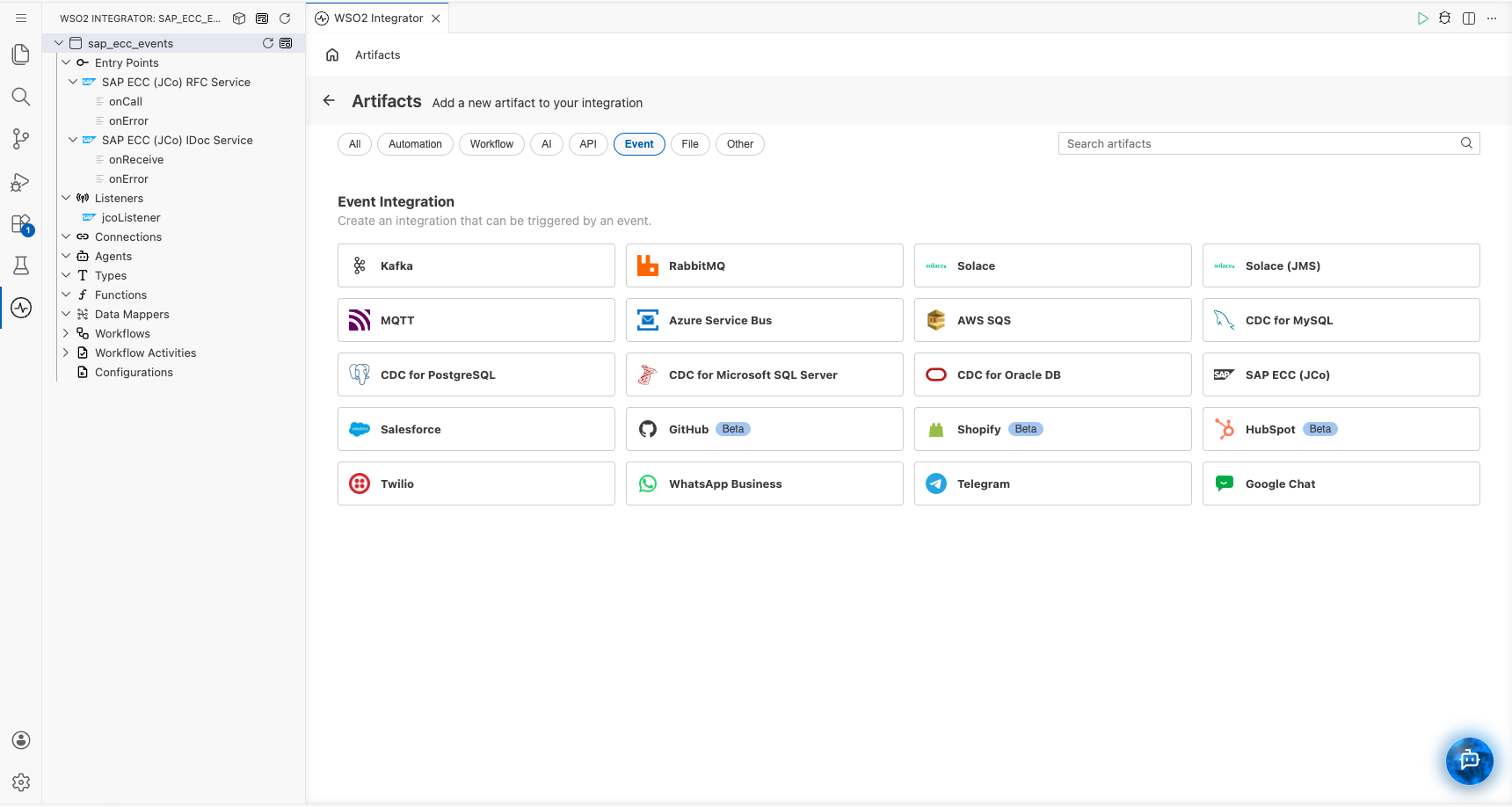
Click + Add Artifact in the canvas or click + next to Entry Points in the sidebar.
-
In the Artifacts panel, select SAP ECC (JCo) under Event Integration.
-
In the creation form, select Create New Listener and fill in the following fields under Listener Configurations:
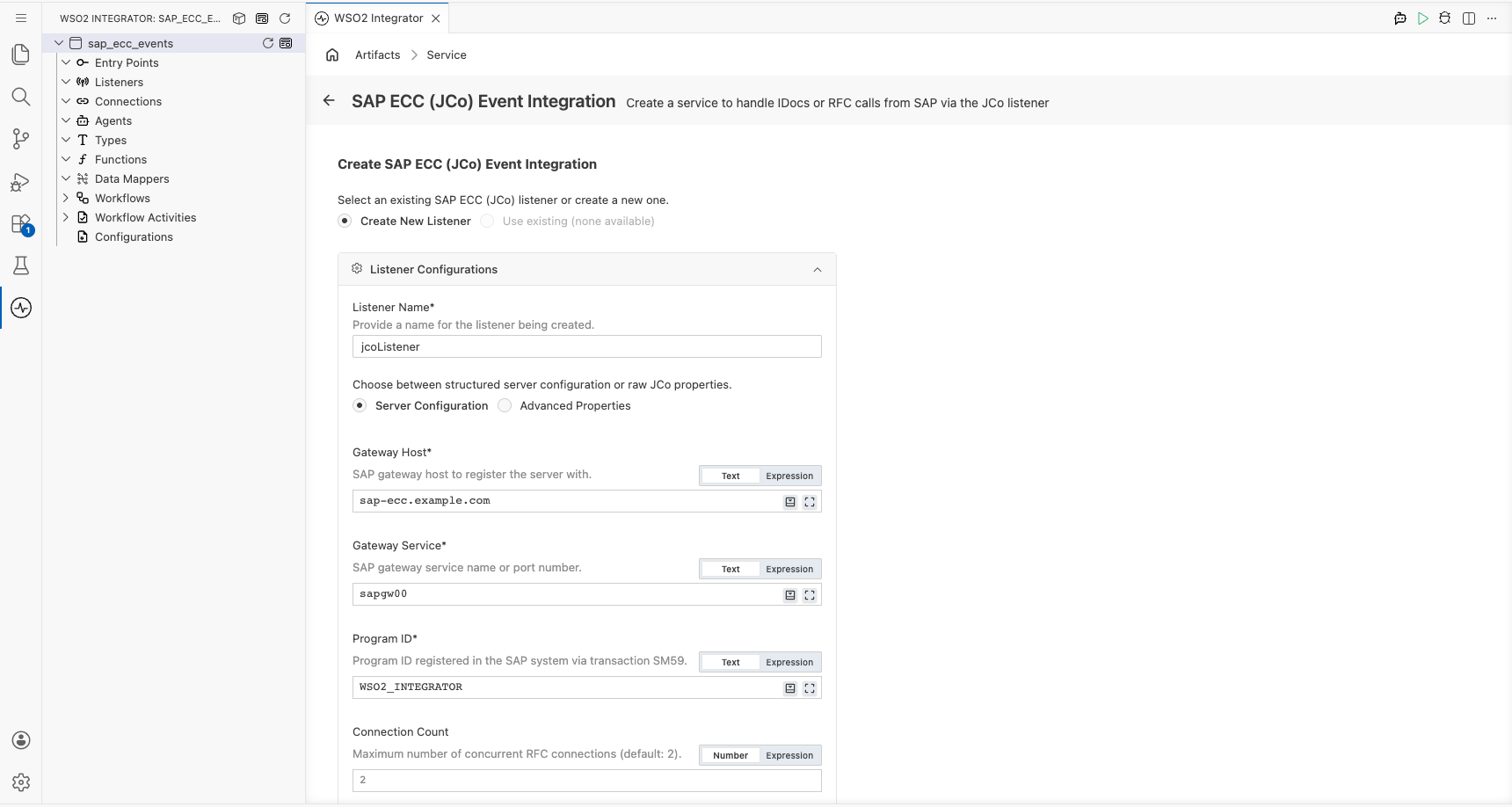
- Listener Name: Identifier for the listener created with this service. Defaults to
jcoListener. - Server Configuration or Advanced Properties: Choose Server Configuration to fill in the structured fields below, or Advanced Properties to supply raw JCo properties (
jco.server.*andjco.client.*) as amap<string>expression. - Gateway Host: Host name or IP address of the SAP gateway. For a single application server this is the application server host.
- Gateway Service: Gateway service name or port number. The service name is
sapgw<instance number>(for example,sapgw00), which resolves to port33<instance number>. - Program ID: Program ID of the registered server program created in SM59.
- Connection Count: Number of connections the server registers with the gateway. Defaults to
2. Raise it to process more IDocs or RFC calls in parallel.
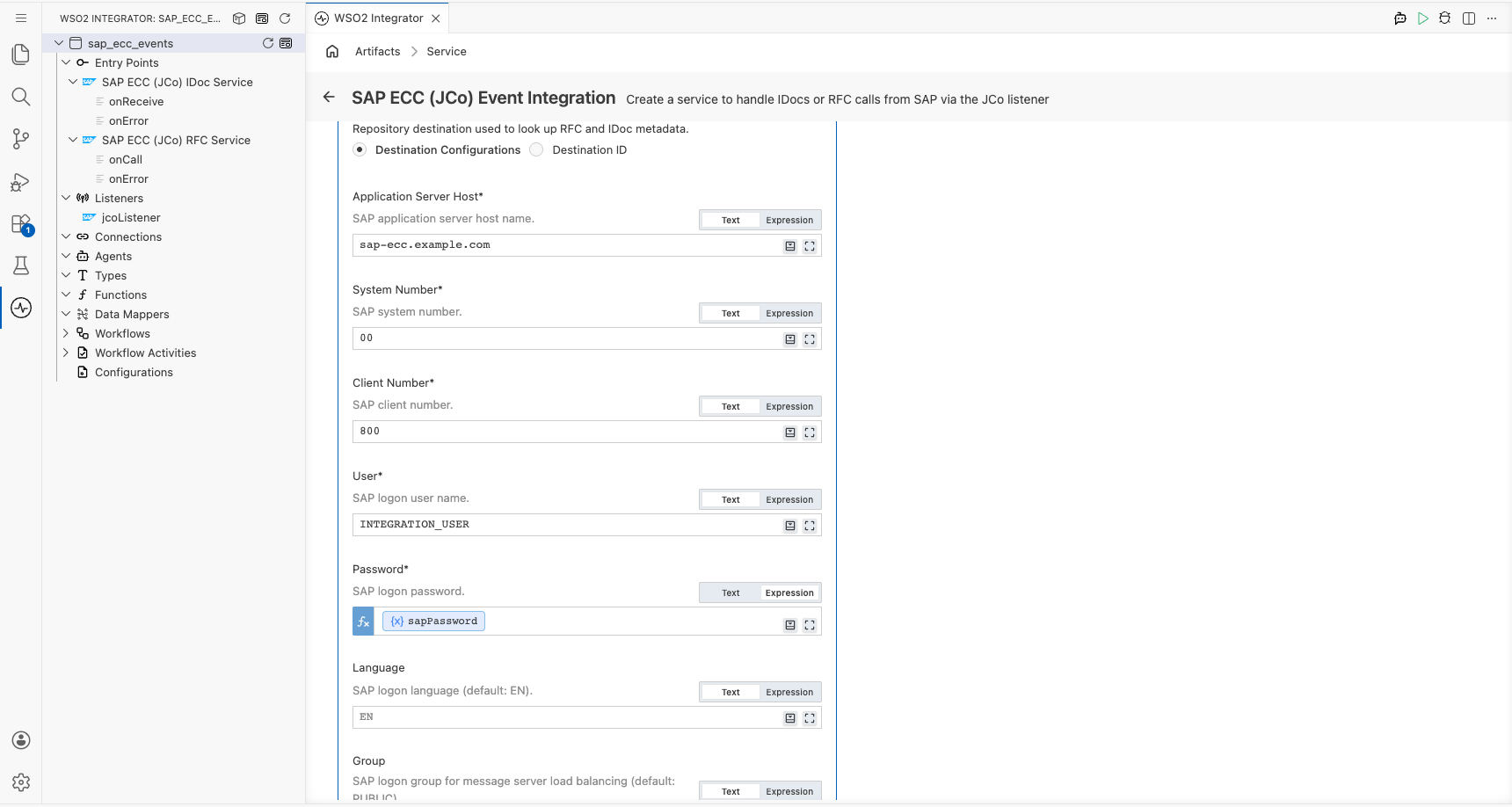
Under Repository destination, choose how the listener logs on to SAP to read IDoc and function module metadata:
- Destination Configurations: Log on with the credentials below. The listener registers them as an internal JCo destination. This is the default.
- Destination ID: Reuse the destination of an existing SAP ECC (JCo) connection in the integration instead. Enter the
destinationIdthe connection was created with. - Application Server Host: SAP application server host name.
- System Number: Two-digit SAP system number.
- Client Number: Three-digit SAP client.
- User: SAP logon user.
- Password: SAP logon password. Switch the field to Expression and reference a configurable (for example,
sapPassword) so the secret is not stored in code. - Language: SAP logon language. Defaults to
EN. - Group: Logon group for message server load balancing. Defaults to
PUBLIC.
Expand Advanced Configurations to set the Server Name, the name under which the server is registered with the JCo runtime. A UUID is generated if you leave it empty.
Scroll down to SAP Driver Libraries and select the SAP JARs. The files are copied into the project's
libsdirectory (if needed) and registered asprovidedplatform dependencies inBallerina.toml. Then pick the Service Type.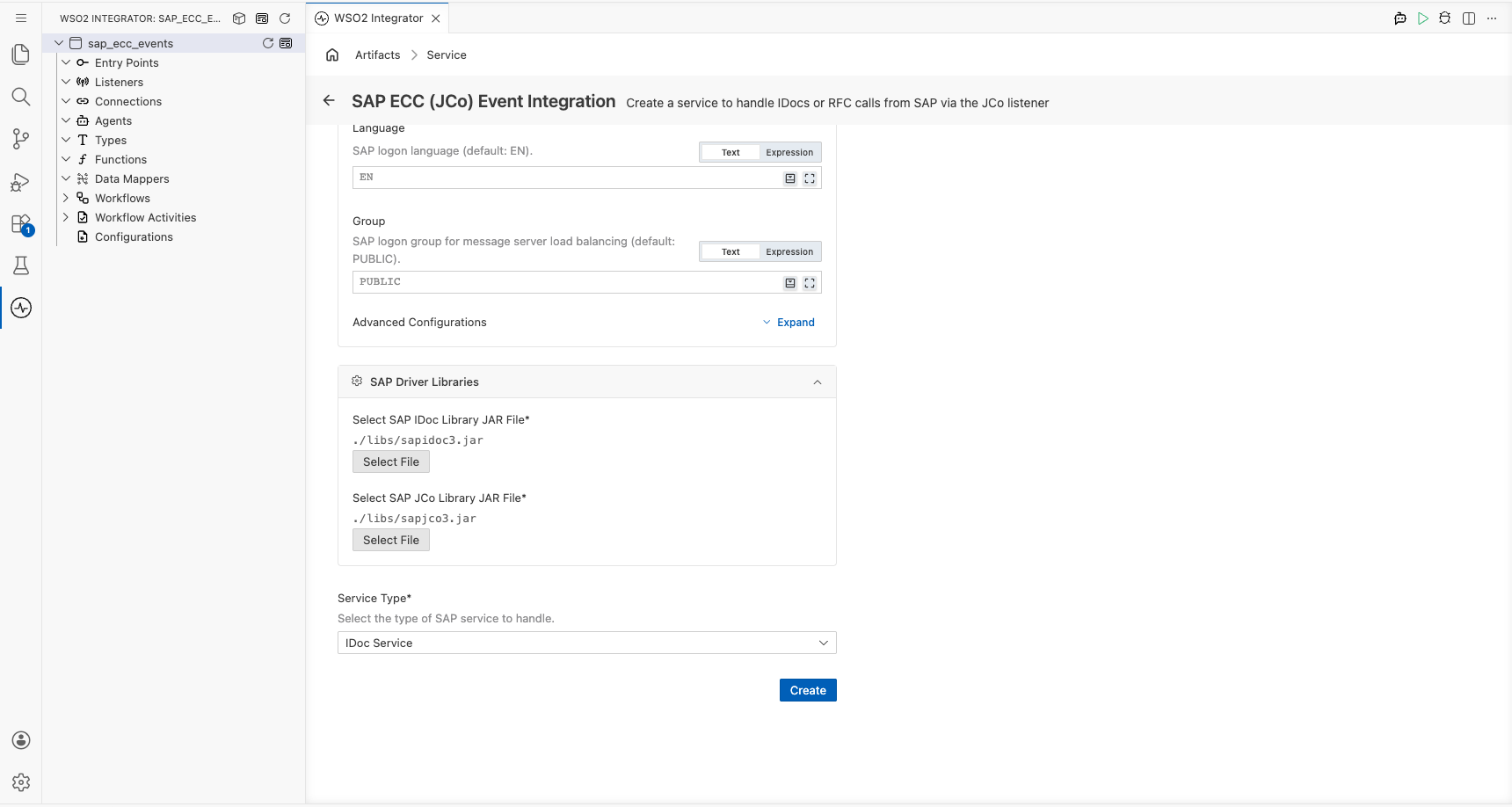
- Select SAP IDoc Library JAR File: Path to
sapidoc3.jar. - Select SAP JCo Library JAR File: Path to
sapjco3.jar. - Service Type: Keep IDoc Service, the default.
- Listener Name: Identifier for the listener created with this service. Defaults to
-
Click Create.
-
WSO2 Integrator opens the service in the Service Designer. The canvas shows the attached listener pill and the Event Handlers section with
onReceiveandonErrorpre-added.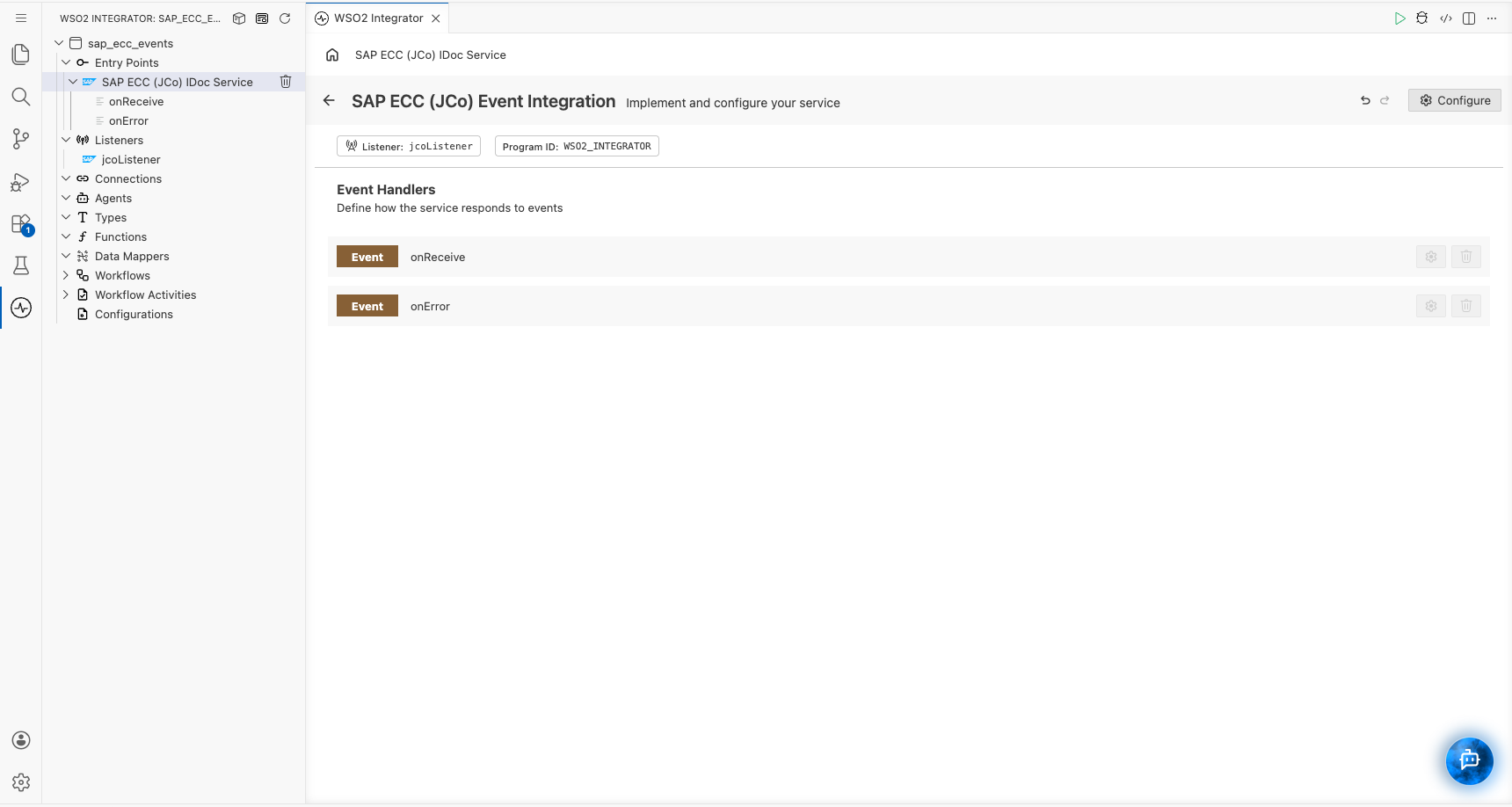
Click a handler to open it in the flow diagram view and implement the logic.
import ballerina/log;
import ballerinax/sap.jco;

// Gateway registration details and SAP credentials loaded from Config.toml at startup.
configurable string gwhost = ?;
configurable string gwserv = "sapgw00";
configurable string progid = ?;
configurable string ashost = ?;
configurable string sysnr = "00";
configurable string sapClient = ?;
configurable string user = ?;
configurable string passwd = ?;

// Registers the integration as a server program with the SAP gateway.
// The repository destination is used to look up IDoc and function module metadata.
listener jco:Listener sapListener = new ({
    gwhost,
    gwserv,
    progid,
    repositoryDestination: {
        ashost,
        sysnr,
        jcoClient: sapClient,
        user,
        passwd
    }
});

// Receives IDocs that SAP distributes to the registered program through ALE.
service jco:IDocService on sapListener {

    remote function onReceive(xml iDoc) returns error? {
        xml idocType = iDoc/**/<IDOCTYP>;
        log:printInfo("IDoc received", idocType = idocType.data());
    }

    remote function onError(error err) returns error? {
        log:printError("IDoc listener error", err);
    }
}
The SAP JCo JARs must be declared as provided platform dependencies in Ballerina.toml. The Visual Designer adds these entries for you when you select the JARs in the creation form.
[[platform.java21.dependency]]
path = "libs/sapidoc3.jar"
groupId = "com.sap"
artifactId = "com.sap.conn.idoc"
version = "3.1.*"
scope = "provided"

[[platform.java21.dependency]]
path = "libs/sapjco3.jar"
groupId = "com.sap"
artifactId = "com.sap.conn.jco"
version = "3.1.*"
scope = "provided"
Creating an RFC service
- Visual Designer
- Ballerina Code
-
Click + Add Artifact in the canvas or click + next to Entry Points in the sidebar.
-
In the Artifacts panel, select SAP ECC (JCo) under Event Integration.
-
In the creation form, select Use Existing Listener and pick the listener created with the IDoc service (for example,
jcoListener). The SAP driver libraries registered with that listener are shown under SAP Driver Libraries. If the integration has no SAP ECC (JCo) listener yet, select Create New Listener and fill in the fields described in Creating an IDoc service.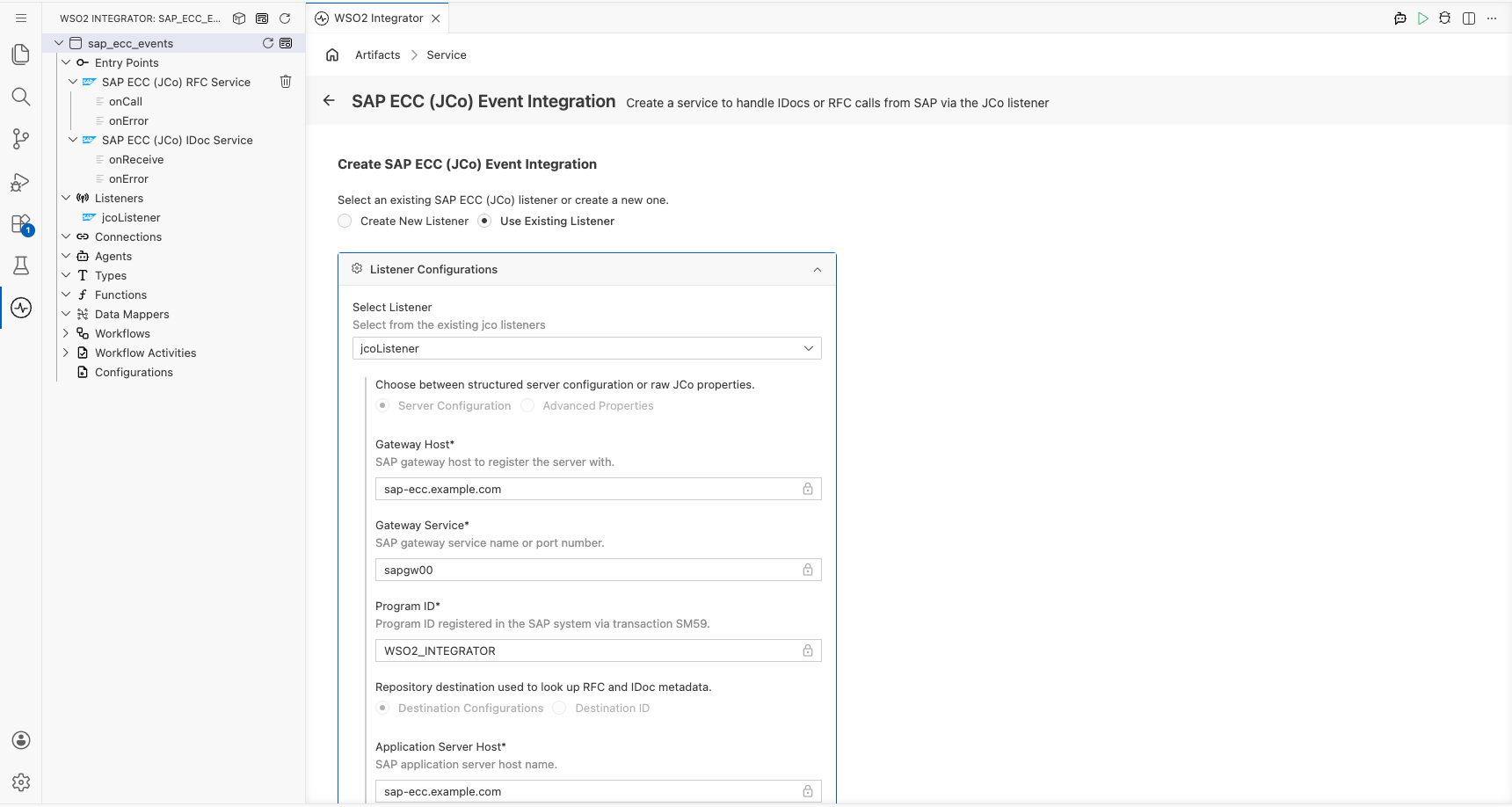
-
Set Service Type to RFC Service and click Create.
-
WSO2 Integrator opens the service in the Service Designer with
onCallandonErrorpre-added. Both services share the listener pill and the program ID.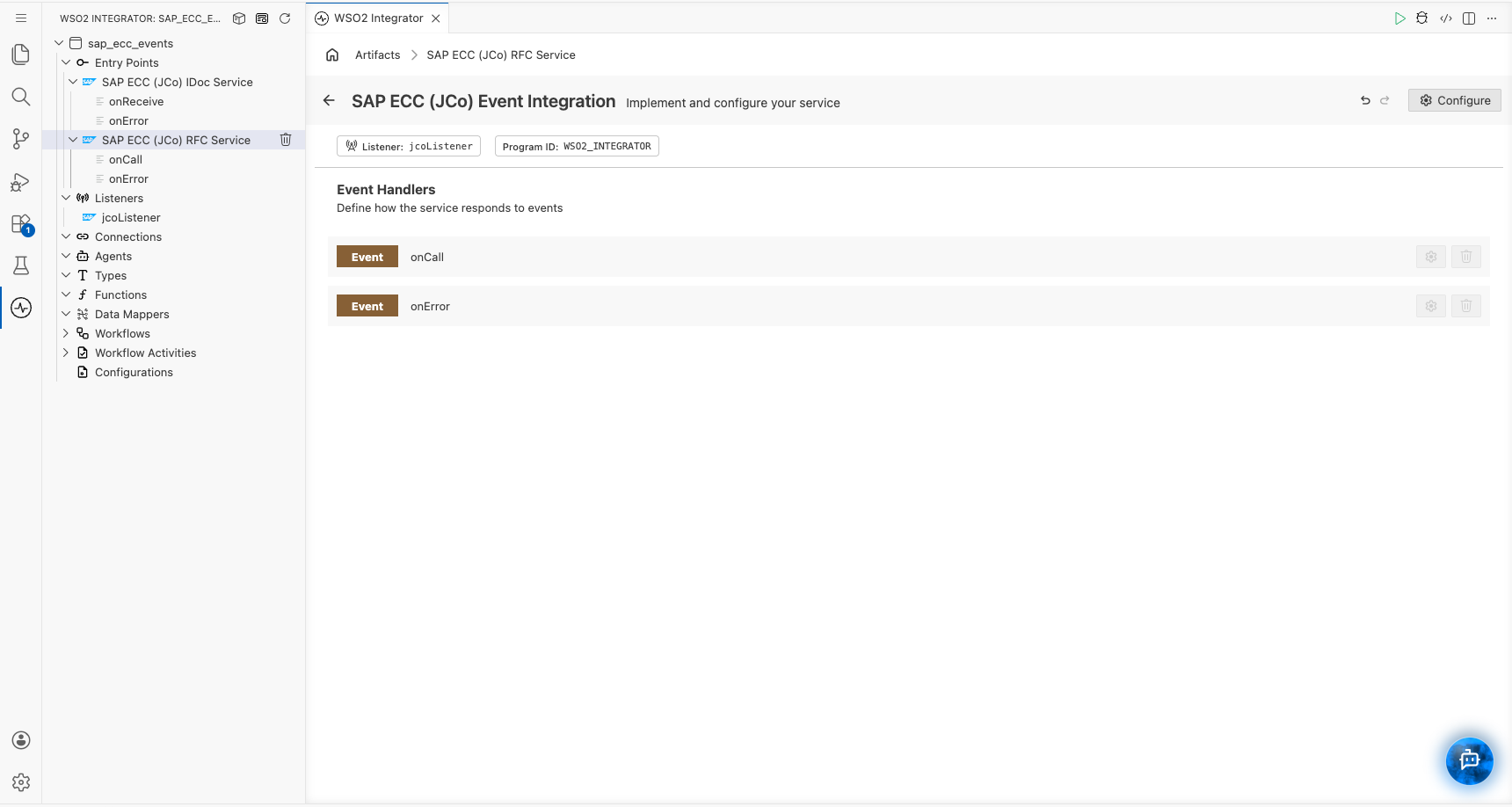
Click a handler to open it in the flow diagram view and implement the logic.
Attach the RFC service to the listener declared for the IDoc service. If the integration only handles RFC calls, declare the listener and the Ballerina.toml platform dependencies exactly as shown in Creating an IDoc service.
// Answers function module calls that SAP routes to the registered program.
service jco:RfcService on sapListener {

    remote function onCall(string functionName, jco:RfcParameters parameters) returns jco:RfcRecord|xml|error? {
        if functionName != "STFC_CONNECTION" {
            return error("Unsupported function module: " + functionName);
        }
        jco:RfcRecord importParams = parameters.importParameters ?: {};
        string requestText = (importParams["REQUTEXT"] ?: "").toString();
        return {
            "ECHOTEXT": requestText,
            "RESPTEXT": "Handled by WSO2 Integrator"
        };
    }

    remote function onError(error err) returns error? {
        log:printError("RFC listener error", err);
    }
}
Listener configuration
In the Service Designer, click Configure in the header to open the SAP ECC (JCo) Event Integration Configuration panel. The panel shows the service type and, under Attached Listeners, the configuration of the listener the service is attached to.
- Visual Designer
- Ballerina Code

| Field | Description | Default |
|---|---|---|
| Name | Identifier for the listener. | jcoListener |
| Server Config | Gateway registration as a record expression with gwhost, gwserv, progid, connectionCount, and repositoryDestination fields. Switch to Expression and supply a map<string> of raw jco.server.* and jco.client.* properties for settings that the record does not cover. | Required |
| Server Name | Name under which the server is registered with the JCo runtime. Also used as the ID of the internal repository destination when credentials are supplied inline. | Generated UUID |
Click Save Changes to apply updates.
// Listener configuration: gateway registration plus the SAP credentials
// used to look up IDoc and function module metadata.
listener jco:Listener sapListener = new ({
    gwhost: "sap.example.com",     // SAP gateway host
    gwserv: "sapgw00",             // Gateway service (port 3300)
    progid: "WSO2_INTEGRATOR",     // Program ID registered in SM59
    connectionCount: 2,            // Registered connections at the gateway
    repositoryDestination: {       // SAP logon used for metadata lookups
        ashost: "sap.example.com",
        sysnr: "00",
        jcoClient: "800",
        user,
        passwd
    }
});
jco:ServerConfig accepts the following fields:
gwhost(string, required): SAP gateway host to register the server with.gwserv(string, required): SAP gateway service name (sapgw<nn>) or port number.progid(string, required): Program ID of the registered server program (transaction SM59).connectionCount(int, default2): Number of connections registered with the gateway. This is also the maximum number of IDocs or RFC calls processed in parallel.repositoryDestination(stringorjco:DestinationConfig, required): RFC destination used to read IDoc and function module metadata. Pass SAP credentials as ajco:DestinationConfig, or thedestinationIdof ajco:Clientthat is already initialized in the same integration.
jco:DestinationConfig has these fields:
ashost(string, required): SAP application server host.sysnr(string, required): SAP system number, for example"00".jcoClient(string, required): SAP client, for example"800".user(string, required): SAP logon user.passwd(string, required): SAP logon password.lang(string, default"EN"): Logon language.group(string, default"PUBLIC"): Logon group, used with message server load balancing.
Reusing an SAP ECC (JCo) connection
If the integration also calls SAP through a jco:Client connection, give the client an explicit destinationId and pass that ID as the repositoryDestination. The listener then shares the client's destination instead of opening a second logon.
configurable jco:DestinationConfig destinationConfig = ?;
configurable jco:ServerConfig serverConfig = ?;

// Outbound connection to SAP, also used by the listener for metadata lookups.
final jco:Client sapClient = check new (destinationConfig, destinationId = "ECC_DEMO");

// serverConfig.repositoryDestination is set to "ECC_DEMO" in Config.toml.
listener jco:Listener sapListener = new (serverConfig);
[destinationConfig]
ashost = "sap.example.com"
sysnr = "00"
jcoClient = "800"
user = "INTEGRATION_USER"
passwd = "<password>"

[serverConfig]
gwhost = "sap.example.com"
gwserv = "sapgw00"
progid = "WSO2_INTEGRATOR"
repositoryDestination = "ECC_DEMO"
Advanced configuration
To set JCo properties that jco:ServerConfig does not expose, such as SNC or message server settings, pass a jco:AdvancedConfig map of raw property names instead.
listener jco:Listener sapListener = new ({
    "jco.server.gwhost": "sap.example.com",
    "jco.server.gwserv": "sapgw00",
    "jco.server.progid": "WSO2_INTEGRATOR",
    "jco.server.connection_count": "2",
    "jco.server.repository_destination": "ECC_DEMO",
    "jco.server.snc_mode": "1",
    "jco.server.snc_qop": "3",
    "jco.server.snc_lib": "/opt/sap/lib/libsapcrypto.so"
});
The listener starts asynchronously. A successful start means the server has been handed to the JCo runtime, not that registration with the gateway has completed. If the gateway is unreachable or rejects the program ID, JCo retries automatically and reports each failure through the service's onError handler, so implement onError to surface connectivity problems.
Event handlers
When an SAP ECC service is created, WSO2 Integrator adds the handlers for the selected service type automatically. Click a handler in the Service Designer or in the project tree to open it in the Flow Designer and implement the processing logic.
IDoc Service handlers
| Handler | Triggered when | Use when |
|---|---|---|
onReceive | SAP sends an IDoc to the registered program | Transforming the IDoc and forwarding it to downstream systems |
onError | The JCo runtime reports a gateway, registration, or IDoc parsing error | Logging failures and sending alerts |
onReceive receives the IDoc as an xml value in the standard IDOC XML format. The control record (EDI_DC40) carries the IDoc type, message type, and partner details, and the data records follow as segments named after the IDoc segment types.
- Visual Designer
- Ballerina Code
The following flow reads the message type and IDoc number from the control record, logs them, and branches on the message type to read the order header segment.
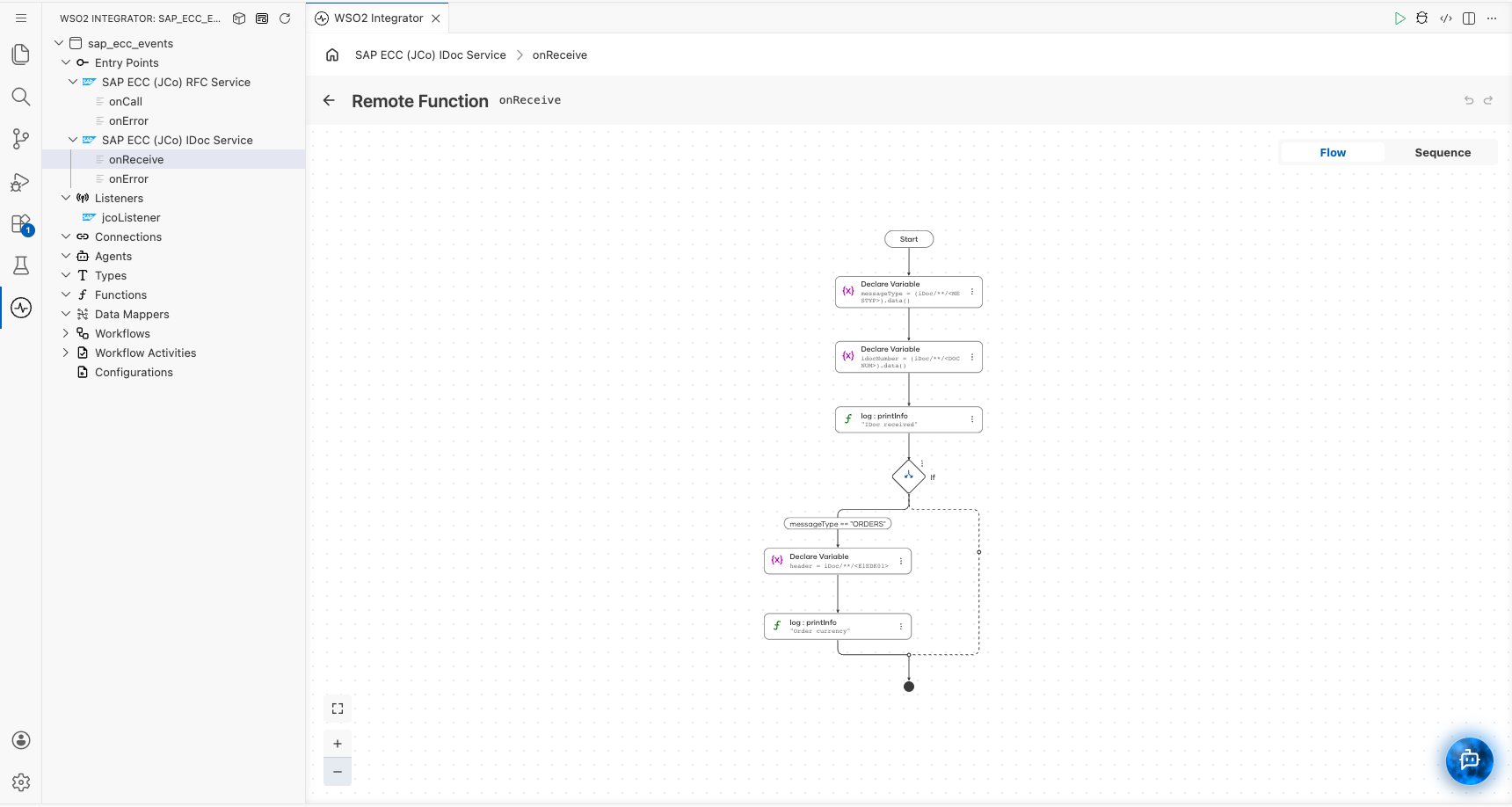
To build it, click + on the canvas and add nodes in order:
- Declare Variable
messageTypewith the expression(iDoc/**/<MESTYP>).data(), and another foridocNumberwith(iDoc/**/<DOCNUM>).data(). - Log (
log:printInfo) with the messageIDoc receivedand the two variables as key-value pairs. - If with the condition
messageType == "ORDERS". Inside the branch, declareheaderasiDoc/**/<E1EDK01>and log(header/<CURCY>).data().
service jco:IDocService on sapListener {

    remote function onReceive(xml iDoc) returns error? {
        // Control record fields identify the document.
        string messageType = (iDoc/**/<MESTYP>).data();
        string idocNumber = (iDoc/**/<DOCNUM>).data();
        log:printInfo("IDoc received", messageType = messageType, idocNumber = idocNumber);

        // Route on the message type. Segment names follow the IDoc type definition.
        if messageType == "ORDERS" {
            xml header = iDoc/**/<E1EDK01>;
            log:printInfo("Order currency", currency = (header/<CURCY>).data());
        }
    }

    remote function onError(error err) returns error? {
        log:printError("IDoc listener error", err);
    }
}
To work with typed values, declare a record that mirrors the IDoc structure and convert the XML with xmldata:parseAsType, or open the IDoc in the Data Mapper to map it to your target type.
IDoc delivery is fire-and-forget. SAP considers the IDoc delivered as soon as the tRFC call completes, and an error returned from onReceive is logged but not sent back to SAP. Persist or queue the IDoc before doing work that can fail if you need to retry it later.
RFC Service handlers
| Handler | Triggered when | Use when |
|---|---|---|
onCall | SAP calls a function module on the RFC destination that points to the registered program | Serving lookups, validations, or callbacks that ABAP programs call synchronously |
onError | The JCo runtime reports a gateway, registration, parameter construction, or response serialization error | Logging failures and sending alerts |
onCall receives the name of the function module and its parameters, and its return value is sent back to SAP as the function module's export and table parameters. The function module must exist in the SAP system (it supplies the parameter metadata), but its ABAP implementation is not executed; the integration answers in its place.
| Parameter | Type | Description |
|---|---|---|
functionName | string | Name of the function module SAP called (for example, STFC_CONNECTION) |
parameters | jco:RfcParameters | importParameters holds scalar and structure imports; tableParameters maps each table parameter name to its rows |
Return one of the following:
| Return value | Effect on the SAP caller |
|---|---|
jco:RfcRecord | Each field is written to the export or table parameter with the same name. Use a nested record for a structure and a record array for a table. |
xml | Each direct child element whose name matches an export parameter is written as a string value. Wrap table rows as <TABLE_NAME><row><FIELD>value</FIELD></row></TABLE_NAME>. |
() | Returns without data. Use for function modules with no export parameters. |
error | Raised as an ABAP exception in the calling program. |
- Visual Designer
- Ballerina Code
The following flow answers STFC_CONNECTION, the standard SAP connection test module, and rejects anything else.
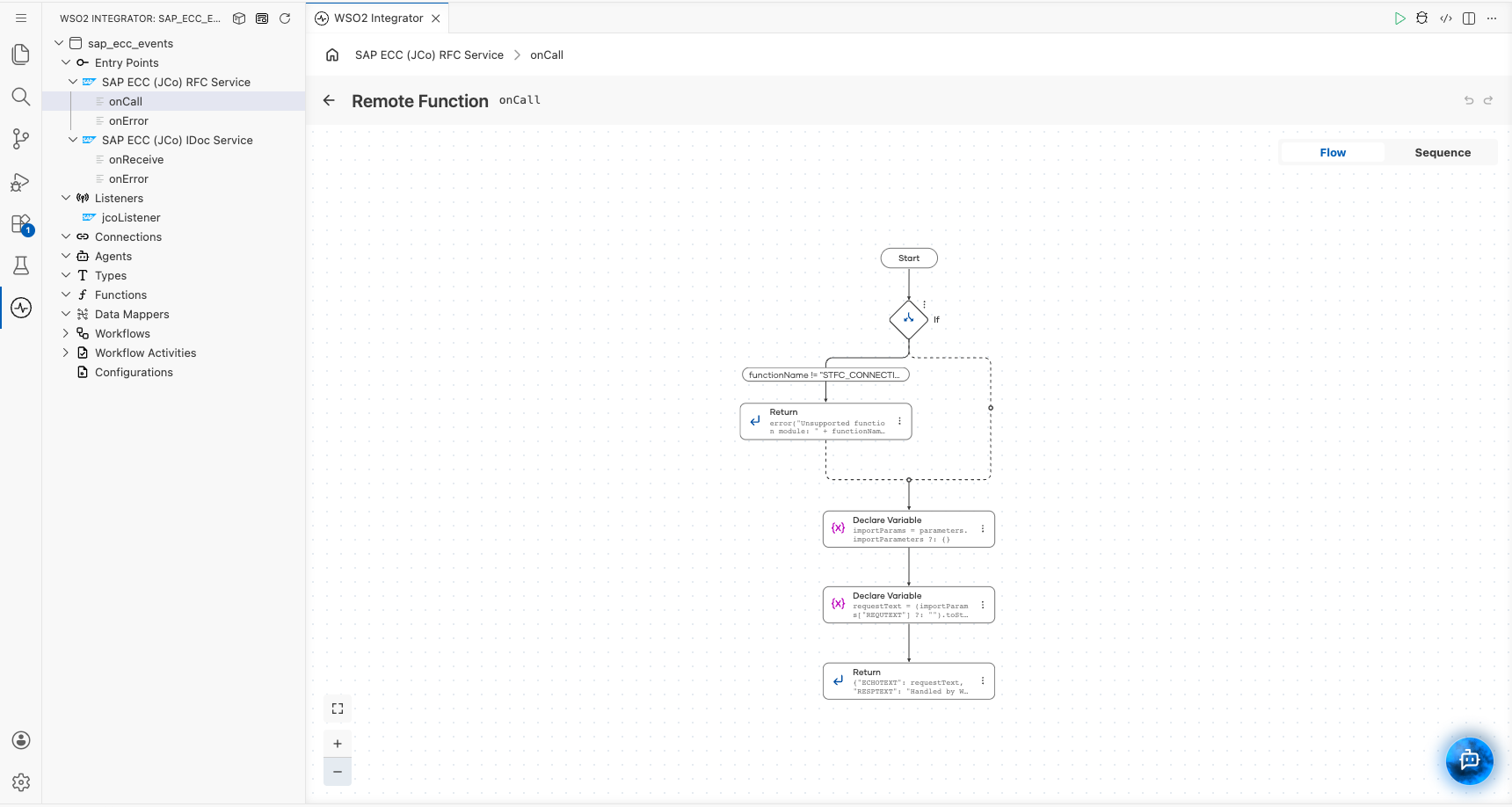
To build it, click + on the canvas and add nodes in order:
- If with the condition
functionName != "STFC_CONNECTION". Inside the branch, add Return witherror("Unsupported function module: " + functionName). - Declare Variable
importParamswithparameters.importParameters ?: {}, andrequestTextwith(importParams["REQUTEXT"] ?: "").toString(). - Return with the record
{"ECHOTEXT": requestText, "RESPTEXT": "Handled by WSO2 Integrator"}. Its fields become the export parametersECHOTEXTandRESPTEXTon the SAP side.
service jco:RfcService on sapListener {

    remote function onCall(string functionName, jco:RfcParameters parameters) returns jco:RfcRecord|xml|error? {
        // Reject function modules this service does not implement.
        if functionName != "STFC_CONNECTION" {
            return error("Unsupported function module: " + functionName);
        }
        // Read the import parameters SAP passed in.
        jco:RfcRecord importParams = parameters.importParameters ?: {};
        string requestText = (importParams["REQUTEXT"] ?: "").toString();
        // The returned record becomes the export parameters of the function module.
        return {
            "ECHOTEXT": requestText,
            "RESPTEXT": "Handled by WSO2 Integrator"
        };
    }

    remote function onError(error err) returns error? {
        log:printError("RFC listener error", err);
    }
}
To serve several function modules from one service, branch on functionName with a match statement and return the record that each module expects.
Field values in a jco:RfcRecord can be string, int, float, decimal, boolean, time:Date, time:TimeOfDay, byte[], a nested record (structure), or a record array (table).
Triggering events from SAP
After the integration starts, use the following transactions to verify the registration and send test events.
| Step | Transaction | What to do |
|---|---|---|
| Check registration | SM59 | Open the TCP/IP destination and click Connection Test. A successful test confirms the program ID is registered at the gateway. Transaction SMGW > Goto > Logged on Clients lists the registered program. |
| Send a test IDoc | WE19 | Create a test IDoc for the message type, set the receiver port to the port from WE21, and choose Standard Outbound Processing. Transaction WE02 or WE05 shows the IDoc status; status 03 means it was passed to the port. |
| Distribute master data | BD10 / BD12 / BD14 | Send material (MATMAS), customer (DEBMAS), or vendor (CREMAS) IDocs to the logical system configured in the partner profile. |
| Call a function module | SE37 | Open the function module, choose Test/Execute, enter the RFC target sys as the SM59 destination, and execute. The values returned by onCall appear as the export parameters. |
What's next
- SAP ECC (JCo) connector reference - call function modules, send IDocs, and use the full trigger reference
- Data Mapper - map IDoc segments to the records your downstream systems expect
- Connections - reuse SAP ECC (JCo) credentials across services
- Kafka - publish SAP events to Apache Kafka topics