FTP / SFTP
FTP, SFTP, and FTPS file integrations poll remote file servers for new files and process them as they arrive. Use them for ETL pipelines, batch processing, and B2B integrations where partners exchange data as CSV, XML, JSON, or binary files.
| Protocol | Description | Transport security | Authentication |
|---|---|---|---|
| FTP | Standard file transfer protocol with no encryption. Suitable for internal networks or non-sensitive data. | None | Anonymous or username/password |
| SFTP | File transfer over an SSH tunnel. Use this for secure transfers when the remote server supports SSH. | SSH | Username/password or private key |
| FTPS | FTP extended with SSL/TLS encryption. Use this when the remote server requires FTP with certificate-based security. | SSL/TLS | Username/password with certificate verification |
Creating an FTP service
Use this flow for plain (unencrypted) FTP. Default port: 21. Supports anonymous connections and username/password authentication.
- Visual Designer
- Ballerina Code
-
Click + Add Artifact in the canvas or click + next to Entry Points in the sidebar.
-
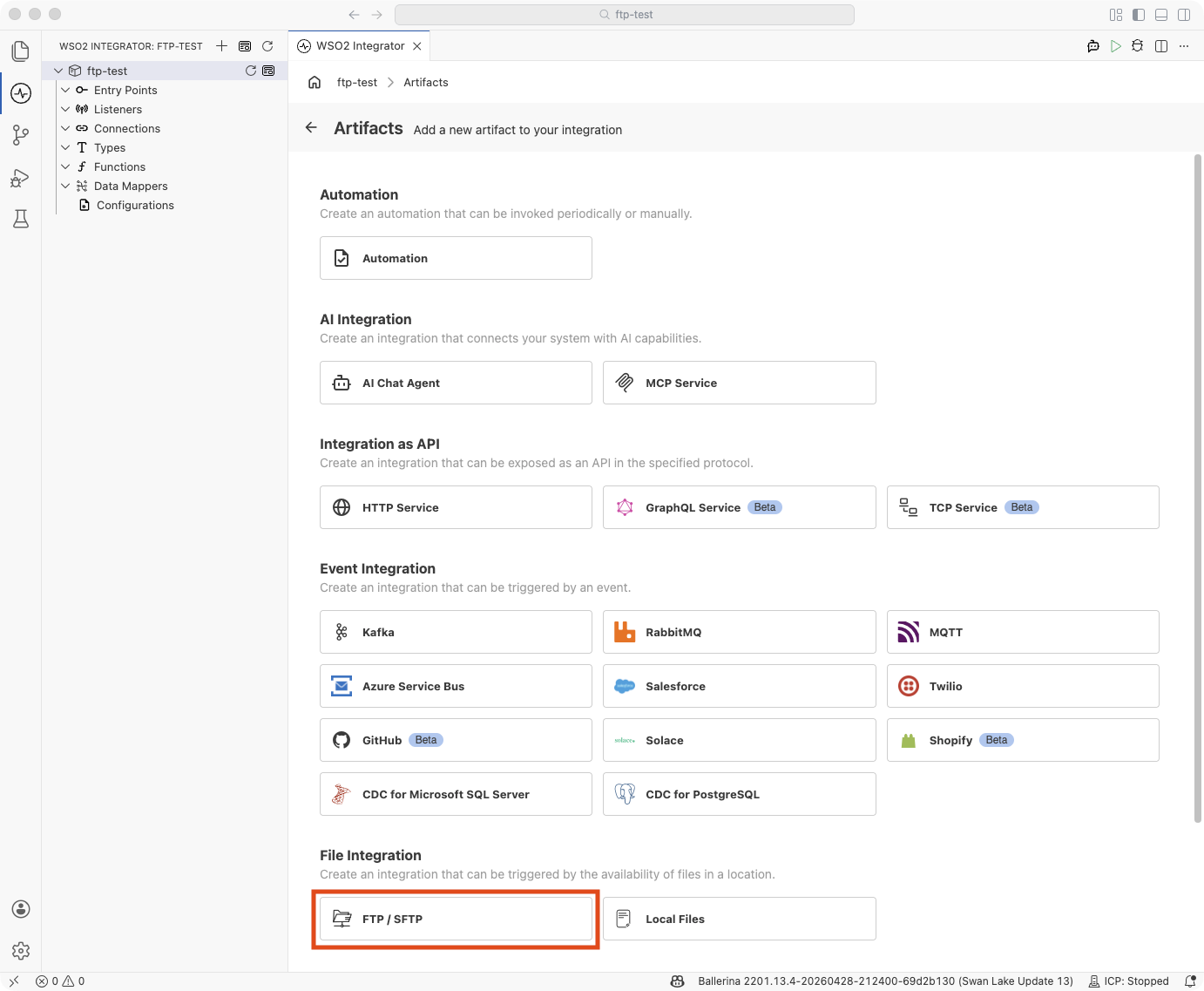
In the Artifacts panel, select FTP / SFTP under File Integration.
-
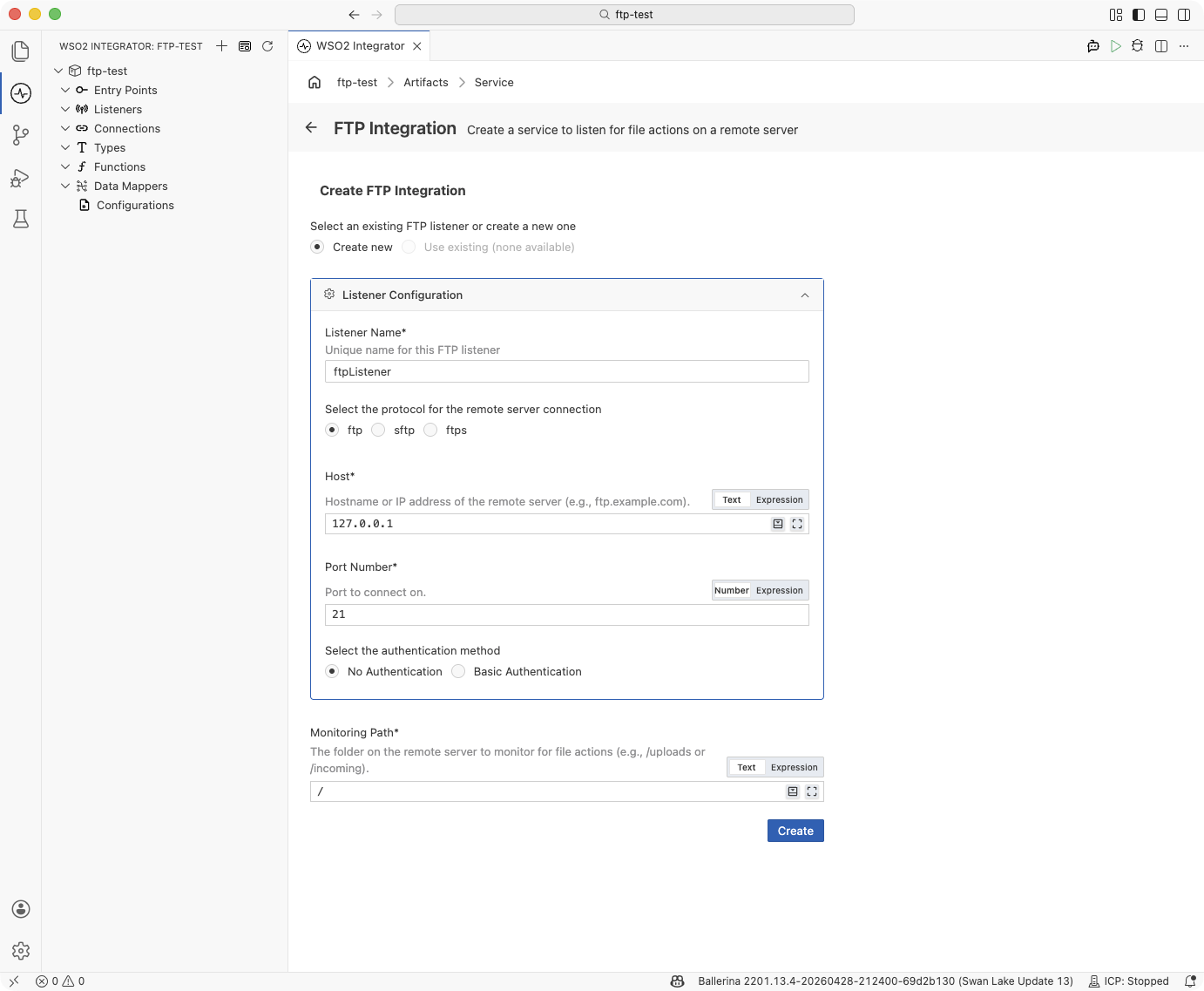
In the Create FTP Integration form, keep Protocol set to ftp.
-
Fill in the Listener Configuration:
Field Description Listener Name Identifier for this listener (e.g., ftpListener).Host Hostname or IP address of the remote server (e.g., ftp.example.com).Port Number Port to connect on. Set to 21for standard FTP. -
Choose an authentication method:
Option Fields revealed Use when No Authentication — The server accepts anonymous logins or a username alone without a password. Basic Authentication Username, Password The server requires a username and password. -
Enter the Monitoring Path — the directory on the remote server to poll for new files (e.g.,
/uploads). Defaults to/. -
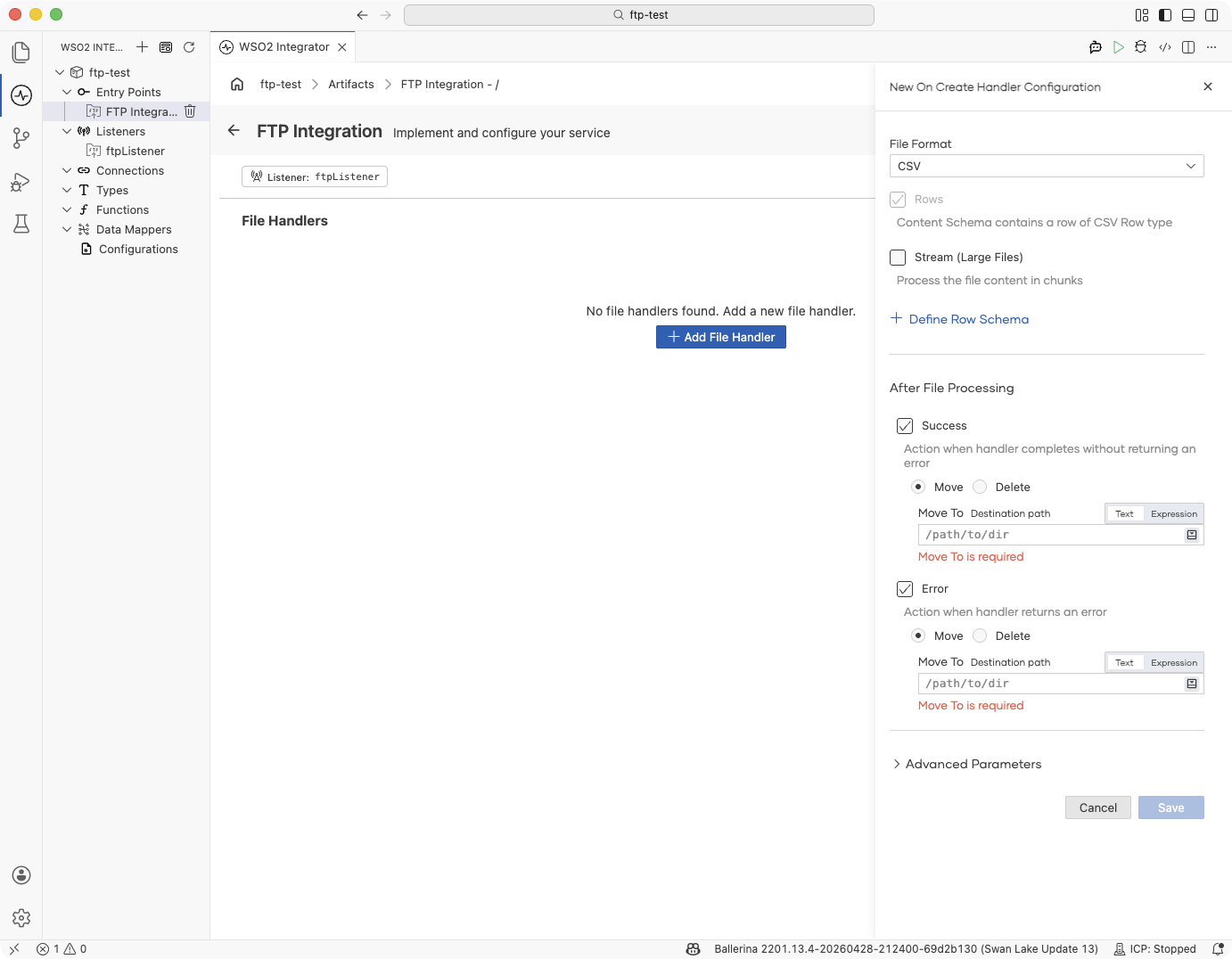
Click Create. WSO2 Integrator opens the service in the Service Designer with the listener pill attached.
-
Click + Add File Handler to define how incoming files are processed.
FTP with anonymous access:
import ballerina/ftp;

listener ftp:Listener ftpListener = check new ({
    protocol: ftp:FTP,
    host: "ftp.example.com",
    port: 21
});

@ftp:ServiceConfig {
    path: "/incoming"
}
service on ftpListener {
    remote function onFileText(string content, ftp:FileInfo fileInfo) returns error? {
        // Process text file content
    }
}
FTP with username and password:
import ballerina/ftp;

configurable string host = "ftp.example.com";
configurable int port = 21;
configurable string username = ?;
configurable string password = ?;

listener ftp:Listener ftpListener = check new ({
    protocol: ftp:FTP,
    host: host,
    port: port,
    auth: {credentials: {username, password}}
});

@ftp:ServiceConfig {
    path: "/incoming"
}
service on ftpListener {
    remote function onFileText(string content, ftp:FileInfo fileInfo) returns error? {
        // Process text file content
    }
}
Creating an FTPS service
Use this flow for FTP over SSL/TLS. Default port: 21 (explicit
FTPS) or 990 (implicit FTPS). The listener performs a TLS handshake
before any credentials are exchanged, so certificate material is always
part of the configuration.
- Visual Designer
- Ballerina Code
-
Click + Add Artifact → FTP / SFTP under File Integration.
-
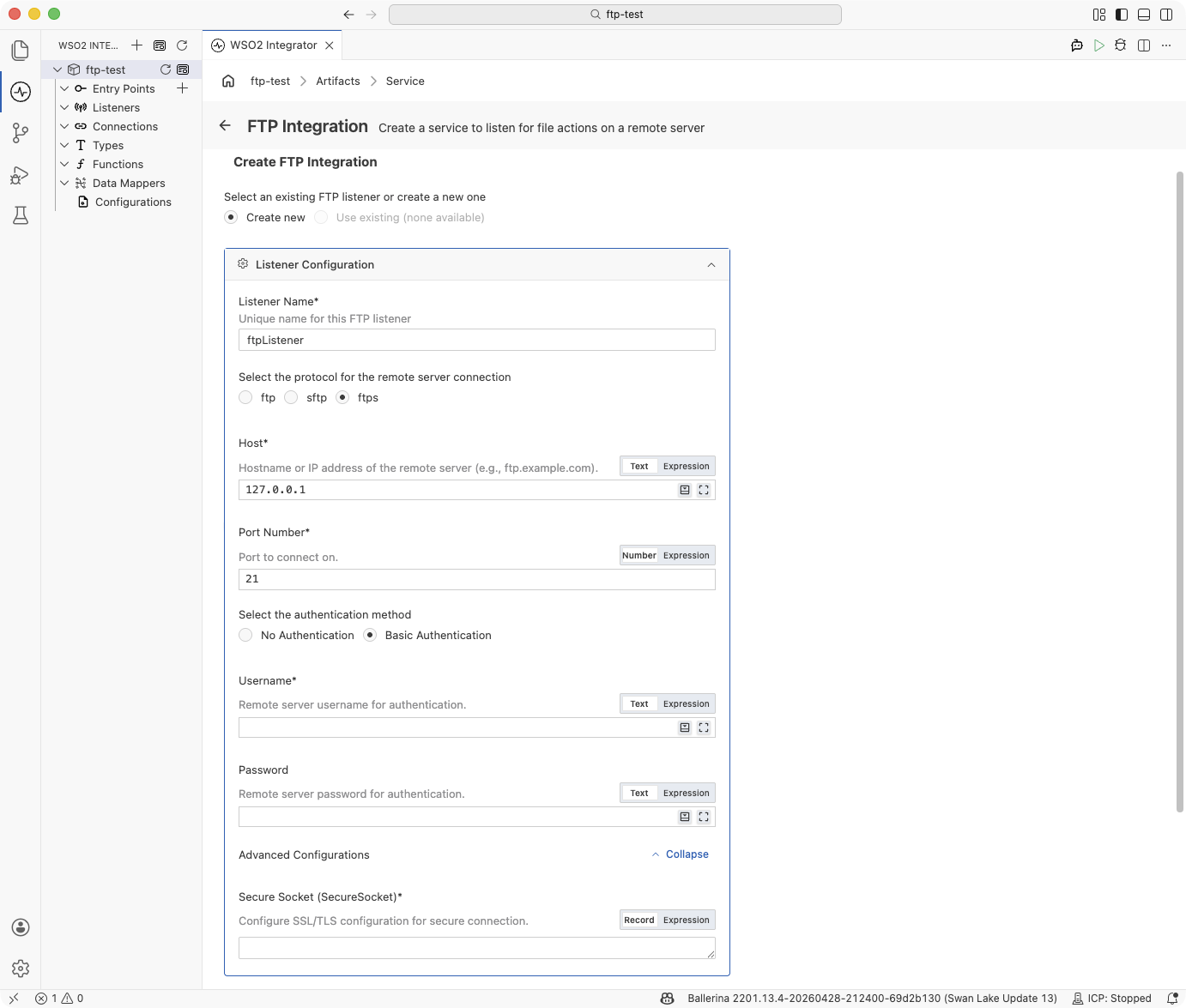
In the Create FTP Integration form, select Protocol → ftps.
-
Fill in the Listener Configuration:
Field Description Listener Name Identifier for this listener (e.g., ftpsListener).Host Hostname or IP address of the remote server (e.g., ftps.example.com).Port Number Port to connect on. Set to 21for explicit FTPS or990for implicit FTPS. -
Choose an authentication method:
Option Fields revealed Use when No Authentication — The server accepts anonymous TLS connections. Basic Authentication Username, Password The server requires credentials over the encrypted channel. Typical for FTPS. -
Expand Advanced Configurations. The Secure Socket field is required for FTPS. Click Record and supply the SSL/TLS configuration — at minimum a truststore or certificate path so the client can verify the server:
{
    cert: {path: "/path/to/truststore.jks", password: "changeit"}
}
See SSL/TLS configuration for the full field set, including mutual TLS and protocol-version pinning.
-
Enter the Monitoring Path and click Create.
-
Click + Add File Handler in the Service Designer to define how incoming files are processed.
FTPS with username and password and a truststore:
import ballerina/ftp;

configurable string host = "ftps.example.com";
configurable int port = 21;
configurable string username = ?;
configurable string password = ?;

listener ftp:Listener ftpsListener = check new ({
    protocol: ftp:FTPS,
    host: host,
    port: port,
    auth: {
        credentials: {username, password},
        secureSocket: {
            cert: {
                path: "/path/to/truststore.jks",
                password: "changeit"
            }
        }
    }
});

@ftp:ServiceConfig {
    path: "/incoming"
}
service on ftpsListener {
    remote function onFileText(string content, ftp:FileInfo fileInfo) returns error? {
        // Process text file content
    }
}
The cert field accepts either a crypto:TrustStore record (JKS) or a
path to a PEM certificate. For the full schema, see
SSL/TLS configuration (FTPS).
Creating an SFTP service
Use this flow for SFTP (FTP over SSH). Default port: 22. The form collects the SSH private key material and matching username. For username/password SFTP authentication, use the Ballerina Code tab below.
- Visual Designer
- Ballerina Code
-
Click + Add Artifact → FTP / SFTP under File Integration.
-
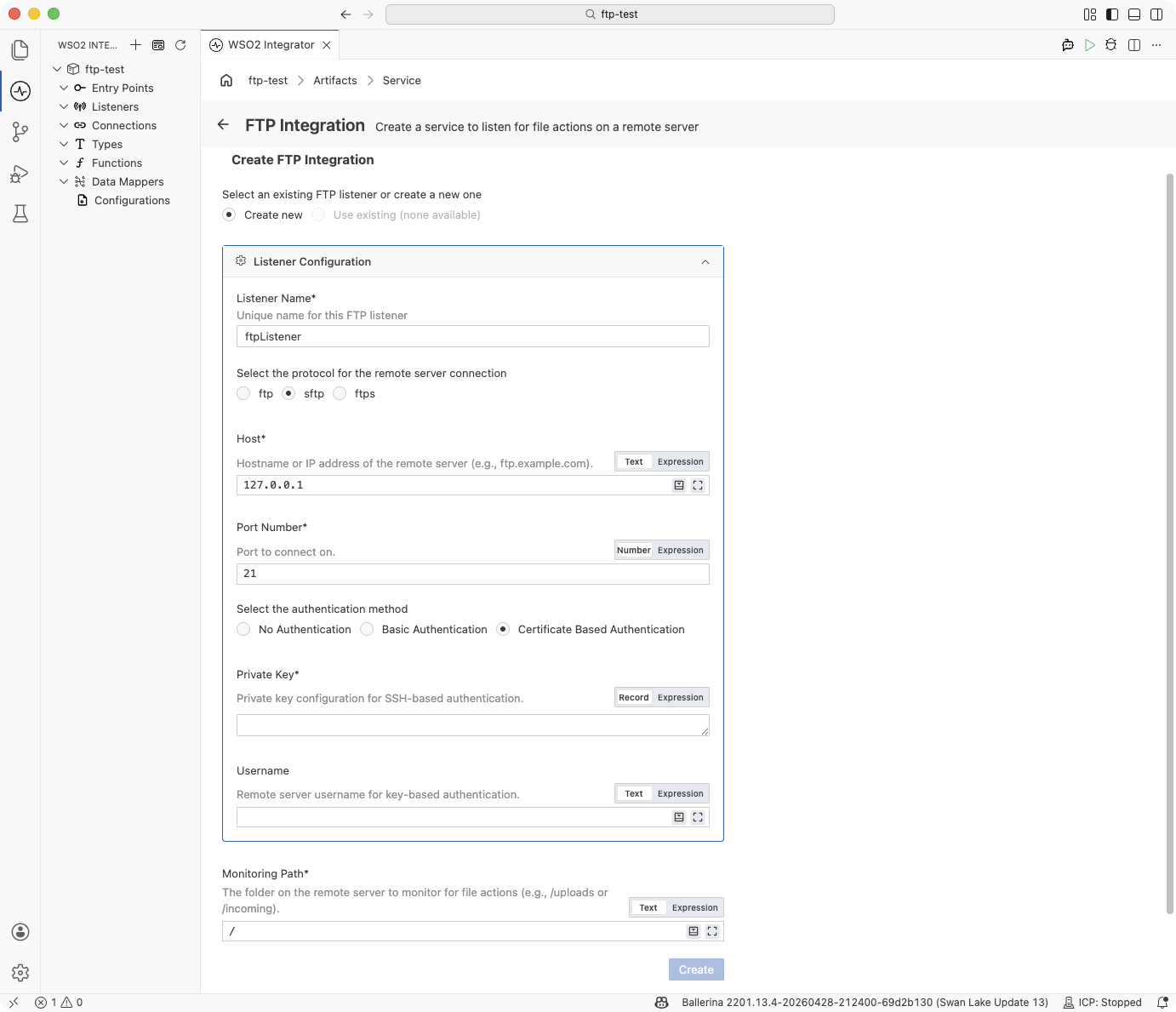
In the Create FTP Integration form, select Protocol → sftp.
-
Fill in the Listener Configuration:
Field Description Listener Name Identifier for this listener (e.g., sftpListener).Host Hostname or IP address of the remote server (e.g., sftp.example.com).Port Number Port to connect on. Set to 22for SFTP. -
Choose Certificate-Based Authentication under authentication method. This reveals the Private Key and Username fields.
-
Enter the Private Key record. Click Record on the field and supply:
{path: "/path/to/private_key"}If the private key is passphrase-protected, include the passphrase in the record:
{path: "/path/to/private_key", password: "my-passphrase"} -
Enter the Username that matches the configured private key and the Monitoring Path.
-
Click Create. Then click + Add File Handler in the Service Designer.
SFTP with username and password:
import ballerina/ftp;

configurable string host = "sftp.partner.com";
configurable int port = 22;
configurable string username = ?;
configurable string password = ?;

listener ftp:Listener sftpListener = check new ({
    protocol: ftp:SFTP,
    host: host,
    port: port,
    auth: {credentials: {username, password}}
});

@ftp:ServiceConfig {
    path: "/data/inbound"
}
service on sftpListener {
    remote function onFileText(string content, ftp:FileInfo fileInfo) returns error? {
        // Process text file content
    }
}
SFTP with a private key:
import ballerina/ftp;

configurable string host = "sftp.partner.com";
configurable int port = 22;
configurable string username = ?;
configurable string privateKeyPath = ?;

listener ftp:Listener sftpListener = check new ({
    protocol: ftp:SFTP,
    host: host,
    port: port,
    auth: {
        credentials: {username},
        privateKey: {path: privateKeyPath}
    }
});

@ftp:ServiceConfig {
    path: "/data/inbound"
}
service on sftpListener {
    remote function onFileCsv(string[][] content, ftp:FileInfo fileInfo) returns error? {
        // Process CSV rows
    }
}
SFTP with a passphrase-protected private key:
listener ftp:Listener sftpListener = check new ({
    protocol: ftp:SFTP,
    host: host,
    port: port,
    auth: {
        credentials: {username},
        privateKey: {path: privateKeyPath, password: keyPassphrase}
    }
});
File handlers
A file handler is a remote function that WSO2 Integrator calls each time the listener's polling cycle detects a file event in the monitored directory. A service can declare any combination of the three handler types:
| Handler | Trigger |
|---|---|
onCreate (onFileText / onFileJson / onFileXml / onFileCsv / onFile) | A new file matching the service's fileNamePattern appears on the remote server. The function name depends on the content type — one variant per file format. |
| onFileDelete | A previously seen file is no longer present on the remote server. |
| onError | The runtime could not map incoming content to a typed onCreate handler — for example, a JSON handler received malformed JSON. |
At least one onCreate or onFileDelete handler is required — a service with only an onError handler is not valid.
onFileDeleted is also supported as a legacy/deprecated delete callback. Prefer onFileDelete for new services.
Adding a file handler
- Visual Designer
- Ballerina Code
In the Service Designer, click + Add File Handler and pick onCreate, onDelete, or onError. The handler configuration panel opens on the right.
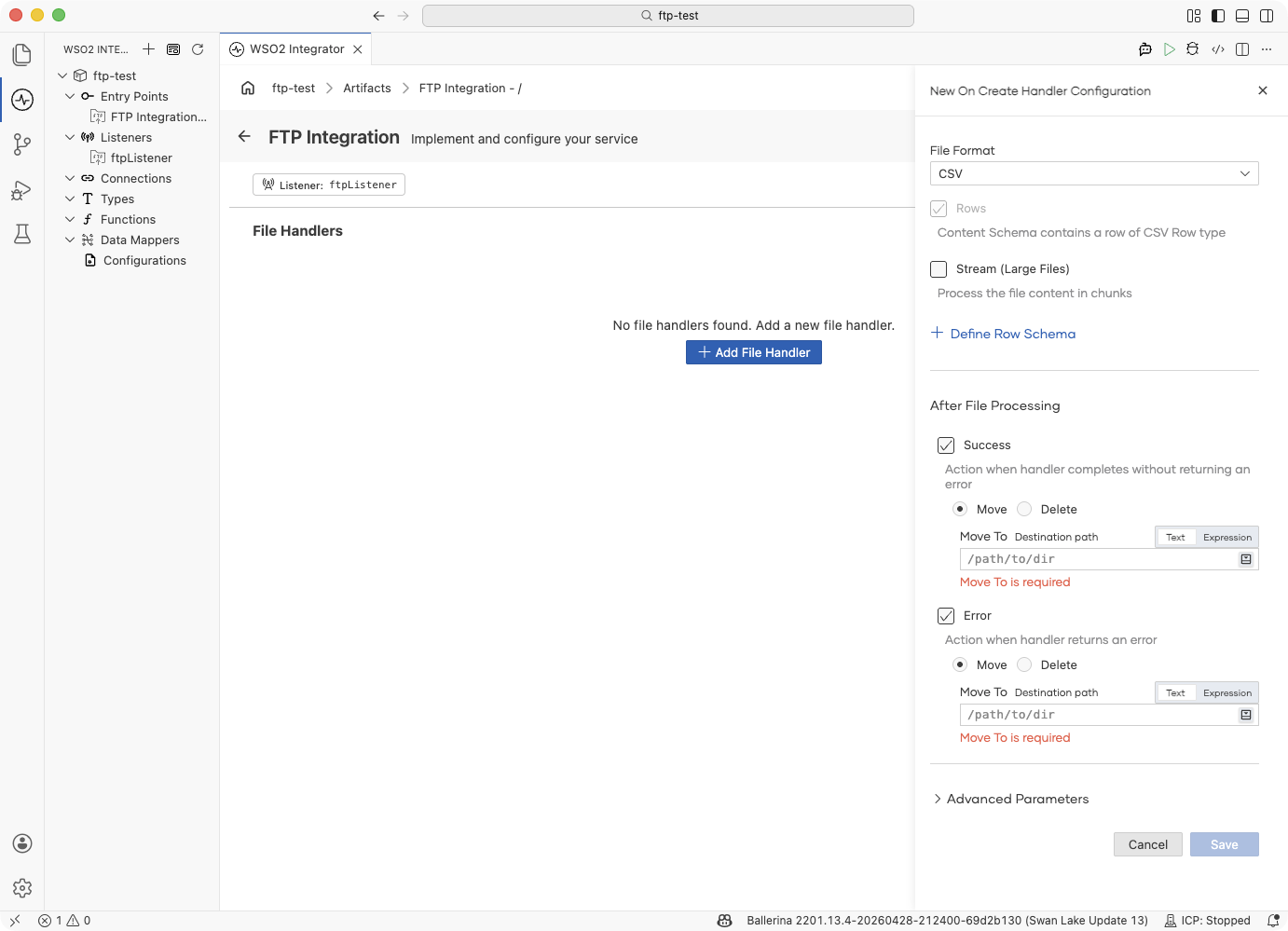
| Field | Description |
|---|---|
| File Format | (onCreate only) The format of incoming files. Determines the handler function name and the type of the content parameter. Options: TEXT, JSON, XML, CSV, RAW. See Content types. |
| + Define Content Schema | (JSON, XML only) Binds the document to a record type you build in a form. See Data binding. |
| + Define Row Schema | (CSV only) Binds each row to a record type you build in a form. See Data binding. |
| Stream (Large Files) | (CSV, RAW only) Hands the handler the file a piece at a time instead of loading it all into memory. See Streaming large files. |
| After File Processing — Success | Action to take when the handler completes without error: Move to a destination path or Delete the file. See Post-processing. |
| After File Processing — Error | Action to take when the handler returns an error: Move to an error directory or Delete the file. |
Expand Advanced Parameters for optional handler parameters:
| Field | Description |
|---|---|
| File Metadata (fileInfo) | Include ftp:FileInfo as a parameter in the handler function, giving access to file name, path, size, and other metadata. See FileInfo. |
| FTP Connection (caller) | Include ftp:Caller as a parameter, giving access to read/write operations on the same server. See Caller operations. |
Click Save to add the handler.
File handlers are typed remote function declarations inside the service. WSO2 Integrator routes events to handlers by function name; the content parameter type determines deserialization.
Text file handler:
remote function onFileText(string content, ftp:FileInfo fileInfo) returns error? {
    // content contains the full file text
}
JSON file handler (bound to a record type):
type Order record {|
    string orderId;
    string product;
    int quantity;
|};

remote function onFileJson(Order orderData, ftp:FileInfo fileInfo) returns error? {
    // orderData is deserialized from JSON
}
CSV streaming handler (large files):
remote function onFileCsv(stream<string[], error?> content, ftp:FileInfo fileInfo) returns error? {
    check content.forEach(function(string[] row) {
        // Process each row without loading the whole file into memory
    });
}
Binary file handler:
remote function onFile(byte[] content, ftp:FileInfo fileInfo) returns error? {
    // content is the raw file bytes
}
Delete handler:
remote function onFileDelete(string deletedFile) returns error? {
    // deletedFile is the path of the file that was removed
}
Error handler — fires when content cannot be mapped to a typed handler (for example, a JSON handler receiving malformed JSON):
remote function onError(ftp:Error ftpError) returns error? {
    log:printError("file processing error", 'error = ftpError);
}
Content types
The File Format chosen on an onCreate handler determines the function name and the type of the content parameter.
| File Format | Handler function | Content type | Use when |
|---|---|---|---|
| TEXT | onFileText | string | Files are plain text (logs, EDI, custom formats). |
| JSON | onFileJson | json or a record type | Files are JSON documents. |
| XML | onFileXml | xml or a record type | Files are XML documents. |
| CSV | onFileCsv | string[][], record[], or a stream variant | Files are comma-separated values. Define a row schema to bind each row to a record type. Enable Stream for large files. |
| RAW | onFile | byte[] or stream<byte[], error?> | Binary files or when you need raw byte access. Enable Stream for large files. |
Post-processing: moving or deleting files
Once a handler finishes — whether successfully or with an error — the runtime can move the file to another directory on the same server or delete it outright. You configure this directly on the Add File Handler form; switch to the Ballerina Code tab only when you need to review or adjust the generated annotation.
- Visual Designer
- Ballerina Code
The Add File Handler form's After File Processing section has two independent toggles:
| Event | Ticked by default? | Action picker | Extra input |
|---|---|---|---|
| Success | Yes | Move or Delete | Move To destination path (required when Move is chosen) |
| Error | Yes | Move or Delete | Move To destination path (required when Move is chosen) |
Common combinations:
- Move on success, move on error — archive processed files and quarantine failures. Set separate destinations like
/processedand/errors. - Delete on success, move on error — discard successfully processed files, keep failures for review.
- Leave the file alone for this outcome — untick Success or Error to skip the action for that side.
The choices update the handler's @ftp:FunctionConfig annotation as you toggle; switch to the Ballerina Code tab to review the generated annotation.
The form writes an @ftp:FunctionConfig annotation on the handler. Each of afterProcess and afterError takes one of two values — ftp:MOVE (a ftp:Move record) for move, or the bare constant ftp:DELETE for delete:
@ftp:FunctionConfig {
    afterProcess: {
        moveTo: string `/processed`
    },
    afterError: ftp:DELETE
}
remote function onFileText(string content, ftp:FileInfo fileInfo) returns error? {
    check processFile(fileInfo.name, content);
}
@ftp:FunctionConfig fields:
| Field | Type | Description |
|---|---|---|
fileNamePattern | string? | Regex to filter which files this handler processes. Overrides the service-level pattern for this handler. |
afterProcess | ftp:MOVE|ftp:DELETE? | Action to take when the handler returns without error. Omit the field to leave the file in place. For move, use { moveTo: <path> }. |
afterError | ftp:MOVE|ftp:DELETE? | Action to take when the handler returns an error. Same shape as afterProcess. |
Data binding
A handler can take the file content in a generic shape (json, xml, or a list of raw CSV values), or bound to a record type you define. Binding to a record type is what lets you refer to order.quantity in the handler instead of picking values out of a raw document, and it catches misspelled fields and wrong value types before the integration ever runs.
New to record types? A record type is just a named shape for your data — a list of the fields it holds and the kind of value in each. If your CSV has the columns
orderId,product, andquantity, the record type names those three fields and says which holds text and which holds a number. You build it from a form in the Visual Designer, so there is nothing to write by hand. For the language-level detail, see Type System & Records.
- Visual Designer
- Ballerina Code
On the Add File Handler form, the File Format you pick decides which button appears:
| File Format | Button | What it does |
|---|---|---|
| JSON | + Define Content Schema | Builds a record type for the whole JSON document. Skip it and the handler receives plain json. |
| XML | + Define Content Schema | Builds a record type for the whole XML document. Skip it and the handler receives plain xml. |
| CSV | + Define Row Schema | Builds a record type for one row; each row of the file then arrives as one filled-in record. Skip it and every row arrives as a list of raw text values. |
| TEXT, RAW | — | Nothing to define — the content is always plain text or raw bytes. |
The button opens a record builder. Add one field at a time, giving each a name and a type:
| Pick this type | For values like |
|---|---|
string | Text — names, IDs, reference codes |
int | Whole numbers — quantities, counts |
decimal | Numbers with a fractional part — prices, rates |
boolean | True/false flags |
| Another record | A nested object inside the document |
Field names have to match what is in the file — the JSON keys, the XML element names, or the CSV column headers. Once you save the schema the handler is rewritten to use it, and the fields become available by name in the expression editor everywhere you use the content.
CSV rows bound to a record:
type Order record {|
    string orderId;
    string product;
    int quantity;
|};

remote function onFileCsv(Order[] orders, ftp:FileInfo fileInfo) returns error? {
    foreach Order 'order in orders {
        // field access is type-checked: 'order.orderId, 'order.quantity, ...
    }
}
A JSON document bound to a record:
type OrderBatch record {|
    string batchId;
    Order[] orders;
|};

remote function onFileJson(OrderBatch batch, ftp:FileInfo fileInfo) returns error? {
    // batch.batchId and batch.orders are typed
}
An onFileXml handler binds the same way. Leave the parameter as json, xml, or string[][] to skip binding altogether.
Streaming large files
The runtime normally reads the whole file into memory before calling the handler. For a large file — a multi-gigabyte CSV export, say — that can exhaust the memory the integration has to work with. Streaming avoids it: the runtime hands the handler the file a piece at a time and the handler works through the pieces in order.
- Visual Designer
- Ballerina Code
Tick Stream (Large Files) on the Add File Handler form. The option only appears for the CSV and RAW formats:
| File Format | What the handler receives when streaming is on |
|---|---|
| CSV | One row at a time. Combine it with + Define Row Schema and each row arrives as a filled-in record. |
| RAW | The file in 8 KB blocks. |
JSON and XML offer no streaming option — both have to be read in full before they can be parsed.
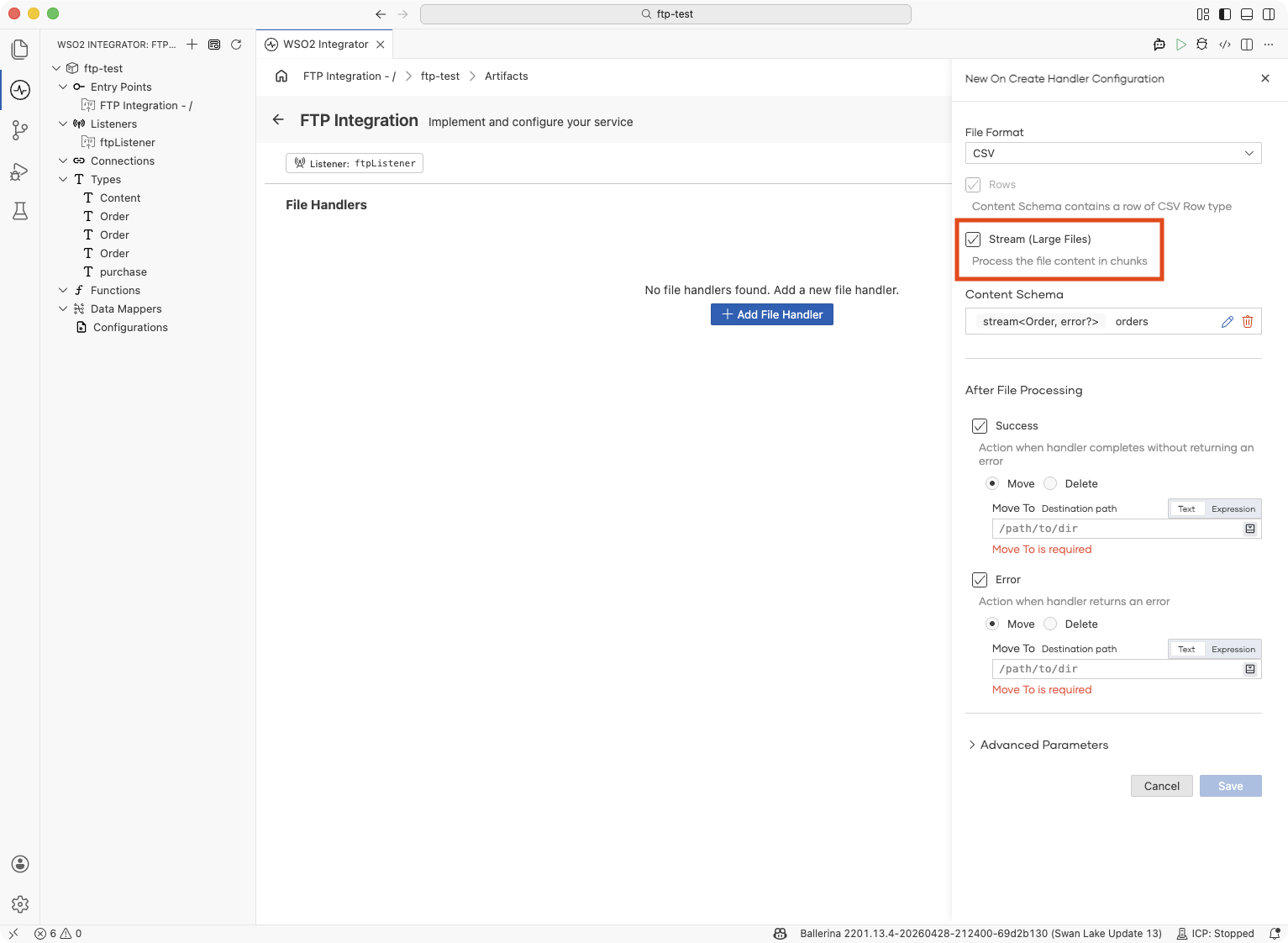
Two things to keep in mind:
- Leave the option off unless the files really are large — under roughly 50 MB, a handler that gets the whole content is simpler to build.
- Streamed content can only be read once, start to finish. If the handler needs to go over the content twice, or look at the end before the beginning, don't stream it.
Streaming turns the content parameter into a stream<T, error?>. Iterate it with forEach:
Streaming CSV rows:
remote function onFileCsv(stream<Order, error?> orders, ftp:FileInfo fileInfo) returns error? {
    check orders.forEach(function(Order 'order) {
        // process each row as it arrives
    });
}
Use stream<string[], error?> instead when you have not defined a row schema — each row then arrives as an array of raw column values.
Streaming raw bytes:
remote function onFile(stream<byte[], error?> content, ftp:FileInfo fileInfo) returns error? {
    check content.forEach(function(byte[] chunk) {
        // process each chunk
    });
}
Chunks are a fixed 8 KB for the listener.
A bad row (malformed CSV or wrong type) stops the stream right there, and the file goes to your After Error destination. Anything your handler already did for earlier rows (database writes, API calls, published messages) stays.
When you retry the file, those rows run again. To stay safe, make your handler idempotent (check before you write) or track which rows you've already processed per file. If you'd rather skip bad rows and keep going, turn on CSV fault tolerance.
FileInfo
Each handler receives an ftp:FileInfo parameter with metadata about the incoming file.
| Field | Type | Description |
|---|---|---|
name | string | File name without path |
path | string | Relative path on the remote server |
pathDecoded | string | Normalized absolute path — use this for all caller-> operations |
size | int | File size in bytes |
lastModifiedTimestamp | int | Last-modified time as UNIX epoch milliseconds |
extension | string | File extension |
isFile | boolean | true if the entry is a file |
isFolder | boolean | true if the entry is a directory |
Caller operations
For most use cases, the handler content parameter (string, json, xml, records, streams) and @ftp:FunctionConfig post-processing actions are sufficient. When you need additional control — such as reading a related file, writing output to a different path, or managing files manually — add the ftp:Caller parameter to your handler. It provides typed read and write operations on the connected server using the same session.
Reading files:
| Operation | Return type | Description |
|---|---|---|
caller->getText(path) | string|Error | Read file as plain text |
caller->getBytes(path) | byte[]|Error | Read file as a byte array |
caller->getJson(path, typedesc) | T|Error | Read and deserialize JSON; pass a typed record typedesc to get a typed result |
caller->getXml(path, typedesc) | T|Error | Read and deserialize XML; pass a typed record typedesc to get a typed result |
caller->getCsv(path, typedesc) | T|Error | Read and parse CSV; pass string[][] or a record array typedesc |
caller->getBytesAsStream(path) | stream<byte[], error?>|Error | Read as a byte stream for large files |
caller->getCsvAsStream(path, typedesc) | stream<T, error?>|Error | Read CSV as a stream for large files |
Writing files:
All write operations accept a ftp:FileWriteOption third argument to control overwrite behaviour (OVERWRITE or APPEND).
| Operation | Description |
|---|---|
caller->putText(path, content, option) | Write a string to a file |
caller->putBytes(path, content, option) | Write a byte array to a file |
caller->putJson(path, content, option) | Serialize and write JSON |
caller->putXml(path, content, option) | Serialize and write XML |
caller->putCsv(path, content, option) | Serialize and write CSV (string[][] or record[]) |
caller->putBytesAsStream(path, stream, option) | Write a byte stream to a file |
File management:
| Operation | Return type | Description |
|---|---|---|
caller->delete(path) | Error? | Delete a file |
caller->mkdir(path) | Error? | Create a directory |
caller->exists(path) | boolean|Error | Check whether a path exists on the server |
Service and listener
Every FTP/SFTP integration you see in the project tree is built from two pieces:
| Construct | Role |
|---|---|
| Listener | The connection to the remote server. Holds the protocol, host, port, credentials, and how often to poll. Each listener represents one server. |
| Service | The processing logic for a single directory on that server. Holds the monitoring path, file filters, and the file handlers that run when a file arrives. |
You can reuse either side of the pair. The same listener can feed several services (for example, different directories on one server that need different handling), and a single service can draw from several listeners (for example, a primary and a backup server feeding the same integration). Three topologies cover the common cases:
| Topology | When to use |
|---|---|
| One listener ↔ one service | The default. One remote server, one integration handling one directory. |
| One listener ↔ many services | One remote server with multiple directories that need different handlers (for example, /orders and /invoices on the same FTP server). Create one listener and attach several services to it. |
| One service ↔ many listeners | One integration that drains two (or more) remote servers — typical for HA/failover setups or for consolidating identical file feeds from multiple partners. |
One listener ↔ many services
- Visual Designer
- Ballerina Code
Under Entry Points, each service appears as its own FTP Integration - <path> item. Under Listeners, you'll see a single listener shared by all of them:
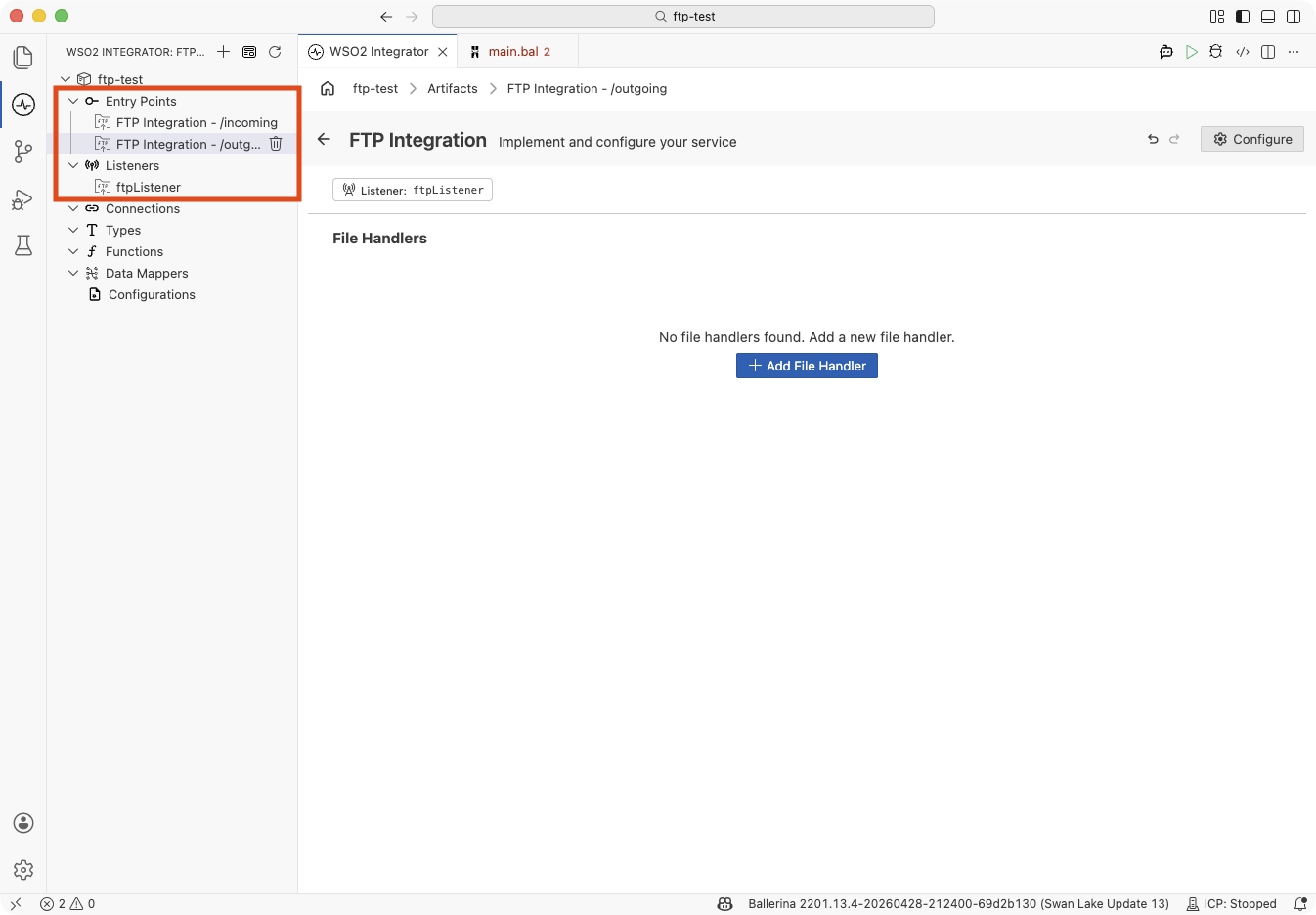
This is the default path: every FTP service you add after the first one starts on the Use existing option, so new services reuse the listener unless you opt out. See Reusing an existing listener when creating a service.
Declare the listener once, then write each service against the same listener name:
listener ftp:Listener ftpListener = new (
    host = "ftp.example.com",
    auth = {credentials: {username: ftpUser, password: ftpPassword}},
    pollingInterval = 30
);

@ftp:ServiceConfig { path: "/orders", fileNamePattern: ".*\\.csv" }
service on ftpListener {
    remote function onFileCsv(string[][] content, ftp:FileInfo fileInfo) returns error? {
        // Process order CSVs
    }
}

@ftp:ServiceConfig { path: "/invoices", fileNamePattern: ".*\\.xml" }
service on ftpListener {
    remote function onFileXml(xml content, ftp:FileInfo fileInfo) returns error? {
        // Process invoice XMLs
    }
}
One service ↔ many listeners
- Visual Designer
- Ballerina Code
A single FTP Integration - <path> entry lists both (or all) of its listeners under Attached Listeners in the FTP Integration Configuration panel:
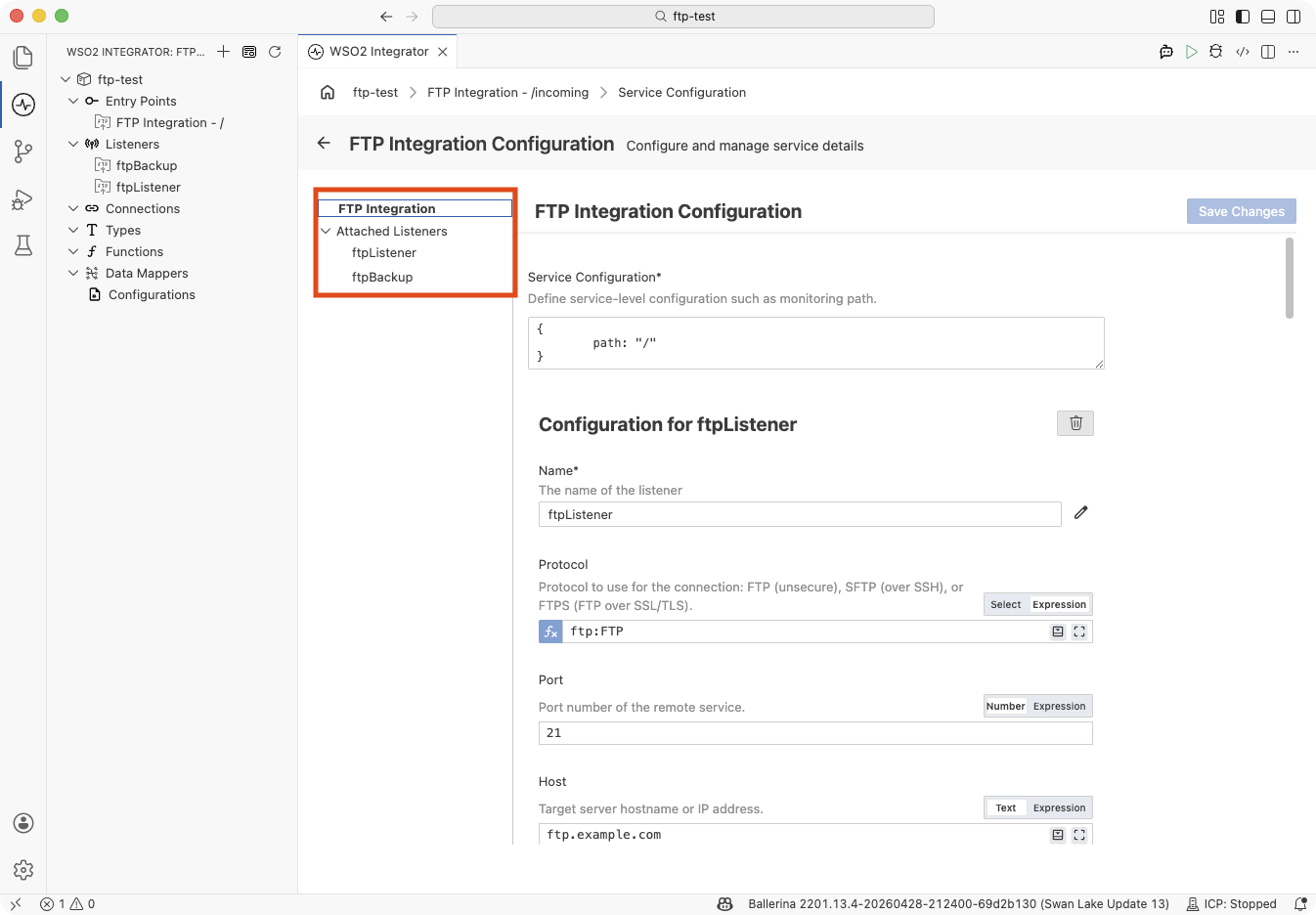
Build this topology by opening the service's Configure panel and clicking + Attach Listener — see Attaching an additional listener to an existing service.
Declare each listener separately, then attach the same service to all of them:
listener ftp:Listener primaryListener = new (
    host = "ftp-primary.example.com",
    auth = {credentials: {username: ftpUser, password: ftpPassword}}
);

listener ftp:Listener backupListener = new (
    host = "ftp-backup.example.com",
    auth = {credentials: {username: ftpUser, password: ftpPassword}}
);

@ftp:ServiceConfig { path: "/incoming" }
service on primaryListener, backupListener {
    // One handler fires regardless of which server the file arrived on.
    remote function onFileText(string content, ftp:FileInfo fileInfo) returns error? {
        // Process the file
    }
}
For the general concept, see Services and listeners.
Attaching listeners to services
Once the integration has at least one listener, two flows wire up the topologies described under Service and listener. Sharing a listener is the default when you create a second FTP service from the Create FTP Integration form; attaching an additional listener to an existing service is an explicit action on the Service Configuration panel.
Reusing an existing listener when creating a service
Use this flow to build the one listener ↔ many services topology. After the first FTP service is saved, the Create FTP Integration form defaults to Use existing when you open it again — every subsequent service attaches to an existing listener unless you explicitly switch to Create new.
- Visual Designer
- Ballerina Code
-
Click + Add Artifact → FTP / SFTP under File Integration to open the Create FTP Integration form.
-
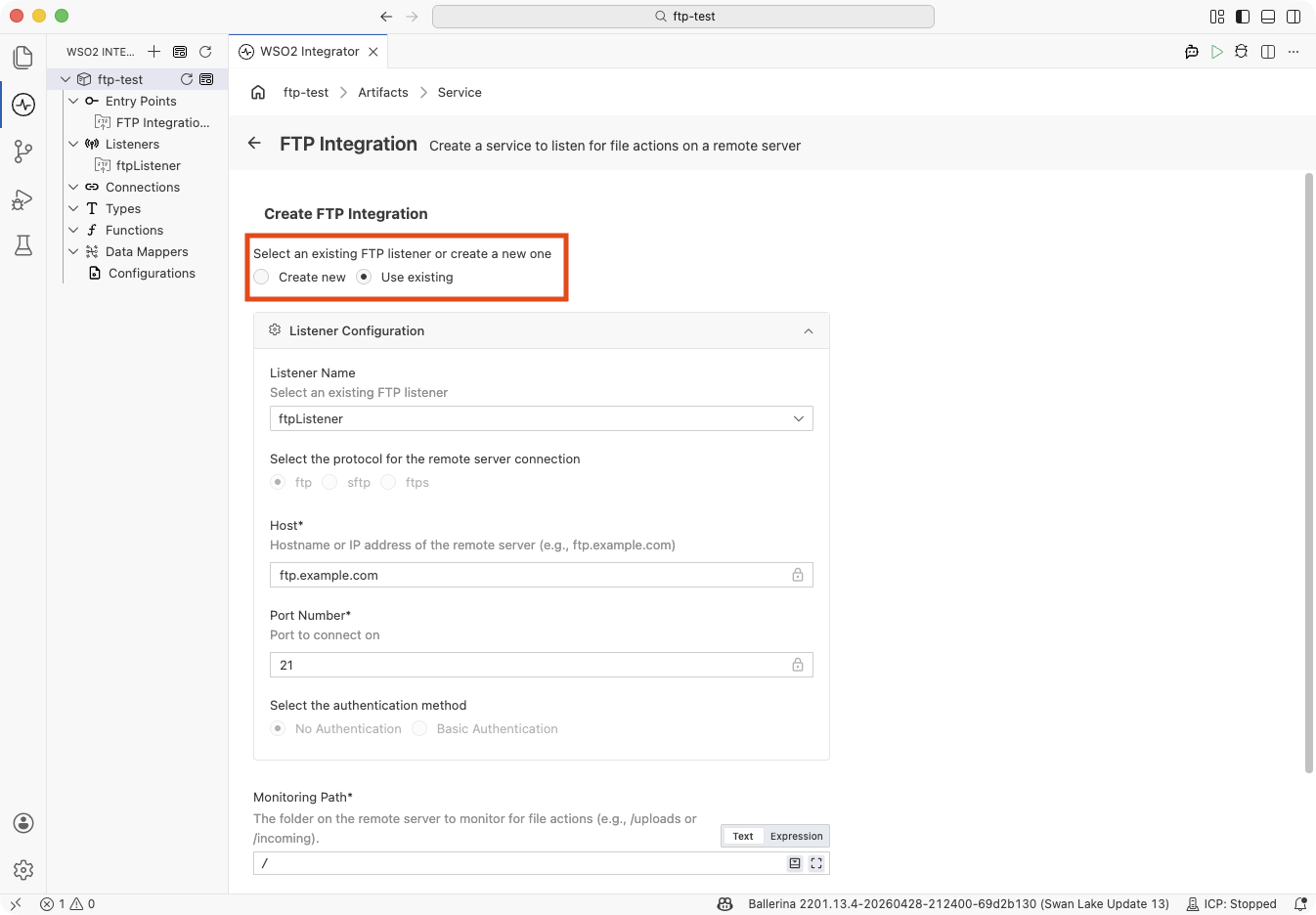
When the integration already has at least one FTP listener, the Select an existing FTP listener or create a new one picker at the top of the form defaults to Use existing. Sharing a listener is the encouraged flow for the second and subsequent services. (Create new should only be used when you want a dedicated listener for this service.)
-
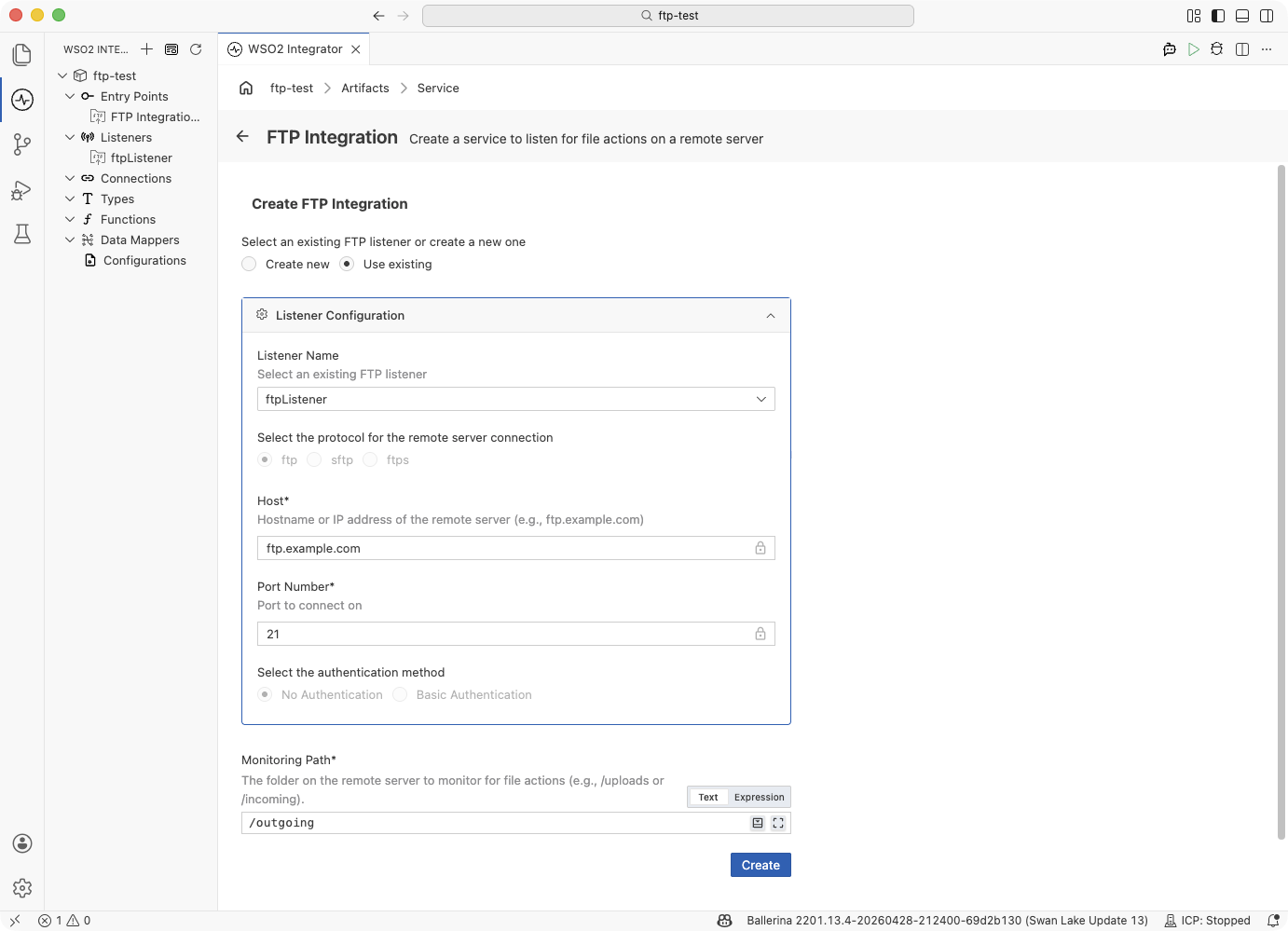
The Listener Name field is a dropdown prefilled with the first available listener. Pick a different one if needed. Protocol, Host, Port Number, and the authentication method are locked (they belong to the listener, not to this service) so you can see the settings the new service will inherit but cannot change them here.
-
Enter the Monitoring Path for the new service (this is service-level, so it stays editable even under Use existing) and click Create.
-
The project tree now shows both services under Entry Points and the single shared listener under Listeners:
Declare the listener once, then add another service on block referring to the same listener variable:
import ballerina/ftp;

listener ftp:Listener ftpShared = new (
    protocol = ftp:FTP,
    host = "ftp.example.com",
    port = 21
);

@ftp:ServiceConfig { path: "/incoming" }
service on ftpShared {
    remote function onFileText(string content, ftp:FileInfo fileInfo) returns error? {
        // Handle files in /incoming
    }
}

@ftp:ServiceConfig { path: "/outgoing" }
service on ftpShared {
    remote function onFileText(string content, ftp:FileInfo fileInfo) returns error? {
        // Handle files in /outgoing
    }
}
Both services poll the same remote server through the same connection and authentication — only the monitoring path and handler logic differ.
Attaching an additional listener to an existing service
Use this flow to build the one service ↔ many listeners topology. It attaches a second (or third) listener to a service that is already saved, so a single handler implementation processes files from every attached listener.
- Visual Designer
- Ballerina Code
-
Open the service you want to extend — click the FTP Integration - <path> entry in the project tree.
-
In the Service Designer, click Configure to open the FTP Integration Configuration panel. The left-hand nav pane lists the service's current listeners under Attached Listeners.
-
Scroll to the bottom of the panel and click + Attach Listener. The Attach Listener side panel opens with two tabs:
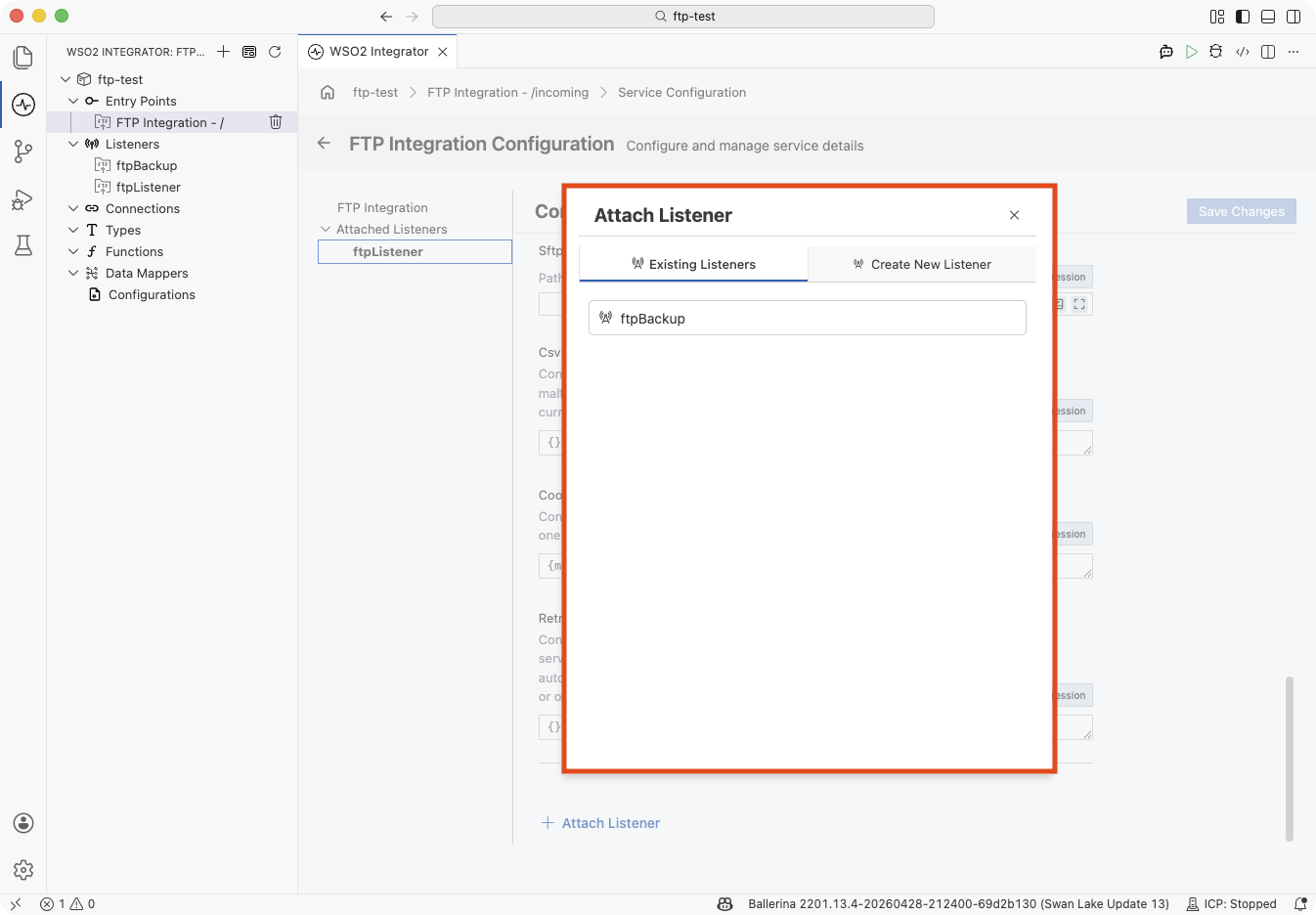
Tab Use when Existing Listeners You already have another listener defined in the integration. Click its name to attach it. Listeners already bound to this service are omitted from the list. Create New Listener You want to spawn a new listener inline — same field set as the Create FTP Integration form's listener section. -
Pick the listener to attach. The panel closes and the Attached Listeners list in the left nav now includes both listeners:
Click any listener name in this list to edit its configuration inline on the right.
Declare each listener separately, then attach them all to a single service with a comma-separated service on list:
import ballerina/ftp;

listener ftp:Listener ftpShared = new (
    protocol = ftp:FTP,
    host = "ftp.example.com",
    port = 21
);

listener ftp:Listener ftpBackup = new (
    protocol = ftp:FTP,
    host = "backup.example.com",
    port = 2121
);

@ftp:ServiceConfig { path: "/incoming" }
service on ftpShared, ftpBackup {
    remote function onFileText(string content, ftp:FileInfo fileInfo) returns error? {
        // Fires for every file that arrives on either server, using the
        // same handler implementation.
    }
}
The order of listeners in service on a, b does not imply priority — each listener polls independently and dispatches events to the shared handler as they occur.
Service configuration
The @ftp:ServiceConfig annotation controls what the service monitors — the directory path, file filters, age constraints, and dependency conditions.
- Visual Designer
- Ballerina Code
In the Service Designer, click Configure to open the FTP Integration Configuration panel. The panel has a left-hand navigation that lists the service (FTP Integration) and every listener under Attached Listeners. Clicking a name pivots the right pane between the service's own configuration fields and the inline configuration for the selected listener — headed Configuration for <listenerName>.
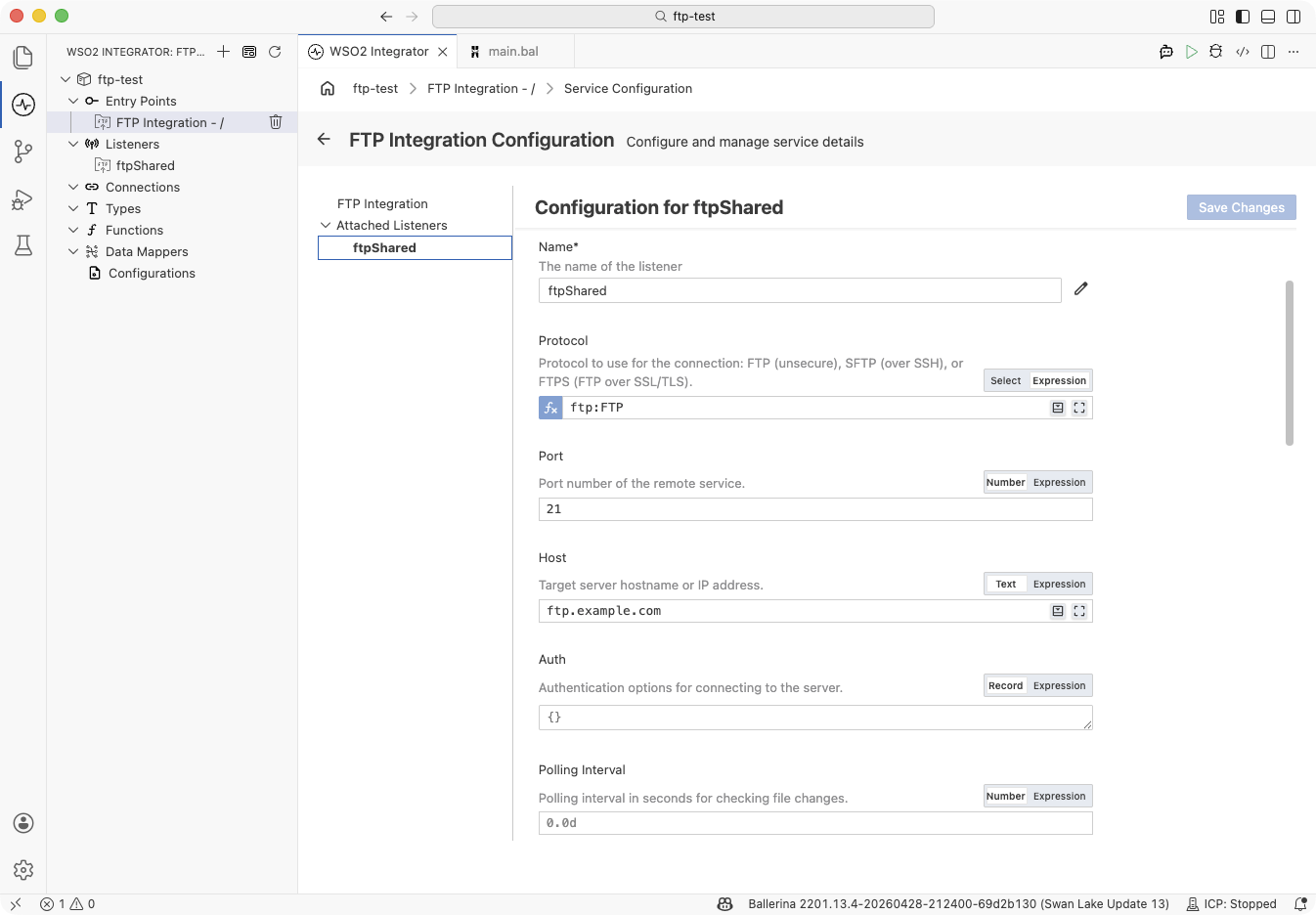
| Field | Description |
|---|---|
| Service Configuration | Service-level settings. Accepts an @ftp:ServiceConfig record literal such as { path: "/incoming", fileNamePattern: ".*\\.csv" }. Click the full-screen icon on the field to open the guided Record Configuration builder with checkboxes for optional fields. path is required; the other fields are optional. |
@ftp:ServiceConfig {
    path: "/incoming/orders",
    fileNamePattern: ".*\\.csv",
    fileAgeFilter: {
        minAge: 30,
        maxAge: 3600
    }
}
service on ftpListener {
}
@ftp:ServiceConfig fields:
| Field | Type | Default | Description |
|---|---|---|---|
path | string | — | Directory on the remote server to monitor for new files. Required. |
fileNamePattern | string? | — | Regex to filter which files trigger handlers. Only matching files are processed. |
fileAgeFilter | FileAgeFilter? | — | Age bounds to skip files that are too new (still uploading) or too old (stale). See File dependency and trigger conditions. |
fileDependencyConditions | FileDependencyCondition[]? | — | Conditions that block processing until related files exist. See File dependency and trigger conditions. |
The Attached Listeners list in the left nav pane shows every listener this service is attached to. Click a listener name to edit that listener's configuration inline on the right. To attach another listener, click + Attach Listener at the bottom of the panel — see Attaching listeners to services.
Listener configuration
The listener controls how to connect — protocol, host, authentication, polling interval, and connection behaviour. One listener represents one connection to one remote server. Open the Ftp Listener Configuration view by clicking the listener name (for example, ftpListener) under Listeners in the sidebar, or by clicking the listener name under Attached Listeners inside the FTP Integration Configuration panel.
- Visual Designer
- Ballerina Code
| Field | Description | Default |
|---|---|---|
| Name | Identifier for the listener, used to attach services to it. Required. | — |
| Protocol | Connection protocol: ftp, sftp, or ftps. | ftp |
| Host | Hostname or IP address of the remote server. | 127.0.0.1 |
| Port | Port number of the remote server. | 21 |
| Auth | Authentication record carrying credentials, a private key, and/or an SSL/TLS secureSocket. See the per-protocol sections above for the typical shapes. | — |
| Polling Interval | Seconds between directory polls. | 60 |
| User Dir Is Root | When true, treats the login home directory as / and suppresses directory-change commands. Set this for chrooted or jailed servers. | false |
| Lax Data Binding | When true, relaxes data binding for the handler's content parameter: null values map to optional fields, and absent fields map to nilable fields. Content that still does not match the type raises a binding error. | false |
| Connect Timeout | Connection timeout in seconds. | 30.0 |
| Socket Config | Socket read/write timeouts. See ftp:SocketConfig reference. | — |
| Proxy | Proxy configuration for SFTP connections (SFTP only). | — |
| File Transfer Mode | BINARY or ASCII. Use ASCII only for text-only files on servers that require line-ending conversion. | BINARY |
| SFTP Compression | SSH compression algorithms to negotiate with the server (SFTP only). | — |
| SFTP SSH Known Hosts | Path to an SSH known_hosts file (SFTP only). | — |
| CSV Fail Safe | Fail-safe options for CSV content processing. Malformed records are skipped and written to a side file in the working directory. | — |
| Retry Config | Retry configuration for transient failures during polling or file retrieval. For the retry-with-backoff mechanics and field reference, see ftp:RetryConfig. | — |
| Coordination | Distributed coordination for multi-instance deployments. See High availability. | — |
Listener configuration maps to the ftp:ListenerConfiguration record passed when constructing the listener:
listener ftp:Listener ftpListener = new (
    protocol = ftp:FTP,
    host = "ftp.example.com",
    port = 21,
    auth = {credentials: {username: "user1", password: "pass456"}},
    pollingInterval = 30
);
ftp:ListenerConfiguration fields:
| Field | Type | Default | Description |
|---|---|---|---|
protocol | ftp:Protocol | ftp:FTP | Connection protocol (FTP, SFTP, or FTPS). |
host | string | "127.0.0.1" | Hostname or IP address of the remote server. |
port | int | 21 | Port number of the remote server. |
auth | ftp:AuthConfiguration? | — | Credentials, private key, and/or secureSocket. See ftp:AuthConfiguration reference. |
pollingInterval | decimal | 60 | Interval in seconds between directory polls. |
userDirIsRoot | boolean | false | Treat the login home directory as root and prevent directory-change commands. |
laxDataBinding | boolean | false | When true, null values map to optional fields and absent fields map to nilable fields during data binding. Content that still does not match the type raises a binding error. |
connectTimeout | decimal | 30.0 | Connection timeout in seconds. |
socketConfig | ftp:SocketConfig? | — | Socket timeout configuration. See ftp:SocketConfig reference. |
fileTransferMode | ftp:FileTransferMode | BINARY | File transfer mode (BINARY or ASCII). Use ASCII only for text-only files on servers that require line-ending conversion. |
retryConfig | ftp:RetryConfig? | — | Retry configuration for failed polling attempts. See ftp:RetryConfig. |
coordination | ftp:CoordinationConfig? | — | Distributed coordination for multi-instance deployments. See High availability. |
What's next
- CSV fault tolerance — skip malformed rows instead of failing the whole file
- Local files — monitor a local directory instead of a remote server
- File integrations on S3 file events — react to S3 uploads using an SQS listener
- Connections — reuse FTP connection credentials across services
- Data Mapper — transform incoming file payloads between formats