Azure Files
Azure Files file integrations poll a directory on an Azure file share and process files as they arrive. Use them for drop-folder processing, ETL pipelines, and batch integrations where applications exchange data as CSV, XML, JSON, or binary files through a share mounted over SMB or NFS.
The listener authenticates to the storage account with a shared key, a SAS token, a SAS URL, a connection string, or a Microsoft Entra ID identity. For creating the storage account, the file share, and the credentials, see the Azure Files setup guide.
Creating an Azure Files service
One flow creates the listener and the service together; the authentication method is a selector on the creation form.
- Visual Designer
- Ballerina Code
-
Click + in the WSO2 Integrator side panel header to open the New Integration wizard (on an empty project, the + Add Integration or Library button in the project view opens the same wizard), and continue to the Type step.
-
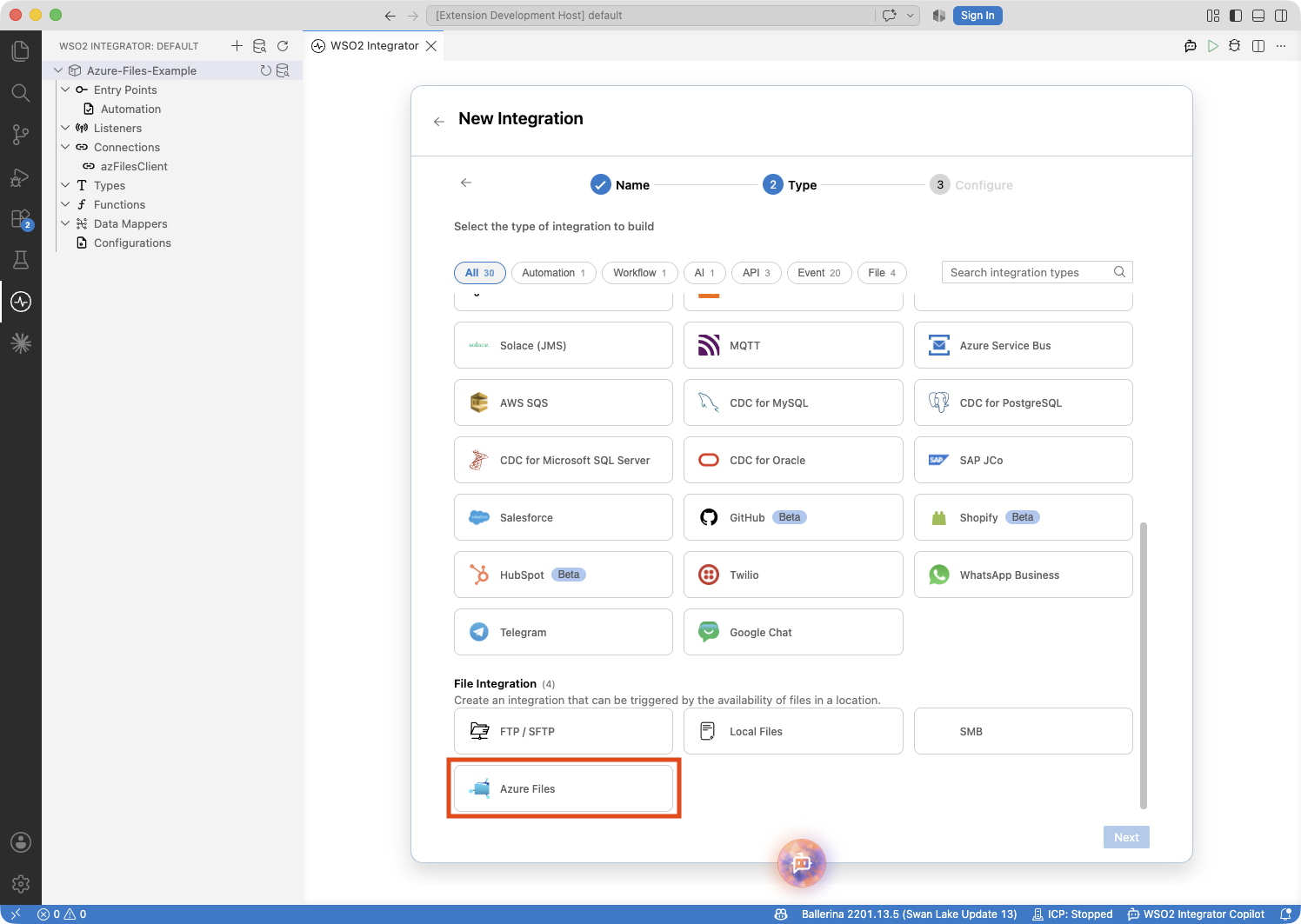
Scroll to the File Integration category, select the Azure Files card, and click Next.
-
The Azure Files Integration page opens with the Listener Configurations form. Fill in:
Field Description Listener Name Identifier for this listener (e.g., shareListener).Share Name The name of the file share to watch. Monitoring Path The directory on the share to poll for files (e.g., /incoming)./watches the share root. -
Choose an authentication method. For Shared Key, fill in:
Field Description Account Name The storage account name. Account Key A base64-encoded access key of the storage account. 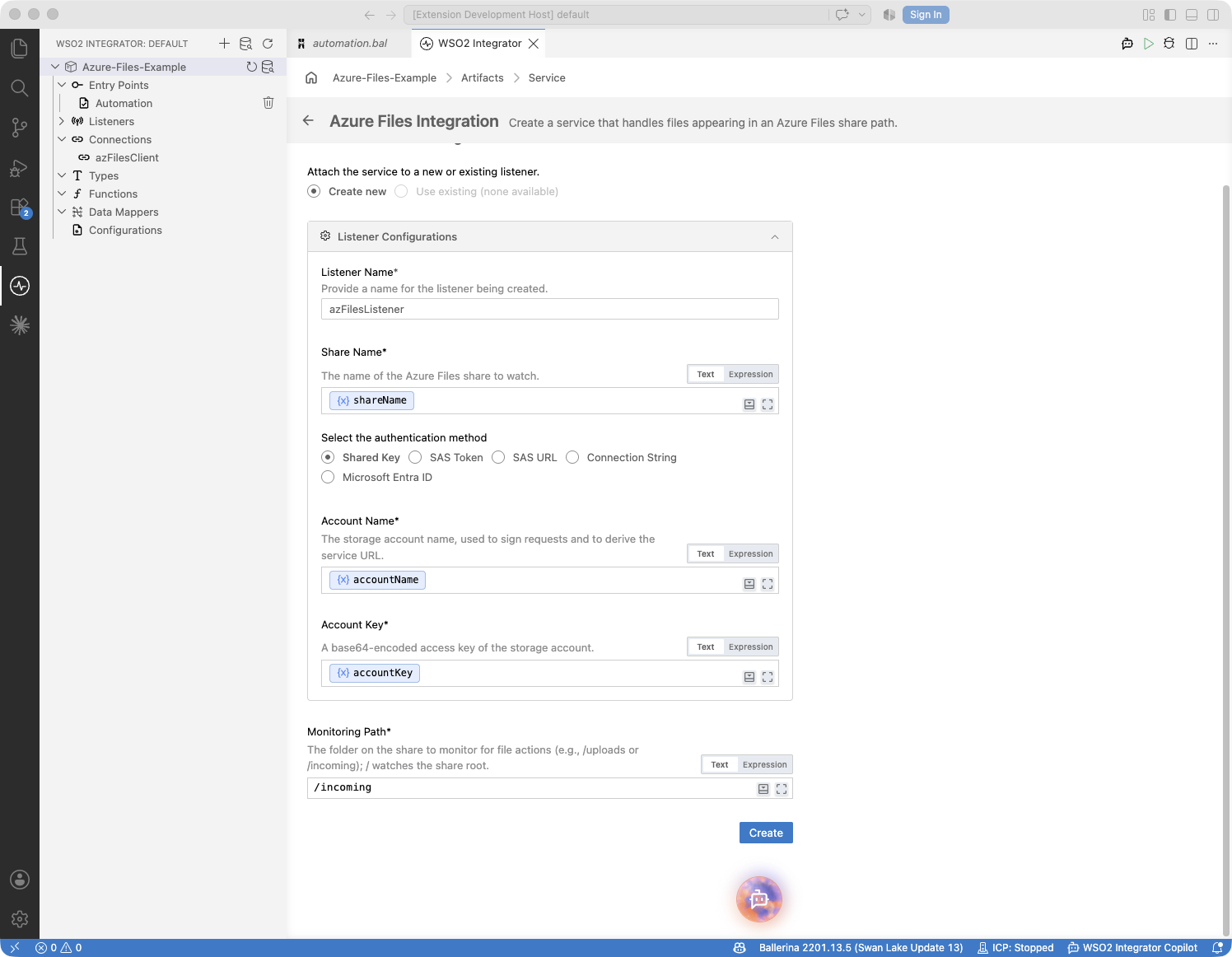
The selector's other options — SAS token, SAS URL, connection string, and Microsoft Entra ID — reveal the fields of the matching credential record shown on the Ballerina Code tab.
-
Click Create. WSO2 Integrator generates the listener and the service, and a files:Service entry appears in the sidebar under Entry Points.
-
Click + Add Handler in the service view to define how incoming files are processed.
The service's attach point is the watched path — service /incoming on shareListener watches the /incoming directory of the share, the string form service "/dir one/reports" on shareListener covers names a resource path cannot express, and a service with no attach point watches the share root.
Shared Key:
import ballerinax/azure.storage.files;

configurable string accountName = ?;
configurable string accountKey = ?;
configurable string shareName = ?;

listener files:Listener shareListener = new (shareName,
    auth = {accountName, accountKey},
    pollingInterval = 30
);

service /incoming on shareListener {
    remote function onFileText(string content, files:FileInfo file) returns error? {
        // Process text file content
    }
}
SAS token:
import ballerinax/azure.storage.files;

configurable string accountName = ?;
configurable string sasToken = ?;
configurable string shareName = ?;

listener files:Listener shareListener = new (shareName,
    auth = {accountName, sasToken}
);

service /incoming on shareListener {
    remote function onFileText(string content, files:FileInfo file) returns error? {
        // Process text file content
    }
}
SAS URL — the full URL from the Azure portal, carrying the endpoint and the token in one string:
import ballerinax/azure.storage.files;

configurable string sasUrl = ?;
configurable string shareName = ?;

listener files:Listener shareListener = new (shareName,
    auth = {sasUrl}
);

service /incoming on shareListener {
    remote function onFileText(string content, files:FileInfo file) returns error? {
        // Process text file content
    }
}
Connection string:
import ballerinax/azure.storage.files;

configurable string connectionString = ?;
configurable string shareName = ?;

listener files:Listener shareListener = new (shareName,
    auth = {connectionString}
);

service /incoming on shareListener {
    remote function onFileText(string content, files:FileInfo file) returns error? {
        // Process text file content
    }
}
Microsoft Entra ID with the default credential chain — tries the environment, a managed identity, and developer sign-ins in turn, so one configuration works both locally and when deployed:
import ballerinax/azure.storage.files;

configurable string accountName = ?;
configurable string shareName = ?;

listener files:Listener shareListener = new (shareName,
    auth = {kind: "default", accountName}
);

service /incoming on shareListener {
    remote function onFileText(string content, files:FileInfo file) returns error? {
        // Process text file content
    }
}
Microsoft Entra ID as a service principal with a client secret:
import ballerinax/azure.storage.files;

configurable string accountName = ?;
configurable string tenantId = ?;
configurable string clientId = ?;
configurable string clientSecret = ?;
configurable string shareName = ?;

listener files:Listener shareListener = new (shareName,
    auth = {accountName, tenantId, clientId, clientSecret}
);

service /incoming on shareListener {
    remote function onFileText(string content, files:FileInfo file) returns error? {
        // Process text file content
    }
}
Entra ID also supports managed identities, service principals with client certificates, and workload identities — one record per credential kind, each carrying the fields that credential needs. See the connector configuration reference for every record. The Entra ID identity must hold the Storage File Data Privileged Reader or Storage File Data Privileged Contributor role on the storage account.
File handlers
A file handler is a remote function that WSO2 Integrator calls for each file the listener's polling cycle finds on the watched path. A service declares one handler per content format it processes, plus an optional error handler:
| Handler | Trigger |
|---|---|
onCreate (onFileText / onFileJson / onFileXml / onFileCsv / onFile) | A file on the watched path matches the service's filters. The function name depends on the content type — one typed variant per file format, with onFile as the raw-bytes catch-all. |
| onError | A poll failed, a listed file's content could not be read, or a file's content could not be bound to a typed handler's content parameter — for example, a JSON handler received malformed JSON. A binding failure arrives as a files:ContentBindingError naming the file. |
At least one content handler is required — a service with only an onError handler is not valid.
There is no delete handler: the listener dispatches the files present on the share and keeps no per-file state.
Adding a file handler
- Visual Designer
- Ballerina Code
-
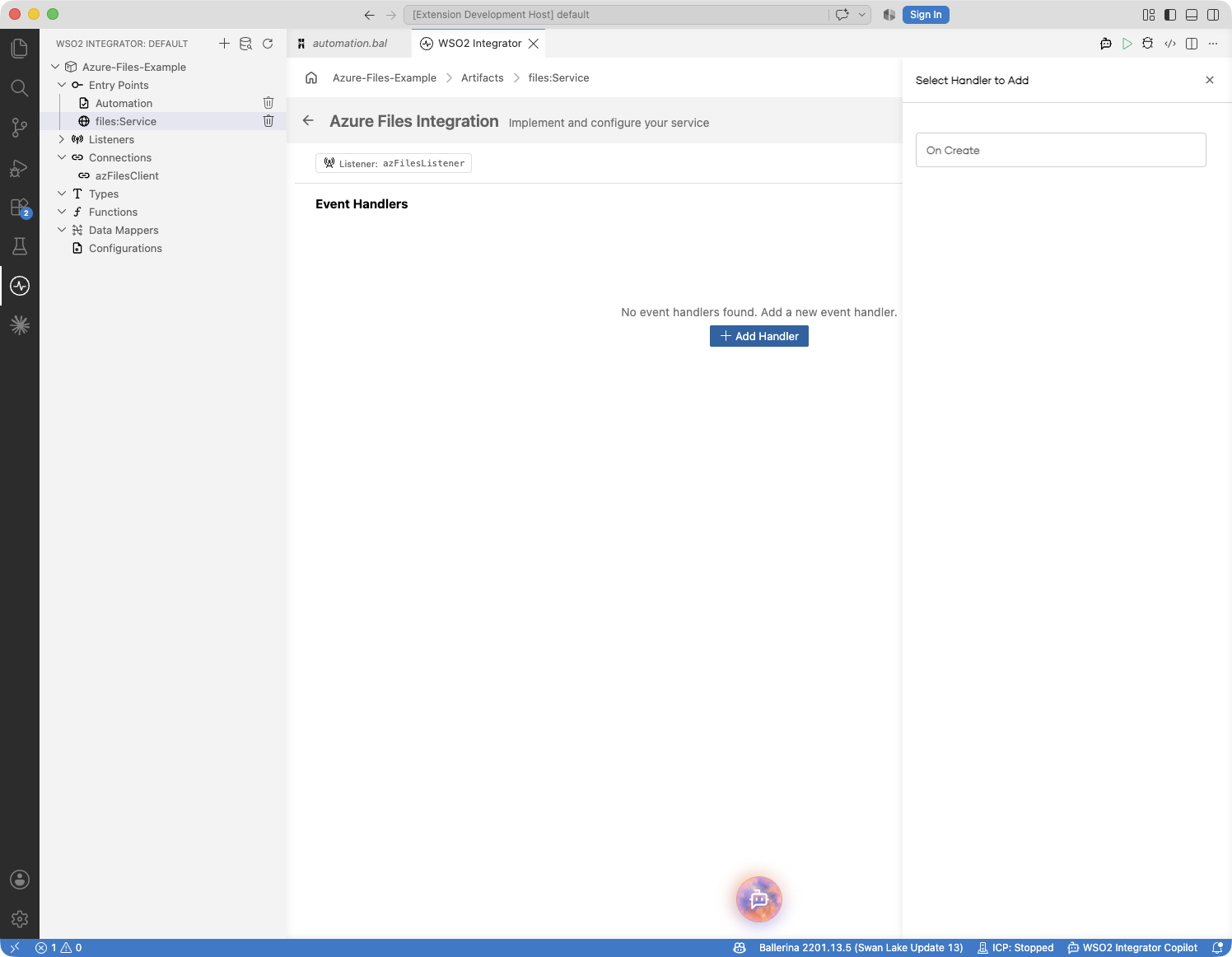
Open the service view (select files:Service under Entry Points) and click + Add Handler. The handler picker offers On Create, which fires for files appearing on the monitoring path; select it.
-
The handler configuration panel opens:
Field Description Format The format of incoming files. Determines the handler function name and the type of the contentparameter. Options: JSON, XML, CSV, Text, Raw Bytes. See Content types.After File Processing — On Success Action to take when the handler completes without error: Move to a destination path or Delete the file. See Post-processing. After File Processing — On Error Action to take when the handler returns an error: Move to an error directory or Delete the file. It also covers a content-binding failure, unless the service declares an onErrorhandler in code, in which case the binding failure's disposition followsonError's own actions instead. See Post-processing.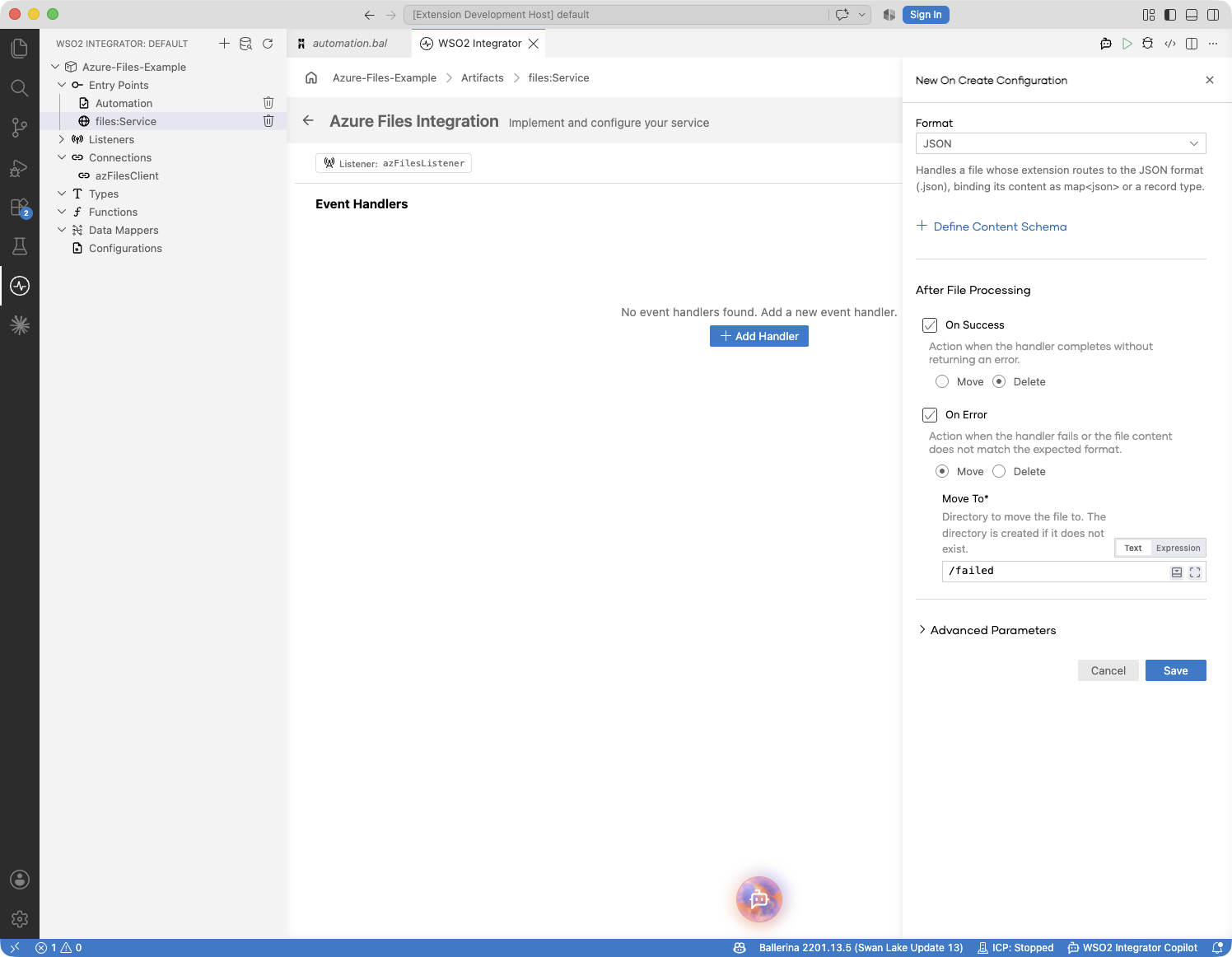
-
Click Save to register the handler. The service view lists it:
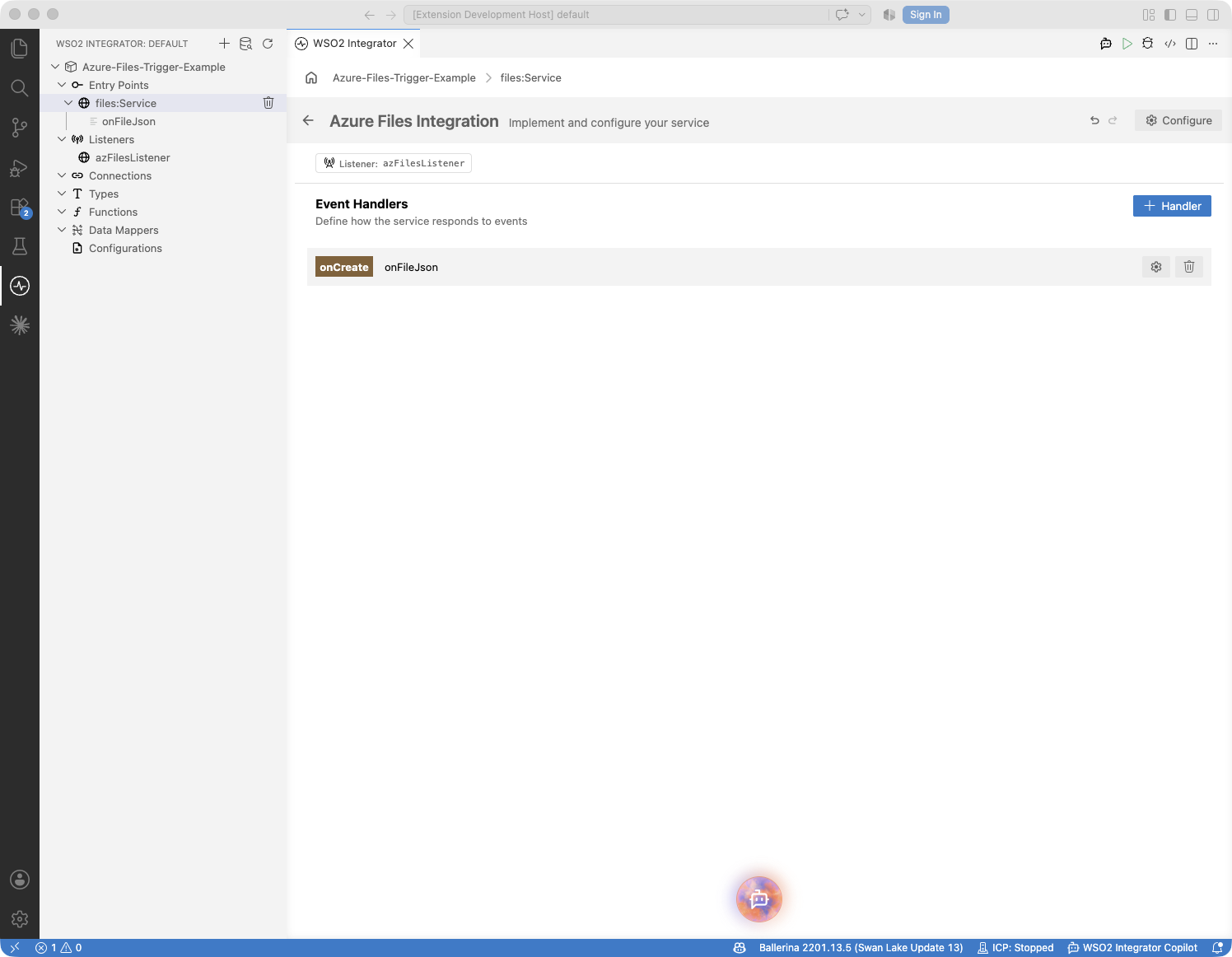
An onError handler for poll, read, and content-binding failures is added in the code view — see the Ballerina Code tab. Declaring one changes how content-binding failures are post-processed; see Post-processing.
File handlers are typed remote function declarations inside the service. WSO2 Integrator routes files to handlers by file extension; the content parameter type determines deserialization.
Text file handler:
remote function onFileText(string content, files:FileInfo file) returns error? {
    // content contains the full file text
}
JSON file handler (typed record):
type Order record {|
    string orderId;
    string product;
    int quantity;
|};

remote function onFileJson(Order 'order, files:FileInfo file) returns error? {
    // 'order is deserialized from JSON
}
CSV streaming handler (large files):
type Row record {|
    string orderId;
    int quantity;
|};

remote function onFileCsv(stream<Row, error?> content, files:FileInfo file) returns error? {
    check content.forEach(function(Row row) {
        // Process each row without loading the whole file into memory
    });
}
Binary file handler:
remote function onFile(byte[] content, files:FileInfo file) returns error? {
    // content is the raw file bytes
}
Error handler — fires on every listener-side failure: a failed poll, a listed file whose content could not be read, and a typed handler's content-binding failure (for example, a JSON handler receiving malformed JSON). Poll and read failures arrive as the mapped typed error, such as a files:AuthorizationError. A binding failure arrives as a files:ContentBindingError, whose detail carries the file's filePath and, when the content had been downloaded before binding failed, its raw content:
remote function onError(files:Error err) returns error? {
    if err is files:ContentBindingError {
        log:printError("file did not bind", path = err.detail().filePath, 'error = err);
        return;
    }
    log:printError("file processing error", 'error = err);
}
A read failure always leaves the file for the next poll, so the notification repeats while the read keeps failing. Errors a content handler itself returns do not reach onError.
The trailing parameters are optional. A content handler declares its content parameter first, then either, both, or neither of files:FileInfo and files:Caller — the accepted shapes are (content), (content, FileInfo), (content, Caller), and (content, FileInfo, Caller); when both are present, FileInfo must precede Caller. onError accepts (error) or (error, Caller), and may carry its own @files:FunctionConfig to dispose of the binding failures it handles.
Content types
The Format chosen on an On Create handler determines the function name and the type of the content parameter. Files are routed to handlers by file extension:
| Format | Handler function | Routed extension | Content type | Use when |
|---|---|---|---|---|
| Text | onFileText | .txt | string | Files are plain text (logs, EDI, custom formats). |
| JSON | onFileJson | .json | json or a typed record | Files are JSON documents. |
| XML | onFileXml | .xml | xml or a typed record | Files are XML documents. |
| CSV | onFileCsv | .csv | string[][], record {}[], or a stream of either row form | Files are comma-separated values. Record rows map through the header row into your record type; string rows keep every row of the file. Use a stream for large files. |
| Raw Bytes | onFile | any other extension | byte[] or stream<byte[], error?> | Binary files or when you need raw byte access. |
Routing rules:
- A per-handler
@files:FunctionConfigwith afileNamePatternoverrides extension routing for that handler. When several patterns match one file name, the handlers are checked in the fixed orderonFileText,onFileJson,onFileXml,onFileCsv, thenonFile. At most one handler runs per file. - A file whose extension maps to a handler the service does not declare falls back to
onFile; ifonFileis also absent, the file is skipped and logged. - A file routed to a typed handler whose content is malformed raises a
files:ContentBindingError— it never falls through toonFile. Its detail carries the file's path infilePath, and its raw bytes incontentwhen the download had already completed. When the service declares anonErrorhandler, the error is delivered there and the file's fate followsonError's own@files:FunctionConfig; the content handler'safterErroris not applied. When the service declares noonError, the error is logged and the content handler'safterErrorapplies. - A CSV stream handler is the exception for individual rows. A row that fails to bind while the handler reads the stream is returned to the handler as a
files:Errorfrom the stream, not raised as afiles:ContentBindingError. It does not reachonError; if the handler returns it, the handler'safterErrorapplies.
Post-processing: moving or deleting files
Delivery is at-least-once: the listener keeps no per-file state, so a file that stays on the watched path fires again on every poll. Handlers consume files by deleting or moving them out of the watched path — either through the Caller or with the automatic actions configured here.
- Visual Designer
- Ballerina Code
The handler configuration panel's After File Processing section has two independent actions:
| Event | Action picker | Extra input |
|---|---|---|
| On Success | Move or Delete | Move To destination path (required when Move is chosen) |
| On Error | Move or Delete | Move To destination path (required when Move is chosen) |
Common combinations:
- Delete on success, move on error — discard processed files, quarantine failures for review. Set an error destination like
/failed. - Move on success, move on error — archive processed files and quarantine failures. Set separate destinations like
/processedand/failed. - Leave the file alone for an outcome — skip the action for that side; the file stays on the watched path and fires again on the next poll.
These actions cover errors the handler returns. If the service also declares an onError handler in the code view, content-binding failures are disposed of by onError's own actions instead, so annotate onError to quarantine files that fail to bind.
The choices update the handler's @files:FunctionConfig annotation; switch to the code view to review the generated annotation.
The form writes an @files:FunctionConfig annotation on the handler. Each of afterProcess and afterError takes one of two values — the bare constant files:DELETE for delete, or a files:Move record for move:
@files:FunctionConfig {
    afterProcess: files:DELETE,
    afterError: {moveTo: "/failed"}
}
remote function onFileJson(Order 'order, files:FileInfo file) returns error? {
    check processOrder('order, file.name);
}
@files:FunctionConfig fields:
| Field | Type | Description |
|---|---|---|
fileNamePattern | string? | Regular expression matched against the file name, routing matching files to this handler. Overrides extension routing. Ignored on onError, which is never routed a file. |
afterProcess | files:DELETE|files:Move? | Action to take when the handler returns without error. Omit the field to leave the file in place. |
afterError | files:DELETE|files:Move? | Action to take when the handler returns an error or panics. Also covers the handler's content-binding failures, but only when the service declares no onError handler. Same shape as afterProcess. |
The annotation may also sit on onError, where afterProcess and afterError dispose of the binding failures it handles.
files:Move fields:
| Field | Type | Default | Description |
|---|---|---|---|
moveTo | string | — | The target directory the file is moved into. The file keeps its name, and the directory is created if it does not exist. A move onto an existing same-named file replaces it. |
preserveSubDirs | boolean | true | On recursive watches, recreate the file's sub-path (relative to the watched path) under moveTo. |
afterError also covers the handler's content-binding failures, but only when the service declares no onError handler. With an onError declared, a binding failure becomes its to dispose of: annotate onError itself to quarantine the file.
// Quarantines every file that fails to bind, and logs the failure.
@files:FunctionConfig {afterProcess: {moveTo: "/failed"}}
remote function onError(files:Error err) returns error? {
    log:printError("listener error", 'error = err);
}
On onError, afterProcess applies when it returns normally and afterError when it returns an error; fileNamePattern is ignored. The actions cover binding failures only — a file whose content could not be read always stays for the next poll, whatever onError returns. Setting neither leaves the file on the watched path to fire again on every poll.
Typed content and streaming
JSON and XML handlers can receive their payload as a free-form value (json, xml) or as a typed record you define; CSV handlers receive rows as string arrays (string[][]) or as typed records. CSV and Raw Bytes handlers can additionally receive the content as a stream<T, error?>, so the handler never holds the whole file in memory. The Format picker on the handler form selects the base delivery type; to bind typed records or streams, edit the handler's content parameter type in the code view.
Typed CSV rows — the file's first row is always consumed as the header and maps each row's fields:
type Order record {|
    string orderId;
    string product;
    int quantity;
|};

remote function onFileCsv(Order[] orders, files:FileInfo file) returns error? {
    foreach Order 'order in orders {
        // typed field access: 'order.orderId, 'order.quantity, ...
    }
}
Typed JSON document:
type OrderBatch record {|
    string batchId;
    Order[] orders;
|};

remote function onFileJson(OrderBatch batch, files:FileInfo file) returns error? {
    // batch.batchId and batch.orders are typed
}
Streaming CSV rows:
remote function onFileCsv(stream<Order, error?> orders, files:FileInfo file) returns error? {
    check orders.forEach(function(Order 'order) {
        // process each row as it arrives
    });
}
Streaming raw bytes:
remote function onFile(stream<byte[], error?> content, files:FileInfo file) returns error? {
    check content.forEach(function(byte[] chunk) {
        // process each chunk
    });
}
A content value that does not match the declared parameter type is a files:ContentBindingError, delivered to onError. The exception is a row of a CSV stream, which fails inside the handler instead; see Content types. To relax the record binding — treating a null value as an optional field and an absent field as a nilable field — set laxDataBinding: true on the listener configuration.
FileInfo
Each handler can receive a files:FileInfo parameter with metadata about the dispatched file.
| Field | Type | Description |
|---|---|---|
shareName | string | The name of the share the file lives on |
path | string | The share-relative path of the file, for example /dir1/dir2/file.ext — use this for all caller-> operations |
name | string | The file name only, without the directory component |
sizeBytes | int | The file size in bytes |
eTag | string | The entity tag of the file |
lastModified | time:Utc | The last-modified time (UTC) |
FileInfo carries what a directory listing provides. For full properties (content type, metadata, headers), use the connector's getFileProperties operation — see the action reference.
Caller operations
For most use cases, the typed handler parameters and the @files:FunctionConfig post-processing actions are sufficient. When you need additional control — reading a related file, writing output to a different path, or managing files manually — add the files:Caller parameter to your handler. It exposes a share-scoped subset of the connector's client operations on the same connection the listener polls with.
Reading and writing content:
| Operation | Return type | Description |
|---|---|---|
caller->getFile(path, options) | T|Error | Retrieve a file's content in the form the assignment target selects — byte[], string, json, xml, a typed record or record array, or a lazy stream |
caller->download(sourcePath, destinationPath, options) | Error? | Download a file to a local path |
caller->uploadFromFile(sourcePath, destinationPath, options) | Error? | Upload a local file to the share |
caller->upload(content, destinationPath, options) | Error? | Upload in-memory content — byte[], string, json, xml, a record, or a record array |
File management:
| Operation | Return type | Description |
|---|---|---|
caller->deleteFile(path) | Error? | Delete a file |
caller->renameFile(sourcePath, destinationPath, options) | Error? | Rename or move a file within the share |
caller->copyFile(sourcePath, destinationPath, options) | files:CopyInfo|Error | Start an asynchronous copy within the share |
caller->checkCopyStatus(path) | files:CopyStatusInfo?|Error | Check the state of the most recent copy targeting a file |
caller->abortCopy(path, copyId) | Error? | Abort a pending copy |
Directories:
| Operation | Return type | Description |
|---|---|---|
caller->createDirectory(directoryPath, options) | Error? | Create a directory |
caller->deleteDirectory(directoryPath) | Error? | Delete an empty directory |
caller->list(directoryPath, options) | stream<files:Entry, Error?>|Error | List the entries under a directory |
Handlers pass the event's path explicitly — for example, a handler that consumes its file manually:
remote function onFile(byte[] content, files:FileInfo file, files:Caller caller) returns error? {
    check archive(content);
    check caller->deleteFile(file.path);
}
Property reads and writes and share-level administrative operations are not on the Caller; construct a client through a connection for those. See the action reference for every operation's parameters.
Service and listener
Every Azure Files integration in the project tree is built from two pieces:
| Construct | Role |
|---|---|
| Listener | The connection to one file share. Holds the credentials, the share name, and how often to poll. |
| Service | The processing logic for one directory on that share. Its attach point is the watched path, and it holds the file filters and the file handlers that run when a file arrives. |
The pairing is one-to-one: each listener accepts exactly one service. To watch several paths — on the same share or on different shares — declare one listener and service pair per path:
import ballerinax/azure.storage.files;

configurable string accountName = ?;
configurable string accountKey = ?;
configurable string shareName = ?;

listener files:Listener ordersListener = new (shareName,
    auth = {accountName, accountKey}
);

listener files:Listener invoicesListener = new (shareName,
    auth = {accountName, accountKey}
);

type OrderRow record {|
    string orderId;
    int quantity;
|};

service /orders on ordersListener {
    remote function onFileCsv(OrderRow[] content, files:FileInfo file) returns error? {
        // Process order CSVs from /orders
    }
}

service /invoices on invoicesListener {
    remote function onFileXml(xml content, files:FileInfo file) returns error? {
        // Process invoice XMLs from /invoices
    }
}
Delivery is at-least-once. The listener keeps no per-file state, so a file that stays on the watched path fires again on every poll — consume processed files with the post-processing actions or through the Caller. One file is never dispatched twice at once: at most one invocation runs per path at a time, and a file overwritten while its handler is running is picked up on a later poll. For exactly-once effects, make handlers idempotent or claim each file by renaming it out of the watched path before processing. A file still being written when a poll runs can be picked up mid-write — set minFileAgeSeconds on the service configuration to guard against partial writes.
For the general concept, see Services and listeners.
Service configuration
The optional @files:ServiceConfig annotation controls what the service watches — recursion into subdirectories, file-name filtering, and a minimum file age. It does not carry a path: the watched path is the service's attach point, so where the FTP/SFTP service sets a path field, the Azure Files service is declared as service /incoming on shareListener.
type OrderRow record {|
    string orderId;
    int quantity;
|};

@files:ServiceConfig {
    recursive: false,
    fileNamePattern: ".*\\.csv",
    minFileAgeSeconds: 30
}
service /incoming/orders on shareListener {
    remote function onFileCsv(OrderRow[] content, files:FileInfo file) returns error? {
        // Process order CSVs
    }
}
@files:ServiceConfig fields:
| Field | Type | Default | Description |
|---|---|---|---|
recursive | boolean | true | Watch subdirectories under the watched path. |
fileNamePattern | string? | — | Regular expression matched against the file name (not the path); non-matching files are never dispatched. |
minFileAgeSeconds | decimal? | — | Skip files younger than this many seconds, guarding against files still being written. |
Listener configuration
The listener controls how to connect — the share, the credentials, and the polling cadence. Open the listener's configuration by clicking its name (for example, shareListener) under Listeners in the sidebar.
- Visual Designer
- Ballerina Code
| Field | Description | Default |
|---|---|---|
| Name | Identifier for the listener. Required. | — |
| Share Name | The name of the file share to watch. Required. | — |
| Auth | The authentication record — one of the five credential kinds. See Creating an Azure Files service. Required. | — |
| Polling Interval | Seconds between polls of the watched path. Must be greater than zero. | 60 |
| Retry Config | Retry behaviour for service requests. | Service defaults |
| Transport Config | HTTP transport settings — proxy, connection pool, and TLS. | Defaults |
| Lax Data Binding | Relaxed data binding for the typed content handlers: JSON, XML, and CSV record binding treat a null value as an optional field and an absent field as a nilable field. | false |
Listener configuration maps to the files:ListenerConfiguration record passed when constructing the listener, alongside the share name:
listener files:Listener shareListener = new (shareName,
    auth = {accountName, accountKey},
    pollingInterval = 30
);
files:ListenerConfiguration fields:
| Field | Type | Default | Description |
|---|---|---|---|
auth | files:AuthConfig | — | The authentication configuration — one credential-artifact record. See Creating an Azure Files service. |
pollingInterval | decimal | 60 | How often the watched path is polled, in seconds. Must be greater than zero. |
retryConfig | files:RetryConfig? | — | Retry behaviour for service requests; omit for the service defaults. |
transportConfig | files:TransportConfig? | — | HTTP transport settings (proxy, connection pool, TLS); omit for the defaults. |
laxDataBinding | boolean | false | Relaxed data binding for the typed content handlers. |
For the RetryConfig and TransportConfig field sets and the credential records, see the connector configuration reference.
Each poll with recursive: true issues a full recursive listing and downloads every dispatched file. At scale, widen the polling interval, narrow the watched path, or add a fileNamePattern.
What's next
- Local files — monitor a local directory instead of a file share
- Azure Files connector reference — setup, operations, and the full trigger reference