SMB
SMB file integrations poll a directory on a network share and process files as they arrive. Use them when the files you need already live on a Windows file server, a NAS appliance, or a Samba host, rather than on an FTP endpoint.
The listener speaks SMB dialects 2.0.2 through 3.1.1 and authenticates with NTLMv2 credentials or Kerberos. It can optionally require message signing and encrypt data in transit.
Creating an SMB service
- Visual Designer
- Ballerina Code
-
Select + Add Artifact in the canvas, or select + next to Entry Points in the sidebar.
-
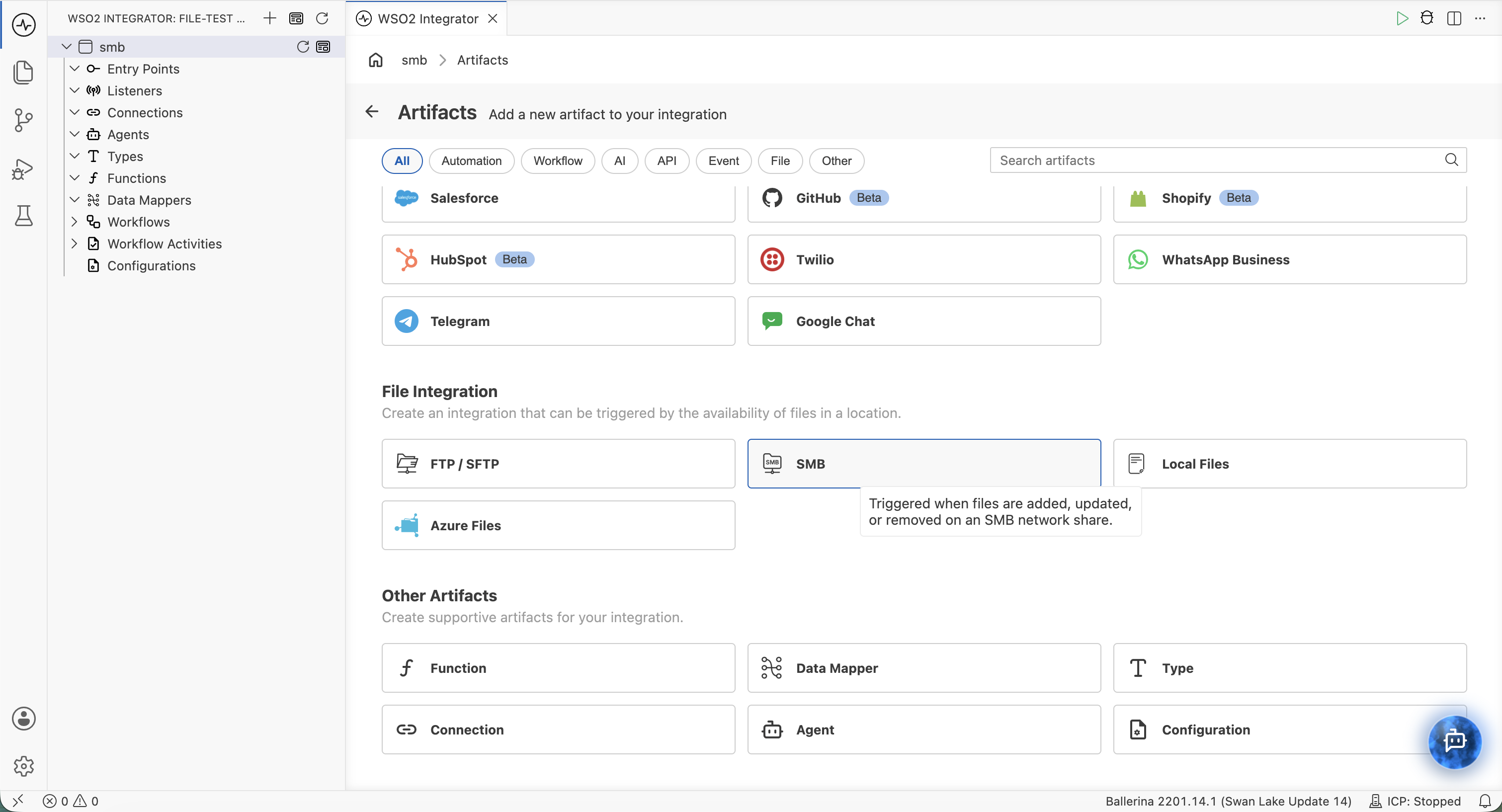
In the Artifacts panel, select SMB under File Integration.
-
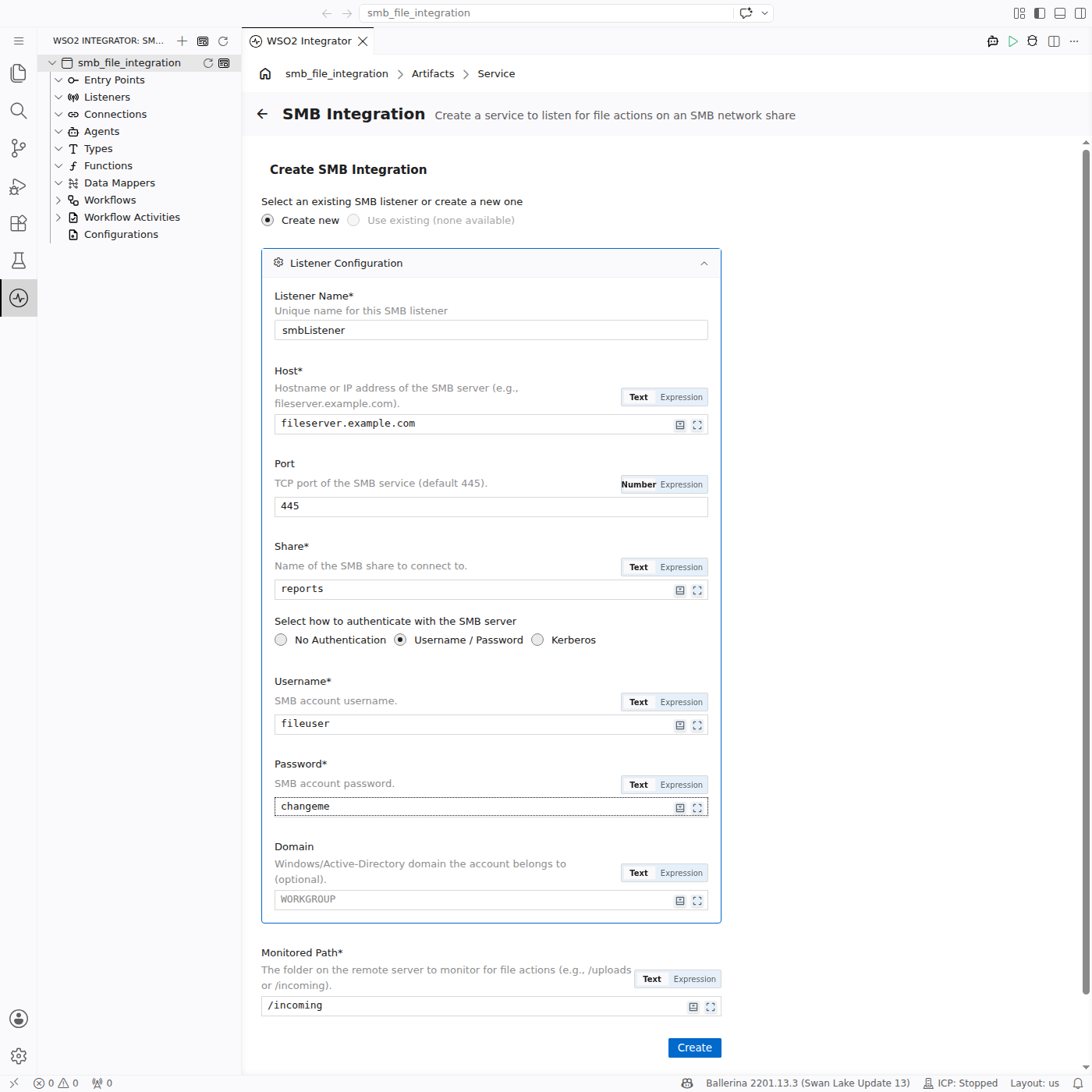
In the Create SMB Integration form, keep Create new selected to define a listener. Choose Use existing instead to attach the service to a listener the project already has.
-
Fill in the Listener Configuration:
Field Description Listener Name Identifier for this listener (e.g., smbListener).Host Hostname or IP address of the SMB server (e.g., fileserver.example.com).Port TCP port of the SMB service. Defaults to 445.Share Name of the share to connect to (e.g., reports). Every path is resolved inside this share. -
Choose an authentication method:
Option Fields revealed Use when No Authentication — The share allows guest access. Username / Password Username, Password, Domain NTLMv2 — the usual choice for Windows and Samba. Leave Domain at WORKGROUPfor standalone servers, or set the Active Directory domain.Kerberos Principal and keytab settings The domain requires mutual authentication. -
Enter the Monitored Path — the directory inside the share to poll (e.g.,
/incoming). Defaults to/. -
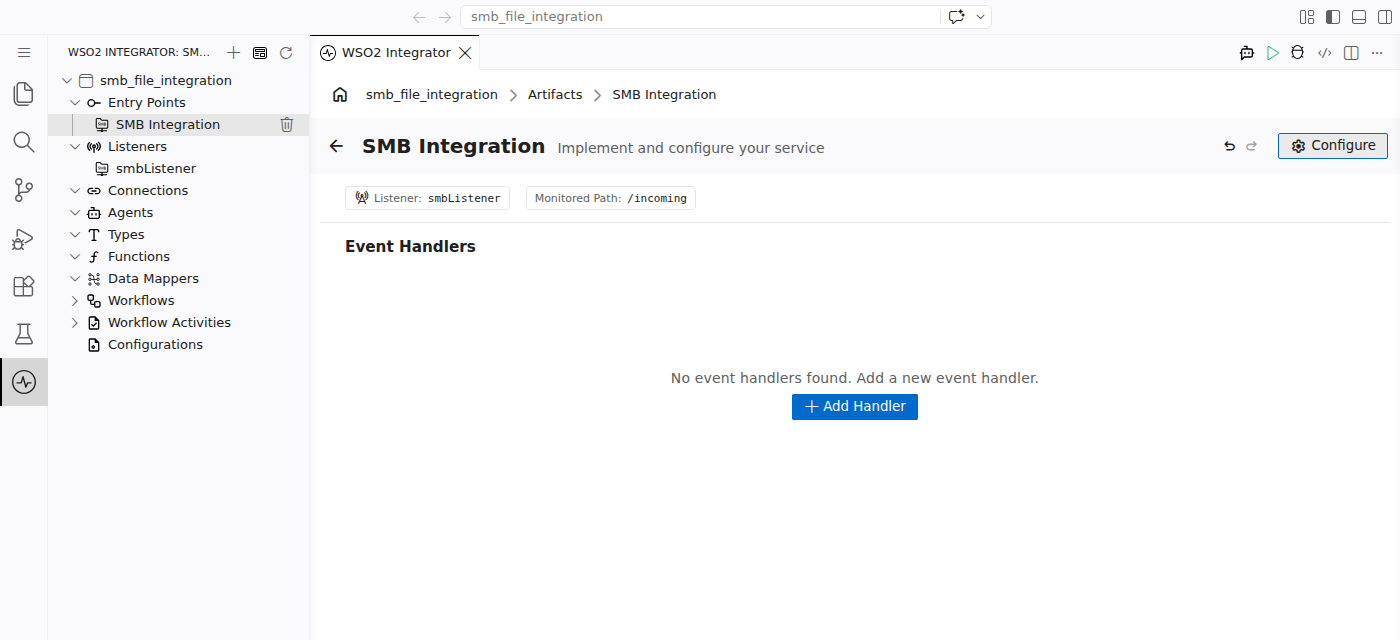
Select Create. WSO2 Integrator opens the service with its listener and monitored path shown at the top.
-
Select + Handler to define how incoming files are processed.
Tip: Bind Username and Password to configurable variables instead of typing literals. Switch the field to Expression and reference a configurable so credentials never reach source control.
SMB with NTLMv2 credentials:
import ballerina/smb;

configurable string host = ?;
configurable string share = ?;
configurable string username = ?;
configurable string password = ?;

listener smb:Listener smbListener = new (
    host = host,
    port = 445,
    share = share,
    auth = {credentials: {username, password, domain: "WORKGROUP"}}
);

@smb:ServiceConfig {
    path: "/incoming"
}
service smb:Service on smbListener {
    remote function onFileText(string content, smb:FileInfo fileInfo) returns error? {
        // Process text file content
    }
}
SMB with Kerberos:
import ballerina/smb;

listener smb:Listener smbListener = new (
    host = "fileserver.example.com",
    share = "reports",
    auth = {
        kerberosConfig: {
            principal: "[email protected]",
            keytab: "/etc/security/alice.keytab",
            configFile: "/etc/krb5.conf"
        }
    }
);

@smb:ServiceConfig {
    path: "/incoming"
}
service smb:Service on smbListener {
    remote function onFileText(string content, smb:FileInfo fileInfo) returns error? {
    }
}
Note: An SMB service declares its type explicitly —
service smb:Service on smbListener— unlike FTP, where the type is inferred.
File handlers
A file handler is a remote function the runtime calls each time a polling cycle detects a file event in the monitored directory. A service can declare any combination of the three handler kinds:
| Handler | Trigger |
|---|---|
On Create (onFileText / onFileJson / onFileXml / onFileCsv / onFile) | A new file appears in the monitored directory. The function name depends on the content format — one variant per format. |
On Delete (onFileDelete) | A previously seen file is no longer present on the share. |
On Error (onError) | The runtime could not map incoming content to a typed handler — for example, a JSON handler received malformed JSON. |
Adding a file handler
- Visual Designer
- Ballerina Code
In the service designer, select + Handler, then pick On Create, On Delete, or On Error. The handler configuration panel opens on the right.
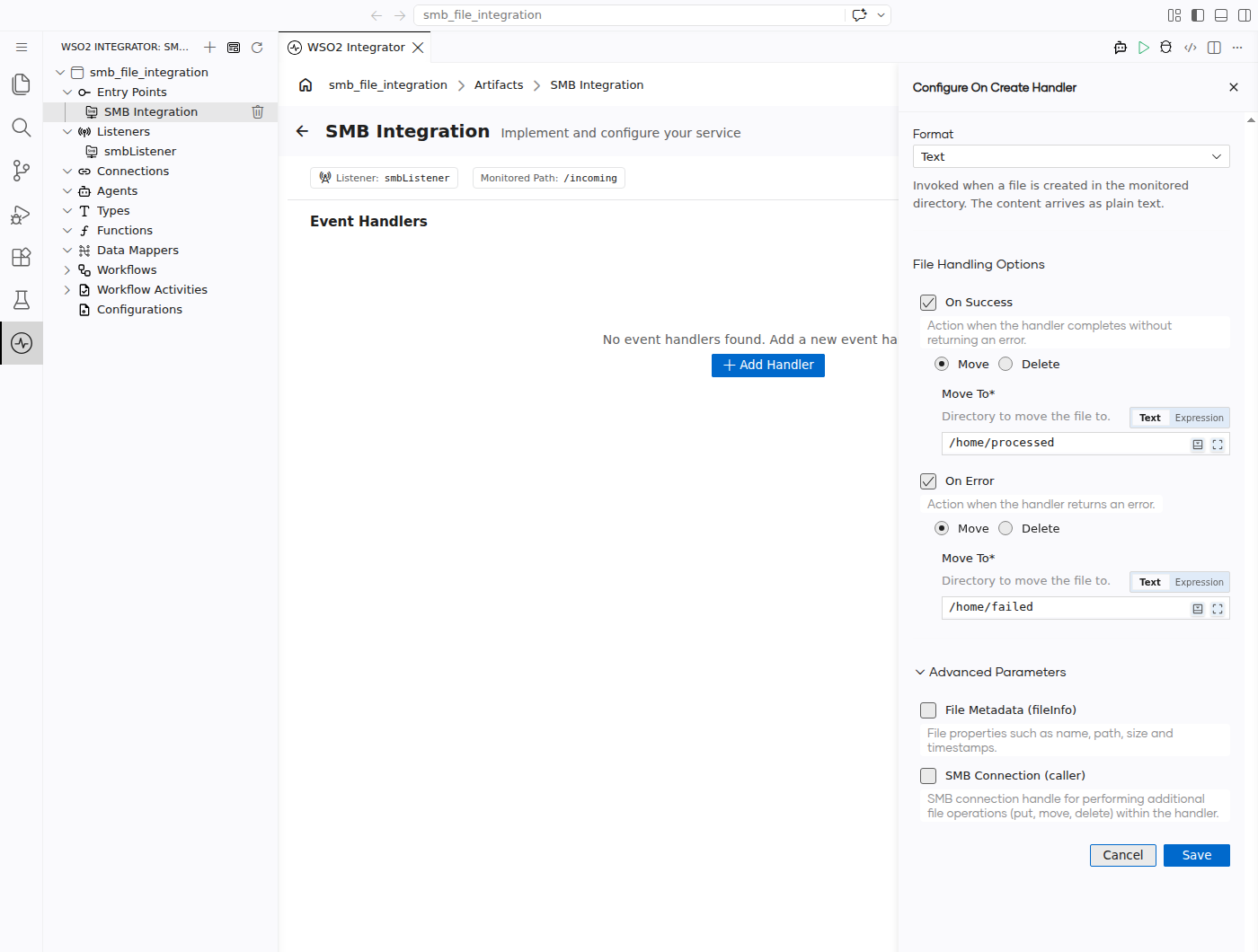
| Field | Description |
|---|---|
| Format | (On Create only) The format of incoming files. Determines the handler function name and the type of the content parameter. Options: Text, JSON, XML, CSV, Raw Bytes. See Content types. |
| + Define Content Schema | (JSON, XML only) Binds the document to a record type you build in a form. See Data binding. |
| + Define Row Schema | (CSV only) Binds each row to a record type you build in a form. See Data binding. |
| Stream (Large Files) | (CSV, Raw Bytes only) Hands the handler the file a piece at a time instead of loading it all into memory. See Streaming large files. |
| On Success | Action to take when the handler completes without returning an error: Move the file to another directory, or Delete it. See Post-processing. |
| On Error | Action to take when the handler returns an error. Same choices as On Success. |
| Move To | Destination directory, required when Move is selected. |
Expand Advanced Parameters for optional handler parameters:
| Field | Description |
|---|---|
| File Metadata (fileInfo) | Adds an smb:FileInfo parameter carrying the file's name, path, size, and timestamps. See FileInfo. |
| SMB Connection (caller) | Adds an smb:Caller parameter for read and write operations on the same share. See Caller operations. |
Select Save to add the handler. It appears in the Event Handlers list, tagged with its kind.
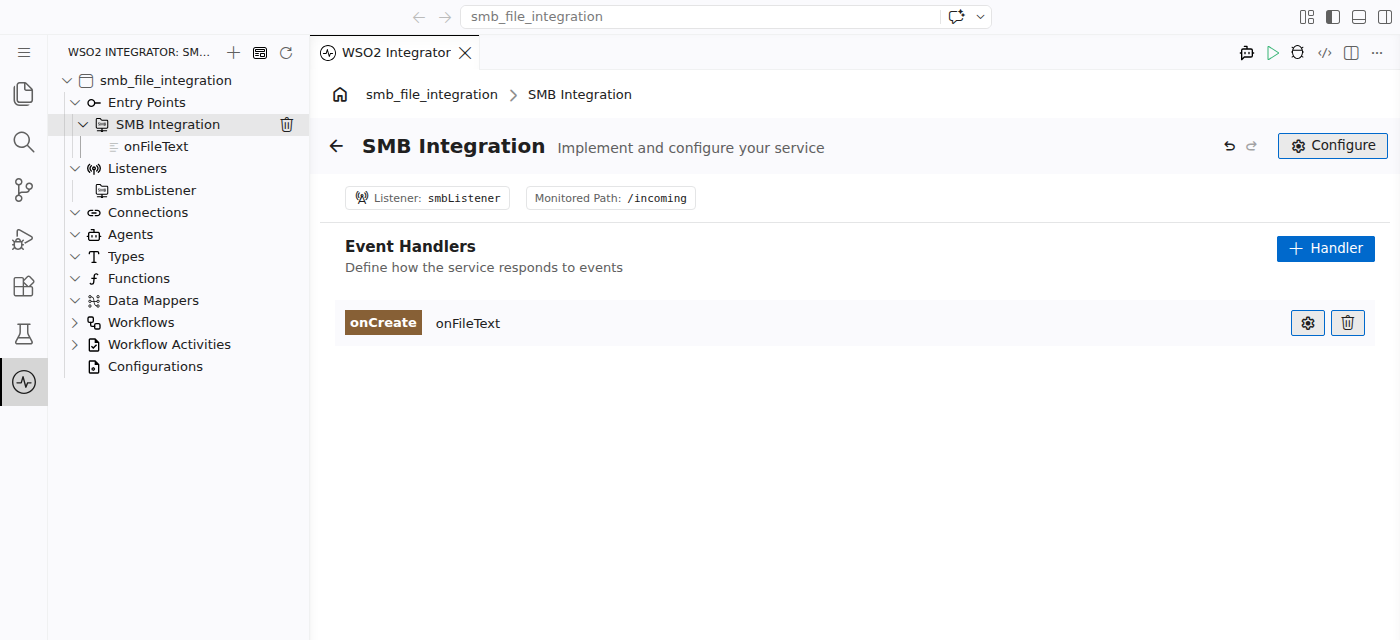
Select the handler to implement its body in the flow designer.
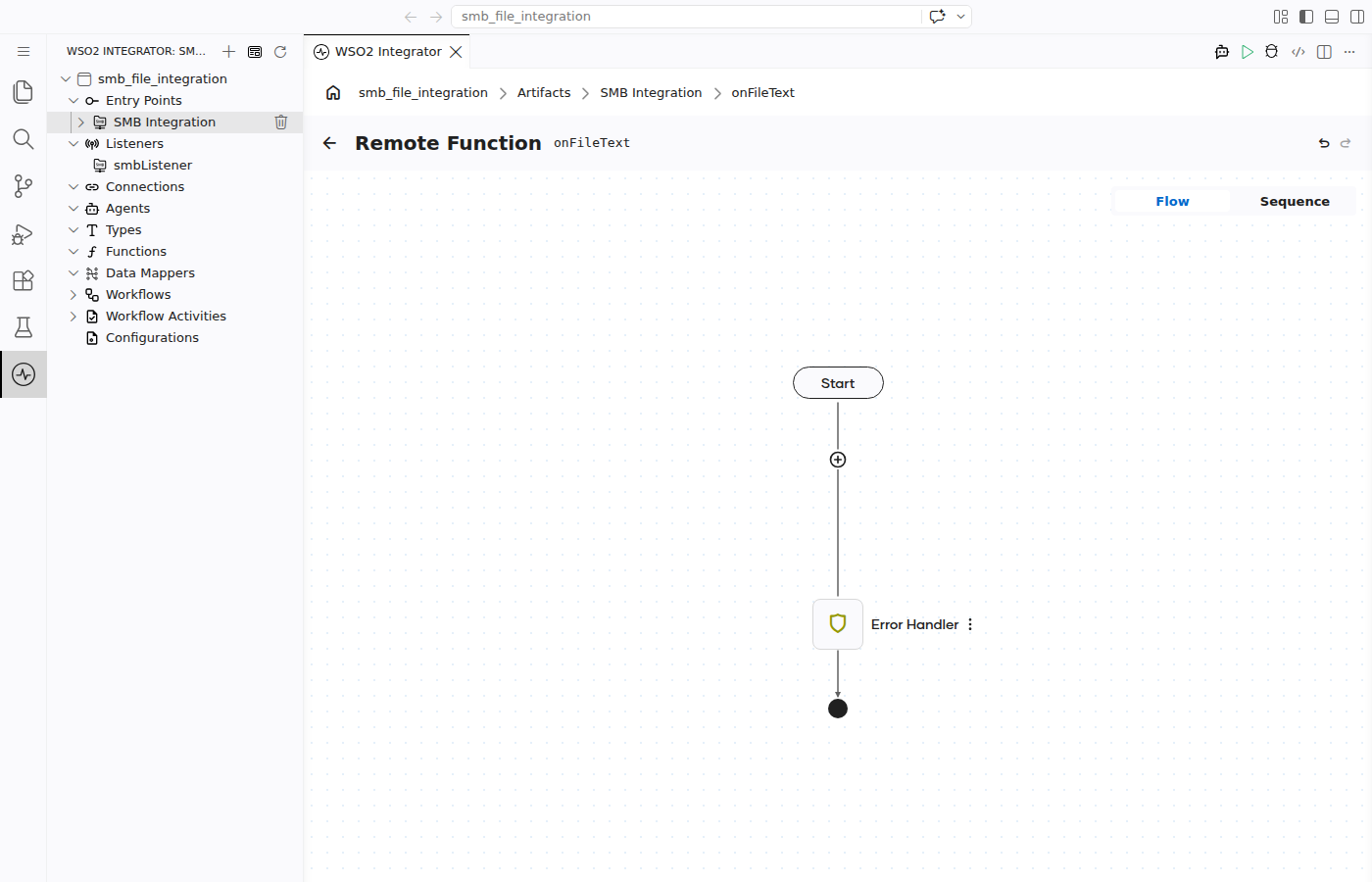
File handlers are typed remote function declarations inside the service. The runtime routes events by function name; the content parameter type determines deserialization.
Text file handler:
remote function onFileText(string content, smb:FileInfo fileInfo) returns error? {
    // content contains the full file text
}
JSON file handler (bound to a record type):
type Order record {|
    string orderId;
    string product;
    int quantity;
|};

remote function onFileJson(Order 'order, smb:FileInfo fileInfo) returns error? {
    // 'order is deserialized from JSON
}
CSV streaming handler (large files):
remote function onFileCsv(stream<string[], error?> content, smb:FileInfo fileInfo) returns error? {
    check content.forEach(function(string[] row) {
        // Process each row without loading the whole file into memory
    });
}
Binary file handler:
remote function onFile(byte[] content, smb:FileInfo fileInfo) returns error? {
    // content is the raw file bytes
}
Delete handler:
remote function onFileDelete(string deletedFile) returns error? {
    // deletedFile is the path of the file that disappeared from the monitored directory
}
Error handler:
remote function onError(smb:Error smbError) returns error? {
    log:printError("file processing error", 'error = smbError);
}
Content types
The Format chosen on an On Create handler determines the function name and the type of the content parameter.
| Format | Handler function | Content type | Use when |
|---|---|---|---|
| Text | onFileText | string | Files are plain text (logs, EDI, custom formats). |
| JSON | onFileJson | json or a record type | Files are JSON documents. |
| XML | onFileXml | xml or a record type | Files are XML documents. |
| CSV | onFileCsv | string[][], a record array, or a stream variant | Files are comma-separated values. Define a row schema to bind each row to a record type. |
| Raw Bytes | onFile | byte[] or stream<byte[], error?> | Binary files, or when you need raw byte access. |
Post-processing: moving or deleting files
Once a handler finishes — successfully or with an error — the runtime can move the file elsewhere on the same share or delete it. Configure this on the handler form; switch to the Ballerina Code tab only to review the generated annotation.
- Visual Designer
- Ballerina Code
The File Handling Options section has two independent toggles:
| Event | Ticked by default? | Action picker | Extra input |
|---|---|---|---|
| On Success | Yes | Move or Delete | Move To destination, required when Move is chosen |
| On Error | Yes | Move or Delete | Move To destination, required when Move is chosen |
Common combinations:
- Move on success, move on error — archive processed files and quarantine failures in separate directories.
- Delete on success, move on error — discard files that processed cleanly, keep failures for review.
- Leave the file in place — clear On Success or On Error to skip the action for that outcome.
The form writes an @smb:FunctionConfig annotation on the handler. Each of afterProcess and afterError takes either a move record or the bare constant smb:DELETE:
@smb:FunctionConfig {
    fileNamePattern: ".*\\.csv",
    afterProcess: {
        moveTo: "/processed"
    },
    afterError: smb:DELETE
}
remote function onFileText(string content, smb:FileInfo fileInfo) returns error? {
}
@smb:FunctionConfig fields:
| Field | Type | Description |
|---|---|---|
fileNamePattern | string? | Regex a file name must match for this handler to run. Narrows the listener-level pattern. |
afterProcess | smb:MOVE|smb:DELETE? | Action when the handler returns without error. Omit to leave the file in place. For a move, use {moveTo: <path>}. |
afterError | smb:MOVE|smb:DELETE? | Action when the handler returns an error. Same shape as afterProcess. |
The move record also accepts preserveSubDirs, which defaults to true and recreates the file's subdirectory structure under the destination:
afterProcess: {
    moveTo: "/processed",
    preserveSubDirs: false
}
Data binding
A handler can take the file content in a generic shape (json, xml, or a list of raw CSV values), or bound to a record type you define. Binding to a record type is what lets you refer to order.quantity in the handler instead of picking values out of a raw document, and it catches misspelled fields and wrong value types before the integration ever runs.
New to record types? A record type is just a named shape for your data — a list of the fields it holds and the kind of value in each. If your CSV has the columns
orderId,product, andquantity, the record type names those three fields and says which holds text and which holds a number. You build it from a form in the Visual Designer, so there is nothing to write by hand. For the language-level detail, see Type System & Records.
- Visual Designer
- Ballerina Code
On the Add File Handler form, the Format you pick decides which button appears:
| Format | Button | What it does |
|---|---|---|
| JSON | + Define Content Schema | Builds a record type for the whole JSON document. Skip it and the handler receives plain json. |
| XML | + Define Content Schema | Builds a record type for the whole XML document. Skip it and the handler receives plain xml. |
| CSV | + Define Row Schema | Builds a record type for one row; each row of the file then arrives as one filled-in record. Skip it and every row arrives as a list of raw text values. |
| Text, Raw Bytes | — | Nothing to define — the content is always plain text or raw bytes. |
The button opens a record builder. Add one field at a time, giving each a name and a type:
| Pick this type | For values like |
|---|---|
string | Text — names, IDs, reference codes |
int | Whole numbers — quantities, counts |
decimal | Numbers with a fractional part — prices, rates |
boolean | True/false flags |
| Another record | A nested object inside the document |
Field names have to match what is in the file — the JSON keys, the XML element names, or the CSV column headers. Once you save the schema the handler is rewritten to use it, and the fields become available by name in the expression editor everywhere you use the content.
CSV rows bound to a record:
type Order record {|
    string orderId;
    string product;
    int quantity;
|};

remote function onFileCsv(Order[] orders, smb:FileInfo fileInfo) returns error? {
    foreach Order 'order in orders {
        // field access is type-checked: 'order.orderId, 'order.quantity, ...
    }
}
A JSON document bound to a record:
type OrderBatch record {|
    string batchId;
    Order[] orders;
|};

remote function onFileJson(OrderBatch batch, smb:FileInfo fileInfo) returns error? {
    // batch.batchId and batch.orders are typed
}
An onFileXml handler binds the same way. Leave the parameter as json, xml, or string[][] to skip binding altogether.
Streaming large files
The runtime normally reads the whole file into memory before calling the handler. For a large file — a multi-gigabyte CSV export, say — that can exhaust the memory the integration has to work with. Streaming avoids it: the runtime hands the handler the file a piece at a time and the handler works through the pieces in order.
- Visual Designer
- Ballerina Code
Tick Stream (Large Files) on the Add File Handler form. The option only appears for the CSV and Raw Bytes formats:
| Format | What the handler receives when streaming is on |
|---|---|
| CSV | One row at a time. Combine it with + Define Row Schema and each row arrives as a filled-in record. |
| Raw Bytes | The file in 64 KB blocks. |
JSON and XML offer no streaming option — both have to be read in full before they can be parsed.
Two things to keep in mind:
- Leave the option off unless the files really are large. A handler that gets the whole content is simpler to build.
- Streamed content can only be read once, start to finish. If the handler needs to go over the content twice, or look at the end before the beginning, don't stream it.
Streaming turns the content parameter into a stream<T, error?>. Iterate it with forEach:
Streaming CSV rows:
remote function onFileCsv(stream<Order, error?> orders, smb:FileInfo fileInfo) returns error? {
    check orders.forEach(function(Order 'order) {
        // process each row as it arrives
    });
}
Use stream<string[], error?> instead when you have not defined a row schema — each row then arrives as an array of raw column values.
Streaming raw bytes:
remote function onFile(stream<byte[], error?> content, smb:FileInfo fileInfo) returns error? {
    check content.forEach(function(byte[] chunk) {
        // process each chunk
    });
}
Chunks are a fixed 64 KB for the listener; the listener's bufferSize setting does not affect them, as it governs client-side reads and writes.
A bad row (malformed CSV or wrong type) stops the stream right there. The handler returns an error, so the file takes the On Error path you configured under Post-processing. Anything your handler already did for earlier rows (database writes, API calls, published messages) stays.
When you retry the file, those rows run again. To stay safe, make your handler idempotent (check before you write) or track which rows you've already processed per file. To skip malformed rows instead of failing the entire file, enable CSV fault tolerance.
FileInfo
Enable File Metadata (fileInfo) to receive an smb:FileInfo parameter describing the incoming file.
| Field | Type | Description |
|---|---|---|
name | string | File name without path |
path | string | Path within the share |
size | int | File size in bytes |
modifiedAt | time:Utc | Last-modified time |
createdAt | time:Utc | Creation time |
accessedAt | time:Utc | Last-accessed time |
writtenAt | time:Utc | Last-written time |
isDirectory | boolean | true if the entry is a directory |
extension | string | File extension |
isExecutable | boolean | true if the file is marked executable |
isHidden | boolean | true if the file is marked hidden |
isWritable | boolean | true if the file is writable |
uri | string | Full URI of the file |
Caller operations
For most cases the content parameter and the post-processing annotation are enough. When you need more control — reading a related file, writing output elsewhere, or managing files yourself — enable SMB Connection (caller) to add an smb:Caller parameter. It reuses the listener's session.
Reading files:
| Operation | Return type | Description |
|---|---|---|
caller->getText(path) | string|Error | Read a file as plain text |
caller->getBytes(path) | byte[]|Error | Read a file as a byte array |
caller->getJson(path) | json|Error | Read and parse JSON |
caller->getXml(path) | xml|Error | Read and parse XML |
caller->getCsv(path) | string[][]|Error | Read and parse CSV |
caller->getBytesAsStream(path) | stream<byte[], error?>|Error | Read as a byte stream for large files |
caller->getCsvAsStream(path) | stream<string[], error?>|Error | Read CSV as a stream for large files |
Writing files:
Write operations take an smb:FileWriteOption — smb:OVERWRITE (default) or smb:APPEND.
| Operation | Description |
|---|---|
caller->putText(path, content, option) | Write a string to a file |
caller->putBytes(path, content, option) | Write a byte array to a file |
caller->putJson(path, content, option) | Serialize and write JSON |
caller->putXml(path, content, option) | Serialize and write XML |
caller->putCsv(path, content, option) | Write CSV from string[][] or a record array |
caller->putBytesAsStream(path, stream, option) | Write a byte stream to a file |
caller->putCsvAsStream(path, stream, option) | Write CSV from a stream |
caller->patch(path, content, offset) | Overwrite part of a file at a byte offset |
File management:
| Operation | Return type | Description |
|---|---|---|
caller->list(path) | FileInfo[]|Error | List files and directories |
caller->mkdir(path) | Error? | Create a directory |
caller->rmdir(path) | Error? | Remove a directory |
caller->rename(origin, destination) | Error? | Rename a file or directory |
caller->move(source, destination) | Error? | Move a file |
caller->copy(source, destination) | Error? | Copy a file |
caller->exists(path) | boolean|Error | Check whether a path exists |
caller->size(path) | int|Error | Get a file's size in bytes |
caller->isDirectory(path) | boolean|Error | Check whether a path is a directory |
caller->delete(path) | Error? | Delete a file |
Service configuration
The @smb:ServiceConfig annotation controls what the service monitors.
- Visual Designer
- Ballerina Code
In the service designer, select Configure to edit the service's settings. The Monitored Path shown beside the listener name at the top of the designer reflects the annotation's path field.
@smb:ServiceConfig {
    path: "/incoming/orders"
}
service smb:Service on smbListener {
}
@smb:ServiceConfig fields:
| Field | Type | Default | Description |
|---|---|---|---|
path | string? | Service name | Directory inside the share to monitor. Paths are relative to the share root. |
Listener configuration
The listener controls how to connect — host, share, authentication, dialects, and polling behaviour. One listener represents one connection to one share. Open its configuration by selecting the listener name (for example, smbListener) under Listeners in the sidebar.
- Visual Designer
- Ballerina Code
| Field | Description | Default |
|---|---|---|
| Host | Hostname or IP address of the SMB server. | localhost |
| Port | TCP port of the SMB service. | 445 |
| Share | Name of the share to connect to. Required. | — |
| Auth | NTLMv2 credentials or a Kerberos configuration. | — |
| File Name Pattern | Regex a file name must match to trigger any handler. | — |
| Polling Interval | Seconds between directory polls. | 60 |
| Dialects | SMB protocol dialects to negotiate, in order of preference. | All dialects |
| Sign Required | Whether SMB message signing is required. | false |
| Encrypt Data | Whether to encrypt data in transit. | false |
| Enable DFS | Whether to follow Distributed File System referrals. | false |
| Buffer Size | Read and write buffer size in bytes. | 65536 |
| Connect Timeout | Connection timeout in seconds. | 30.0 |
| Lax Data Binding | When true, data-binding errors yield () instead of surfacing as an error. | false |
| CSV Fail Safe | Skip malformed CSV rows rather than rejecting the whole file. | — |
Listener configuration maps to the smb:ListenerConfiguration record passed when constructing the listener:
listener smb:Listener smbListener = new (
    host = "fileserver.example.com",
    port = 445,
    share = "reports",
    auth = {credentials: {username: "fileuser", password: "changeme"}},
    fileNamePattern = ".*\\.csv",
    pollingInterval = 30,
    dialects = [smb:SMB_3_1_1, smb:SMB_3_0_2],
    signRequired = true
);
smb:ListenerConfiguration fields:
| Field | Type | Default | Description |
|---|---|---|---|
host | string | "localhost" | Hostname or IP address of the SMB server. |
port | int | 445 | Port number of the SMB service. |
share | string | "" | Share name to connect to. Required in practice. |
auth | smb:AuthConfiguration? | — | NTLMv2 credentials or a kerberosConfig. |
fileNamePattern | string? | — | Regex a file name must match to trigger any handler. |
pollingInterval | decimal | 60 | Seconds between directory polls. |
dialects | smb:Dialect[] | All dialects | Dialects to negotiate, in order of preference: SMB_3_1_1, SMB_3_0_2, SMB_3_0, SMB_2_1, SMB_2_0_2. |
signRequired | boolean | false | Whether SMB message signing is required. |
encryptData | boolean | false | Whether to encrypt data in transit. |
enableDfs | boolean | false | Whether to follow Distributed File System referrals. |
bufferSize | int | 65536 | Read and write buffer size in bytes. |
connectTimeout | decimal | 30.0 | Connection timeout in seconds. |
laxDataBinding | boolean | false | When true, data-binding errors yield () instead of an error. |
csvFailSafe | smb:FailSafeOptions? | — | Skip malformed CSV rows instead of failing the file. |
smb:AuthConfiguration carries one of two records:
| Field | Type | Description |
|---|---|---|
credentials | smb:Credentials? | username, password, and domain (defaults to WORKGROUP). |
kerberosConfig | smb:KerberosConfig? | principal in user@REALM form, plus an optional keytab and configFile. |
What's next
- CSV fault tolerance — skip malformed rows instead of failing the whole file
- FTP / SFTP — poll a remote FTP, SFTP, or FTPS server instead of a network share
- Local files — monitor a local directory
- SMB connector — call SMB operations from an integration instead of being triggered by them
- Data Mapper — transform incoming file payloads between formats