Embedding APIs Explained: How They Work and When to Use Them
Most teams meet embeddings the same way. Someone asks for a search that treats "reset my login" and "change my password" as the same question, and keyword matching can't do it. A prototype calls an embedding API, stores the vectors, and the demo works.
Then the prototype becomes a product, and the questions get practical. How many dimensions should you store, and which similarity metric should the vector database use? What does a re-index of a few million documents cost? Who controls the API key once five services call the same provider?
This guide covers how embedding APIs work, the settings that matter, and how to run embedding traffic in production.
What Is an Embedding API?
An embedding API is an endpoint that converts text into a fixed-length list of numbers called an embedding vector. Some models also accept images or audio. Content with similar meaning produces vectors that sit close together. Software can then measure semantic similarity mathematically instead of by keyword overlap.
A chat or completions API returns generated text. An embedding API returns vectors and a token count, so pricing differs too. OpenAI, for example, bills embedding requests on input tokens. Those vectors then feed semantic search, clustering, classification, anomaly detection, and retrieval for LLM applications.
How Embedding Models Turn Text Into Vectors
A neural network encodes the text you send and returns an array of floating-point numbers. The array length is set by the model and its configuration, not by the input. A five-word question and a two-page policy come back the same size.
The model is trained so that inputs with related meaning land near each other in that high-dimensional space. "How do I change my login credentials?" and "Reset your password from the account settings page" share almost no words, yet they produce nearby vectors.
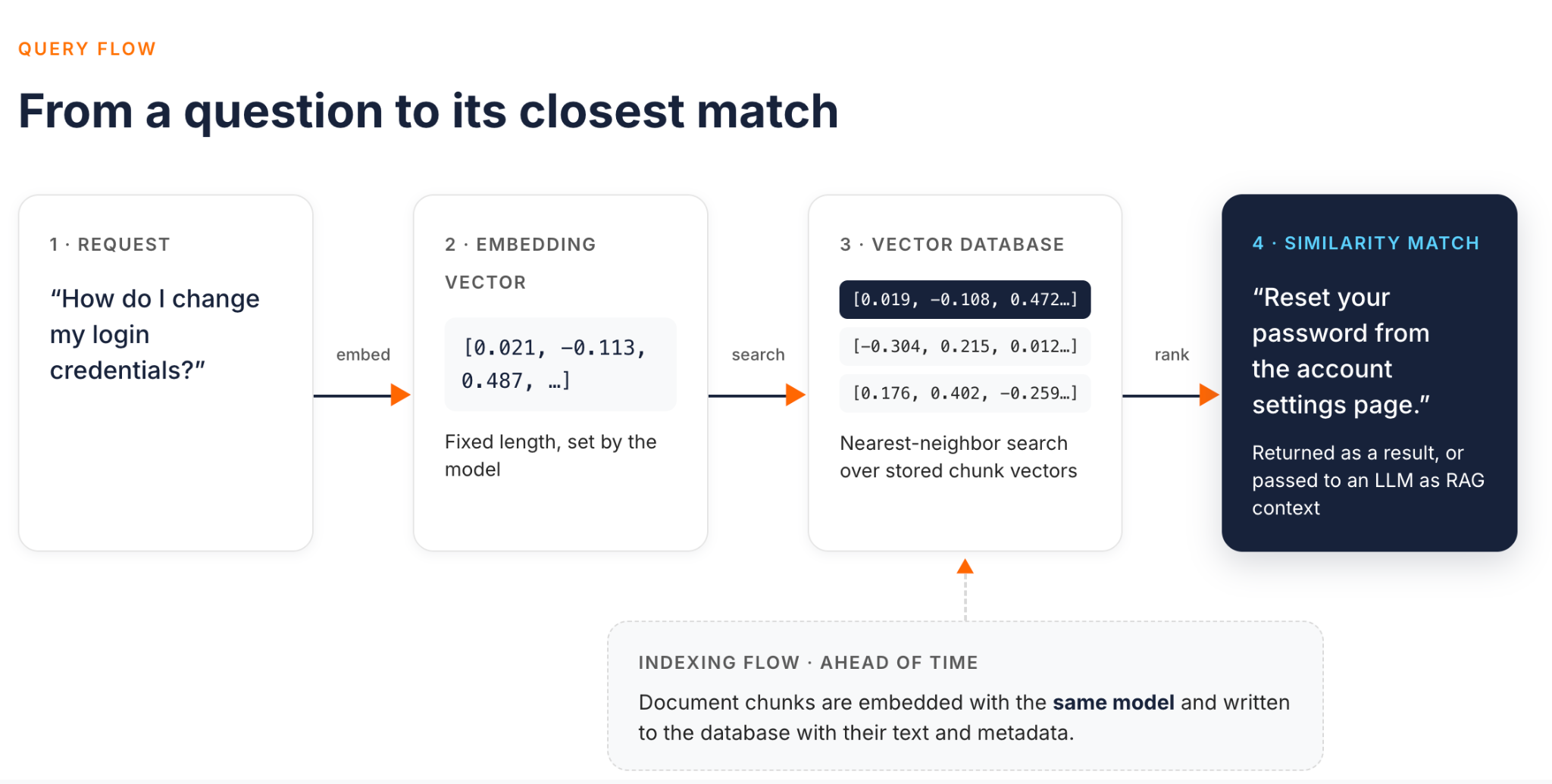
Here is a basic call with OpenAI's text-embedding-3-small model. It sends three inputs in one request:
from openai import OpenAI

client = OpenAI()  # reads OPENAI_API_KEY from the environment

docs = [
    "Reset your password from the account settings page.",
    "How do I change my login credentials?",
    "Our office is closed on public holidays.",
]

response = client.embeddings.create(model="text-embedding-3-small", input=docs)

for item in response.data:
    print(item.index, len(item.embedding))  # one vector per input

print(response.usage.total_tokens)  # what you are billed on
One rule matters more than any other. Embeddings from different models are not interchangeable. Each model defines its own embedding space, even within one vendor. Google states this directly: the spaces of gemini-embedding-001 and gemini-embedding-2 are incompatible, and upgrading means re-embedding all existing data. Never mix vectors from two models in one index. Store the model name and version next to every vector so you can tell which is which.
Embedding Dimensions: How Many Do You Need?
Dimension size is the length of each vector. It drives storage, memory, and search speed in your vector database. OpenAI's text-embedding-3-small returns 1,536 dimensions by default, and text-embedding-3-large returns 3,072. Google's gemini-embedding-2 defaults to 3,072 and supports anything from 128 to 3,072.
Why smaller isn't automatically worse
OpenAI's text-embedding-3 models and Google's Gemini embedding models are trained with Matryoshka Representation Learning. This technique makes the first part of each vector a useful embedding on its own. You request fewer embedding dimensions with a parameter: dimensions on OpenAI's text-embedding-3 models and output_dimensionality on Gemini.
The quality loss can be small. OpenAI reports that text-embedding-3-large shortened to 256 dimensions still outperforms the older text-embedding-ada-002 at 1,536 on the MTEB benchmark.
One trap is worth knowing. If you truncate vectors yourself after generating them, re-normalize them to unit length. OpenAI calls this out for manual truncation, while Gemini Embedding 2 re-normalizes truncated outputs automatically. Passing the parameter at request time avoids the problem on both.
Practical guidance
- Start with the model's default: Establish a baseline before you optimize anything.
- Build a small evaluation set first: Use real queries with known correct results from your own data.
- Reduce dimensions only after measuring: Compare recall at each size, and stop when it drops below what your product needs.
- Treat the choice as a schema decision: Changing dimensionality later requires an index migration. A supported reduction can reuse stored larger vectors by truncating and re-normalizing them. Other changes, such as a new model or more dimensions than you stored, require re-embedding. Evaluate the new size before you migrate.
Distance Metrics: Cosine Similarity vs. Euclidean Distance vs. Dot Product
Distance metrics decide which stored vectors count as closest to a query:
| Metric | What it measures | When to use it |
|---|---|---|
| Cosine similarity | The angle between two vectors, ignoring their length. Scores run from -1 to 1. | Default for text embeddings, and the metric OpenAI recommends for its models. |
| Dot product | Direction and magnitude together. For unit-length vectors it equals cosine similarity. | Use it when your model returns normalized vectors. It skips the normalization math. |
| Euclidean distance | Straight-line distance between two points. Lower means more similar. | Use it when vector magnitude carries meaning, or when a vector store only supports L2. |
The practical rule: if the model returns normalized vectors, all three metrics produce the same ranking. OpenAI's embeddings are normalized to length 1, so cosine can be computed as a dot product, and cosine and Euclidean distance give identical rankings. Gemini Embedding 2 output is normalized too. For these models, pick dot product when your vector database supports it, since it is the cheapest calculation.
The metric matters when vectors are not normalized. That happens with some self-hosted models, with manually truncated vectors, and where magnitude encodes something like frequency. Using the vectors from the earlier call:
import numpy as np


def cosine_similarity(a, b):
    a, b = np.asarray(a), np.asarray(b)
    return float(a @ b / (np.linalg.norm(a) * np.linalg.norm(b)))


vectors = [item.embedding for item in response.data]
query = vectors[1]  # "How do I change my login credentials?"

for candidate in (vectors[0], vectors[2]):
    # For unit-length vectors, both numbers match
    print(cosine_similarity(query, candidate), float(np.dot(query, candidate)))
Batching, Rate Limits, and Cost at Scale
A single embedding call costs very little. Cost and rate limits become real during bulk work: the first index build, a re-index after a model change, or a nightly knowledge base sync.
Batch inputs into one request
Every HTTP call carries latency and rate-limit overhead. The input field accepts an array, so send many documents per call. On OpenAI, each input can be up to 8,192 tokens. An array can hold up to 2,048 inputs, and one request can carry at most 300,000 tokens across all of them. Check how each provider treats arrays. Gemini Embedding 2 returns one aggregated embedding for multiple inputs in a single request, unless each input is wrapped in its own Content object. Chunk long documents to fit the per-input limit before you batch them. Anything longer will fail or, on some providers, be silently truncated.
Use async batch APIs for bulk jobs
If the work can wait, it is cheaper. OpenAI's Batch API supports the embeddings endpoint at a 50% discount. It has its own pool of rate limits and completes within 24 hours. An embeddings batch is capped at 50,000 inputs. Google offers Gemini embedding batches at 50% of the standard price. Keep the synchronous endpoint for live traffic, such as embedding a user's search query.
Cache embeddings for content that has not changed
Reuse embeddings for unchanged content under the same pinned embedding configuration, and recompute when the content or the configuration changes. Store a hash of each chunk next to its vector, along with the model and version, dimension size, task format, and preprocessing settings. On the next sync, embed only chunks where any of these changed. For a mostly stable document store, a full re-index becomes a small incremental job.
Separate bulk work from live queries
By default, a re-index job and user-facing search share one provider quota. A large job can exhaust it and cause 429 errors on the search path. Give each workload its own budget or schedule bulk jobs off-peak, and retry 429 responses with backoff. The same cost levers apply to completion traffic, as covered in our guide to LLM cost control.
Choosing an Embedding Model and Provider
The MTEB benchmark compares embedding models across retrieval, clustering, and classification tasks. Use it to build a shortlist, then let your own evaluation set decide. The criteria that usually matter:
- Task fit: Search, clustering, and classification reward different behavior, and some models take the task as input. Gemini Embedding 2, for example, expects task instructions in the text. For search, format queries as
task: search result | query: {content}and documents astitle: {title} | text: {content}, usingtitle: nonewhen there is no title. The two formats differ on purpose. - Languages: If users search in several languages, test multilingual queries against your corpus directly.
- Context length: OpenAI's embedding models and
gemini-embedding-2accept 8,192 tokens per input, whilegemini-embedding-001accepts 2,048. A shorter limit means more chunking before you embed. - Cost per token: Compare prices at your real volume, including batch discounts.
- Hosted or self-hosted: Hosted APIs from OpenAI, Google, Voyage, and Jina remove the need to run inference yourself. A self-hosted open-source model keeps data in your network and removes per-token fees, but you run and scale the inference.
Switching models later means re-embedding the whole corpus. What you can avoid is hard-coding one provider into every service. If applications call a gateway instead of the provider, credentials and routing live in one place. A move still needs a re-index, and providers with different request formats can need client changes. But provider settings change at the gateway, not in every service. If you are comparing gateways that support several model providers, see our AI gateway comparison.
Powering Search and RAG With Embeddings
Semantic search and retrieval-augmented generation (RAG) share two flows that run at different times.
- The indexing flow runs ahead of time. Split source documents into chunks. Embed each chunk, and write the vector, the chunk text, and metadata into a vector database. This is the bulk, batch-friendly workload from the previous section.
- The query flow runs per request, on the user's critical path. Embed the question with the same model, then run a nearest-neighbor search. For search, return the closest chunks as results. For RAG systems, pass them to an LLM as context, so it answers from your knowledge base rather than its training data alone.
Three design points decide whether retrieval quality holds up:
- Semantic, keyword, or hybrid: Semantic search handles paraphrase well but can miss exact identifiers such as product codes and error strings, where keyword search is strongest. Many teams run both and merge results, which is hybrid search.
- Consistency: The corpus and the live query must go through the same model, version, and dimension size. If the model uses task instructions, follow its prescribed query and document pair. For Gemini Embedding 2 retrieval, the query and document formats are intentionally different. A mismatch returns similarity scores that look plausible and mean nothing.
- Score thresholds: A similarity score is only meaningful relative to one model and one dataset. Calibrate any cut-off against your evaluation set, and recalibrate after every model change.
Governing Embedding API Traffic at the Gateway
In a notebook, one developer holds one API key. In production, several services embed content, sometimes through several providers, and those calls need the same controls as other API traffic. A gateway earns its place when any of these apply:
- You use more than one embedding model or provider, or expect to switch.
- Finance or platform teams need spend attributed to specific teams, services, or tenants.
- The text being embedded contains customer or regulated data, and you want one audited egress point for it.
- Several workloads share a provider quota, and bulk jobs must not starve live queries.
Embedding traffic reaches a gateway in two distinct ways.
Governing the embedding calls your applications make
This is outbound traffic from your services to an embedding provider. WSO2 AI Gateway models each provider as an LLM Provider. That provider holds the upstream URL and credentials, and can expose the /embeddings path alongside chat endpoints through its access control rules. Applications call the gateway's invoke URL with a gateway-issued credential, so the provider API key stays at the gateway instead of in application code.
Policies then attach to individual paths. The example below exposes only the OpenAI embeddings endpoint. It caps prompt tokens per minute with the token-based rate limit policy:
apiVersion: gateway.api-platform.wso2.com/v1
kind: LlmProvider
metadata:
  name: openai-embeddings
spec:
  displayName: OpenAI Embeddings
  version: v1.0
  template: openai
  context: /openai
  upstream:
    url: https://api.openai.com/v1
    auth:
      type: api-key
      header: Authorization
      value: Bearer ${OPENAI_API_KEY}
  accessControl:
    mode: deny_all
    exceptions:
      - path: /embeddings
        methods: [POST]
  operationPolicies:
    - name: api-key-auth
      version: v1
      paths:
        - path: /embeddings
          methods: [POST]
          params:
            key: Authorization
            in: header
            valuePrefix: "Bearer "
    - name: token-based-ratelimit
      version: v1
      paths:
        - path: /embeddings
          methods: [POST]
          params:
            promptTokenLimits:
              - count: 200000  # Illustrative value, size it to your provider quota
                duration: "1m"
The api-key-auth policy requires callers to present a gateway-issued key. Without it, or an equivalent authentication policy, this definition does not authenticate consumers. The rate limit policy reads token counts from the provider's response and returns 429 once a quota is used up. The built-in OpenAI template reads usage.prompt_tokens, which embedding responses include. Policies on a provider apply to every LLM Proxy built on it, and proxy-level policies add to that baseline. Each LLM Proxy gets its own URL context and can carry its own policies. An indexing job and a search service can therefore use separate proxies over the same provider.
The LLM Proxy also supports multi-provider load balancing and failover. For embeddings, treat failover as an architecture pattern to validate, not a default. A fallback is only usable when it matches the primary on model version, dimensions, normalization, task formatting, and request and response format. In practice, that means a second deployment or region of the same model. Test the setup in your environment before relying on it. The LLM Cost policy adds per-call cost attribution across OpenAI, Anthropic, Gemini, Mistral, and AWS Bedrock.
Using embeddings to make gateway decisions
Here the gateway generates embeddings for itself, to make decisions about inbound requests, usually chat requests bound for an LLM. It makes a side call to an embedding service configured at the gateway level, separate from the upstream LLM. Three policies work this way:
- Semantic Cache: The policy embeds a field extracted from the request by JSONPath, which defaults to the last message. It then searches Redis or Milvus by cosine similarity for an earlier response. A hit returns the cached response without calling the upstream model. The docs recommend thresholds of 0.85 to 0.94 for most use cases, starting at 0.85. Cache entries are scoped to the resolved caller identity. That is the application or subscriber established by an auth policy, or else the JWT subject or client ID, so it is not necessarily the individual end user. Requests with no resolvable identity bypass the cache unless
cacheUnauthenticatedis enabled. See the Semantic Cache policy for configuration. - Semantic Model Routing: This policy embeds example utterances once, at startup, and keeps them in memory. At request time it embeds only the prompt, compares it by cosine similarity, and routes to the matching model. The default threshold is 0.90, and requests that match no route go to a default model. This policy is at version 0.9 and is not in the default AI Gateway 1.2.0 build, so it needs a custom gateway build.
- Semantic Prompt Guard: This policy compares prompts against allowed and denied phrase lists by embedding similarity. Both thresholds default to 0.65, and a blocked prompt returns HTTP 422.
These are independent policies, not a pipeline, and you can attach any one without the others. Each adds an embedding call to the request path. The Semantic Cache and Semantic Prompt Guard docs estimate roughly 100 to 500 ms for that call, so measure it in your own environment. Failure behavior also differs by policy. Semantic Cache sends the request upstream if embedding generation or the vector store fails at request time. Semantic Model Routing falls back to its default model when the embedding request fails. Semantic Prompt Guard blocks the request with an error response instead. Its phrase embeddings are generated when the policy initializes, so the embedding provider must be reachable at deployment. Weigh the latency against your cache hit rate before enabling the cache broadly.
Conclusion
An embedding API is the simplest part of a semantic search or RAG system. You send text and get back a vector. The decisions that shape quality and cost come after that call.
Choose one model and treat it as part of your schema, because every stored vector depends on it. Measure retrieval against your own queries before you reduce dimensions or set a similarity cut-off. Use dot product when the model returns normalized vectors. Move bulk indexing to batch endpoints, and embed only content that has changed.
Once several services and providers are involved, the traffic itself needs governance. That means credentials held in one place, token budgets, cost attribution, and failover only to a compatible deployment of the same model. WSO2 AI Gateway, part of WSO2 API Platform, governs this traffic through the same control plane as your APIs. It adds semantic caching, routing, and rate limiting in front of whichever embedding providers you choose. Explore WSO2 AI Gateway to see how it fits your stack.
Frequently Asked Questions
What is an embedding API?
It is a service endpoint that returns a numeric vector for a piece of content, where similar content returns similar vectors. Applications compare those vectors to find related items instead of matching keywords.
Is there a free API that can use embedding models?
Yes, with limits. Google's Gemini API, for example, has a free tier with usage limits and access to a subset of models. Open-source embedding models are free to download and run, but you pay for the compute.
Can I use an LLM as an embedding model?
Not through its chat endpoint, which returns text rather than vectors. Use a model trained and served for embeddings. Many providers offer both kinds of model behind the same account and API key.
What is embedding, with an example?
An embedding is a list of numbers that represents meaning. "Cheap flights to Paris" and "low-cost airfare to Paris" become two vectors that sit close together. "Paris weather" should land further away, even though all three share a word.

