RAG Retrieval
Introduction
Retrieval-Augmented Generation (RAG) retrieval is the process of searching a vector database for the most relevant information in response to a user query.
Note
- This guide assumes you have already ingested files into your vector store. If you haven't already follow the Ingestion guide on how you can do that.
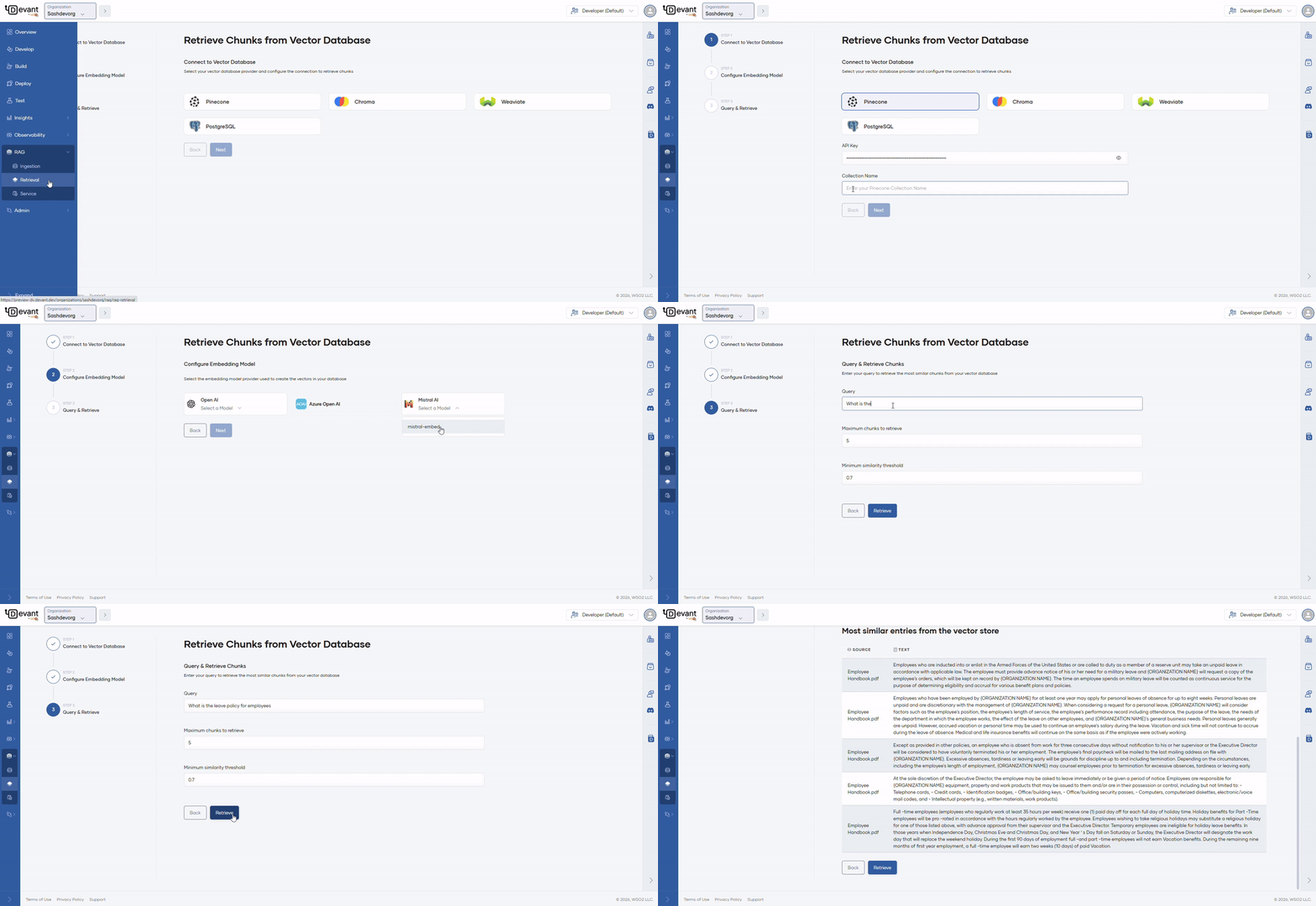
To retrieve chunks that have already been ingested (without uploading new files), navigate to your organization using the Organization dropdown in the top left of the Devant console header. In the left navigation menu, click RAG, then select Retrieval.
Step 1: Initialize vector store
- Select
Pineconeas the vector database. -
Enter the API key in the API Key field.
Info
To create an API key, refer to the Pinecone API key documentation.
-
Enter the Collection Name from which you want to retrieve data.
- Click Next.
Step 2: Configure the embedding model
- Select
text-embedding-ada-002embedding model from the OpenAI dropdown. -
Enter the API key in the Embedding Model API Key field.
Info
To create an API key, refer to the OpenAI platform documentation.
-
Click Next.
Step 3: Query and retrieve chunks
Execute queries to ensure proper data retrieval.
- Enter a query according to the content of the files ingested previously.
-
Maximum chunks to retrieve and Minimum similarity threshold are automatically populated with default values. You can modify them if needed.
Info
- Maximum chunks to retrieve defines the number of matching chunks to retrieve against the query.
- Minimum similarity threshold determines whether a chunk is relevant enough to be considered a match for a given query. Expressed as a value between 0 and 1 (for example, 0.7 or 70% similarity).
-
Click Retrieve. The search results will display the chunks that match the query.
Info
- Devant's retrieval process uses a reranking model to ensure that only the most accurate and contextually relevant chunks are returned.
After completing the RAG ingestion process, you can also implement a RAG retrieval to connect your vector database with user queries and generate responses using the WSO2 Integrator: BI.
For detailed implementation steps and configuration, refer to the RAG retrieval tutorial in the WSO2 Integrator: BI documentation.