TCP Service
TCP services handle raw TCP connections and are suitable for custom binary or text-based protocol implementations where HTTP overhead is not acceptable. WSO2 Integrator generates a service with a pre-defined onConnect handler that returns a connection service instance to manage per-connection lifecycle events.
TCP service support is currently in beta.
Creating a TCP service
- Visual Designer
- Ballerina Code
- In the design view, select Add Artifact.
- Select TCP Service under Integration as API.
- Fill in the creation form fields and select Create.
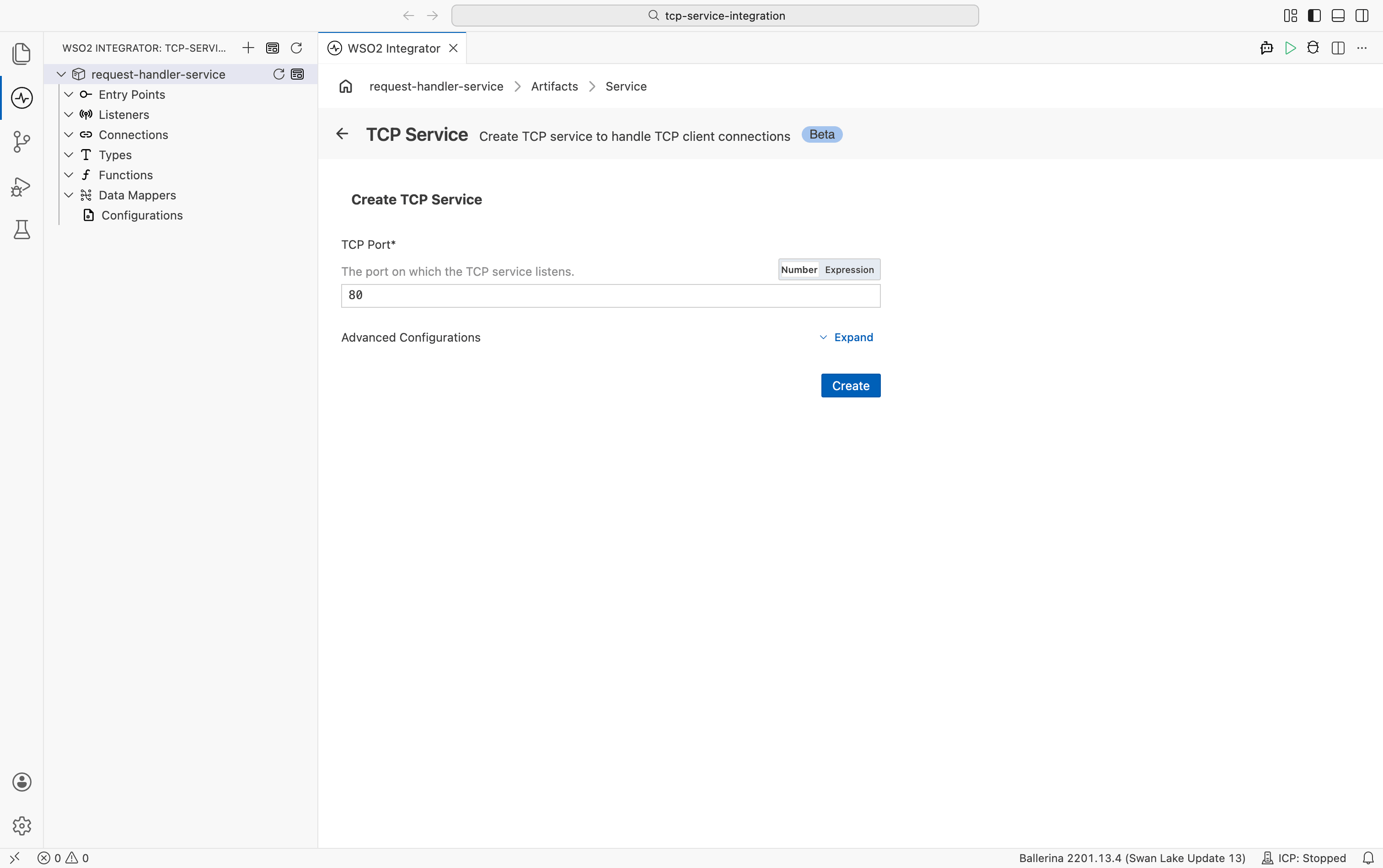
| Field | Description | Default |
|---|---|---|
| TCP Port | Port on which the TCP service listens. Required. | 80 |
Expand Advanced Configurations to set the Listener Name (default: tcpListener).
After selecting Create, WSO2 Integrator opens the service in the TCP Service Designer and generates the onConnect handler automatically.
import ballerina/tcp;

configurable int port = 80;

listener tcp:Listener tcpListener = new (port);

service on tcpListener {

    remote function onConnect(tcp:Caller caller) returns tcp:ConnectionService {
        return new TcpConnectionService();
    }
}

service class TcpConnectionService {
    *tcp:ConnectionService;

    remote function onBytes(readonly & byte[] data) returns byte[]|tcp:Error? {
        // Echo the received bytes back to the client.
        return data;
    }

    remote function onClose() {
        // Handle connection close
    }

    remote function onError(tcp:Error err) {
        // Handle connection errors
    }
}
Save this as main.bal, then run bal run from the project directory.
TCP Service Designer
After creating the service, WSO2 Integrator opens the TCP Service Designer. The designer shows:
- Listener pill: the attached listener (for example,
tcpListener). - Event Handlers section: the handlers that define how the service responds to connection events. The
onConnecthandler is pre-generated when the service is created.
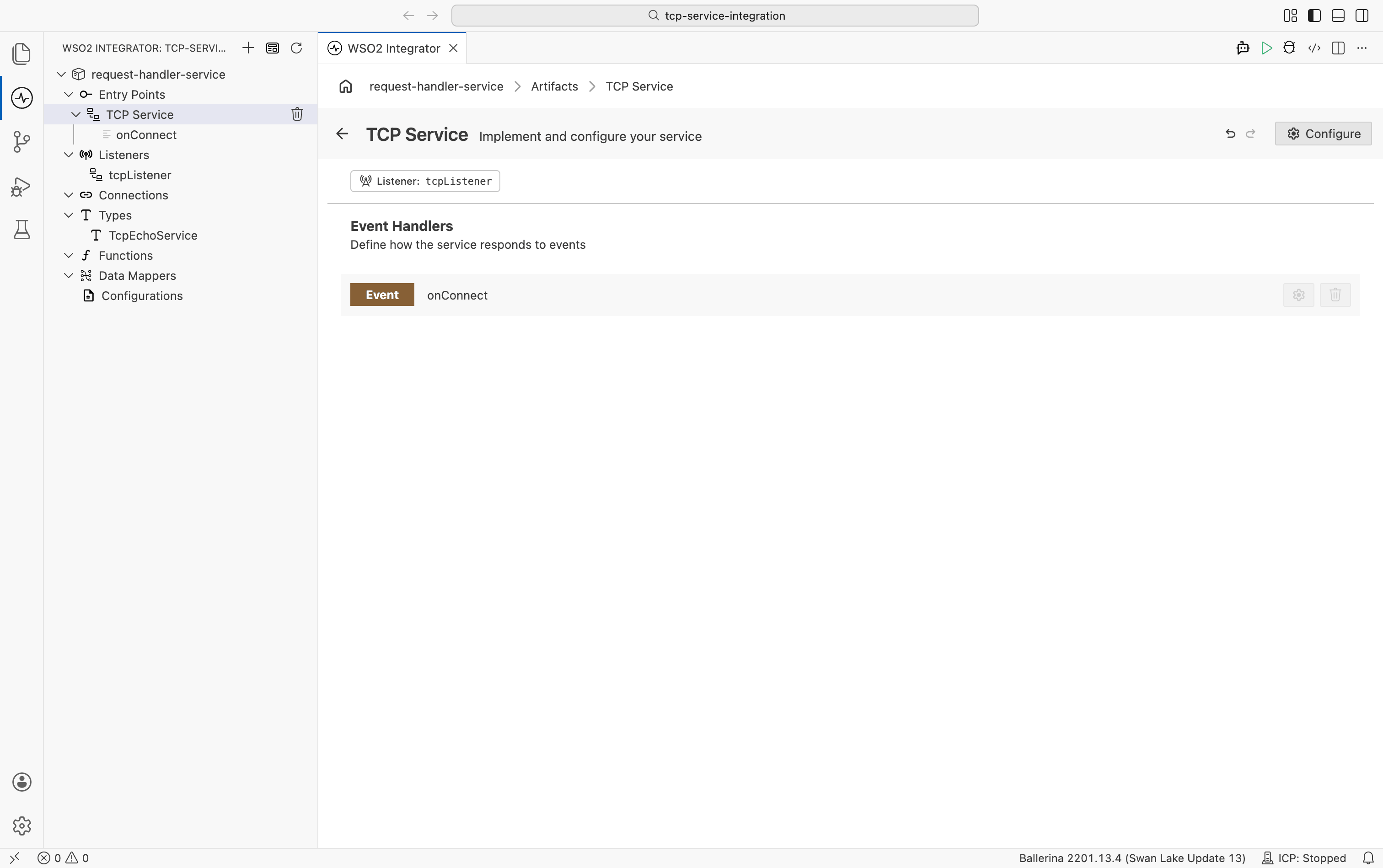
Select Configure in the service header to open the service configuration view.
Service configuration
- Visual Designer
- Ballerina Code
In the TCP Service Designer, select Configure to open the TCP Service Configuration panel. The left navigation shows TCP Service and its attached listeners.
TCP services do not have service-level configuration fields. Select the listener entry (for example, tcpListener) under Attached Listeners to configure the listener settings.
Select + Attach Listener at the bottom of the panel to attach an additional listener to the service.
TCP services do not use a @tcp:ServiceConfig annotation. All configuration is applied at the listener level. Attach the listener directly to the service declaration.
import ballerina/tcp;

listener tcp:Listener tcpListener = new (3000);

service on tcpListener {

    remote function onConnect(tcp:Caller caller) returns tcp:ConnectionService {
        return new TcpConnectionService();
    }
}
Listener configuration
The listener binds to a port and manages incoming TCP connections.
- Visual Designer
- Ballerina Code
In the TCP Service Configuration panel, select the listener entry under Attached Listeners to configure the listener.
| Field | Description | Default |
|---|---|---|
| Local Port | Port number the listener binds to. Required. | |
| Local Host | Hostname or IP address the listener binds to. | "" |
| Secure Socket | TLS/SSL configuration. Configure this to enable secure connections. | () |
Select + Attach Listener at the bottom of the panel to attach an additional listener or select an existing named listener.
Inline listener
An inline listener is created with the service declaration. Use configurable to allow the port to be set via Config.toml or an environment variable without changing source code.
import ballerina/tcp;

configurable int port = 3000;

service on new tcp:Listener(port) {

    remote function onConnect(tcp:Caller caller) returns tcp:ConnectionService {
        return new TcpConnectionService();
    }
}
Named listener
Declare the listener at module level to share it across services or apply TLS configuration.
import ballerina/tcp;

listener tcp:Listener tcpListener = new (3000, {
    localHost: "0.0.0.0",
    secureSocket: {
        key: {
            certFile: "/path/to/cert.pem",
            keyFile: "/path/to/key.pem"
        }
    }
});

service on tcpListener {

    remote function onConnect(tcp:Caller caller) returns tcp:ConnectionService {
        return new TcpConnectionService();
    }
}
All tcp:ListenerConfiguration fields:
| Field | Description |
|---|---|
localHost | Hostname or IP address the listener binds to. Optional. |
secureSocket | TLS/SSL configuration for the listener. Optional. See ListenerSecureSocket below. |
tcp:ListenerSecureSocket fields
| Field | Description |
|---|---|
key | Server certificate and private key. Accepts a crypto:KeyStore or a CertKey record with certFile and keyFile paths. Required. |
protocol | SSL/TLS protocol options. Set name to the protocol (for example, TLS) and optionally restrict versions (for example, ["TLSv1.2", "TLSv1.3"]). |
ciphers | List of cipher suites to allow (for example, ["TLS_ECDHE_RSA_WITH_AES_128_GCM_SHA256"]). Defaults to all supported ciphers. |
handshakeTimeout | Maximum time in seconds to wait for the SSL handshake to complete. |
sessionTimeout | Maximum duration in seconds for an SSL session before re-negotiation is required. |
Implementing connection logic
TCP connection logic is split across two objects. The main service handles the onConnect event and returns a connection service instance. The connection service class implements the per-connection handlers: onBytes, onClose, and onError.
onConnect handler
The onConnect handler runs when a new client connects. Its job is to instantiate the connection service class and return it to the runtime.
- Visual Designer
- Ballerina Code
Select the onConnect row in the TCP Service Designer to open the flow designer for that handler.
The generated flow includes two steps:
- A Declare Variable step that instantiates the connection service class (for example,
new TcpConnectionService()). - A Return step that returns the connection service instance to the runtime.
Add logic before the return to log the connection or pass context to the connection service constructor.
import ballerina/log;
import ballerina/tcp;

service on tcpListener {

    remote function onConnect(tcp:Caller caller) returns tcp:ConnectionService {
        log:printInfo("New TCP connection established");
        return new TcpConnectionService();
    }
}
Connection service class
The onBytes, onClose, and onError handlers live inside the connection service class, not in the main service.
- Visual Designer
- Ballerina Code
Finding the connection service class
In the onConnect flow designer, select the Declare Variable step. The right panel shows the variable details, including the Type field that identifies the connection service class (for example, TcpEchoService).
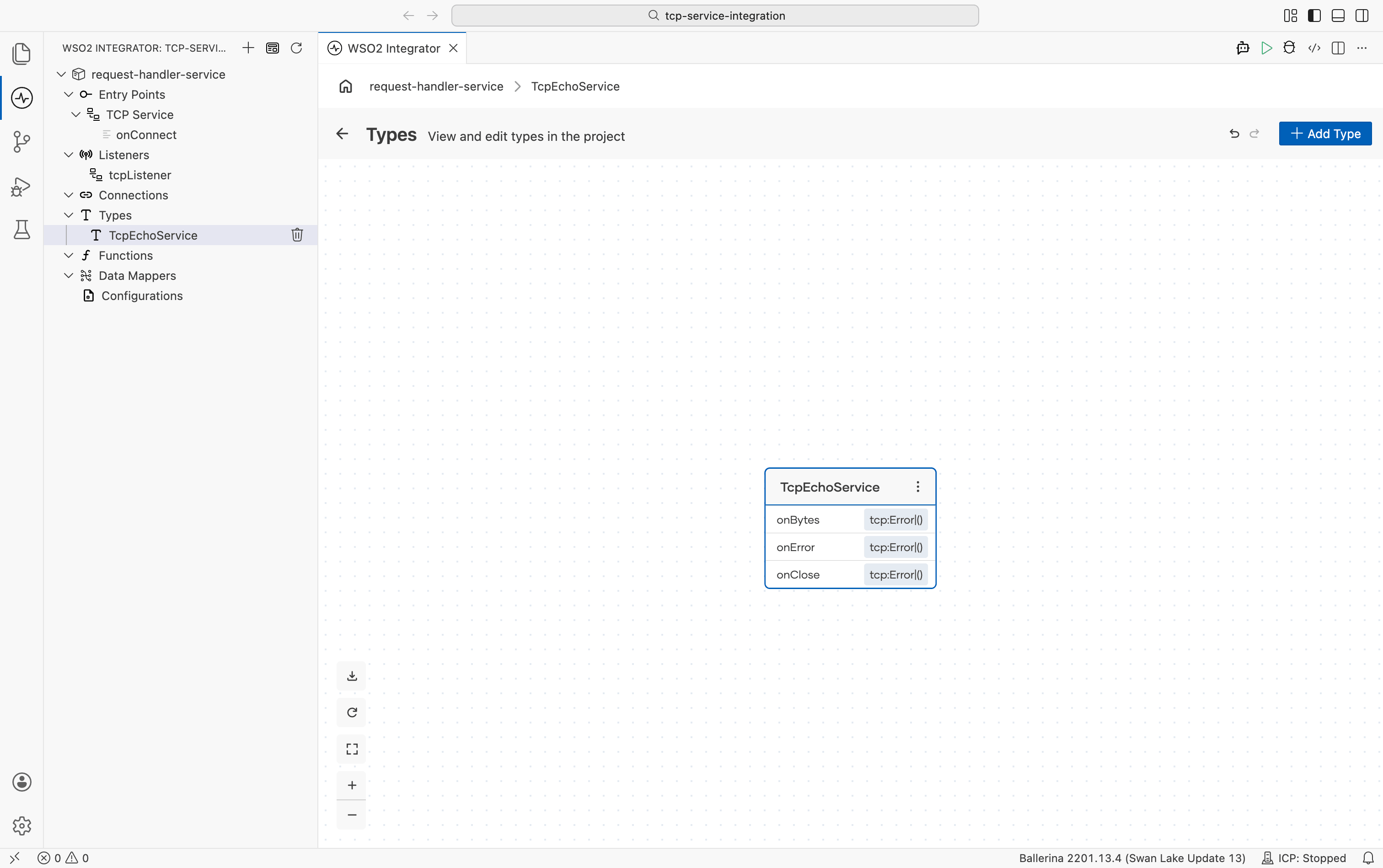
Opening the type diagram
In the sidebar, expand Types and select the connection service class name (for example, TcpEchoService). The Types view opens and shows the type diagram for that class, listing its methods: onBytes, onError, and onClose.
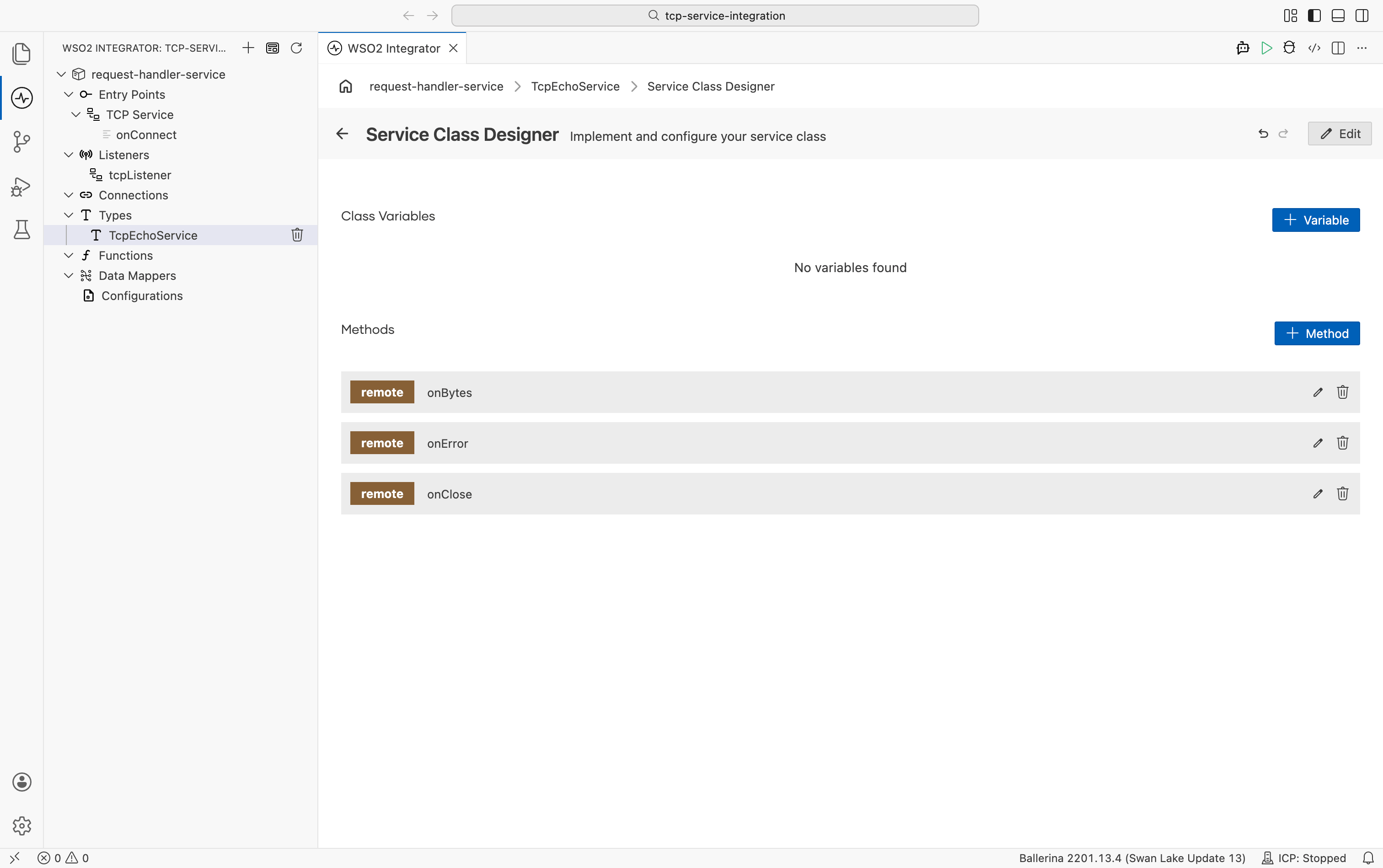
Opening the Service Class Designer
Select the type node in the diagram to open the Service Class Designer. The designer shows:
- Class Variables: shared state available across all handler methods. Select + Variable to add one.
- Methods: the
onBytes,onError, andonCloseremote functions generated for the connection service.
Select any method row to open its flow designer and define the handler logic.
Echo pattern — return byte[] directly from onBytes to send a response without using tcp:Caller:
import ballerina/tcp;

service class TcpConnectionService {
    *tcp:ConnectionService;

    remote function onBytes(readonly & byte[] data) returns byte[]|tcp:Error? {
        // Return the received bytes directly to echo them back to the client.
        return data;
    }

    remote function onClose() {
    }

    remote function onError(tcp:Error err) {
    }
}
Caller pattern — use tcp:Caller to write a response explicitly, log metadata, or send multiple writes:
import ballerina/log;
import ballerina/tcp;

service class TcpConnectionService {
    *tcp:ConnectionService;

    remote function onBytes(tcp:Caller caller, readonly & byte[] data) returns tcp:Error? {
        string message = check string:fromBytes(data);
        log:printInfo("Received message", data = message);
        check caller->writeBytes("ACK".toBytes());
    }

    remote function onClose() {
        log:printInfo("Connection closed");
    }

    remote function onError(tcp:Error err) {
        log:printError("Connection error", 'error = err);
    }
}
Connection lifecycle callbacks
| Callback | Signature | Trigger | Typical use |
|---|---|---|---|
onConnect | (tcp:Caller caller) returns tcp:ConnectionService|tcp:Error | New TCP client connects | Instantiate and return the connection service |
onBytes | (readonly & byte[] data) returns byte[]|tcp:Error? or (tcp:Caller caller, readonly & byte[] data) returns tcp:Error? | Data received from the client | Echo bytes back directly, or use caller->writeBytes() for explicit writes |
onClose | () | Client disconnects | Release per-connection resources |
onError | (tcp:Error err) | Connection error occurs | Log and handle the error condition |
What's next
- HTTP service — build REST endpoints for request/response integrations
- WebSocket service — handle full-duplex connections over HTTP upgrade
- Connections — configure TCP client connections to call external services
- Mocking — replace TCP clients with controlled stubs in tests