GraphQL Service
GraphQL services let clients request exactly the data they need through a single endpoint. WSO2 Integrator supports both code-first and schema-first design, with a visual canvas for modeling types and implementing resolver logic.
GraphQL service support is currently in beta.
Creating a GraphQL service
- Visual Designer
- Ballerina Code
-
Select the + Add Artifacts button in the canvas or select + next to Entry Points in the sidebar.
-
In the Artifacts panel, select GraphQL Service under Integration as API.
-
In the Create GraphQL Service form, fill in the following fields:
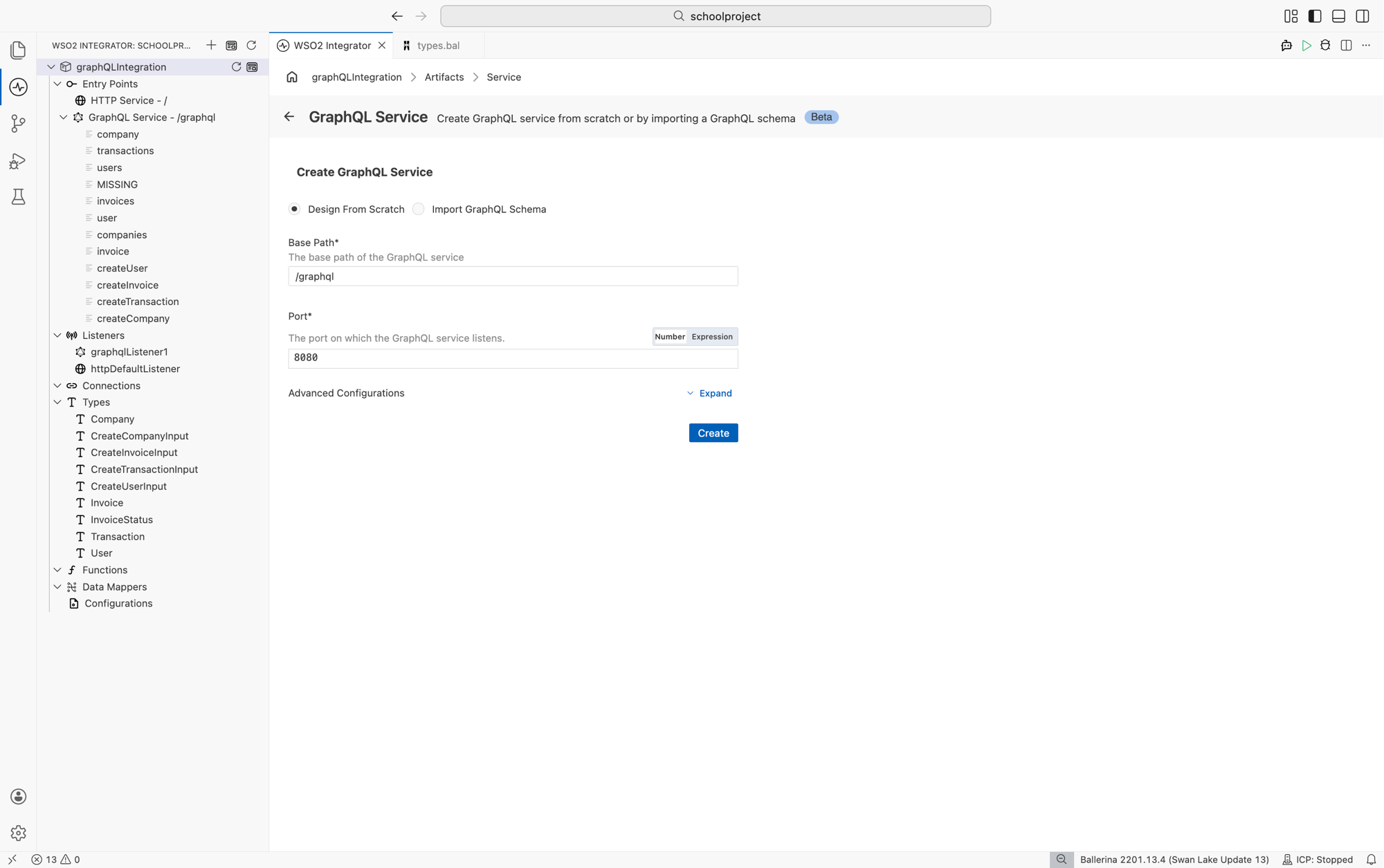
Service Contract
Option Description Design From Scratch Creates a new service with an empty schema. Default selection. Import GraphQL Schema Generates resolver stubs and record types from an existing SDL ( .graphql) file.Base Path
Field Description Default Base Path URL base path for the GraphQL service. /graphqlPort
Field Description Default Port Port on which the GraphQL service listens. Toggle between Number and Expression to enter a literal port or a configurable expression. 8080Advanced Configurations
Select Expand next to Advanced Configurations to set the Listener Name and other listener-level options.
-
Select Create.
-
WSO2 Integrator opens the service in the GraphQL diagram, an interactive canvas where you define types, fields, and resolvers. The diagram shows the service card labeled with the base path (for example,
/graphql) and a + Create Operations button. Use the Configure button at the top right to edit service and listener settings, and the toolbar at the bottom left to zoom, fit, refresh, or export the diagram.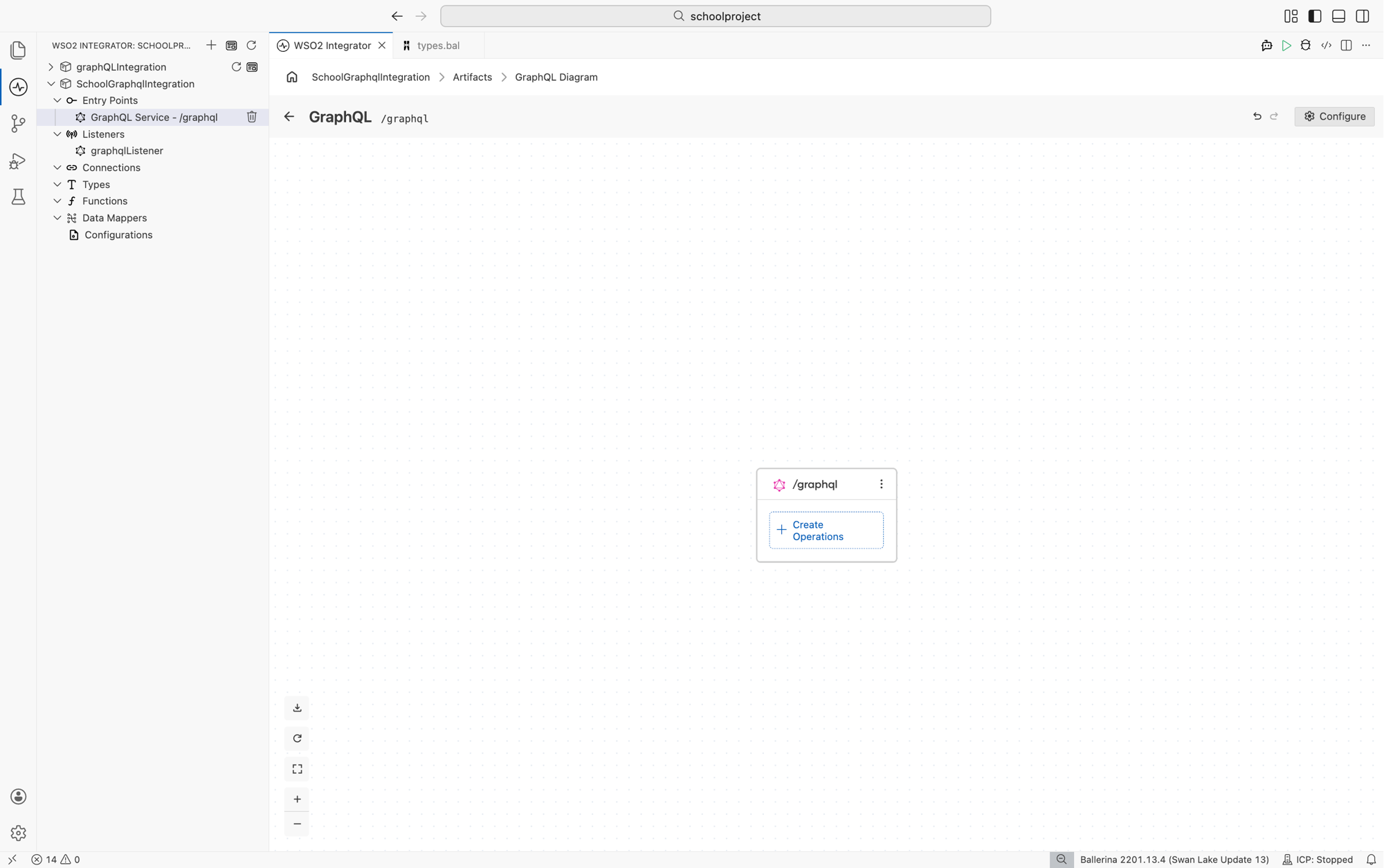
-
Select + Create Operations on the service card to add a Query, Mutation, or Subscription field.
-
Select the field row to open the flow designer and define the resolver logic.
import ballerina/graphql;

configurable int port = 9090;

service /graphql on new graphql:Listener(port) {

    resource function get greeting() returns string {
        return "Hello from WSO2 Integrator!";
    }
}
To start from an existing SDL file, generate the service skeleton with the GraphQL tool, then implement the resolvers:
bal graphql -i schema.graphql --mode service
See GraphQL Tool for details.
Service configuration
Service configuration controls the base path and advanced service-level settings such as maximum query depth, CORS policy, authentication, and introspection.
- Visual Designer
- Ballerina Code
On the GraphQL diagram, select Configure in the service header to open the GraphQL Service Configuration panel.
| Field | Description |
|---|---|
| Service Base Path | URL base path for the service (e.g., /graphql). Required. |
| Service Configuration | Advanced service-level settings (max query depth, CORS, auth, GraphiQL, etc.). Enter a @graphql:ServiceConfig record expression. |
Service-level settings map to the @graphql:ServiceConfig annotation placed before the service declaration:
@graphql:ServiceConfig {
    maxQueryDepth: 7,
    graphiql: {
        enabled: true,
        path: "graphiql"
    },
    cors: {
        allowOrigins: ["https://app.example.com"],
        allowMethods: ["POST", "GET"],
        allowHeaders: ["Content-Type", "Authorization"],
        maxAge: 3600
    }
}
service /graphql on new graphql:Listener(9090) {
    resource function get product(string id) returns Product|error {
        return getProduct(id);
    }
}
All @graphql:ServiceConfig fields:
| Field | Type | Default | Description |
|---|---|---|---|
maxQueryDepth | int? | () | Maximum allowed query nesting depth |
auth | ListenerAuthConfig[] | — | Service-level authentication |
cors | CorsConfig | {} | CORS policy |
contextInit | ContextInit | — | Context initializer invoked per request |
graphiql | Graphiql | {enabled: false} | Enable the built-in GraphiQL client and set its path |
interceptors | readonly & Interceptor[] | [] | Field-level interceptor chain |
introspection | boolean | true | Allow schema introspection queries |
validation | boolean | true | Enable query and variable validation |
schemaString | string | "" | Embedded SDL string (set automatically for generated services) |
cacheConfig | ServerCacheConfig? | () | Service-wide field cache configuration |
CORS configuration
Fields of the CorsConfig record:
| Field | Type | Default | Description |
|---|---|---|---|
allowOrigins | string[] | [] | Permitted origins |
allowMethods | string[] | [] | Permitted HTTP methods |
allowHeaders | string[] | [] | Permitted request headers |
exposeHeaders | string[] | [] | Response headers exposed to the browser |
allowCredentials | boolean | false | Allow cookies and credentials |
maxAge | decimal | -1 | Preflight cache duration in seconds |
Listener configuration
The listener binds to a port and handles incoming GraphQL connections over HTTP. When you create a GraphQL service, WSO2 Integrator creates an inline listener. You can also declare a named listener or attach the service to an existing http:Listener to share a port with HTTP services.
- Visual Designer
- Ballerina Code
In the GraphQL Service Configuration panel, select the attached listener under Attached Listeners to configure it.
| Field | Description | Default |
|---|---|---|
| Port | Listening port of the GraphQL listener. Required. | 9090 |
| Host | Host name or IP address the listener binds to. | 0.0.0.0 |
| HTTP1 Settings | HTTP/1.x protocol settings (keep-alive, max pipelined requests). | {} |
| Secure Socket | TLS/SSL configuration. Configure to enable HTTPS. | () |
| HTTP Version | Highest HTTP version the endpoint supports. | HTTP/2.0 |
| Timeout | Read/write timeout in seconds. Set to 0 to disable. | 60 |
| Server | Value for the Server response header. | () |
| Request Limits | Inbound size limits for URI, headers, and request body. | {} |
| Graceful Stop Timeout | Grace period in seconds before the listener force-stops. | 0 |
| Socket Config | Server socket settings (e.g., soBackLog queue length). | {} |
Select + Attach Listener at the bottom of the panel to attach an additional listener or to select an existing named listener.
Inline listener
Created together with the service:
import ballerina/graphql;

configurable int port = 9090;

service /graphql on new graphql:Listener(port) {
    resource function get greeting() returns string {
        return "Hello!";
    }
}
Named listener
Declare the listener at module level and attach multiple services to it. This corresponds to the "select existing listener" option in the creation form.
import ballerina/graphql;
import ballerina/http;

listener graphql:Listener graphqlListener = new (9090, {
    host: "0.0.0.0",
    httpVersion: http:HTTP_2_0,
    timeout: 60,
    secureSocket: {
        key: {
            certFile: "/path/to/cert.pem",
            keyFile: "/path/to/key.pem"
        }
    }
});

service /graphql on graphqlListener {
    resource function get greeting() returns string {
        return "Hello!";
    }
}
Sharing a port with an HTTP service
Attach the GraphQL listener to an existing http:Listener.
import ballerina/graphql;
import ballerina/http;

listener http:Listener httpListener = new (9090);
listener graphql:Listener graphqlListener = new (httpListener);

service /api on httpListener {
    resource function get health() returns json {
        return {status: "ok"};
    }
}

service /graphql on graphqlListener {
    resource function get greeting() returns string {
        return "Hello!";
    }
}
All graphql:ListenerConfiguration fields (forwarded to the underlying http:Listener):
| Field | Type | Default | Description |
|---|---|---|---|
host | string | "0.0.0.0" | Bind address |
http1Settings | ListenerHttp1Settings | {} | HTTP/1.x keep-alive and pipelining |
secureSocket | ListenerSecureSocket? | () | TLS/SSL configuration |
httpVersion | HttpVersion | HTTP_2_0 | Highest supported HTTP version |
timeout | decimal | 60 | Read/write timeout in seconds |
server | string? | () | Server response header value |
requestLimits | RequestLimitConfigs | {} | URI, header, and body size limits |
gracefulStopTimeout | decimal | 0 | Grace period for gracefulStop in seconds |
socketConfig | ServerSocketConfig | {} | Server socket settings |
Operations and fields
Operations define the entry points to your GraphQL service. GraphQL has three root operation types: Query (read data), Mutation (modify data), and Subscription (real-time updates). Each operation contains fields with a name, optional arguments, and a return type.
- Visual Designer
- Ballerina Code
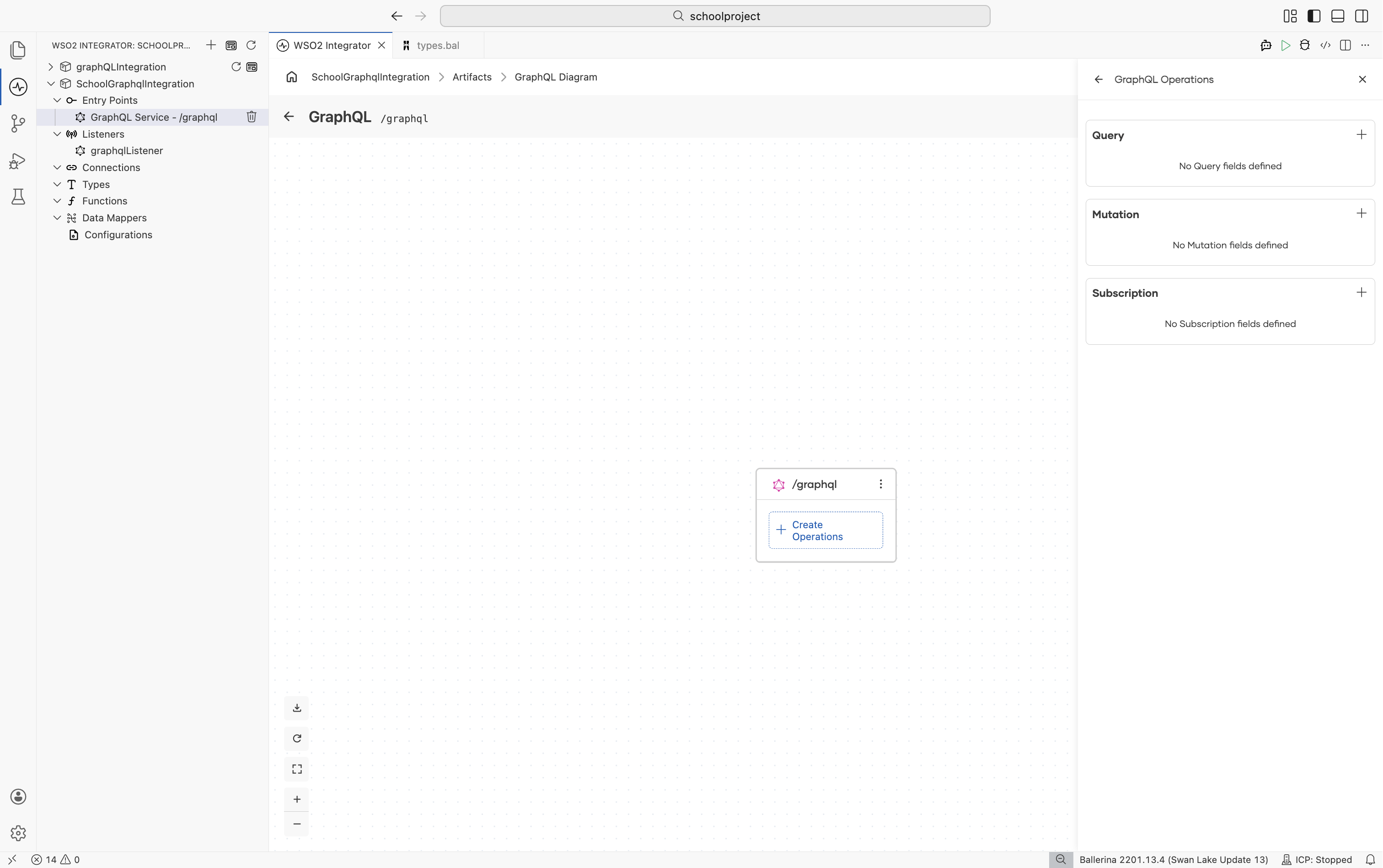
Add an operation
-
On the GraphQL diagram, select + Create Operations on the service card.
-
Choose Query, Mutation, or Subscription.
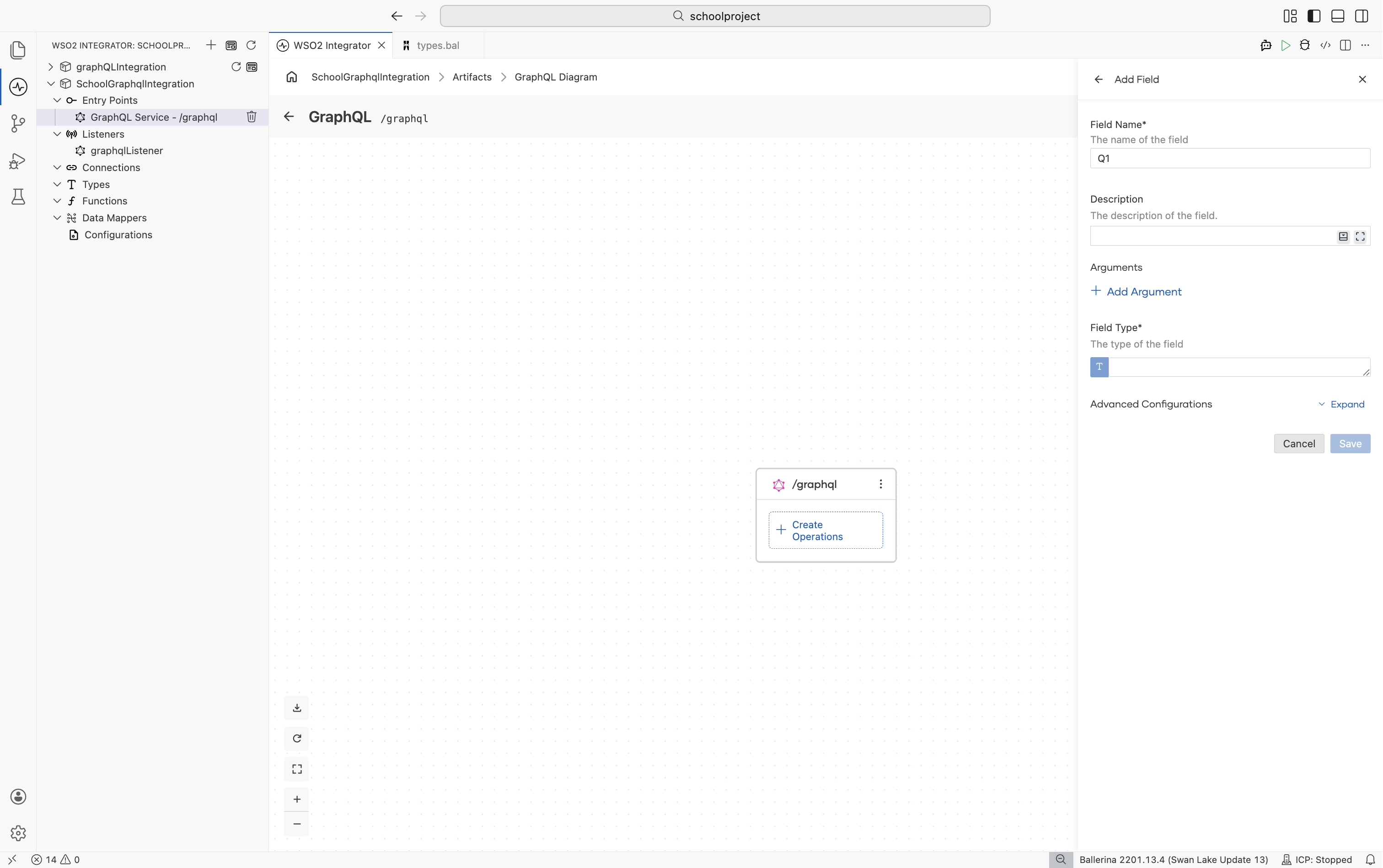
Add a field
Select the + next to an operation type to open the Add Field panel.
| Field | Description |
|---|---|
| Field Name | Name of the field |
| Description | Documentation of the field |
| Arguments | Input arguments. Select + Add Argument to add an argument. |
| Field Type | Return type of the field |
Add an argument
Select + Add Argument to open the Argument form.
| Field | Description |
|---|---|
| Argument Type | Type of the argument. Select the text area to open the type helper. Input objects and enums can be added with + Create New Type. |
| Argument Name | Name of the argument |
| Description | Documentation of the argument (optional) |
| Default Value | Default value (optional). Expand Advanced Configurations to set one. |
Select Add to save the argument.
Define types
A type is the fundamental unit of a GraphQL schema. Each field returns a value of a specific type, and each argument accepts a value of a specific type.
-
Select the Argument Type or Field Type text area to open the type helper.
-
Choose a pre-defined scalar, or select Create New Type to define a custom type.
-
In the Create New Type dialog, choose Create from scratch to define the type inline, or Import to import it from an existing source. Select the Kind, give the type a Name, add its fields, and select Save.
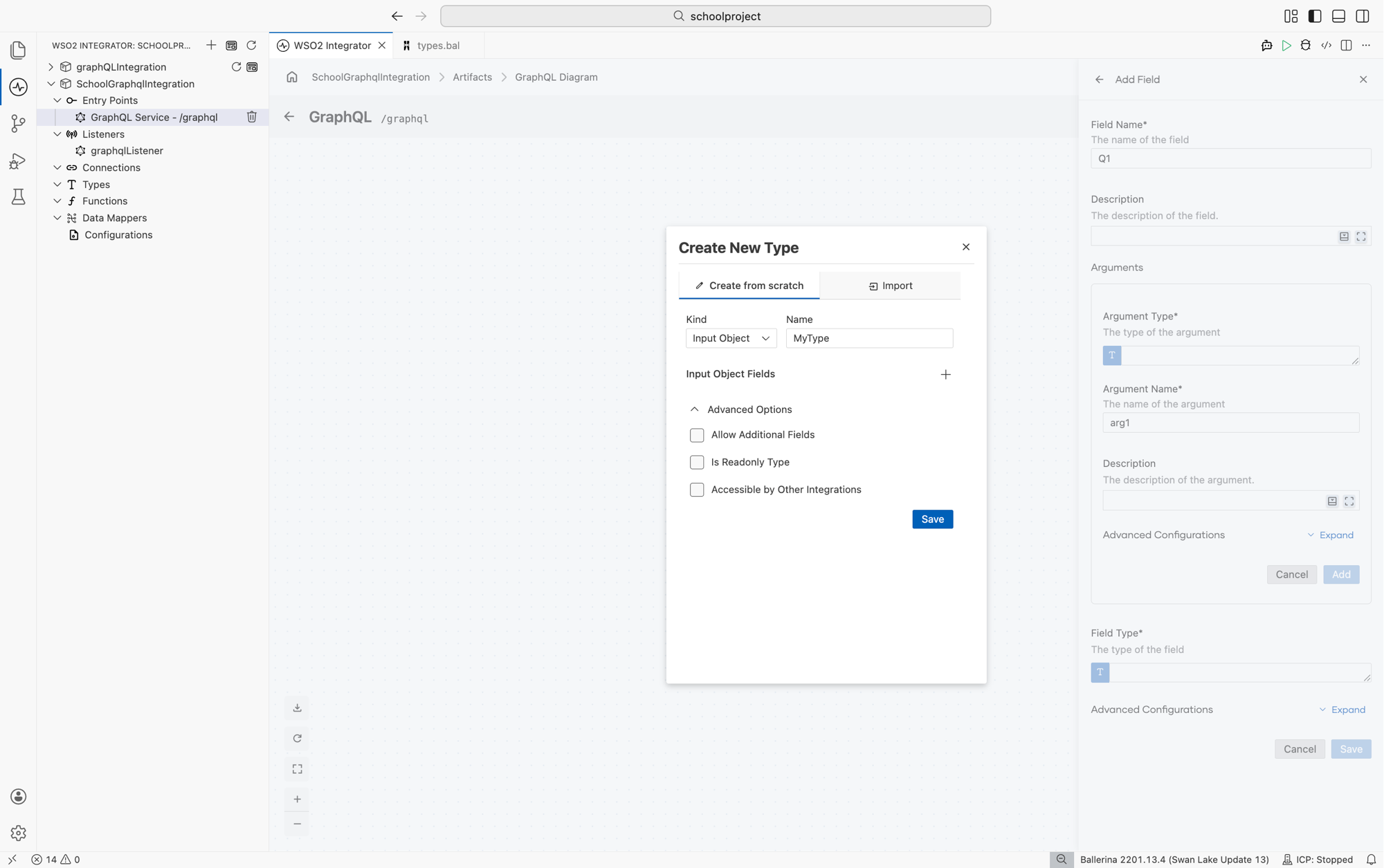
The available kinds depend on where the type is used:
| Used as | Allowed kinds |
|---|---|
| Argument type | Input Object, Enum |
| Field (output) type | Object, Enum, Union |
Advanced Options for a new Argument type include Allow Additional Fields, Is Readonly Type, and Accessible by Other Integrations.
If the selected argument or field type can be marked as an ID, a checkbox appears in the type helper.
Subscription field types must be wrapped with stream. For example, stream<NewsUpdate, error?>.
Implement resolver logic
- Select a Field row (for example,
productorcreateProduct) to open the flow designer. - Select + below the start node to open the Node palette, where you can select any node, including connections and variables.
Field-level configuration
Select the pencil icon on a Field row to return to the field edit form, and expand Advanced Configurations to access:
| Field | Description |
|---|---|
| Field Configuration | Field-level settings such as cache configuration |
| Request Context | Pass meta-information of a request between resolvers |
| Field Metadata | Access meta-information of the executing field |
Resolver function signatures
service /graphql on new graphql:Listener(9090) {

    // Query: resource function get <fieldName>(...)
    resource function get product(string id) returns Product|error {
        return getProduct(id);
    }

    // Mutation: remote function <fieldName>(...)
    remote function createProduct(ProductInput input) returns Product|error {
        return addProduct(input);
    }

    // Subscription: resource function subscribe <fieldName>(...) returns stream<...>
    resource function subscribe onProductCreated() returns stream<Product, error?> {
        return getProductStream();
    }
}
Arguments
// Scalar and optional arguments with defaults
resource function get products(string? category, int 'limit = 20) returns Product[]|error {
    return searchProducts(category, 'limit);
}

// Input object argument
remote function createOrder(OrderInput input) returns Order|error {
    return placeOrder(input);
}
Types
type Product record {|
    string id;
    string name;
    decimal price;
|};

type ProductInput record {|
    string name;
    decimal price;
|};

enum OrderStatus {
    PENDING,
    CONFIRMED,
    SHIPPED
}
Field-level configuration
Use @graphql:ResourceConfig and @graphql:CacheConfig:
service /graphql on new graphql:Listener(9090) {

    @graphql:ResourceConfig {
        cacheConfig: {
            enabled: true,
            maxAge: 60
        }
    }
    resource function get product(string id) returns Product|error {
        return getProduct(id);
    }
}
Common return-type patterns
| Return type | Meaning |
|---|---|
T | Non-null field of type T |
T? | Nullable field |
T[] | List of T |
T|error | Resolver may fail with an error |
stream<T, error?> | Subscription field |
What's next
- GraphQL Tool — generate services and clients from SDL schemas
- gRPC Service — define services using Protocol Buffers
- Connections — configure client connections to call external services
- Data Mapper — transform request and response payloads between formats