EDI Processing
Work with Electronic Data Interchange (EDI) formats used in supply chain, healthcare, retail, and financial integrations. Ballerina provides the ballerina/edi module for parsing and serializing EDI data, and the bal edi CLI tool for generating type-safe code from any supported EDI specification.
The bal edi tool covers all the standards commonly seen in B2B integration:
- EDIFACT: the international UN/EDIFACT standard (
ORDERS,INVOIC,DESADV, and many more). - X12: the ANSI ASC X12 standard widely used in North America for transactions such as
850(purchase orders),810(invoices), and856(advance ship notices). - ESL: the EDI Schema Language — a YAML schema definition that describes an EDI message's structure.
- Custom EDI: any proprietary or non-standard delimited format, described in the tool's own JSON schema.
The workflow is the same for every standard: convert the source spec into the Ballerina EDI JSON schema, then generate typed records and parser functions from it. After that, the integration code is identical regardless of which standard the data originally came from.
For the complete CLI command and flag reference, see the EDI tool page.
For standard EDIFACT D03A message types, prebuilt packages are published under the ballerinax organization — you can import them directly and skip code generation. They are envelope-aware, so they read interchange headers and split a batch as well as parse a single message body; see EDI reference → Prebuilt EDIFACT packages. Use the bal edi tool described below when you need X12, a non-D03A EDIFACT version, a custom format, or a partner-specific variation of a standard message.
Setting up the EDI tool
Pull the bal edi tool from Ballerina Central. This is a one-time setup per developer machine.
bal tool pull edi
Verify the installation:
bal edi --help
Generating code from an EDIFACT spec
For standard EDI formats like EDIFACT, you don't need to write a schema by hand — the bal edi tool builds it from the standard's own specification. Download the release archive for the version you need from the UN/EDIFACT directory downloads, then convert the message type you are interested in. The following generates a JSON schema for the EDIFACT ORDERS message in version D03A:
bal edi convertEdifactSchema -v d03a -t ORDERS -i d03a.zip -o schema
-i accepts the archive as downloaded, or a directory it was extracted to. Omit -t to convert every message type in the directory.
This writes a ready-to-use JSON schema to schema/ORDERS.json. Then generate Ballerina record types and parser/serializer functions from it. Let's add the generated code into a separate library.
- Visual Designer
-
After creating a new integration, click the + Add icon.
-
Select Library as the type, enter
ordersas the library name, and click Add Library.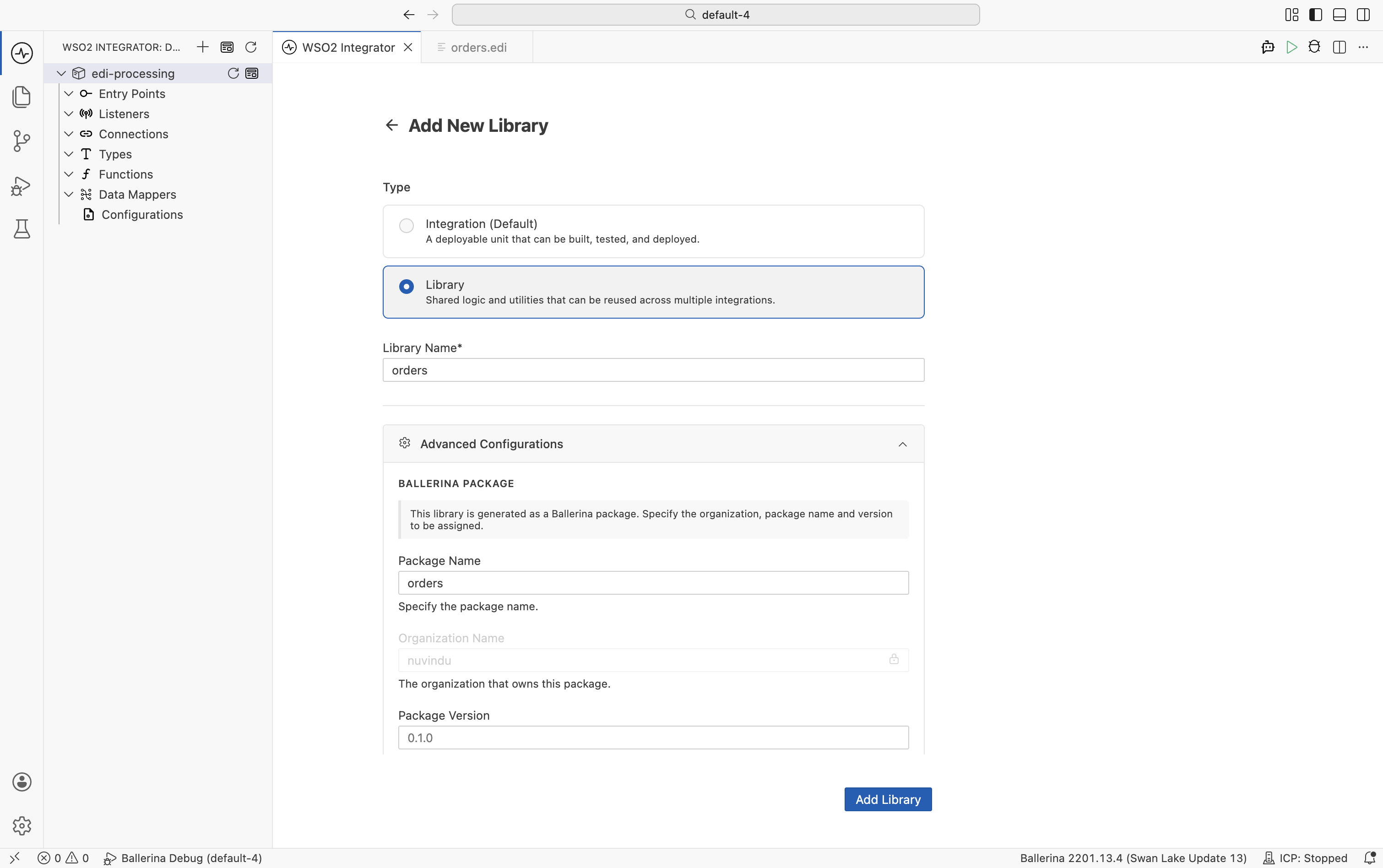
-
Open the terminal and navigate to the
ordersdirectory.cd orders -
Execute the following command to generate the necessary records and functions for the ORDERS schema.
bal edi codegen -i ../schema/ORDERS.json -o orders.bal
The generated file contains:
- Record types: one per segment in the ORDERS message (BGM, DTM, NAD, LIN, and so on).
fromEdiString: converts an EDI string to a typed Ballerina record.toEdiString: converts a Ballerina record to an EDI string.getSchema: returns the EDI schema as anEdiSchemaobject.fromEdiStringWithSchema/toEdiStringWithSchema: variants that accept a pre-loadedEdiSchema, useful when the same code must handle multiple schemas selected at runtime.
Adapting the schema to a trading partner
Trading partners routinely use variations of a standard format: an extra segment, a segment the standard marks optional but the partner always sends, a different delimiter set, or a field the partner sends as a number where the standard says text. Because convertEdifactSchema and convertX12Schema write the schema out as JSON before any code is generated, a partner's deviations are handled by editing that file and re-running codegen — the standard specification itself is never touched.
The fields most often adjusted are:
delimiters— the segment, field, component, and repetition separators, and the decimal separator when the partner uses,.minOccurances/maxOccurances— tighten a segment the partner always sends, or relax one it never does.-1means unlimited.dataType—string,int,float, orcompositefor a field the partner formats differently.ignoreSegments— segment codes to skip instead of failing on, for segments a partner adds that the integration does not care about.
After editing, regenerate the code from the edited schema:
bal edi codegen -i schema/ORDERS.json -o orders.bal
Keep the edited schema in version control alongside the integration: it is the source of truth for what that partner sends. When several partners deviate from the same standard, keep one schema per partner and generate a module for each — or bundle them into a single package with libgen.
For the full schema grammar — segments and segment groups, fields, components, sub-components, the envelope declaration, and every configuration option — see the Ballerina EDI specification.
Generating code from an X12 schema
X12 is the ANSI ASC X12 EDI standard widely used in North America for purchase orders, invoices, advance ship notices, and many other transaction sets.
X12 message specifications are licensed from ASC X12, so — unlike EDIFACT — the tool cannot download one for you and no prebuilt X12 packages are published. The workflow starts from the schema your organization is licensed to use, which bal edi convertX12Schema converts into the Ballerina EDI JSON schema format.
bal edi convertX12Schema -i path/to/850.xsd -o schema
If you are working with an X12 transaction set and need help mapping your licensed specification, contact us.
The command supports three optional flags for tuning how the schema is interpreted:
-H, --headers: turn on headers mode when the source schema separates interchange/group headers from the transaction set body.-c, --collection: treat the input as a collection of related schemas rather than a single transaction set.-d, --segdet: point to an external segment-details file when the X12 schema references segment definitions stored separately.
See the EDI tool page for full flag details. Once converted, run codegen the same way as for EDIFACT:
bal edi codegen -i schema/schema.json -o x12.bal
Generating code from a custom schema
For a proprietary or non-standard format that is neither X12 nor EDIFACT, describe its structure directly in the Ballerina EDI JSON schema format — the same format that convertEdifactSchema, convertX12Schema, and convertESL all produce internally, so you can skip conversion and write it by hand:
{
  "name": "Document",
  "delimiters": {
    "segment": "~",
    "field": "*",
    "component": ":",
    "repetition": "^"
  },
  "segments": [
    {
      "code": "BEG",
      "tag": "BEG",
      "minOccurances": 1,
      "maxOccurances": 1,
      "fields": [
        {"tag": "purposeCode"},
        {"tag": "typeCode"},
        {"tag": "poNumber"},
        {"tag": "releaseNumber"},
        {"tag": "date"}
      ]
    },
    {
      "code": "SE",
      "tag": "SE",
      "minOccurances": 1,
      "maxOccurances": 1,
      "fields": [
        {"tag": "code"},
        {"tag": "segmentCount"},
        {"tag": "controlNumber"}
      ]
    }
  ]
}
Then generate Ballerina code from it:
bal edi codegen -i schema.json -o document.bal
If your format is already defined in ESL (EDI Schema Language) — a YAML schema definition with a separate base segment-definitions file — convert it to a Ballerina EDI schema first with convertESL, then run codegen as above:
bal edi convertESL -b path/to/base-definitions -i path/to/esl-schema -o schema
The same generated artifacts are produced whether the source is EDIFACT, X12, ESL, or a custom schema. Once you have a generated module, the rest of this page applies unchanged.
If you need to handle several EDI schemas at once, you can bundle them into a single reusable package instead of generating each module by hand. See Building a reusable library package.
Parsing EDI documents
Once you have the generated library, parse an EDIFACT ORDERS message into typed Ballerina records.
The following EDIFACT ORDERS message will be used as the input. Save this content into a orders.edi file.
UNB+UNOA:1+SENDER+RECEIVER+260511:1000+1'
UNH+1+ORDERS:D:03A:UN'
BGM+220+PO-001+9'
DTM+137:20260511:102'
NAD+BY+123456789::9++ACME Corp'
LIN+1++PROD-001:SA'
QTY+21:10'
PRI+AAA:25'
UNS+S'
UNT+8+1'
- Visual Designer
- Ballerina Code
-
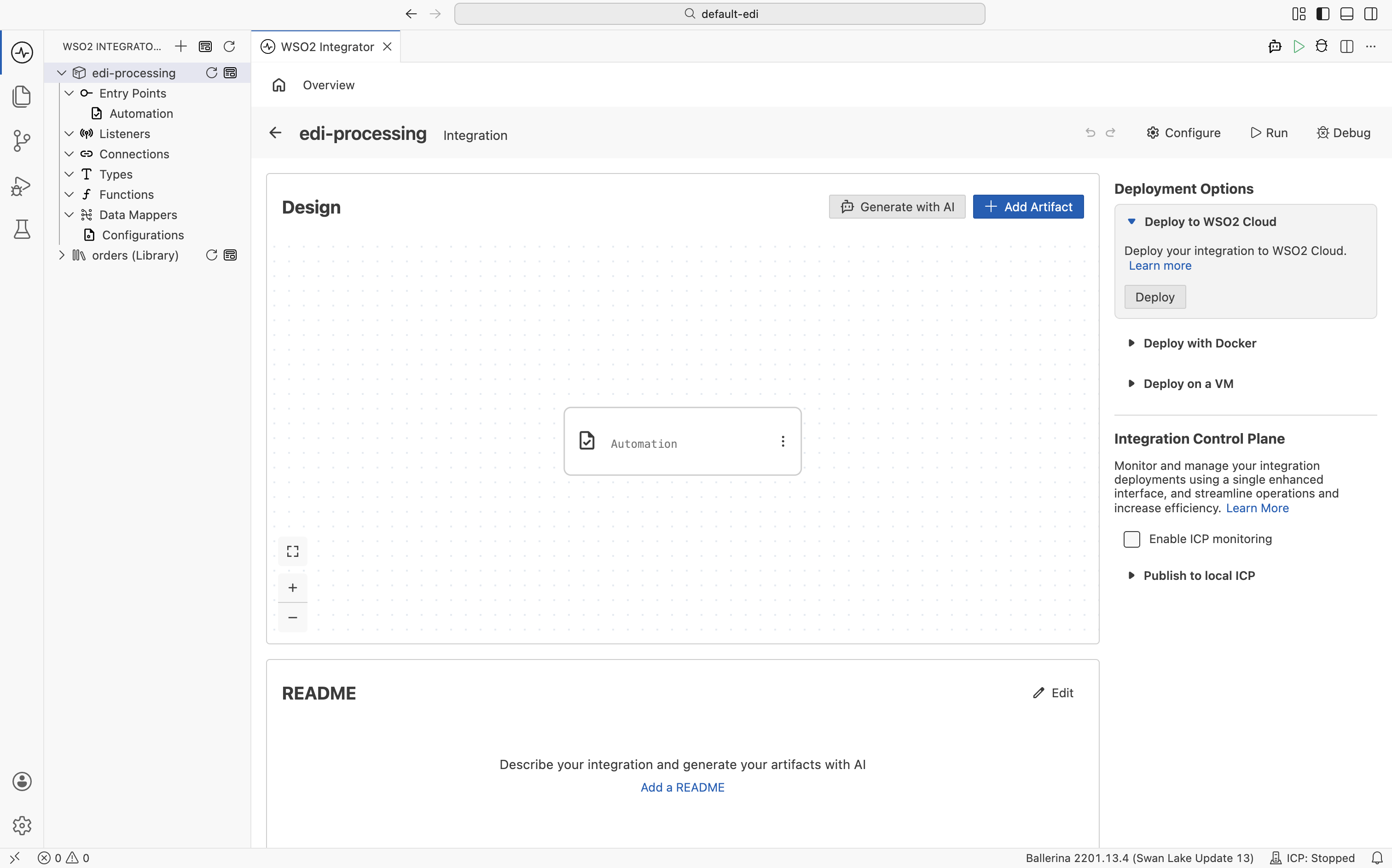
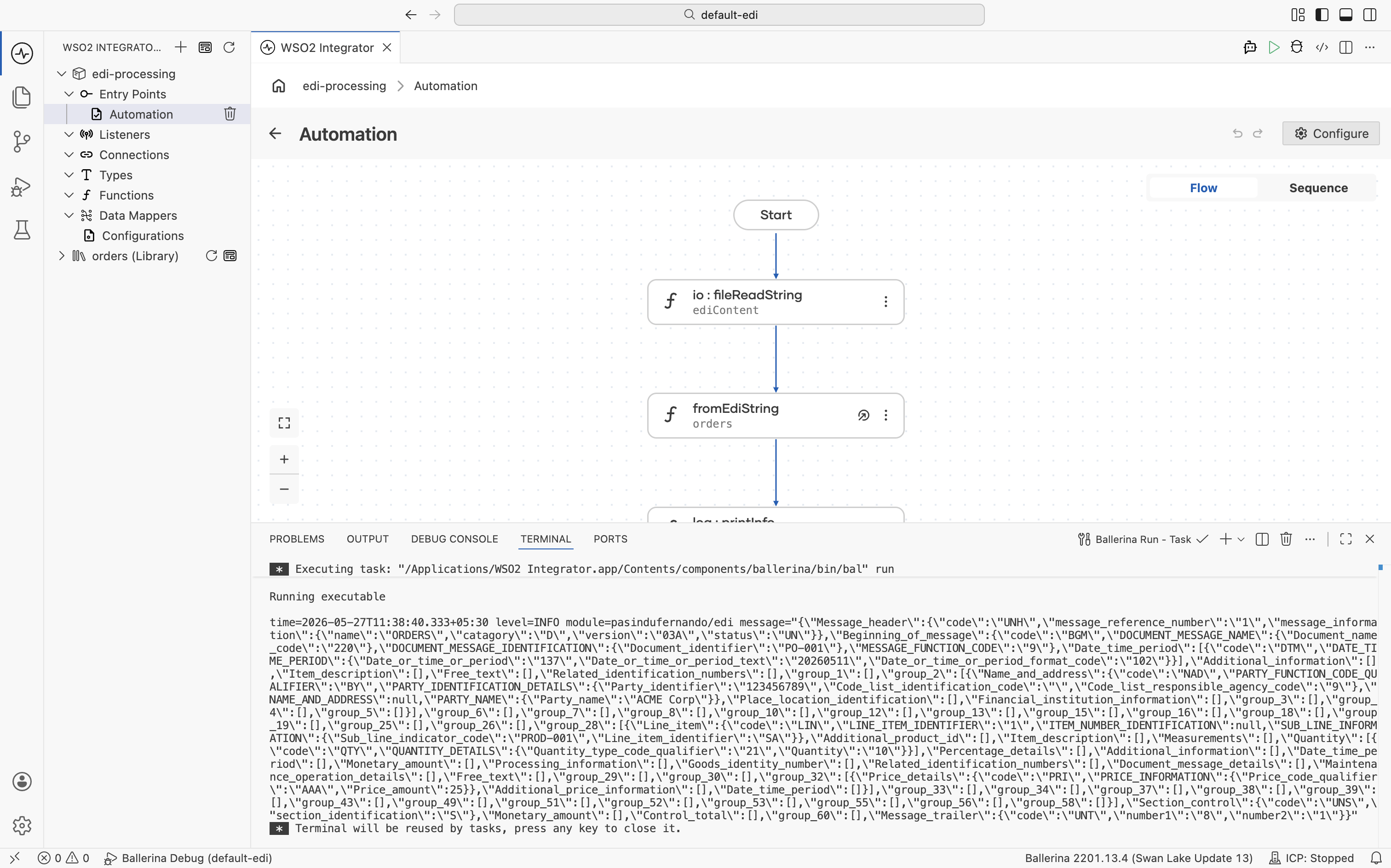
Open your main integration and click + Add Artifact on the canvas.
-
Select Automation from the artifacts panel.
-
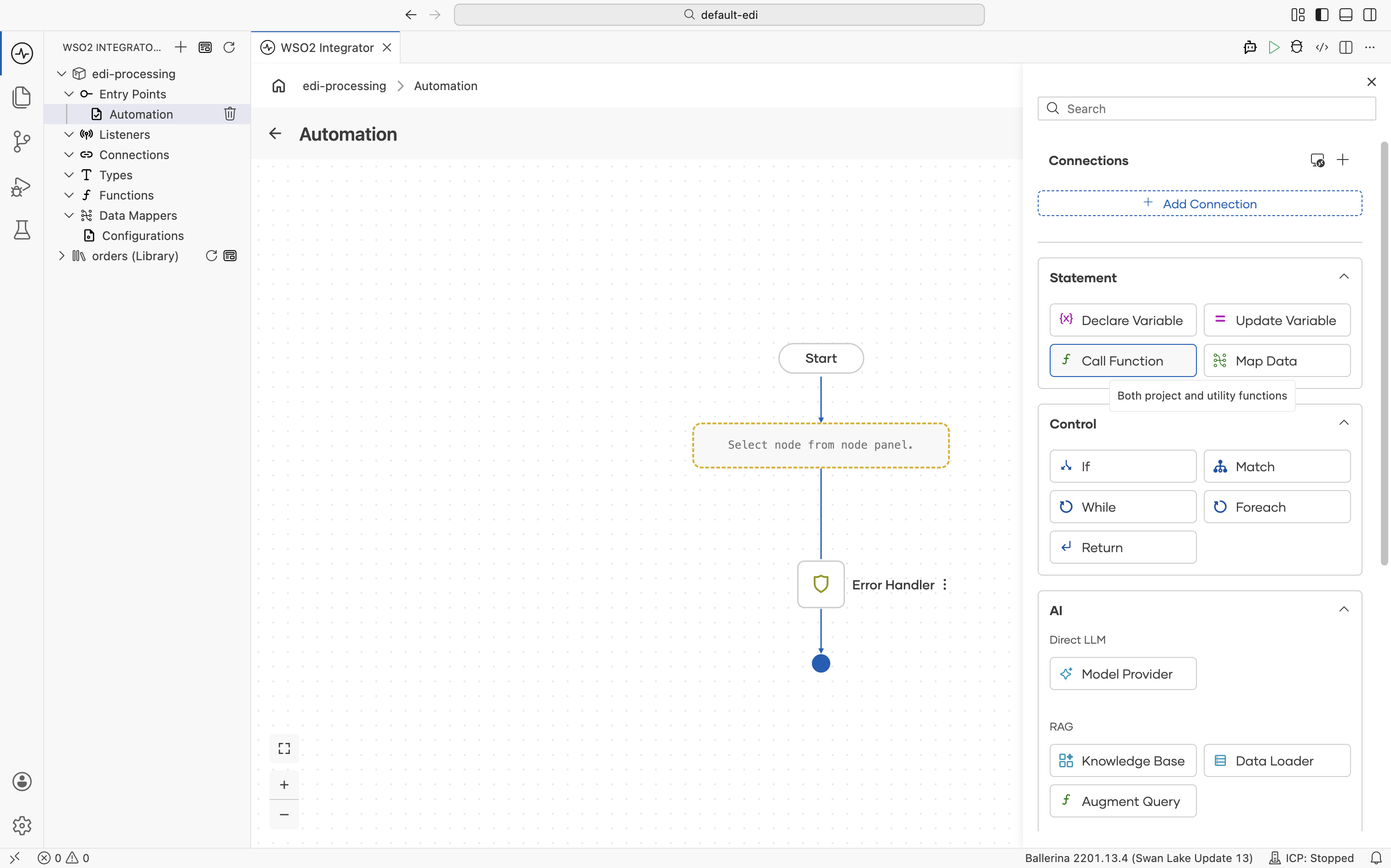
Click + and select Call Function.
-
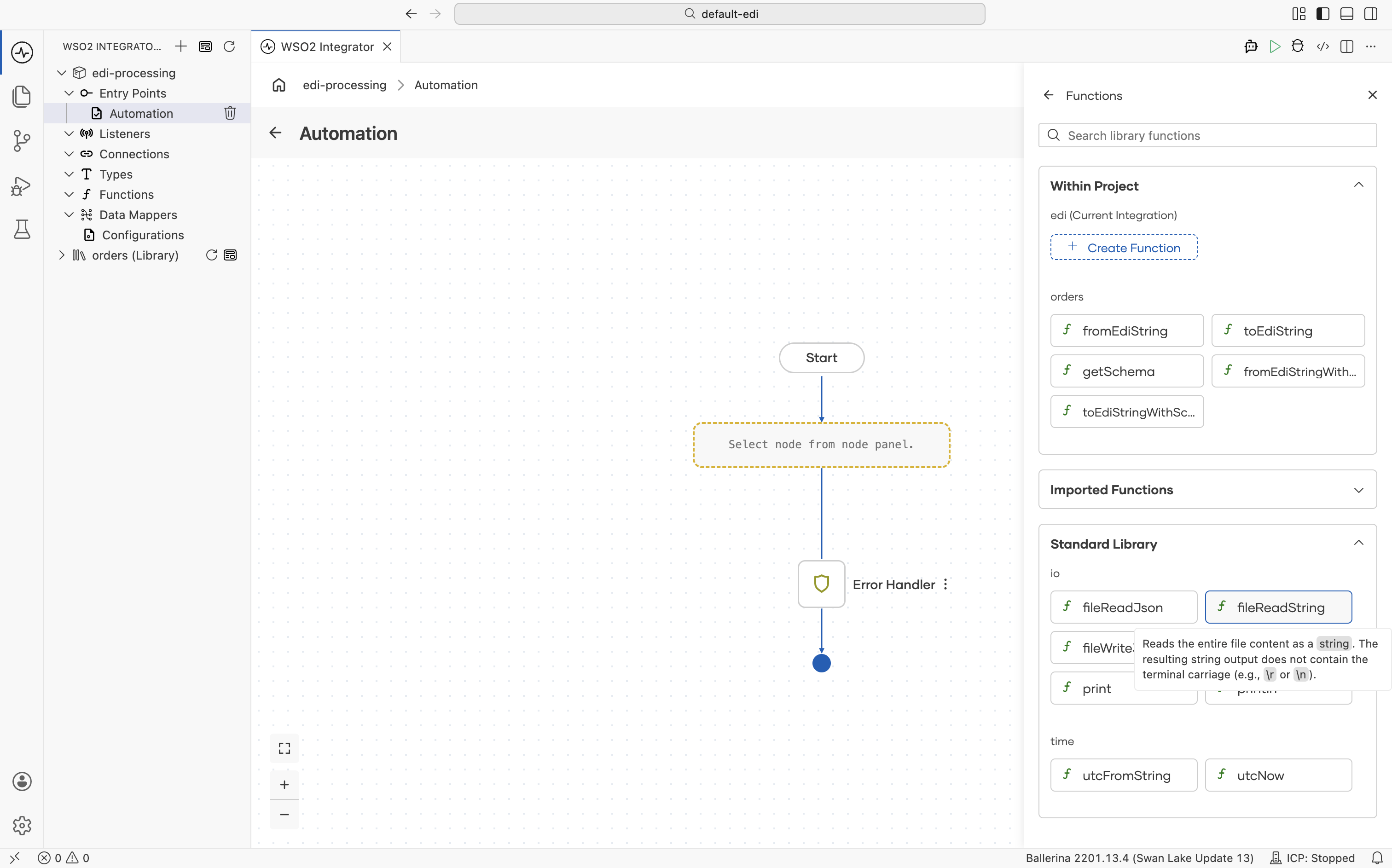
In the Functions panel, scroll down to the io section and select fileReadString.
-
Set Path to the path of your EDI file (e.g.,
orders.edi) and Result toediContent, then click Save.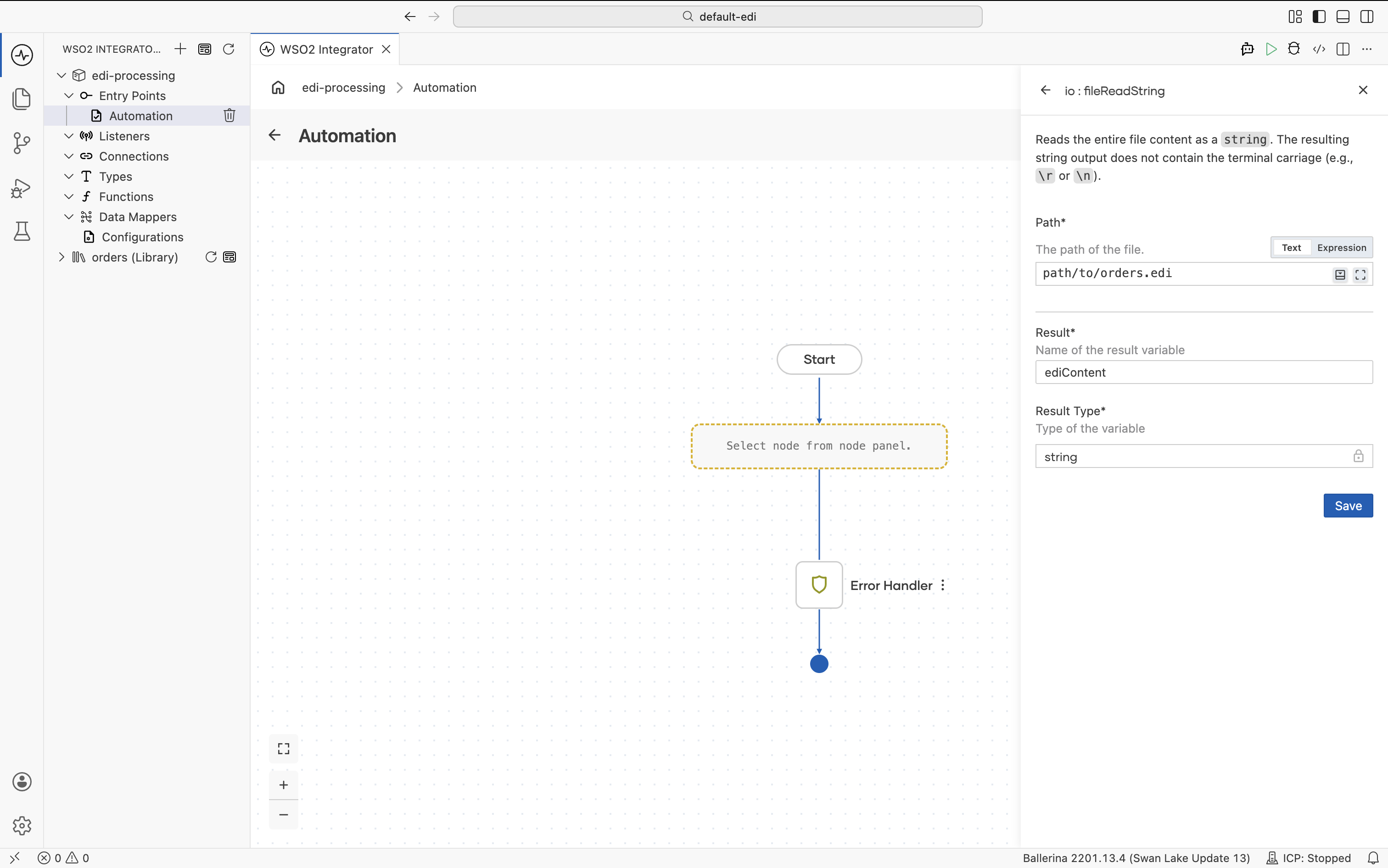
-
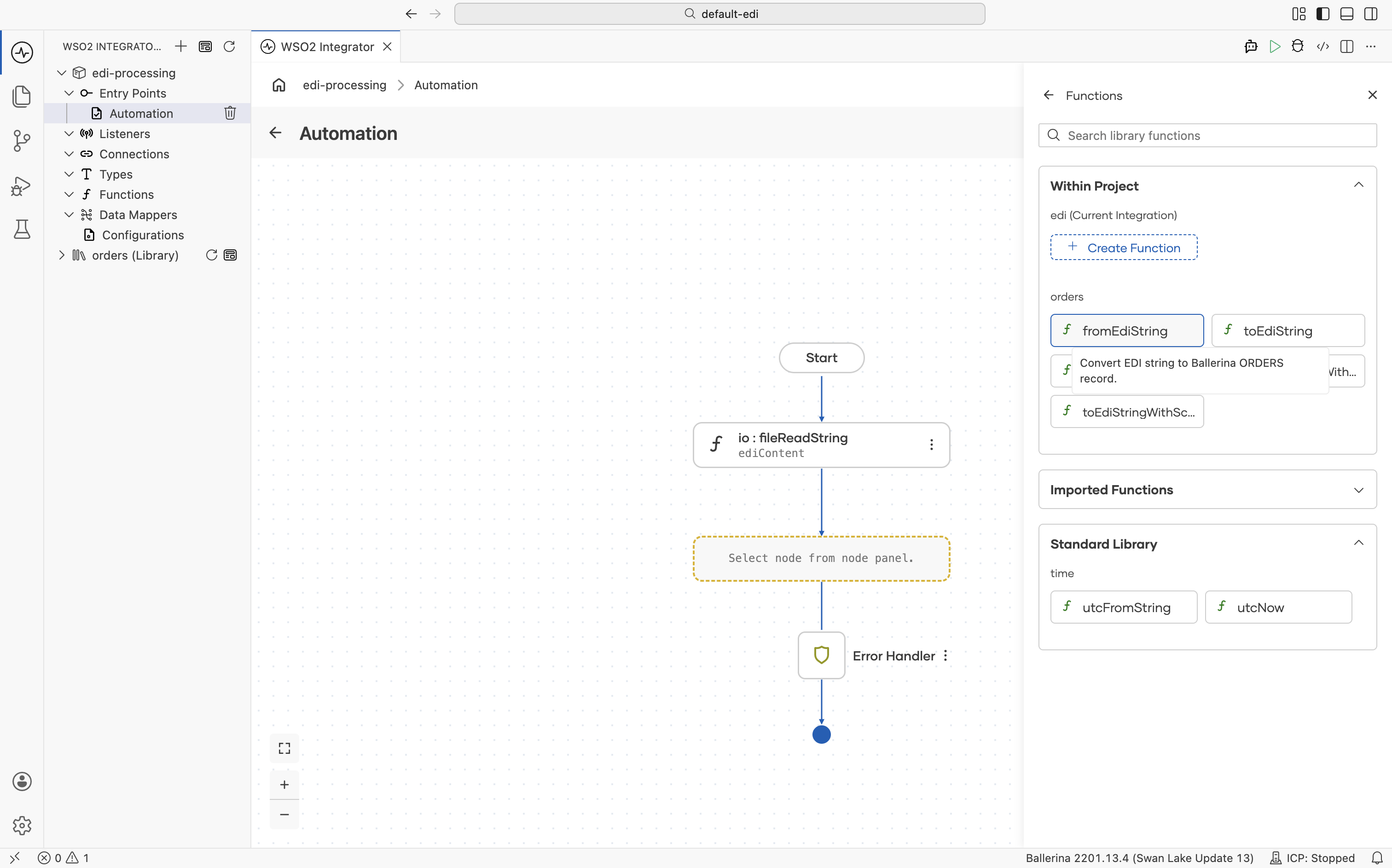
Click + again and select Call Function. In the Functions panel under Within Project, select fromEdiString.
-
Set Edi Text to
ediContentand Result toorders, then click Save.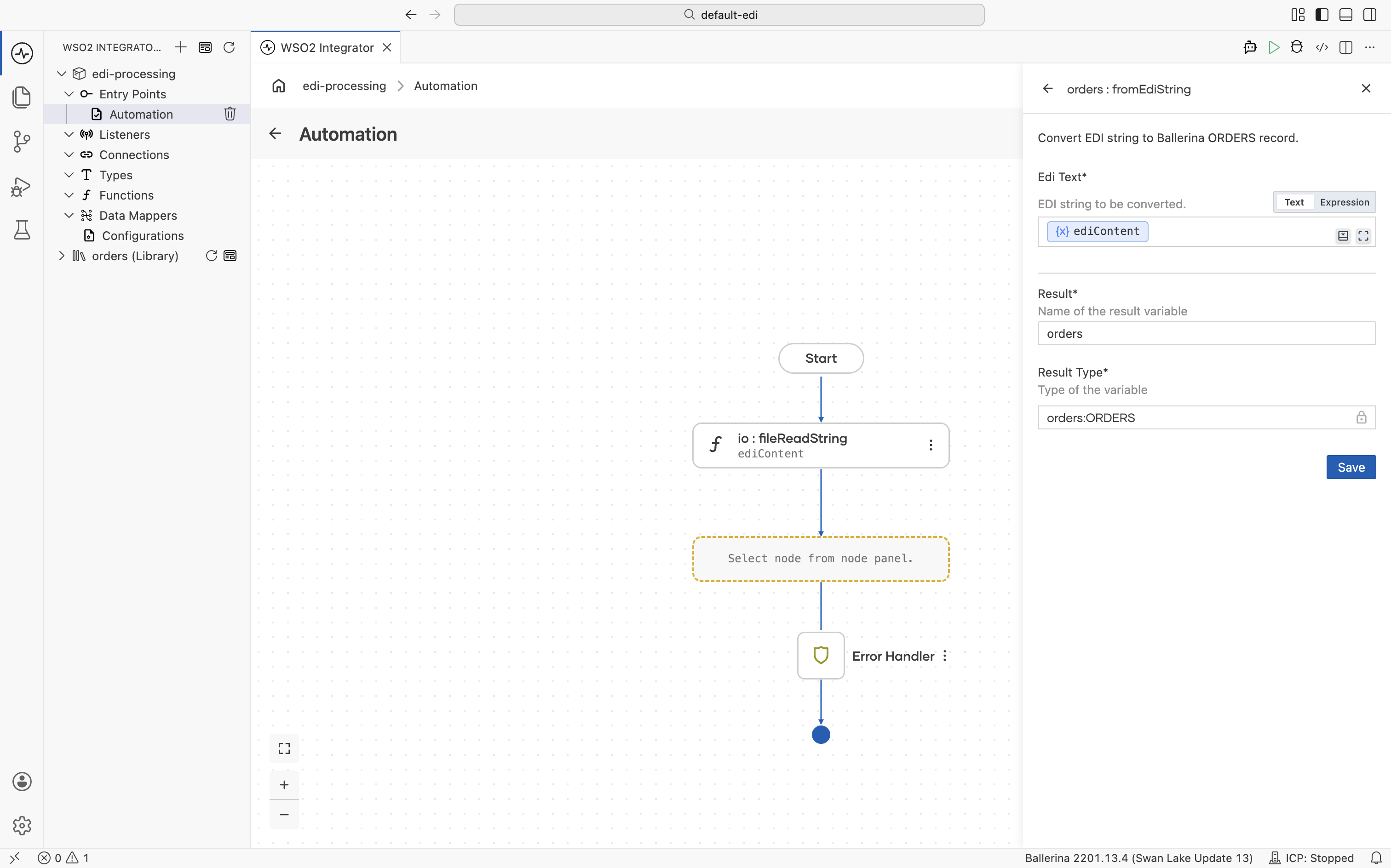
-
Click + again. In the right panel, expand the Logging section and select Log Info.
-
In the Msg field, select Expression, enter
orders.toString(), and click Save.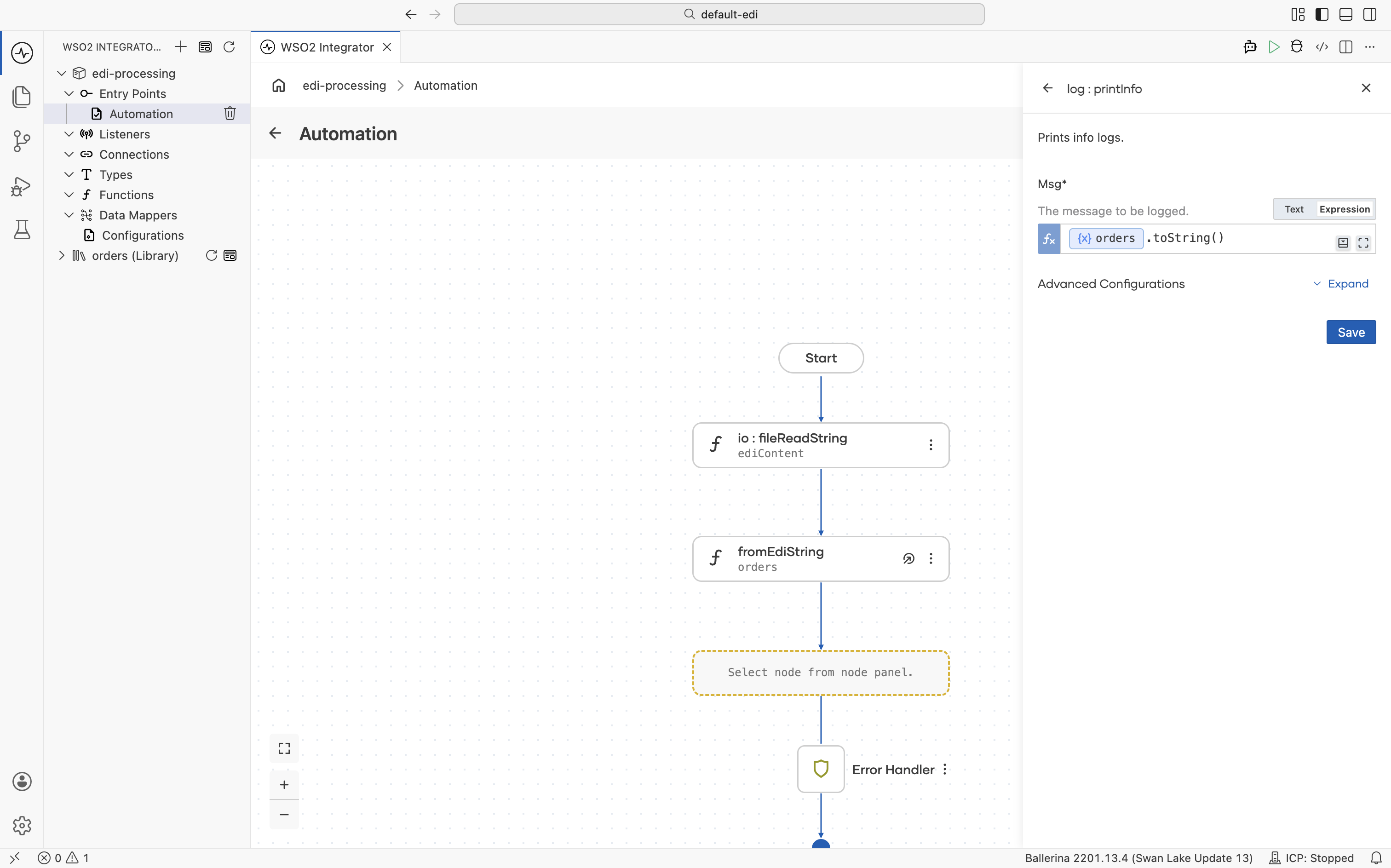
-
Run the integration and observe the logs.
import ballerina/io;
import ballerina/log;

// Generated library from the EDIFACT ORDERS schema.
import <add-org-name>/orders;

public function main() returns error? {
    do {
        string ediContent = check io:fileReadString("path/to/orders.edi");
        orders:ORDERS document = check orders:fromEdiString(ediContent);

        log:printInfo(document.toString());
    } on fail error e {
        log:printError("Error occurred", 'error = e);
        return e;
    }
}
Parsing the full interchange
A complete EDI file is an interchange — one or more transactions wrapped in envelope headers and trailers. interchangeFromEdiString parses the whole hierarchy into typed records, capturing any malformed transaction body as an error instead of failing the entire parse, so well-formed transactions can still be processed:
import ballerina/io;
import ballerina/log;

// Generated library from the EDIFACT ORDERS schema.
import <add-org-name>/orders;

public function main() returns error? {
    string ediContent = check io:fileReadString("path/to/orders.edi");

    orders:ORDERSInterchange interchange = check orders:interchangeFromEdiString(ediContent);
    foreach orders:ORDERSTransaction txn in interchange.transactions {
        orders:ORDERS|error body = txn.body;
        if body is error {
            log:printError("Quarantined malformed transaction", 'error = body);
            continue;
        }
        log:printInfo(body.toString());
    }
}
To route or filter messages by trading partner without parsing the whole document, orders:headersFromEdiString returns just the envelope headers.
Generating EDI output
Build an EDIFACT ORDERS message from Ballerina records and serialize it to EDI text.
- Visual Designer
- Ballerina Code
-
In a new integration, click + Add Artifact and select Automation.
-
Inside the Automation, click + and select Declare Variable. Set Name to
orders, Type toorders:ORDERS, and enter the following json as the Expression, then click Save.
{"Message_header":{"code":"UNH","message_reference_number":"1","message_information":{"name":"ORDERS","catagory":"D","version":"96A","status":"UN"}},"Beginning_of_message":{"code":"BGM","DOCUMENT_MESSAGE_NAME":{"Document_name_code":"220"},"DOCUMENT_MESSAGE_IDENTIFICATION":{"Document_identifier":"PO-001"},"MESSAGE_FUNCTION_CODE":"9"},"Date_time_period":[{"code":"DTM","DATE_TIME_PERIOD":{"Date_or_time_or_period":"137","Date_or_time_or_period_text":"20260511","Date_or_time_or_period_format_code":"102"}}],"Additional_information":[],"Item_description":[],"Free_text":[],"Related_identification_numbers":[],"group_1":[],"group_2":[{"Name_and_address":{"code":"NAD","PARTY_FUNCTION_CODE_QUALIFIER":"BY","PARTY_IDENTIFICATION_DETAILS":{"Party_identifier":"123456789","Code_list_identification_code":"","Code_list_responsible_agency_code":"9"},"NAME_AND_ADDRESS":null,"PARTY_NAME":{"Party_name":"ACME Corp"}},"Place_location_identification":[],"Financial_institution_information":[],"group_3":[],"group_4":[],"group_5":[]}],"group_6":[],"group_7":[],"group_8":[],"group_10":[],"group_12":[],"group_13":[],"group_15":[],"group_16":[],"group_18":[],"group_19":[],"group_25":[],"group_26":[],"group_28":[{"Line_item":{"code":"LIN","LINE_ITEM_IDENTIFIER":"1","ITEM_NUMBER_IDENTIFICATION":{"Item_identifier":"PROD-001","Item_type_identification_code":"SA"}},"Additional_product_id":[],"Item_description":[],"Measurements":[],"Quantity":[{"code":"QTY","QUANTITY_DETAILS":{"Quantity_type_code_qualifier":"21","Quantity":"10"}}],"Percentage_details":[],"Additional_information":[],"Date_time_period":[],"Monetary_amount":[],"Processing_information":[],"Goods_identity_number":[],"Related_identification_numbers":[],"Document_message_details":[],"Maintenance_operation_details":[],"Free_text":[],"group_29":[],"group_30":[],"group_32":[{"Price_details":{"code":"PRI","PRICE_INFORMATION":{"Price_code_qualifier":"AAA","Price_amount":25}},"Additional_price_information":[],"Date_time_period":[]}],"group_33":[],"group_34":[],"group_37":[],"group_38":[],"group_39":[],"group_43":[],"group_49":[],"group_51":[],"group_52":[],"group_53":[],"group_55":[],"group_56":[],"group_58":[]}],"Section_control":{"code":"UNS","section_identification":"S"},"Monetary_amount":[],"Control_total":[],"group_60":[],"Message_trailer":{"code":"UNT","number1":"9","number2":"1"}}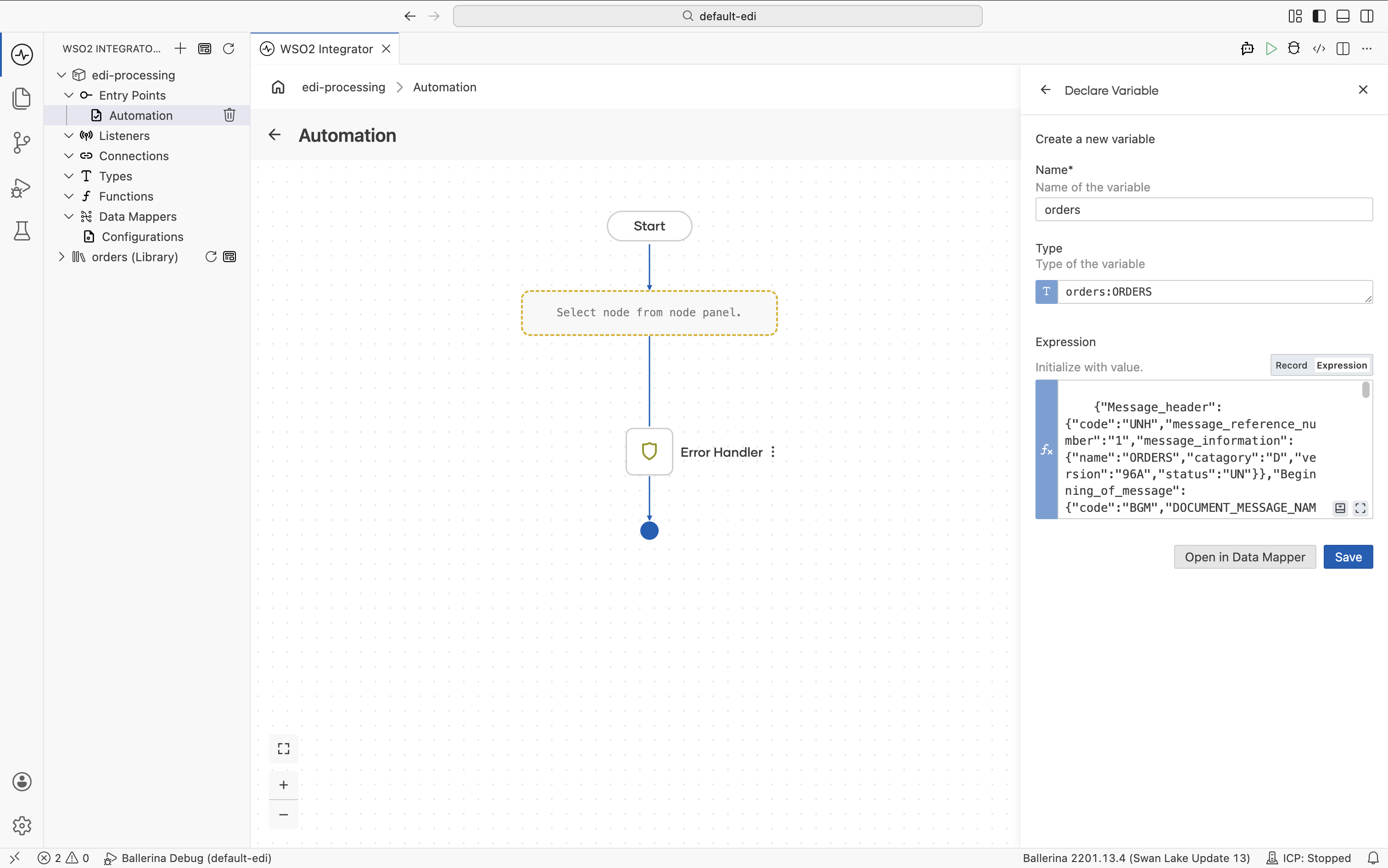
-
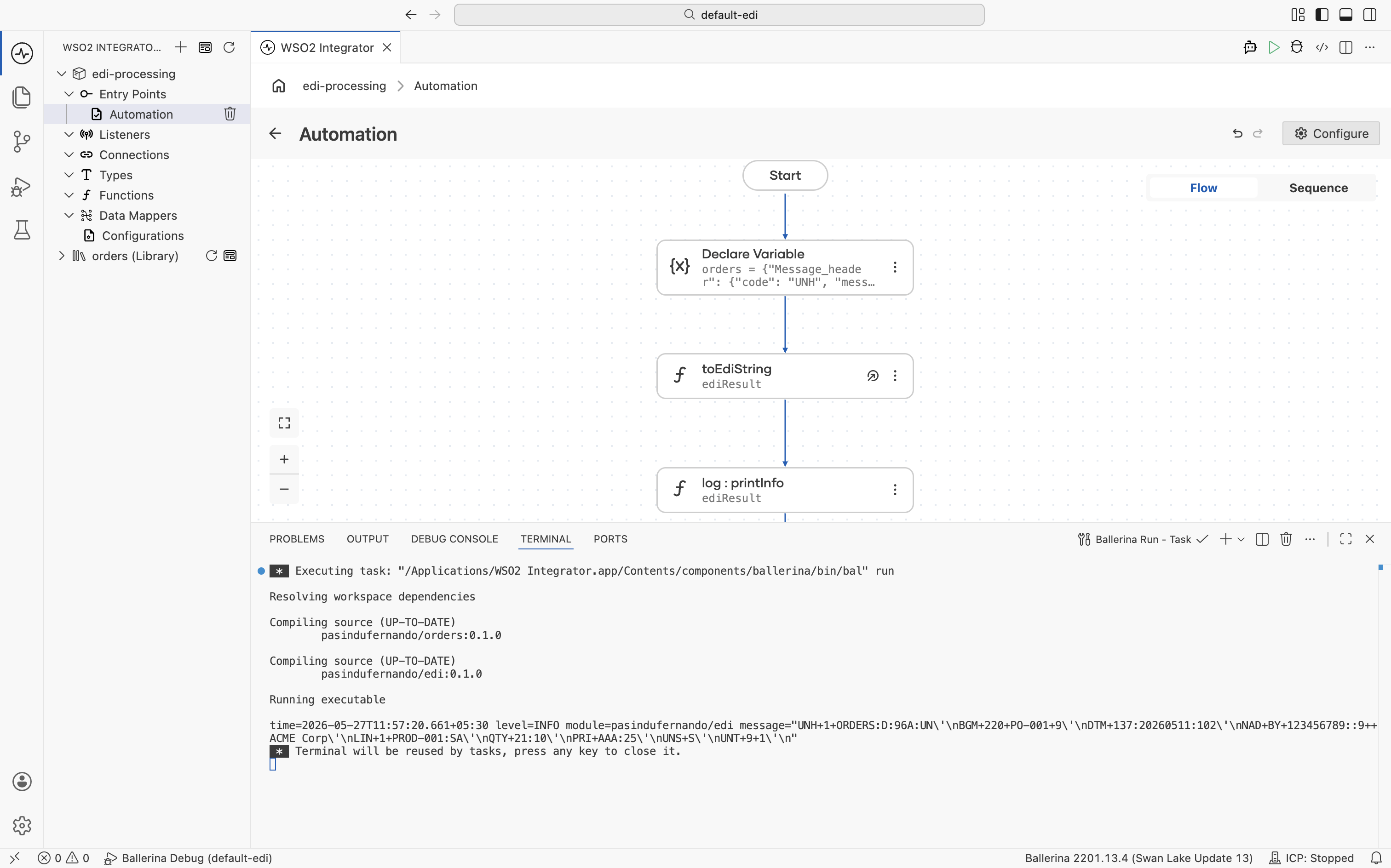
Click + and select Call Function. Under the orders section, select toEdiString. Set Data to
ordersand Result toediResult, then click Save.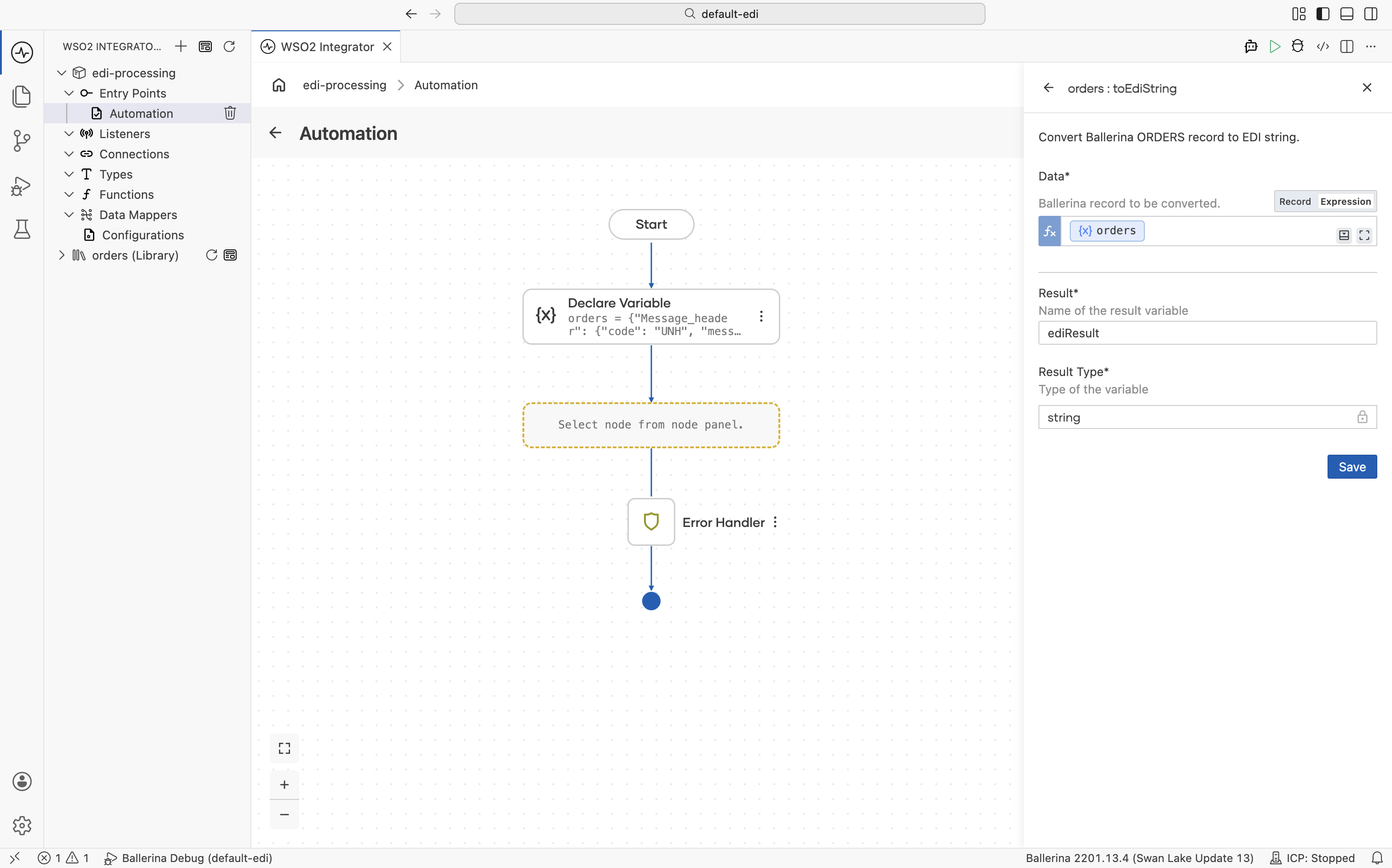
-
Click + and select Log Info. Set Msg to
ediResult, then click Save.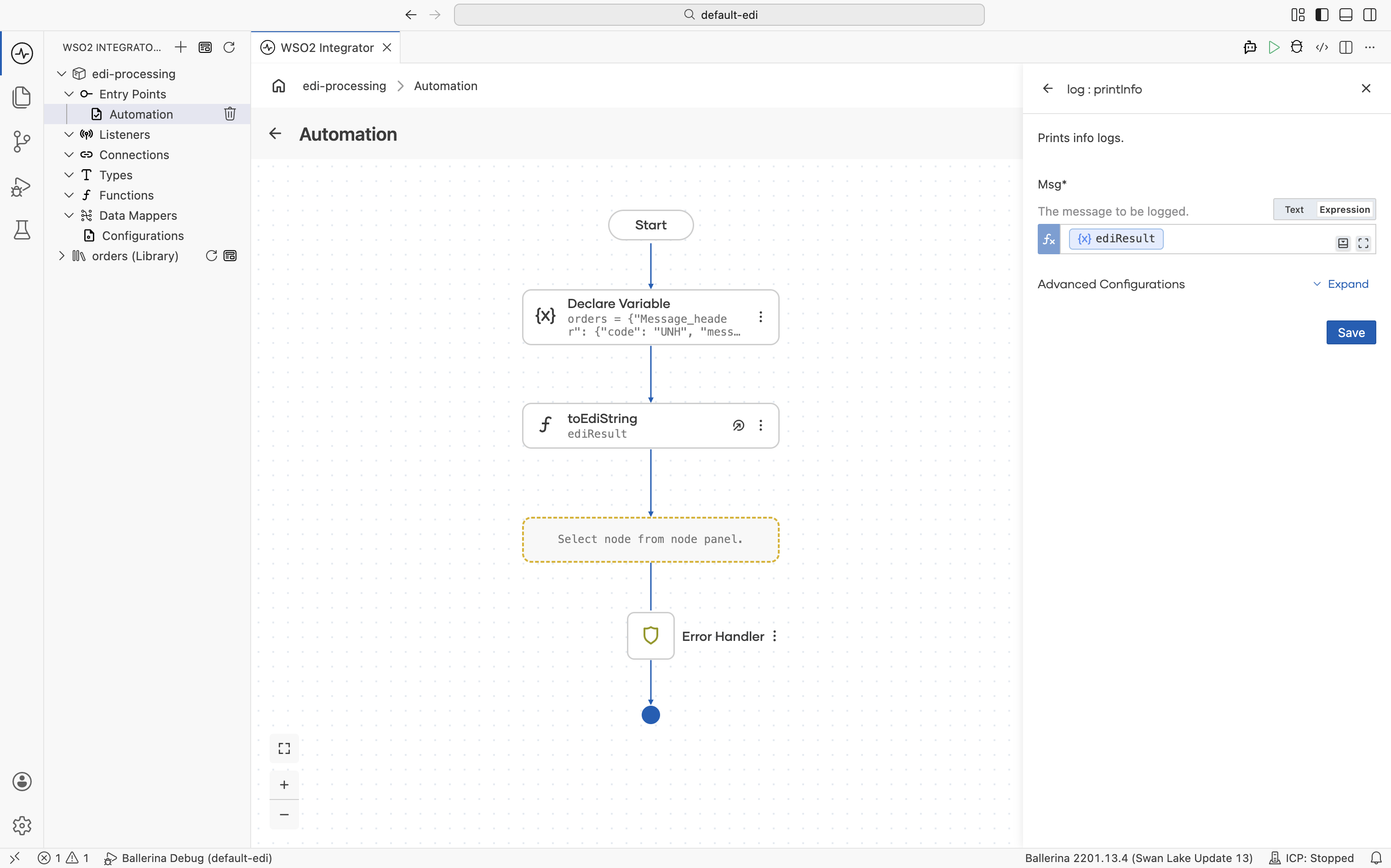
-
Run the integration and observe the logs.
import ballerina/log;

// Generated library from the EDIFACT ORDERS schema.
import <add-org-name>/orders;

public function main() returns error? {
   do {
      // Build the ORDERS document as a typed record.
      orders:ORDERS orders =  {"Message_header":{"code":"UNH","message_reference_number":"1","message_information":{"name":"ORDERS","catagory":"D","version":"96A","status":"UN"}},"Beginning_of_message":{"code":"BGM","DOCUMENT_MESSAGE_NAME":{"Document_name_code":"220"},"DOCUMENT_MESSAGE_IDENTIFICATION":{"Document_identifier":"PO-001"},"MESSAGE_FUNCTION_CODE":"9"},"Date_time_period":[{"code":"DTM","DATE_TIME_PERIOD":{"Date_or_time_or_period":"137","Date_or_time_or_period_text":"20260511","Date_or_time_or_period_format_code":"102"}}],"Additional_information":[],"Item_description":[],"Free_text":[],"Related_identification_numbers":[],"group_1":[],"group_2":[{"Name_and_address":{"code":"NAD","PARTY_FUNCTION_CODE_QUALIFIER":"BY","PARTY_IDENTIFICATION_DETAILS":{"Party_identifier":"123456789","Code_list_identification_code":"","Code_list_responsible_agency_code":"9"},"NAME_AND_ADDRESS":null,"PARTY_NAME":{"Party_name":"ACME Corp"}},"Place_location_identification":[],"Financial_institution_information":[],"group_3":[],"group_4":[],"group_5":[]}],"group_6":[],"group_7":[],"group_8":[],"group_10":[],"group_12":[],"group_13":[],"group_15":[],"group_16":[],"group_18":[],"group_19":[],"group_25":[],"group_26":[],"group_28":[{"Line_item":{"code":"LIN","LINE_ITEM_IDENTIFIER":"1","ITEM_NUMBER_IDENTIFICATION":{"Item_identifier":"PROD-001","Item_type_identification_code":"SA"}},"Additional_product_id":[],"Item_description":[],"Measurements":[],"Quantity":[{"code":"QTY","QUANTITY_DETAILS":{"Quantity_type_code_qualifier":"21","Quantity":"10"}}],"Percentage_details":[],"Additional_information":[],"Date_time_period":[],"Monetary_amount":[],"Processing_information":[],"Goods_identity_number":[],"Related_identification_numbers":[],"Document_message_details":[],"Maintenance_operation_details":[],"Free_text":[],"group_29":[],"group_30":[],"group_32":[{"Price_details":{"code":"PRI","PRICE_INFORMATION":{"Price_code_qualifier":"AAA","Price_amount":25}},"Additional_price_information":[],"Date_time_period":[]}],"group_33":[],"group_34":[],"group_37":[],"group_38":[],"group_39":[],"group_43":[],"group_49":[],"group_51":[],"group_52":[],"group_53":[],"group_55":[],"group_56":[],"group_58":[]}],"Section_control":{"code":"UNS","section_identification":"S"},"Monetary_amount":[],"Control_total":[],"group_60":[],"Message_trailer":{"code":"UNT","number1":"9","number2":"1"}};

      // Serialize the record back into an EDI string.
      string ediResult = check orders:toEdiString(orders);
      log:printInfo(string `${ediResult}`);

   } on fail error e {
      log:printError("Error occurred", 'error = e);
      return e;
   }
}
EDI to JSON conversion
A common integration pattern is converting EDI documents to JSON for downstream systems. The walkthrough below uses the in-process generated functions. If you instead want to expose EDI-to-JSON (and JSON-to-EDI) as an HTTP service that any downstream system can call, use libgen to generate a package with built-in REST endpoints.
- Visual Designer
- Ballerina Code
-
In a new integration create an Automation.
-
Click + and select Call Function and select fromEdiString.
-
Add the EDI content into Edi Text and
ordersas Result and Save.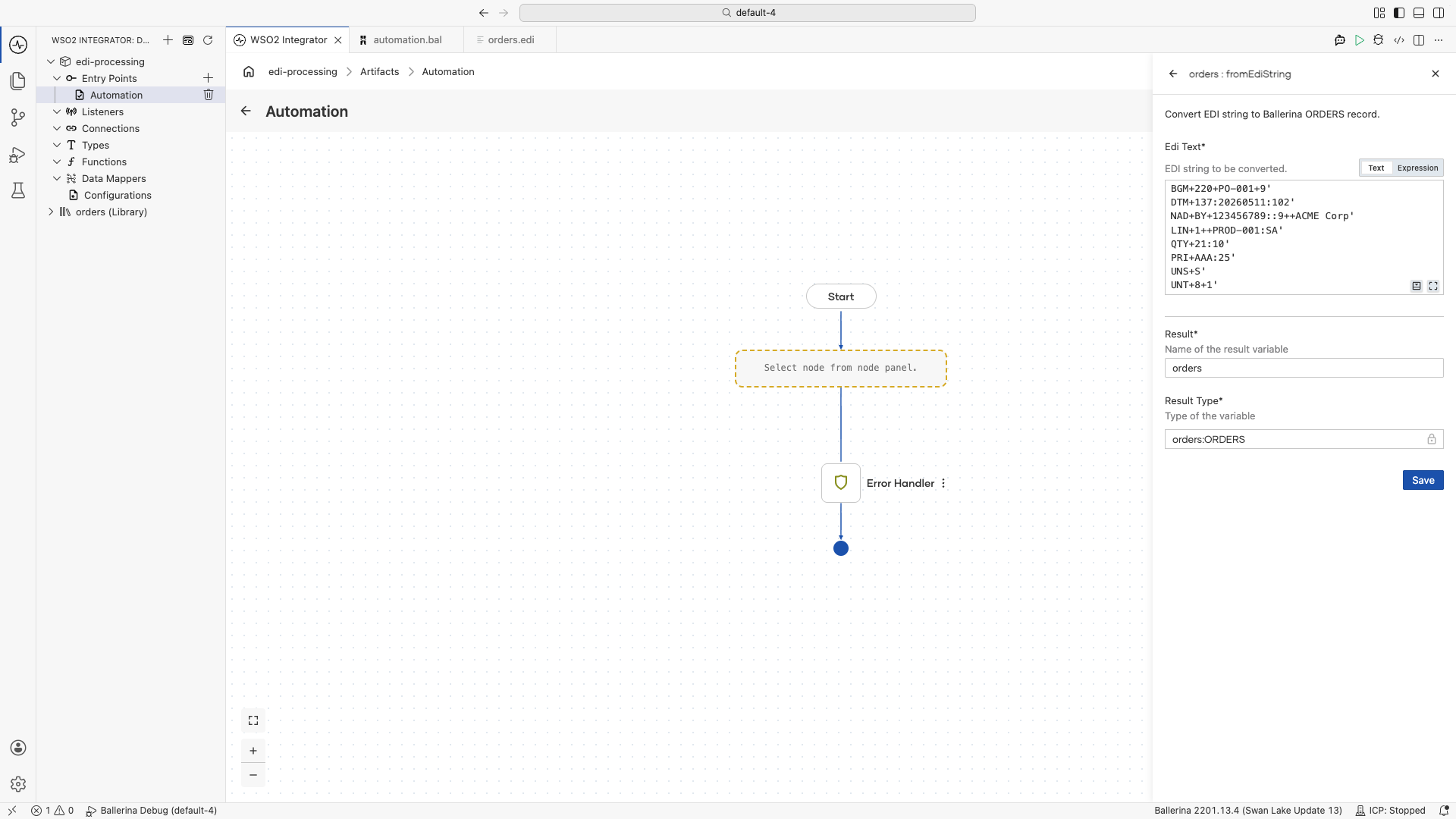
-
In the Automation, click + and select Declare Variable.
-
Set Name to
jsonOrder, Type tojson, and Expression toorders.toJson(), then click Save.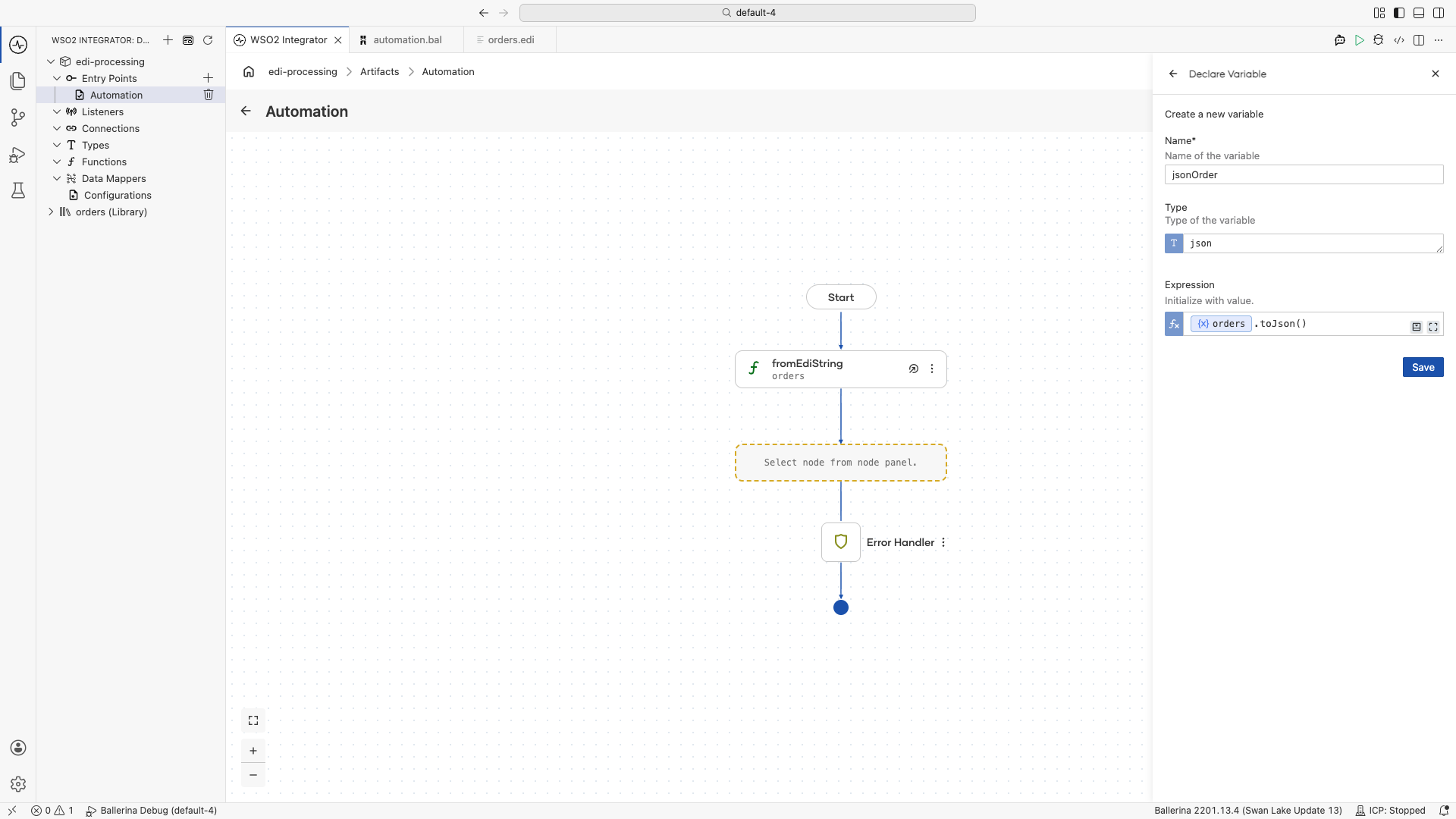
-
Click + and select Call Function. Under the
iosection, select fileWriteJson.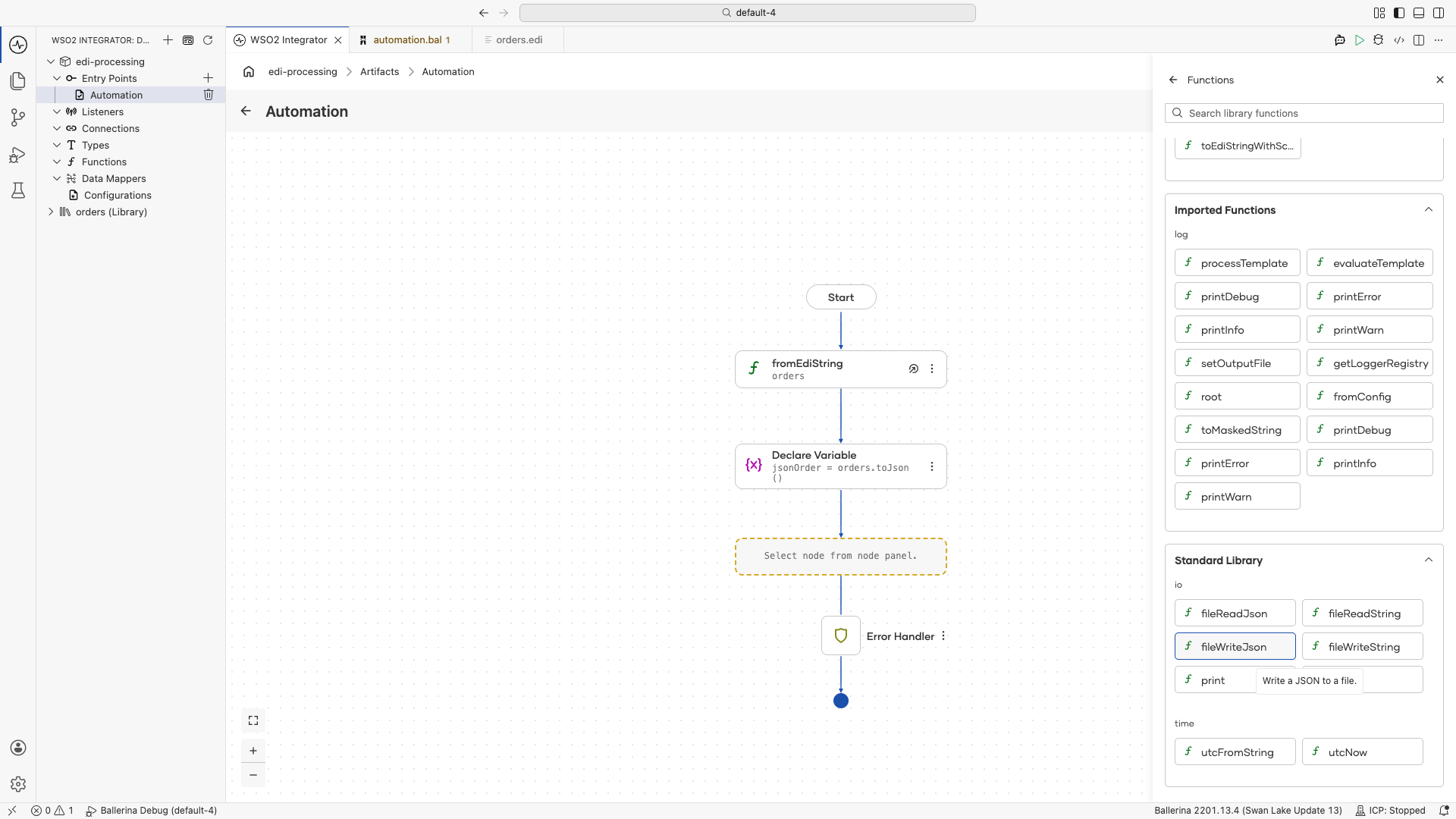
-
Set Path to
order.jsonand Content tojsonOrder, then click Save.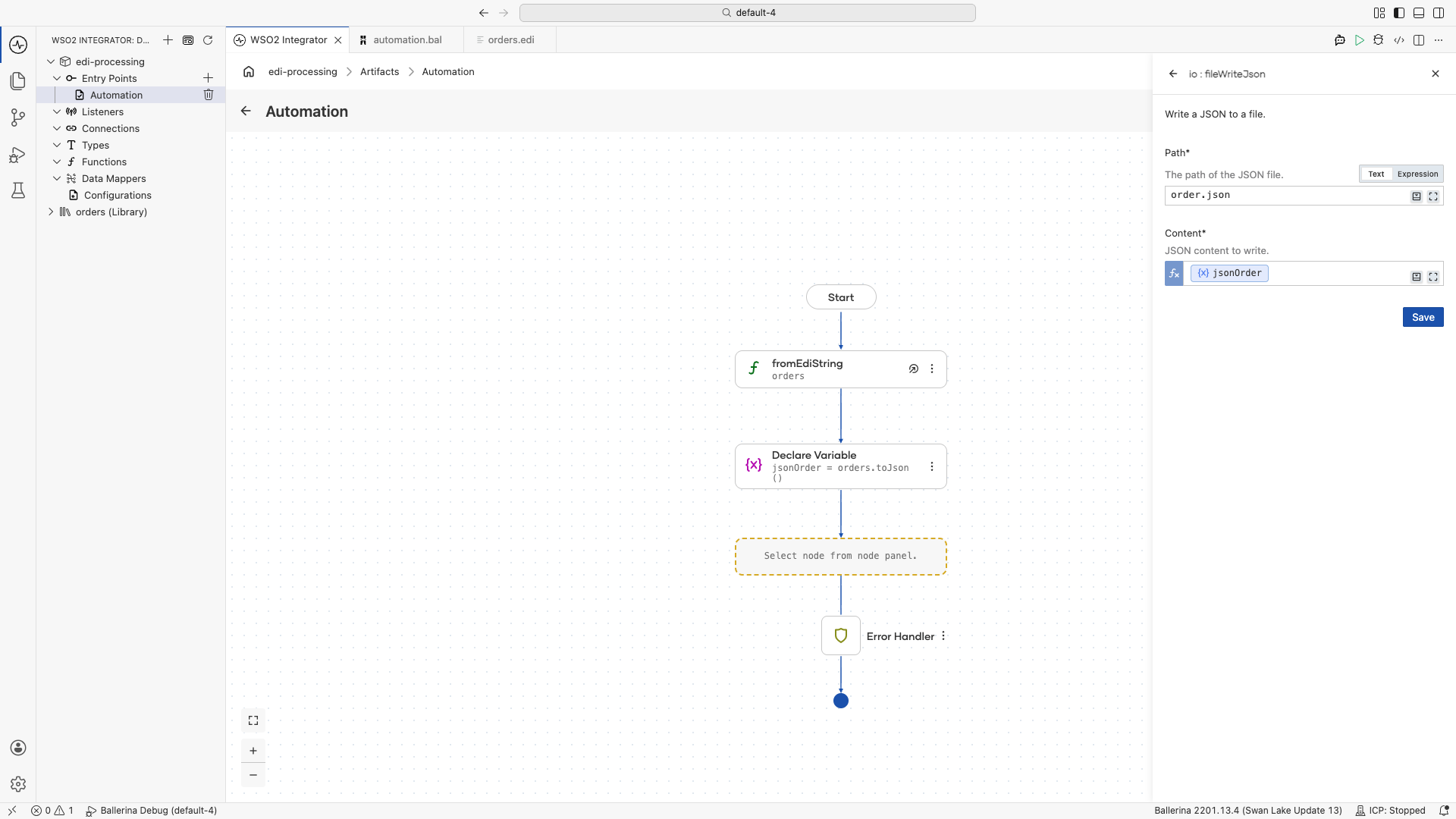
-
Run the integration and check the created
order.jsonfile.
import ballerina/io;
import ballerina/log;

import <add-org-name>/orders;

public function main() returns error? {
    do {
        // Parse the EDI string into a typed record.
        orders:ORDERS orders = check orders:fromEdiString(
            string `UNB+UNOA:1+SENDER+RECEIVER+260511:1000+1'
                    UNH+1+ORDERS:D:03A:UN'
                    BGM+220+PO-001+9'
                    DTM+137:20260511:102'
                    NAD+BY+123456789::9++ACME Corp'
                    LIN+1++PROD-001:SA'
                    QTY+21:10'
                    PRI+AAA:25'
                    UNS+S'
                    UNT+8+1'`
        );

        // Convert the record to JSON.
        json jsonOrder = orders.toJson();

        check io:fileWriteJson("order.json", jsonOrder);
    } on fail error e {
        log:printError("Error occurred", 'error = e);
        return e;
    }
}
Building a reusable library package
A real integration usually needs to handle several EDI schemas at once: a purchase order, an invoice, a shipping notice, and often multiple versions of each. Running codegen per schema and tracking the outputs by hand becomes tedious. The bal edi libgen command bundles a directory of schemas into a complete Ballerina package.
bal edi libgen -p <org-name>/<package-name> -i path/to/schemas/ -o path/to/output/
The generated package contains:
- One Ballerina module per schema: each with its own record types and
fromEdiString/toEdiStringfunctions, named after the source schema file. - Utility methods: shared helpers for working with the EDI schemas in the package.
- A REST connector: a generated service that exposes EDI-to-JSON and JSON-to-EDI conversion endpoints for every schema in the package. Downstream services can call these endpoints over HTTP without taking a Ballerina dependency.
Publish the generated package to Ballerina Central and import it into any integration the same way you import any other Ballerina library. Alternatively, build and run it directly with bal build and bal run to deploy it as a standalone EDI conversion microservice.
For the libgen flag reference, see the EDI tool page.
Best practices
- Generate code from schemas rather than parsing EDI manually. The generated records and functions handle segment delimiters, escape characters, and validation.
- Use packages for reuse. Bundle frequently used EDI schemas into shared Ballerina packages with
libgen. - Validate early. Parse EDI at the integration boundary to catch format errors before business logic executes.
- Convert to records immediately. Work with typed records throughout your integration and serialize back to EDI only at the output boundary.
What's next
- EDI tool reference — Full CLI command and flag reference for
bal edi - Type System Reference — Define EDI record types