PDF Processing
Extract text from existing PDFs, convert PDF pages to images, and generate PDF documents from HTML. The ballerina/pdf module provides a single-call API for each task. Parsing and rendering run locally, with no external service or headless browser required.
Text Extraction
Read the textual content of a PDF one page at a time. The module provides three entry points — choose the one that matches where the PDF originates.
Extracting from PDF Bytes
Use pdf:extractText when the PDF is already in memory. For example, when it arrives as an HTTP request payload or comes from another connector call.
- Visual Designer
- Ballerina Code
-
Add a Variable step for the PDF bytes: In the flow designer, click + and select Declare Variable. Set the name to
pdfBytesand the type tobyte[]. If the PDF arrives in an HTTP request, assign the request payload as the expression. -
Add a Function Call step for extraction: Click + and select Call Function. Search for
extractTextunder pdf and configure:- pdf*:
pdfBytes - Result*:
pages - Type:
string[]
- pdf*:
-
Add a Foreach step: Click + and select Foreach under Control. Set the Collection to
pagesand the Variable Name topageText. Inside the loop, process each page's text, index it, search it, or forward it to a downstream service.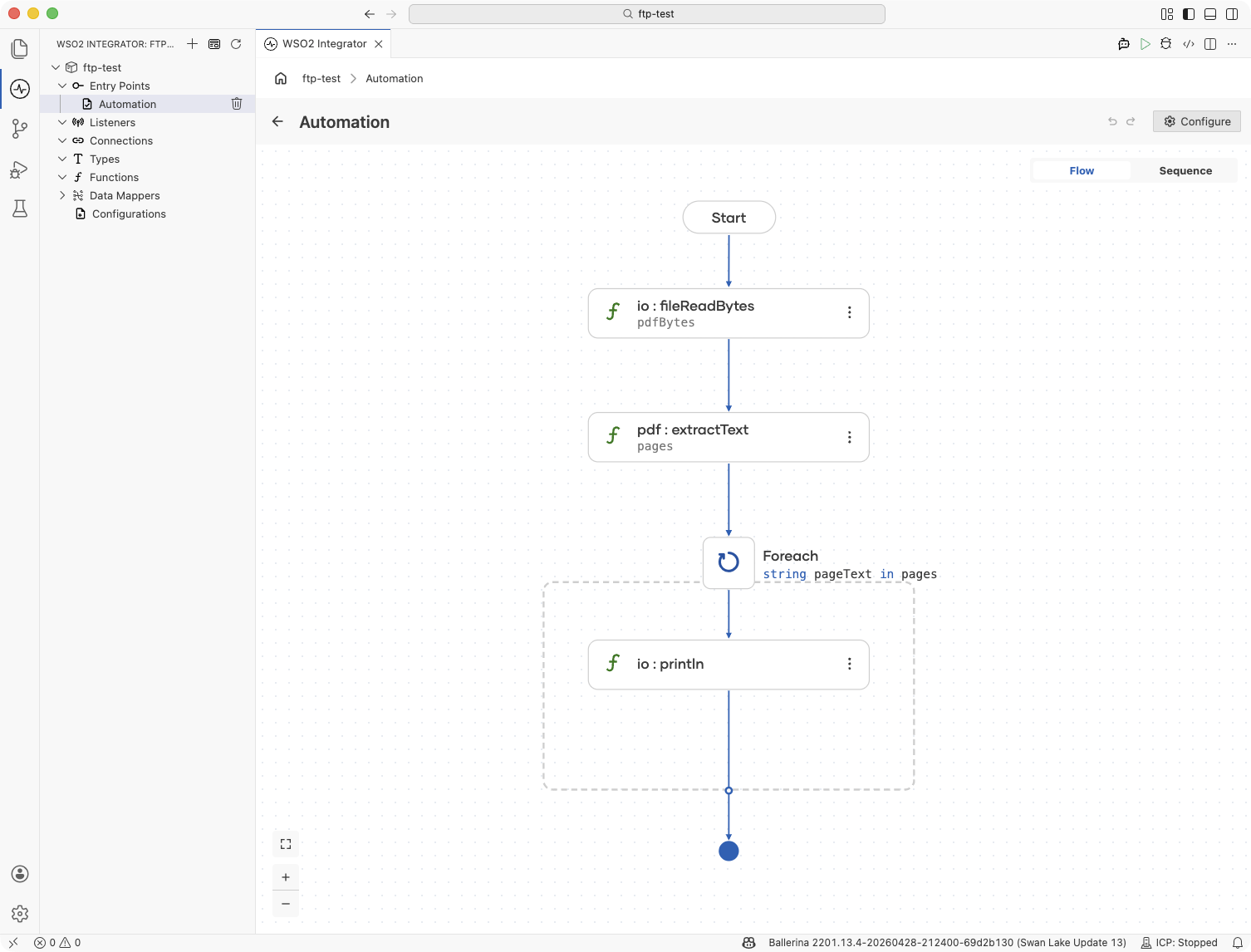
import ballerina/io;
import ballerina/pdf;

public function main() returns error? {
    byte[] pdfBytes = check io:fileReadBytes("./report.pdf");
    string[] pages = check pdf:extractText(pdfBytes);

    foreach string pageText in pages {
        io:println(pageText);
    }
}
Extracting from a File or URL
When the PDF lives on disk or behind a URL, skip the intermediate byte[] and use fileExtractText or urlExtractText directly.
- Visual Designer
- Ballerina Code
-
Add a Function Call step for file extraction: Click + and select Call Function. Search for
fileExtractTextunder pdf and set the input to a file path string such as"./report.pdf". Assign thestring[]result to a variable namedpages. -
Add a Function Call step for URL extraction: For PDFs served over HTTP, search for
urlExtractTextunder pdf instead. Set the input to the URL string. The module fetches the document and returns the samestring[]shape.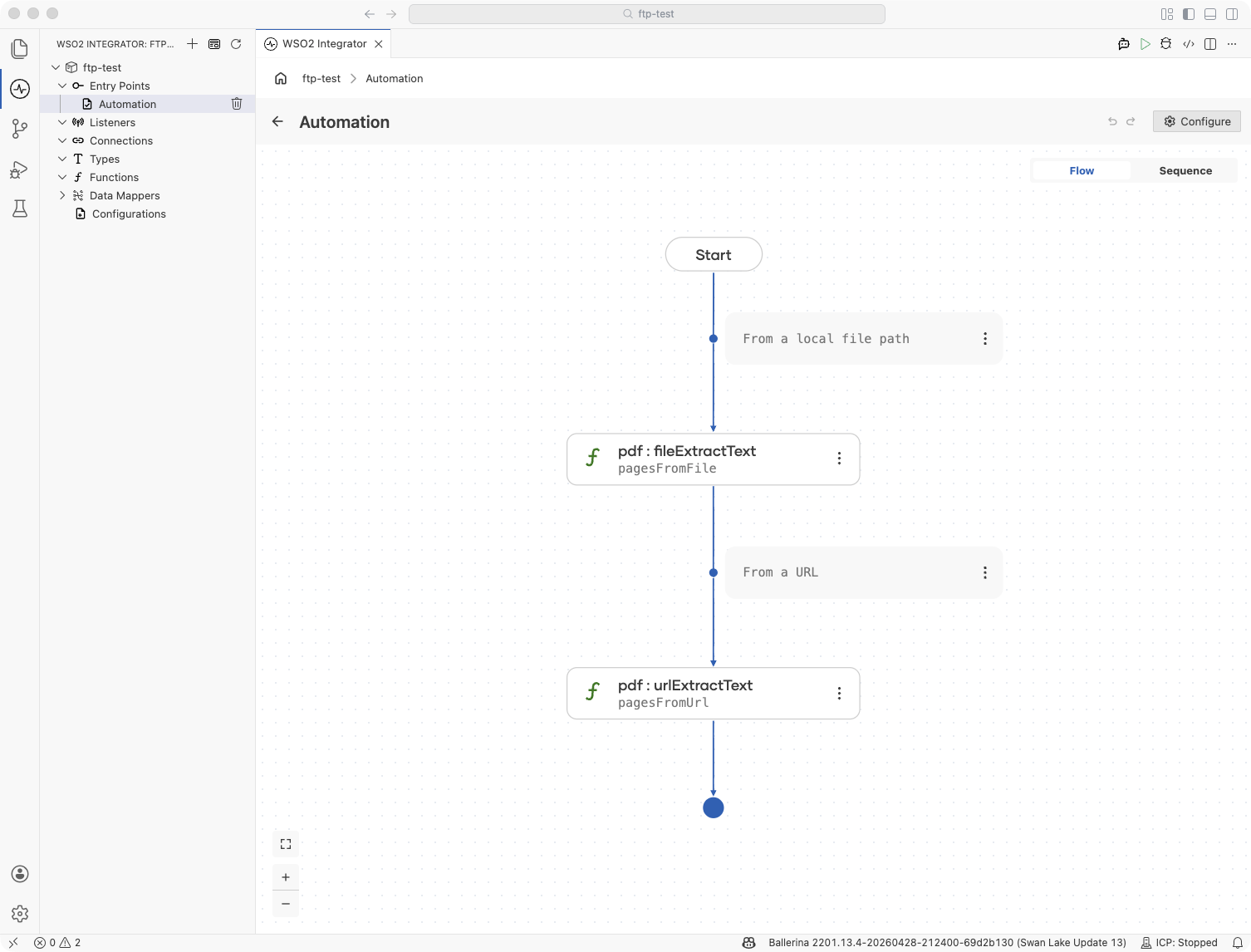
import ballerina/pdf;

public function main() returns error? {
    // From a local file path
    string[] pagesFromFile = check pdf:fileExtractText("./report.pdf");

    // From a URL
    string[] pagesFromUrl = check pdf:urlExtractText("https://example.com/report.pdf");
}
Image Conversion
Render each page of a PDF to a Base64-encoded PNG. Useful for page previews, thumbnails, archival snapshots, or feeding pages to an OCR or vision model.
Converting from a PDF
The three variants mirror text extraction: bytes, file path, or URL. Each returns a string[] where every element is a Base64-encoded PNG for one page.
- Visual Designer
- Ballerina Code
-
Add a Function Call step for conversion: Click + and select Call Function. Choose one of the following under pdf library depending on your input.
toImages: when the input isbyte[]fileToImages: when the input is a file pathstringurlToImages: when the input is a URLstring
Then, assign the
string[]result to a variable namedpageImages. -
Add a Foreach step: Click + and select Foreach under Control. Set the Collection to
0 ..< pageImages.length()and the Variable Name toi.Why an index range here? Each output file needs a unique name (
page-1.png,page-2.png, ...), so the loop tracks the page number throughi. Direct iteration overpageImages(as in the text-extraction example) wouldn't expose the position. -
Decode and write each image: Inside the loop, click + and select Call Function. Call
fromBase64(pageImages[i])to obtain the raw PNG bytes for the current page, then callfileWriteByteswith the path expressionstring `./page-${i + 1}.png`to save each page as a separate, numbered PNG file.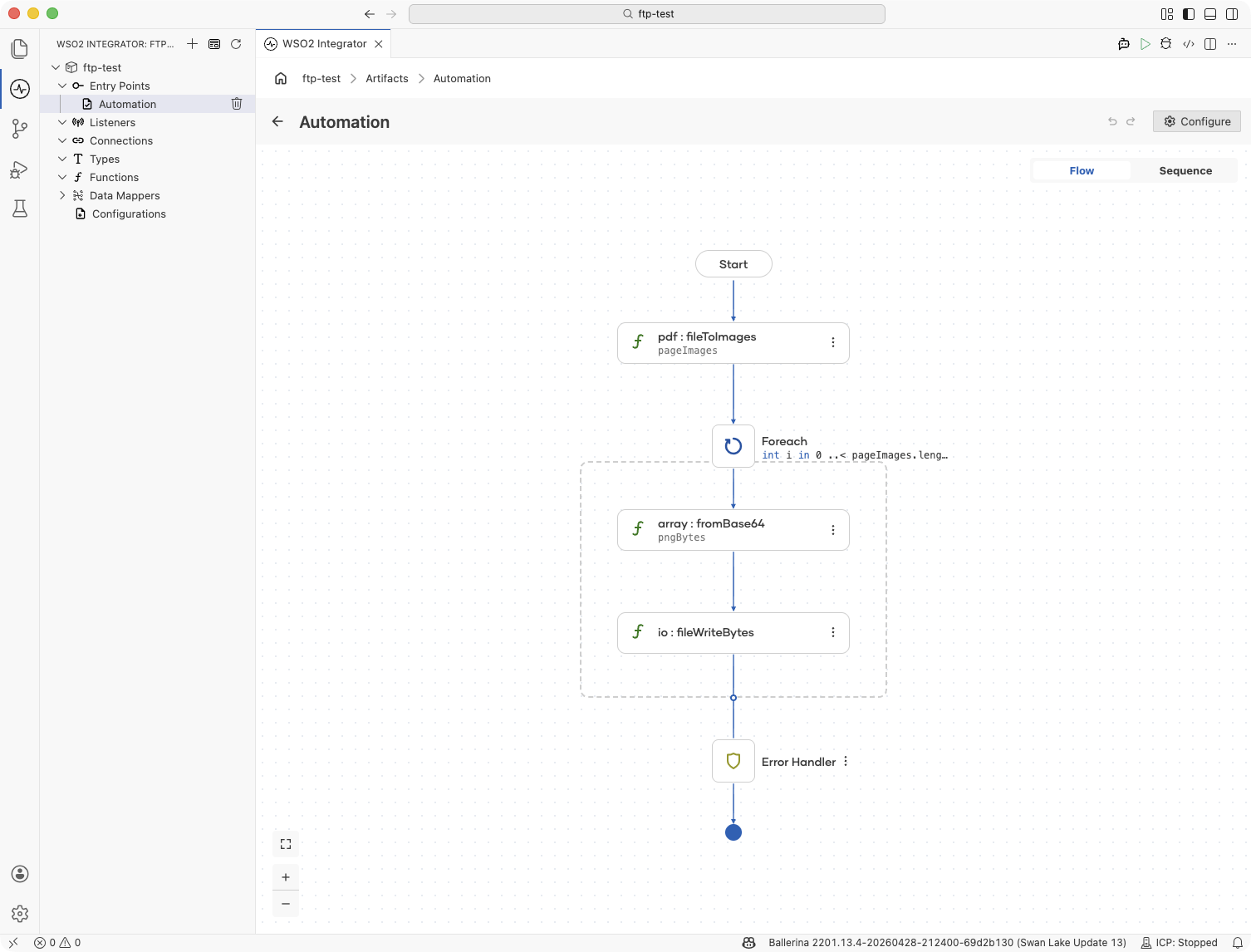
import ballerina/io;
import ballerina/lang.array;
import ballerina/pdf;

public function main() returns error? {
    string[] pageImages = check pdf:fileToImages("./report.pdf");

    foreach int i in 0 ..< pageImages.length() {
        byte[] pngBytes = check array:fromBase64(pageImages[i]);
        check io:fileWriteBytes(string `./page-${i + 1}.png`, pngBytes);
    }
}
HTML to PDF Rendering
Convert parameterized HTML templates into PDF bytes suitable for download, email attachments, or storage. The rendering engine covers document-style HTML and CSS — tables, inline images, fonts, colored cells, and injected stylesheets — without depending on a headless browser.
Rendering an HTML String
Read or build an HTML string, then pass it to pdf:parseHtml to obtain the PDF bytes.
- Visual Designer
- Ballerina Code
-
Add a Declare Variable step for the HTML: In the flow designer, click + and, under Statement, select Declare Variable. Set the type to
stringand the name tohtml. Switch the toggle from Record to Expression and enter the HTML as a Ballerina template literal (string `...`) so you can interpolate parameter values like${customer}directly into the markup. -
Add a Function Call step for rendering: Click + and select Call Function. Search for
parseHtmlunder pdf and configure:- html*:
html - Result*:
pdfBytes - Type:
byte[]
- html*:
-
Add a Function Call step for output: Click + and select Call Function. Call
fileWriteBytesand setPathas"./output.pdf"and theContentaspdfBytesand save the PDF to disk, or assignpdfBytesto anhttp:Responsepayload to return it from a service.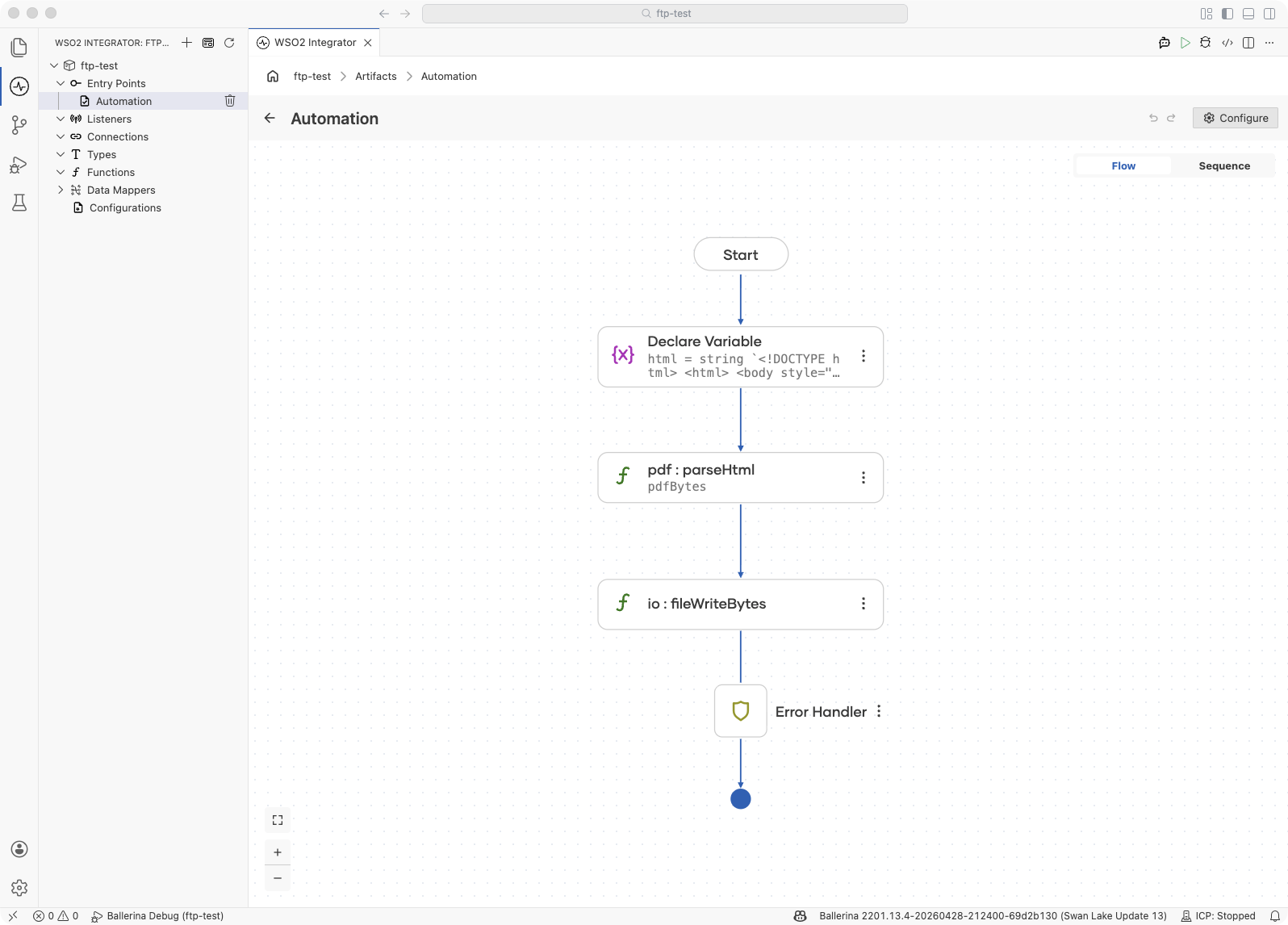
import ballerina/io;
import ballerina/pdf;

public function main() returns error? {
    string html = string `<!DOCTYPE html>
<html>
  <body style="font-family: 'Liberation Sans'; padding: 24px;">
    <h1>Invoice #1042</h1>
    <p>Amount due: $240.00</p>
  </body>
</html>`;

    byte[] pdfBytes = check pdf:parseHtml(html);
    check io:fileWriteBytes("./invoice.pdf", pdfBytes);
}
Customizing Page Size, Margins, and Fonts
parseHtml accepts a ConversionOptions record spread as named arguments: page size, margins (PageMargins), a maxPages cap, custom fonts for non-Latin scripts, a fallbackFontSize (default 12.0) applied when CSS does not specify one, and additionalCss injected into every render.
Custom-font prerequisite: The example below uses Noto Sans SC for custom-font rendering. Download the font file and place it at
./resources/NotoSansSC.ttfin your Ballerina project before running the integration. Substitute any TrueType font that covers your target script.
- Visual Designer
- Ballerina Code
-
Add a Function Call step for the font bytes: Click + and select Call Function. Call
fileReadBytes("./resources/NotoSansSC.ttf")and assign the result to abyte[] & readonlyvariable namedfontBytes. The font is required to render non-Latin scripts such as Chinese, Japanese, Korean, Arabic, or Devanagari.Note: Declare
fontBytesat module scope (as shown in the Ballerina Code tab) so the font is read once at startup rather than on every render. -
Add a Function Call step for rendering with options: Click + and select Call Function. Search for
parseHtmlunder pdf and add the named arguments:- html*:
html - pageSize:
pdf:LETTER - margins:
{top: 36.0, right: 40.0, bottom: 36.0, left: 40.0} - customFonts:
[{family: "NotoSansSC", content: fontBytes}](theFontrecord also accepts optionalboldanditalicboolean fields, both defaulting tofalse) - fallbackFontSize:
12.0(applied when the HTML/CSS does not specify a font size) - maxPages:
50 - Result*:
pdfBytes
- html*:
-
Add a Function Call step for output: Click + and select Call Function. Call
io:fileWriteBytes("./invoice.pdf", pdfBytes)to save the PDF to disk.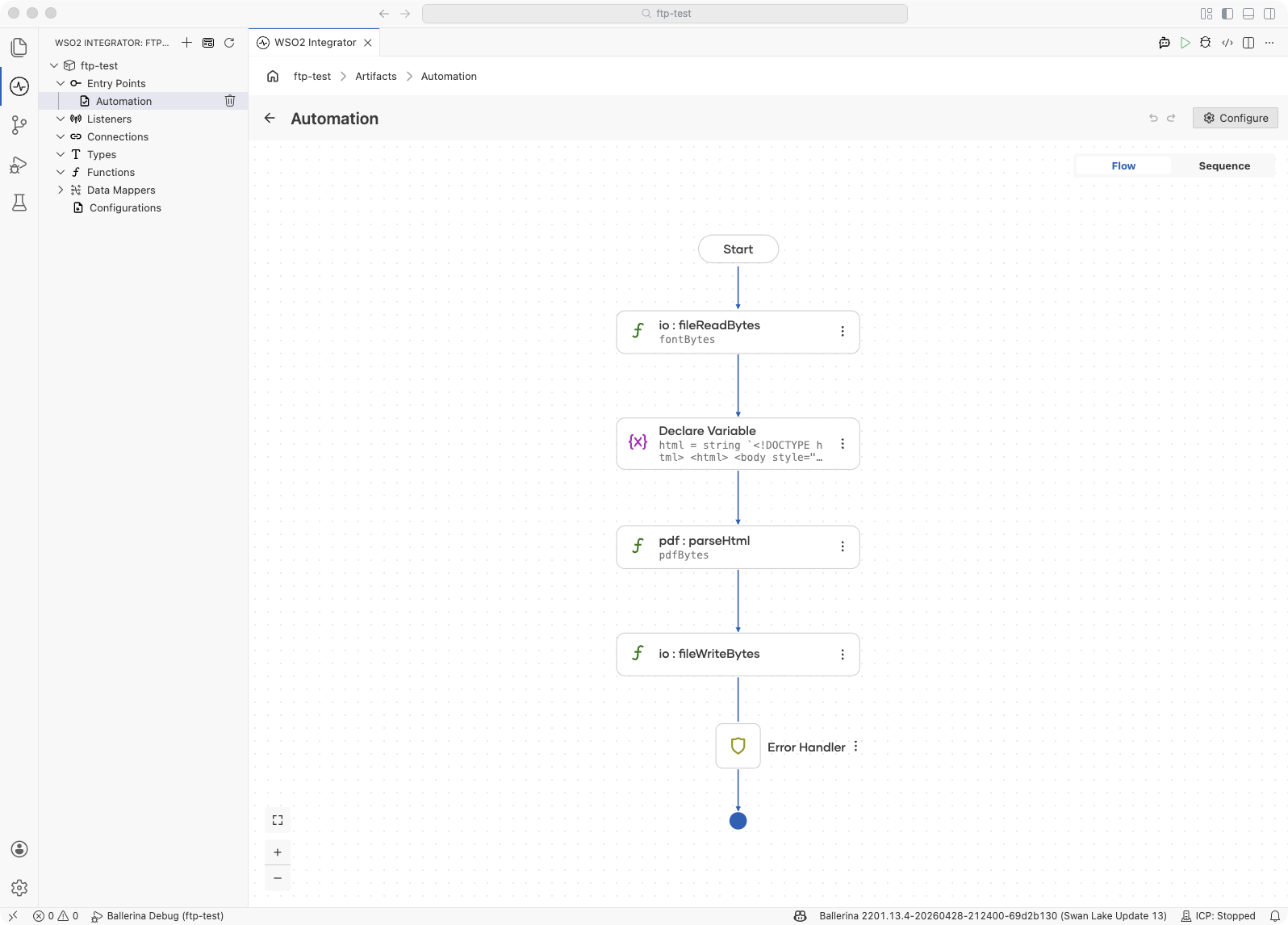
import ballerina/io;
import ballerina/pdf;

final byte[] & readonly fontBytes = check io:fileReadBytes("./resources/NotoSansSC.ttf");

public function main() returns error? {
    string html = string `<!DOCTYPE html>
<html>
  <body style="font-family: 'NotoSansSC'; padding: 24px;">
    <h1>Invoice #1042</h1>
    <p>Amount due: $240.00</p>
  </body>
</html>`;

    byte[] pdfBytes = check pdf:parseHtml(html,
        pageSize = pdf:LETTER,
        margins = {top: 36.0, right: 40.0, bottom: 36.0, left: 40.0},
        customFonts = [{family: "NotoSansSC", content: fontBytes}],
        maxPages = 50);

    check io:fileWriteBytes("./invoice.pdf", pdfBytes);
}
For landscape orientation, use a pdf:CustomPageSize with the width and height of the standard portrait size swapped.
For the complete list of options, the ConversionOptions record, the StandardPageSize enum, the CustomPageSize record, the PageMargins record, and the Font record, see the ballerina/pdf API reference on Ballerina Central.
Supported HTML and CSS
The renderer covers the subset of HTML and CSS needed for document-style templates. Headings, paragraphs, tables with colspan, solid borders, background colors, percentage widths, inline images, and embedded data URLs all work as expected. Two bundled fonts, Liberation Sans and Liberation Serif, cover most Western European scripts. For other scripts, load a font via customFonts.
The renderer does not support CSS flex, CSS Grid, position: fixed, @font-face rules, inline <svg>, rowspan, or non-solid border styles. Unsupported features are silently dropped rather than raising an error. Always preview new templates visually before shipping.
Integration Example: PDF Generation Service
Build an HTTP service that renders a parameterized template into a PDF and returns it as a binary response. The same pattern fits invoices, certificates, boarding passes, and receipts.
- Visual Designer
- Ballerina Code
- Create the HTTP service: Add an HTTP service with the base path
/invoices.
- Add a resource; set the HTTP Method to
GETand the Resource Path torender(the field takes only the segment, so omit any leading slash). - Declare the query parameters
customer(string),amount(decimal), anddueDate(string) on the resource.
-
Configure the response: Open the Responses tab on the resource. Edit the success response (click the pencil icon) and pick Dynamic - Response from the Status Code dropdown. This lets the resource return any
http:Response, which is required to carry the binary PDF payload. -
Add a Declare Variable step for the HTML: Click + and, under Statement, select Declare Variable. Set the type to
stringand the name tohtml. Switch the toggle from Record to Expression and enter the HTML as a Ballerina template literal (string `...`), interpolating the query parameters directly into the markup:string `<!DOCTYPE html>
<html>
<body style="font-family: 'Liberation Sans'; padding: 24px;">
<h1>Invoice</h1>
<p>Customer: ${customer}</p>
<p>Amount due: $${amount}</p>
<p>Due by: ${dueDate}</p>
</body>
</html>` -
Add a Function Call step for rendering: Click + and select Call Function. Call
parseHtml(html)and assign the result topdfBytes. -
Build the response: Add the following steps in order inside the flow:
- Declare Variable with type
http:Response, nameresponse, and expressionnew. - Declare Variable with type
(), namepayload, and expressionresponse.setBinaryPayload(pdfBytes). - Declare Variable with type
error?, namecontentType, and expressionresponse.setContentType("application/pdf").
- Declare Variable with type
-
Return the response: Click + and, under Control, select Return. Set the return value to
response.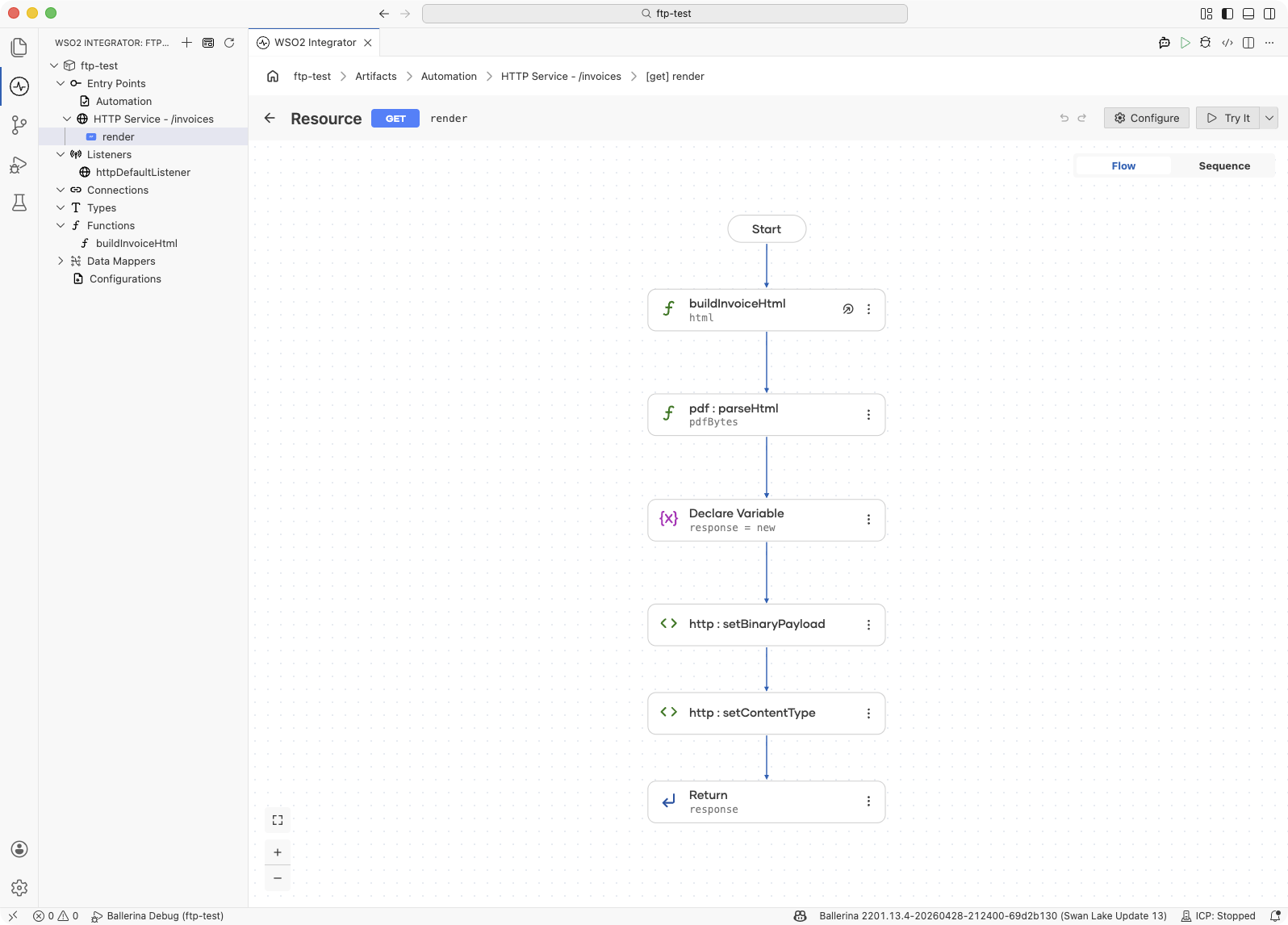
import ballerina/http;
import ballerina/pdf;

configurable int port = 8290;

service /invoices on new http:Listener(port) {

    resource function get render(
            string customer,
            decimal amount,
            string dueDate) returns http:Response|error {

        string html = buildInvoiceHtml(customer, amount, dueDate);
        byte[] pdfBytes = check pdf:parseHtml(html);

        http:Response response = new;
        response.setBinaryPayload(pdfBytes);
        response.setContentType("application/pdf");
        return response;
    }
}

function buildInvoiceHtml(string customer, decimal amount, string dueDate)
        returns string {
    return string `<!DOCTYPE html>
<html>
  <body style="font-family: 'Liberation Sans'; padding: 24px;">
    <h1>Invoice</h1>
    <p>Customer: ${customer}</p>
    <p>Amount due: $${amount}</p>
    <p>Due by: ${dueDate}</p>
  </body>
</html>`;
}
Best Practices
- Prefer
file*andurl*variants when the input location is fixed: they skip the intermediatebyte[]for one less step in the flow. - Parameterize HTML templates with string templates: use Ballerina's
string `...`syntax for interpolation rather than string concatenation; it is less error-prone and more readable. - Escape untrusted input before rendering: any value that ends up in the HTML must be escaped for angle brackets, quotes, and ampersands. Treat query parameters, form inputs, and user-supplied data as untrusted.
- Load custom fonts once at module level: font files are several megabytes each. Read them into a
readonlymodule-level variable at startup so every render reuses the same bytes. - Set
maxPageson user-driven renders: cap the number of pages rendered from any template that takes external input to avoid runaway documents and memory pressure. - Catch the right error type:
parseHtmlraisespdf:HtmlParseErrorfor malformed HTML andpdf:RenderErrorduring rendering;extractText,toImages, and theirfile*/url*variants raisepdf:ReadErrorwhen the input PDF cannot be read. Match on a specific subtype only when you need to retry or substitute behavior; otherwise check the basepdf:Error.
What's Next
- ballerina/pdf API reference — full signatures, supporting records, and error types.
- HTTP Service — return PDFs as binary payloads from an HTTP resource.