CDC for Microsoft SQL Server
Microsoft SQL Server CDC integrations capture row-level changes from SQL Server tables in real time using Debezium-based Change Data Capture. Use them for data synchronization, audit logging, and event-driven workflows that must react to database inserts, updates, and deletes without polling. This page covers creating the integration, configuring the service and listener, and adding event handlers for insert, update, delete and read events.
CDC must be enabled on the SQL Server database and on each table you want to track before creating this integration. See the CDC connector setup guide for step-by-step instructions.
Create a CDC service for Microsoft SQL Server
- Visual Designer
- Ballerina Code
-
Click + Add Artifact in the canvas or click + next to Entry Points in the sidebar.
-
In the Artifacts panel, select CDC for Microsoft SQL Server under Event Integration.
-
In the creation form, select Create new to configure a new listener.
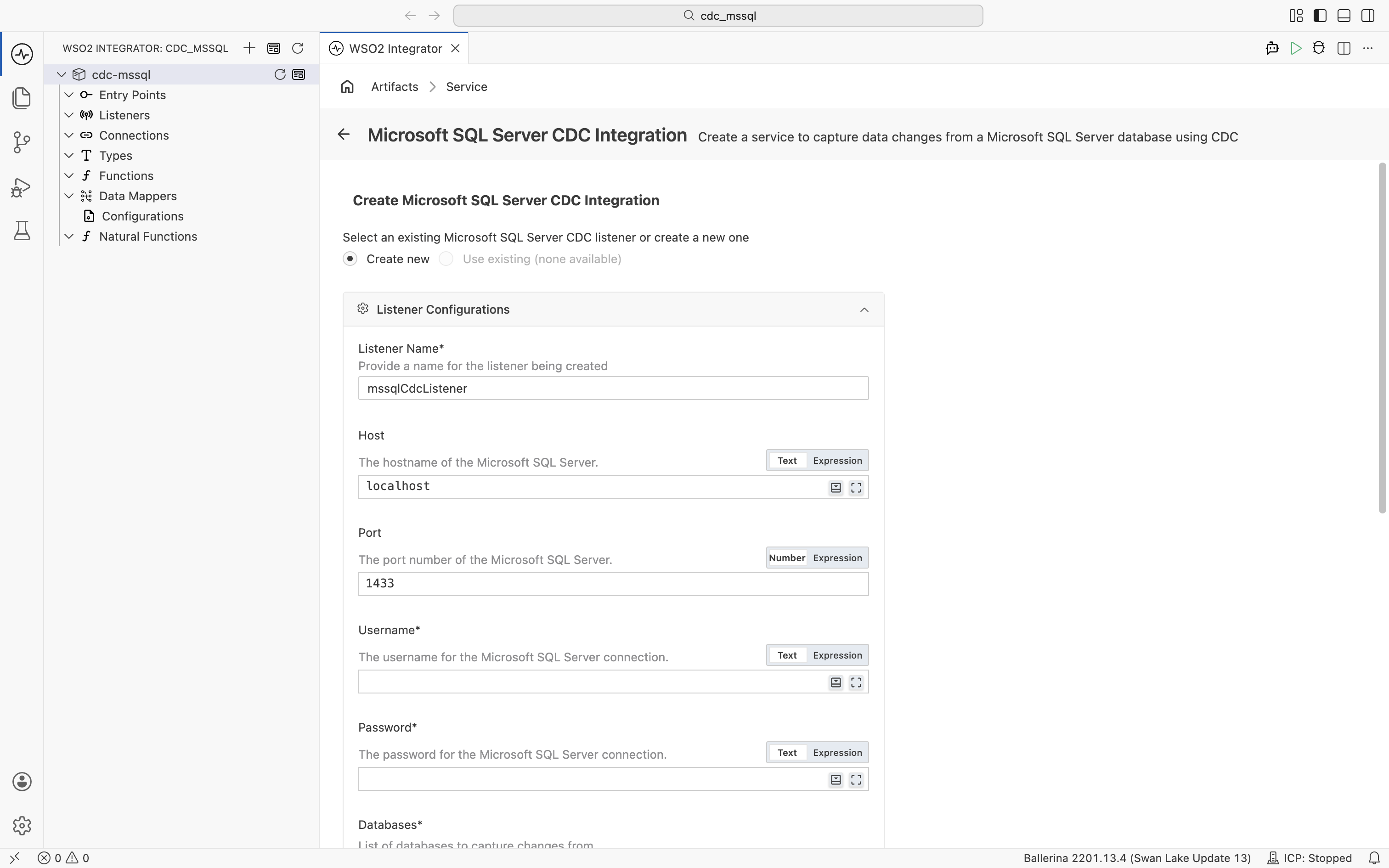
Under Listener Configurations, fill in the following fields:
Field Description Default Listener Name Identifier for the listener created with this service. mssqlCdcListenerHost Hostname of the Microsoft SQL Server. localhostPort Port number of the Microsoft SQL Server. 1433Username Username for the SQL Server connection. Required Password Password for the SQL Server connection. Required Databases List of databases to capture changes from. Click + Add Item to add each database name. Required Schemas Regular expressions matching schema names to capture changes from. Click + Add Item to add each pattern. — Expand Advanced Configurations for additional settings:
Field Description Default Database Instance Microsoft SQL Server named instance (if applicable). — Secure Socket SSL/TLS configuration for a secure connection. — Options Additional options for the CDC engine as a record expression. Common keys include snapshotMode(for example,cdc:NO_DATAto skip the initial snapshot) andskippedOperations(for example,[cdc:TRUNCATE, cdc:UPDATE, cdc:DELETE]to skip truncate, update, and delete events; note that snapshot reads still triggeronReadunlesssnapshotModeis also set tocdc:NO_DATA).— Under Table, enter the fully qualified table name to capture events from in the format
<database>.<schema>.<table>(for example,mydb.dbo.customers). -
Click Create.
-
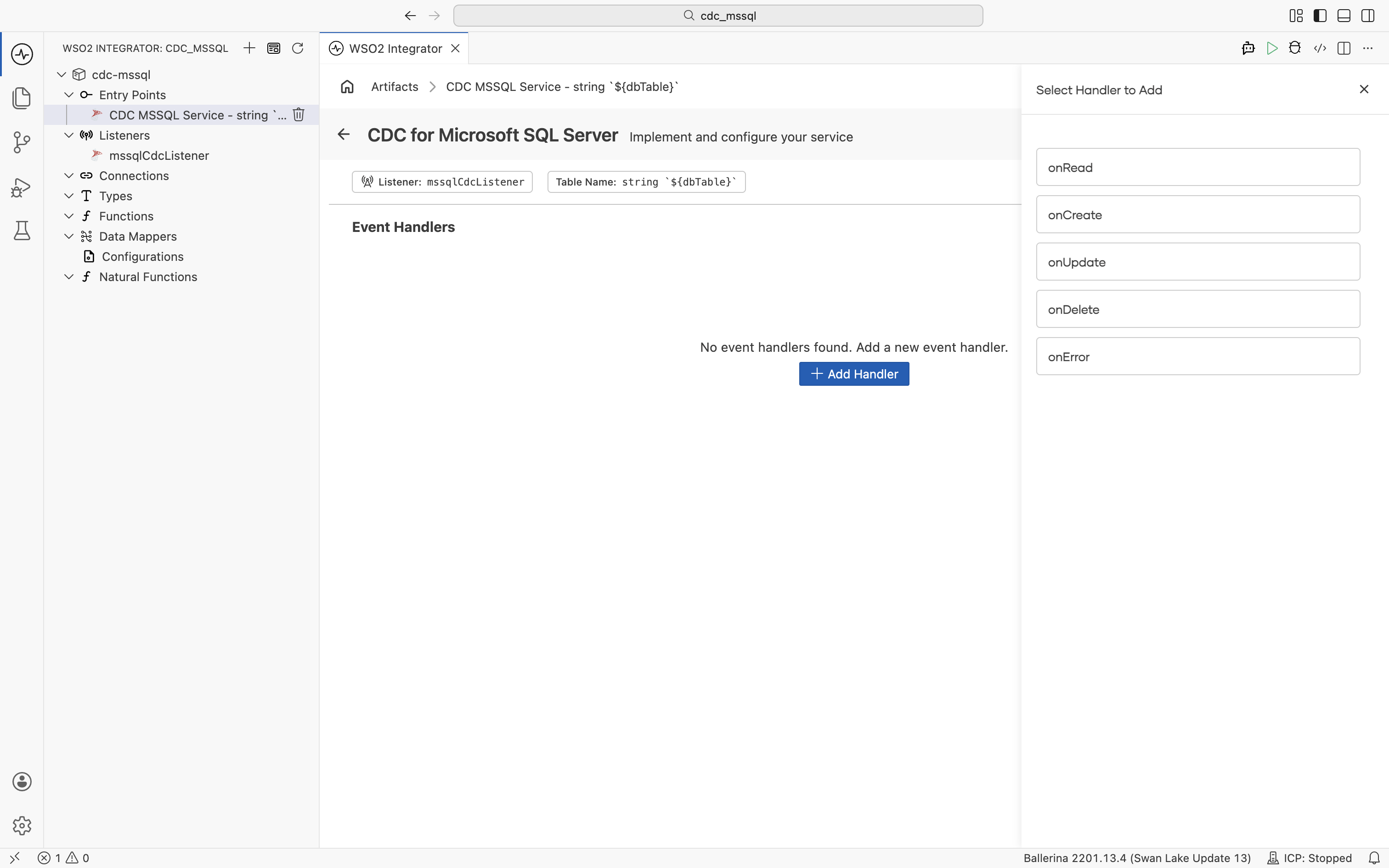
WSO2 Integrator creates the empty service and opens it in the Service Designer. The canvas shows the attached listener pill and the table name pill. The service has no handlers yet.
import ballerina/log;
import ballerinax/cdc;
import ballerinax/mssql;
// Bundles the Debezium SQL Server connector; required for CDC to work.
import ballerinax/mssql.cdc.driver as _;

// Credentials and target table loaded from Config.toml at startup.
configurable string username = ?;
configurable string password = ?;
configurable string dbName = "mydb";
configurable string dbTable = "mydb.dbo.customers";

// CDC listener that connects to SQL Server and streams row-level changes.
listener mssql:CdcListener mssqlCdcListener = new (database = {
    hostname: "localhost",
    port: 1433,
    username,
    password,
    databaseNames: [dbName],
    includedSchemas: ["dbo"]
});

// Typed record that mirrors the columns of the tracked table.
// Declare a matching record so handlers receive a typed value and can
// access fields directly (for example, `after.id`) instead of working
// with an untyped `record {}`.
type Customer record {|
    int id;
    string name;
    string email;
|};

// Routes change events for this fully qualified table to the service.
@cdc:ServiceConfig {
    tables: dbTable
}
service cdc:Service on mssqlCdcListener {

    // Fires when a new row is inserted. The inserted row is bound to `after` as a `Customer`.
    remote function onCreate(Customer after) returns error? {
        log:printInfo("Row inserted", id = after.id, name = after.name);
    }

    // Fires when a row is updated. Both states are bound to `Customer` records,
    // so you can compare fields directly (for example, `before.email != after.email`).
    remote function onUpdate(Customer before, Customer after) returns error? {
        log:printInfo("Row updated",
                id = after.id,
                oldEmail = before.email,
                newEmail = after.email);
    }

    // Fires when a row is deleted. The deleted row is bound to `before`.
    remote function onDelete(Customer before) returns error? {
        log:printInfo("Row deleted", id = before.id);
    }

    // Fires when the listener encounters a processing error.
    remote function onError(error err) returns error? {
        log:printError("CDC error", 'error = err);
    }
}
To accept any row shape without defining a record type, declare handler parameters as record {}. With a typed record like Customer, the runtime binds the change-event payload to your record fields automatically.
Service configuration
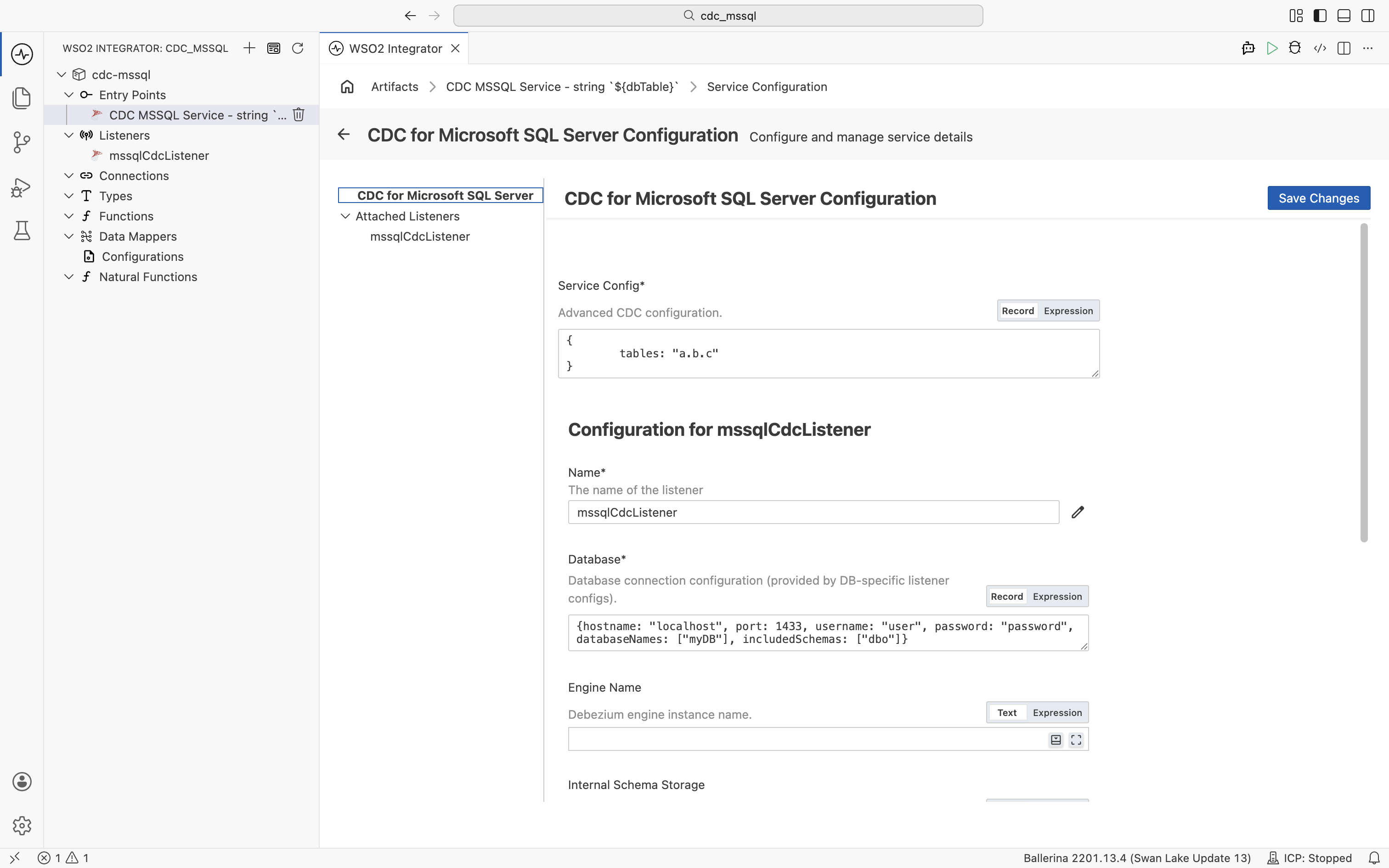
In the Service Designer, click the Configure icon in the header to open the CDC for Microsoft SQL Server Configuration panel. Select CDC for Microsoft SQL Server in the left panel.
- Visual Designer
- Ballerina Code
| Field | Description |
|---|---|
| Service Config | Advanced CDC configuration as a record expression. The tables field sets the table(s) whose change events are routed to this service, using the fully qualified format <database>.<schema>.<table>. Provide a single table as a string (for example, "mydb.dbo.customers"), or multiple tables as a string array (for example, ["mydb.dbo.customers", "mydb.dbo.orders"]). |
The tables field accepts either a single table name as a string or multiple tables as a string array.
// Single table: the service receives change events only for `customers`.
@cdc:ServiceConfig {
    tables: "mydb.dbo.customers"
}
service cdc:Service on mssqlCdcListener {
    remote function onCreate(record {} after) returns error? {
        log:printInfo("Row inserted", data = after.toString());
    }
}
// Multiple tables: the service receives events for both `customers` and `orders`,
// and the same handlers run for each.
@cdc:ServiceConfig {
    tables: ["mydb.dbo.customers", "mydb.dbo.orders"]
}
service cdc:Service on mssqlCdcListener {
    remote function onCreate(record {} after) returns error? {
        log:printInfo("Row inserted", data = after.toString());
    }
}
Listener configuration
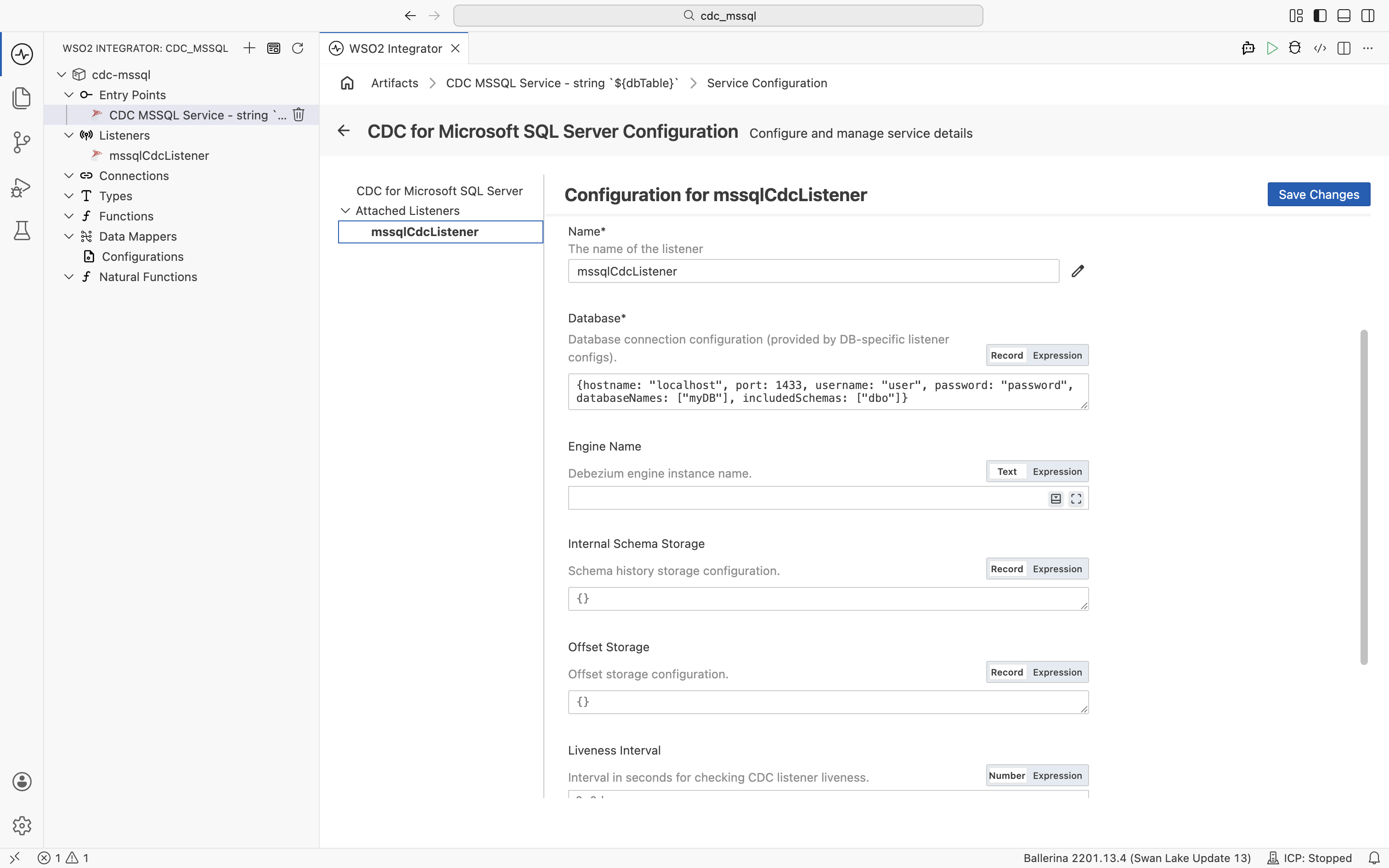
In the CDC for Microsoft SQL Server Configuration panel, select mssqlCdcListener under Attached Listeners to configure the listener.
A CDC service can be attached to only one listener.
- Visual Designer
- Ballerina Code
| Field | Description | Default |
|---|---|---|
| Name | Identifier for the listener. | mssqlCdcListener |
| Database | Database connection configuration as a record expression with hostname, port, username, password, and databaseNames fields. | Required |
| Engine Name | Debezium engine instance name. | ballerina-cdc-connector |
| Internal Schema Storage | Schema history storage configuration. | {fileName: "tmp/dbhistory.dat"} |
| Offset Storage | Offset storage configuration for tracking CDC progress. | {fileName: "tmp/debezium-offsets.dat"} |
| Liveness Interval | Interval in seconds for checking CDC listener liveness. | 60.0 |
| Options | Additional connector options as a record expression. | {} |
Click Save Changes to apply updates.
The Debezium SQL Server connector reads changes from CDC change tables on a polling cycle. To tune the cycle, set Debezium properties such as poll.interval.ms in the Options field (for example, { "poll.interval.ms": "1000" }).
// Listener configuration: connection details for the SQL Server instance
// and the databases and schemas to track.
listener mssql:CdcListener mssqlCdcListener = new (database = {
    hostname: "localhost",
    port: 1433,
    username,
    password,
    databaseNames: ["mydb"],         // Databases to capture changes from.
    includedSchemas: ["dbo"]         // Restrict CDC to the `dbo` schema.
});
mssql:MsSqlListenerConfiguration accepts the following top-level fields:
| Field | Type | Default | Description |
|---|---|---|---|
database | mssql:MsSqlDatabaseConnection | Required | Database connection (see fields below) |
engineName | string | "ballerina-cdc-connector" | Debezium engine instance name |
internalSchemaStorage | cdc:InternalSchemaStorage | {fileName: "tmp/dbhistory.dat"} | Schema history storage configuration |
offsetStorage | cdc:OffsetStorage | {fileName: "tmp/debezium-offsets.dat"} | Offset storage configuration |
livenessInterval | decimal | 60.0 | Liveness check interval in seconds |
options | mssql:MssqlOptions | {} | SQL Server-specific CDC options |
The database value (mssql:MsSqlDatabaseConnection) has these fields:
| Field | Type | Default | Description |
|---|---|---|---|
hostname | string | "localhost" | SQL Server hostname |
port | int | 1433 | SQL Server port |
username | string | Required | Database username |
password | string | Required | Database password |
databaseNames | string|string[] | Required | Databases to capture changes from |
includedSchemas | string|string[]? | — | Regex patterns for schemas to capture |
excludedSchemas | string|string[]? | — | Regex patterns for schemas to exclude |
includedTables | string|string[]? | — | Regex patterns for tables to capture |
excludedTables | string|string[]? | — | Regex patterns for tables to exclude |
databaseInstance | string? | — | SQL Server named instance |
secure | cdc:SecureDatabaseConnection? | — | SSL/TLS connection configuration |
tasksMax | int | 1 | Maximum connector tasks (raise when capturing from multiple databases) |
connectTimeout | decimal? | — | Connection timeout in seconds |
For the full set of fields (including messageKeyColumns, includedColumns, excludedColumns, and streamingConfig), see the ballerinax/mssql package on Ballerina Central.
Event handlers
Adding an event handler
- Visual Designer
- Ballerina Code
In the Service Designer, click + Add Handler. The Select Handler to Add panel lists onRead, onCreate, onUpdate, onDelete, and onError.
onRead, onCreate, onUpdate, and onDelete each open a Message Handler Configuration panel for the row payload. onError is added directly without additional configuration.
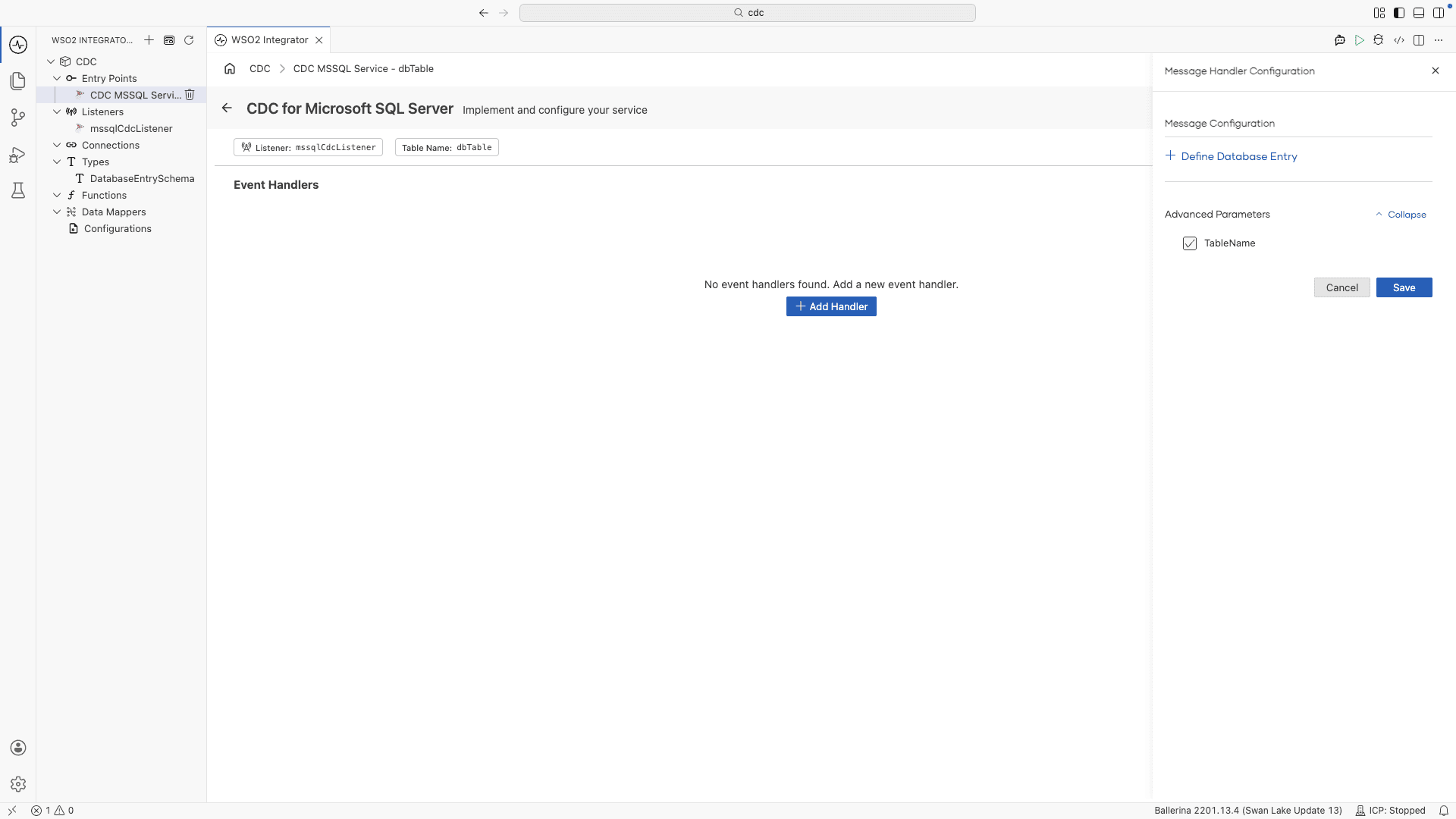
The configuration panel exposes the following fields:
| Field | Description |
|---|---|
| + Define Database Entry | Defines the record type representing one row of the tracked table. The handler receives this record at runtime with values from the change event. |
| Advanced Parameters > TableName | Adds a string parameter to the handler that receives the name of the table the change event came from. It does not filter events. |
Click Save to add the handler. Added handlers appear in the Event Handlers list on the Service Designer, where you can edit or remove each one.
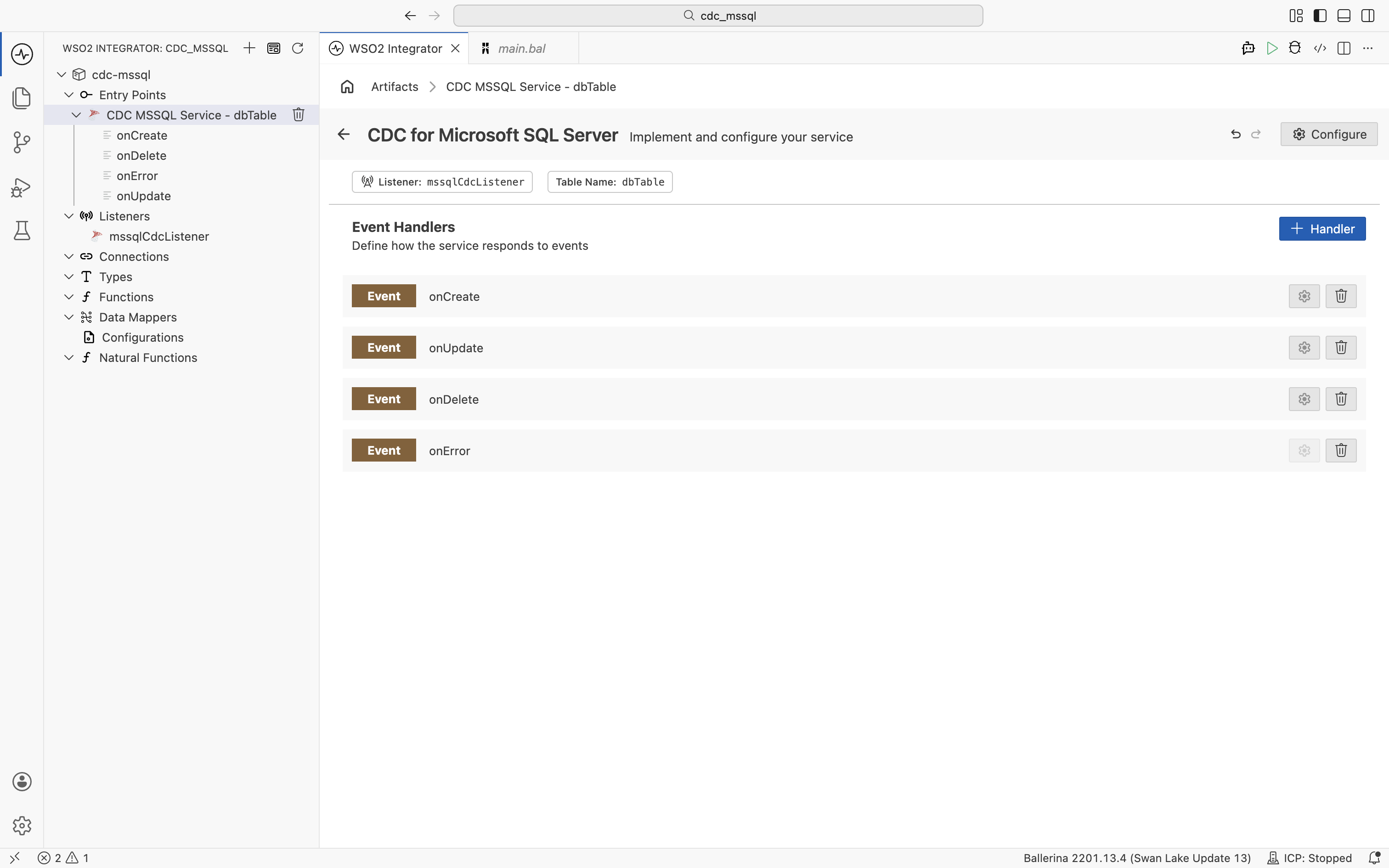
// Typed record that mirrors the columns of the `customers` table.
// Declaring the type lets handlers work with fields like `after.id`
// instead of a raw `record {}` value.
type Customer record {|
    int id;
    string name;
    string email;
|};

@cdc:ServiceConfig {
    tables: "mydb.dbo.customers"
}
service cdc:Service on mssqlCdcListener {

    // Insert handler: the newly inserted row arrives as `after`.
    remote function onCreate(Customer after) returns error? {
        log:printInfo("Row inserted", data = after.toString());
        check syncToDownstream("INSERT", after);
    }

    // Update handler: receives both the previous (`before`) and new (`after`) row state.
    remote function onUpdate(Customer before, Customer after) returns error? {
        log:printInfo("Row updated",
                before = before.toString(),
                after = after.toString());
        check syncToDownstream("UPDATE", after);
    }

    // Delete handler: only `before` is available, since the row no longer exists.
    remote function onDelete(Customer before) returns error? {
        log:printInfo("Row deleted", data = before.toString());
        check syncToDownstream("DELETE", before);
    }

    // Error handler: invoked when the listener fails to process a change event.
    remote function onError(error err) returns error? {
        log:printError("CDC processing error", 'error = err);
    }
}

// Placeholder for your own downstream integration logic.
function syncToDownstream(string operation, Customer row) returns error? {
    log:printInfo("Syncing change", operation = operation, id = row.id);
}
The handler parameter types are inferred at runtime from the row data. Declare a record type that matches your table columns (as shown by Customer above), or use record {} to accept any shape.
Handler types
| Handler | Triggered when | Use when |
|---|---|---|
onRead | A row is read during the initial snapshot of the table | Bootstrapping downstream systems with existing data |
onCreate | A row is inserted into the tracked table | Syncing new records to downstream systems |
onUpdate | A row is updated in the tracked table | Propagating field changes |
onDelete | A row is deleted from the tracked table | Removing records from downstream systems |
onError | A CDC processing error occurs | Logging failures and sending alerts |
What's next
- CDC Connector Overview — full CDC connector reference covering listeners, configuration, and supported databases
- Data Mapper — transform change events into the shape your downstream systems expect
- CDC for PostgreSQL — capture changes from PostgreSQL tables