Solace
Solace event integrations consume messages from a Solace PubSub+ queue or topic and trigger event handlers as each message arrives. The listener is built on the Solace JCSMP API. Use it for high-performance event streaming in financial services, IoT, and real-time analytics workloads that require guaranteed or direct message delivery.
Creating a Solace events service
- Visual Designer
- Ballerina Code
-
Click + Add Artifact in the canvas or click + next to Entry Points in the sidebar.
-
In the Artifacts panel, select Solace under Event Integration.
-
In the creation form, fill in the following fields:
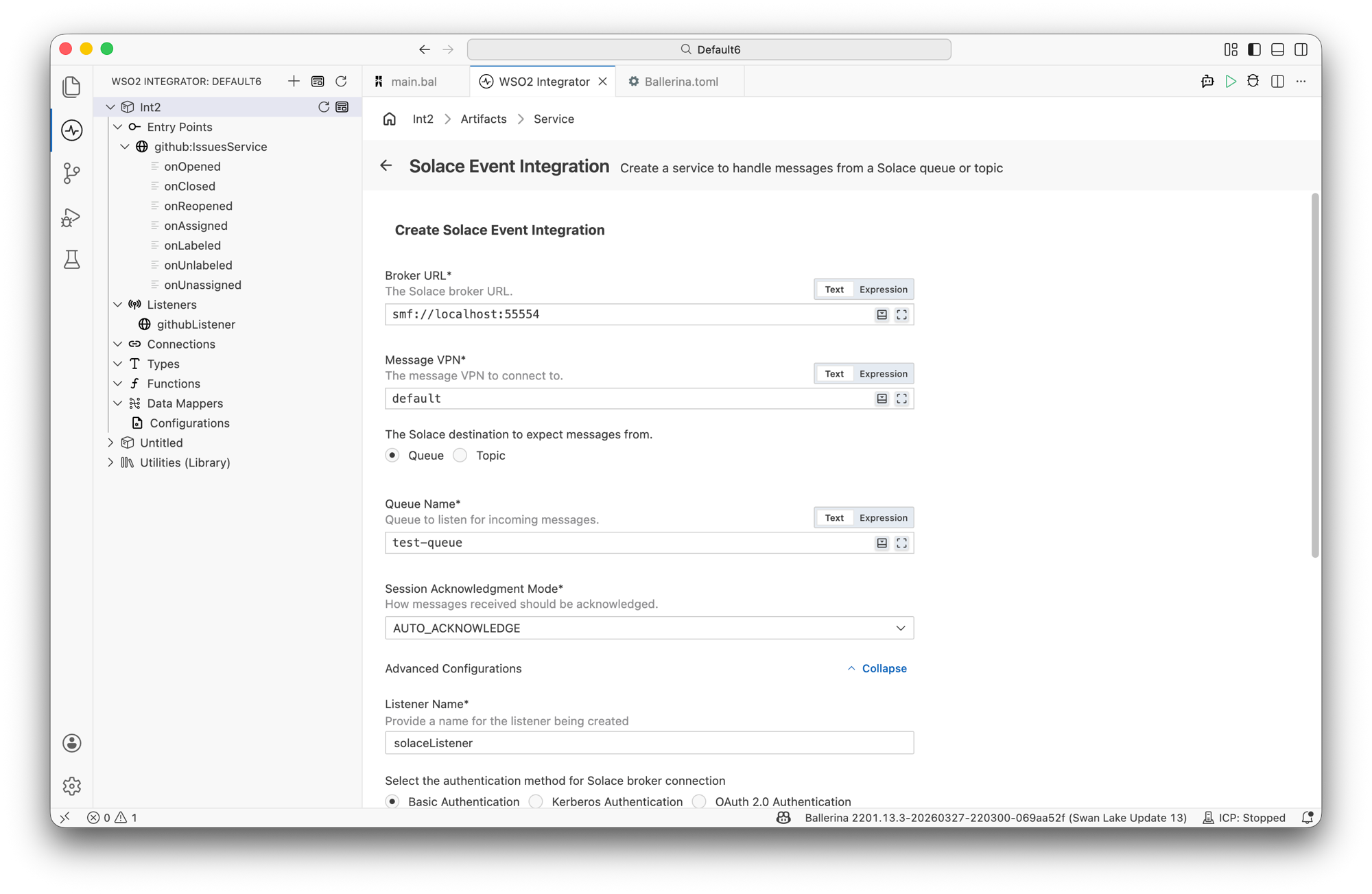
Field Description Default Listener Name Identifier for the listener created with this service. solaceListenerBroker URL The Solace broker URL in the format [protocol:]host[:port].tcp://localhost:55554Message VPN The message VPN to connect to. defaultAuthentication configuration How to authenticate with the broker. Select Basic Authentication, Kerberos Authentication, or OAuth 2.0 Authentication. Basic AuthenticationDestination Whether to consume from a Queue or a Topic. QueueAcknowledgement Mode The JCSMP message acknowledgement mode. Options: Auto Ack, Client Ack. Auto Ack Basic Authentication fields:
Field Description Username Username for broker authentication. Password Password for broker authentication. Kerberos Authentication fields:
Field Description Default Service Name Kerberos service name. solaceJAAS Login Context JAAS login context name. SolaceGSSMutual Authentication Enable Kerberos mutual authentication. Disabled JAAS Config File Reload Enabled Enable automatic reload of the JAAS configuration file. Disabled OAuth 2.0 Authentication fields:
Field Description Issuer OAuth 2.0 issuer identifier URI. Access Token OAuth 2.0 access token. Provide this or an OIDC token. OIDC Token OpenID Connect ID token. Provide this or an access token. When Destination is Queue:
Field Description Queue Name The durable queue to consume messages from. The queue must already exist on the broker; it isn't created automatically. When Destination is Topic:
Field Description Default Topic Name The topic to subscribe to. Required Durability Temporaryfor a direct, at-most-once subscription, orDurablefor a durable topic endpoint.TemporaryEndpoint Name The durable topic endpoint name. Required when Durability is Durable.— Expand Advanced Configurations to set
secureSocket,clientName,clientDescription,transacted,compressionLevel,localhost,connectTimeout,readTimeout, andretryConfig. -
Click Create.
-
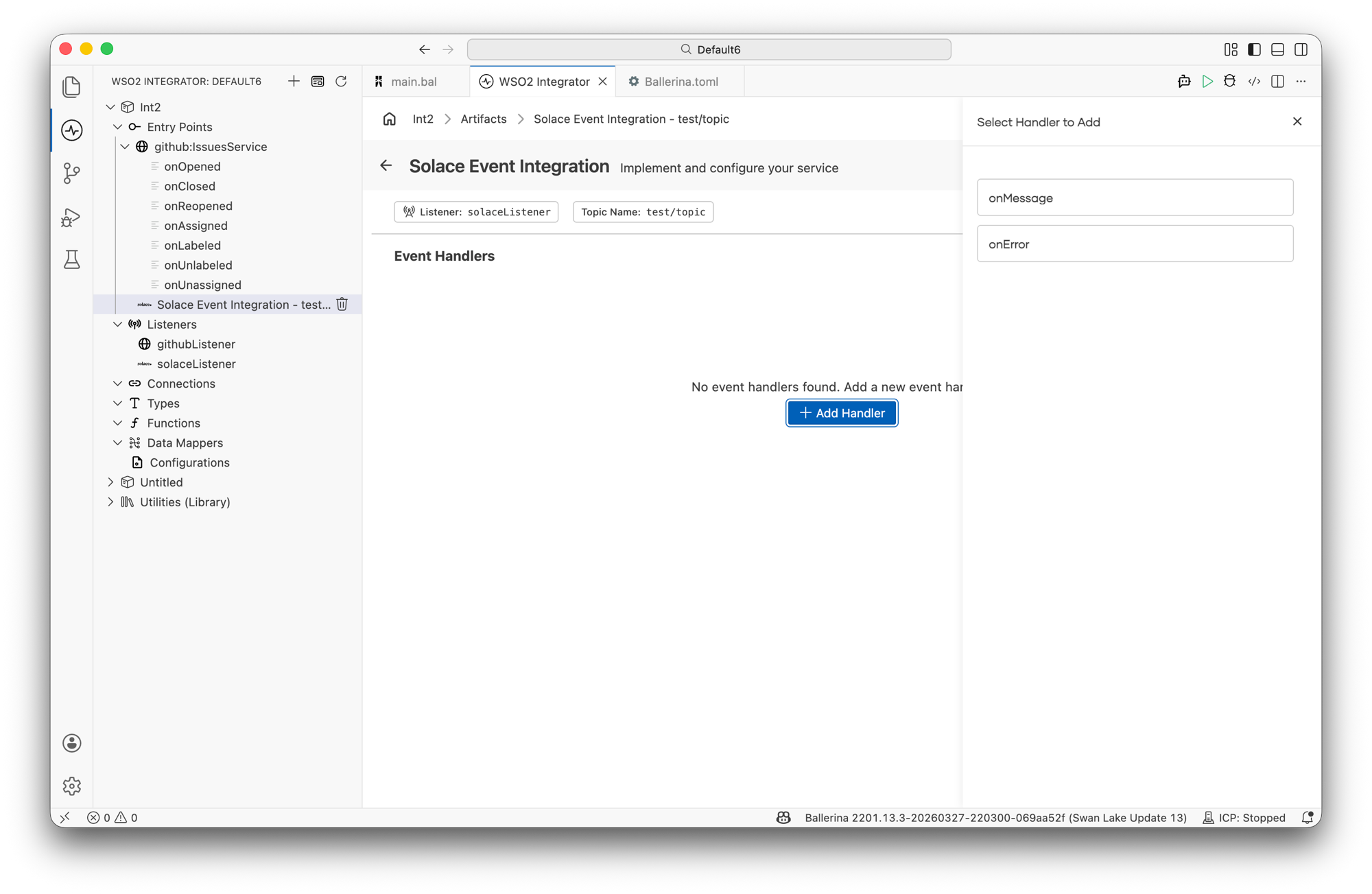
WSO2 Integrator opens the service in the Service Designer. The canvas shows the attached listener pill, the queue or topic name pill, and an empty Event Handlers section.
-
Click + Add Handler to add event handlers.
import ballerinax/solace;
import ballerina/log;

configurable string brokerUrl = "tcp://localhost:55554";
configurable string msgVpn = "default";
configurable string username = "admin";
configurable string password = "admin";

listener solace:Listener solaceListener = check new (
    brokerUrl,
    messageVpn = msgVpn,
    auth = {
        username: username,
        password: password
    }
);

type OrderMessage record {|
    string orderId;
|};

type Message record {|
    *solace:Message;
    OrderMessage payload;
|};

@solace:ServiceConfig {
    queueName: "test-queue",
    ackMode: "AUTO_ACK"
}
service solace:Service on solaceListener {

    remote function onMessage(Message message, solace:Caller caller) returns solace:Error? {
        log:printInfo("Message received", orderId = message.payload.orderId);
    }

    remote function onError(solace:Error err) returns solace:Error? {
        log:printError("Solace error", 'error = err);
    }
}
Service configuration
In the Service Designer, click the Configure icon in the header to open the Solace Event Integration Configuration panel. Select Solace Event Integration in the left panel.
- Visual Designer
- Ballerina Code
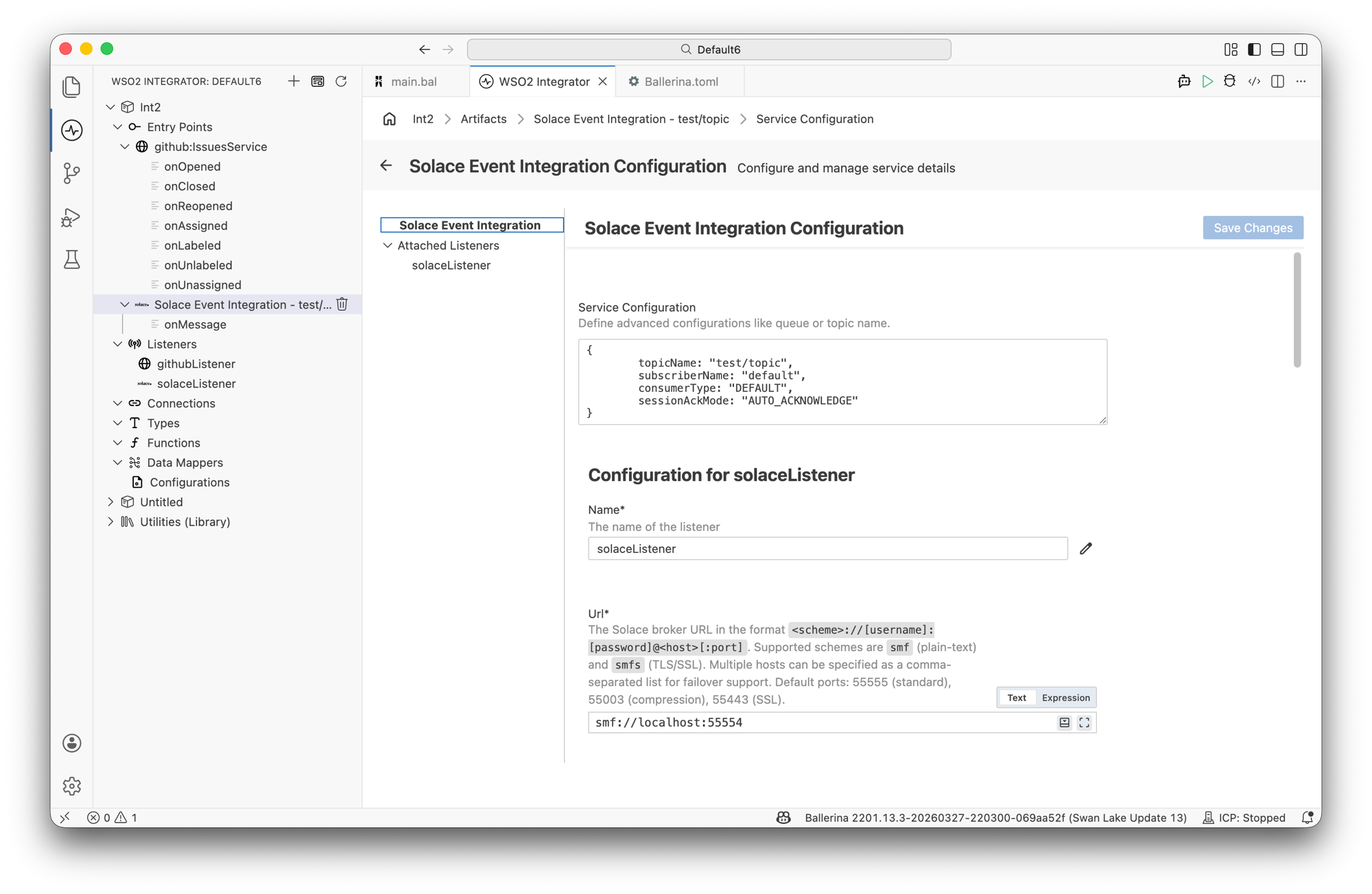
The ServiceConfig field accepts a record expression that sets the destination and message handling options.
Queue service configuration fields:
| Field | Description | Default |
|---|---|---|
| queueName | Name of the durable queue to consume from. | Required |
| ackMode | Message acknowledgement mode: AUTO_ACK or CLIENT_ACK. | AUTO_ACK |
| messageSelector | SQL-92 message selector expression. | — |
| transportWindowSize | Maximum number of guaranteed messages in flight, unacknowledged. | 255 |
| ackThreshold | Percentage of transportWindowSize consumed before an automatic acknowledgement is sent. | 60 |
| reconnectTries | Number of reconnection attempts after a flow failure. -1 retries indefinitely. | -1 |
| reconnectRetryInterval | Delay in seconds between reconnection attempts. | 3.0 |
Topic service configuration fields:
| Field | Description | Default |
|---|---|---|
| topicName | Name of the topic to subscribe to. | Required |
| durability | TEMPORARY for a direct subscription, or DURABLE for a durable topic endpoint. | TEMPORARY |
| endpointName | Durable topic endpoint name. Required when durability is DURABLE. | — |
| ackMode | Message acknowledgement mode: AUTO_ACK or CLIENT_ACK. | AUTO_ACK |
// Queue subscription
@solace:ServiceConfig {
    queueName: "orders",
    ackMode: "CLIENT_ACK"
}
service solace:Service on solaceListener {
    remote function onMessage(solace:Message message, solace:Caller caller) returns solace:Error? {
        check caller->ack(message);
    }
}

// Topic subscription
@solace:ServiceConfig {
    topicName: "trades/>",
    durability: "TEMPORARY",
    ackMode: "AUTO_ACK"
}
service solace:Service on solaceListener {
    remote function onMessage(solace:Message message) returns solace:Error? {
    }
}
Listener configuration
In the Solace Event Integration Configuration panel, select solaceListener under Attached Listeners to configure the listener.
- Visual Designer
- Ballerina Code
| Field | Description | Default |
|---|---|---|
| Name | Identifier for the listener. | solaceListener |
| Url | The Solace broker URL in the format [protocol:]host[:port]. Supported schemes: tcp (plain-text) and tcps (TLS/SSL). | tcp://localhost:55554 |
| Message Vpn | The name of the message VPN to connect to. | default |
| Auth | Authentication configuration. Supports basic authentication, Kerberos, and OAuth 2.0. | Required |
| Secure Socket | TLS/SSL configuration for secure connections. | — |
| Client Name | Client identifier reported to the broker. A unique name is generated when omitted. | — |
| Client Description | Human-readable description of the client connection. | Ballerina Solace Connector |
| Transacted | Enables a transacted session shared by every service attached to this listener. Requires ackMode: CLIENT_ACK on each service. | false |
| Compression Level | ZLIB compression level. Valid range is 0–9, where 0 disables compression. | 0 |
| Localhost | Local interface IP address to bind for outbound connections. | — |
| Connect Timeout | Connection timeout, in seconds. | 30.0 |
| Read Timeout | Read timeout, in seconds. | 10.0 |
| Retry Config | Reconnection retry configuration. | — |
| Generate Receive Timestamps | Populate receiveTimestamp on every message delivered to a service. | false |
| Calculate Message Expiration | Populate expiration on every message delivered to a service. | false |
Click + Attach Listener to attach an additional listener to the same service.
Click Save Changes to apply updates.
listener solace:Listener solaceListener = check new (
    "tcp://localhost:55554",
    messageVpn = "default",
    auth = {
        username: username,
        password: password
    },
    clientName = "my-client",
    transacted = false,
    compressionLevel = 0
);
solace:ListenerConfiguration fields:
| Field | Type | Default | Description |
|---|---|---|---|
| url (constructor parameter) | string | Required | Solace broker URL |
| messageVpn | string | "default" | Message VPN name |
| auth | solace:BasicAuthConfiguration|solace:KerberosConfiguration|solace:OAuth2Configuration | Required | Authentication configuration |
| secureSocket | solace:SecureSocket? | — | TLS/SSL configuration |
| clientName | string? | — | Client identifier |
| clientDescription | string | "Ballerina Solace Connector" | Client description |
| transacted | boolean | false | Share one transacted session across every attached service |
| compressionLevel | int | 0 | ZLIB compression level (0–9) |
| localhost | string? | — | Local interface IP address |
| connectTimeout | decimal | 30.0 | Connection timeout in seconds |
| readTimeout | decimal | 10.0 | Read timeout in seconds |
| retryConfig | solace:RetryConfiguration? | — | Reconnection retry configuration |
| generateReceiveTimestamps | boolean | false | Populate receiveTimestamp on received messages |
| calculateMessageExpiration | boolean | false | Populate expiration on received messages |
Event handlers
Adding an event handler
- Visual Designer
- Ballerina Code
In the Service Designer, click + Add Handler. The Select Handler to Add panel lists onMessage and onError.
onMessage — opens a configuration panel before saving:
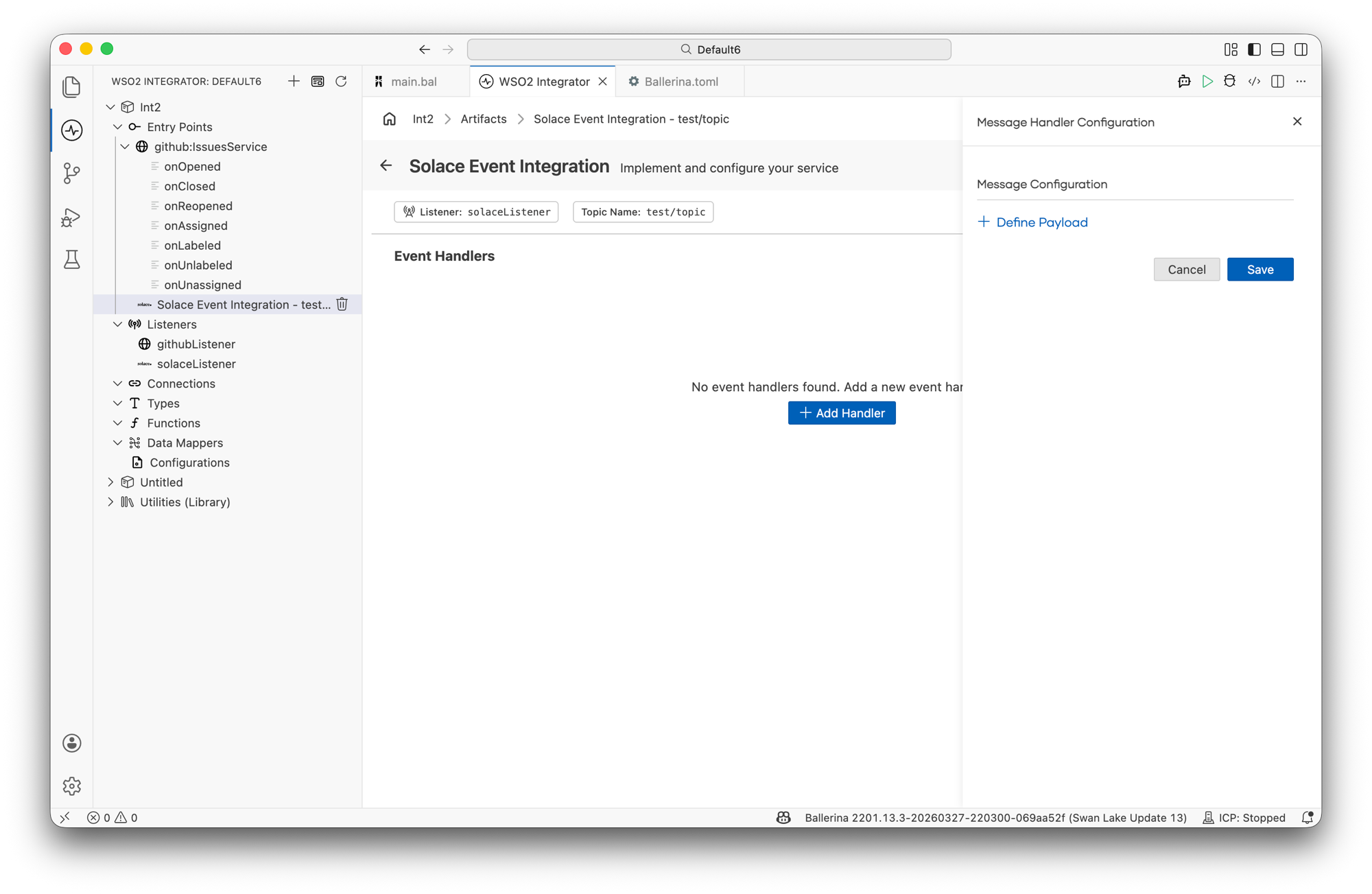
| Option | Description |
|---|---|
| Define Value | Define the expected payload type of the incoming message, either by creating a new type schema or reusing an existing one. |
Click Save to add the handler.
onError — added directly without additional configuration.
onMessage handler — called for each message received:
type TradeEvent record {|
    string tradeId;
    string symbol;
    decimal price;
    int quantity;
|};

type TradeMessage record {|
    *solace:Message;
    TradeEvent payload;
|};

function executeTrade(TradeEvent trade) returns error? {}

@solace:ServiceConfig {
    queueName: "trades",
    ackMode: "CLIENT_ACK"
}
service solace:Service on solaceListener {

    remote function onMessage(TradeMessage message, solace:Caller caller) returns solace:Error? {
        do {
            log:printInfo("Trade received",
                          tradeId = message.payload.tradeId,
                          symbol = message.payload.symbol);
            check executeTrade(message.payload);
            check caller->ack(message);
        } on fail error e {
            check caller->nack(message, requeue = true);
        }
    }
}
onError handler — called when message receipt or data binding fails:
@solace:ServiceConfig {
    queueName: "trades"
}
service solace:Service on solaceListener {

    remote function onMessage(solace:Message message) returns error? {
    }

    remote function onError(solace:Error err) returns solace:Error? {
        log:printError("Solace error", 'error = err);
    }
}
Handler types
| Handler | Triggered when | Use when |
|---|---|---|
onMessage | A new message arrives from the queue or topic | Processing incoming messages |
onError | Message receipt or data binding fails, or onMessage returns an error | Logging failures and triggering alerts |
What's next
- Solace (JMS) — consume messages from Solace PubSub+ using the standard JMS API
- Kafka — consume messages from Apache Kafka topics
- RabbitMQ — consume messages from RabbitMQ queues
- Connections — reuse Solace connection credentials across services