CSV Fault Tolerance
Real-world CSV files rarely arrive perfectly clean. A single bad row (a stray comma, a wrong data type, a trailing blank) would normally fail the whole file. With CSV fault tolerance enabled, the listener treats malformed rows as a per-row issue instead of a per-file one. It skips rows that don't fit your schema and hands the rest to the handler as if nothing happened.
What the handler sees
| Feature state | Bad row encountered | Handler receives | File outcome (default) |
|---|---|---|---|
| Off (default) | The first malformed row trips data binding | An error instead of content | Moves to the After Error destination |
| On | The row is dropped before the handler is called | Only valid rows, as usual | Moves to the After Success destination |
Fault tolerance only skips rows that fail typed binding. If your handler is generated with the default string[][] content type, every row is valid as a string array and nothing is ever dropped.
On the Add File Handler form, click + Define Row Schema and describe each column as a field on a Ballerina record. This flips the handler parameter to a typed array (for example Order[]), and rows that don't match trigger binding errors that fault tolerance can skip. See the row-schema step in Streaming large files for a walkthrough.
Fault tolerance combines cleanly with:
- Streaming — works with streamed CSV. A bad row no longer terminates the stream; processing continues through the rest of the file.
- Move / Delete post-processing — because the handler completes successfully, the file follows the After Success action as it would for a clean run.
Configuration
Fault tolerance is a listener-level setting. Turn it on once per listener and every CSV handler attached to that service inherits the behaviour. It is part of the listener's regular configuration, not tucked under Advanced.
- Visual Designer
- Ballerina Code
-
Open the listener by clicking its name under Listeners in the sidebar, or under Attached Listeners in the FTP Integration Configuration panel.
-
Scroll to the Csv Fail Safe field and click Record to open the builder.
-
In the Record Configuration panel, tick the top-level FailSafeOptions checkbox to include the record, tick contentType, and pick an enum value:
contentTypevalueWhat gets logged for a dropped row METADATA (default) Row number, column, and the binding error. RAW The raw row text as it appeared in the source file. RAW_AND_METADATA Both. 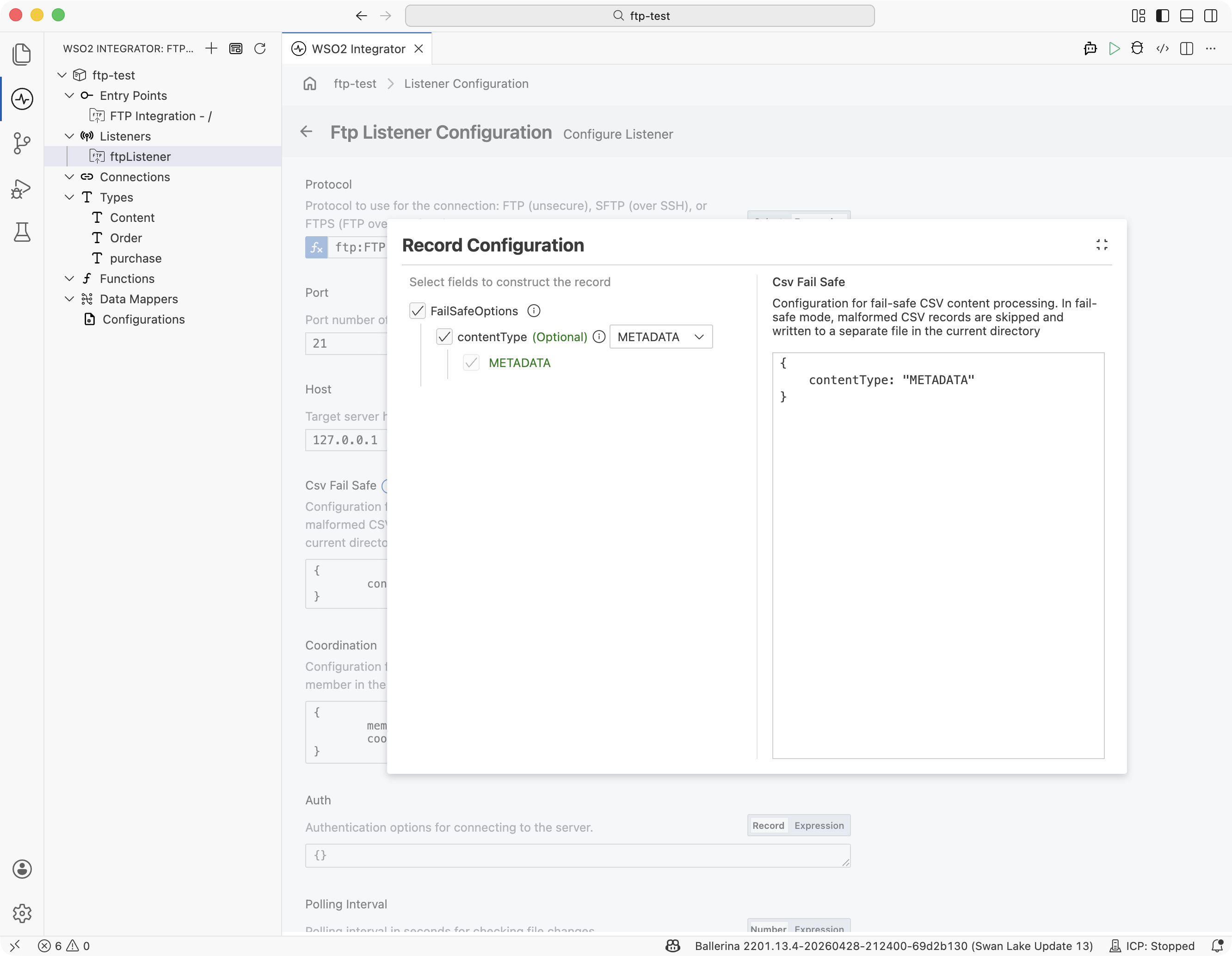
-
Close the panel and click Save. Every CSV handler on every service attached to this listener now skips malformed rows.
Add a csvFailSafe field to the listener constructor:
import ballerina/ftp;

listener ftp:Listener ftpListener = new (
    protocol = ftp:FTP,
    host = "ftp.example.com",
    port = 21,
    auth = {credentials: {username: ftpUser, password: ftpPassword}},
    csvFailSafe = {
        contentType: ftp:RAW_AND_METADATA
    }
);

@ftp:ServiceConfig { path: "/incoming" }
service on ftpListener {
    remote function onFileCsv(Order[] orders, ftp:FileInfo fileInfo) returns error? {
        // `orders` contains only rows that parsed successfully.
    }
}
Dropped-row log
When fault tolerance is on, the listener writes each dropped row to a side log file. The filename is the source CSV's basename with its extension replaced by _error.log, and the file is created in the integration's working directory:
incoming/orders-2026.csv → <working-dir>/orders-2026_error.log
Each dropped row becomes one JSON line. The contentType setting picked above controls which fields appear:
contentType value | time | location.{row,column} | offendingRow | message |
|---|---|---|---|---|
METADATA (default) | ✓ | ✓ | — | ✓ |
RAW | ✓ | ✓ | ✓ | — |
RAW_AND_METADATA | ✓ | ✓ | ✓ | ✓ |
Example entry with RAW_AND_METADATA:
{"time":"2026-04-19T05:17:27.239Z","location":{"row":3,"column":3},"offendingRow":"2,sprocket,five,4.75","message":"value 'five' cannot be cast into 'int'"}
The file is opened in append mode, so repeated drops for files whose names share a prefix accumulate in the same log.
The _error.log filename, location, and JSON layout are the built-in defaults for the onFileCsv handler. If you need a different file name, a different directory, or a custom log format, switch to an onFileText handler and parse the CSV yourself with csv:parseString. This way you control every aspect of error handling from there. See CSV & Flat File Processing for the parser reference and the handler pattern.
The listener's After Success and After Error branches are picked based on whether the handler returned an error. A dropped row is not itself an error. Even if every row in the file gets dropped, the handler still receives an empty typed array and the file takes the After Success path by default.
When to leave it off
| Scenario | Recommendation |
|---|---|
| Partner agreement says every row must be accounted for | Leave fault tolerance off. A single bad row should fail the file and route it to the error directory for replay. |
| The feed is known-dirty and most rows are usable | Turn it on. Clean rows proceed and dropped rows are logged. |
| You need files with any dropped rows to go to After Error | Leave fault tolerance off, but note this will fail the whole file at the first bad row. |
| You need a different log format, filename, or location | Switch to onFileText and parse with [csv:parseString]. |
What's next
- Streaming large files — combine fault tolerance with row-by-row streaming for large CSVs
- CSV & flat file processing — parse, transform, and write CSV when you need control beyond what the handler offers
- FTP / SFTP — listener and handler configuration reference
ftp:Listenerreference — the fullcsvFailSafefield schema