Memory
Memory is the infrastructure enabling AI systems to store, recall, and utilize past interactions to deliver personalized, continuous, and context-aware experiences. It transforms stateless models into persistent, long-term assistants by managing short-term conversations and long-term user preferences.
Configure memory
Click + Add Memory on the AI Agent node. The Configure Memory panel opens on the right.
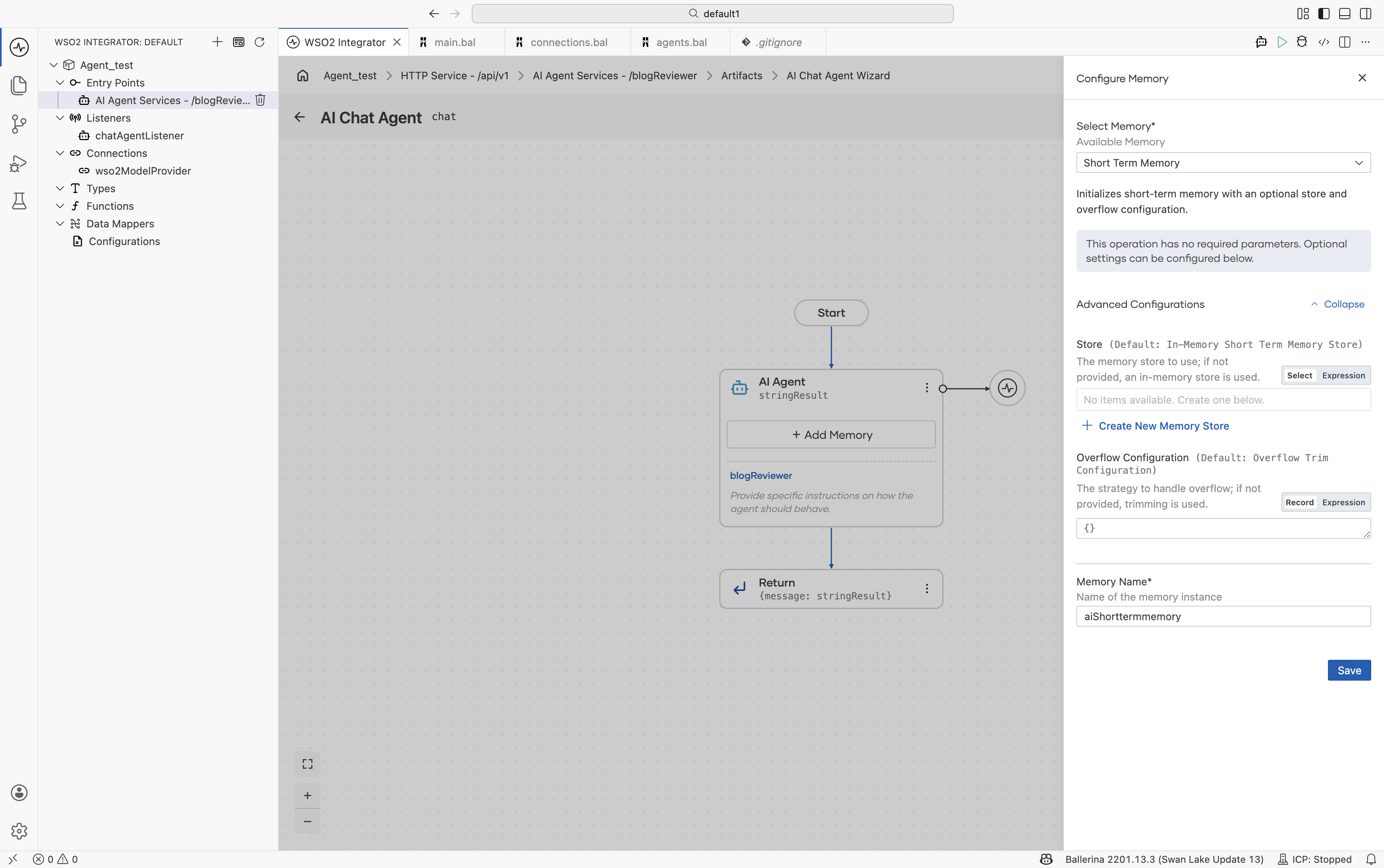
| Field | Required | Description |
|---|---|---|
| Select Memory* | Yes | Specifies the memory strategy used by the agent. Currently, the supported option is Short Term Memory. |
| Advanced Configurations | No | Contains additional memory-related settings such as Store and Overflow Configuration. |
| Memory Name* | Yes | The variable name used in the generated source code. The default value is aiShorttermmemory. |
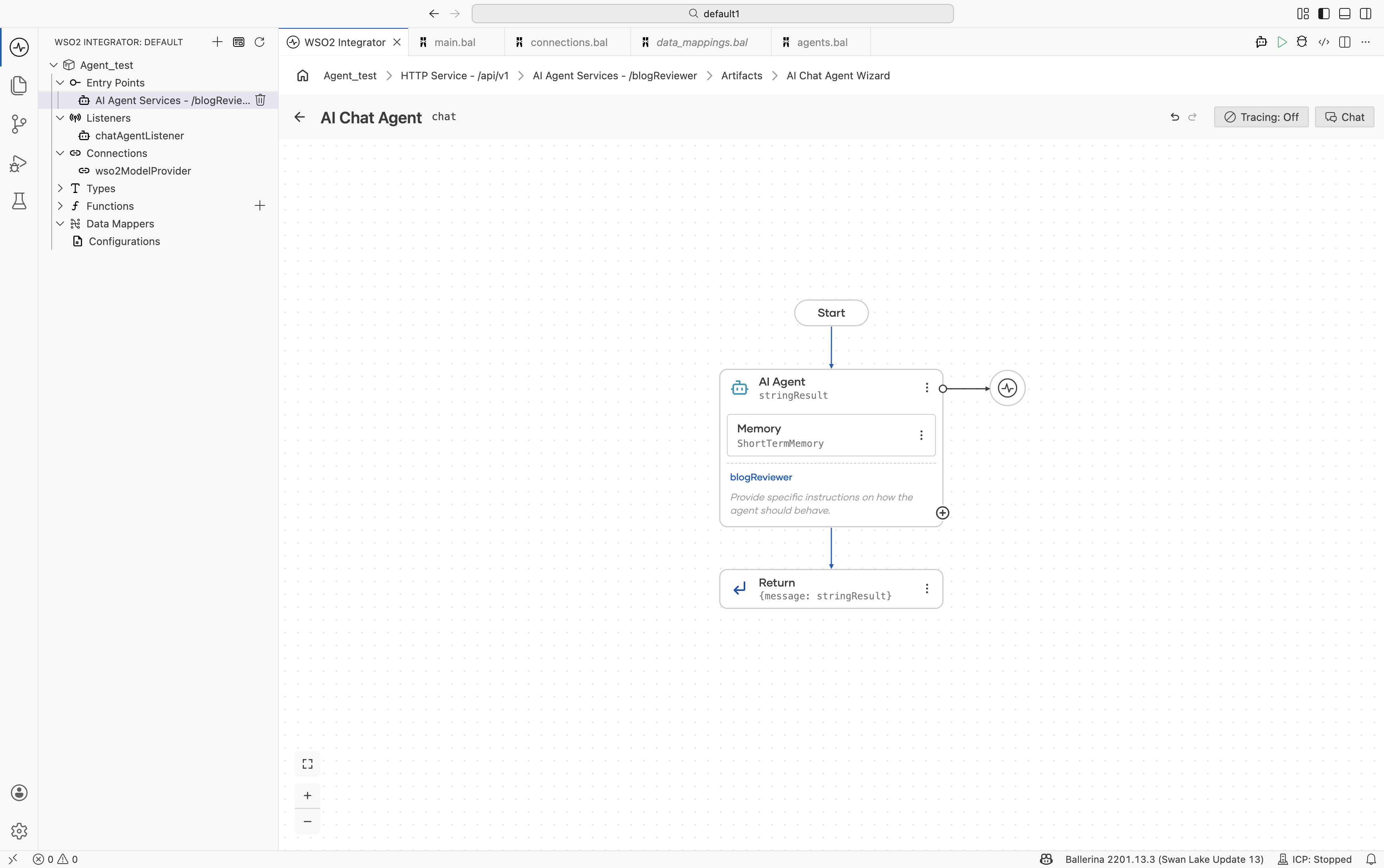
After saving, the AI Agent block on the canvas expands to include a Memory sub-block. See Agent after memory is attached.
Advanced configurations
Click Expand in the Advanced Configurations section to view the Store and Overflow Configuration settings in detail.
| Field | Required | Description |
|---|---|---|
| Store | No | Defines where conversation memory is stored. Available options include In-Memory Short Term Memory Store and MSSQL Short Term Memory Store. |
| Overflow Configuration | No | Defines what happens when the memory window reaches its limit. The default option is Overflow Trim. |
Add memory store
The Store field determines where the conversation history is stored.
Click + Create New Memory Store to open the Select Memory Store picker.
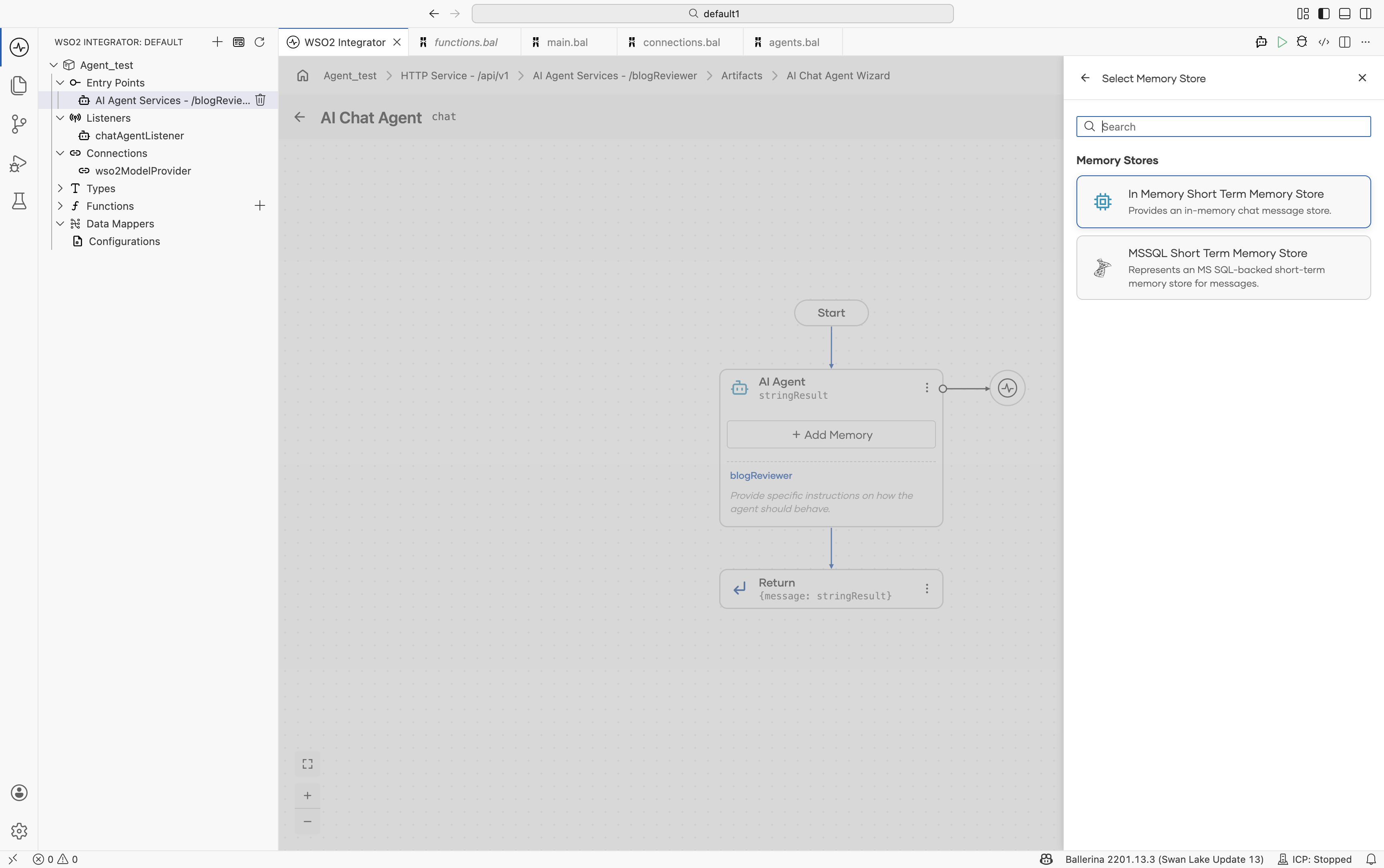
| Store | Module | Survives restart? | Recommended use |
|---|---|---|---|
| In Memory Short Term Memory Store | ballerina/ai | No — data is stored only in process memory. | Suitable for most agents. Lightweight, fast, and requires no additional infrastructure. |
| MSSQL Short Term Memory Store | ballerinax/ai.mssql | Yes — backed by an MSSQL database. | Suitable for long-running conversations, audit/compliance requirements, and conversations that span multiple sessions. |
Additional database-backed stores can be added in the same way. The picker automatically expands as new stores become available.
Currently, PostgreSQL, MySQL, and Redis are not supported out of the box. To use these backends, implement the ai:Memory interface in a custom class. See Custom memory.
Creating an in-memory short-term memory store
Selecting In Memory Short Term Memory Store opens the configuration form for an in-memory memory store.
Configure the following settings and save the configuration.
| Field | Required | Description |
|---|---|---|
| Memory Store Name* | Yes | The variable name used for the generated memory store. Default: aiInmemoryshorttermmemorystore. |
| Result Type* | Yes | The generated result type. Default: ai:InMemoryShortTermMemoryStore. |
| Size | No | The maximum number of messages stored in memory. Default: 10. |
Creating an MSSQL short-term memory store
Selecting MSSQL Short Term Memory Store opens a configuration form for creating an MSSQL-backed memory store.
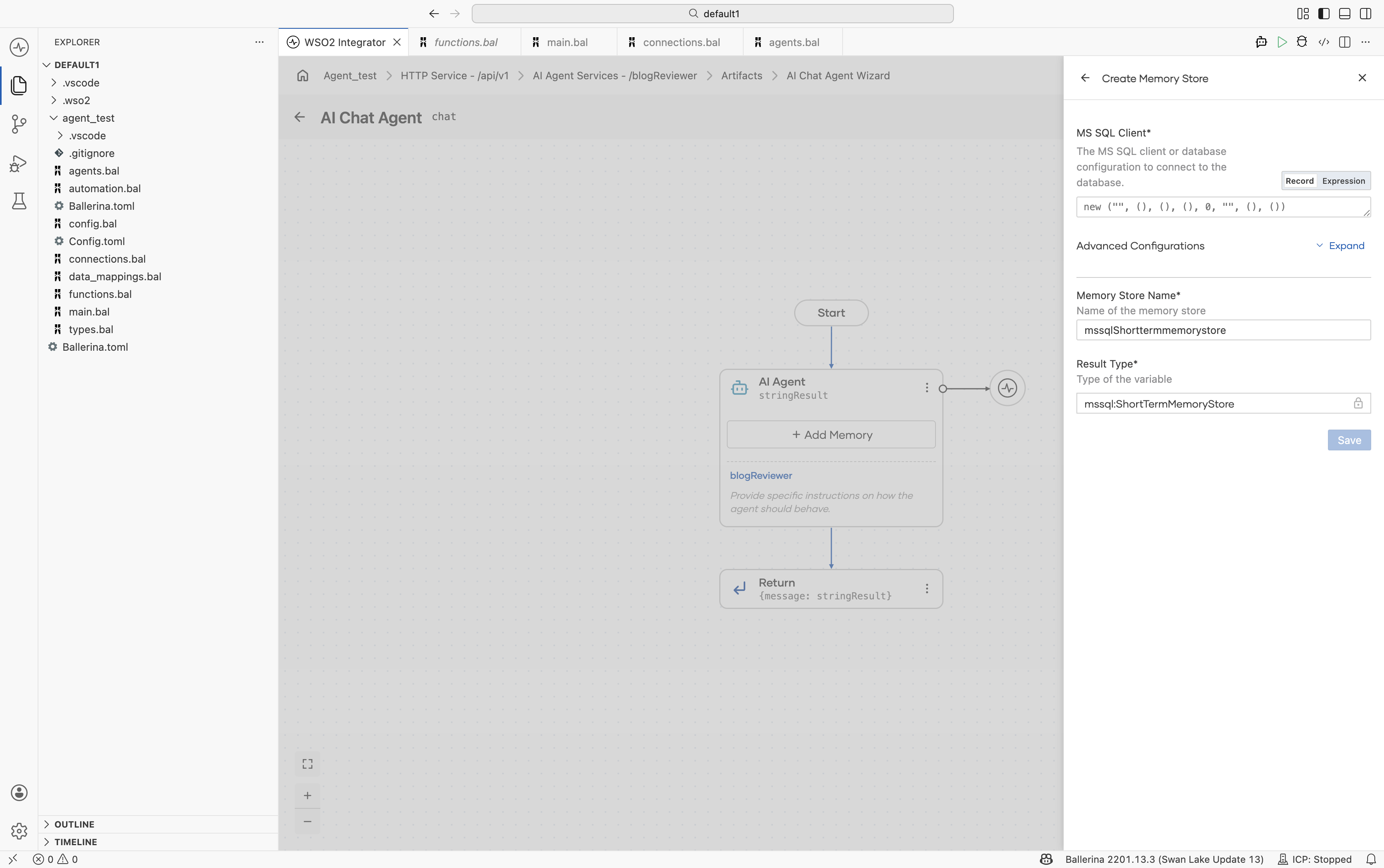
| Field | Required | Description |
|---|---|---|
| MS SQL Client* | Yes | Specifies the MSSQL client or database configuration used to connect to the database. Supports both Record and Expression modes. The default value initializes an mssql:Client: new ("", (), (), (), 0, "", (), ()). Configure the required connection details such as host, username, password, database name, and port. |
| Advanced Configurations | No | Additional optional configurations for the memory store. See below for more details. |
| Memory Store Name* | Yes | The variable name used for the generated memory store. Default: mssqlShorttermmemorystore. |
| Result Type* | Yes | The generated result type. Default: mssql:ShortTermMemoryStore. |
Advanced configurations of MSSQL memory store
Expand Advanced Configurations to view additional persistence-related settings.
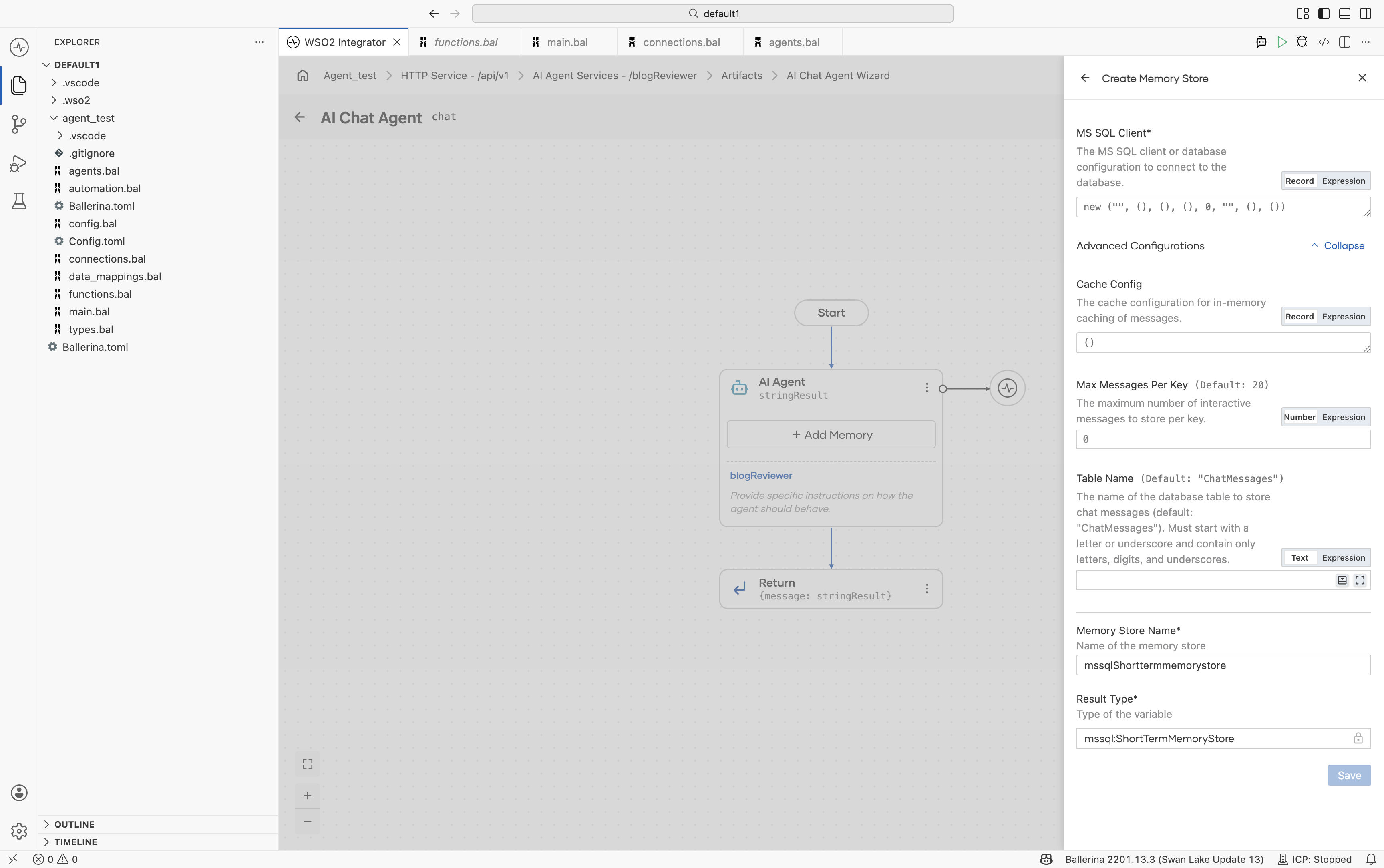
| Field | Default | Description |
|---|---|---|
| Cache Config | {} | Configures the in-memory cache layer on top of the SQL store. This helps reduce database round-trips for frequently accessed sessions. |
| Max Messages Per Key | 20 | Defines the maximum number of messages stored per session ID. When the limit is reached, the oldest messages are removed. |
| Table Name | "ChatMessages" | Specifies the database table used to store chat messages. If the table does not exist, it is created automatically. |
In an agent hosted on ai:Listener, each chat request’s sessionId is used as the key for storing conversation messages in the database table. Inspecting this table directly can help debug and analyze conversations.
Overflow configuration
Memory works as a sliding window. When new conversation turns exceed the configured memory limit, the Overflow Configuration determines how older messages are handled.
| Strategy | Behavior | Configuration |
|---|---|---|
| Trim Overflow Handler Configuration (default) | Removes the oldest messages one at a time until the new message fits within the memory window. | Optional: trimCount |
| Model Assisted Overflow Handler | Uses a model-assisted strategy to manage memory overflow. | Optional: model and prompt |
The effective size of the memory window depends on the model’s context window, with additional space reserved for the system prompt and tool definitions. In most cases, no manual tuning is required.
Agent after memory is attached
After memory is configured, the AI Agent block on the canvas displays the attached memory configuration as a sub-block.
Sessions and isolation
Regardless of the configured memory store, each session ID maintains its own isolated conversation history. If multiple users interact with the same agent simultaneously, their conversations remain separate.
sessionId = "user-alice-1234"  ────►  Alice's history
sessionId = "user-bob-5678"    ────►  Bob's history
sessionId = "user-alice-9999"  ────►  Alice's other conversation
The session ID is included in every chat request through ai:ChatReqMessage.sessionId. The listener automatically reads and manages memory using this value.
Custom memory
For storage backends that are not available in the memory store picker, implement the ai:Memory interface in a custom class.
public type Memory distinct isolated object {
    function get(string key) returns ai:ChatMessage[]|ai:MemoryError;

    function update(
            string key,
            ai:ChatMessage|ai:ChatMessage[] message)
            returns ai:MemoryError?;

    function delete(string key) returns ai:MemoryError?;
};
The following example shows a minimal PostgreSQL-backed implementation.
public isolated class PostgresMemory {
    *ai:Memory;

    private final postgresql:Client db;

    public isolated function init(postgresql:Client db) {
        self.db = db;
    }

    public isolated function get(string key)
            returns ai:ChatMessage[]|ai:MemoryError {
        // Load messages for `key` from the database and return them.
        return [];
    }

    public isolated function update(
            string key,
            ai:ChatMessage|ai:ChatMessage[] message)
            returns ai:MemoryError? {
        // Append messages.
    }

    public isolated function delete(string key)
            returns ai:MemoryError? {
        // Clear messages for the session.
    }
}
Editing memory after it is attached
To update the memory configuration after it has been created:
- Click the Memory sub-block inside the AI Agent block on the canvas.
- The Configure Memory panel opens with the existing configuration.
- Update the required settings and click Save.
To change the underlying memory store:
- Open Configure Memory → Advanced Configurations → Store.
- Select a different store or click + Create New Memory Store.
- Save the configuration.
Designing memory for your agent
The following table provides general recommendations for choosing a memory setup.
| Situation | Recommended setup |
|---|---|
| Getting started with a new chat agent | Use the default configuration — In-Memory Short-Term Memory with the default overflow configuration. |
| The agent needs to retain conversations across restarts | Configure Short Term Memory with MSSQL Short Term Memory Store. |
| You want to use an existing PostgreSQL, MySQL, or Redis backend | Implement a custom ai:Memory implementation. |
| You do not want conversation context to persist across requests | Use agent.run(input) without a session ID instead of using ai:Listener. |
| Multiple agents need to share the same conversation memory | Configure the same MSSQL memory store for all related agents. |
What's next
- Observability — See which tools the agent actually selects.
- Evaluations — Learn how to prevent regressions in AI agent quality.