Agent Definitions
An agent definition is a reusable template for an agent. It captures the role, instructions, tools, and response type once, so the same agent can be instantiated in more than one integration or shared with other projects and other teams.
An agent (or an inline agent, where the two need distinguishing) is created directly in an integration and belongs to it. It can be used as many times as that integration needs, but it cannot be shared beyond it.
This page describes when to use each, how to create an agent definition, and how to configure it in the Agent Definition Designer.
Definitions and instances
| Inline agent | Agent definition | |
|---|---|---|
| What it is | A single agent instance | A template that agent instances are created from |
| Scope | The integration it was created in | Reusable across integrations and projects |
| Reuse | Can reuse the instance within the same integration | Instantiate as many times as needed |
| Updating behavior | Edit the instance | Edit the definition; instances pick up the change |
| Use it when | The agent is specific to this integration and isn't needed elsewhere | The same agent is needed in several places, or by other teams |
A definition is a template, not a running agent. Nothing executes until an instance is created from it either in an integration flow, or as a tool of another agent.
Where a definition lives
When you create a definition, you can choose where WSO2 Integrator saves it.
| Option | Where it goes | Choose this when |
|---|---|---|
| New library package (recommended) | A separate, publishable library package in the same workspace | The definition should be shared beyond this integration |
| Current integration | Alongside the current integration's source | The definition is reused only within this integration |
A local definition can still be instantiated multiple times within the integration, but it cannot be published or consumed by other projects.
Only a definition in a library package can be published and consumed by other projects. See Sharing and Reusing Definitions.
Create an agent definition
- Open your integration project in WSO2 Integrator.
- Click Add Artifact manually from the bottom of the project view.
- Under Other Artifacts, select Agent.
- In the Add Agent dialog, select Create Agent Definition.
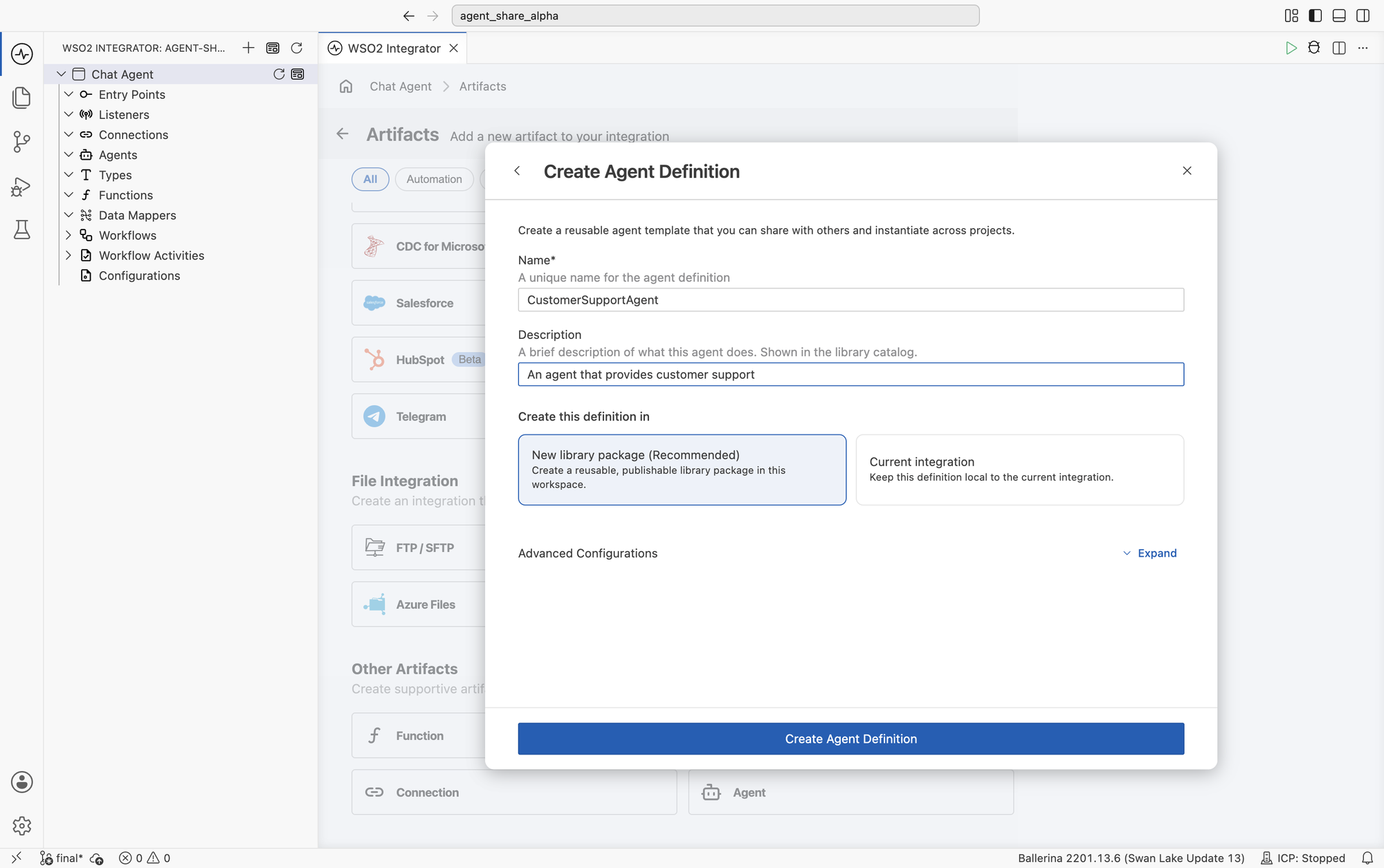
| Field | Required | Description |
|---|---|---|
| Name | Yes | A unique name for the agent definition, such as CustomerSupportAgent. |
| Description | No | A brief description of what the agent does. This is shown in the library catalog, so write it for the people who will consume the definition. |
| Create this definition in | Yes | New library package creates a reusable, publishable package in this workspace. Current integration keeps the definition local. |
Advanced configurations
The defaults are derived from the definition's name and your account, so most definitions need nothing here. Click Expand on Advanced Configurations to change how the library package is named and versioned.
| Field | Required | Description |
|---|---|---|
| Library Name | Yes | The name of the reusable library package created in this workspace. |
| Package Name | Yes | The package name used when the definition is published and imported. |
| Organization | Yes | The organization that owns this package. This is derived from your account and cannot be edited here. |
| Package Version | No | The version of the package. Defaults to 0.1.0. |
These fields apply only when New library package is selected.
Agent Definition Designer
After clicking Create Agent Definition, WSO2 Integrator generates the definition and opens the Agent Definition Designer. The designer is where you configure what the agent does. Unlike an agent created directly in an integration, a definition is configured through a form rather than the integration canvas since a definition has no flow of its own, because it runs wherever it is instantiated.
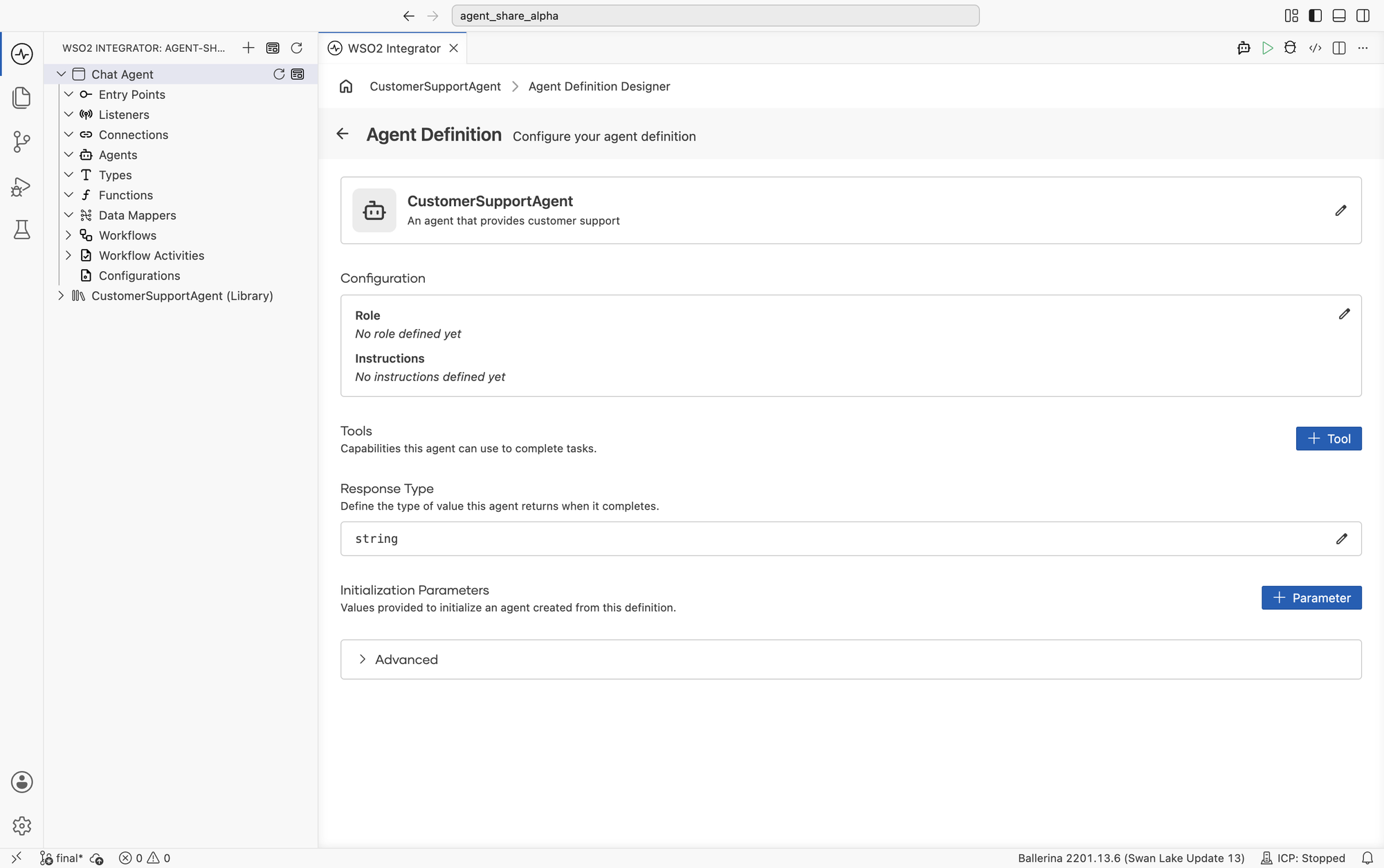
| Section | Description |
|---|---|
| Name and description | The definition's identity. The description is what consumers see in the library catalog. |
| Configuration | The agent's Role and Instructions, which together form its system prompt. |
| Tools | The capabilities the agent can use to complete tasks. |
| Response Type | The type of value the agent returns when it completes. |
| Initialization Parameters | Values supplied when an instance is created from this definition. |
| Advanced | The members of the generated agent class, and a way into their implementations. |
Configuration
Click the edit icon on the Configuration card to set the agent's role and instructions.
| Field | Description |
|---|---|
| Role | The primary responsibility or persona of the agent. |
| Instructions | The behavior guidelines and operational instructions the agent follows while responding. |
Because a definition can be instantiated in contexts you don't control, write instructions that don't assume a particular caller or flow.
Tools
Click + Tool to add capabilities to the definition. The tool types and their configuration are the same as for any other agent: connections, functions, MCP servers, custom tools, and other agents. See Tools.
Tools added to a definition are part of the template: every instance created from it gets the same tools.
Response Type
Response Type defines the type of value the agent returns when it completes. It defaults to string.
Choose a simple type such as string, int, or boolean, or a record type when the agent should return structured data, such as a support ticket with a category, a priority, and a summary.
A structured response type is easier to work with programatically than string, because the result can be used directly instead of being interpreted again. When the definition is used as a tool by another agent: the response type is the shape the calling agent receives.
Consumers of the definition depend on this type, so changing it after the definition has been published is a breaking change. See Versioning a definition.
Initialization Parameters
Initialization Parameters are the values provided to initialize an agent created from this definition. They are what makes a definition a template rather than a fixed agent: the parts that vary per instance become parameters, and everything else stays in the definition.
Every definition takes a model provider and an optional memory implementation. Click + Parameter to add your own.
Advanced
The Advanced section lists the members of the generated agent class.
| Member | Description |
|---|---|
Constructor: init | Initializes an instance of the definition with its model, memory, and initialization parameters. |
run | Runs the agent against a query and returns the configured response type. |
trace | Runs the agent and returns the full execution trace instead of the result. |
Selecting the constructor or either method opens it in the flow diagram view, where its implementation can be edited directly.
The designer generates and maintains these members from the sections above, so most definitions never need them. Use the flow diagram view when a definition requires behavior the form does not express.
Generated source
Creating a definition generates a Ballerina class that wraps an ai:Agent. You configure it through the designer; the source is shown here for reference.
- Ballerina Code
import ballerina/ai;

# An agent that provides customer support.
public isolated class CustomerSupportAgent {
    *ai:FixedTypedAgent;

    private final ai:Agent agent;

    # Initializes the agent
    # + model - The AI model provider to use
    # + memory - The memory implementation to use
    public function init(ai:ModelProvider model, ai:Memory? memory = ()) returns error? {
        self.agent = check new (
            systemPrompt = {
                role: string ``,
                instructions: string ``
            },
            model = model,
            memory = memory,
            tools = []
        );
    }

    public isolated function run(string|ai:Prompt query,
            string sessionId = "sessionId",
            ai:Context context = new) returns string|ai:Error {
        return self.agent.run(query, sessionId, context);
    }

    public isolated function trace(string|ai:Prompt query,
            string sessionId = "sessionId",
            ai:Context context = new) returns ai:Trace|ai:Error {
        return self.agent.run(query, sessionId, context);
    }
}
The model provider and memory are constructor parameters rather than fixed values, so the same definition can run against a different model or a different memory store in each instance.
Create an instance from a definition
Once a definition exists, create instances of it from the Pre-built Agents section of the Add Agent dialog, in either of the places that dialog appears:
- Add Artifact manually → Other Artifacts → Agent - to use the agent in an integration.
- Add Tool → Agent → + Add Agent - to use the agent as a tool of another agent. See Agents as Tools.
Common pitfalls
| Symptom | Likely cause | Fix |
|---|---|---|
| The definition doesn't appear under Pre-built Agents in another project. | It was created in the current integration rather than a library package. | Recreate it with New library package, then publish it. |
| Instances share state you expected to be isolated. | The same instance is being reused rather than a new one created. | Create a separate instance, or scope state through initialization parameters. |
| A consumer breaks after you edit the definition. | The response type or an initialization parameter changed. | Treat both as public API and version the package accordingly. |
| Instructions assume a caller the agent doesn't have. | The definition was written against one integration and then reused elsewhere. | Rewrite instructions to be caller-independent; move the variable parts to parameters. |
What's next
- Sharing and Reusing Definitions — Publish a definition and consume it from other projects.
- Agents as Tools — Use an agent as a tool of another agent.
- Tools — Add connections, functions, MCP servers, and custom tools.
- Memory — Configure conversational and persistent memory.