

CMS Interoperability: Automating Prior Authorization

- Isuru Uyanage
- Associate Technical Lead, WSO2

Introduction
The Centers for Medicare & Medicaid Services (CMS) has taken a key step toward improving healthcare efficiency and transparency. Under the CMS Interoperability and Prior Authorization Final Rule (CMS-0057-F), payers must offer electronic access to prior authorization (PA) information.
Prior authorization is a widely used cost-containment mechanism that allows health insurers to determine whether a prescribed service, procedure, or medication qualifies for coverage. To proceed with treatment, healthcare providers must first submit a request to the payer, who evaluates it based on medical necessity, policy guidelines, and patient eligibility. While this process is intended to ensure appropriate and cost-effective care, it often becomes frustrating due to administrative bottlenecks, delays, and paperwork-heavy workflows.
In this blog, we will explore how to address the common challenges of prior authorization by automating the entire process using the WSO2 Accelerator for Healthcare. We’ll walk through each phase of the prior authorization workflow with detailed steps and highlight the key components of our reference implementation, which has been implemented with Ballerina.
Scenario
Patient: Jack Shaw
Payer (Insurer): UnitedCare
Practitioner: Dr. Smith
Hospital: Grace Hospital
EHR: E-Health
Jack Shaw visits Dr. Smith at a local clinic, seeking relief from persistent migraine pain. After a thorough clinical evaluation, Dr. Smith determines that an Aimovig 70mg Injection would be an appropriate treatment option. However, before proceeding, he must obtain prior authorization from Jack’s health plan, UnitedCare, as the medication requires approval based on coverage policies.
Workflow

Figure 1: Sequence diagram of the prior authorization workflow
1. CRD Phase: Is Prior Authorization Required?
Dr. Smith prescribes the Aimovig 70mg injection for his patient Jack through the E-Health EHR. The system performs a real-time coverage check with UnitedCare, which responds that prior authorization is required and provides a link to a Questionnaire App. This SMART on FHIR app is used in the documentation templates and rules (DTR) phase to gather the necessary documentation and information needed to process the prior authorization request.
- Login and select the patient: Dr. Smith logs in and selects the patient Jack from the EHR App.
- Order medication: Dr. Smith orders the Aimovoig 70mg injection.
- CDS Server invocation: EHR triggers the coverage requirements discovery (CRD) flow with the payer’s clinical decision support (CDS) server. The EHR sends a CDS Hooks call to the payer’s cds-service to determine if PA is required. Then, the payer’s cds-server responds with a CDS Card indicating that PA is required and includes a link to launch the questionnaire app.
2. Documentation Templates and Rules (DTR) Phase: Gather Prior Authorization Information
Dr. Smith launches the Questionnaire SMART app from the link. The app loads a pre-filled Prior Authorization Request form with Jack’s clinical and prescription data. He reviews and completes any missing information necessary for the request.
- Invoke questionnaire SMART app link: Dr. Smith launches the Questionnaire SMART app from the CDS card link.
- Get the questionnaire: The Questionnaire SMART app retrieves the FHIR Questionnaire from the payer’s FHIR server.
- Insert requested information and submit: Dr. Smith fills the requested clinical information into the form and submits it. This will submit a questionnaire response to the payer’s FHIR server so that the payer can proceed to the next phase.
3. PAS Phase: PA Submission
Once all the required information is entered, Dr. Smith submits the FHIR-based prior authorization request through the SMART app. The payer evaluates the request and returns an approval or denial, which is automatically reflected in the EHR for status tracking and next steps in Jack’s care.
- Submit claim: Dr. Smith submits the claim from the EHR app for Prior Authorization. The EHR will construct a FHIR Claim and submit to the payer’s FHIR Server. The request is then routed through a FHIR-to-X12 Mapper, which converts the FHIR Claim into an X12 278 transaction format.
- Process and return PA decision: The transformed X12 278 request is sent to the payer’s X12 Engine, which processes the prior authorization. The decision, approved or denied, is returned in X12 format and then converted back into a FHIR ClaimResponse by the Mapper. Then, the FHIR Server delivers the decision to the EHR, where Dr. Smith can see and act accordingly.
Reference Implementation
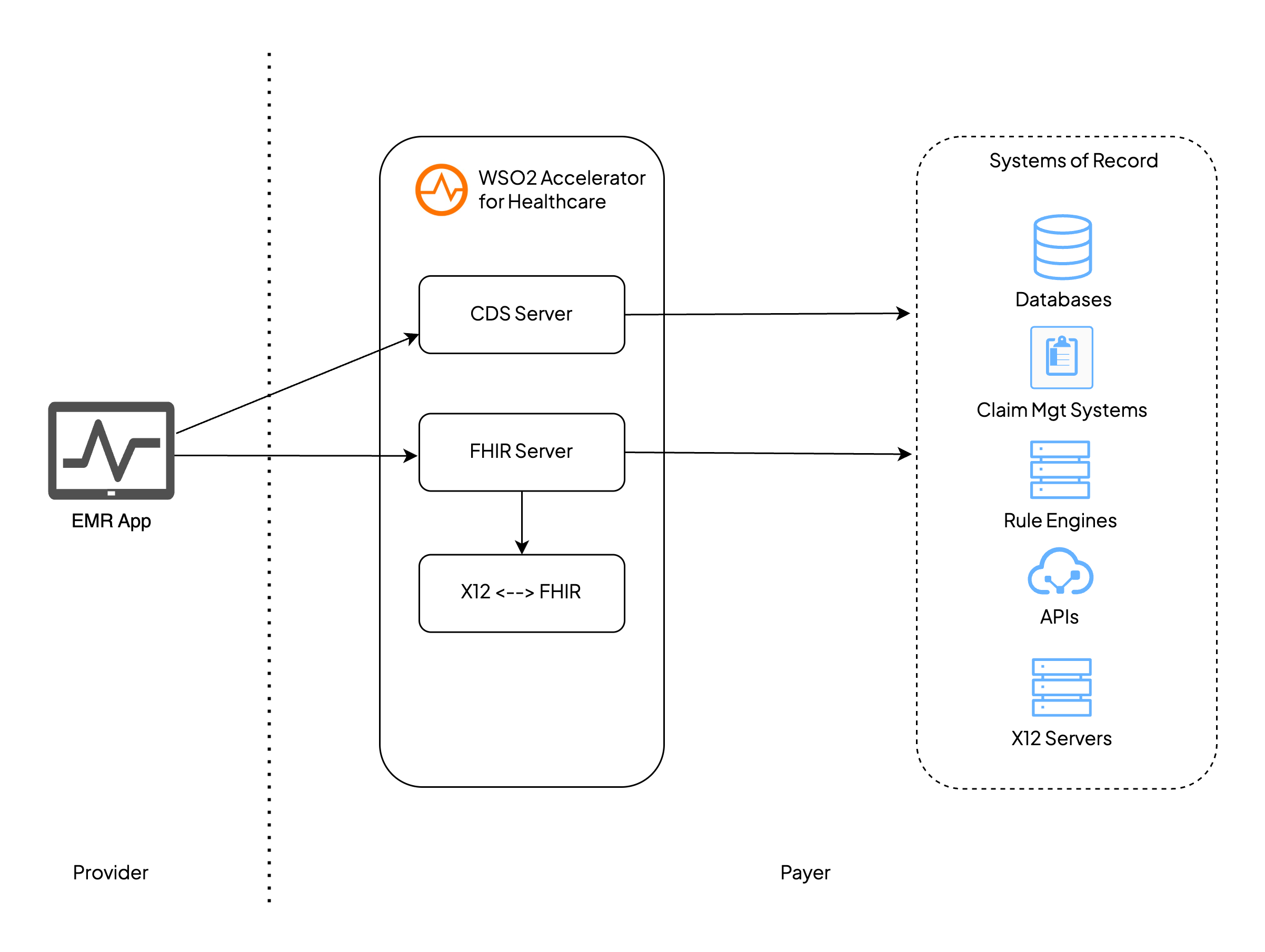
Figure 2: Architecture diagram of the reference implementation
The reference implementation architecture is divided into two domains:
- Provider Side: An EMR/EHR system capable of generating and submitting FHIR-based prior authorization requests to the payer system.
- Payer Side: A set of healthcare microservices powered by WSO2 Accelerator for Healthcare, which handle FHIR request processing, clinical decision service, FHIR-to-X12 conversion, and integration with internal systems.
Core Components
Provider side
| Component | Role |
| EHR App | A frontend application used by healthcare providers to log in and create medication orders. This app can trigger and visualize the prior auth workflow. |
Payer side
| Component | Role |
| CDS Server | Triggered by CDS Hooks when a provider initiates an order in the EHR, the CDS Server integrates with the payer’s rule engines to determine if Prior Authorization (PA) is required based on the patient context and interprets the CDS Hooks flows. The CDS server is implemented using the WSO2 Accelerator for Healthcare. |
| FHIR Server | The FHIR Server integrates with existing systems of record, such as X12 Engines, databases, and FHIR repositories, serving as a facade to fulfill the Prior Authorization workflows. It is provided by WSO2 Accelerator for Healthcare, with pre-built FHIR APIs for the CRD, DTR, and PAS flows required for the Prior Authorization process. |
| X12 ↔ FHIR Mapper | Converts Prior Authorization data between FHIR and X12 278 formats. Pre-built mappings for Prior Authorization 278/275 messages are implemented in the WSO2 Accelerator for Healthcare, enabling seamless interoperability with legacy payer systems. |
| Rule Engine | Applies clinical and administrative rules to determine the need for Prior Authorization (PA). This is an existing component at the payer side, integrated with the CDS Server for real-time decision support. |
| Questionnaire App | It is a SMART on FHIR enabled application which is used to retrieve the FHIR questionnaire for the DTR flow from the payer’s FHIR server. |
| Systems of Record |
The payer’s existing systems of record, which can include:
|
A complete reference implementation for the Electronic Prior Authorization (ePA) use case has been built using the WSO2 Accelerator for Healthcare. This implementation demonstrates key components such as CDS Hooks, DTR Flow, FHIR, X12 integration, etc. It is publicly available on GitHub and includes a hosted demo setup, where users can explore the full workflow.
The video below will provide a walkthrough of the demo setup:
Glossary
| CDS | A Clinical Decision Support (SCD) Server is a backend service that provides real-time clinical decision support by evaluating clinical data and returning actionable guidance to healthcare providers during their workflows. |
| DTR | Documentation Templates and Rules (DTR) allows providers to download payer-defined questionnaires and associated rules, and launch a SMART on FHIR app within the EHR to auto-populate and complete required clinical documentation for a planned service. |
| EHR | An Electronic Health Record (EHR) is a digital version of a patient's medical history, maintained by a healthcare provider over time. It includes clinical data such as diagnoses, medications, treatment plans, immunization dates, allergies, lab results, and imaging reports. |
| CRD | Coverage Requirements Discovery (CRD) is a standard workflow that helps providers to identify if a procedure or medication needs prior authorization. |
| PAS | Prior Authorization Submission (PAS) is a standard workflow that allows providers to submit prior authorization requests and receive approval or denial decisions electronically. |