

Cost Optimization with AI-Powered FinOps

- Isuru Ruhunage
- Senior Software Engineer, WSO2

As cloud native applications grow, managing resource usage and controlling costs becomes increasingly complex. Choreo's Cost Optimizer addresses this challenge by providing AI-driven insights and actionable recommendations, enabling developers and organizations to streamline resource utilization and reduce unnecessary expenditures.
This blog explores how Choreo users can take full advantage of the Cost Optimizer to improve cloud efficiency and reduce waste within their existing deployments using AI-driven recommendations.
Key features and benefits
1. AI-powered resource right-sizing recommendations
Choreo leverages usage analytics and AI models to evaluate CPU and memory utilization trends. If a component consistently underutilizes its allocated resources, the cost optimizer recommends right-sized configuration to maintain performance while minimizing waste.
E.g. If your API consistently consumes 20% of its allocated memory over several weeks, Choreo suggests more suitable CPU and memory allocations based on actual usage.
2. Smart idle component detection
Through observability, Choreo tracks loads and trends to detect idle components. These components are flagged for potential un-deployment, helping teams to reduce costs by shutting down unused services.
3. Scale-to-zero recommendations
Using behavioral models, Choreo identifies services with low utilization and recommends enabling scale-to-zero (S2Z). This allows rarely accessed services to spin up on demand and shut down automatically when idle so they only consume resources when needed.
4. Automated AI-based optimization
Platform engineers can enable Auto-Optimize for an organization, a project or a component allowing Choreo to automatically apply recommendations and manage the resource allocations.
Note: Some actions such as stopping idle services, or enabling S2Z recommendations need to be applied by the user.
5. Visibility into AI recommendations and savings
Choreo's Cost Optimizer gives users a progressive, top-down view of cost efficiency, starting from an organization-wide perspective and allowing them to drill down into project and component details. This hierarchy ensures that every team, from platform owners to individual developers, can understand and act on AI-driven recommendations within their own scope.
Organization-level insights - "Where are we spending, and saving?"
At the organization level, platform teams and engineering leadership get a unified view of cost efficiency across all projects.
While visually similar to project-level views, this dashboard aggregates metrics to answer:
- Total savings in an organization
- Projects that are missing optimization opportunities
- Efficiency of CPU and memory utilization
- Number of optimized vs. unoptimized deployments
You also see an annualized view of total savings and breakdowns across production and non-production environments.
This high-level view enables cross-project prioritization and supports governance policies around cost.
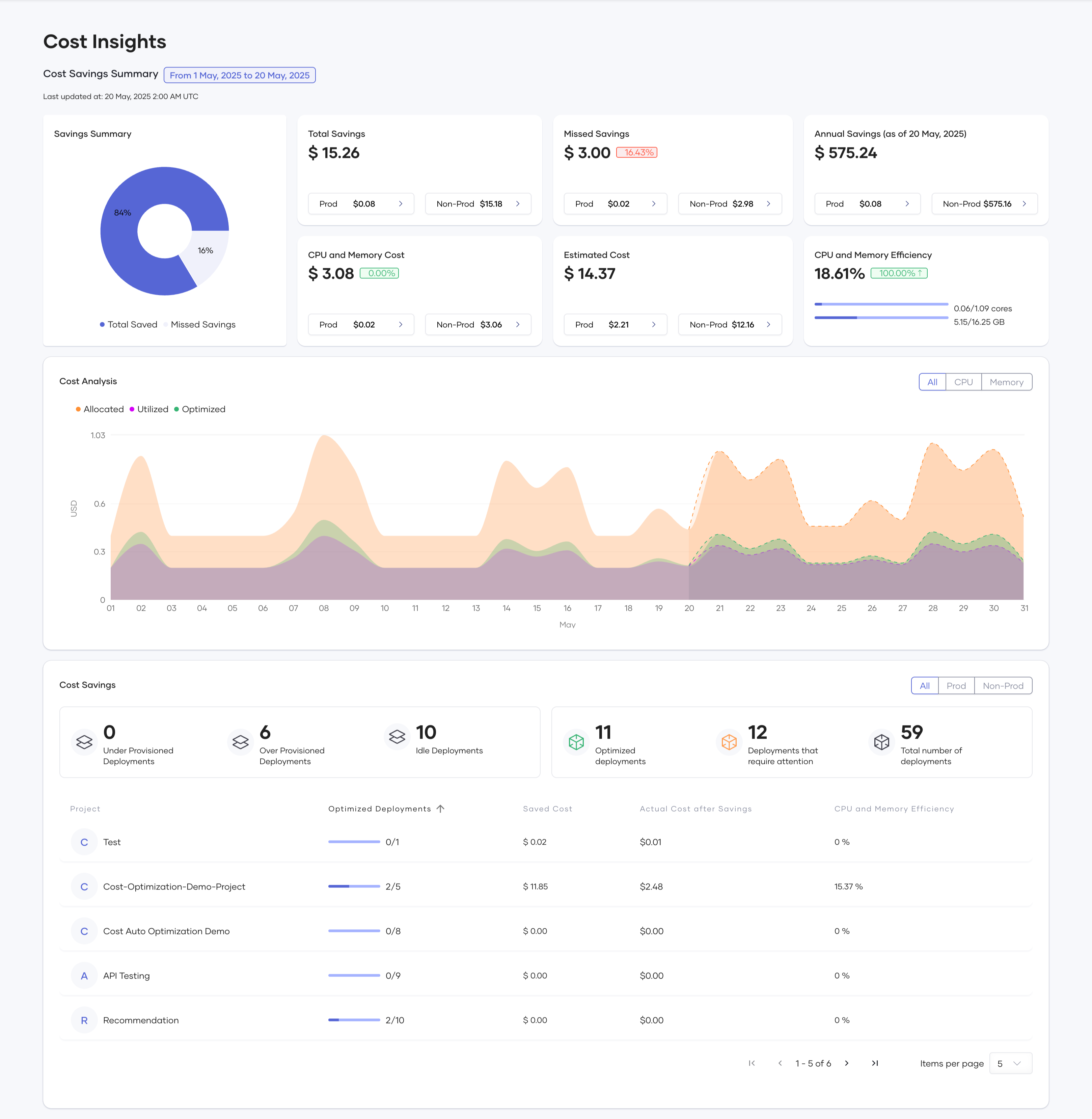
Figure 1: Organization level dashboard view
Project-level insights - “Which services within my project are inefficient?”
The project-level dashboard offers the same layout as the organization view, but zooms in on a specific project's deployments, providing actionable insights for your team.
As a developer or DevOps engineer, this is your go-to view to identify:
- Reviewing which deployments are over/under-provisioned
- Identifying idle services
- Tracking how many AI recommendations have been applied
- Monitoring auto-optimization across components
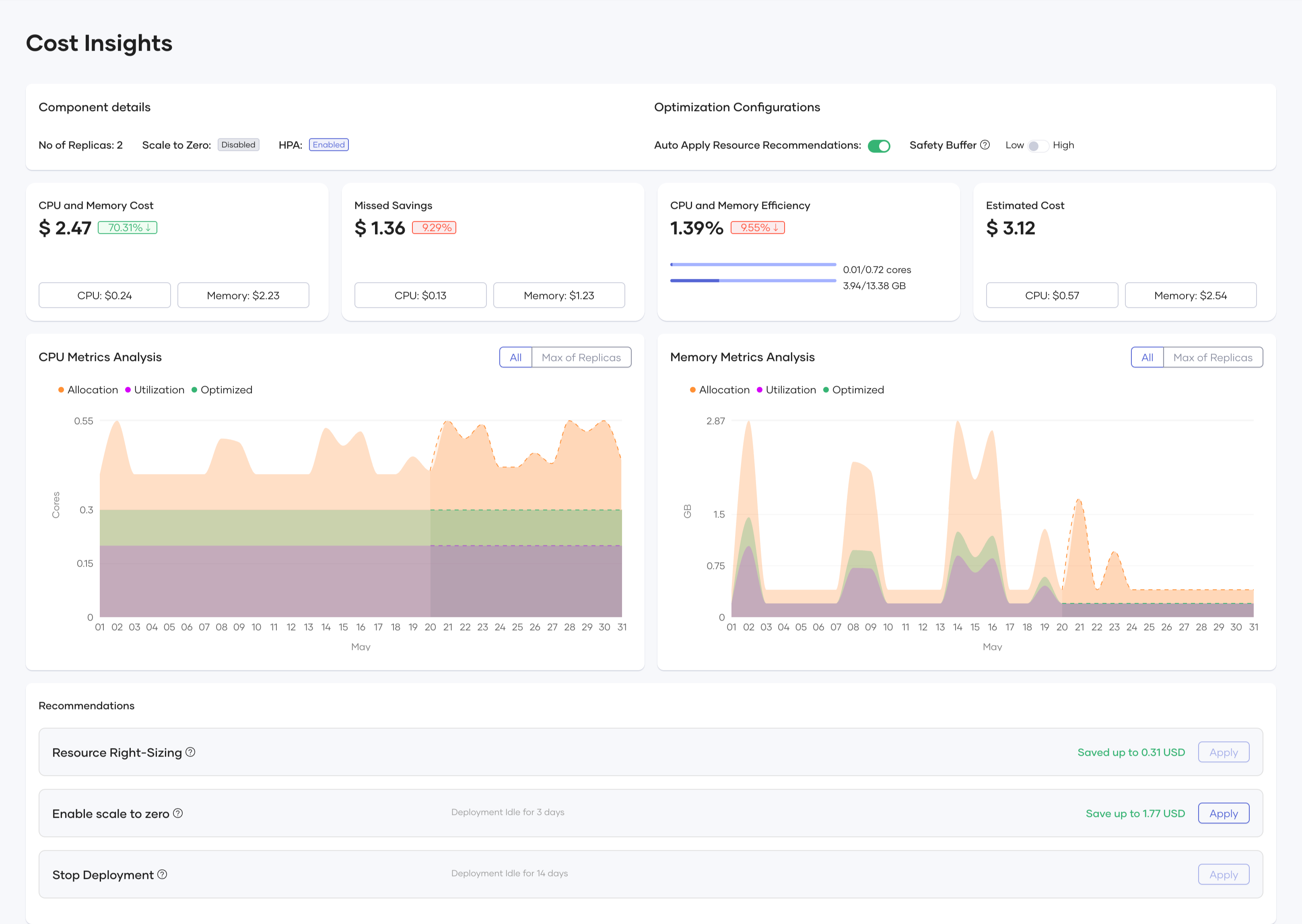
Figure 2: Project level dashboard view
Component-level deep-dive—“What exactly can I improve?”
For individual deployments, Choreo provides a component-level view that brings clarity to specific AI recommendations.
Key details include:
- CPU/memory usage vs. allocation over time.
- AI-suggested optimized values.
- Whether the component is eligible for:
- Resource right-sizing
- S2Z
- Deployment stop (due to idleness)
- Auto-apply toggle and projected savings per action.
This is where developers can apply the recommendations.
Figure 3: Component level view
Why you should use Choreo's cost optimizer
Choreo's Cost Optimizer helps you keep your cloud spend under control intelligently and effortlessly.
- AI-powered recommendations: Get tailored suggestions for scaling and right-sizing based on real usage, not guesswork.
- Continuous cost savings: Reduce waste by identifying idle or over-provisioned components and act before costs pile up.
- Automation when you want it: Apply recommendations manually or let Choreo handle it.
- Complete visibility: From high-level org stats to granular component insights, you always know where you're spending and where you can save.
Sign up to Choreo today and build, deploy, and scale your components without overspending.