

How to Build a CI/CD Pipeline for APIs Using WSO2 API Manager and GitOps

- Naduni Pamudika
- Associate Technical Lead, WSO2

- Tharani Karunathilaka
- Senior Software Engineer, WSO2
Continuous integration and continuous delivery/deployment (CI/CD) in API management refers to the automation of building, testing, publishing, and promoting APIs across environments (development, staging, and production) using CI/CD practices. It brings DevOps principles to the API lifecycle, enabling faster and more reliable API releases.
Why you need CI/CD for API management
APIs are core components of modern applications. Manually deploying or updating APIs can be time-consuming, error-prone, inconsistent across environments, and hard to track. CI/CD introduces automation and repeatability, ensuring APIs are published correctly, securely, and consistently every time. Key benefits include the following.
- Faster API Delivery: APIs reach consumers more quickly.
- Consistency Across Environments: Dev, staging, and prod stay aligned.
- Reduced Manual Errors: Automates API imports and gateway updates.
- Version Control for APIs: Track who changed what, when, and why.
- Auditability and Traceability: Git logs + CI/CD logs = full traceability.
Core components of CI/CD for APIs
Continuous integration (CI)
CI is about automatically integrating and testing code changes as soon as they are committed.
Key features:
- Developers push code to a shared repo (in GitHub).
- The CI system builds the code automatically.
- It runs tests to catch bugs early.
- Ensures the codebase is always in a working state.
Example tools:
- GitHub Actions, GitLab CI, Jenkins, CircleCI.
Continuous delivery (CD)
Continuous delivery ensures that code is always ready for deployment to staging or production; however, the actual deployment may be manual.
Key features:
- Automates packaging and releasing code.
- Human approval before deploying to production.
- Safer and faster releases.
Continuous deployment (CD)
Continuous deployment takes it one step further: every successful change is automatically deployed to production, without manual intervention.
Benefits:
- Code gets to users faster.
- Very short feedback loops.
- Ideal for modern cloud-native apps and microservices.
| Stage | Action |
| Continuous integration (CI) | Lint and validate OpenAPI specs, test mock APIs. |
| Continuous delivery (CD) | Package API artifacts, push to dev/staging environments. |
| continuous deployment (CD) | Automatically publish APIs to production after tests pass. |
What is GitOps?
GitOps is a DevOps practice that uses Git as the single source of truth for infrastructure and application configuration. Instead of manually deploying or updating systems, teams store the desired state (such as API definitions or environment configs) in a Git repository. Tools like Argo CD or Flux continuously monitor these repositories and automatically reconcile the running system to match the declared state. This approach brings version control, auditability, and automation to operations. Every change is tracked as a Git commit, enabling easy rollbacks, peer reviews, and consistent deployments across environments.
Example actions in a pipeline
- Validate: Check OpenAPI/Swagger for syntax and standards.
- Build: Convert API definition to API Gateway format (e.g., WSO2 API Project).
- Test: Run mock tests or integration tests.
- Deploy: Use tools like apictl to import APIs to gateways (e.g., WSO2, Apigee).
- Promote: Move API between environments using GitOps or manual approval.
How WSO2 API Manager supports CI/CD
WSO2 API Controller (APICTL) is a powerful CLI tool that makes API lifecycle automation possible. It supports CI/CD by enabling developers and DevOps teams to:
- Treat APIs as code (API-as-code) by keeping them as version-controlled projects using apictl.
- Automate import/export between environments.
- Support multiple environments with named profiles by injecting environment-specific configurations.
- Integrate with CI tools like GitHub Actions for automated deployment.
- Integrate easily with GitOps tools like Argo CD for environment sync.
Combining WSO2 APICTL and GitOps creates a powerful model for managing APIs across environments with automation, version control, and reproducibility. You can either create an API using the WSO2 API Manager Publisher and then export it with WSO2 APICTL, or create an API from scratch using WSO2 APICTL.
| Component | Purpose |
| OpenAPI Spec | Central contract for API design. |
| WSO2 APICTL | CLI tool to create, import/export, deploy APIs. |
| Git | Stores versioned API artifacts. |
| GitOps (Argo CD) | Syncs API definitions to environments. |
| CI/CD Tool (GitHub Actions) | Automates validation, testing, and promotion. |
The challenge at ShopKart
ShopKart is a fast-growing online retailer known for its wide selection of electronics, fashion, and household goods. Customers rely on its website and mobile app for everything from flash sales to seasonal promotions, and partner businesses use its integrations to keep product catalogs and stock levels up to date. As a result, ShopKart frequently introduces new features, including personalized recommendations, same-day delivery tracking, and promotional discount logic.
To support this rapid pace of innovation, the company relies heavily on its Product API, which powers its website, mobile app, and third-party integrations. However, the company faced several challenges with its manual deployment process:
- Deployments were manual and error-prone.
- Dev, staging, and prod environments should be synced.
- Releases took hours of copying artifacts and running scripts.
- Nobody could easily tell who deployed what and when.
The team needed a solution to streamline this process. They turned to a CI/CD + GitOps approach. With automation, every API change can be validated, tested, and safely promoted across environments, no manual clicks needed.
The ShopKart pipeline: Step by step
-
Create an OpenAPI definition file (openapi.yaml) with the following definition given.
-
Initialize the WSO2 API project as “ProductAPI”.
This creates a directory like:
-
Modify the api.yaml with the endpoint details.
-
Create a git repository named shopkart with the structure.
- dev/, stag/, and prod/ hold environment-specific API projects.
- .github/workflows/ contains the CI pipeline.
- argo-apps/ contains Argo CD application manifests.
-
Use a CI tool like GitHub Actions to lint the OpenAPI spec, run apictl import-api command to deploy the API to WSO2 APIM dev environment, and optionally run tests (Postman or integration scripts). Refer to the api-pipeline.yml below.
- Add the secrets under settings sections in GitHub. Here are some examples.
WSO2_DEV_APIM - Dev APIM URL (apim.com:9443)
APIM_USERNAME - admin
APIM_PASSWORD - admin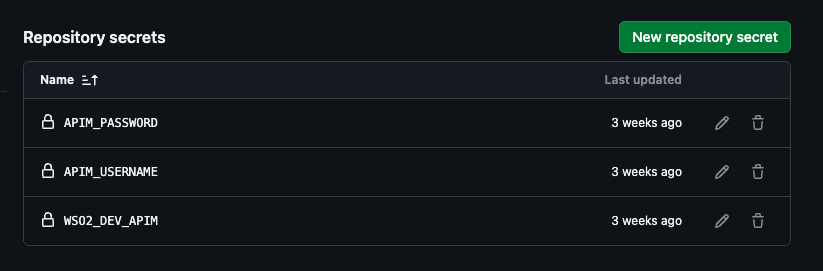
-
Clone the ShopKart git repository and add the “ShopKartAPI” API project to the ShopKart/dev folder and push the changes.
-
Now the git repository would look like this.
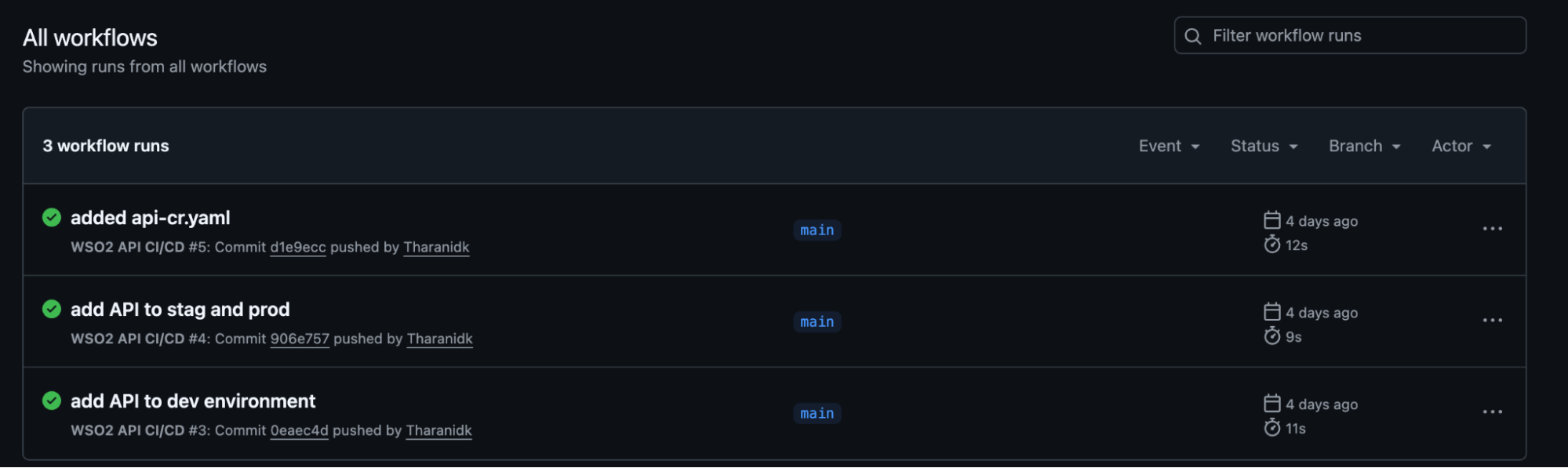
- Once the changes are merged, the workflow will automatically trigger as shown below and the ProductAPI will be published to the dev environment.
You can see the API is available in the dev environment.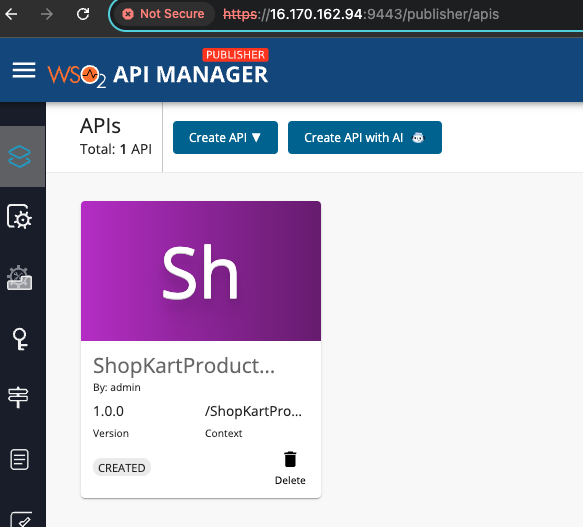
-
Once the tests are passed in the dev environment, ShopKart developers need to promote APIs simply by merging the artifacts to stag and then to prod environments.
Use GitOps to promote API across environments. You can use Argo CD to watch Git branches or folders. Promotion means merging changes from dev → stag → prod. Argo CD will sync those changes to WSO2 instances in each environment.
Argo CD will automatically sync changes under prod/ to production. A sample productapi-argo-app.yaml file is as follows,
When there are new changes to be done to the API, you can edit the OpenAPI file at `dev/ProductAPI/Definitions/swagger.yaml`, commit your changes and push, and then the GitHub Actions will deploy the API to the dev environment. You can merge the tested changes to stag and prod in the git repository, so that Argo CD will pick up `prod` folder changes and sync them to the prod environment.
-
Syncing files in Kubernetes doesn’t automatically publish APIs into WSO2 API Manager. For that, ShopKart added an Argo CD PostSync hook job. It runs right after the Prod app syncs, calling apictl import api against the production APIM.
Here is the sample productapi-argo-app.yaml file with a hook job.
In GitHub Actions, we used GitHub Secrets for the Dev APIM login. However, in production, Argo CD runs inside Kubernetes, and the credentials will be handled differently. The best practice is to create a Kubernetes Secret that holds your APIM hostname, username, and password. The Argo CD hook Job (PostSync) will read from it. An example of apim-prod-credentials.yaml will be as follows.
The final ShopKart git repository would be:
The healthy and synced Argo CD application for ShopKart API will be as follows.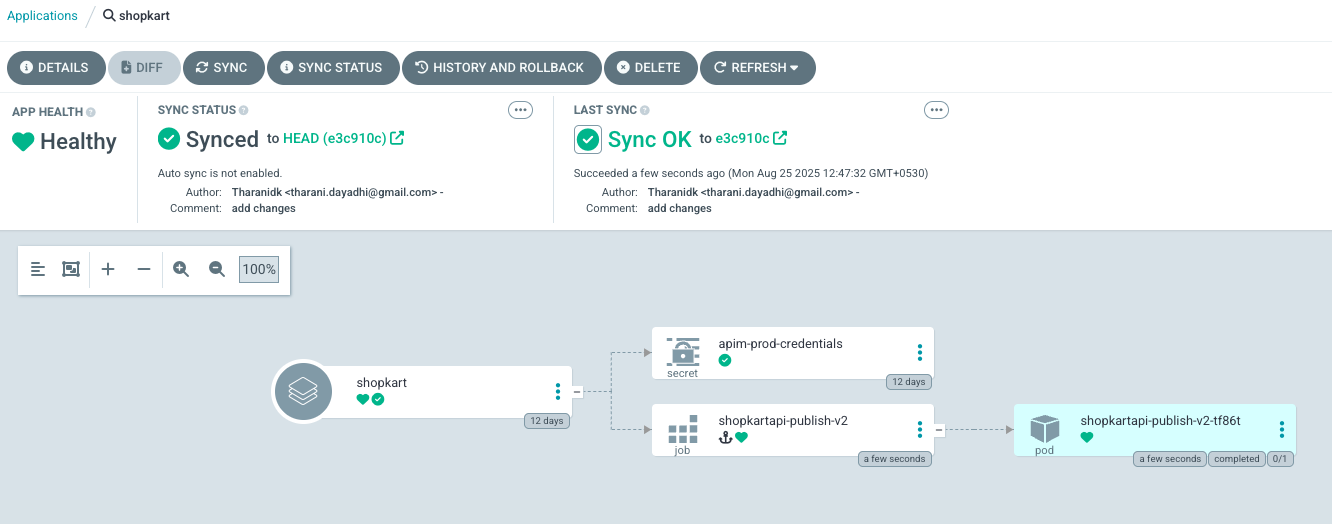 ="" li="" width="1332" height="524">
What WSO2 API Manager CI/CD can support in the future
WSO2’s current API management CI/CD solution, which uses WSO2 API Controller, ensures the following:
- API contracts are always up to date.
- Environments remain automatically synchronized.
- Audibility is maintained through Git history and pull request (PR) reviews.
- Clear separation of concerns between design and implementation.
To go beyond basic API deployment, this solution can be enhanced with automated testing, validation, breaking change detection, quality checks, security analysis, performance analysis, and promotions.
In future releases, we aim to enhance WSO2 API Manager’s CI/CD and GitOps capabilities in several ways to provide deeper automation, better DevOps integration, and seamless multi-environment management by:
- Integrating native GitOps to the API Manager Publisher Portal (built-in Git repository support, automatically sync APIs with Git).
- Automatically detecting and reporting drifts between Git states and actual deployed APIs.
- Having the CI/CD status dashboard within the WSO2 Developer Portal or Publisher.