

Implementing an Event-Driven GraphQL BFF with Real-Time Notifications

- Chintana Wilamuna
- Director Solutions Architect, WSO2

Photo by Sergey Svechnikov on Unsplash
Near real-time notifications have become a regular feature in modern applications. These notifications inform us
about taxi arrivals, food deliveries, prescription availability, etc. Incorporating this experience into modern
enterprise applications is crucial to offer users a smooth, simple, and secure experience.
What is Event-Driven Design?
Today, many apps use a synchronous approach when they talk to APIs. In this approach, when
a client asks the server for something, it stops and waits until it receives a reply. A synchronous API call is when
we wait for either success or failure. You've probably seen an app that takes forever to load and eventually says,
"Please try again later." Many developers like using synchronous APIs because they're simple to create, test, and
quickly move to production. But, when an app gets more complicated, has more users, or more features, this approach
can become tricky to handle and ensure it works smoothly.
We can divide the application into smaller parts, often called a microservices design. The next logical step to
enhance developer efficiency, simplify things, and make the app more responsive is to adopt an
asynchronous approach. With asynchronous API calls, the client sends a request and resumes
its tasks within the application without remaining idle and waiting.When the task finishes, the server responds to
the client. You can see this in action when using ride-sharing apps like Uber. You don't have to refresh the app
constantly; instead, Uber sends you a notification when the driver is nearby so you can be ready.
One effective method to achieve an asynchronous design is to adopt an event-driven approach. Instead of sending
requests and waiting for responses, all the different parts of the system send out events. Event consumers pick up
these events, listen to them, filter to see if they're relevant, and then take appropriate actions. These actions
can trigger more events, such as API requests or database operations, creating a chain of events. An event bus
connects those creating events and who responds to them, ensuring efficient communication.
What’s the BFF Pattern?
The Backend for Frontend (BFF) pattern, introduced by Sam
Newman, deals with issues that arise when you try to use a one-size-fits-all API (a general-purpose API) to
serve various types of clients. This general-purpose API started with desktop apps and then expanded to work with
web-based apps accessed through web browsers. Later, it was modified to include other devices like mobile phones,
smart TVs, kiosks, microwaves, refrigerators, and more. However, this approach isn't always the best choice because
these devices have different limitations, like varying amounts of memory, computing power, and screen sizes. This
can lead to more reliance on the API team and other application development teams when making changes, testing, and
releasing. The BFF pattern aims to address these challenges.
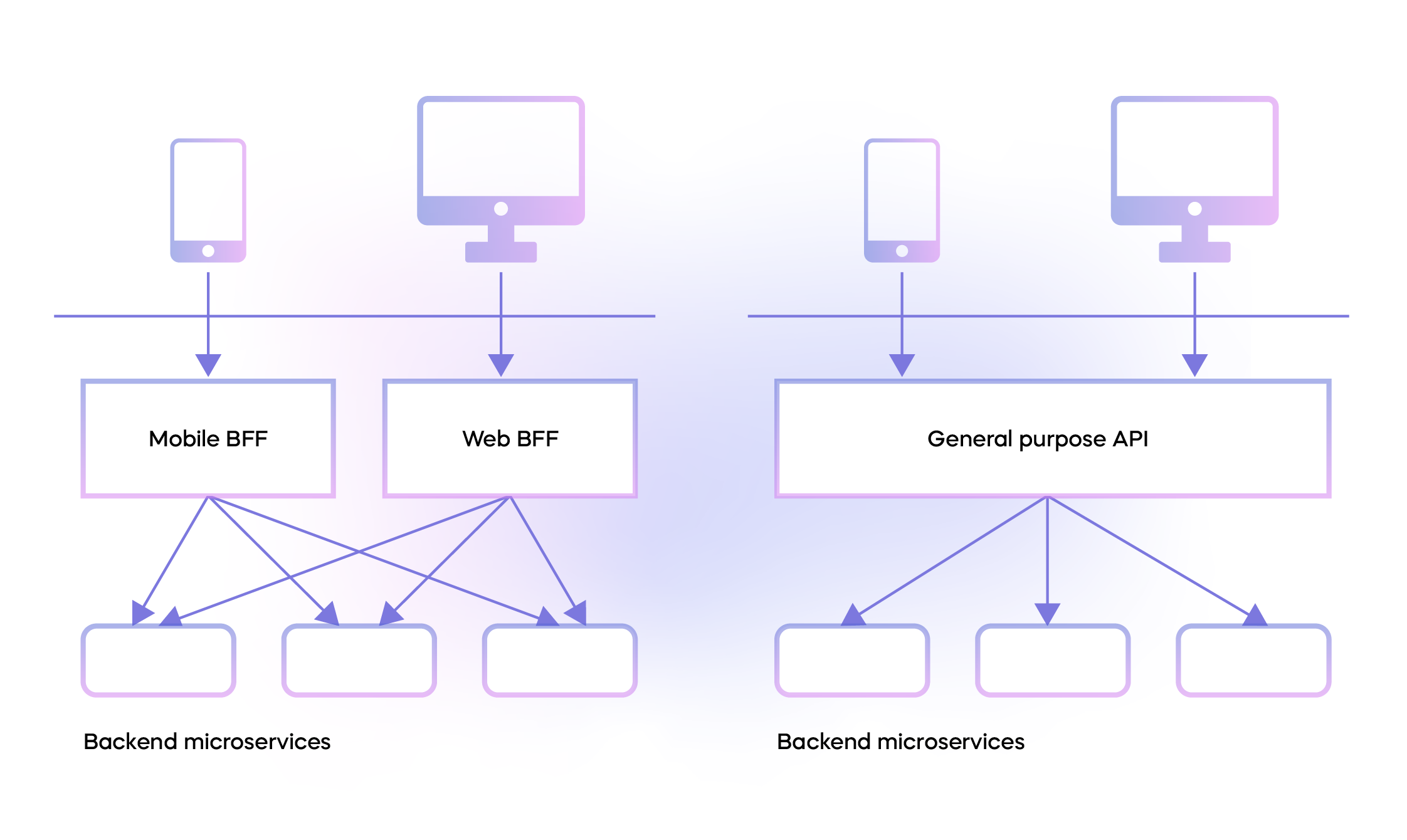
Figure 1: BFF vs. general-purpose API
Figure 1 shows the differences between the BFF pattern and the general-purpose API serving different clients.
The reference architecture for an event-driven system with the BFF pattern is shown in Figure 2 below.
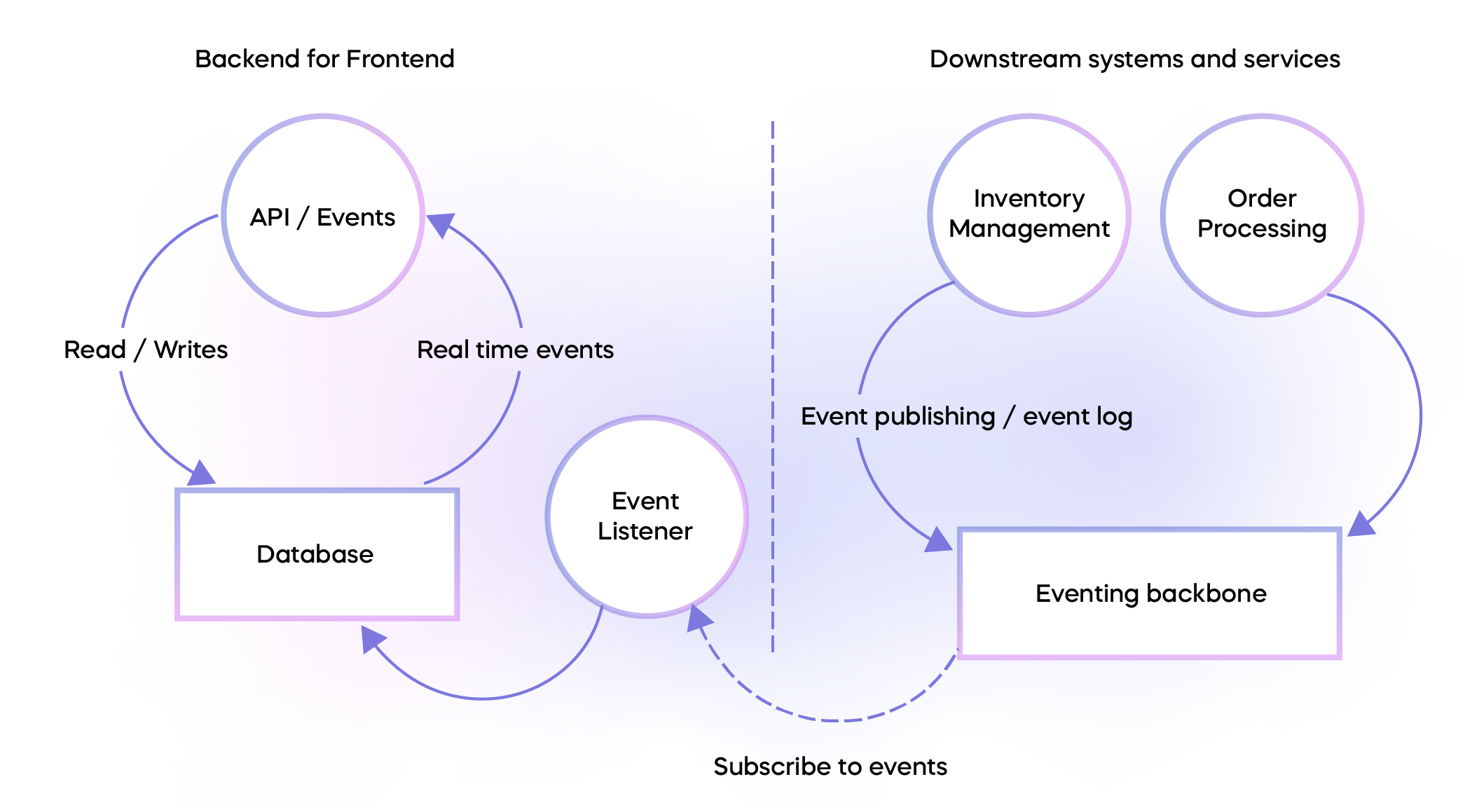
Figure 2: High-level architecture for an event-driven microservices deployment
In Figure 2, the left side represents the BFF portion, which consists of several key components. These components
include an event listener, a database (DB) for storing data, and an API for sending notifications and providing
messages to the app.
- The event listener subscribes to events generated by various backend systems.
- The database serves as a way to store data over time and sends alerts when there are changes in the data,
following a pattern known as change data capture.
On the right side of Figure 2, you can see the downstream systems and services. These are microservices that support
various business functions. Separate teams manage these microservices that adhere to domain-driven design (DDD)
principles. Each microservice has its own codebase, database, and release schedule, and is deployed into distinct
namespaces.
Each circular shape in Figure 2 represents a specific domain, and within each domain, there can be a collection of
services working together.
Implementation Details
Selecting the right technologies and methods for setting up this architecture can be tricky because so many options
are available. In general, there are two main approaches to tackle this challenge:
- Build Your Own: This means creating everything from the ground up, including the infrastructure
and domain-specific business services. - Use Best-of-Breed Software as a Service (SaaS) Solutions: Here, you focus on building user
experiences on top of existing SaaS solutions.
Building your own infrastructure can be time-consuming and resource-intensive. On the other hand, relying solely on
pre-existing platforms might fall short of your exact needs, often covering about 60% of your requirements and
leaving the remaining 40% unaddressed. This can be problematic for several reasons:
- Some SaaS platforms cater more to individual developers’ needs than enterprises.
- They might lack support for critical enterprise needs such as collaborative development, flexible pipelines, or
multiple environments. - Limited plugins or extension points can limit customization.
Given this situation, it may seem safer to create everything from scratch using a cloud provider like AWS, Azure, or
GCP. However, we'll introduce you to a better approach to solving this problem. But first, let's explore what it
would look like if you implemented this using AWS as an example.
This AWS blog outlines a similar
approach for building an event-driven BFF. We will reference the diagrams from the same blog post.
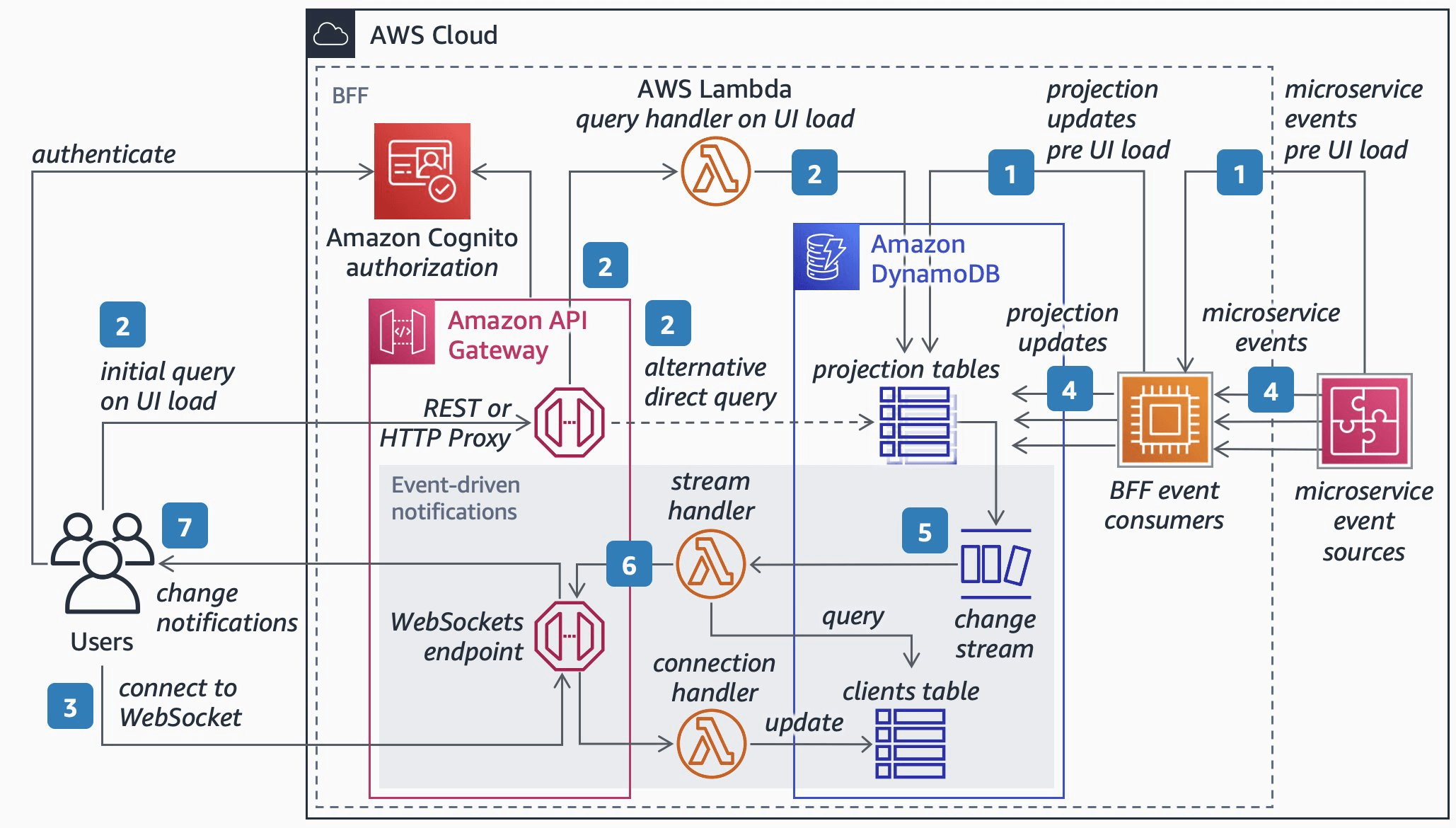
Figure 3: AWS reference architecture for BFF with a REST API [Source:
href="https://aws.amazon.com/blogs/mobile/backends-for-frontends-pattern/">AWS]
Figure 3 shows an event-driven BFF with a REST API. The client calls the REST API through the API gateway. The
GraphQL version of this architecture has been reproduced below for clarity.
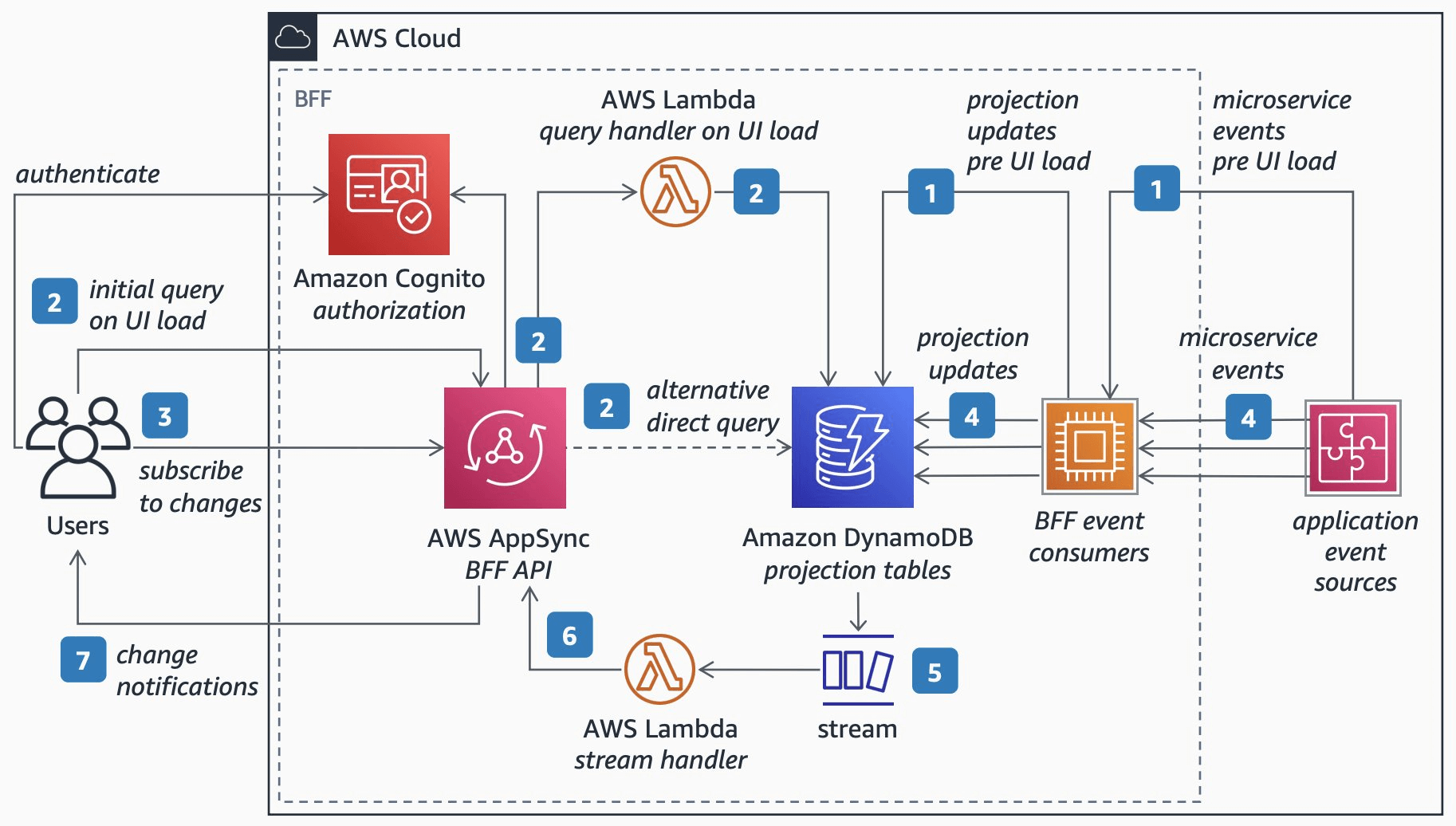
Figure 4: AWS reference architecture for a BFF with a GraphQL API [Source:
href="https://aws.amazon.com/blogs/mobile/backends-for-frontends-pattern/">AWS]
Figure 4 illustrates a shift in architecture when transitioning to GraphQL. The reference implementation focuses
solely on the BFF component, neglecting downstream services. The following elements are needed to create a
comprehensive end-to-end system, which are absent in Figures 3 and 4:
- Source Code Hosting: You need a place to host your source code.
- Build Pipelines and Infrastructure: You must set up build pipelines and the necessary
infrastructure. You can choose to provision these resources yourself or use SaaS offerings, and you'll need to
establish the essential connections. - Environments: If you require different environments like development, testing, and production,
you'll likely need to replicate your setup and create Terraform scripts for each. - DDD: AWS doesn’t inherently support DDD. The closest option is using Amazon Elastic
Kubernetes Service (EKS) and Kubernetes namespaces as domains. However, this approach introduces complexities,
such as setting up network rules to isolate these domains.
If we include all of the above, the timeline for building this infrastructure can extend from a few weeks to six
months, plus you will have to consider how to manage and operate on an ongoing basis. Fortunately, there's a more
efficient approach.
Let's reconsider using best-of-breed SaaS solutions, where we avoid building our own platform and instead utilize
existing solutions. Additionally, we can choose not to host anything on our servers. Instead, we can leverage
existing services. Now, let's explore how this same architecture looks when implemented with
href="https://wso2.com/choreo/?utm_source=article&utm_medium=link&utm_campaign=article_link_event_driven_graphql_bff_230905">Choreo.
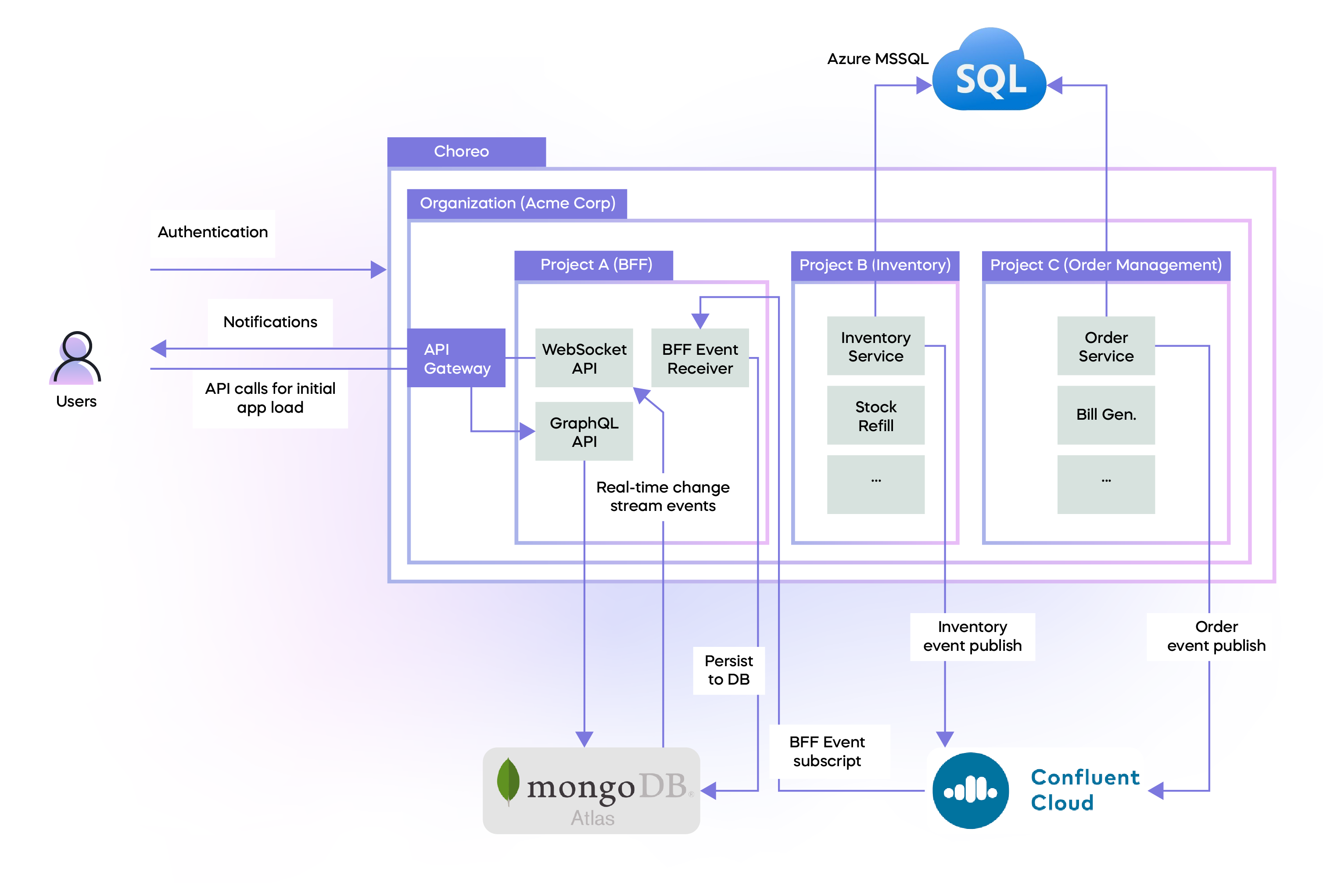
Figure 5: Event-driven GraphQL BFF with Choreo
Figure 5 presents a detailed view of the system. Let's break it down step by step:
- Automatic Organization Creation: When a developer signs up with Choreo, the system creates an
organization for them. This organization serves as a global workspace for all their components, similar to a
personal workspace. - Projects A, B, and C: You can create projects through the user interface (UI). Each project
corresponds to a domain in DDD. Services within a project can automatically discover and communicate with each
other. From a technical standpoint, think of a project as a cell in a
href="https://github.com/wso2/reference-architecture/blob/master/reference-architecture-cell-based.md">cell-based
architecture. - Organization-Wide API Gateway: The system provisions an API gateway for the entire
organization. This API gateway is accessible to any service within a project, allowing it to expose public APIs. - Team Autonomy: Small and large teams can efficiently manage their services within projects. DDD
is seamlessly integrated into the core workflow, eliminating the need to set up complex network or firewall
rules, Kubernetes namespaces, etc.
This setup showcases how the platform handles infrastructure-related tasks, allowing teams to focus on their core
objectives. Let's explore the remaining details.
Projects B and C represent downstream services:
- These downstream services use the same database instance. However, they can select different storage methods for
their data. - All these downstream services regularly send out events to Confluent Cloud, which functions as a managed Kafka
service.
Project A (BFF)
- The BFF event receiver actively subscribes to incoming events, processes them, and stores them securely in
MongoDB Atlas. - A WebSocket API is in place to handle change stream events. It processes these events and dispatches
notifications to users. - The GraphQL API accesses data stored in MongoDB and serves as the BFF API for the client applications.
Now, let’s compare the GraphQL vs. REST change in the AWS diagram and Choreo.
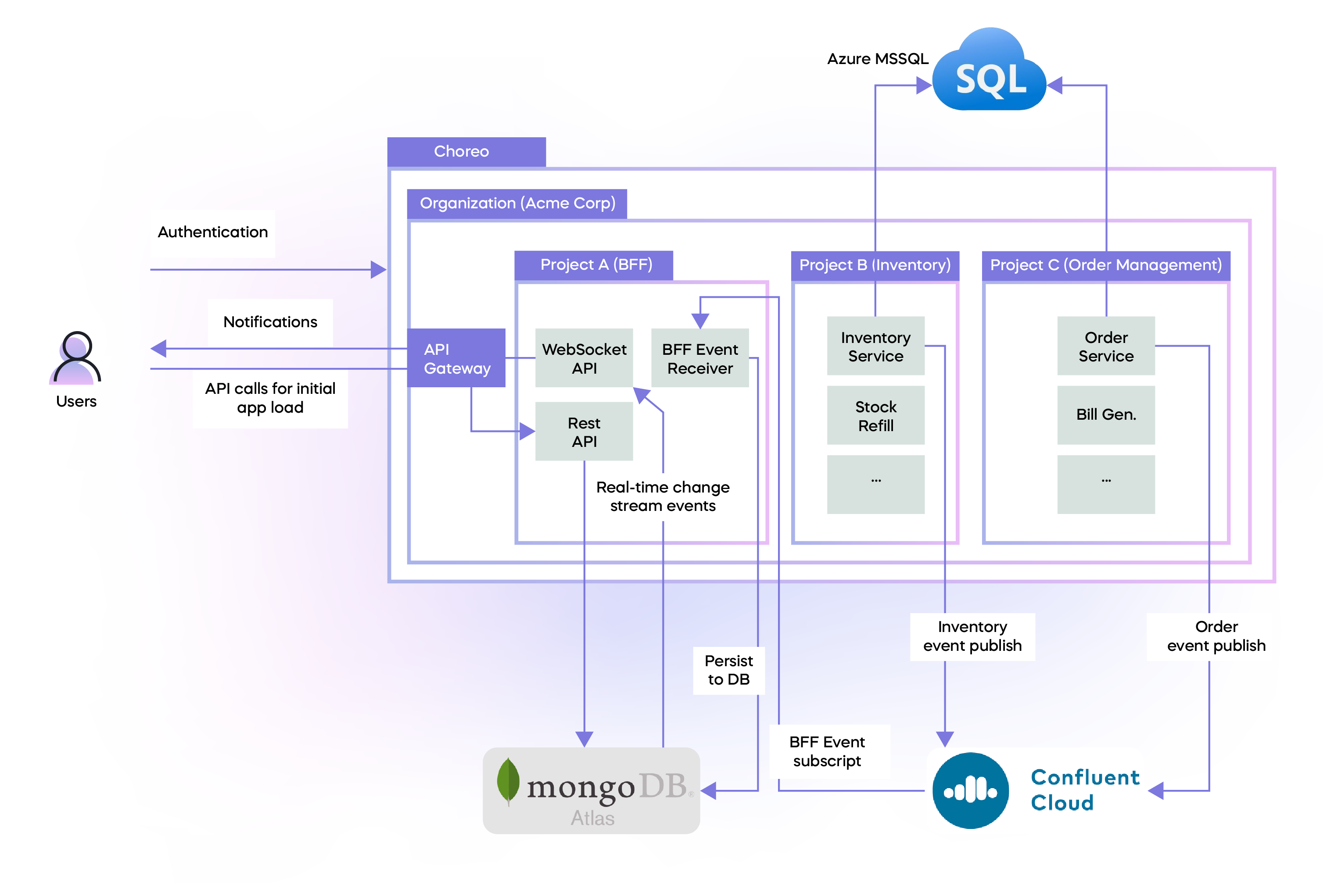
Figure 6: Event-driven REST BFF with Choreo
As shown in Figure 6, the only modification is the name on the box. The security measures and the overall system
architecture remain unchanged.
It's important to note that all the white boxes in Figure 6 represent various services and APIs. The code for
these services can originate from private GitHub repositories, which developers manage. This enterprise architecture
is entirely cloud-hosted and relies on top-tier solutions that are carefully chosen to align with specific use
cases.
Comparing AWS and Choreo
The following table shows the differences between the highlighted solutions based on the architecture diagrams for
this use case.
|
AWS |
Choreo |
|
|---|---|---|
|
Source code repos |
Not mentioned (configure your own) |
Connect your GitHub repo |
|
DDD |
No built-in method to implement DDD |
In-built to user workflow ( create projects for domains) |
|
Build pipelines |
Not mentioned. Create your own |
In-built |
|
Multiple environments |
Not mentioned. Create your own through Terraform |
In-built |
|
Bring your own infrastructure |
Many configurations necessary |
Straightforward |
|
Configuration management (environment variables) |
Roll out your own |
In-built |
|
Release management |
Not mentioned. Design your own |
In-built. By default, build on commit and deploy to development |
|
Authentication |
Using Cognito |
In-built |
|
API Management |
Using AWS Gateway |
In-built |
|
Runtime infrastructure |
Multiple choices. Design based on requirements |
K8s. Transparent to devs. No YAML editing |
|
Platform capabilities |
Thousands of different building blocks to choose from |
One coherent platform for application development |
Conclusion
Asynchronous APIs enhance the user experience by removing the need for users to wait for the server's response.
Event-driven architectures offer a method for implementing asynchronous communication for API calls and among a
distributed network of microservices. However, when relying solely on a general-purpose API layer, setting up a
distributed, event-driven architecture to deliver robust experiences across various clients can be challenging. This
is where the BFF pattern comes to the rescue, addressing most of these challenges.
Creating a BFF layer with real-time notifications for clients by integrating various infrastructure components from a
platform like AWS can be a complex and time-consuming task. In contrast, we see a simplified process when we explore
this architecture implemented using Choreo. It empowers developers to establish an event-driven BFF without
requiring extensive installations or configuration changes, making the development process more straightforward and
efficient.