

Introducing Agent-Flavored Markdown (AFM): No Code, Portable AI Agents

- Maryam Ziyad Mohamed
- Senior Technical Lead , WSO2
Advances in large language models (LLMs) and their widespread accessibility have transformed both what software can do and how we build it. The use of LLMs has quickly evolved from simple single-turn interactions to AI agents that reason, use tools, manage state, and operate autonomously.
Approaches to AI agent development range from no-code and low-code to pro-code frameworks and tools, with each providing different levels of control and abstractions. However, the instructions for the agent, which naturally often make up most of the agent declaration, are often intermingled with configuration, including those related to the LLM, tools, and how the agent is triggered. These configurations often get in the way of declaring the core of the agent: its instructions.
Moreover, implementing an agent for a specific framework requires understanding framework-specific abstractions. These abstractions impact portability: migrating from one framework to another, which given the rapid changes in the agent ecosystem can be a fairly common requirement, becomes complex and time-consuming.
While AI-assisted tools could simplify agent development and migration to a certain extent, there could still be a fair amount of verification and validation required, especially given the lack of one-to-one mapping across frameworks.
Agent-Flavored Markdown
Agent-Flavored Markdown (AFM) is a markdown-based, natural language-first approach to define AI agents. AFM distinguishes between the instructions of an AI agent and the configuration required for the agent to work. The instructions (directives and guidelines in natural language) are specified in markdown format—familiar to developers, but also natural to domain experts who are not developers. Configuration is specified in YAML front matter. The AFM specification defines platform-agnostic configuration that enables agents to work with any framework or platform.
An AFM file consists of two distinct sections—the YAML front matter specifying the configuration and the markdown component that specifies the agent instructions, optionally leveraging markdown formatting for headings, lists, code blocks, etc. We believe that this makes agent authoring more natural and accessible to both technical and non-technical users, and it enables better collaboration by allowing independent development.
AFM also allows specifying interfaces—how an agent is triggered, for example via a chat interface or a webhook trigger, and the expected input and output signatures. For many use cases, this allows the entire executable program to be defined in AFM, also enabling end-to-end portability. This also makes a significant portion of the implementation a one-time per framework task as opposed to a per-agent task.
Here's what a simple conversational assistant looks like in AFM:
---
name: "Friendly Assistant"
interfaces:
 - type: "webchat"
---
# Role
You are a friendly and helpful conversational assistant. Your purpose is to engage in
natural, helpful conversations with users, answering their questions, providing
information, and assisting with various tasks to the best of your abilities.

# Instructions
- Always respond in a friendly and conversational tone
- Keep your responses clear, concise, and easy to understand
- If you don't know something, be honest about it
- Ask clarifying questions when the user's request is ambiguous
For a comprehensive example, see the GitHub Pull Request Analyzer agent. The following diagram illustrates the runtime execution for this agent definition, all defined in the AFM file.

This specification-driven approach enables many experiences from the same source of truth — the AFM file. In addition to cross-framework, cross-platform portability, editors can make use of this format to provide tooling support including different visual editor experiences and validation and completion capabilities.
Markdown and front matter-based formats have also emerged elsewhere for agent definitions, including Claude Code Sub Agents and Custom Agents for GitHub Copilot. Although these are framework- or tool-specific, their adoption demonstrates the suitability of this format for agent authoring and readability. Agent Skills, which makes reusable skills and expertise available to agents, also uses a similar format, further demonstrating its suitability.
Key Features
Tools: Tools enable AI agents to take actions; perform operations, interact with external systems, access data, etc. The current version of the AFM specification supports tools via the Model Context Protocol (MCP) over the streamable HTTP transport. The MCP tool configuration specifies the transport, a URL if the transport is the streamable HTTP transport, and optionally authentication and tool filter configuration.
Here’s what GitHub MCP tool configuration could look like:
tools:
 mcp:
   - name: "github"
     transport:
       type: "http"
       url: "https://api.githubcopilot.com/mcp/"
       authentication:
         type: "bearer"
         token: "${env:GITHUB_TOKEN}"
     tool_filter:
       allow:
         - "pull_request_read"
         - "get_file_contents"
- "pull_request_review_write"Interfaces: The specification defines interface kinds to represent how the agent is triggered and the signature (expressed as JSON schema) for the expected inputs and outputs, allowing them to be validated. The specification currently defines the following interfaces:
- consolechat: Command-line/terminal chat interface (default if not specified)
- webchat: Web-based chat interface with HTTP endpoint configuration
- webhook: Event-driven interface with subscription and user prompt templating support
The webhook interface supports prompt templating, allowing dynamic construction of the user prompt for an agent run from incoming webhook data. The variable substitution syntax (explained below) can be used to reference fields from the request payload or headers directly in prompts.
For example, when the webhook is triggered on a change to a pull request (PR), you can extract the PR URL to create a specific user prompt:
Analyze the changes proposed in ${http:payload.pull_request.url} based on the
specified criteria.
Variable Substitution: The AFM specification supports a variable substitution syntax to reference sensitive or dynamic values, facilitating portability across frameworks and/or environments while maintaining security.
The specification defines three standard prefixes:
- env — Environment variables (e.g., ${env:GITHUB_TOKEN})
- http:payload — Webhook payload fields (e.g., ${http:payload.event})
- http:header — Webhook HTTP request headers (e.g., ${http:header.User-Agent})
Running AFM Agents
There are three main approaches to run AFM agents:
- Interpreter: An interpreter reads an AFM file, extracts the agent’s configuration and the instructions, and dynamically creates an agent and exposes it via the specified interface(s).
- Library function: A library function accepts an AFM file as an argument, initializes an agent based on the configuration and instructions, and attaches it to the specified interface(s). Such a function may also return the agent instance to use elsewhere in the project and is called explicitly in the code.
- Code generator: A code generator translates an AFM file into framework-specific code.
With an interpreter implementation, the agent and its interfaces become the entire program, whereas with the other two approaches, AFM agents can exist alongside other code, making AFM a high-level agent authoring interface.
To try out AFM agents today, use a reference interpreter implementation.
For the GitHub Pull Request Analyzer agent, the interpreter works as follows: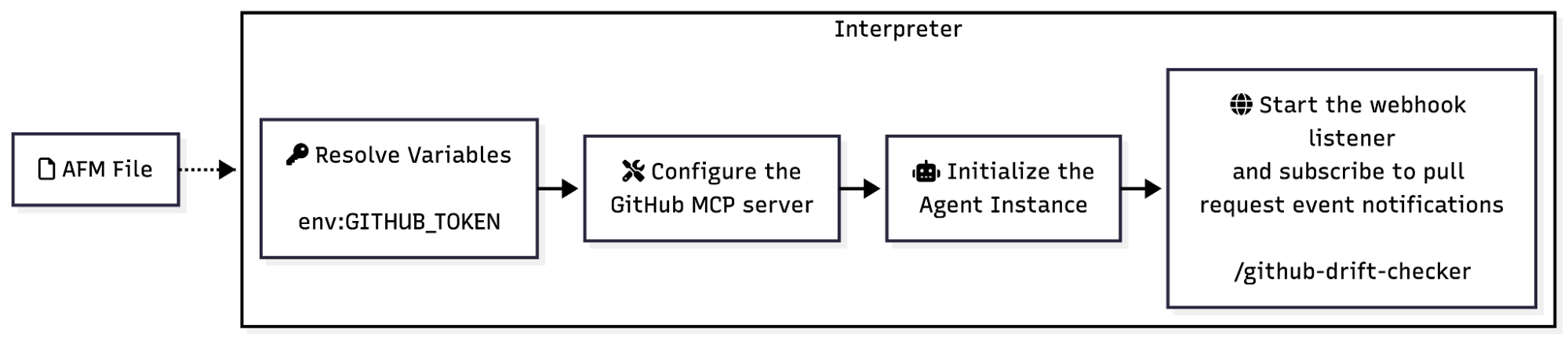
Design trade-offs
While AFM supports an expression syntax, it is intentionally restricted to refer to variables or access payload/header data and is not a generic expression syntax that would allow complex logic. It also does not support programmatic control such as conditional logic or loops and relies on natural language directives for such behaviour, handing over control to the agent and the LLM. While these choices could impact expressiveness and flexibility, and may result in additional LLM calls compared to code-based implementations, it allows AFM agent authoring and readability to remain straightforward and the AFM file to remain a focused definition of the agent.
For similar reasons, AFM is also focused on agent definitions rather than “workflows” orchestrating multiple agents or LLM calls according to pre-defined logic. While multi-agent interactions are a future goal for AFM, it may not necessarily provide programmatic control as with workflows.
Future work
The AFM specification is under active development, and future work includes support for multi-agent interactions, agent memory, and agent identity. See Future Work for more.
Ready to try it out and contribute?
Try out a reference implementation to run AFM agents.
AFM is an open-source project and we welcome feedback and contributions to the specification and reference implementations over on GitHub!