

Introducing Asgardeo MCP Server

- Sagara Gunathunga
- Head of IAM DevRel, WSO2
Today, we're excited to officially release the Asgardeo MCP Server, enabling developers to securely manage their Asgardeo organizations using natural language—right from their favorite code editors like VS Code, Claude Desktop, Cursor, Windsurf, and other MCP-compatible clients.
Asgardeo already supports Login Flow AI and Branding AI, making it easier to build secure, customized login and registration experiences using plain language. With the Asgardeo MCP Server, we’re taking that experience a step further.
Now, as a developer, you can register applications, design login flows with MFA options, and manage users—all using natural language commands, without leaving your code editor.
For example, you can simply prompt:
"Register this React app in Asgardeo and add passkey and email OTP login"
With the Asgardeo MCP server, your code editor becomes an intelligent assistant—interpreting natural language commands and executing the necessary steps to configure your Asgardeo organization.
What is MCP, and why an Asgardeo MCP Server?
The Model Context Protocol (MCP) is an emerging open standard for connecting AI agents with tools, APIs, and systems. As LLMs and agentic applications redefine how software is built and used, MCP bridges the gap between AI clients and real-world services—and Asgardeo is now part of that ecosystem.
Behind the scenes, the Asgardeo MCP Server receives requests as MCP messages and translates them into Asgardeo Management API calls. It automatically handles the required security configurations and scopes.
The Asgardeo MCP Server brings a new level of "vibe coding"—letting you build secure login flows and manage application access entirely through natural language, working in harmony with tools like GitHub Copilot or any AI coding assistant. For example, imagine an application developer creating a React or Next.js application GitHub Copilot assists with the core app logic, while MCP servers—like the Asgardeo MCP Server—you can connect the application with Asgardeo, add secure login flows with MFA, provisioning and managing user accounts —all through natural language. Then, with the GitHub MCP Server, you seamlessly push the code to a repository, completing the flow without ever leaving your development environment.
In practice, you can leverage the Asgardeo MCP Server in various scenarios, such as creating a customer self-service portal with secure API access, implementing service-to-service authentication in a microservices environment, or securing a mobile application with multi-factor authentication.
What you can do
With Asgardeo MCP Server you can:
- Register your applications in Asgardeo using application templates such as SPA, mobile, or machine-to-machine (M2M).
- Easily find and list applications registered in your Asgardeo organization.
- Create login flows for your applications in Asgardeo.
- Create, and search API resources for secure access control in Asgardeo.
- Authorize your applications with APIs in Asgardeo.
How Asgardeo MCP Server works
The Asgardeo MCP Server acts as a bridge between your code editor (via MCP) and Asgardeo Management APIs. When you issue a natural language instruction with the help of an LLM, your AI-powered code editor determines the necessary tools to fulfill the task and prompts you for explicit consent. Once granted, the editor sends an MCP message to the Asgardeo MCP Server, which processes the request and interacts with the Asgardeo Management API—obtaining an access token with the required scopes before making the call.

You can refer to the Asgardeo documentation for full configuration instructions. In most cases, the following configuration works for integrating the Asgardeo MCP Server with your preferred code editor:
The Asgardeo Management API uses fine-grained authorization with clearly defined scopes. As part of the initial MCP Server setup, the machine-to-machine (M2M) management application used by the Asgardeo MCP server must be explicitly authorized to access only the necessary parts of the Management API. This ensures that the MCP Server is scoped appropriately and only performs operations it's permitted to.
Once the Asgardeo MCP Server is configured, you should see the tool listed in your code editor—for example, as shown in the Claude Desktop screenshot.
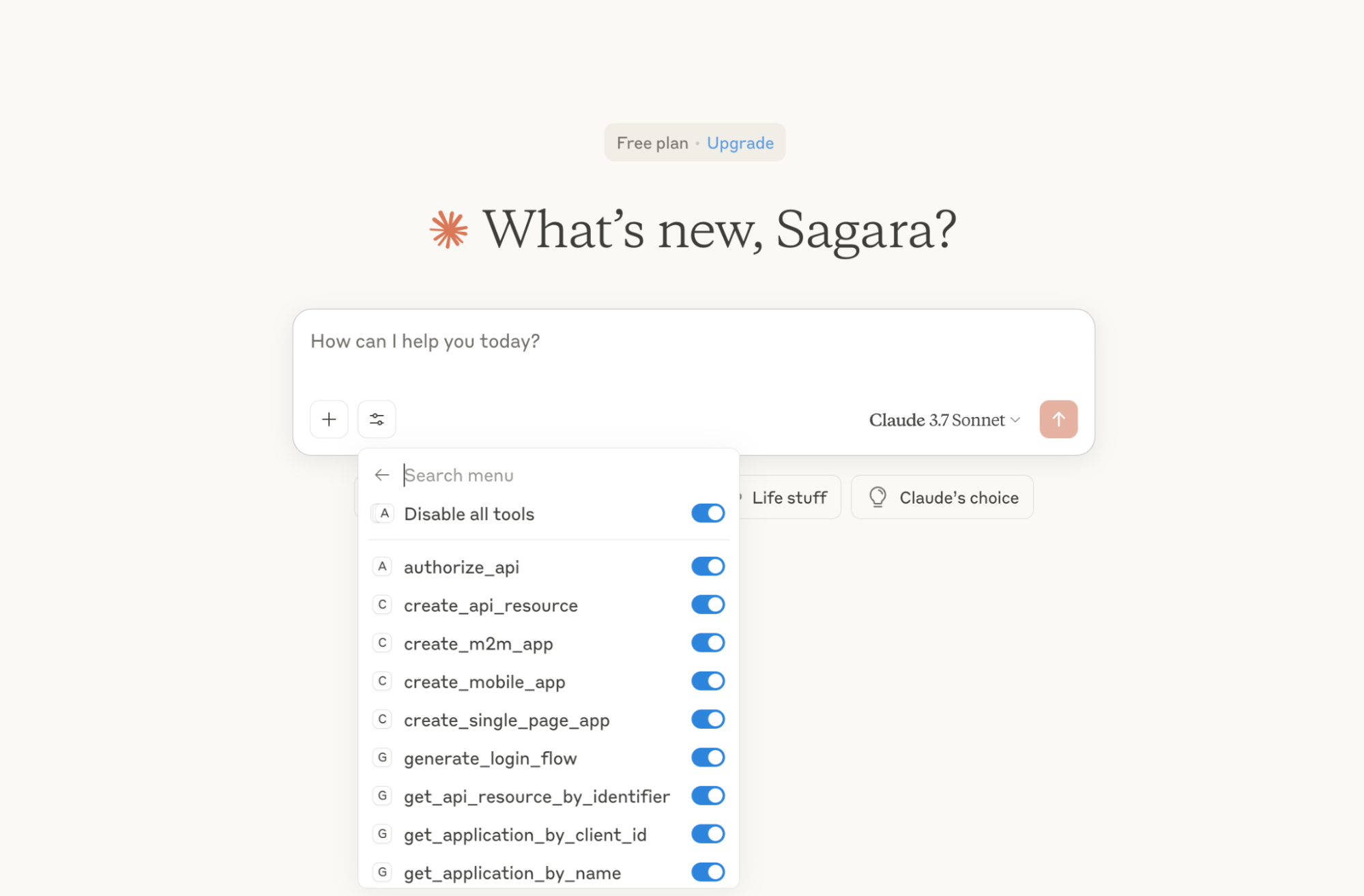
This setup ensures that your editor never handles access tokens or credentials directly. The Asgardeo MCP Server is solely responsible for communicating with the Asgardeo Management API and handling token-based access securely.
How to get started
Try the Asgardeo MCP Server with the Quickstart Guide for:
- VS Code
- Cursor
- Windsurf
- Claude Desktop
What’s next?
We’ve recently released OpenMCPAuthProxy, a lightweight proxy that simplifies OAuth2-based authorization for MCP servers by acting as an intermediary Authorization Server. It supports seamless integration with any standard OAuth provider—such as Asgardeo or any identity provider that supports OAuth 2.0/OpenID Connect—offloading the complexity of token validation and security management to the Identity Provider.
Once deployed, the proxy takes care of client requests, token validation, and secure access to MCP functions. This allows MCP servers to focus solely on core functionality without having to implement complex security logic themselves.
With today’s release of the Asgardeo MCP Server, our goal is to empower developers to build secure applications and APIs—interacting with the Asgardeo Management API using natural language.
If you’re building your own MCP server, you’ll need to secure it according to the MCP authorization specification. This requires familiarity with the OAuth 2.1 draft, OAuth 2.0 Authorization Server Metadata, and OAuth 2.0 Dynamic Client Registration specifications. We’re actively working to reduce this complexity and make it easier for you to secure your MCP servers—and you’ll be hearing more from us on that soon.
Conclusion
AI-powered editors are transforming the developer experience across the full app lifecycle. With the Asgardeo MCP Server, developers can now register applications in Asgardeo, configure secure login flows—including MFA with passkeys, push notifications, and OTPs—using natural language, and attend user management activities without ever leaving their editor.
Get started today:
- Asgardeo MCP Server Quickstart Guide
- Asgardeo MCP Server GitHub Repo
The agentic-app development space is evolving fast. We’re evolving just as fast with our agentic IAM capabilities.
If you're building agentic apps or looking to learn more about agentic IAM, join our early adopter program to get early access to what we’re building.
Join here: https://wso2.com/identity-and-access-management/ai/#early_access_program.