

Operationalizing the Model Context Protocol: Unified Governance with the WSO2 MCP Gateway

- Dinith Herath
- Senior Software Engineer, WSO2
The WSO2 API Platform offers an MCP Gateway that sits between MCP clients and the MCP servers they use, applying security, access control, rate limits, observation, and policy enforcement across all tool calls. Instead of requiring teams to write these controls directly within their MCP servers, the platform extends its existing API governance layer to cover MCP traffic. It can generate MCP servers automatically from your existing APIs when needed, proxy existing MCP servers, and control how agents interact with them in production.
Why use the WSO2 MCP Gateway
Unified control and governance
The MCP Gateway functions as a single entry point for all tool calls, ensuring that AI agents do not require direct point-to-point connections to dozens of individual servers. This architecture provides:
- Virtualization of existing APIs: Instantly convert any REST API into a virtual MCP server by automatically deriving tool definitions from OpenAPI specifications.
- Connection bridging: Seamlessly manage the connection between diverse MCP clients and the remote MCP servers, all of which run on streamable HTTP.
- Production-grade security: Enforce the Model Context Protocol’s OAuth-based authorization flow, requiring granular OAuth2 scopes, the use of resource indicators (RFC 8707) in all token requests, and rigorous token validation (including audience binding and PKCE) to govern agent-tool interactions.
- Traffic management: Protect backend resources with rate limiting and quotas based on token consumption or request volume, essential for controlling costs in heavy agentic workloads.
Strategic discovery with the MCP Hub
All published MCP servers are organized in a dedicated MCP Hub, a searchable catalog where AI developers can discover available tools.
- Standardized documentation: Each tool includes clear descriptions and input/output schemas to ensure LLMs can accurately select and invoke the correct function.
- Copy-ready configs: Developers can quickly integrate tools into clients like VS Code Copilot with pre-formatted configuration snippets.
- Lifecycle management: Admins can manage the entire lifecycle of an MCP server, from initial creation and testing in the MCP Playground to final publication and versioning.
How the WSO2 API Platform’s MCP Gateway helps you operationalize MCP
The WSO2 API Platform provides a comprehensive control plane designed to transform fragmented AI tool ecosystems into production-grade, governed environments. By centralizing the management of Model Context Protocol (MCP) traffic, the platform eliminates the need for teams to repeatedly implement MCP-specific controls from scratch every time they deploy a new AI agent.
MCP server onboarding under gateway control
With the WSO2 MCP Gateway, teams can onboard MCP servers through the console by pointing to their existing API or proxy. The platform automatically derives tool definitions from an OpenAPI definition. These tools are then governed through the gateway layer, not executed as raw MCP services.
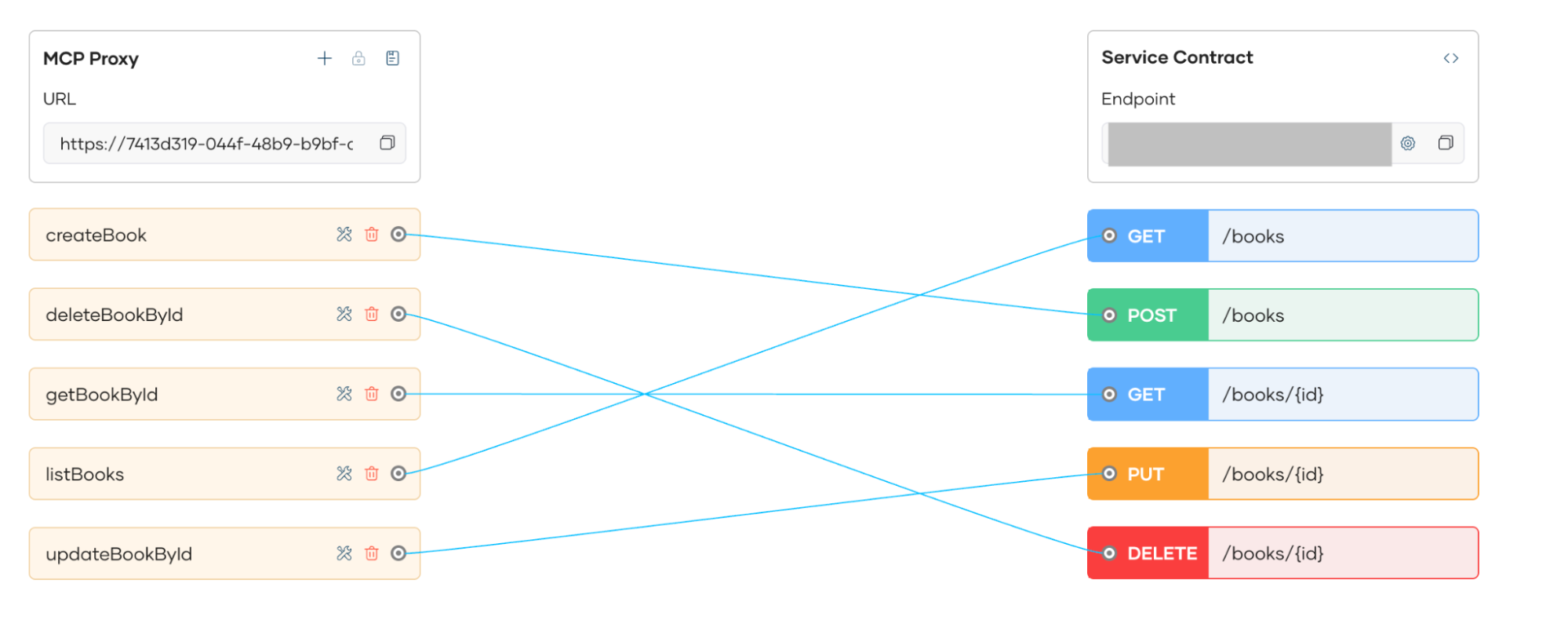
Figure 1: Tool generation view based on OpenAPI schema
Policies, security, and QoS applied at the gateway
Token validation
Every request passing through the gateway undergoes rigorous token validation. WSO2 supports both Opaque and JWT (JSON Web Token) formats, verifying signatures, expiration times, and issuer authenticity. Crucially for AI ecosystems, WSO2 fully complies with the MCP Authorization specification. For agentic workflows, this means the gateway handles delegated identity natively, ensuring the agent is securely acting "on behalf of" a verified user and that the proper MCP authorization context remains intact across the entire tool-calling chain.
OAuth2 scopes
WSO2 leverages OAuth2 scopes to define granular permissions for AI agents. Instead of giving an agent broad access, scopes allow you to map specific MCP tools (e.g., get_user_email) to specific authorization levels. This ensures that even if an agent is authenticated, it is restricted to the "least privilege" required for its task, preventing it from calling high-risk tools like delete_database without explicit scope clearance.
Rate limits and quotas
Traditional request-based throttling is often insufficient for AI workloads where agents dynamically execute tools to complete complex tasks. For MCP integrations, WSO2 introduces tool-based rate limiting, allowing you to set execution limits and usage quotas on specific tool calls. This prevents autonomous agents from triggering runaway "infinite loops," while ensuring your underlying backend services are protected from being overwhelmed by high-frequency, automated tool invocations.
Access control rules
Beyond basic authentication, the Gateway applies sophisticated access control rules such as IP filtering, role-based access control (RBAC), and integration with policy engines like Open Policy Agent (OPA). These rules can restrict agent access based on the time of day, geographical origin, or the specific "agent persona" making the call, ensuring that sensitive organizational data is only accessible under approved environmental conditions.
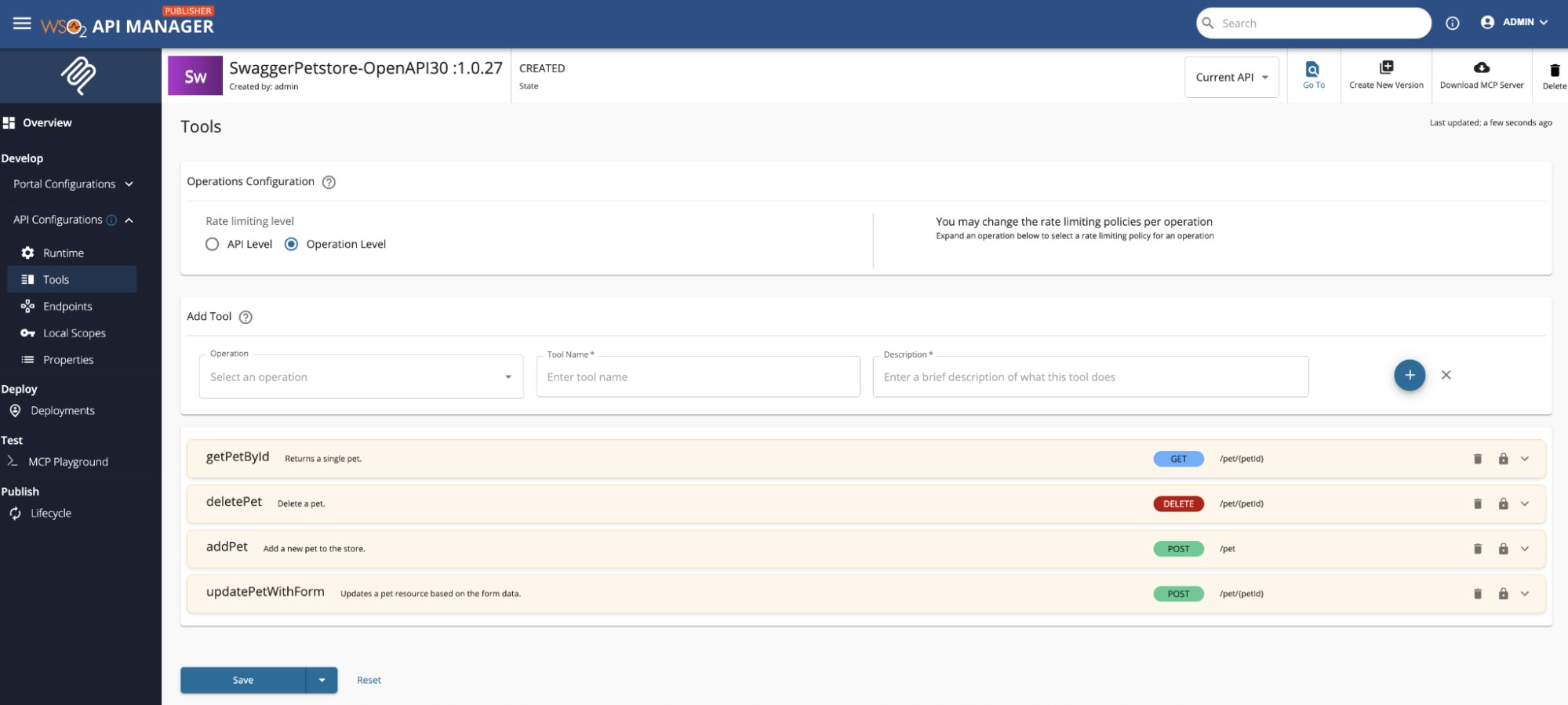
Figure 2: Policies view showing rate limiting, security, and access control for MCP servers
Test MCP behavior before publishing
The integrated MCP Inspector serves as a vital sandbox for developers to validate AI tool interactions before they go live. It allows teams to simulate agentic calls and observe how the gateway’s security policies such as rate limits, scope restrictions, and sanitization impact the tool's execution in real-time.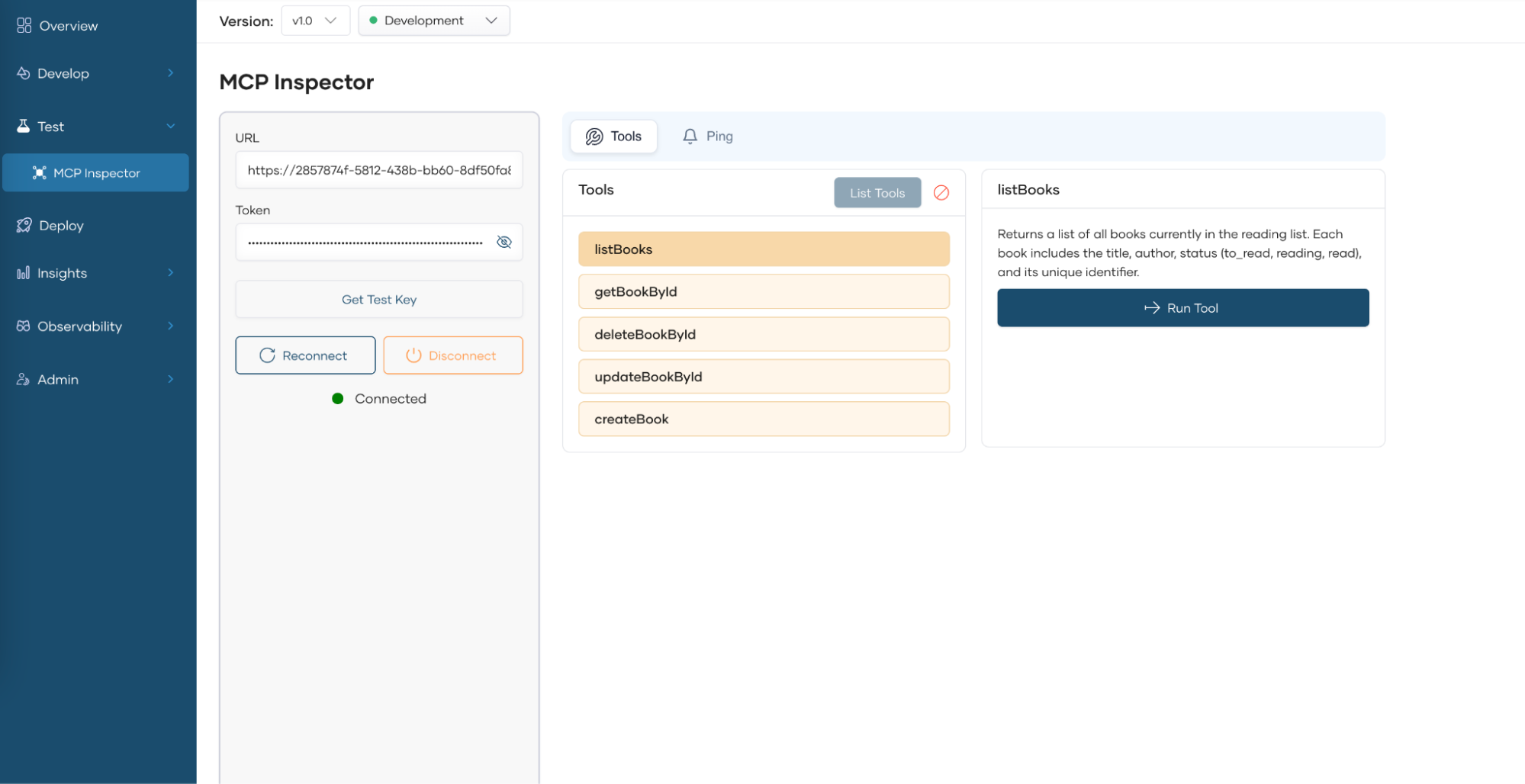
Figure 3: MCP Inspector testing view
MCP Hub for discovery
The MCP Hub acts as a centralized marketplace for an organization’s AI capabilities, transforming technical API endpoints into human-readable and agent-ready tools. By providing a single point of truth, it eliminates the fragmentation that often occurs when developers try to integrate disparate backend services into AI environments.
Within the hub, developers gain access to full tool documentation and exact invocation details, ensuring they understand the context and parameters required for each AI action. To accelerate development, the Hub provides copy-ready configurations for popular MCP clients like VS Code Copilot and Claude Desktop. This "AI-first" discovery experience allows agent developers to quickly find, test, and connect verified organizational tools to their AI models with minimal friction.
Published MCP servers appear in a dedicated MCP Hub with:
- Full tool documentation.
- Invocation details.
- Copy-ready configuration for MCP clients like VS Code Copilot.
This gives agent developers a clean, AI-specific discovery experience.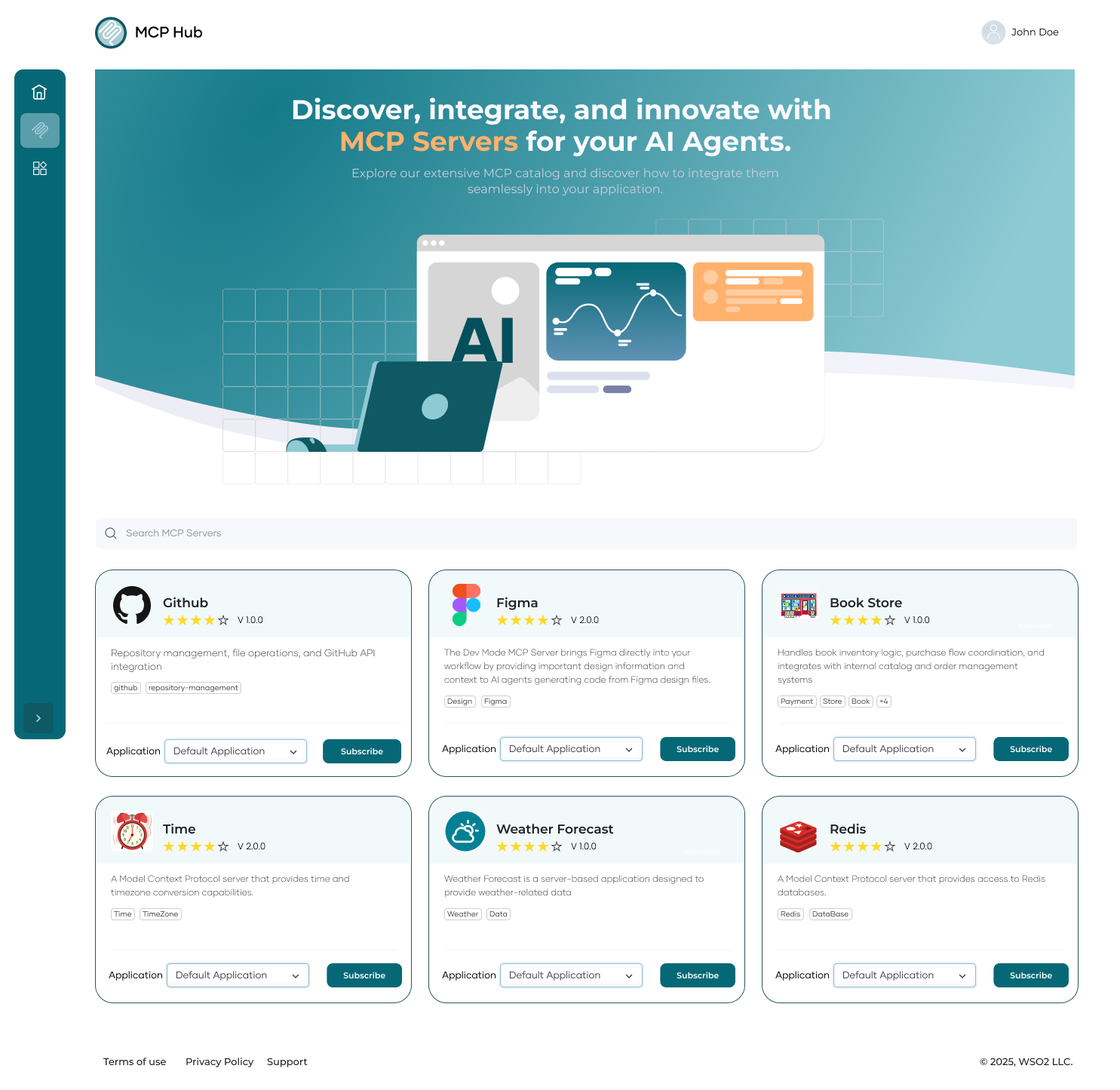
Figure 4: MCP Hub listing MCP servers
Governed interaction with AI agents
The governed interaction workflow represents the lifecycle of a secure AI transaction. When an MCP client such as VS Code Copilot, Claude Desktop, or a custom ChatGPT agent attempts to execute a function, the WSO2 MCP Gateway acts as a "smart interceptor". This layer ensures that every action taken by an autonomous agent is transparent, authorized, and compliant with enterprise safety standards.
The governed workflow
- The call enters the MCP gateway
Instead of the agent connecting directly to a sensitive backend, the request is routed to the gateway. This centralizes all AI traffic, providing a single point of governance for the entire organization. - The gateway validates scopes and policies
Before any logic is executed, the gateway performs a high-speed check. It verifies that the agent has the correct OAuth2 scopes and that the request does not violate real-time constraints like rate limits or safety guardrails. - It routes the request to the correct MCP server
Once authorized, the gateway performs intelligent routing. It directs the request to the specific MCP server whether hosted on-premise, in a private cloud, or as a third-party service ensuring the agent reaches the correct data source. - It logs and enriches the interaction with metadata
Every interaction is recorded for auditability. The gateway adds critical metadata, such as user identity, correlation IDs, and cost tracking tags, providing a complete audit trail of what the AI did and why.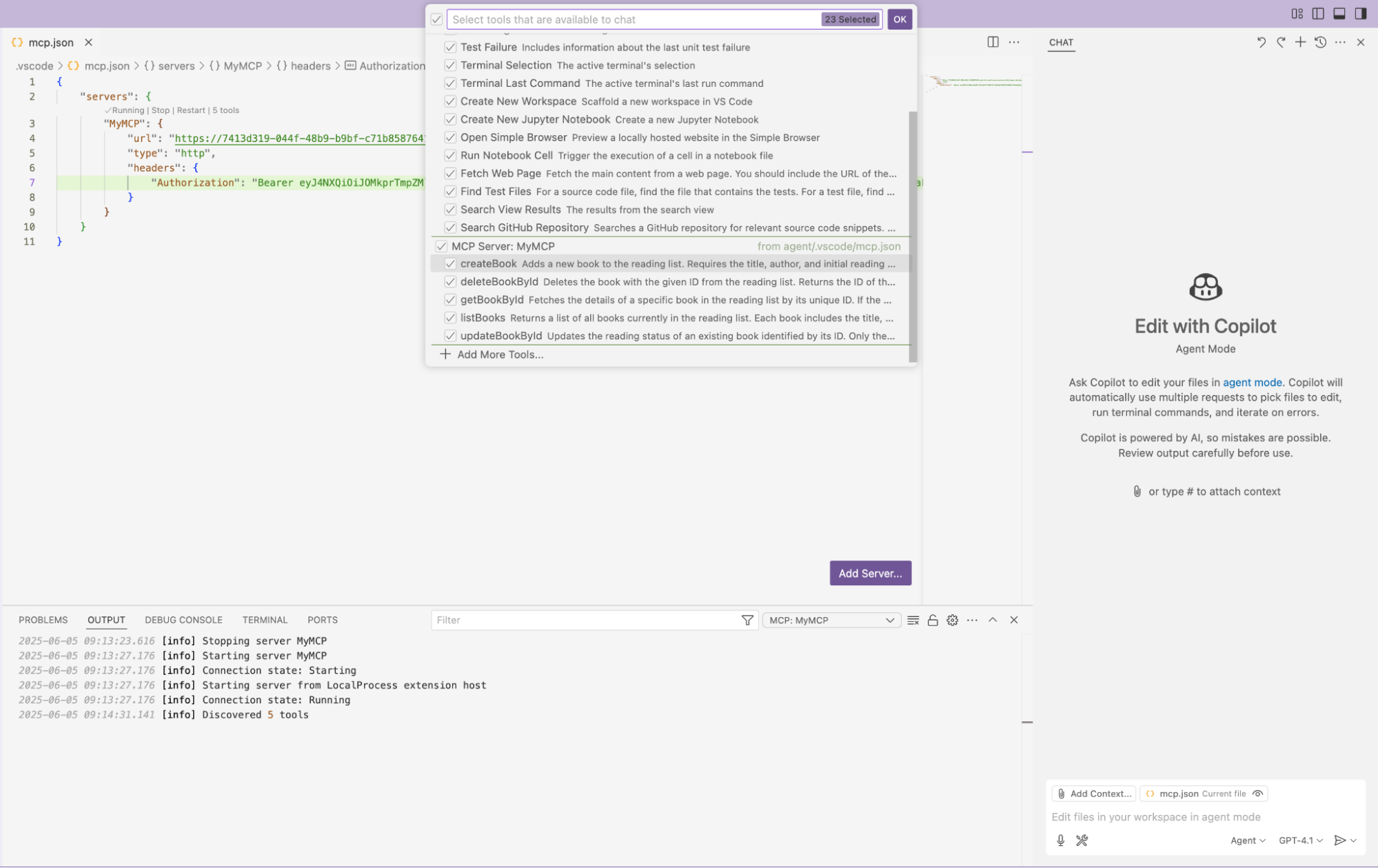
Figure 5: Agent calling an MCP server governed through the gateway
Combining LLM and MCP governance
Although MCP governs tools, most agents still rely heavily on LLMs. An LLM gateway manages prompts, model routing, and token spend. When paired with an MCP gateway, organizations get full-stack governance. For example, a customer support assistant might:
- Ask the LLM to summarize an issue.
- Use MCP to fetch order history.
- Ask the LLM to generate a response.
- Use MCP to initiate a refund.
Each step passes through either the LLM gateway or the MCP gateway. With WSO2’s platform, both layers share consistent security policies, rate limits, and logging. This unified approach prevents blind spots where LLM output drives unsafe MCP actions.
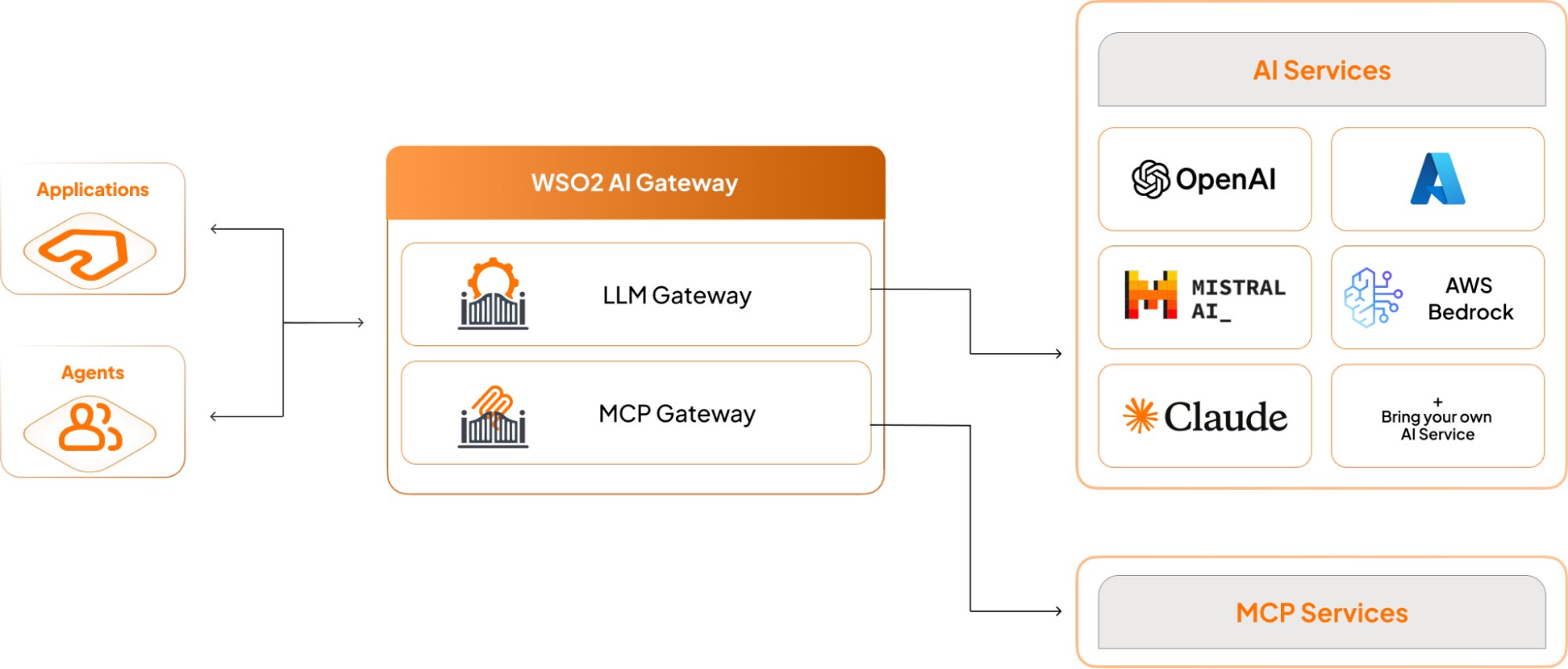
Figure 6: LLM and MCP governance with LLM and MCP gateways
How organizations deploy MCP gateways
- Step 1: Publish MCP servers
Wrap key APIs behind MCP. Start with read-only tools. - Step 2: Add a gateway
Introduce governance, authentication, rate limits, and filtering. - Step 3: Expand tools
Expose write-enabled tools with strict scopes. - Step 4: Add an AI gateway
Connect LLM traffic to WSO2’s LLM Gateway for unified governance across prompts and MCP actions. - Step 5: Scale to teams
Organize tools by department. Use the WSO2 API Platform as the central platform.
Looking ahead
As agent workloads increase, organizations will need consistent governance across tools, models, and workflows. MCP gateways provide the missing layer that connects agent intelligence with enterprise reliability.
With the WSO2 API Platform, teams gain a stable foundation for building agent-driven systems without sacrificing control or security.
In practice, MCP enables action. MCP gateways ensure that action is safe, predictable, and auditable.