

WSO2 Identity Server 7.1: Open-Source IAM with AI-Powered Efficiency

- Sagara Gunathunga
- Head of IAM DevRel, WSO2
With the release of WSO2 Identity Server 7.1, WSO2 continues to lead with innovation in the open-source identity space by introducing AI-powered development capabilities. The new features introduced, enable developers to secure applications more efficiently using natural language instructions, reducing time, effort, and the required identity domain expertise.
In this blog post, we’ll explore how architects and application developers can benefit from these AI-powered enhancements and also highlight some of the key new features in the WSO2 Identity Server 7.1 release.
AI-powered capabilities
A key part of WSO2’s AI strategy is enabling developers to use generative AI to speed up identity-related configurations. Instead of manually setting up identity server configurations, developers can describe what they need in natural language, and AI will generate the required configurations within WSO2 Identity Server. This reduces the time, effort, and domain expertise needed during development.
These capabilities are available as a free cloud service. You can access them by creating a subscription in the WSO2 AI Subscription Portal and integrating it with WSO2 Identity Server in your development environment. This can be shared with your team or used in a locally running WSO2 Identity Server instance in your laptop.
WSO2 AI only needs to be connected during development. Once your identity configurations are set up, there’s no need to connect any other environments such as staging or production to WSO2 AI. After all, these capabilities can be considered as development-time productivity tools.
To address any potential privacy and data residency concerns, no data from your WSO2 Identity Server development instance is exposed to the WSO2 AI cloud service, giving you peace of mind in case sensitive data is accidentally present in your development environment.
In the following sections in this blog, we will introduce Login Flow AI and Branding AI capabilities available in the WSO2 Identity Server 7.1 release. To try out all WSO2 AI capabilities, simply follow this guide here.
WSO2’s AI strategy is not only limited to the above capabilities. You can read about the AI capabilities we have introduced to Asgardeo, WSO2’s public identity cloud offering, which includes AI agent development, here. These capabilities will eventually be available with future releases of WSO2 Identity Server.
Login Flow AI
The previous version, WSO2 Identity Server 7.0, introduced a visual login flow designer, allowing developers to build anything from simple to complex login flows by dragging and dropping MFA options and federated IdPs. It also provided a WYSIWYG (What You See Is What You Get) experience, enabling developers to preview the exact runtime login experience during development time within the visual editor itself.
Login Flow AI takes this concept further by integrating AI-powered capabilities into the tool. Developers can now generate secure, production-ready login flows using simple natural language instructions. Instead of dealing with complex IAM terminology, they can describe the desired login flow in plain language, and Login Flow AI will generate the corresponding flow in a graphical format within the Login Flow Designer. The instructions can be as simple as password or magic link or can get as complex as Password or Google then SMS if the user has manager role, from the Primary user store, and no other session.
Find out how you can get started with Login Flow AI with WSO2 Identity Server here.
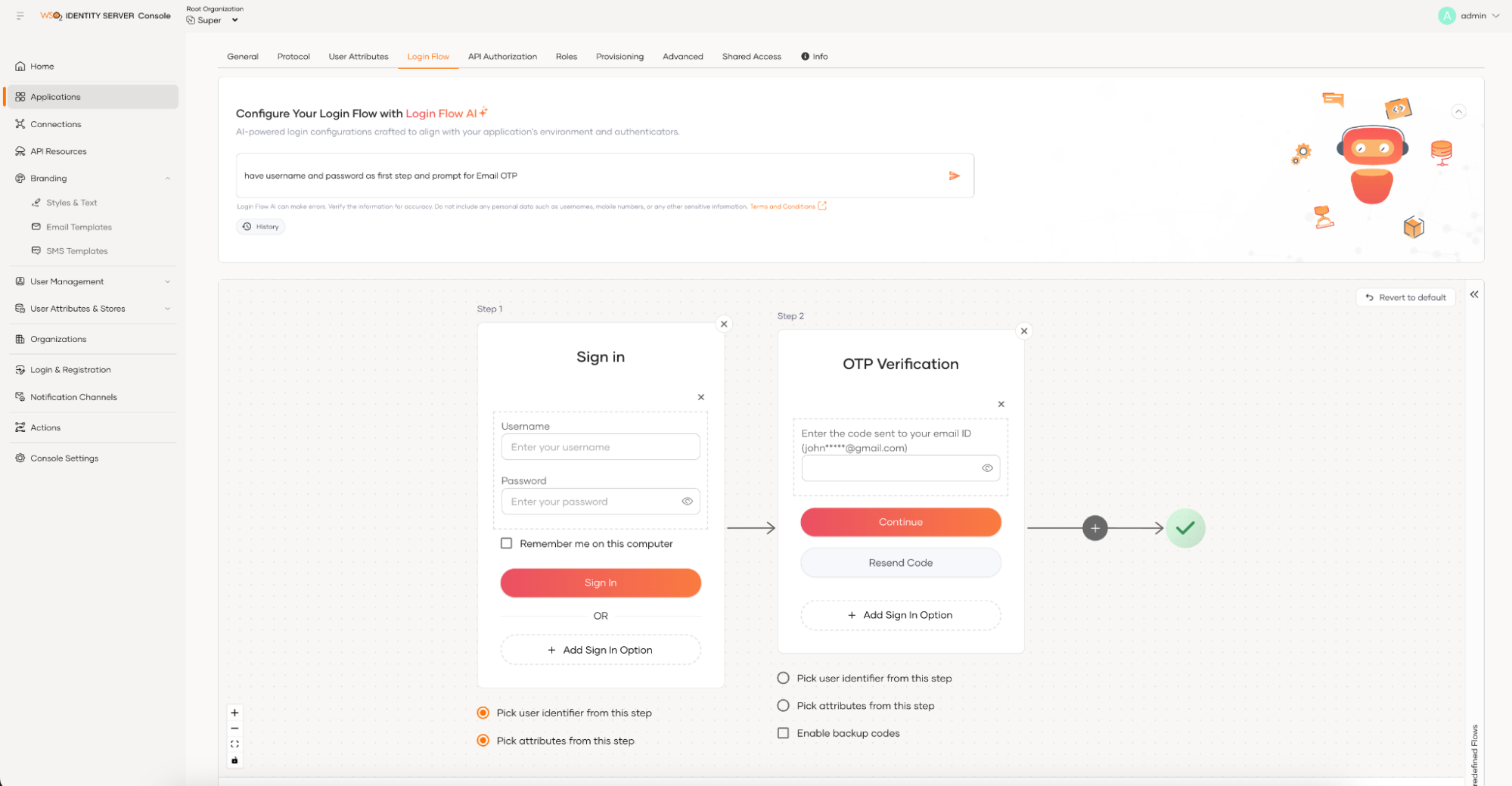
Figure 1: Login Flow AI
Branding AI
The login experience for modern applications goes beyond a simple username and password interface. It now includes elements like OTP verification, password resets, and forgotten password functionalities. The same applies to the onboarding experience, which is no longer limited to a basic form submission. Instead, you need to enable user sign-ups through social platforms and verify users via an OTP. As a developer, it’s crucial to ensure that all user touchpoints are rebranded to match your organization’s identity, which can often be a time-consuming task.
With Branding AI, you simply provide publicly available branded content, such as your organization’s website URL. The tool extracts the branding details and automatically applies them to your login flow. If you're not satisfied with the results, you can instruct the tool to regenerate them. At the very least, Branding AI offers a great starting point, saving you valuable time.
Learn how you can get started with Branding AI with WSO2 Identity Server here.
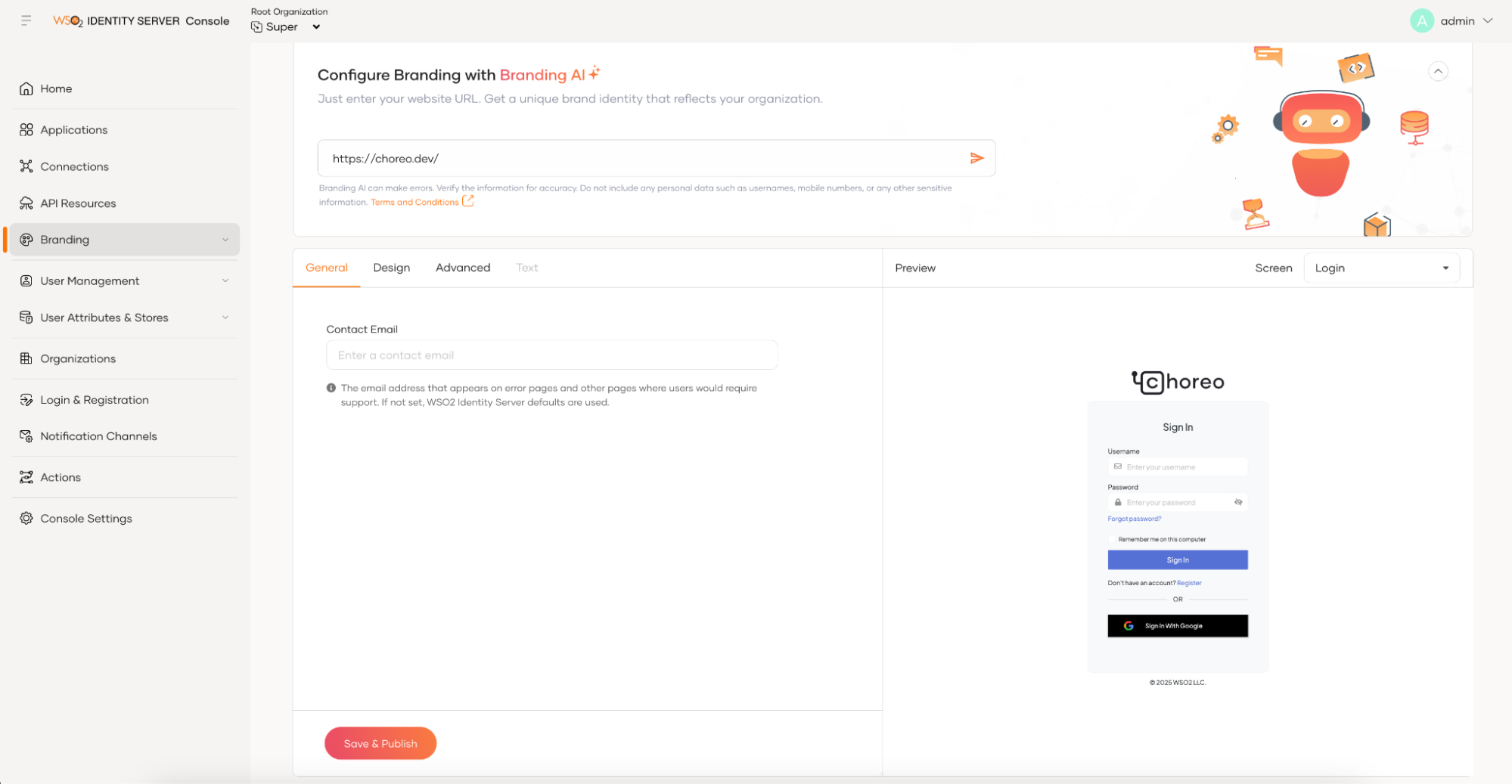
Figure 2: Branding AI
Service-based product extensions
WSO2 Identity Server is well-known for its highly extensible architecture, which allows you to create custom extensions to meet your requirements. The 7.1 release introduces a new direction by providing a service-based product extension model.
With this new model, you no longer need to write product extensions in Java by extending Java classes and interfaces. Instead, you can develop your custom behaviors using your preferred language and host them externally, outside of your WSO2 Identity Server deployment. These extensions can then be called using simple HTTP API calls with JSON payloads, just as you are calling any random HTTP API. This new extension model offers several benefits, such as enabling you to write extensions in any language, host them anywhere, and eliminate incompatibility issues when upgrading your WSO2 Identity Server deployment.
You can call external HTTP APIs during various stages of flows, such as in the middle of the login flow or user onboarding flow. Additionally, external APIs can be invoked before certain events occur, such as before a password is updated or before an access token is issued.
To give a concrete example, writing a custom authenticator using the old Java-based extension model requires several steps. First, you need to create a Java class by extending the AbstractApplicationAuthenticator class and implementing the FederatedApplicationAuthenticator interface. Then, you must create a service component class, build the extension project using Maven, and deploy the resulting JAR file in the dropins folder. Finally, you need to restart the Identity Server to make the new authenticator available.
In contrast, writing a custom authenticator using the new service-based extension model offers much more flexibility. You can write your custom authentication logic in any programming language and host it as an HTTP API anywhere. The only requirement is that your custom HTTP API must accept a JSON input message and return a JSON response in the specified format. Once your external API is running, you can configure it directly in the Identity Server console—without needing to install any plugins, modify server configurations, or restart the server. The following diagram illustrates this scenario.
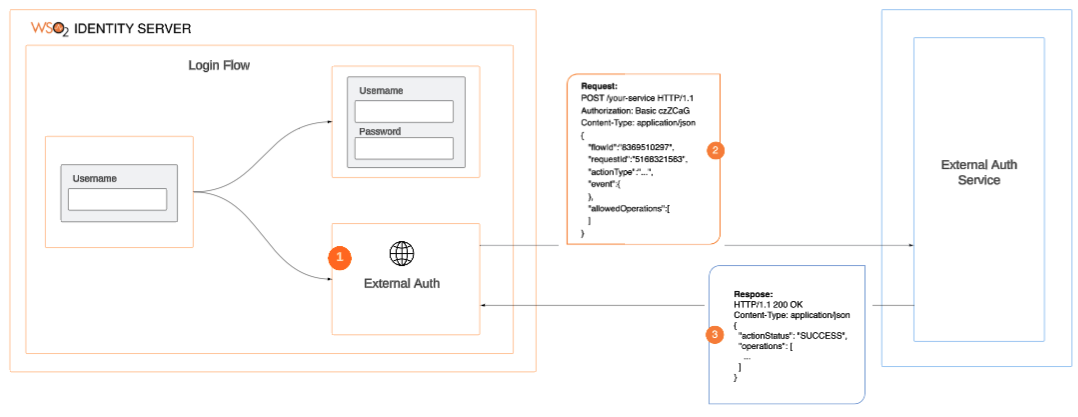
Figure 3: New service-based extension model
You can read more about the new service-based extension model here.
Identity verification
Identity verification (IDV) has become an essential part of the user onboarding process, especially in regulated industries like finance and healthcare. Traditionally, these industries relied on non-digital verification methods. However, during the pandemic, they were pushed to adopt digital identity verification for customer onboarding. This process includes verifying government-issued IDs, capturing selfies, and performing biometric verification—a trend that continues even in the post-pandemic world.
Recognizing the strong connection between identity verification and access management, WSO2 Identity Server now offers built-in support for integrating with external IDV providers. This allows organizations to verify users not only during onboarding but also during profile updates. For example, as an application developer, you can trigger identity verification immediately after submitting a registration form to create a new account or when a user logs in for the first time.
As part of this effort, WSO2 has partnered with Onfidot, a leading identity verification provider, to offer a seamless integration through an in-built connector, enabling organizations to leverage Onfido’s verification capabilities directly within WSO2 Identity Server. With the base-level support in place, we will be releasing identity verification connectors for additional providers through our connector store.
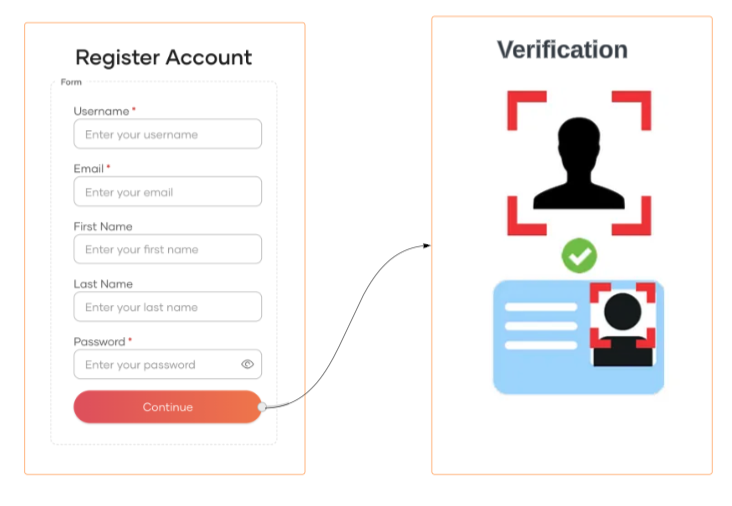
Figure 4: Identity verification during user onboarding
Push-based authentication
Push-based authentication is becoming increasingly popular among application developers due to the convenience it offers users. Instead of entering passwords or one-time codes, users receive a notification on their registered mobile device, allowing them to approve or deny the real-time request with a single tap. These notifications typically include details such as location, time, and device information, helping users verify the legitimacy of the request. By combining device possession with user interaction, this method enhances security and reduces the risk of unauthorized access. It is widely used for logging into accounts, approving transactions, and as part of multi-factor authentication (MFA), offering real-time alerts and protection against phishing attacks. Push-based authentication isn't limited to customer-facing applications. For example, a call center agent can trigger a real-time push notification to a caller's registered device, providing a more convenient and secure authentication method eliminating the need for lengthy security questions, simplifying the verification process while enhancing security.
Push-based authentication has been a highly requested feature from our community, and with the WSO2 Identity Server 7.1 release, it is now fully supported. You can register push providers, such as Firebase Cloud Messaging, just like you would register email and SMS providers, and then incorporate them into your login flows. Users can register their devices for push-based authentication during the initial login process (progressive enrollment) or after logging in, with WSO2 Identity Server providing the necessary APIs for integration. Alternatively, if you prefer to use the WSO2 Identity Server’s self-care portal, device enrollment is available out of the box. Refer to the following guide for details on integrating push-based authentication into your applications.
Fraud detection
With evolving security threats driven by technological and other trends, fraud detection is becoming a key part of application security. With the WSO2 Identity Server 7.1 release, we introduced built-in integration with fraud detection platforms, starting with a connector for the Sift fraud detection platform. We plan to release more fraud detection connectors through our connector store in the future.
WSO2 Identity Server, along with the Sift fraud detection connector, allows applications to send context information during login attempts with additional parameters to Sift. Then the WSO2 Identity Server can query Sift for a calculated risk score. Based on the risk score received within the login flow, WSO2 Identity Server can enforce additional security measures, such as prompting extra authentication steps, denying login requests, or even locking accounts when necessary. With the support for fraud detection platforms, you can now protect your application with real-time fraud detection and prevention mechanisms, ensuring the safety of your users and their data.
Apart from the features we looked at above, WSO2 Identity Server 7.1 release brings you the following new features and improvements.
- Support for user impersonation - User impersonation allows authorized personnel, such as support staff, to temporarily access a customer's account without needing their login credentials or resetting the customer's credentials, which would require them to set new ones later. This feature also improves auditing capabilities, ensuring that any modifications made by staff members are clearly identified and logged. In addition to customer support, this feature can be used to delegate access to family members of elderly and minor users.
- Enhancement to B2B identity capabilities that includes:
- Multiple user stores for organizations - WSO2 Identity Server 7.1 allows multiple user stores for organizations regardless of whether they are root-level organizations or child organizations residing at the very bottom of the organizational hierarchy.
- Registration of applications at organizational level - Supports registering OAuth2 applications at the organization level.
- Email domain-based organization discovery - supports email domain-based organization discovery for self-registration. When enabled, users can enter an email address with a domain associated with a specific organization. The system automatically identifies the corresponding organization, enabling users to seamlessly self-register within it. Additionally, the login_hint query parameter can be used for organization discovery. For example, when a user’s email is provided in the login_hint, the system can automatically route them to their organization’s login page.
- SSO templates for SaaS application - To simplify the configuration of SSO for the SaaS applications used by your organization, WSO2 Identity Server 7.1 provides templates tailored to each SaaS application. You only need to provide the necessary configuration parameter values, while the template includes other configurations specific to the SaaS application. The current release includes templates for Google Workspace, Microsoft 365, Salesforce, Zoom, and Slack, with more to come.
Conclusion
WSO2 Identity Server 7.1 introduces major improvements that make it easier for application developers to build secure applications integrating IAM capabilities. With the addition of AI-assisted tools and a new service-based extension model, developers can reduce the time and effort needed to implement and customize identity functionality—especially helpful for teams with limited IAM expertise.
Ultimately, this release is about giving developers practical tools to solve real-world identity challenges—without adding unnecessary complexity. If you're working on IAM for modern applications, WSO2 Identity Server 7.1 provides a solid, extensible foundation to build on.