Sharing and Reusing Definitions
An agent definition created in a library package can be published and used by other integrations, other projects, and other teams in your organization. Consumers find it in the Pre-built Agents catalog and create instances of it directly, instead of recreating its role, instructions, and tools themselves.
This page describes how to publish a definition, how consumers find and use it, and how to change a published definition without breaking them.
Prerequisites
Before getting started, ensure that the following requirements are met:
- The definition was created with New library package selected. A definition kept in the current integration cannot be shared. For more information, see Where a definition lives
- A Ballerina Central access token is configured. For more information, see Obtain an access token
Publish a definition
A definition is published as a Ballerina library package to Ballerina Central, using the Package Name, Organization, and Package Version set when it was created.
Publishing makes the library available to the entire Ballerina community. Anyone can find and use it, so review the definition's role, instructions, and tools for internal details before publishing.
- Open the library package. Its Overview page lists the agent definitions in the library and the library's README.
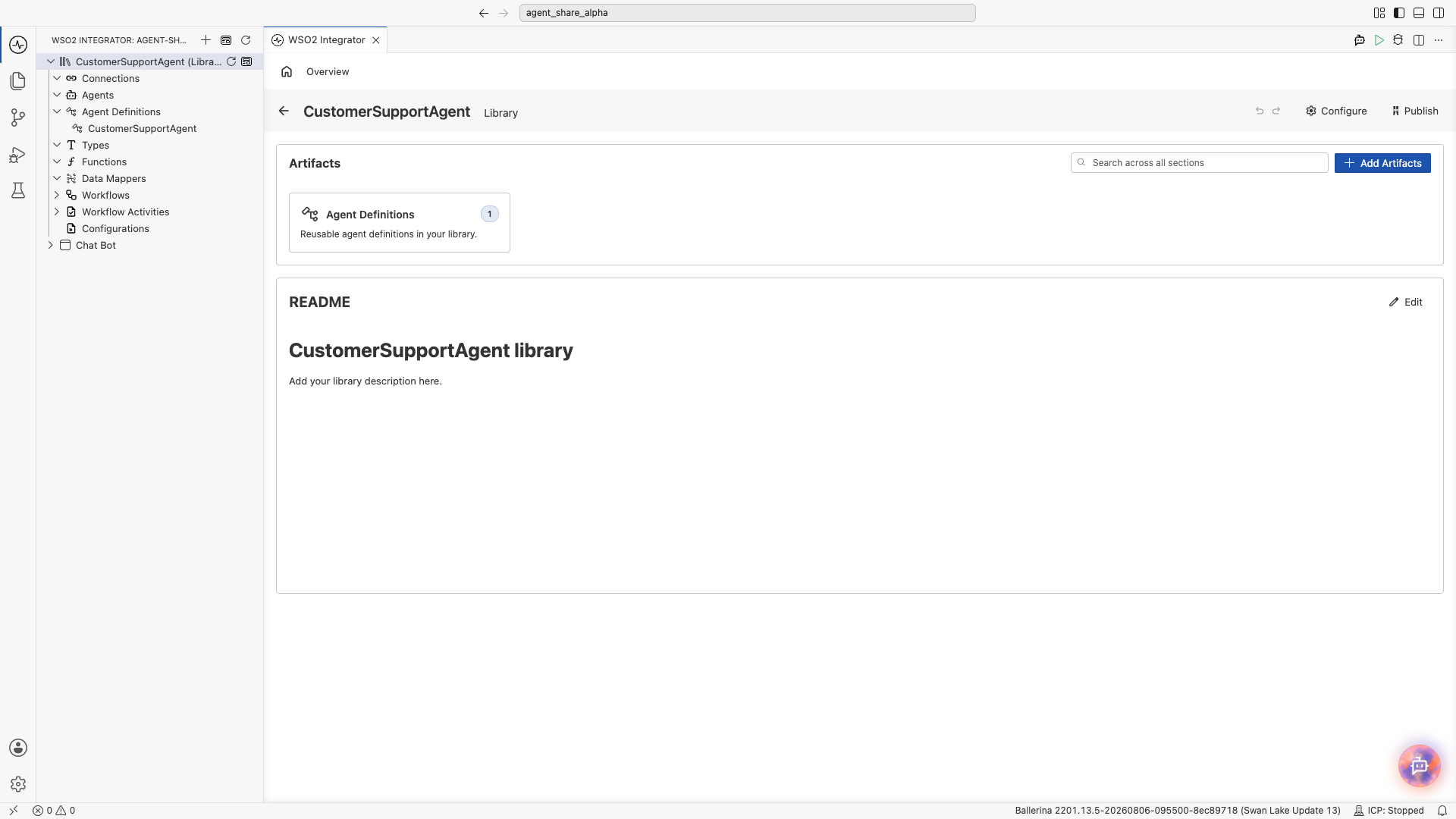
- Click Publish.
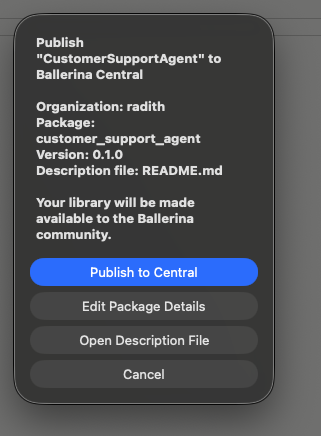
The dialog confirms what will be published:
| Detail | Description |
|---|---|
| Organization | The Ballerina Central organization that will own the package. |
| Package | The package name consumers use to import the library. |
| Version | The version being published. |
| Description file | The file used as the package description on Ballerina Central, normally README.md. |
| Option | Description |
|---|---|
| Publish to Central | Publishes the package to Ballerina Central. |
| Edit Package Details | Change the package name, version, or other settings before publishing. |
| Open Description File | Open the description file to write or update the library's README. |
| Cancel | Close the dialog without publishing. |
Write the README before publishing
The description file is what consumers read on Ballerina Central, and a new library starts with placeholder text. Use Edit on the README section of the library Overview page, or Open Description File in the publish dialog, to describe what the agent does, what it expects in a query, and what it returns.
Find a shared definition
Shared definitions appear under Pre-built Agents in the Add Agent dialog, wherever that dialog is opened from.
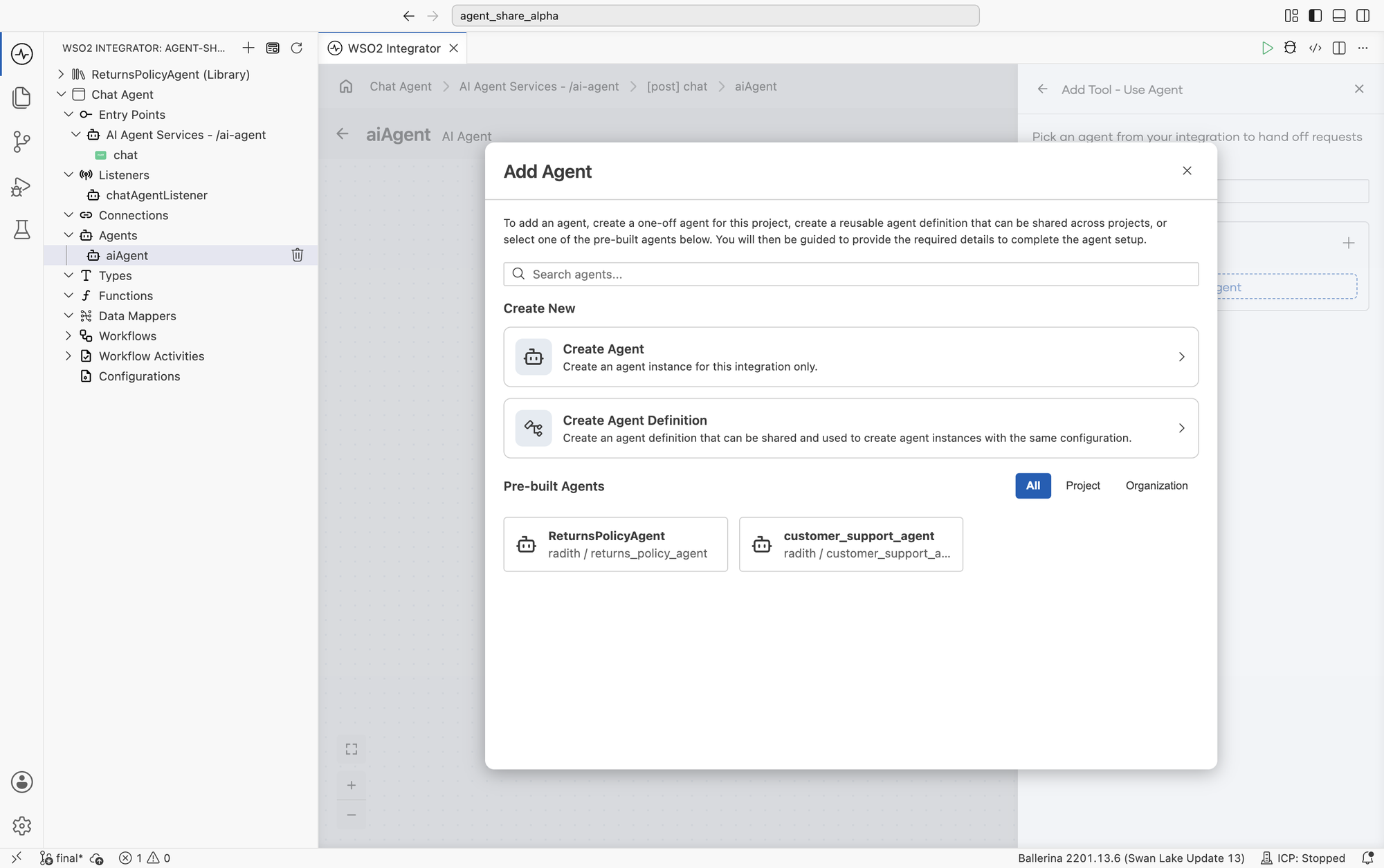
Each entry shows the definition name and the organization and package it comes from, so definitions with the same name from different sources stay distinguishable.
A definition also carries its own composition as metadata: the tools it uses, its system prompt when statically resolvable, and which initialization parameters supply its model provider and memory. This is recorded when the definition is compiled, so a consumer can inspect what a shared definition is made of without access to its implementation.
| Tab | Shows |
|---|---|
| All | Every definition available to you. |
| Project | Definitions in the current workspace, including those kept in the current integration. |
| Organization | Definitions published by your organization. |
Use the search box to filter by name.
Use a shared definition
Select the definition under Pre-built Agents. WSO2 Integrator adds the package as a dependency and guides you through supplying its model provider, memory, and any initialization parameters it declares.
The definition can be used in two places:
- In an integration, through Add Artifact → Other Artifacts → Agent.
- As a tool of another agent, through Add Tool → Agent → + Add Agent. See Agents as Tools.
Consumers configure the instance, not the definition. Role, instructions, tools, and response type come from the definition and are changed by whoever owns it.
Versioning a definition
A published definition is public API. Its consumers depend on more than its behavior. They also depend on its response type and its initialization parameters.
| Change | Breaking? | Notes |
|---|---|---|
| Editing role or instructions | No | Behavior changes, but nothing consumers bind to. |
| Adding a tool | No | Extends what the agent can do. |
| Removing a tool | No, but | Consumers may depend on the behavior it enabled. |
| Adding an optional initialization parameter | No | Existing instances continue to work. |
| Adding a required initialization parameter | Yes | Existing consumers no longer satisfy the constructor. |
| Renaming or removing an initialization parameter | Yes | Existing consumers no longer compile. |
| Changing the response type | Yes | Consumers bind against this type, including calling agents. |
Bump the package version for every published change, and reserve breaking changes for a major version bump. Consumers upgrade by moving to the new version.
Design definitions for reuse
A definition that works well in the integration it was written for often fails elsewhere. When a definition is meant to be shared:
- Write the description for consumers. It appears in the library catalog and is often all a consumer reads before picking the definition.
- Keep instructions caller-independent. Don't assume a particular flow, request format, or upstream system.
- Parameterize what varies, fix what defines. Environment endpoints, tenant identifiers, and model choices belong in initialization parameters. The agent's role does not.
- Don't hard-code a model provider. It is a constructor parameter for a reason, because consumers run in different environments.
- Choose the response type deliberately. It is the hardest thing to change later.
- Scope memory per instance. Memory is supplied at initialization, so consumers control isolation.
- Keep internal details out. Instructions, tool names, and descriptions are published with the package, so keep internal system names and confidential business rules out of a definition you intend to publish.
Common pitfalls
| Symptom | Likely cause | Fix |
|---|---|---|
| Two definitions have the same name. | Different organizations or packages publish the same name. | Check the organization and package shown under the entry name. |
| A consumer stops compiling after an upgrade. | A breaking change shipped without a major version bump. | Pin the previous version, then follow the versioning table above. |
| The agent behaves differently in each consuming project. | Consumers supply different models or memory implementations. | Document the expected model class and memory scope in the description. |
What's next
- Agent Definitions — Create and configure a definition.
- Agents as Tools — Use a shared definition as a tool of another agent.
- Multi-Agent Systems — Decide when to split work across agents.