

Introducing Automation Pipelines in Choreo

- Hasitha Abeykoon
- Senior Technical Lead, WSO2

Choreo already provides application developers with powerful CI/CD pipelines, enabling them to automate, customize, and streamline build and deployment processes. However, until now, external resource integration was limited strictly to APIs—lacking a native mechanism to create or register other external dependencies like databases, message queues, or storage services directly within the platform.
Today, we're excited to introduce a major enhancement that builds on these strengths: automation pipelines.
This feature unlocks the ability to define and orchestrate infrastructure provisioning workflows that create external resources such as S3 buckets and databases used by the developers within your organization. Powered by Argo Workflows, a CNCF-backed Kubernetes-native workflow engine that runs on your private data planes (PDPs), automation pipelines allows you to define, manage, and run all automated infrastructure pipelines collaboratively in one central place.
Bring your IaC code to Choreo
Platform engineering teams can now easily bring their existing infrastructure as code (IaC) into Choreo, regardless of the language or tooling they use. Leveraging the Choreo Pipeline Specification (a simplified version of the Argo configuration language), teams can quickly define pipeline steps to check out their code and execute it in an automation pipeline.
This allows organizations to standardize infrastructure workflows, reuse existing automation, and ensure consistency across environments, all without needing to rebuild tooling from scratch.
Creating and organizing infrastructure pipelines in Choreo
To get started:
- Navigate to the "Platform Operations" perspective.
- Under "DevOps," select "Automation Pipelines."
You have two flexible options when creating a pipeline:
- Connect to a repository: Reference a pipeline definition in a GitHub, GitLab, or Bitbucket repository for enhanced collaboration and version control.
- Define within Choreo: Define your pipeline directly within Choreo, ideal for quick testing and iteration.
Once a pipeline is created, platform engineers can trigger runs with different inputs and parameters as defined within the pipeline specification.
View logs of each pipeline step
Every time an automation pipeline runs, Choreo provides detailed logs at each step of execution, making debugging straightforward and efficient. Users can:
- See the status of the latest run at a glance
- Navigate into individual runs
- Drill down into step-by-step logs to pinpoint issues
This visibility is essential for diagnosing failures, validating IaC execution, and ensuring predictable, repeatable automation.
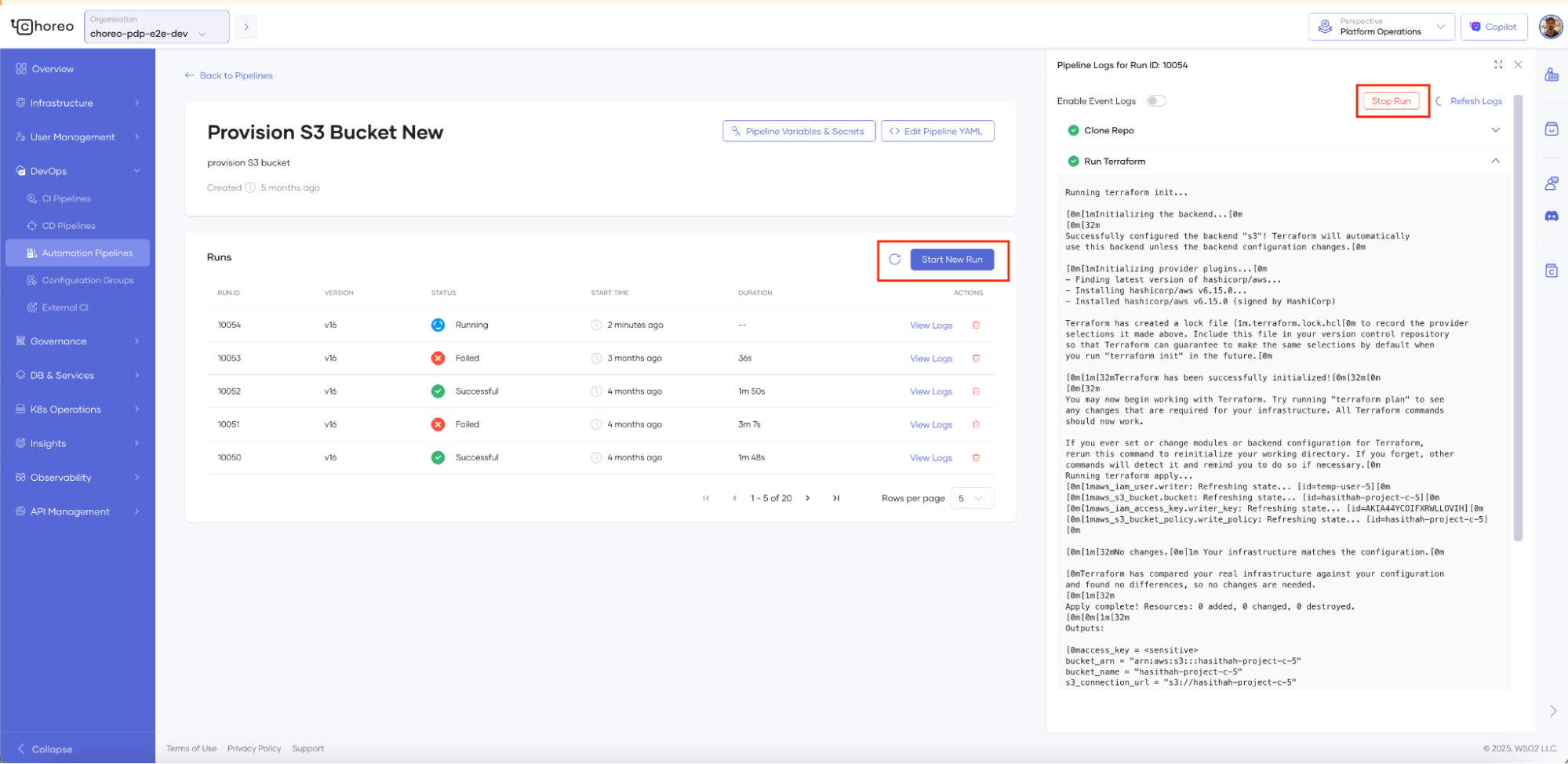
Figure 1: Pipeline runs and their logs
Parameterize pipeline inputs
Choreo automation pipelines are designed for reusability, allowing platform teams to parameterize them using various input types. This enables flexibility and control when executing automation logic.
You can inject values into your pipeline using:
- Variables: Plain text values (e.g., database name). Visible to anyone with edit access to the pipeline.
- Secrets: Sensitive values (e.g., passwords, tokens) stored in a secure vault and injected safely at runtime.
- Parameters: User-provided inputs that act as global values for the pipeline (e.g., selecting the Git branch containing IaC code). These can be adjusted from the Choreo UI before running the pipeline.
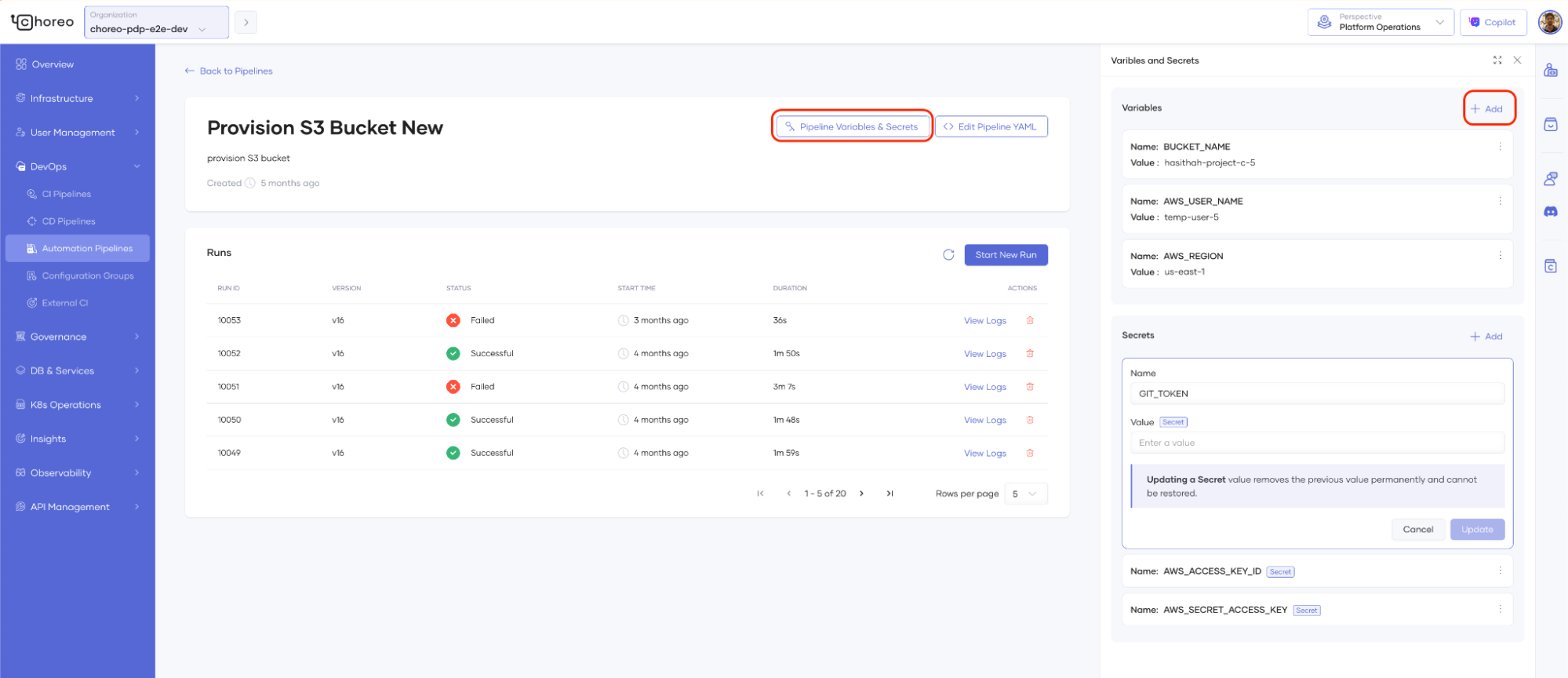
Figure 2: Input parameters for automation pipelines
All defined inputs automatically render in the Choreo UI, providing a clear, intuitive interface for managing configurations.
Automatically publish provisioned resources
In Choreo, developers can discover and connect to resources published within their organization through the internal marketplace. Automation pipelines now support an optional step to publish newly provisioned resources directly to this Choreo marketplace.
Platform engineers can extract connection details or credentials from earlier steps in the pipeline and feed them into a final publish step, eliminating the need for manual credential sharing. Developers can then effortlessly connect to these shared infrastructure resources, such as services, databases, storage, messaging, or generative AI services provisioned via Choreo, by simply creating a Choreo connection.
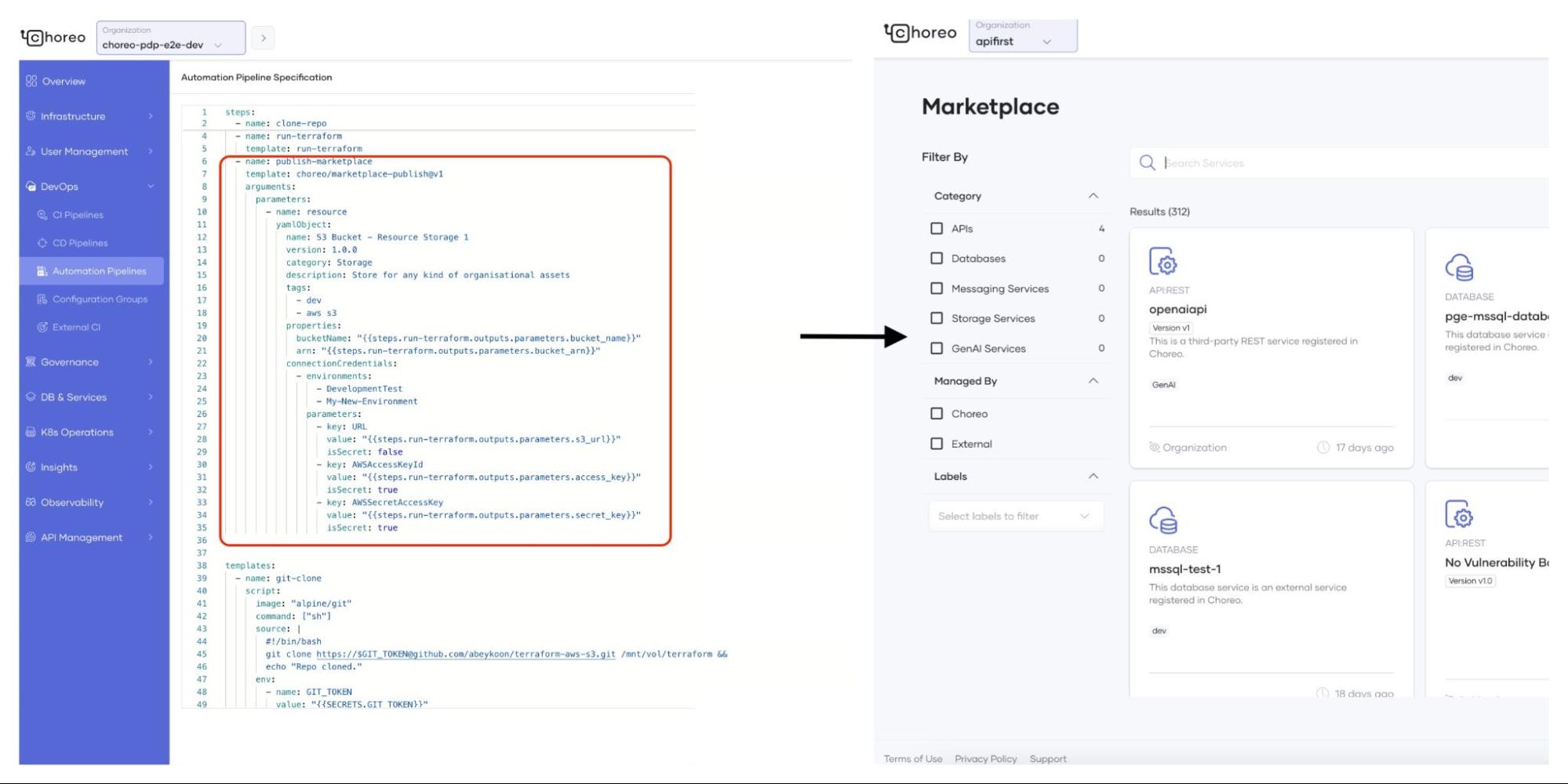
Figure 3: Publishing provisioned resources to Choreo marketplace
Conclusion
In a nutshell, a key responsibility of the platform engineering role is to create the right abstractions for infrastructure provisioning, automate these processes, manage their versions, and maintain the associated pipelines. Choreo goes beyond providing powerful capabilities for deploying and managing application workloads; it also provides the tools to manage infrastructure provisioning across external systems. Together, these features seamlessly integrate, offering a complete solution for both developers and platform engineers. We encourage you to explore how Choreo can modernize your enterprise platform engineering workflows and share your feedback with us.