

What is an MCP Gateway? Key Features and Benefits

- Dakshitha Ratnayake
- Director - Developer Relations, WSO2
API protocols evolve every few years. We have moved from SOAP to REST, then to GraphQL, gRPC, and AsyncAPI for event-driven systems. Now with the rise of large language models (LLMs) and AI agents, organizations need a new class of interfaces that allow agents to take action across real systems, not just generate text.
LLMs are powerful reasoning engines, but they lack context. They cannot perform actions by themselves, see real-time data, private information, or internal systems. They cannot directly query databases, call APIs, perform actions, or fetch real-world data. This limits their usefulness in enterprise settings.
The Model Context Protocol (MCP) was created to bridge this gap. MCP gives AI agents structured access to tools, data, and other capabilities. But MCP by itself does not solve all the challenges of security, governance, and scale. That is where MCP gateways come in.
What is the Model Context Protocol (MCP)?
The Model Context Protocol (MCP) is an open protocol designed to let AI agents interact with external systems in a predictable, structured, and secure way. At its core, MCP defines how an agent discovers tools, how it calls those tools, and how both sides maintain context across multi-step tasks. MCP has a host-client-server architecture and uses JSON-RPC over stdio or streamable HTTP. While the stdio transport is popular when it comes to clients and servers that run on the same machine, streamable HTTP transport is used for remote connections and communication over networks.
Why MCP exists
Before MCP, every organization created custom connectors between agents and their internal systems. This led to several problems:
- Different teams implemented their own integration patterns
- Authentication was inconsistent and often insecure
- Tools were not discoverable
- Changes to APIs often broke agents
- No shared contract for how agents and systems should communicate
MCP standardizes this entire exchange. It defines a contract for:
- How tools are advertised
- How parameters are passed
- How long-running tasks stream results
- How sessions maintain state
- How agents should be authenticated and how agents access resources, prompts, and functions
MCP does not define what your tools do; it defines how agents and tools talk to each other.
In March 2025, MCP introduced a formal authorization framework based on OAuth 2.1 as part of a major specification update. This allowed MCP servers to operate as secure remote services rather than only local processes.
What MCP provides
MCP defines three categories of capabilities:
- Tools
Actions an agent can perform
Example: create_ticket, validate_transaction, run_forecast
- Resources
Data that can be retrieved or queried
Example: get_customer_profile, list_orders, fetch_revenue_data
- Prompts
Reusable templates that agents can use to standardize behavior
These capabilities allow AI agents to move beyond text generation and actually complete work across real enterprise systems.
MCP is not a governance layer
MCP defines communication. It now also defines how clients authenticate using OAuth 2.1, and the protocol provides an authorization framework for securely connecting agents to servers. However, MCP does not provide the governance or operational controls required for production systems. It does not manage:
- Which users or agents should be allowed to use a specific tool inside an organization
- Rate limits or usage quotas
- Data masking or payload sanitization
- Approval workflows or policy enforcement
- Multi-server coordination
- Detailed logging and auditability
- Environment-wide security guardrails
What are MCP clients and MCP servers?
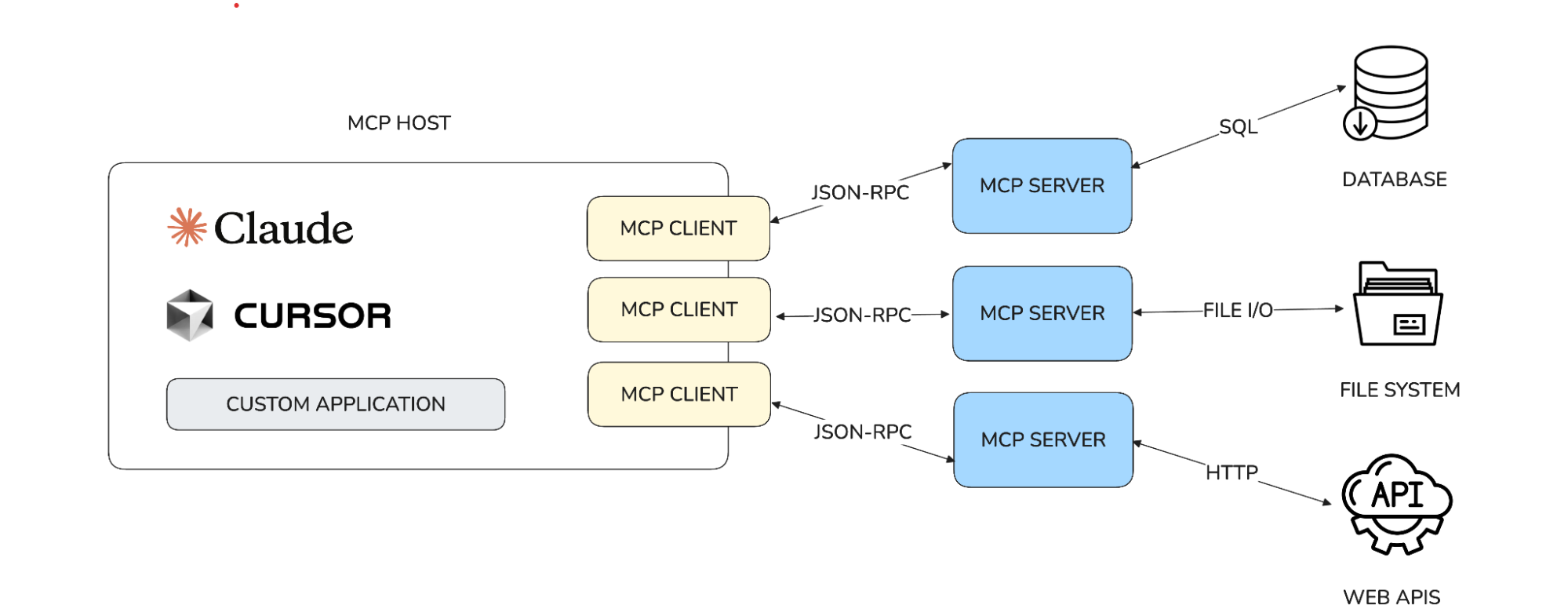
Figure 1: How MCP clients connect to MCP servers
MCP client
An MCP client is the component used by an AI agent (or any application) to connect to an MCP server. The client understands the MCP protocol and handles:
- Sending requests to servers
- Receiving responses or streamed updates
- Managing session state
- Passing authentication tokens
- Exposing MCP tools to the agent in a structured way
In practical terms, the MCP client is the agent’s gateway into your enterprise systems.
Examples of MCP clients include:
- The MCP integration built into OpenAI’s models
- Claude Desktop, which allows local tools to be exposed to Claude through MCP
- GitHub Copilot (VS Code) when configured with remote MCP servers
- An internal agent running a Python-based MCP client
- A CLI tool using MCP to query enterprise systems
If an AI assistant needs to retrieve customer data or run a forecast, the MCP client is what lets it discover the available tools and interact with them.
MCP server
An MCP server is the system that exposes tools, resources, or prompts to an AI agent.
It is a backend service that implements the MCP specification and provides one or more capabilities such as tools, resources and prompts.
The server responds to JSON-RPC requests, maintains session context, and often performs long-running or multi-step operations with streaming outputs.
In short, the MCP server is the source of the capabilities. It exposes what the agent can actually do.
Key characteristics of MCP servers:
- Stateful sessions (unlike stateless REST APIs)
- Can initiate streaming messages back to the client
- Represent business logic or data access
- Can be written in any language, as long as the MCP spec is followed
Most organizations will have multiple MCP servers, one per domain (e.g., customer data MCP server, order system MCP server, etc.). This is where MCP starts to get complex at scale, because agents need a way to manage all of these servers safely.
What is an MCP gateway
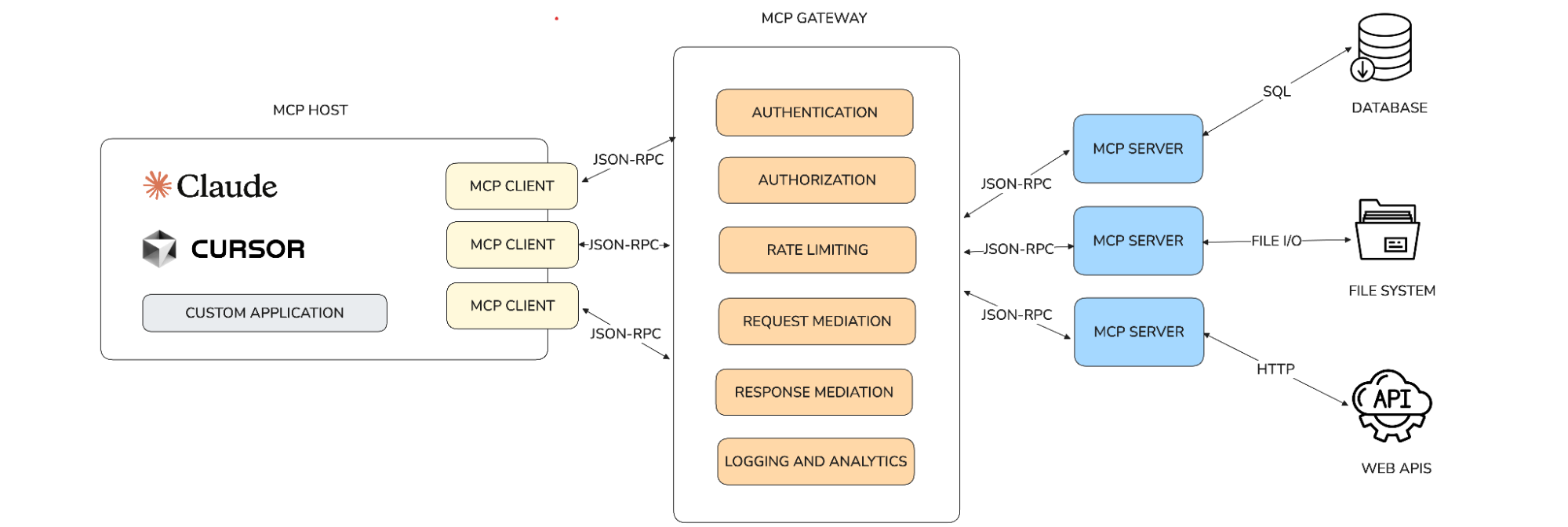
Figure 2: Adding an MCP gateway for governance and control
An MCP gateway is a mediation layer between MCP clients and the MCP servers they interact with. It provides a single entry point for tool calls, applies authentication and authorization checks, enforces rate limits, manages session context, and routes requests to the correct backend system. It gives AI agents a uniform interface for invoking tools, even when those tools come from different teams or domains.
Several MCP gateways exist today, both open source and commercial. Examples include:
- WSO2 MCP Gateway (part of the WSO2 API Platform)
- Docker MCP Gateway (from the Docker MCP ecosystem)
- Agent Gateway (Linux Foundation AI & Data)
MCP offers the foundation for secure authentication, but gateways provide the governance, observability, and enforcement needed to operate MCP safely at scale, such as:
- Authentication and authorization
- Rate limiting and QoS
- Request/response sanitization
- Logging and observability
- Consistent governance across multiple MCP servers
- Safe onboarding of internal or external MCP servers
Gateways like the WSO2 MCP Gateway, Docker MCP Gateway, Agent Gateway and others help organizations run MCP securely and at scale without modifying backend services. They add the operational, security, and governance layers required for production-grade AI agent workflows.
How an MCP gateway works
An MCP gateway receives a request from an agent, checks the request, and forwards it to the correct MCP server. It also maintains session context so the agent can carry out multi-step workflows across different systems.
Example: Customer support assistant
A customer support assistant may need to:
- Look up customer profiles
- Fetch order history
- Check refund eligibility
- Create or update support tickets
Through MCP, the assistant discovers tools such as get_customer_profile, list_orders, check_refund_status, and create_ticket. The agent calls these tools using an MCP interface.
Without a gateway, the assistant would contact each backend system directly, exposing sensitive data and creating multiple governance gaps. With an MCP gateway, the assistant sends all requests to a single controlled endpoint. Teams do not need to modify backend services.
The gateway:
- Validates OAuth scopes
- Applies PII masking before forwarding requests
- Enforces rate limits
- Routes tool calls to the correct MCP server
- Generates logs and audit trails
- Captures analytics and enables monitoring
- Returns sanitized responses to the agent
Example: Finance analyst assistant
A finance analyst assistant may need to:
- Fetch quarterly revenue data
- Run forecasting models
- Validate transactions
- Generate financial statements
With MCP, the assistant discovers tools such as fetch_revenue_data, run_forecast, validate_transaction, and download_statement.
The MCP gateway:
- Applies strict finance-grade access controls
- Masks sensitive figures or identifiers
- Enforces quotas for heavy operations like forecasting
- Routes each request to the correct MCP server (data service, forecasting engine, transaction validator)
- Logs each interaction for compliance and auditing
Using an MCP Gateway, finance teams can introduce these tools without duplicating logic or building custom connectors.
Why MCP alone is not enough
MCP standardizes communication and provides an authorization model, but it does not provide the governance, enforcement, or operational controls required in production. MCP alone lacks:
- Tool filtering
- Rate limits
- Approval workflows
- Usage quotas
- Session inspection
- Sanitization
- Multi-server coordination
- Infrastructure-level governance
- Monitoring and analytics
For example, a customer support agent may call get_customer_details thousands of times during a major incident. MCP allows the call, but it does not protect backend systems. An MCP gateway can detect the surge, throttle abusive patterns, and alert administrators.
Benefits of MCP gateways
Security
Gateways protect against:
- Tool poisoning
- Prompt injection
- Data leaks
- Excessive tool calls
- Unauthorized access - Gateways can centralize OAuth flows and ensure agents have the required scopes.
Reliability
Gateways handle retries, throttling, and data shaping to stabilize agent behavior. The gateway can mask sensitive data and remove unsafe instructions.
Performance
Gateways reduce token usage and response size by filtering and structuring data. Teams can also see which tools exist, who uses them, and how they perform.
Governance
Admins can manage tool access, policies, and usage patterns (protect backend resources from excessive or abusive usage) from one place. Gateways can ensure every call follows organizational rules for formats, methods, and data handling.
Observability and analytics
An MCP Gateway can record all requests and responses with metadata for debugging and auditing. Deep observability is essential for understanding agent performance and tool behavior. MCP gateways collect:
- Latency metrics
- Error rates
- Tool invocation counts
- User and agent identities
- Payload metadata
- Rate limit violations
This allows operations teams to identify performance bottlenecks, detect unusual behavior, and optimize workflows.
Summary: Why MCP alone isn’t enough and the role of MCP gateways in production AI systems
MCP has become the standard way for AI agents to access tools, resources, and workflows. It gives agents a consistent protocol to discover capabilities and act on external systems. But MCP was never designed to handle everything required in production. It does not enforce organizational policies, protect backend systems, or provide the guardrails teams need when agents start making real changes in real environments.
That gap is where MCP gateways come in. Gateways apply authentication and authorization, control usage through rate limits and quotas, filter and sanitize data, enforce governance rules, and give organizations the visibility they need to understand how agents behave. They make AI actions safe, predictable, and auditable.
As agents become more capable and more widely deployed, this operational layer becomes essential. MCP provides the connectivity. MCP gateways provide the control. Together, they form a complete foundation for building production-grade agentic systems that can scale across teams, tools, and domains.
FAQ: MCP Gateways, MCP Servers, and AI Agent Integration
1. What is an MCP gateway?
An MCP gateway is a mediation layer that sits between MCP clients (AI agents) and MCP servers (tools and data sources). It adds authentication, authorization, rate limiting, data sanitization, and governance capabilities that MCP itself does not provide. MCP Gateways ensure safe, controlled, and auditable agent actions in production environments.
2. Why do enterprises need an MCP gateway?
MCP alone only defines communication and authentication. It does not enforce policies, protect backend systems, manage quotas, or offer observability.
An MCP gateway fills these gaps by providing:
- Centralized access control
- Rate limiting and quotas
- Data masking and request/response mediation
- Logging, auditing, and analytics
- Consistent governance across multiple MCP servers
Without a gateway, AI agents may overload systems, perform unintended actions, or bypass security controls.
3. How is an MCP gateway different from an MCP server?
An MCP server exposes tools, resources, or prompts that an agent can use.
An MCP gateway governs how agents interact with those servers.
MCP server = capability provider
MCP gateway = policy, security, and control layer
Gateways do not replace servers; they coordinate them and secure them.
4. What problems does MCP (Model Context Protocol) solve?
MCP standardizes how AI agents:
- Discover capabilities
- Send structured tool calls
- Maintain session state
- Stream long-running task results
- Authenticate using OAuth 2.1
It eliminates custom integrations, reduces brittle glue code, and makes tools discoverable by design.
5. What problems does MCP not solve?
MCP does not provide:
- Tool-level access control
- Rate limits or usage quotas
- Payload sanitization
- Approval workflows
- Multi-server orchestration
- Audit logs and observability
- Backend protection
This is why MCP Gateways have become essential.
6. Who needs an MCP gateway?
Any team deploying AI agents that:
- Access sensitive systems
- Modify data
- Invoke high-risk or high-cost tools
- Rely on multiple MCP servers
- Require enterprise compliance or auditing
Examples include customer support automation, finance assistants, document processing agents, IT operations copilots, and enterprise copilots built on OpenAI/Claude.
7. Does MCP handle security on its own?
Yes and no.
MCP introduced OAuth 2.1-based authentication in 2025, enabling secure remote servers.
BUT MCP does not provide:
- Authorization rules
- Organizational policy enforcement
- Data protection
- Monitoring or audit trails
Security is foundational, but governance lives in the gateway.
8. Can I use multiple MCP servers behind one MCP Gateway?
Yes.
A gateway can route tool calls from many MCP clients to many MCP servers, apply consistent policies, and simplify onboarding.
This prevents AI agents from having direct, uncontrolled access to backend systems.
9. Which MCP gateways are available today?
Popular options include:
- WSO2 MCP Gateway (part of the WSO2 API Platform)
- Docker MCP Gateway (Docker ecosystem)
- Agent Gateway (Linux Foundation AI & Data)
All aim to add governance and observability to MCP deployments.
10. How does an MCP gateway improve AI agent reliability?
Gateways can:
- Retry failed backend calls
- Throttle excessive requests
- Reject malformed payloads
- Enforce expected schemas
- Mask or shape data before sending it to the agent
These features make agents more predictable and reduce downstream failures.