Azure Service Bus
Azure Service Bus event integrations consume messages from a queue or topic subscription and trigger event handlers as each message arrives. Use them for reliable enterprise messaging, decoupled service-to-service communication, and workflows that require ordered or transactional message delivery.
Creating an Azure service bus service
- Visual Designer
- Ballerina Code
-
Click + Add Artifact in the canvas or click + next to Entry Points in the sidebar.
-
In the Artifacts panel, select Azure Service Bus under Event Integration.
-
In the creation form, fill in the following fields:
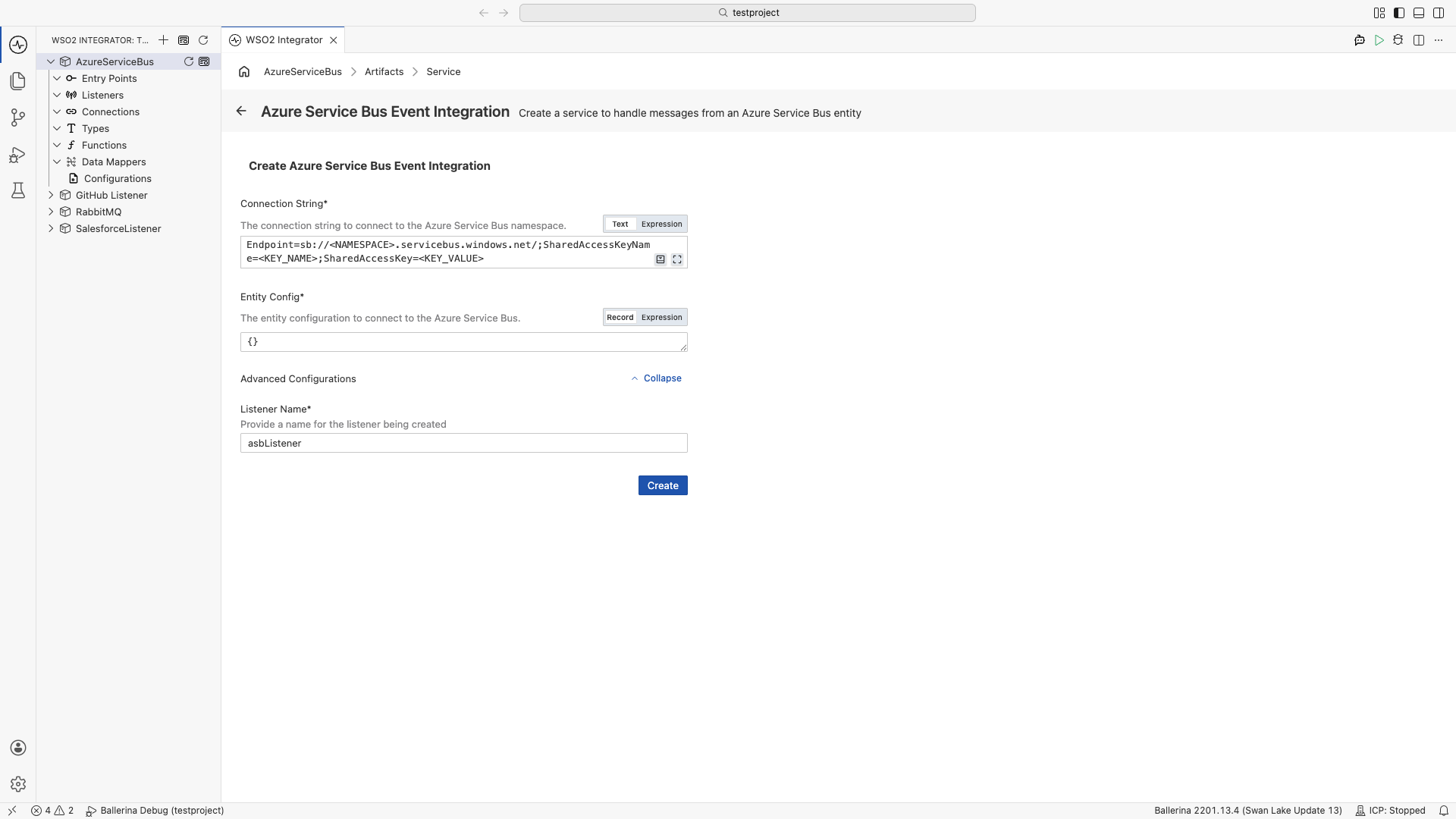
Field Description Connection String Service Bus connection string with Shared Access Signatures. Format: Endpoint=sb://<NAMESPACE>.servicebus.windows.net/;SharedAccessKeyName=<KEY_NAME>;SharedAccessKey=<KEY_VALUE>. Required.Entity Config Configuration for the queue or topic subscription to connect to. Accepts a QueueConfigorTopicSubsConfigrecord expression. Required.Expand Advanced Configurations to set the listener name.
Field Description Default Listener Name Identifier for the listener created with this service. asbListener -
Click Create.
-
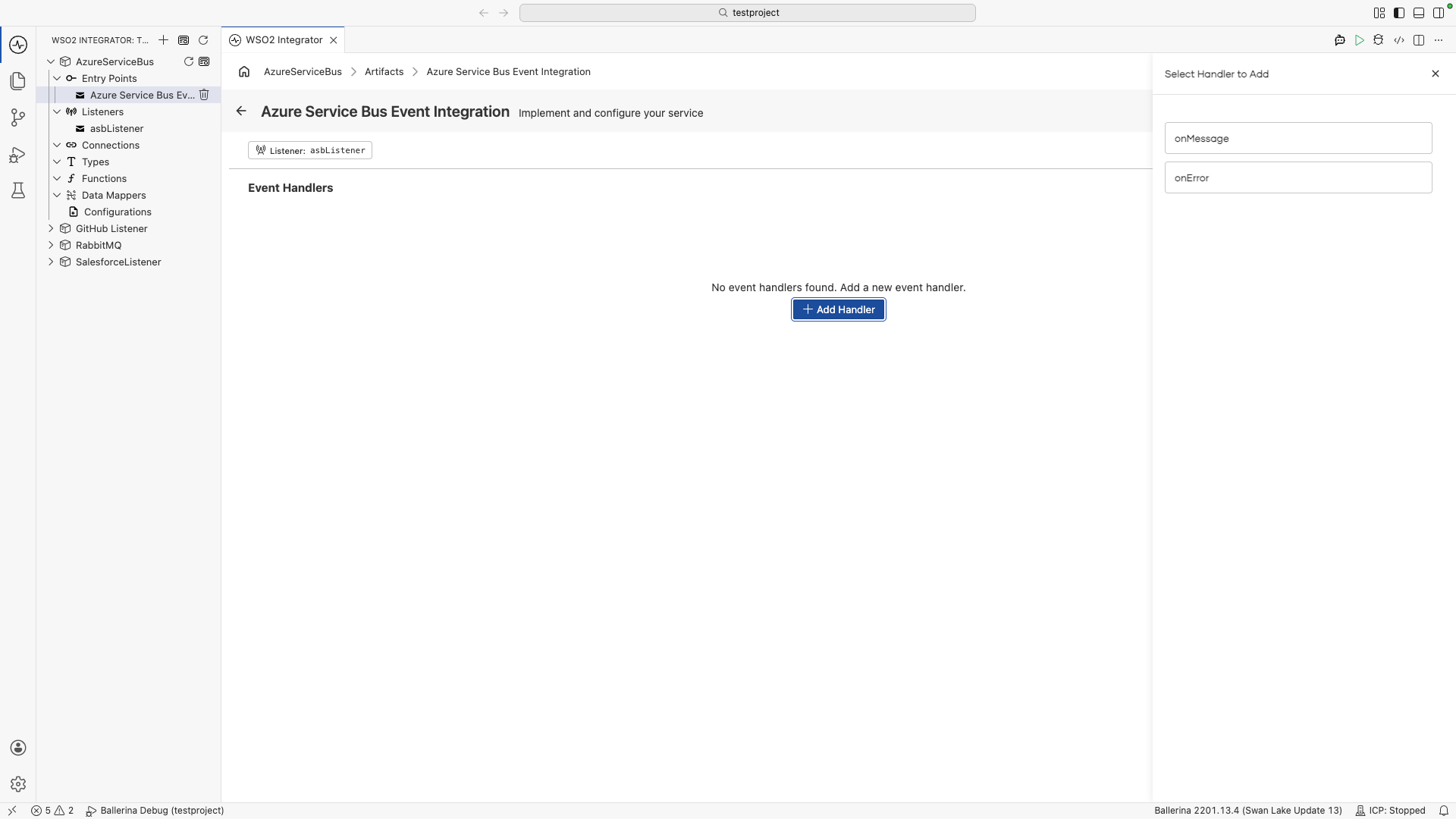
WSO2 Integrator opens the service in the Service Designer. The canvas shows the attached listener pill and the Event Handlers section.
-
Click + Add Handler to add event handlers.
import ballerinax/asb;
import ballerina/log;

configurable string connectionString = ?;

listener asb:Listener asbListener = new ({
    connectionString: connectionString,
    entityConfig: {
        queueName: "invoices"
    }
});

service asb:Service on asbListener {

    remote function onMessage(asb:Message message) returns error? {
        log:printInfo("Message received", messageId = message.messageId);
    }

    remote function onError(asb:MessageRetrievalError err) returns error? {
        log:printError("Azure Service Bus error", 'error = err);
    }
}
Listener configuration
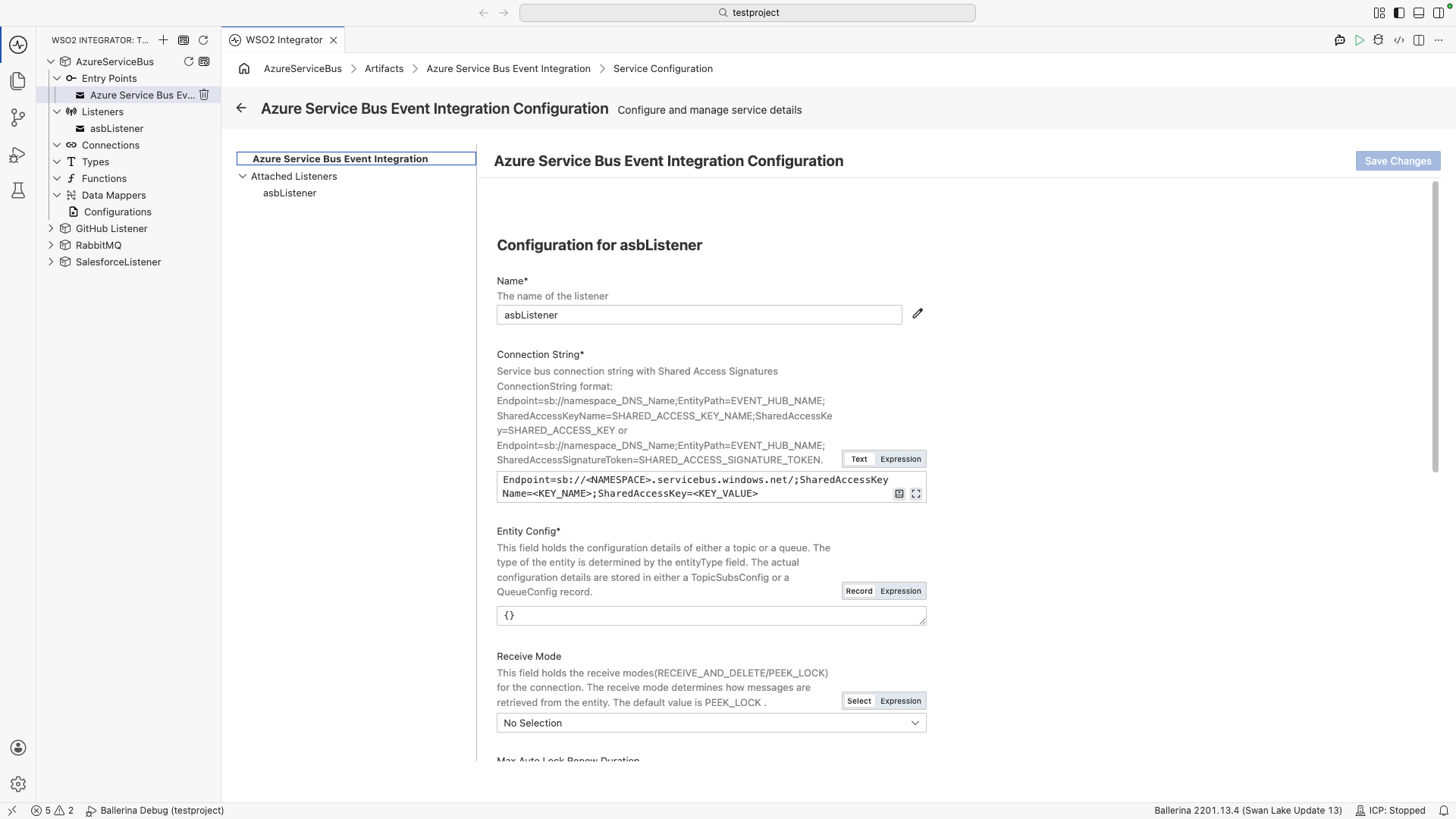
In the Service Designer, click the Configure icon in the header to open the Azure Service Bus Event Integration Configuration panel. Select asbListener under Attached Listeners to configure the listener.
- Visual Designer
- Ballerina Code
| Field | Description | Default |
|---|---|---|
| Name | Identifier for the listener. | asbListener |
| Connection String | Service Bus connection string with Shared Access Signatures. | Required |
| Entity Config | Configuration for the target queue or topic subscription. The entity type is determined by the record type — use QueueConfig for queues or TopicSubsConfig for topic subscriptions. | Required |
| Receive Mode | How messages are retrieved from the entity. PEEK_LOCK holds a lock on the message until completed or abandoned. RECEIVE_AND_DELETE removes the message immediately on receipt. | PEEK_LOCK |
| Max Auto Lock Renew Duration | Maximum lock renewal duration in seconds under PEEK_LOCK mode. Set to 0 to disable auto-renewal. Auto-renewal is disabled for RECEIVE_AND_DELETE mode. | 300 |
| Amqp Retry Options | Retry configuration for the underlying AMQP message receiver. | {} |
| Additional Values | Key-value pairs for additional connection or entity configuration. | {} |
| Auto Complete | When enabled, messages are automatically completed on successful handler execution and abandoned on failure. | true |
| Prefetch Count | Number of messages to prefetch from the broker. | 0 |
| Max Concurrency | Maximum number of concurrent messages this listener processes at one time. | 1 |
Click + Attach Listener to attach an additional listener to the same service.
Click Save Changes to apply updates.
listener asb:Listener asbListener = new ({
    connectionString: connectionString,
    entityConfig: {
        queueName: "invoices"
    },
    receiveMode: asb:PEEK_LOCK,
    maxAutoLockRenewDuration: 300,
    autoComplete: false,
    prefetchCount: 0,
    maxConcurrency: 5
});
asb:ListenerConfiguration fields:
| Field | Type | Default | Description |
|---|---|---|---|
connectionString | string | Required | Service Bus SAS connection string |
entityConfig | asb:QueueConfig|asb:TopicSubsConfig | Required | Target queue or topic subscription |
receiveMode | asb:ReceiveMode | PEEK_LOCK | Message retrieval mode |
maxAutoLockRenewDuration | int | 300 | Lock renewal timeout in seconds under PEEK_LOCK |
amqpRetryOptions | asb:AmqpRetryOptions? | — | AMQP retry configuration |
additionalValues | map<string>? | — | Additional key-value configuration |
autoComplete | boolean | true | Auto-complete messages on success |
prefetchCount | int | 0 | Number of messages to prefetch |
maxConcurrency | int | 1 | Maximum concurrent message processing |
Event handlers
Azure Service Bus services support two handler types: onMessage and onError, both added directly without additional configuration.
Adding an event handler
- Visual Designer
- Ballerina Code
In the Service Designer, click + Add Handler. The Select Handler to Add panel lists onMessage and onError. Click either handler to add it directly. No additional configuration is required.
| Handler | Triggered when |
|---|---|
| onMessage | A new message arrives from the queue or topic subscription |
| onError | A message retrieval or processing error occurs |
onMessage handler: called for each message received:
type InvoiceMessage record {|
    string invoiceId;
    string vendorId;
    decimal amount;
    string currency;
|};

service asb:Service on asbListener {

    remote function onMessage(asb:Message message,
                              asb:Caller caller) returns error? {
        InvoiceMessage invoice = check message.body.ensureType();
        log:printInfo("Invoice received", invoiceId = invoice.invoiceId);

        check processInvoice(invoice);
        // Complete the message to remove it from the queue
        check caller->complete();
    }
}
onError handler: called when message retrieval fails:
service asb:Service on asbListener {

    remote function onError(asb:MessageRetrievalError err) returns error? {
        log:printError("Azure Service Bus error", 'error = err);
    }
}
Message type
The onMessage handler receives an asb:Message parameter with the message content and metadata.
| Field | Type | Description |
|---|---|---|
body | anydata | Message payload. Use message.body.ensureType() to cast to a typed record. |
contentType | string? | MIME content type of the message body. Use asb:TEXT, asb:JSON, asb:XML, or asb:BYTE_ARRAY. |
messageId | string? | Unique message identifier set by the sender. |
correlationId | string? | Correlation identifier for request/reply patterns. |
label | string? | Application-specific label. Corresponds to the Azure Service Bus "Subject" property. |
to | string? | Destination address of the message. |
replyTo | string? | Address to send replies to. |
replyToSessionId | string? | Session ID for the reply destination. |
sessionId | string? | Session identifier for session-aware entities. |
partitionKey | string? | Partition key for partitioned queues and topics. |
timeToLive | int? | Message expiry duration in seconds. |
applicationProperties | ApplicationProperties? | Custom application properties. Access values via message.applicationProperties?.properties. |
sequenceNumber | int? | Unique sequence number assigned by the broker. Read-only. |
lockToken | string? | Lock token used for settlement in PEEK_LOCK mode. Read-only. |
deliveryCount | int? | Number of times delivery has been attempted. |
enqueuedTime | string? | UTC time when the message was added to the queue. |
enqueuedSequenceNumber | int? | Sequence number assigned when the message was first enqueued. |
deadLetterReason | string? | Reason the message was moved to the dead-letter sub-queue. |
deadLetterErrorDescription | string? | Description of the error that caused dead-lettering. |
deadLetterSource | string? | Name of the entity where the message was dead-lettered. |
state | string? | Current message state: Active, Deferred, or Scheduled. |
What's next
- Azure Service Bus connector reference — full connector API reference
- RabbitMQ — consume messages from RabbitMQ queues
- Kafka — consume messages from Apache Kafka topics
- Connections — reuse Azure Service Bus connection strings across services