RabbitMQ
RabbitMQ event integrations consume messages from a RabbitMQ queue and trigger event handlers as each message arrives. Use them for asynchronous task processing, event-driven workflows, and integrations where producers publish messages that must be reliably consumed and processed.
Creating a RabbitMQ service
- Visual Designer
- Ballerina Code
-
Click + Add Artifact in the canvas or click + next to Entry Points in the sidebar.
-
In the Artifacts panel, select RabbitMQ under Event Integration.
-
In the creation form, fill in the following fields:
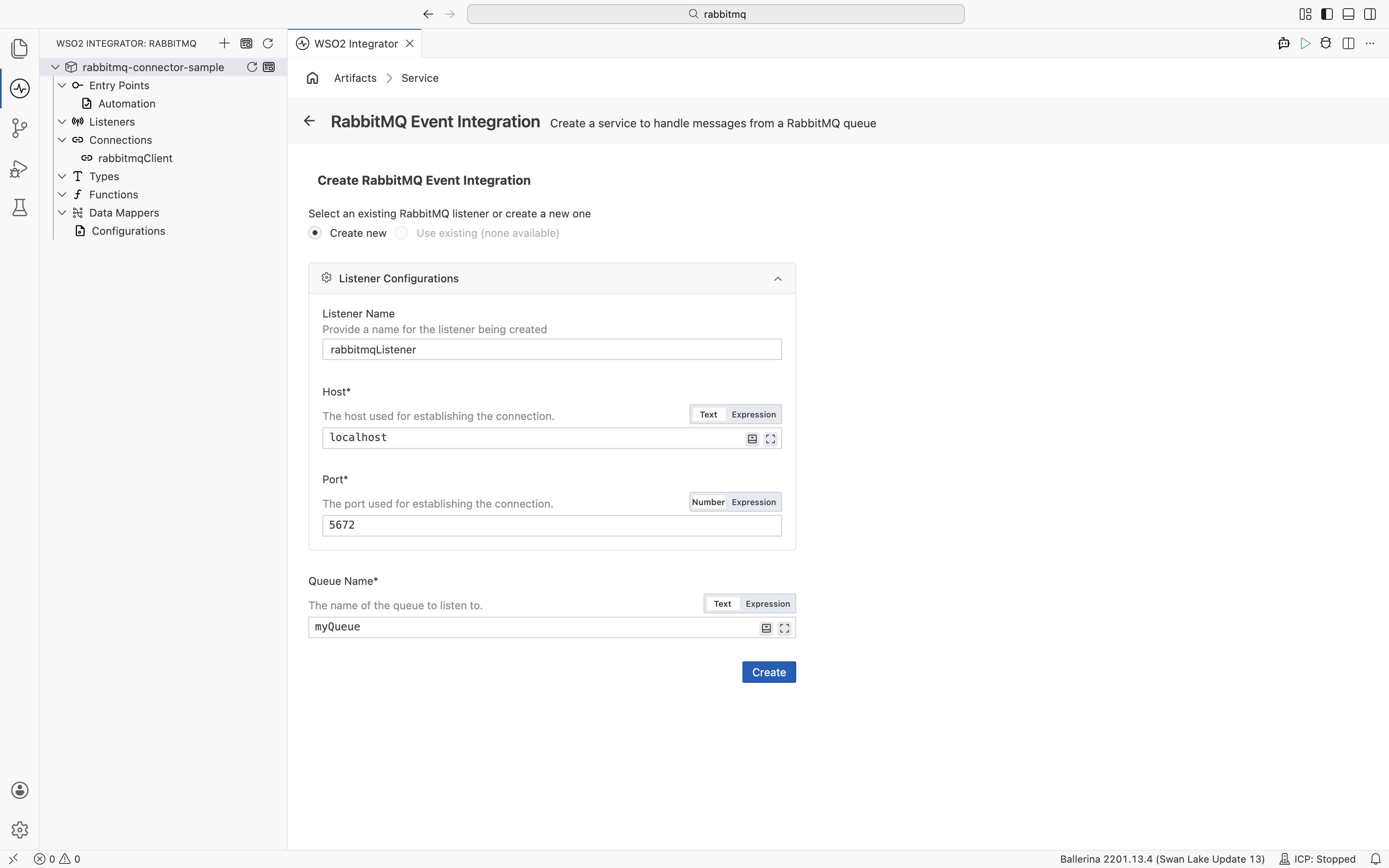
Field Description Default Listener Name Identifier for the listener created with this service. rabbitmqListenerHost Hostname or IP address of the RabbitMQ broker. localhostPort Port used to connect to the broker. 5672Queue Name Name of the RabbitMQ queue to listen to. myQueue -
Click Create.
-
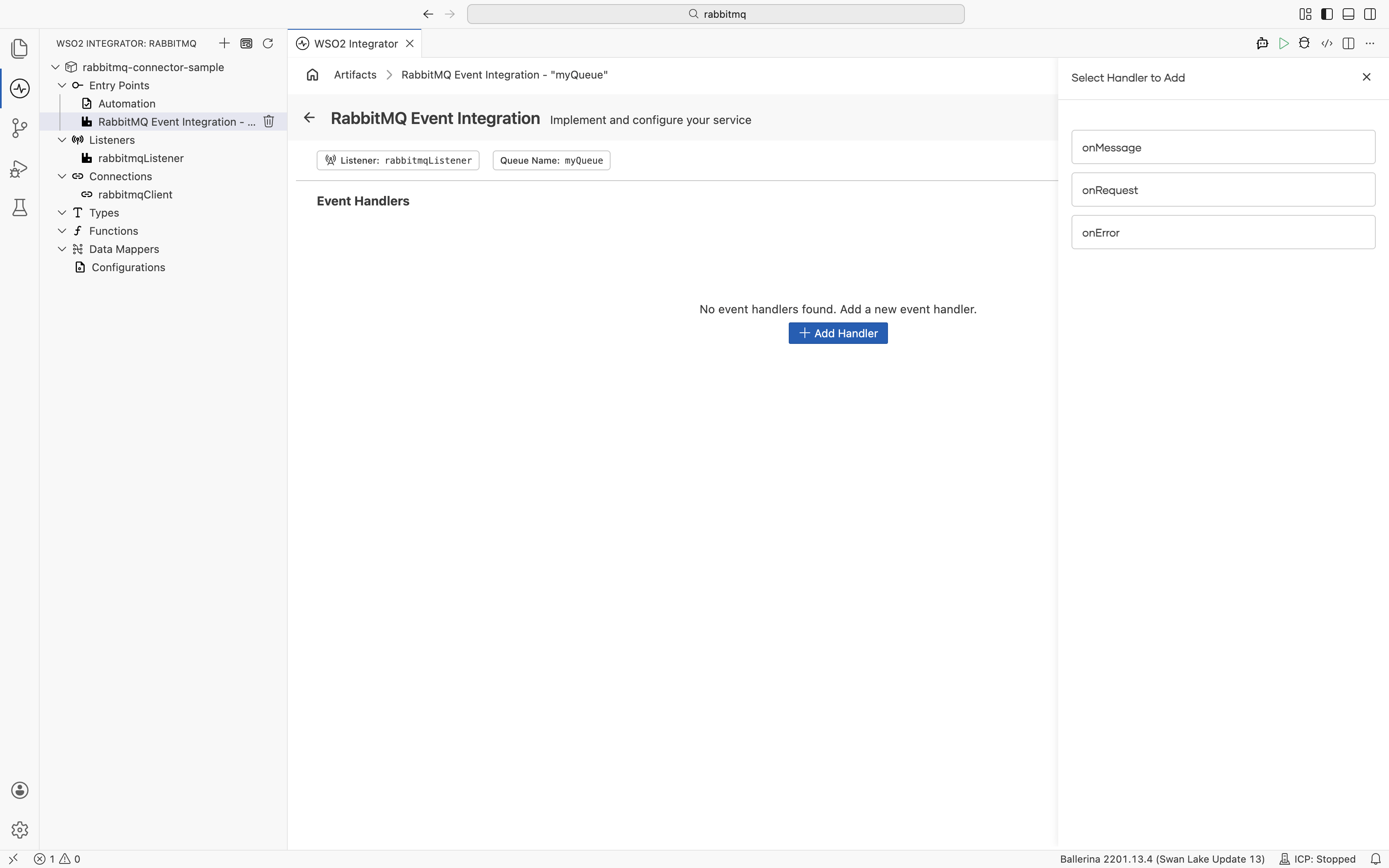
WSO2 Integrator opens the service in the Service Designer. The header shows the attached listener pill and the queue name pill.
-
Click + Add Handler to define how incoming messages are processed.
import ballerinax/rabbitmq;
import ballerina/log;

configurable string host = "localhost";
configurable int port = 5672;

listener rabbitmq:Listener rabbitmqListener = new (host, port);

@rabbitmq:ServiceConfig {
    queueName: "myQueue"
}
service on rabbitmqListener {

    remote function onMessage(rabbitmq:AnydataMessage message) returns error? {
        log:printInfo("Message received", content = message.content.toString());
    }
}
Service configuration
Service configuration sets the queue the service subscribes to and applies advanced queue-level settings.
- Visual Designer
- Ballerina Code
In the Service Designer, click the Configure icon in the header to open the RabbitMQ Event Integration Configuration panel. Select RabbitMQ Event Integration in the left panel.
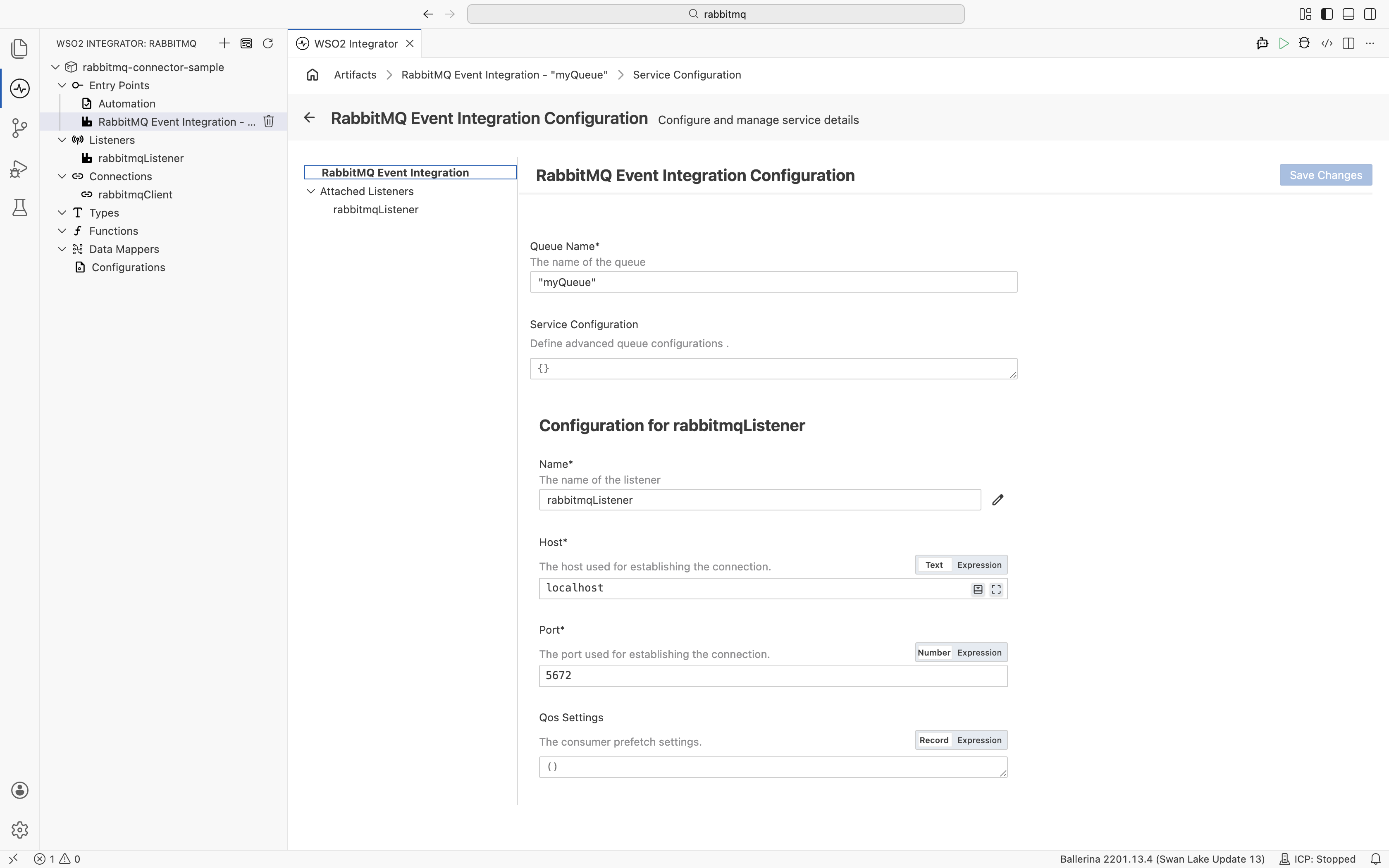
| Field | Description |
|---|---|
| Queue Name | Name of the queue this service listens to. |
| Service Configuration | Advanced queue-level settings as a @rabbitmq:ServiceConfig record expression (e.g., { autoAck: false }). |
The @rabbitmq:ServiceConfig annotation placed before the service declaration sets the queue and message acknowledgment mode:
@rabbitmq:ServiceConfig {
    queueName: "myQueue",
    autoAck: false
}
service on rabbitmqListener {
}
@rabbitmq:ServiceConfig fields:
| Field | Type | Default | Description |
|---|---|---|---|
queueName | string | Required | Name of the queue to consume from |
autoAck | boolean | true | When false, messages must be manually acknowledged using rabbitmq:Caller |
Listener configuration
The listener connects to the RabbitMQ broker and manages the consumer lifecycle.
- Visual Designer
- Ballerina Code
In the RabbitMQ Event Integration Configuration panel, select rabbitmqListener under Attached Listeners to configure the listener.
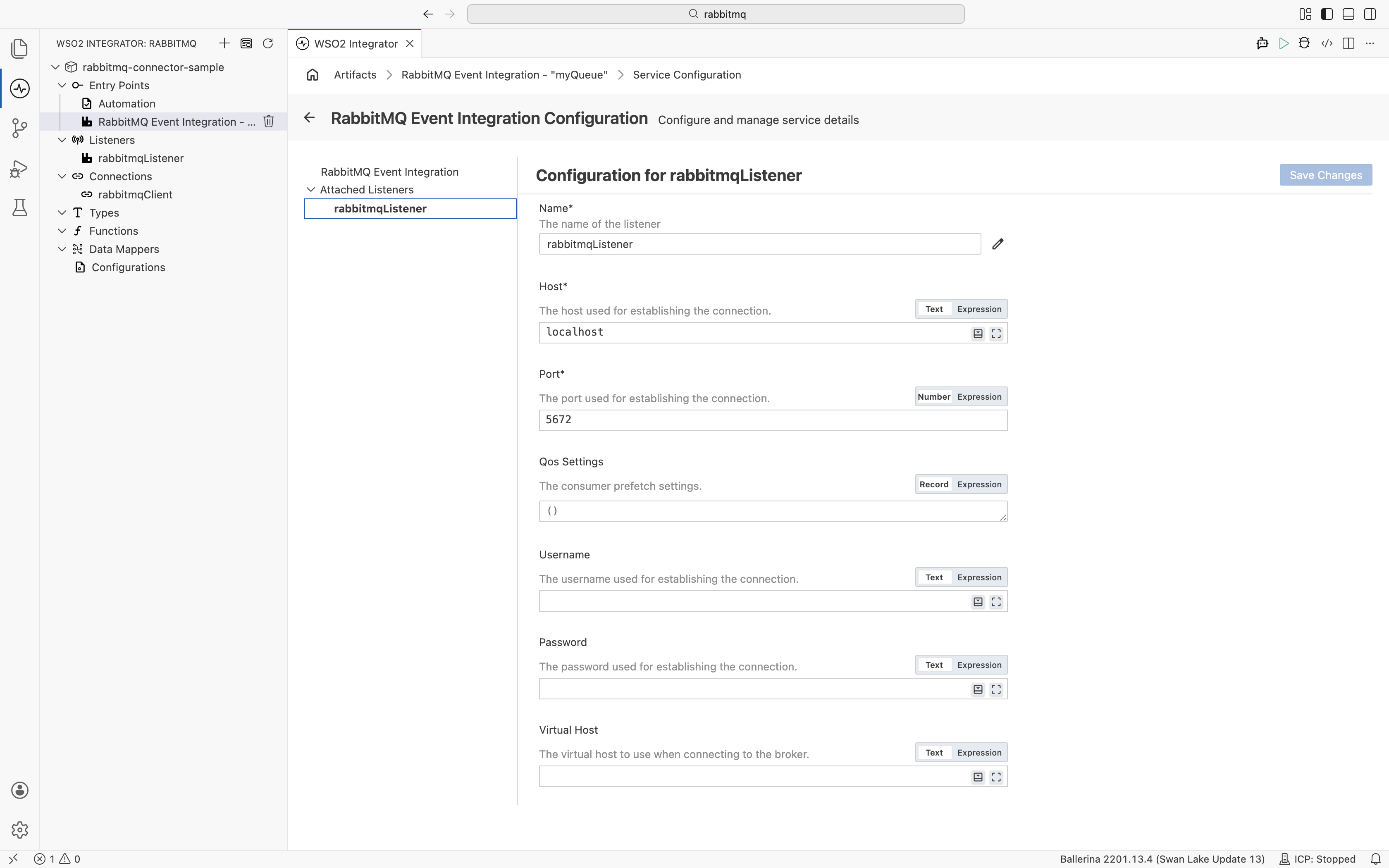
| Field | Description | Default |
|---|---|---|
| Name | Identifier for the listener. | rabbitmqListener |
| Host | Hostname or IP address of the RabbitMQ broker. | localhost |
| Port | Port used to connect to the broker. | 5672 |
| Qos Settings | Consumer prefetch settings. Controls how many unacknowledged messages can be in flight. | () |
| Username | Username for broker authentication. | — |
| Password | Password for broker authentication. | — |
| Virtual Host | Virtual host to use when connecting to the broker. | — |
| Connection Timeout | TCP connection establishment timeout in seconds. Set to 0 for infinite. | 0.0 |
| Handshake Timeout | AMQP 0-9-1 protocol handshake timeout in seconds. | 0.0 |
| Shutdown Timeout | Shutdown timeout in seconds. Set to 0 for infinite. If consumers exceed this timeout, any remaining queued deliveries will be lost. Default is 10. | 0.0 |
| Heartbeat | Initially-requested heartbeat timeout in seconds. Set to 0 for none. | 0.0 |
| Validation | Enable constraint validation on incoming message content. | — |
| Secure Socket | SSL/TLS configuration for secure connections (certificate path and password). | — |
| Auth | Authentication record with username and password fields. | — |
Click Save Changes to apply updates.
listener rabbitmq:Listener rabbitmqListener = new (
    host = "localhost",
    port = 5672,
    auth = {
        username: "guest",
        password: "guest"
    }
);
rabbitmq:ConnectionConfiguration fields:
| Field | Type | Default | Description |
|---|---|---|---|
host | string | "localhost" | RabbitMQ broker hostname |
port | int | 5672 | Broker port |
username | string | — | Broker username |
password | string | — | Broker password |
virtualHost | string | — | Virtual host |
connectionTimeout | decimal | 0.0 | TCP connection timeout in seconds |
handshakeTimeout | decimal | 0.0 | AMQP handshake timeout in seconds |
shutdownTimeout | decimal | 0.0 | Shutdown timeout in seconds |
heartbeat | decimal | 0.0 | Heartbeat interval in seconds |
secureSocket | rabbitmq:SecureSocket? | — | TLS/SSL configuration |
validation | boolean? | — | Enable constraint validation |
Event handlers
An event handler is a remote function that WSO2 Integrator calls for each event received from the queue.
Adding an event handler
- Visual Designer
- Ballerina Code
In the Service Designer, click + Add Handler. A Select Handler to Add panel opens on the right listing the available event types.
onMessage — opens a configuration panel before saving:
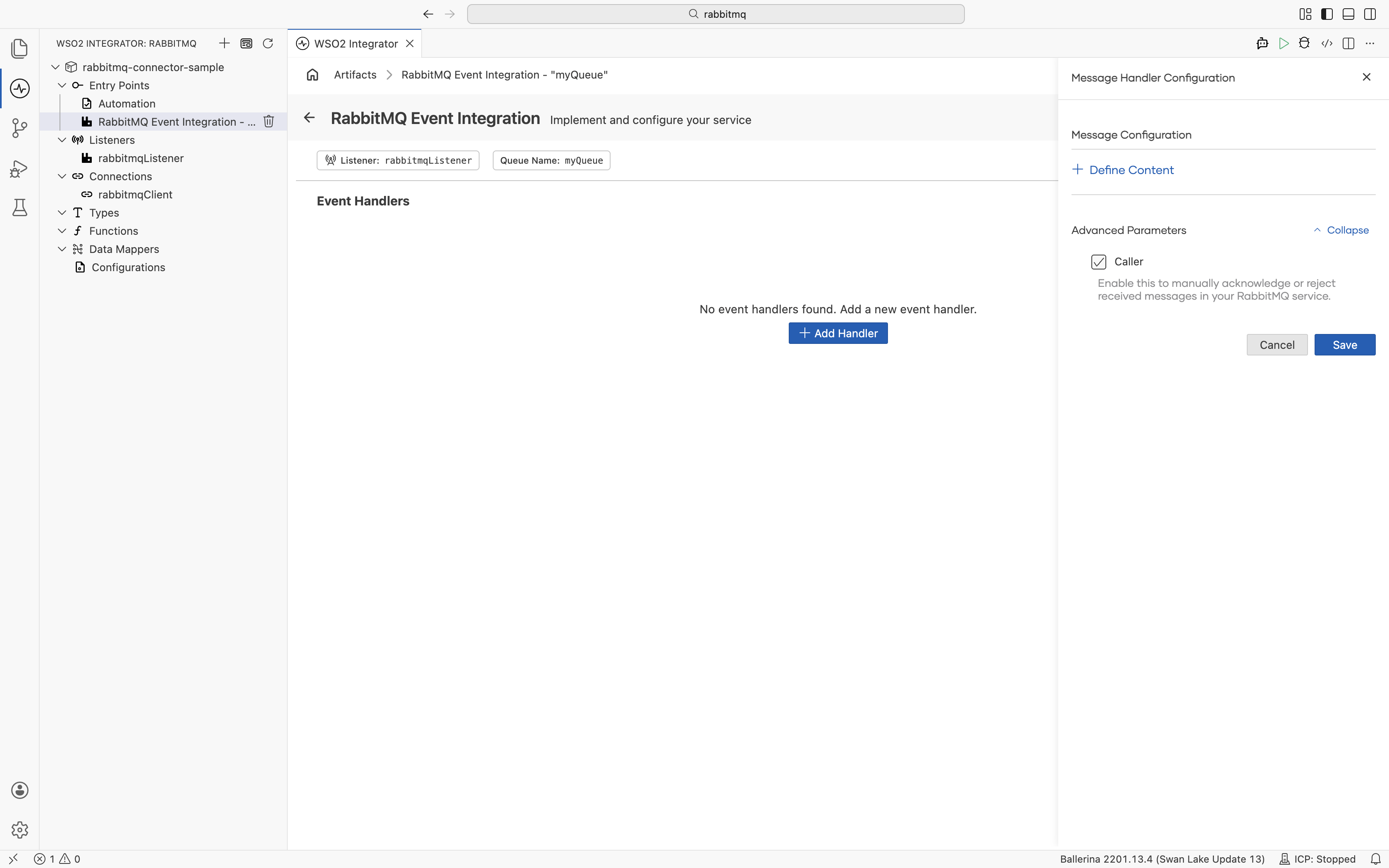
| Field | Description |
|---|---|
| + Define Content | Define the expected content type of the incoming message (e.g., a typed record). |
| Caller | When selected, includes rabbitmq:Caller as a parameter in the handler, enabling manual acknowledgment (basicAck) or rejection (basicNack) of messages. |
Click Save to add the handler.
onRequest and onError — added directly without additional configuration.
onMessage handler — called for each message received from the queue:
type OrderEvent record {|
    string orderId;
    string customerId;
    decimal amount;
|};

@rabbitmq:ServiceConfig {
    queueName: "orders",
    autoAck: false
}
service on rabbitmqListener {

    remote function onMessage(rabbitmq:AnydataMessage message,
                              rabbitmq:Caller caller) returns error? {
        OrderEvent order = check message.content.ensureType();
        check processOrder(order);
        check caller->basicAck();
    }
}
onRequest handler — called for RPC-style request/reply messages:
service on rabbitmqListener {

    remote function onRequest(rabbitmq:AnydataMessage message) returns string|error {
        OrderEvent order = check message.content.ensureType();
        string result = check processOrder(order);
        return result;
    }
}
onError handler — called when message processing fails:
service on rabbitmqListener {

    remote function onError(rabbitmq:AnydataMessage message,
                            rabbitmq:Error err) returns error? {
        log:printError("Message processing failed",
                       'error = err,
                       content = message.content.toString());
    }
}
Handler types
| Handler | Triggered when | Use when |
|---|---|---|
onMessage | A new message arrives on the queue | Standard one-way message consumption |
onRequest | An RPC request message arrives (has a replyTo property) | Request/reply messaging patterns |
onError | A handler returns an error or message processing fails | Logging failures and routing to dead-letter queues |
Message type
Each handler receives a rabbitmq:AnydataMessage parameter with the message content and metadata.
| Field | Type | Description |
|---|---|---|
content | anydata | Message payload. Use message.content.ensureType() to cast to a typed record. |
routingKey | string | Routing key used when the message was published. |
exchange | string | Exchange the message was published to. Empty string for the default exchange. |
deliveryTag | int | Unique delivery identifier. Used with caller->basicAck(deliveryTag) for manual acknowledgment. |
properties | rabbitmq:BasicProperties? | AMQP message properties including replyTo, correlationId, contentType, and headers. |
What's next
- Kafka — consume messages from Apache Kafka topics
- Connections — reuse RabbitMQ connection credentials across services
- RabbitMQ connector reference — full connector API reference and trigger reference