Twilio
Twilio event integrations receive webhook callbacks from the Twilio platform and trigger handler functions as call or message status changes occur. Use them to track call progress, monitor SMS delivery, and build real-time communication workflows without polling the Twilio API.
Creating a Twilio events service
The Twilio webhook listener must be reachable from the internet. For local development, use a tunneling tool such as ngrok to create a public URL for your local port. In production, deploy the integration to a publicly accessible host.
After starting the integration, configure the webhook URL in the Twilio Console under your phone number settings:
- For SMS status callbacks: set the A MESSAGE COMES IN webhook to
http://<your-host>:<port>with methodHTTP POST. - For call status callbacks: set the STATUS CALLBACK URL to
http://<your-host>:<port>with methodHTTP POST.
- Visual Designer
- Ballerina Code
-
Click + Add Artifact in the canvas or click + next to Entry Points in the sidebar.
-
In the Artifacts panel, select Twilio under Event Integration.
-
In the creation form, fill in the following fields:
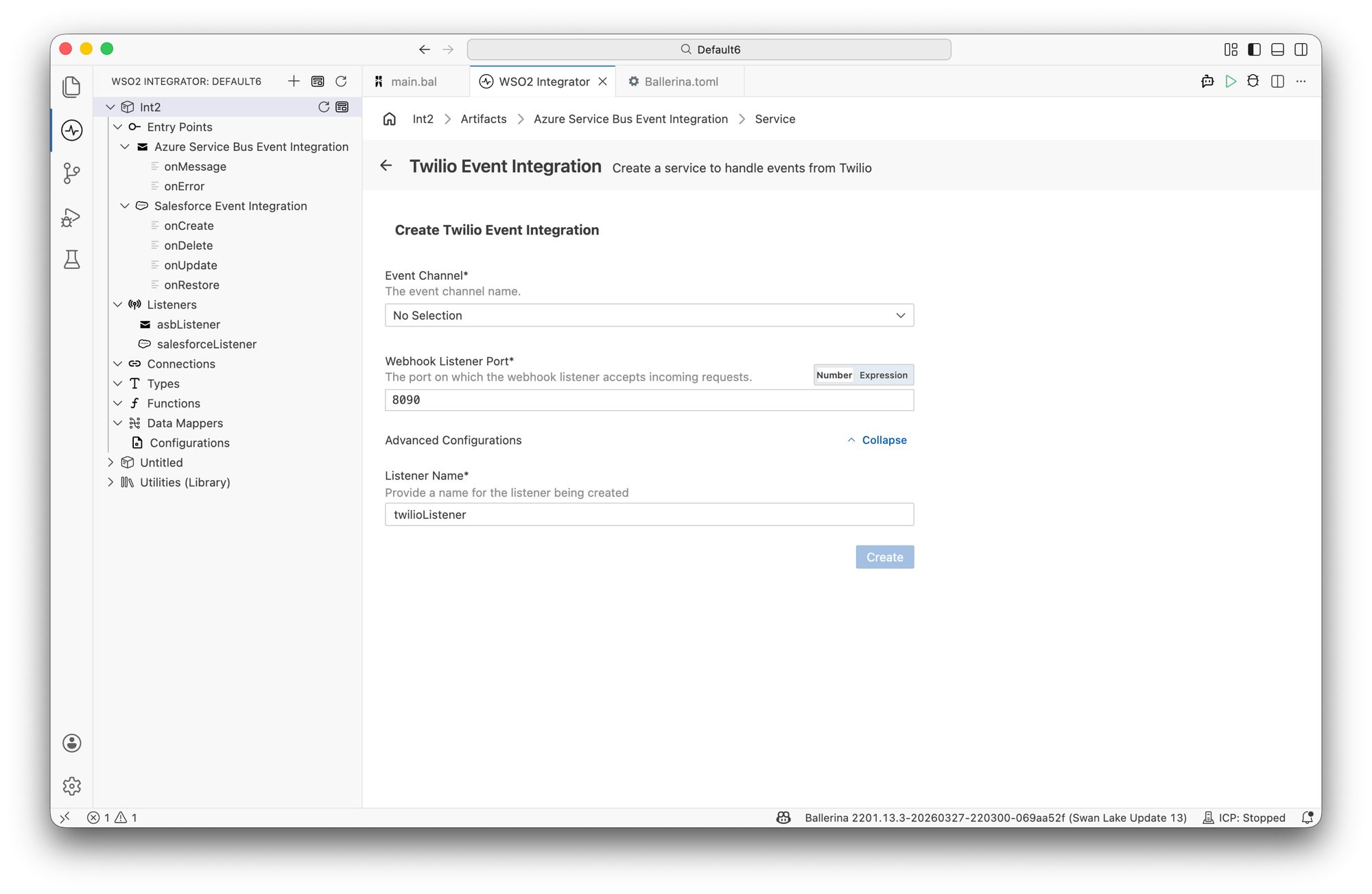
Field Description Default Event Channel The Twilio event channel to subscribe to. Select CallStatusService to handle call status events or SmsStatusService to handle SMS status events. Required Webhook Listener Port The port on which the webhook listener accepts incoming requests from Twilio. 8090Expand Advanced Configurations to set the listener name.
Field Description Default Listener Name Identifier for the listener created with this service. twilioListener -
Click Create.
-
WSO2 Integrator opens the service in the Service Designer. The canvas shows the attached listener pill and the Event Handlers section with all handlers for the selected channel pre-added.
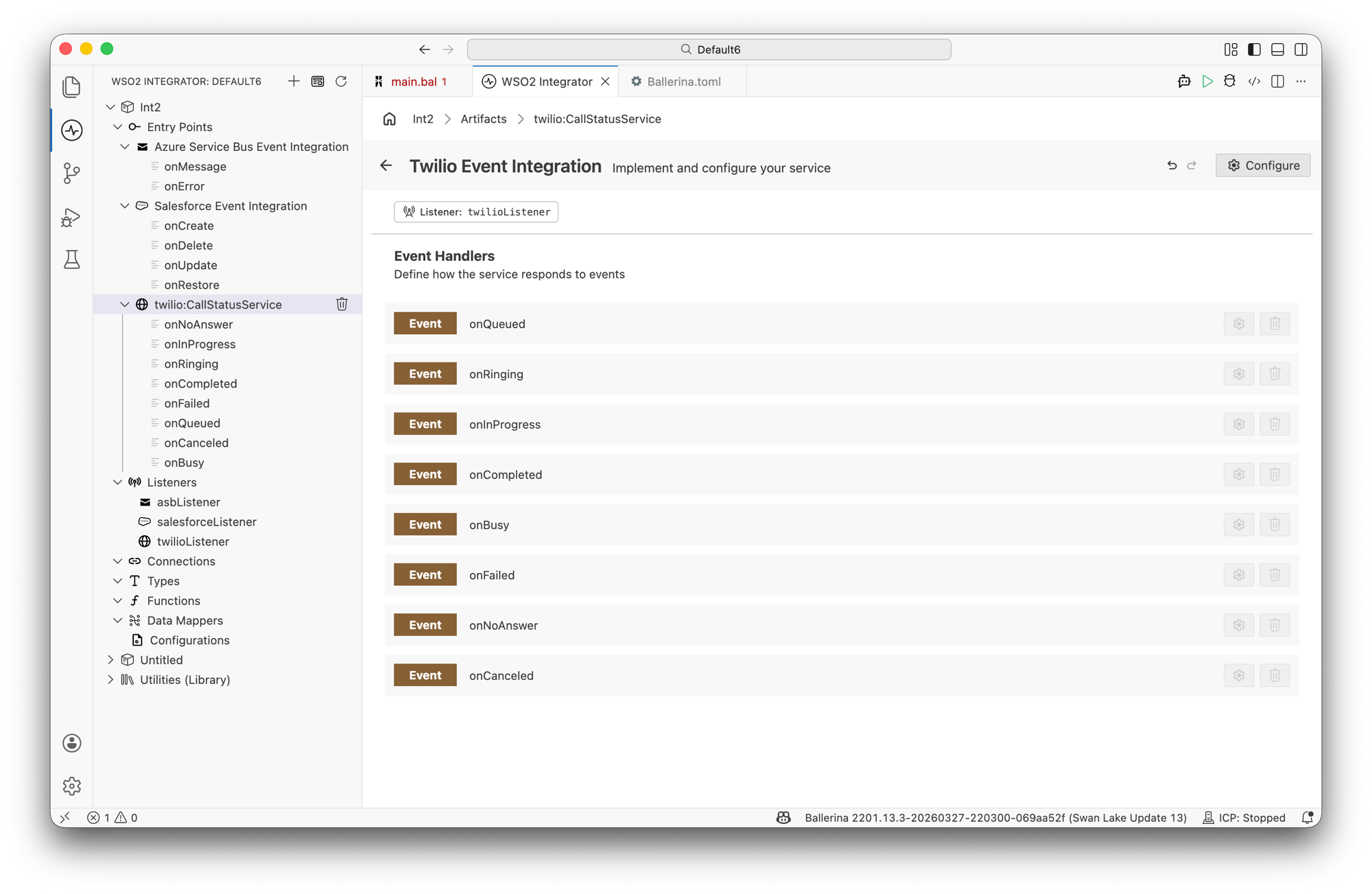
All event handlers for the selected channel are added automatically. Click any handler to open it in the flow diagram view and implement the logic.
import ballerinax/trigger.twilio;
import ballerina/log;

configurable int port = 8090;

listener twilio:Listener twilioListener = new (port);

service twilio:CallStatusService on twilioListener {

    remote function onQueued(twilio:CallStatusEventWrapper event) returns error? {
        log:printInfo("Call queued", callSid = event.CallSid ?: "");
    }

    remote function onRinging(twilio:CallStatusEventWrapper event) returns error? {
        log:printInfo("Call ringing", callSid = event.CallSid ?: "");
    }

    remote function onInProgress(twilio:CallStatusEventWrapper event) returns error? {
        log:printInfo("Call in progress", callSid = event.CallSid ?: "");
    }

    remote function onCompleted(twilio:CallStatusEventWrapper event) returns error? {
        log:printInfo("Call completed",
                      callSid = event.CallSid ?: "",
                      duration = event.CallDuration ?: "");
    }

    remote function onBusy(twilio:CallStatusEventWrapper event) returns error? {
        log:printInfo("Call busy", callSid = event.CallSid ?: "");
    }

    remote function onFailed(twilio:CallStatusEventWrapper event) returns error? {
        log:printInfo("Call failed", callSid = event.CallSid ?: "");
    }

    remote function onNoAnswer(twilio:CallStatusEventWrapper event) returns error? {
        log:printInfo("Call no answer", callSid = event.CallSid ?: "");
    }

    remote function onCanceled(twilio:CallStatusEventWrapper event) returns error? {
        log:printInfo("Call canceled", callSid = event.CallSid ?: "");
    }
}
Service and listener configuration
In the Service Designer, click the Configure icon in the header to open the Twilio Event Integration Configuration panel.
- Visual Designer
- Ballerina Code
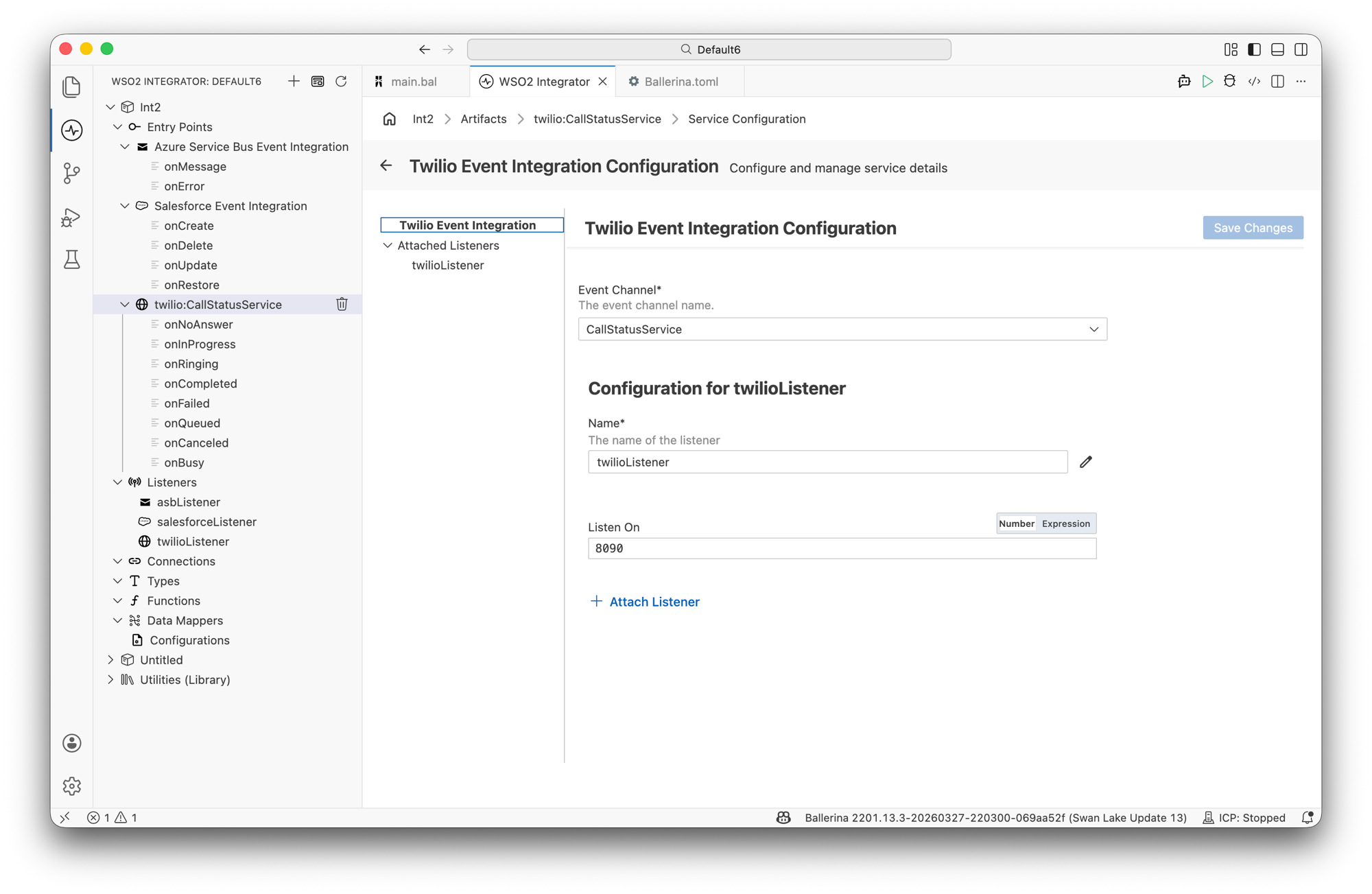
The configuration panel has two sections. The top section configures the service and the bottom section configures the attached listener.
Service configuration:
| Field | Description |
|---|---|
| Event Channel | The Twilio event channel this service handles. Select CallStatusService or SmsStatusService. |
Listener configuration (under Configuration for twilioListener):
| Field | Description | Default |
|---|---|---|
| Name | Identifier for the listener. | twilioListener |
| Listen On | Port on which the listener accepts incoming webhook requests. | 8090 |
Click + Attach Listener to attach an additional listener to the same service.
Click Save Changes to apply updates.
listener twilio:Listener twilioListener = new (8090);
twilio:Listener accepts a port number as its argument. The listener starts an HTTP server on that port to receive Twilio webhook callbacks.
For SmsStatusService:
service twilio:SmsStatusService on twilioListener {

    remote function onAccepted(twilio:SmsStatusChangeEventWrapper event) returns error? {
        log:printInfo("SMS accepted", messageSid = event.MessageSid ?: "");
    }

    remote function onQueued(twilio:SmsStatusChangeEventWrapper event) returns error? {
        log:printInfo("SMS queued", messageSid = event.MessageSid ?: "");
    }

    remote function onSending(twilio:SmsStatusChangeEventWrapper event) returns error? {
        log:printInfo("SMS sending", messageSid = event.MessageSid ?: "");
    }

    remote function onSent(twilio:SmsStatusChangeEventWrapper event) returns error? {
        log:printInfo("SMS sent", messageSid = event.MessageSid ?: "");
    }

    remote function onFailed(twilio:SmsStatusChangeEventWrapper event) returns error? {
        log:printInfo("SMS failed", messageSid = event.MessageSid ?: "");
    }

    remote function onDelivered(twilio:SmsStatusChangeEventWrapper event) returns error? {
        log:printInfo("SMS delivered", messageSid = event.MessageSid ?: "");
    }

    remote function onUndelivered(twilio:SmsStatusChangeEventWrapper event) returns error? {
        log:printInfo("SMS undelivered", messageSid = event.MessageSid ?: "");
    }

    remote function onReceiving(twilio:SmsStatusChangeEventWrapper event) returns error? {
        log:printInfo("SMS receiving", messageSid = event.MessageSid ?: "");
    }

    remote function onReceived(twilio:SmsStatusChangeEventWrapper event) returns error? {
        log:printInfo("SMS received",
                      messageSid = event.MessageSid ?: "",
                      'from = event.From ?: "",
                      body = event.Body ?: "");
    }
}
Event handlers
When a Twilio Events service is created, WSO2 Integrator adds all handlers for the selected channel automatically. Click any handler in the Service Designer to open the flow diagram view and implement the processing logic.
CallStatusService handlers
The CallStatusService channel provides handlers for each Twilio call state.
| Handler | Triggered when |
|---|---|
onQueued | The call has been created and is waiting to be dialed |
onRinging | The call is ringing at the destination |
onInProgress | The call has been answered and is active |
onCompleted | The call ended normally |
onBusy | The destination returned a busy signal |
onFailed | The call could not be connected |
onNoAnswer | The destination did not answer |
onCanceled | The call was canceled before it was answered |
SmsStatusService handlers
The SmsStatusService channel provides handlers for each Twilio SMS delivery state.
| Handler | Triggered when |
|---|---|
onAccepted | Twilio has accepted the message request |
onQueued | The message is queued for delivery |
onSending | Twilio is in the process of sending the message |
onSent | The message has been dispatched to the carrier |
onFailed | The message could not be sent |
onDelivered | The carrier confirmed delivery to the recipient |
onUndelivered | The carrier received the message but could not deliver it |
onReceiving | An inbound message has been received and is being processed |
onReceived | An inbound SMS message was fully received |
Error handling
Service callbacks return error?. If a handler returns an error, the listener returns a non-2xx HTTP response to Twilio, which triggers Twilio's retry mechanism. Handle expected failures within the callback and return () (nil) to acknowledge the event without triggering a retry.
What's next
- Kafka — consume messages from Apache Kafka topics
- MQTT — subscribe to MQTT topics for IoT and lightweight messaging
- Connections — reuse Twilio credentials across services
- Twilio connector reference — full connector API reference