GitHub Webhooks
GitHub event integration is currently in Beta. APIs and behavior may change in future releases.
GitHub event integrations receive webhook callbacks from GitHub and trigger handler functions as repository events occur. Use them to automate CI/CD workflows, sync issue trackers, enforce code review policies, and react to repository activity in real time.
Creating a GitHub Events service
- Visual Designer
- Ballerina Code
-
Click + Add Artifact in the canvas or click + next to Entry Points in the sidebar.
-
In the Artifacts panel, select GitHub under Event Integration.
-
In the creation form, fill in the following fields:
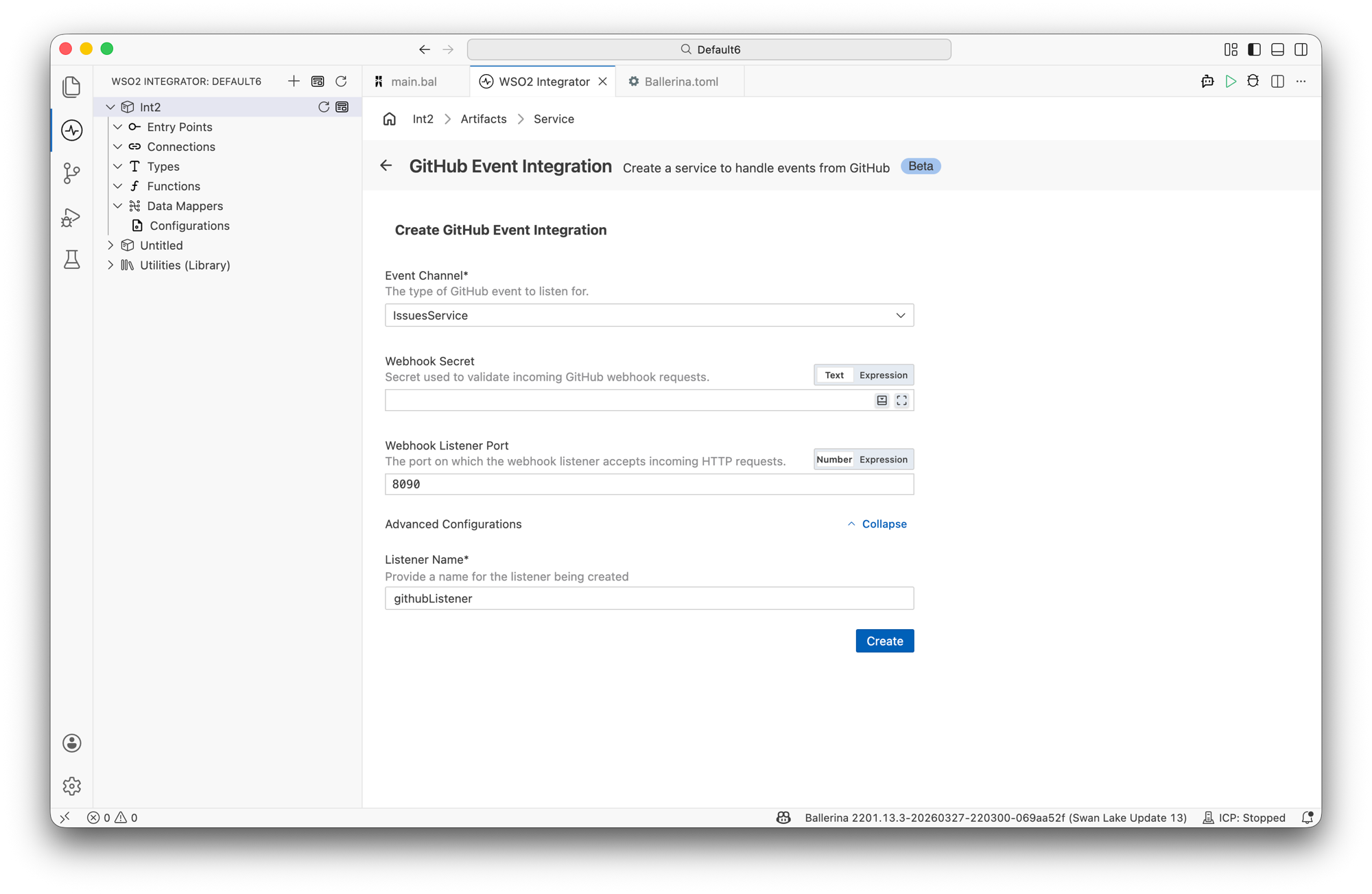
Field Description Default Event Channel The type of GitHub event to listen for. Select a service type from the dropdown (for example, IssuesService, PullRequestService). See Event channels for all options. Required Webhook Secret Secret used to validate incoming GitHub webhook requests. Configure the same value in your GitHub repository webhook settings. — Webhook Listener Port The port on which the webhook listener accepts incoming HTTP requests. 8090Expand Advanced Configurations to set the listener name.
Field Description Default Listener Name Identifier for the listener created with this service. githubListener -
Click Create.
-
WSO2 Integrator opens the service in the Service Designer. The canvas shows the attached listener pill, the active event channel pill, and the Event Handlers section with all handlers for the selected channel pre-added.
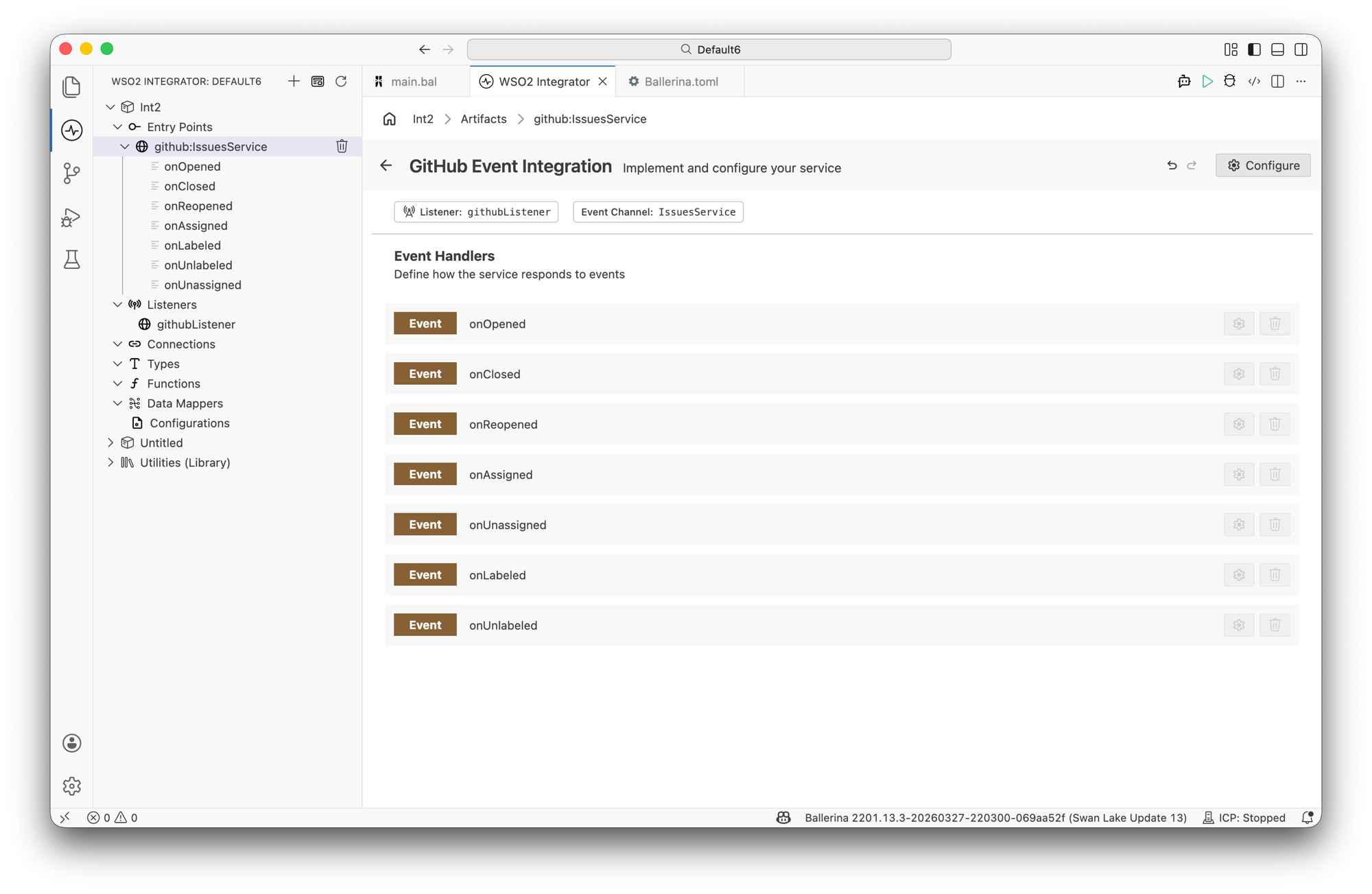
All event handlers for the selected channel are added automatically. Click any handler to open it in the flow diagram view and implement the logic.
import ballerinax/trigger.github;
import ballerina/log;

configurable string webhookSecret = ?;
configurable int port = 8090;

listener github:Listener githubListener = new (
    listenerConfig = {webhookSecret: webhookSecret},
    listenOn = port
);

service github:IssuesService on githubListener {

    remote function onOpened(github:IssuesEvent payload) returns error? {
        log:printInfo("Issue opened",
                      number = payload.issue.number,
                      title = payload.issue.title,
                      repo = payload.repository.name);
    }

    remote function onClosed(github:IssuesEvent payload) returns error? {
        log:printInfo("Issue closed", number = payload.issue.number);
    }

    remote function onReopened(github:IssuesEvent payload) returns error? {
        log:printInfo("Issue reopened", number = payload.issue.number);
    }

    remote function onAssigned(github:IssuesEvent payload) returns error? {
        log:printInfo("Issue assigned", number = payload.issue.number);
    }

    remote function onUnassigned(github:IssuesEvent payload) returns error? {
        log:printInfo("Issue unassigned", number = payload.issue.number);
    }

    remote function onLabeled(github:IssuesEvent payload) returns error? {
        log:printInfo("Issue labeled", number = payload.issue.number);
    }

    remote function onUnlabeled(github:IssuesEvent payload) returns error? {
        log:printInfo("Issue unlabeled", number = payload.issue.number);
    }
}
Service and listener configuration
In the Service Designer, click the Configure icon in the header to open the GitHub Event Integration Configuration panel.
- Visual Designer
- Ballerina Code
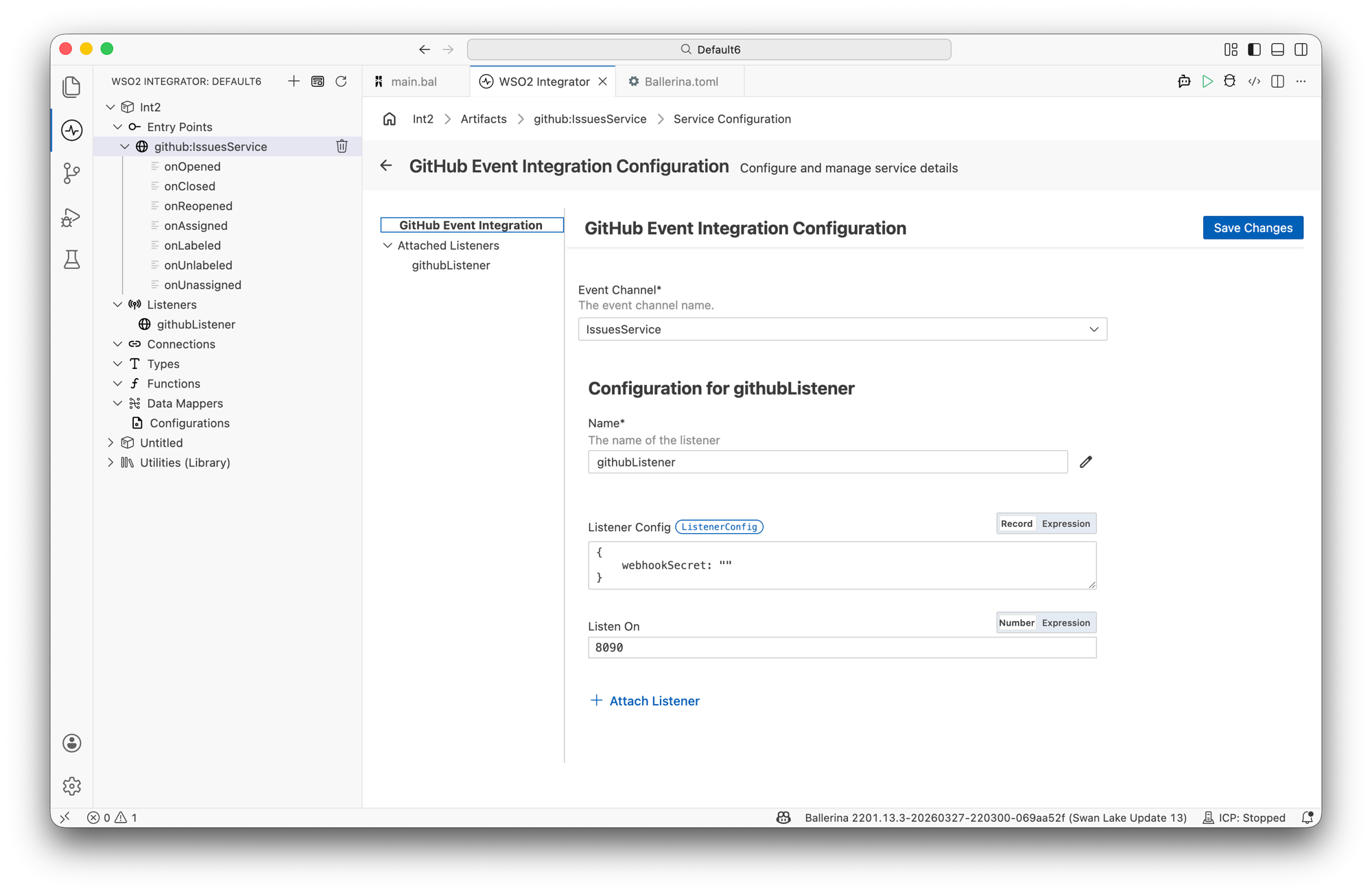
The configuration panel has two sections. The top section configures the service and the bottom section configures the attached listener.
Service configuration:
| Field | Description |
|---|---|
| Event Channel | The GitHub event channel this service handles. Select from the available service types. |
Listener configuration (under Configuration for githubListener):
| Field | Description | Default |
|---|---|---|
| Name | Identifier for the listener. | githubListener |
| Listener Config | Webhook validation configuration. Accepts a ListenerConfig record expression with a webhookSecret field. | { webhookSecret: "" } |
| Listen On | Port on which the listener accepts incoming webhook requests. | 8090 |
Click + Attach Listener to attach an additional listener to the same service.
Click Save Changes to apply updates.
listener github:Listener githubListener = new (
    listenerConfig = {webhookSecret: webhookSecret},
    listenOn = 8090
);
github:ListenerConfig fields:
| Field | Type | Default | Description |
|---|---|---|---|
webhookSecret | string | "" | Secret used to verify the HMAC signature on incoming GitHub webhook requests |
Event channels
Each event channel maps to a specific GitHub webhook event type. Select the channel that matches the repository activity your integration needs to respond to.
| Channel | GitHub event | Description |
|---|---|---|
IssuesService | issues | Issues opened, closed, reopened, assigned, labeled, and more |
IssueCommentService | issue_comment | Comments created, edited, or deleted on issues and pull requests |
PullRequestService | pull_request | Pull requests opened, closed, merged, reviewed, and updated |
PullRequestReviewService | pull_request_review | Pull request reviews submitted, dismissed, or edited |
PullRequestReviewCommentService | pull_request_review_comment | Comments on pull request review diffs created, edited, or deleted |
ReleaseService | release | Releases published, unpublished, created, edited, or deleted |
LabelService | label | Labels created, edited, or deleted |
MilestoneService | milestone | Milestones created, closed, opened, edited, or deleted |
PushService | push | Commits pushed to a branch or tag |
ProjectCardService | project_card | Project board cards created, edited, moved, or deleted |
Event handlers
When a GitHub Events service is created, WSO2 Integrator adds all handlers for the selected channel automatically. Click any handler in the Service Designer to open the flow diagram view and implement the processing logic.
IssuesService handlers
| Handler | Triggered when | Payload type |
|---|---|---|
onOpened | A new issue is opened | github:IssuesEvent |
onClosed | An issue is closed | github:IssuesEvent |
onReopened | A closed issue is reopened | github:IssuesEvent |
onAssigned | A user is assigned to an issue | github:IssuesEvent |
onUnassigned | A user is unassigned from an issue | github:IssuesEvent |
onLabeled | A label is added to an issue | github:IssuesEvent |
onUnlabeled | A label is removed from an issue | github:IssuesEvent |
PullRequestService handlers
| Handler | Triggered when | Payload type |
|---|---|---|
onOpened | A pull request is opened | github:PullRequestEvent |
onClosed | A pull request is closed or merged | github:PullRequestEvent |
onReopened | A closed pull request is reopened | github:PullRequestEvent |
onAssigned | A user is assigned to a pull request | github:PullRequestEvent |
onUnassigned | A user is unassigned from a pull request | github:PullRequestEvent |
onLabeled | A label is added | github:PullRequestEvent |
onUnlabeled | A label is removed | github:PullRequestEvent |
onEdited | A pull request title, body, or base branch is edited | github:PullRequestEvent |
onReviewRequested | A review is requested | github:PullRequestEvent |
onReviewRequestRemoved | A review request is removed | github:PullRequestEvent |
IssueCommentService handlers
| Handler | Triggered when | Payload type |
|---|---|---|
onCreated | A comment is added to an issue or pull request | github:IssueCommentEvent |
onEdited | An existing comment is edited | github:IssueCommentEvent |
onDeleted | A comment is deleted | github:IssueCommentEvent |
PullRequestReviewService handlers
| Handler | Triggered when | Payload type |
|---|---|---|
onSubmitted | A pull request review is submitted | github:PullRequestReviewEvent |
onDismissed | A pull request review is dismissed | github:PullRequestReviewEvent |
onEdited | A pull request review body is edited | github:PullRequestReviewEvent |
PullRequestReviewCommentService handlers
| Handler | Triggered when | Payload type |
|---|---|---|
onCreated | A comment is added to a pull request diff | github:PullRequestReviewCommentEvent |
onEdited | A comment on a pull request diff is edited | github:PullRequestReviewCommentEvent |
onDeleted | A comment on a pull request diff is deleted | github:PullRequestReviewCommentEvent |
ReleaseService handlers
| Handler | Triggered when | Payload type |
|---|---|---|
onPublished | A release is published | github:ReleaseEvent |
onUnpublished | A release is unpublished | github:ReleaseEvent |
onCreated | A release draft is created | github:ReleaseEvent |
onEdited | A release is edited | github:ReleaseEvent |
onDeleted | A release is deleted | github:ReleaseEvent |
onPreReleased | A release is marked as a pre-release | github:ReleaseEvent |
onReleased | A pre-release is promoted to a full release | github:ReleaseEvent |
LabelService handlers
| Handler | Triggered when | Payload type |
|---|---|---|
onCreated | A label is created in the repository | github:LabelEvent |
onEdited | A label name or color is changed | github:LabelEvent |
onDeleted | A label is deleted | github:LabelEvent |
MilestoneService handlers
| Handler | Triggered when | Payload type |
|---|---|---|
onCreated | A milestone is created | github:MilestoneEvent |
onOpened | A closed milestone is reopened | github:MilestoneEvent |
onClosed | A milestone is closed | github:MilestoneEvent |
onEdited | A milestone title or description is edited | github:MilestoneEvent |
onDeleted | A milestone is deleted | github:MilestoneEvent |
PushService handlers
| Handler | Triggered when | Payload type |
|---|---|---|
onPush | Commits are pushed to a branch or a tag is created or deleted | github:PushEvent |
ProjectCardService handlers
| Handler | Triggered when | Payload type |
|---|---|---|
onCreated | A card is added to a project board | github:ProjectCardEvent |
onEdited | A card note is edited | github:ProjectCardEvent |
onMoved | A card is moved to a different column | github:ProjectCardEvent |
onConverted | A card note is converted to an issue | github:ProjectCardEvent |
onDeleted | A card is deleted from a project board | github:ProjectCardEvent |
Error handling
If an event handler returns an error, the GitHub listener logs the error and continues processing subsequent events. Use do/on fail inside each handler to catch and recover from expected failures without propagating them to the listener.
- Visual Designer
- Ballerina Code
Add an Error Handler block inside the handler flow to define recovery logic. Errors that escape the handler are caught by the listener and logged automatically.
service github:IssuesService on githubListener {

    remote function onOpened(github:IssuesEvent payload) returns error? {
        do {
            log:printInfo("Issue opened", number = payload.issue.number);
        } on fail error err {
            log:printError("Failed to handle onOpened event", err);
        }
    }
}
Return error? from a handler to allow unhandled errors to propagate to the listener. Return () to suppress them.
What's next
- Kafka — consume messages from Apache Kafka topics
- Salesforce Events — listen to Salesforce Change Data Capture events
- Connections — reuse GitHub credentials across services
- GitHub connector reference — full connector API reference
- GitHub Personal Access Token Setup Guide — create a GitHub Personal Access Token and configure a repository webhook