CDC for Microsoft SQL Server
Microsoft SQL Server CDC integrations capture row-level changes from SQL Server tables in real time using Debezium-based Change Data Capture. Use them for data synchronization, audit logging, and event-driven workflows that must react to database inserts, updates, and deletes without polling.
CDC must be enabled on the SQL Server database and on the specific tables you want to track before creating this integration. See Prerequisites.
Prerequisites
Before creating the integration:
- SQL Server Agent must be running. CDC relies on Agent jobs to copy changes from the transaction log into change tables. If the agent isn't running, no change events are published. Verify by running
EXEC master.dbo.xp_servicecontrol N'QueryState', N'SQLServerAGENT';and confirming the returned state indicates the service is running. - Enable CDC on the target database and on each table you want to track.
-- Enable CDC on the database
EXEC sys.sp_cdc_enable_db;

-- Enable CDC on a specific table
EXEC sys.sp_cdc_enable_table
    @source_schema        = N'dbo',
    @source_name          = N'customers',
    @role_name            = NULL,
    @supports_net_changes = 1;
Enabling CDC on a table creates a change table at cdc.<capture_instance>_CT, where capture_instance defaults to <schema>_<table> unless overridden with the @capture_instance parameter. The Debezium connector reads from this change table. For advanced Debezium properties, see the Debezium connector for SQL Server.
Create a CDC service for Microsoft SQL Server
- Visual Designer
- Ballerina Code
-
Click + Add Artifact in the canvas or click + next to Entry Points in the sidebar.
-
In the Artifacts panel, select CDC for Microsoft SQL Server under Event Integration.
-
In the creation form, select Create new to configure a new listener.
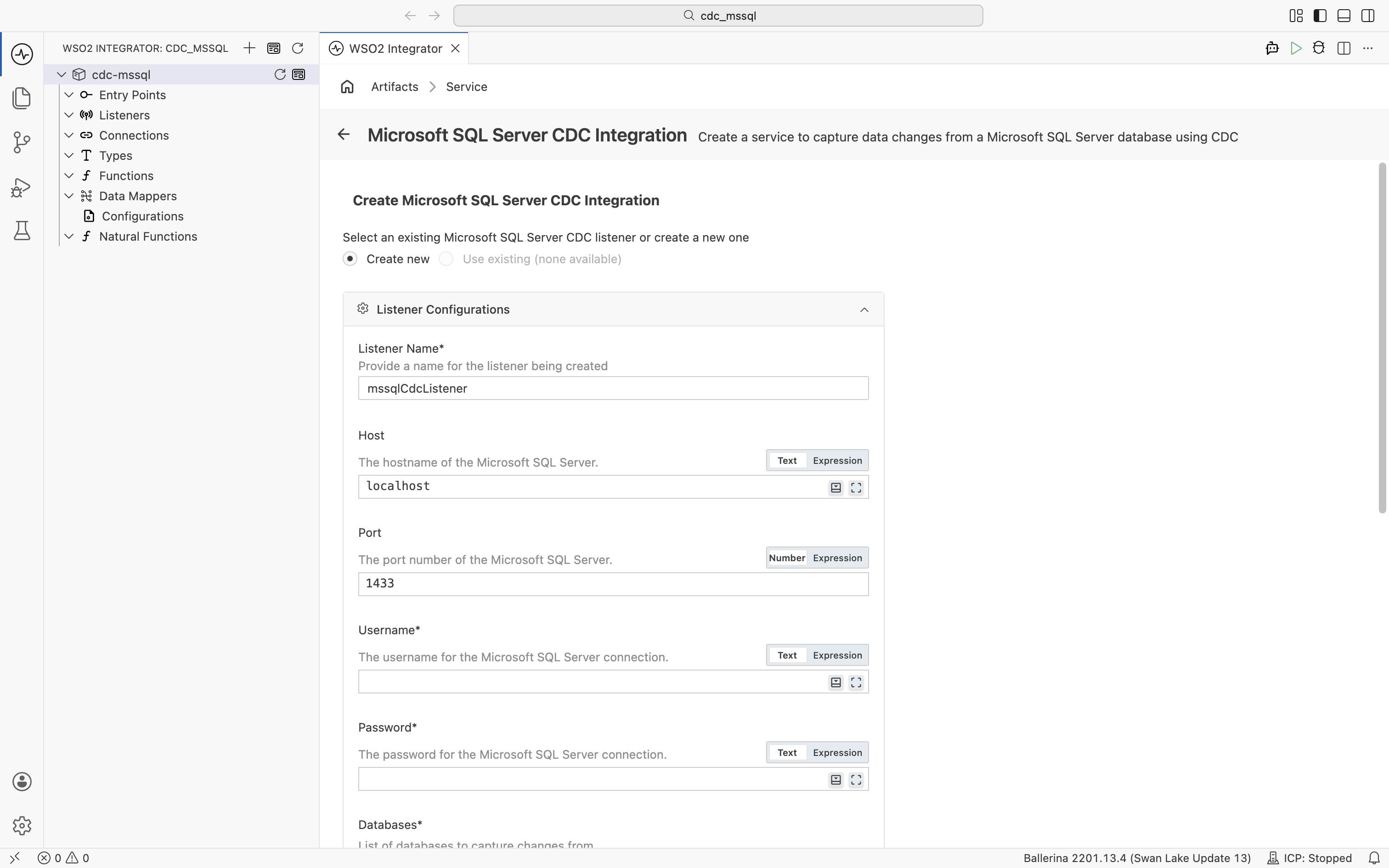
Under Listener Configurations, fill in the following fields:
Field Description Default Host Hostname of the Microsoft SQL Server. localhostPort Port number of the Microsoft SQL Server. 1433Username Username for the SQL Server connection. Required Password Password for the SQL Server connection. Required Databases List of databases to capture changes from. Click + Add Item to add each database name. Required Schemas Regular expressions matching schema names to capture changes from. Click + Add Item to add each pattern. — Expand Advanced Configurations for additional settings:
Field Description Default Listener Name Identifier for the listener created with this service. mssqlCdcListenerDatabase Instance Microsoft SQL Server named instance (if applicable). — Secure Socket SSL/TLS configuration for a secure connection. — Options Additional options for the CDC engine as a record expression. Common keys include snapshotMode(for example,"no_data"to skip the initial snapshot) andskippedOperations(for example,[cdc:TRUNCATE, cdc:UPDATE, cdc:DELETE]to capture only inserts).— Under Table, enter the fully qualified table name to capture events from in the format
<database>.<schema>.<table>(for example,mydb.dbo.customers). -
Click Create.
-
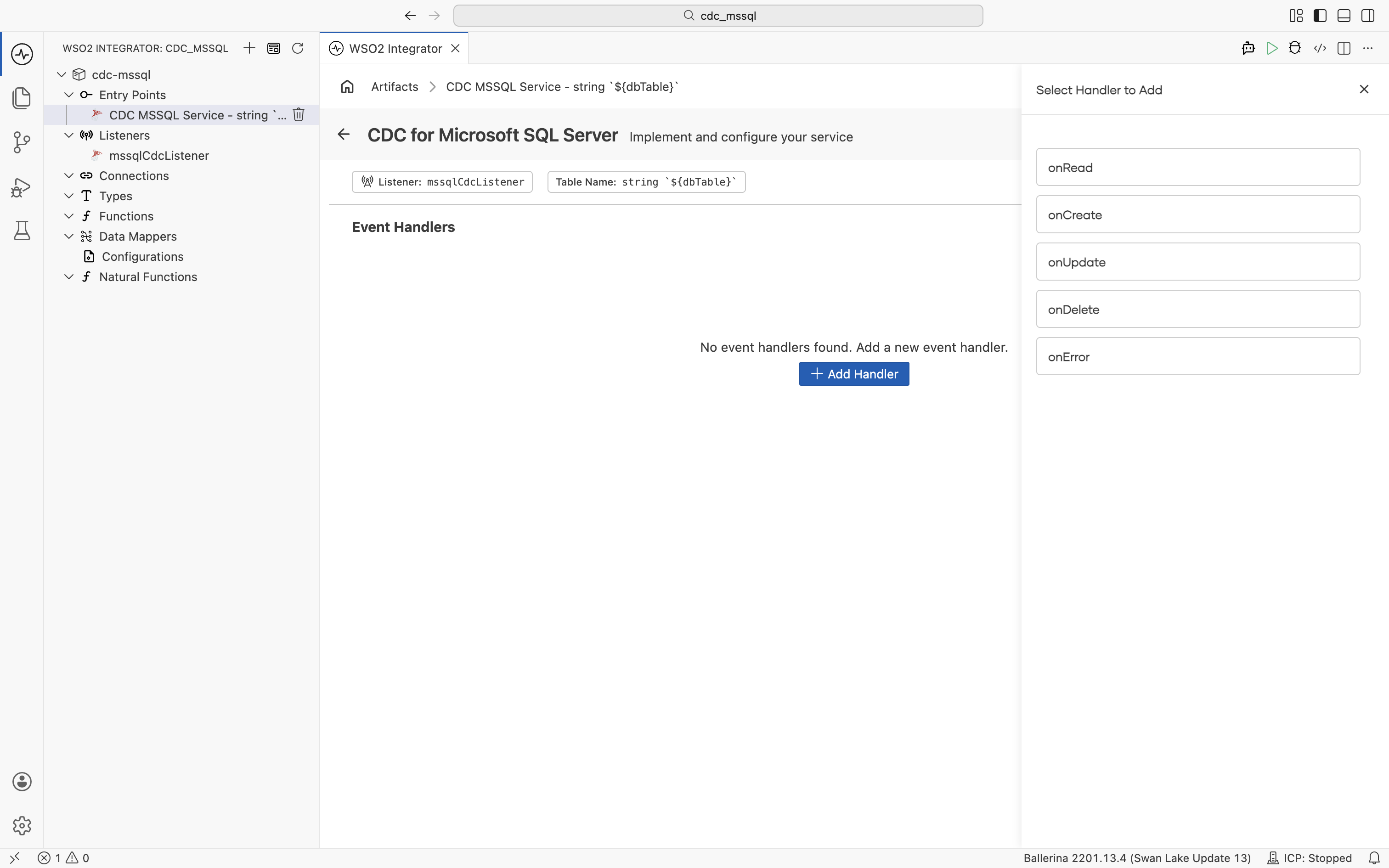
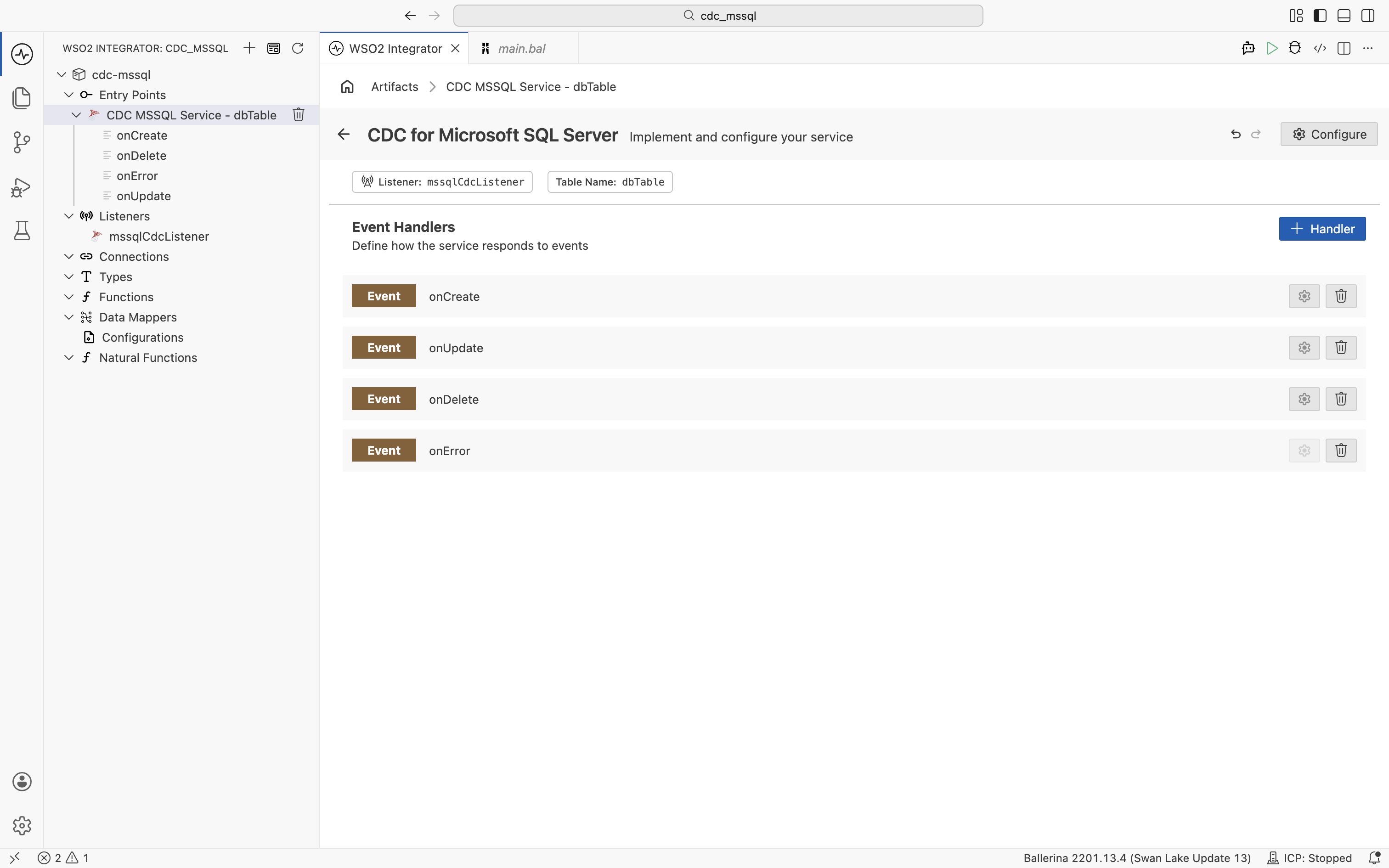
WSO2 Integrator opens the service in the Service Designer. The canvas shows the attached listener pill and the table name pill.
-
Click + Add Handler to add event handlers.
import ballerina/log;
import ballerinax/cdc;
import ballerinax/mssql;
import ballerinax/mssql.cdc.driver as _;

configurable string username = ?;
configurable string password = ?;
configurable string dbName = "mydb";
configurable string dbTable = "mydb.dbo.customers";

listener mssql:CdcListener mssqlCdcListener = new (database = {
    hostname: "localhost",
    port: 1433,
    username,
    password,
    databaseNames: [dbName],
    includedSchemas: ["dbo"]
});

@cdc:ServiceConfig {
    tables: dbTable
}
service cdc:Service on mssqlCdcListener {

    remote function onCreate(record {} after) returns error? {
        log:printInfo("Row inserted", data = after.toString());
    }

    remote function onUpdate(record {} before, record {} after) returns error? {
        log:printInfo("Row updated",
                before = before.toString(),
                after = after.toString());
    }

    remote function onDelete(record {} before) returns error? {
        log:printInfo("Row deleted", data = before.toString());
    }

    remote function onError(error err) returns error? {
        log:printError("CDC error", 'error = err);
    }
}
Service configuration
In the Service Designer, click the Configure icon in the header to open the CDC for Microsoft SQL Server Configuration panel. Select CDC for Microsoft SQL Server in the left panel.
- Visual Designer
- Ballerina Code
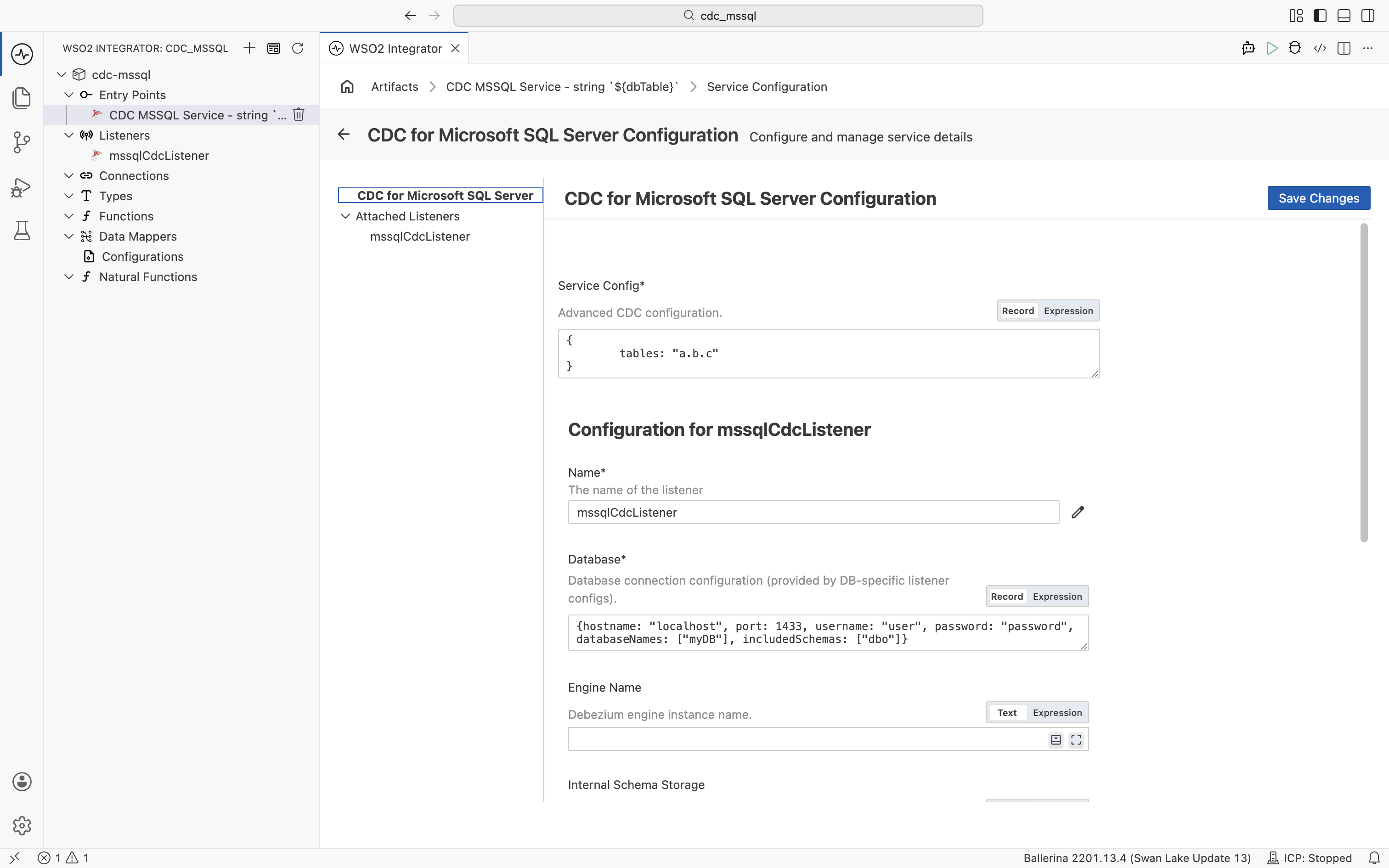
| Field | Description |
|---|---|
| Service Config | Advanced CDC configuration as a record expression. The tables field sets the fully qualified table name (format: <database>.<schema>.<table>). |
@cdc:ServiceConfig {
    tables: "mydb.dbo.customers"
}
service cdc:Service on mssqlCdcListener { }
Listener configuration
In the CDC for Microsoft SQL Server Configuration panel, select mssqlCdcListener under Attached Listeners to configure the listener.
- Visual Designer
- Ballerina Code
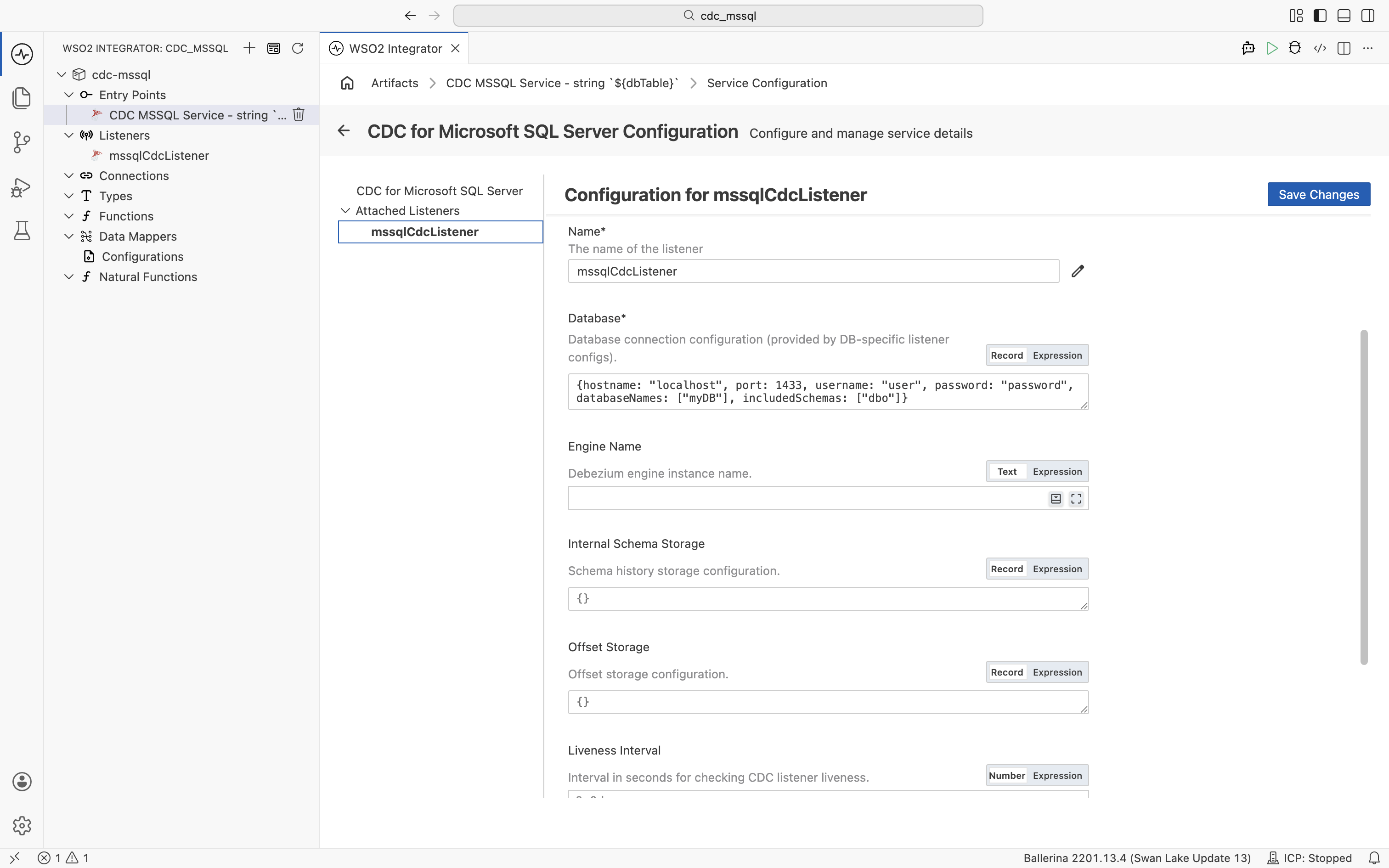
| Field | Description | Default |
|---|---|---|
| Name | Identifier for the listener. | mssqlCdcListener |
| Database | Database connection configuration as a record expression with hostname, port, username, password, and databaseNames fields. | Required |
| Engine Name | Debezium engine instance name. | ballerina-cdc-connector |
| Internal Schema Storage | Schema history storage configuration. | {fileName: "tmp/dbhistory.dat"} |
| Offset Storage | Offset storage configuration for tracking CDC progress. | {fileName: "tmp/debezium-offsets.dat"} |
| Liveness Interval | Interval in seconds for checking CDC listener liveness. | 60.0 |
| Options | Additional connector options as a record expression. | {} |
Click + Attach Listener to attach an additional listener to the same service.
Click Save Changes to apply updates.
The Debezium SQL Server connector reads changes from CDC change tables on a polling cycle. To tune the cycle, set Debezium properties such as poll.interval.ms in the Options field (for example, { "poll.interval.ms": "1000" }).
listener mssql:CdcListener mssqlCdcListener = new (database = {
    hostname: "localhost",
    port: 1433,
    username,
    password,
    databaseNames: ["mydb"],
    includedSchemas: ["dbo"]
});
mssql:MsSqlListenerConfiguration accepts the following top-level fields:
| Field | Type | Default | Description |
|---|---|---|---|
database | mssql:MsSqlDatabaseConnection | Required | Database connection (see fields below) |
engineName | string | "ballerina-cdc-connector" | Debezium engine instance name |
internalSchemaStorage | cdc:InternalSchemaStorage | {fileName: "tmp/dbhistory.dat"} | Schema history storage configuration |
offsetStorage | cdc:OffsetStorage | {fileName: "tmp/debezium-offsets.dat"} | Offset storage configuration |
livenessInterval | decimal | 60.0 | Liveness check interval in seconds |
options | mssql:MssqlOptions | {} | SQL Server-specific CDC options |
The database value (mssql:MsSqlDatabaseConnection) has these fields:
| Field | Type | Default | Description |
|---|---|---|---|
hostname | string | "localhost" | SQL Server hostname |
port | int | 1433 | SQL Server port |
username | string | Required | Database username |
password | string | Required | Database password |
databaseNames | string|string[] | Required | Databases to capture changes from |
includedSchemas | string|string[]? | — | Regex patterns for schemas to capture |
excludedSchemas | string|string[]? | — | Regex patterns for schemas to exclude |
includedTables | string|string[]? | — | Regex patterns for tables to capture |
excludedTables | string|string[]? | — | Regex patterns for tables to exclude |
databaseInstance | string? | — | SQL Server named instance |
secure | cdc:SecureDatabaseConnection? | — | SSL/TLS connection configuration |
tasksMax | int | 1 | Maximum connector tasks (raise when capturing from multiple databases) |
connectTimeout | decimal? | — | Connection timeout in seconds |
For the full set of fields (including messageKeyColumns, includedColumns, excludedColumns, and streamingConfig), see the ballerinax/mssql package on Ballerina Central.
Event handlers
Adding an event handler
- Visual Designer
- Ballerina Code
In the Service Designer, click + Add Handler. The Select Handler to Add panel lists onRead, onCreate, onUpdate, onDelete, and onError.
onRead, onCreate, onUpdate, and onDelete each open a configuration panel with a + Define Database Entry option to define the expected record type for the change event. Click Save to add the handler.
onError is added directly without additional configuration.
Added handlers appear in the Event Handlers list on the Service Designer, where you can edit or remove each one.
type Customer record {|
    int id;
    string name;
    string email;
|};

@cdc:ServiceConfig {
    tables: "mydb.dbo.customers"
}
service cdc:Service on mssqlCdcListener {

    remote function onCreate(Customer after) returns error? {
        log:printInfo("Row inserted", data = after.toString());
        check syncToDownstream("INSERT", after);
    }

    remote function onUpdate(Customer before, Customer after) returns error? {
        log:printInfo("Row updated",
                before = before.toString(),
                after = after.toString());
        check syncToDownstream("UPDATE", after);
    }

    remote function onDelete(Customer before) returns error? {
        log:printInfo("Row deleted", data = before.toString());
        check syncToDownstream("DELETE", before);
    }

    remote function onError(error err) returns error? {
        log:printError("CDC processing error", 'error = err);
    }
}
The handler parameter types are inferred at runtime from the row data. Declare a record type that matches your table columns (as shown by Customer above), or use record {} to accept any shape.
Handler types
| Handler | Triggered when | Use when |
|---|---|---|
onRead | A row is read during the initial snapshot of the table | Bootstrapping downstream systems with existing data |
onCreate | A row is inserted into the tracked table | Syncing new records to downstream systems |
onUpdate | A row is updated in the tracked table | Propagating field changes |
onDelete | A row is deleted from the tracked table | Removing records from downstream systems |
onError | A CDC processing error occurs | Logging failures and sending alerts |
What's next
- CDC for PostgreSQL — capture changes from PostgreSQL tables
- Kafka — consume messages from Apache Kafka topics
- Connections — reuse database credentials across services