Deployment Modes
Every durable workflow keeps its record in a workflow engine, and that record is what a run replays from after a crash or a restart. The mode configurable decides which engine the runtime talks to and how it reaches it, from an in-memory engine for trying a workflow out to a managed cloud deployment in production.
The four modes
| Mode | What it runs against | What it needs |
|---|---|---|
LOCAL | A locally running server, such as one started with temporal server start-dev. This is the default. | Nothing. url defaults to localhost:7233 and namespace to default. |
CLOUD | A managed cloud deployment. | url, namespace, and authentication: either authApiKey or an mTLS certificate and key pair. |
SELF_HOSTED | A server you host yourself. | url. Authentication is optional. |
IN_MEMORY | A lightweight in-memory engine with no external server. | Nothing. Every other connection and scheduler field is ignored in this mode. |
IN_MEMORY does not persistWorkflows are not persisted in this mode and are lost on restart, so it is meant for trying a workflow out rather than for the crash safety durable workflows are built for. Use LOCAL, SELF_HOSTED, or CLOUD when a run has to survive a restart.
Set the configuration
These are ordinary configurable variables on the ballerina/workflow module, so you can set them either from the designer or in the integration's Config.toml.
In the designer:
- In the sidebar, hover over Configurations and click its View Configurations icon.
- On the Configurable Variables page, under Imported libraries, click ballerina/workflow.
- Fill in the box under the variable you want to set, for example
mode.
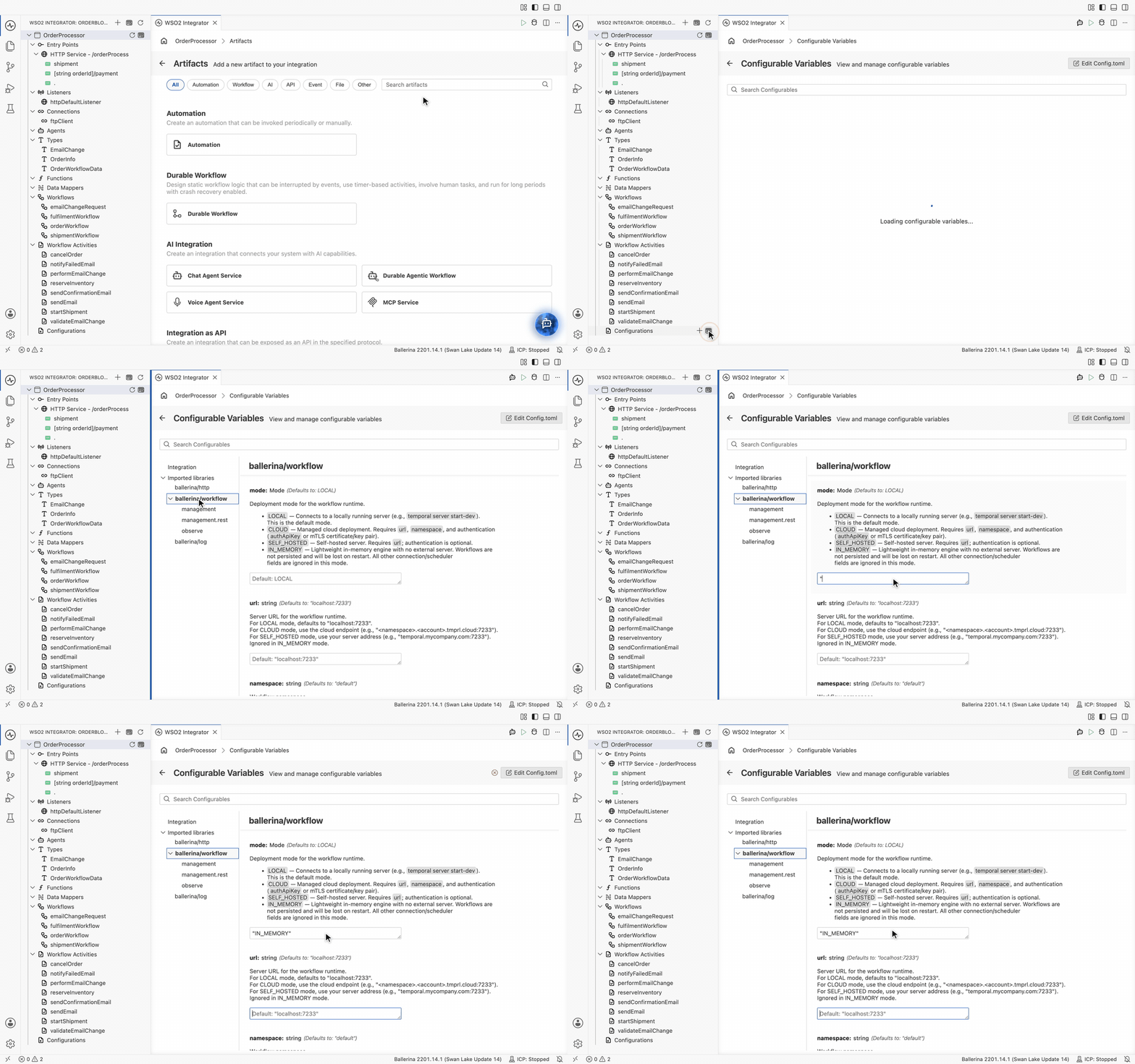
Each setting carries its own documentation, and its box shows the default it falls back to when you leave it empty.
The equivalent in Config.toml goes under the module's own table, which the Edit Config.toml button at the top right of that page opens directly:
[ballerina.workflow]
mode = "SELF_HOSTED"
url = "temporal.mycompany.com:7233"
namespace = "default"
taskQueue = "ORDER_WORKFLOW_TASK_QUEUE"
The Management API is a separate module with its own table, [ballerina.workflow.management.rest]. See Management API.
Connection settings
Both are ignored in IN_MEMORY mode.
| Setting | Default | Description |
|---|---|---|
url | "localhost:7233" | The server address. For CLOUD, use the cloud endpoint, such as <namespace>.<account>.tmprl.cloud:7233. For SELF_HOSTED, use your own server address, such as temporal.mycompany.com:7233. |
namespace | "default" | The workflow namespace. LOCAL and SELF_HOSTED use default. For CLOUD, use your cloud namespace, such as <namespace>.<account>. |
Authentication
All four are ignored in LOCAL and IN_MEMORY modes.
| Setting | Description |
|---|---|
authApiKey | API key for bearer-token authentication. Required for CLOUD unless mTLS is configured, and optional for SELF_HOSTED. |
authMtlsCert | Path to the mTLS client certificate file, in PEM format. Must be provided together with authMtlsKey. |
authMtlsKey | Path to the mTLS client private key file, in PEM format. Used together with authMtlsCert. |
authCaCert | Path to the CA certificate file, in PEM format, used to verify the server's TLS certificate. Set it when the server presents a certificate from a private or self-signed CA that is not in the JVM's default trust store. Applies to CLOUD over TLS and to SELF_HOSTED with TLS or mTLS. |
Worker settings
All three are ignored in IN_MEMORY mode.
| Setting | Default | Description |
|---|---|---|
taskQueue | "BALLERINA_WORKFLOW_TASK_QUEUE" | The task queue used for workflow and activity polling. Give each workflow program its own queue so they do not conflict. |
maxConcurrentWorkflows | 100 | How many workflow tasks the scheduler processes in parallel. Must be a positive integer. |
maxConcurrentActivities | 100 | How many activities the scheduler processes in parallel. Must be a positive integer. |
Two integrations sharing a task queue will poll each other's tasks. Name the queue after the program, as in ORDER_WORKFLOW_TASK_QUEUE, whenever more than one workflow program runs against the same server.
What's next
- Activities — the recorded units of work a workflow calls
- Error handling and review activities — retry and review policies on an activity call
- Manage workflows — registering the integration with the Integration Control Plane
- Management API — the REST surface served by the integration runtime