Management API
Every integration with durable workflows can expose a Management API: a REST surface, served by the integration runtime itself, over the runs that integration owns. Enable it to build custom portals, automations, or operational tooling.
This is not the Integration Control Plane server's own API. ICP serves the console over GraphQL and spans every registered integration, while the API on this page is integration-local and reaches only one runtime. See Integration Control Plane for that side.
Enable the API
The REST surface lives in its own module, ballerina/workflow.management.rest. Bring it into the integration from the designer or by hand. Either way, nothing else about how the workflows run changes.
From the designer
- Open the integration overview.
- In the right panel, below Integration Control Plane, find the Workflow section. It appears once the integration uses workflows.
- Select Enable Workflow Management REST API.
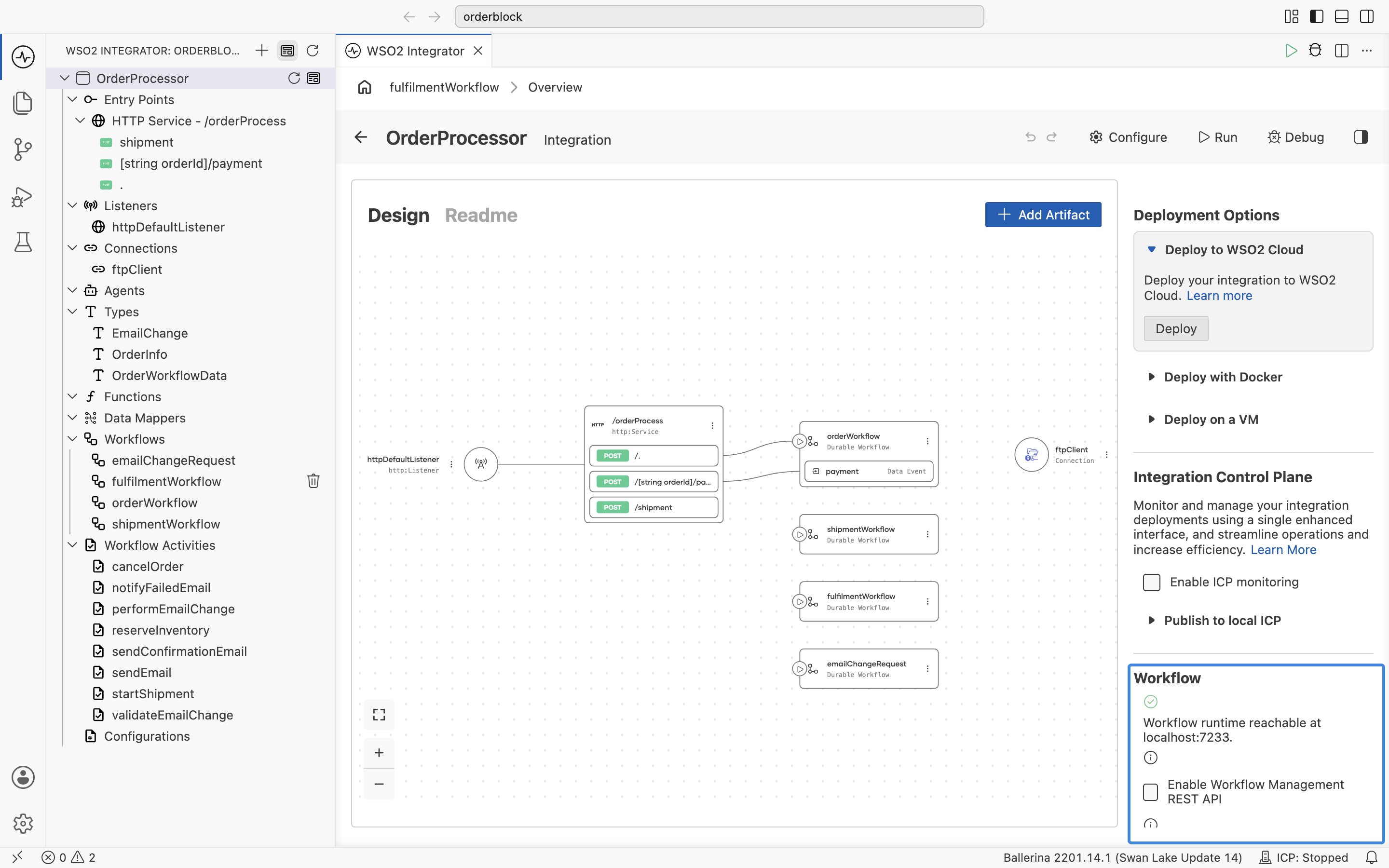
Selecting it adds the ballerina/workflow.management.rest import to main.bal. It also writes enableManagementApi = true to Config.toml, which is already the default.
By hand
Import the module in the integration:
import ballerina/workflow.management.rest as _;
Configure the API
Importing the module serves the API, with no other setting needed. To keep the import without opening the port, set enableManagementApi to false. Set the port, TLS, and CORS settings from the configuration editor, or directly in Config.toml under the module's own table:
[ballerina.workflow.management.rest]
port = 8234                 # default
Base URL: http://<host>:8234/workflow
ballerina/workflow.management holds the programmatic operations and opens no port on its own. ballerina/workflow.management.rest is the HTTP adapter over them, and it is the one this page configures. The engine settings that decide where runs are recorded are separate again, under [ballerina.workflow]. See Deployment modes.
Authentication
Authentication is configured under the same table. Basic authentication is on by default, so importing the module without choosing a scheme does not publish an open endpoint: every request is refused with 401 until you add users to [[ballerina.auth.users]] or enable another scheme. When basic auth is the only scheme and no users are configured, a startup warning and the 401 response say how to fix it.
| Setting | Default | Description |
|---|---|---|
enableBasicAuth | true | HTTP basic authentication against Ballerina's file user store, with credentials from [[ballerina.auth.users]]. |
enableJwtAuth | false | JWT bearer tokens validated against a JWKS endpoint. Requires jwksUrl. jwtIssuer and jwtAudience are optional, and each claim is checked only when set. The token is read from jwtAuthHeader, Authorization by default. |
enableOAuth | false | OAuth2 bearer tokens validated by introspection. Requires oauth2IntrospectionUrl. |
enableApiKey | false | A shared key in a request header. Requires apiKeyValue. The header name is apiKeyHeader, x-api-key by default. |
More than one scheme can be enabled at once, and a request passes if it satisfies any one of them. Turning a scheme on without its required settings panics at startup with a message naming what is missing, rather than failing later at runtime.
Enabling TLS and restricting CORS use the same table:
| Setting | Default | Description |
|---|---|---|
enableTls | false | Serves over HTTPS. Requires certFile and keyFile, both PEM. |
enableCors | true | Sends CORS headers. Set it to false when a gateway handles CORS. |
corsAllowOrigins | ["*"] | Restrict this in production, for example to ["https://portal.example.com"]. |
corsAllowHeaders | Content-Type, x-user-id, x-user-roles, Authorization, x-api-key | If you change apiKeyHeader or jwtAuthHeader, add the new name to this list. |
An externally exposed deployment. Basic auth credentials are not settings of this module: they come from Ballerina's own file user store table.
[ballerina.workflow.management.rest]
enableTls = true
certFile  = "/etc/certs/tls.crt"
keyFile   = "/etc/certs/tls.key"

[[ballerina.auth.users]]
username = "ops"
password = "s3cret!"
A cluster-internal deployment behind a service mesh that already handles identity:
[ballerina.workflow.management.rest]
enableBasicAuth = false
Setting enableBasicAuth = false with no other scheme enabled leaves the API open to anyone who can reach the port. The startup log says which schemes are in force, and reports none when there are none, so check it after a configuration change. Only do this where something in front of the port, such as a service mesh, establishes identity.
Caller identity
Operations record who acted, and filter tasks and reviews by the caller's roles. Where that identity comes from depends on the scheme in force.
| Scheme | Where identity comes from |
|---|---|
| Basic auth or API key | The x-user-id and x-user-roles request headers, read as identity forwarded by a trusted gateway. Basic auth additionally defaults the user ID to the authenticated username. |
| JWT or OAuth2 | The token's claims, which replace any forwarded headers so a client cannot assert another identity alongside a valid token. |
| Header | Purpose |
|---|---|
x-user-id | Recorded in audit fields such as completedBy and decidedBy. |
x-user-roles | Comma-separated role names. Tasks and reviews are filtered and authorized against them. |
In token mode, userIdClaim (default sub) and rolesClaim (default roles) name the claims to read, and both accept dotted paths for nested claims, such as realm_access.roles. Set trustForwardedIdentity = true to give the headers precedence again, for a topology where a trusted gateway terminates OAuth and forwards identity itself.
Under basic auth or API key, the runtime reads x-user-id and x-user-roles as sent and does not verify them, so a caller that reaches the port directly can name any user and any role. Do not expose the port to untrusted callers. Terminate authentication in front of it, at a gateway or reverse proxy that strips both headers from the incoming request and sets them from the identity it verified. Under JWT or OAuth2 the token's claims win, so this does not apply unless you set trustForwardedIdentity = true.
Scopes
With enforceScopes = true, token-based callers must also carry an OAuth scope for the class of operation they are invoking. Scopes are read from the scope claim, space-delimited, or the scp claim. Scope enforcement requires JWT or OAuth2 to be enabled, and panics at startup otherwise.
| Scope | Default value | Permits |
|---|---|---|
scopeWorkflowView | workflow:view | GET on every route outside /human-tasks: workflows, review activities, runtime, definitions, and metadata. |
scopeWorkflowManage | workflow:manage | POST on the same routes, such as starting, suspending, or terminating a workflow and deciding a review. Implies the view scope on them. |
scopeHumanTaskView | humantask:view | GET on /human-tasks routes. |
scopeHumanTaskManage | humantask:manage | POST on /human-tasks routes: complete, fail, reassign, and deadline. Implies the view scope on them. |
Scopes are separate from roles. A scope authorizes a class of operation, while whether a particular task is yours to decide is still the task's own audience: its roles or user ID, minus its exclusions.
Runtime and definitions
| Method and path | Description |
|---|---|
GET /runtime | This worker's runtime state. Returns {"taskQueue": "..."}. |
GET /definitions | The workflow types this integration registers, for launcher UIs. |
GET /metadata | The integration's workflow metadata: its definitions, human tasks, activities, and agents with their schemas, and each workflow's graph. |
Workflow instances
| Method and path | Description |
|---|---|
GET /workflows | List instances. Filters: status, workflowType, workflowId, startedBy, taskQueue, the four time bounds startTimeFrom, startTimeTo, closeTimeFrom, closeTimeTo, and pagination with limit (default 20) and pageToken. |
POST /workflows | Start a workflow: {"workflowType": "...", "input": {…}}, optionally with workflowId and timeoutSeconds. With a workflowId, ifRunning (FAIL, USE_EXISTING, or TERMINATE_EXISTING) and ifClosed (ALLOW_DUPLICATE, ALLOW_DUPLICATE_FAILED_ONLY, or REJECT_DUPLICATE) decide what happens when that ID is already in use. Responds 201 with workflowId and runId, or 200 with "started": false when it joined a running instance. |
GET /workflows/{workflowId} | Instance detail: type, status, result, and activity invocations. |
GET /workflows/{workflowId}/history | Full recorded event history. |
GET /workflows/{workflowId}/activity-tree | The execution as a tree of typed nodes with inputs, outputs, and attempts. |
GET /workflows/{workflowId}/execution-graph | Nodes and edges of the execution so far. |
POST /workflows/{workflowId}/suspend | Pause the instance. |
POST /workflows/{workflowId}/resume | Resume a suspended instance. |
POST /workflows/{workflowId}/wake | Wake a durable agent instance from its built-in sleep tool. Harmless when it is not sleeping. |
POST /workflows/{workflowId}/cancel | Request graceful cancellation. |
POST /workflows/{workflowId}/terminate | Stop immediately, with no cleanup. Optional body {"reason": "..."}. |
POST /workflows/{workflowId}/data/{dataName} | Deliver a named data event. The body is the payload, verbatim, so a workflow awaiting dataEvents.approval receives exactly what is posted. |
GET /workflows/{workflowId}/reset-points | The points this run can be reset to. |
POST /workflows/{workflowId}/reset | Replay the run from a chosen point. See Reset a run. |
Execution-graph and activity-tree nodes are typed ACTIVITY, TIMER, DATA, CHILD_WORKFLOW, HUMAN_TASK, or REVIEW_ACTIVITY, and carry a status of RUNNING, WAITING, COMPLETED, FAILED, TIMED_OUT, or CANCELED. A DATA node with status WAITING marks a data event the workflow is currently blocked on.
Run-pinned variants
The routes above target the latest, or currently active, run of an instance. Insert /{runId} after the workflow ID to pin a request to one exact run:
GET  /workflows/{workflowId}/{runId}
GET  /workflows/{workflowId}/{runId}/history
GET  /workflows/{workflowId}/{runId}/activity-tree
GET  /workflows/{workflowId}/{runId}/execution-graph
GET  /workflows/{workflowId}/{runId}/reset-points
POST /workflows/{workflowId}/{runId}/suspend
POST /workflows/{workflowId}/{runId}/resume
POST /workflows/{workflowId}/{runId}/cancel
POST /workflows/{workflowId}/{runId}/terminate
POST /workflows/{workflowId}/{runId}/reset
wake and the data-event route have no run-pinned form. A data event always reaches the instance's running run.
Example: find where an instance is halted
WORKFLOW_ID="019ffed4-c12e-7e24-a438-8bdaae2b5a29"
curl -s "http://localhost:8234/workflow/workflows/$WORKFLOW_ID/execution-graph" \
  -H "x-api-key: $API_KEY" \
  -H 'x-user-roles: manager' | jq '.nodes[] | select(.status=="WAITING" or .status=="RUNNING")'
Reset a run
POST /workflows/{workflowId}/reset replays a run from an earlier point. The body names which point:
| Field | Description |
|---|---|
resetType | Required. "first-workflow-task" replays the run from the beginning with the input it started with. "last-workflow-task" resets to the most recent workflow task, which is how a run wedged on failing code is moved onto a fix. "workflow-task-id" targets one point from reset-points. |
eventId | Required when resetType is "workflow-task-id". The eventId of the chosen reset point. |
reason | Optional. Recorded with the reset. |
reapply | Optional. {"type": …, "exclude": [...]} decides which post-reset events are re-delivered to the new run. |
reapply.type is "signal" by default, which re-delivers signals, "none" re-delivers nothing, and "all-eligible" also re-delivers updates.
A durable agent's turns arrive as updates, not signals. Resetting an agent with the default "signal" therefore replays the agent without its conversation. Use "all-eligible" to keep the turns.
Each entry from GET /workflows/{workflowId}/reset-points carries an eventId, its eventType, a timestamp, the activity-tree nodeIds and nodeNames that the task scheduled, which all re-execute together, and isFirstFailure, which marks the point that re-runs the run's first failed step.
Human tasks
| Method and path | Description |
|---|---|
GET /human-tasks | List tasks. Filters: status, parentWorkflowId, parentWorkflowType, taskName, userRole, taskQueue, the four time bounds, and pagination with limit (default 20) and pageToken. Visibility is filtered by the caller's roles. |
GET /human-tasks/pending-count | Pending-task count for the caller's roles, for inbox badges. taskQueue narrows it, and all=true counts every pending task regardless of the caller. |
GET /human-tasks/{taskId} | Task detail: title, description, payload, roles, and the decision form's JSON schema. |
POST /human-tasks/{taskId}/complete | Complete with {"result": {…}} matching the task's decision type. |
POST /human-tasks/{taskId}/fail | Fail the task with {"reason": "..."}, optionally with details. |
POST /human-tasks/{taskId}/reassign | Change the audience. Any of userRoles, users, excludedRoles, excludedUsers. |
POST /human-tasks/{taskId}/deadline | Set {"timeoutMillis": …}. Omit the field, or send null, to clear the deadline. |
Under scope enforcement, all=true on the pending count additionally requires either the human-task manage scope or the workflow manage scope, since a caller-independent total is a management view.
There is deliberately no cancel endpoint for a human task. A task becomes CANCELED only internally, when its parent workflow closes. To end one from outside, terminate the task workflow instead.
curl -s -X POST "http://localhost:8234/workflow/human-tasks/$TASK_ID/complete" \
  -H "x-api-key: $API_KEY" \
  -H 'Content-Type: application/json' -H 'x-user-id: alice' -H 'x-user-roles: manager' \
  -d '{"result": {"action": "REQUEST_BILL", "comment": "Please attach the receipts"}}'
Review activities
Approval gates, raised before a gated step runs, and failure reviews, raised after a step fails, share one surface.
| Method and path | Description |
|---|---|
GET /review-activities | List reviews. Filters: status, parentWorkflowId, taskName, taskQueue, the four time bounds, and pagination. Same role-based visibility as human tasks. |
GET /review-activities/{taskId} | Review detail: the activity, its proposed or failing input, the error for a failure review, and the input form's JSON schema. |
POST /review-activities/{taskId}/proceed | Run, or rerun, with the original input. |
POST /review-activities/{taskId}/proceed-with-input | Run, or rerun, with corrected input: {"input": {…}}. |
POST /review-activities/{taskId}/reject | Skip the gated call, or surface the failure to the workflow. Optional body {"feedback": "..."}. |
POST /review-activities/{taskId}/reassign | Change the audience, as for a human task. |
POST /review-activities/{taskId}/deadline | Set or clear the deadline, as for a human task. |
POST /review-activities/bulk-retry | Decide many failure reviews at once. See Decide reviews in bulk. |
curl -s -X POST "http://localhost:8234/workflow/review-activities/$TASK_ID/proceed-with-input" \
  -H "x-api-key: $API_KEY" \
  -H 'Content-Type: application/json' -H 'x-user-id: alice' -H 'x-user-roles: manager' \
  -d '{"input": {"claimId": "EXP-1", "amount": 180.50, "currency": "EUR"}}'
Decide reviews in bulk
POST /review-activities/bulk-retry retries or fails many failed-activity reviews in one call.
| Field | Description |
|---|---|
action | Required. "retry" or "fail". |
taskIds | An array of review activity IDs. Send this or parentWorkflowId, not both. |
parentWorkflowId | Selects every pending failure review of one workflow. |
activityName | Narrows a parentWorkflowId selection to one activity. |
feedback | Accompanies "fail". |
The call responds 200 with a per-task report whenever the batch was accepted, including when some tasks were skipped or failed. Only a malformed selection is a 400.
A bulk decision cannot change the arguments an activity is retried with, because there is no field for replacement input. Correct an argument through proceed-with-input on the individual review.
Response codes
Operations report why they failed in a protocol-independent way, and the HTTP adapter maps that reason to a status code. Authentication failures are answered before any operation runs:
| Status | Meaning |
|---|---|
200 OK | The operation succeeded. |
201 Created | POST /workflows started a new run. |
400 Bad Request | The request was invalid, such as a malformed bulk selection. |
401 Unauthorized | The request carries no valid credential for an enabled scheme. |
403 Forbidden | The caller's roles or scopes do not permit the operation. |
404 Not Found | No such workflow, task, or review. |
409 Conflict | The target is not in a state that allows the operation. |
422 Unprocessable Entity | The payload did not match what the workflow or task expects. |
500 Internal Server Error | The operation failed for any other reason. |
What's next
- Complete human tasks — the console view over the same tasks and reviews
- Workflow executions — the console view over the same history and execution graph
- Deployment modes — the engine settings under
[ballerina.workflow] - Workflow permissions — how roles decide whose tasks are whose