AI Agent Memory: Types, Architecture & How to Implement It
An employee tells a helpdesk agent on Monday that their VPN keeps dropping. On Tuesday they come back, and the agent asks them to describe the problem from the start. The model did not forget the conversation, because it never had it. A model call does not update the model's weights, so the model carries nothing forward on its own. Any continuity comes from state kept outside the model. The application manages that state, even when a provider hosts the conversation for it.
That application-side state is AI agent memory. This guide is for developers and architects who have to build it. It covers the four memory types, how memory differs from RAG, and where to store memory. It also covers how to scope memory per user, when an agent needs no memory at all, and the mistakes that cause trouble in production.
What Is AI Agent Memory (and Why a Bigger Context Window Doesn't Replace It)
AI agent memory is the stored state an agent can write, retrieve, and update across model calls and sessions. It includes conversation history, facts about users, records of past tasks, and the instructions that shape behavior. The application owns this state and loads the relevant parts into the model's context window on each request.
A useful way to separate the two ideas is to treat the context window as a desk and memory as a filing cabinet. The desk holds what the model is working on during one request, and it is cleared afterwards. The filing cabinet holds what should outlast that request, and the agent pulls the right folder onto the desk when it needs it.
Larger context windows do not remove the need for the cabinet, for four reasons:
- The window resets: Nothing in it survives the end of a session unless the application, or a provider-hosted conversation store, saves it first.
- More context is not better context: Liu et al. found that models use information best at the start or end of the input. Accuracy dropped when the relevant passage sat in the middle of a long context (Liu et al., 2023).
- History still costs tokens on every call: A replayed history adds input tokens to every request, whether or not it is relevant. Provider-hosted state does not remove that cost. OpenAI's conversation state guide notes that earlier input tokens in a chained conversation are still billed as input. Prompt caching can reduce cost and latency for an unchanged prefix, but the cached tokens still occupy the context window.
- A transcript is hard to govern: A memory store can be queried, corrected, and deleted per user. A history pasted into prompts offers few of those controls.
A December 2025 survey of agent memory research separates agent memory from LLM memory, RAG, and context engineering. It names token-level, parametric, and latent memory as the three main forms (Hu et al., 2025). This guide covers token-level memory, which is state stored outside the model as text, records, or embeddings. It is the form application developers control directly.
The Four Types of AI Agent Memory
The widely used four-type taxonomy comes from cognitive science, by way of the CoALA framework from Princeton. CoALA splits agent memory into short-term working memory and three long-term types: episodic, semantic, and procedural (Sumers et al., 2023). Framework documentation such as the LangGraph memory guide uses the same three long-term types.
| Memory type | What it stores | Example in an IT helpdesk agent |
|---|---|---|
| Working memory | The active context for the current step: recent turns, tool results, and intermediate reasoning | The last few messages about a VPN error and the result of a knowledge base search |
| Semantic memory | Facts about the user, the domain, or the environment | "This employee uses the Windows VPN client" |
| Episodic memory | Records of past interactions and how they turned out | "Restarting the VPN client did not fix the issue last week" |
| Procedural memory | Rules and skills that govern behavior, held in model weights, agent code, and system prompts | "Always search the knowledge base before suggesting a fix" |
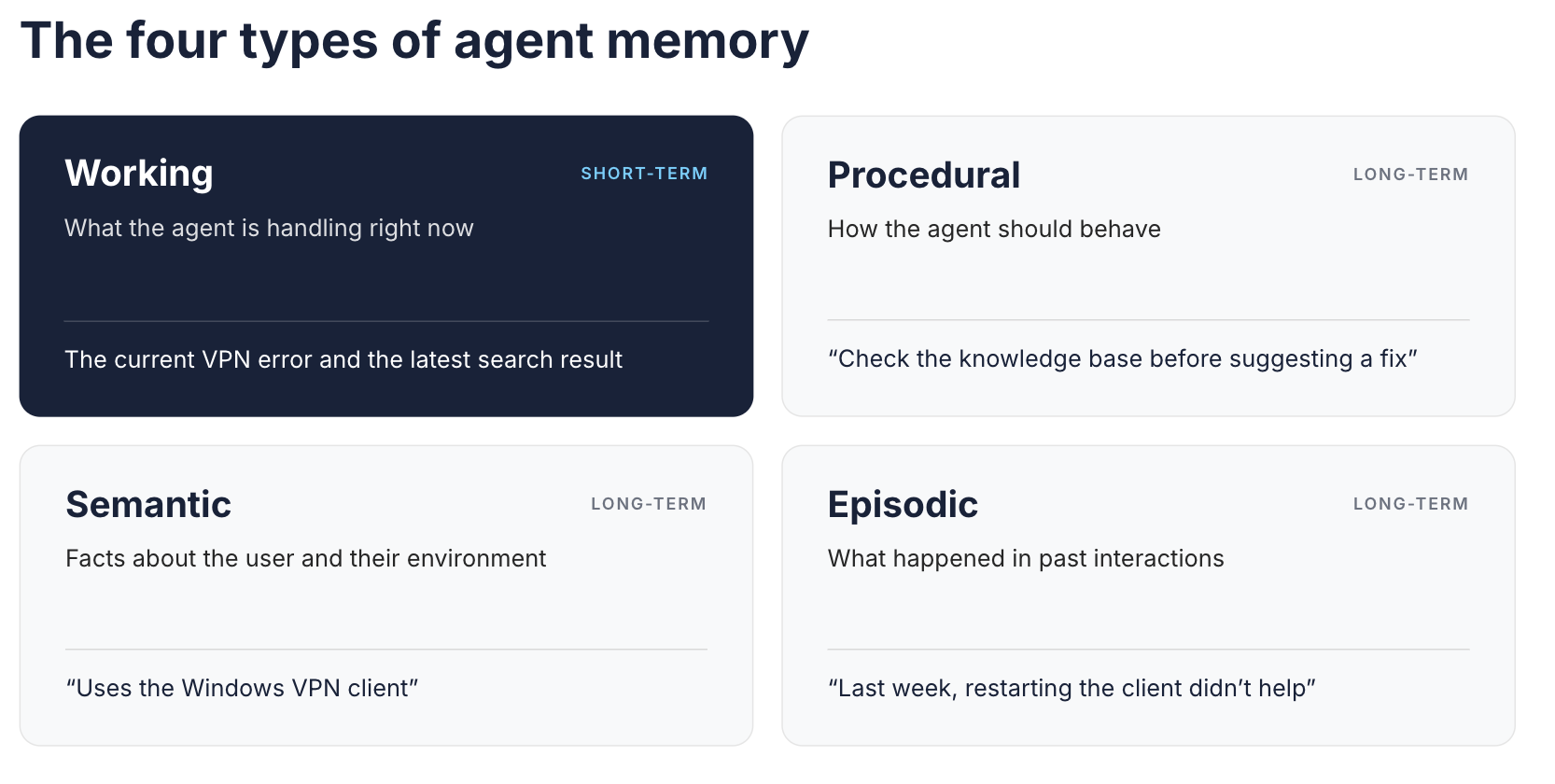
The four types of agent memory, with an example of each from an IT helpdesk agent.
Working memory is the short-term layer. In practice, it is whatever the application assembles into the context window for one call. The other three are long-term memory, and each one fails in its own way. Semantic memory goes stale when facts change, and episodic memory grows without bound unless something prunes it. Procedural memory is the riskiest type for an agent to write. A bad update changes behavior on every future task, as the CoALA authors also note.
Keep semantic memory and semantic search apart. The first is a category of what gets stored, and the second is a retrieval technique that matches by meaning.
The taxonomy tells you what is worth storing. It does not tell you where to store memory, how to scope it, or when to delete it. Those decisions take most of the implementation effort.
AI Agent Memory vs. RAG: They Solve Different Problems
Memory and retrieval augmented generation often run on the same infrastructure, so they get conflated. Both can embed text, store it in a vector database, and load close matches into a prompt. They also overlap, because an agent can retrieve its own memories through a RAG pipeline. This guide therefore uses an operational convention rather than a strict taxonomy. RAG retrieves knowledge, and memory retains interaction history and state.
Under that convention, the two usually differ in three ways.
- Where it comes from: A RAG corpus usually comes from curated documents such as policies, runbooks, and product specs. Memory comes from interactions, written either by the agent or by a deterministic workflow.
- Who it belongs to: A RAG index is usually shared across many users, with access filters applied per request. Memory usually belongs to one user, one session, or one agent.
- How it changes: A RAG corpus changes when source documents change. Memory can change on every turn, and old entries can contradict new ones.
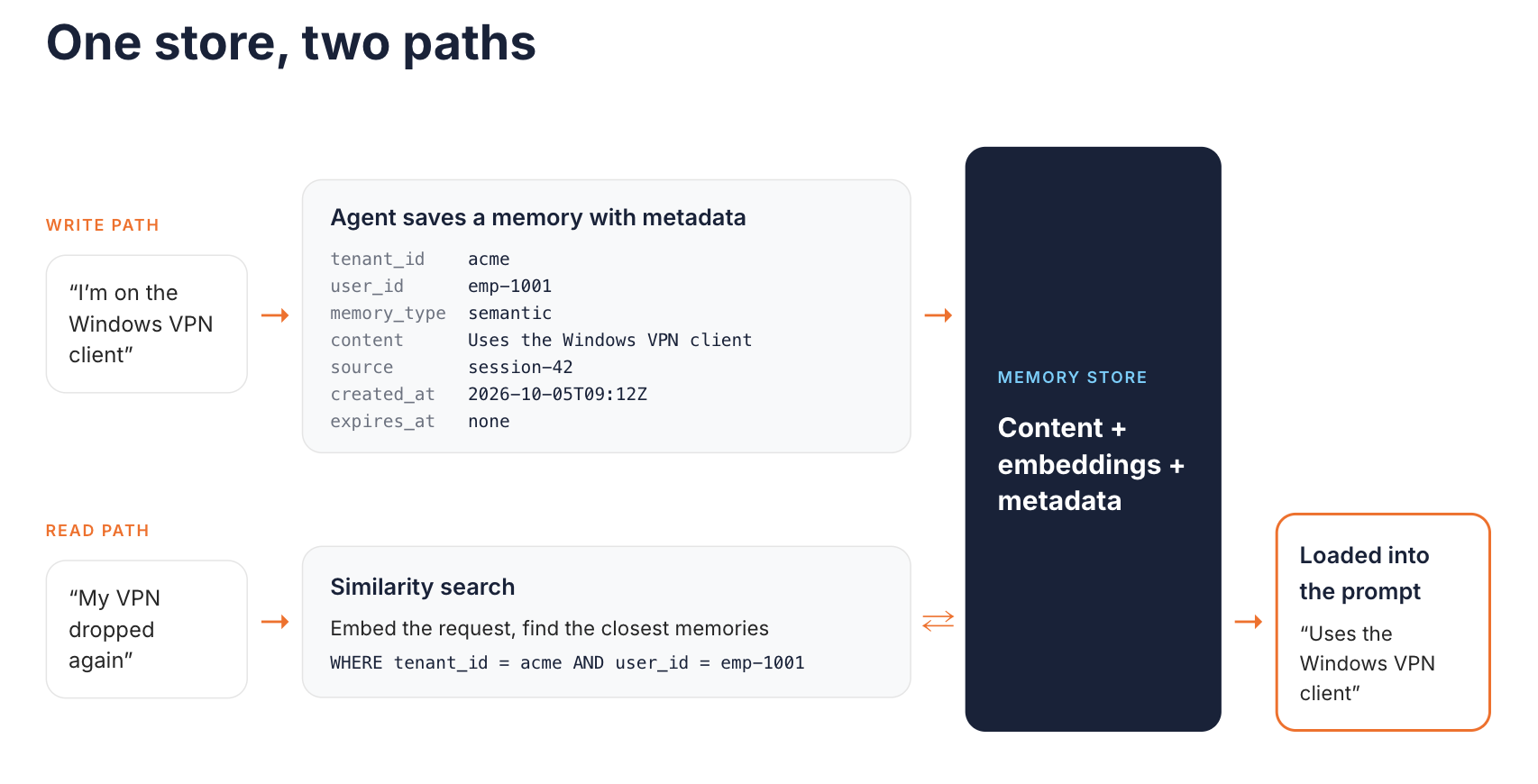
A memory store serves a write path and a read path. The scope filter sits inside the retrieval query.
RAG grounds an answer in external knowledge, while memory gives an agent continuity across sessions. The WSO2 IT helpdesk agent tutorial uses both in one agent. A knowledge base search tool supplies troubleshooting guidance, and a persistent store keeps each employee's conversation history. The two have different owners and retention rules, so keep them in separate stores even when the storage engine is the same. The retrieval side is covered in this guide to RAG API architecture.
Memory Storage and Retrieval: Vector, Graph, and Hybrid Approaches
A memory layer has two paths. The write path decides what is worth keeping and attaches metadata to it. The read path decides what to load into the next prompt, and the storage choice shapes both.
- Relational or key-value stores hold ordered records under a key, such as a session ID or user ID. They suit conversation history and exact lookups, and they are the easiest to audit and delete from. On their own, they match exact keys rather than meaning. Extensions such as pgvector add similarity search to PostgreSQL, so one database can serve both access patterns.
- Vector databases store each memory's content, or a reference to it, next to its embedding, because an embedding cannot be turned back into text. They retrieve entries by similarity search. They handle fuzzy recall well, such as "what has this user said about laptops?" Many also filter on stored IDs, metadata, and timestamps. Similarity ranking alone does not order results by time or resolve contradictions, because two conflicting facts can both score as close matches. Choose a store by the queries you need and how strictly updates must stay consistent, not by database category.
- Knowledge graphs store entities and the relationships between them, such as an employee, their device, and their tickets. A temporal graph can record when a fact became true and when it stopped being true, which helps with stale memories. The cost is an extraction step that turns free text into nodes and edges and can introduce its own errors.
- Hybrid designs combine these. A relational store holds history and metadata, a vector index handles recall by meaning, and a graph is added only where relationships carry the answer.
Start with the simplest structure that answers your agent's actual questions. A graph that nobody queries by relationship is pure overhead.
Whichever store you choose, apply scope filters inside the retrieval query rather than after it. Filtering afterwards means another user's memory has already reached your service layer. The WSO2 example later in this guide uses the relational pattern for conversation history.
Session Management and Conversation State
Agent state management starts with one decision, which is the scope of each memory. Most systems need some mix of three scopes:
- Session scope covers a single session or thread. It holds the multi-turn conversation that follow-up questions depend on.
- User scope spans sessions for one person. It holds user preferences and a record of previous interactions.
- Shared scope spans users or agents. It holds team knowledge or states that several agents hand off between them.
LangGraph draws the same line in code. Its short-term memory is scoped to a single thread through checkpoints, while long-term memory lives in custom namespaces that persist across threads.
The scope key has to be trustworthy. If a client can choose any session ID or user ID, isolation by key protects nothing. A caller could simply request someone else's key. Derive the key from the caller's verified identity on the server, or validate a client-supplied session ID against that identity before reading memory.
Metadata makes scoping, ranking, and cleanup possible. A workable minimum is the user ID, the memory type, a timestamp, the source of the entry, and an expiry. Add a tenant ID wherever user IDs can collide across customers. This small local sketch uses Python's built-in SQLite module to show scoped writes, scoped reads, and expiry. It is an illustration, not production code:
import sqlite3
import time

MAX_RECALL = 20

db = sqlite3.connect("agent_memory.db")
db.execute("""
    CREATE TABLE IF NOT EXISTS memories (
        tenant_id   TEXT NOT NULL,
        user_id     TEXT NOT NULL,
        memory_type TEXT NOT NULL,
        content     TEXT NOT NULL,
        source      TEXT NOT NULL,
        created_at  REAL NOT NULL,
        expires_at  REAL
    )
""")


def remember(tenant_id, user_id, memory_type, content, source,
             ttl_seconds=None):
    if ttl_seconds is not None and ttl_seconds <= 0:
        raise ValueError("ttl_seconds must be a positive number or None")
    now = time.time()
    expires_at = now + ttl_seconds if ttl_seconds is not None else None
    db.execute(
        "INSERT INTO memories VALUES (?, ?, ?, ?, ?, ?, ?)",
        (tenant_id, user_id, memory_type, content, source, now, expires_at),
    )
    db.commit()


def recall(tenant_id, user_id, memory_type, limit=5):
    limit = max(1, min(int(limit), MAX_RECALL))
    rows = db.execute(
        """
        SELECT content FROM memories
        WHERE tenant_id = ? AND user_id = ? AND memory_type = ?
          AND (expires_at IS NULL OR expires_at > ?)
        ORDER BY created_at DESC
        LIMIT ?
        """,
        (tenant_id, user_id, memory_type, time.time(), limit),
    )
    return [content for (content,) in rows]


# tenant_id and user_id come from the caller's verified identity, never from the request body
tenant_id = "acme"
user_id = "emp-1001"

remember(tenant_id, user_id, "semantic", "Uses the Windows VPN client",
         source="session-42")
remember(tenant_id, user_id, "episodic", "Restarting the VPN client did not fix the issue",
         source="session-42", ttl_seconds=30 * 24 * 3600)

print(recall(tenant_id, user_id, "episodic"))
The semantic fact has no expiry, while the episodic record stops being returned after 30 days. Expiry in this sketch only removes a row from recall. It does not delete the row, so production retention also needs a deletion or compaction job and a plan for backups. The sketch rejects zero or negative TTLs and caps how many rows one call can return. Session scope works the same way as tenant scope, with a session_id column added to the filter. A vector-backed version would rank by similarity, but the scope filter would stay in the query.
Shared memory needs one more rule, which is to decide which agents may write to it. Write access lets one agent's mistake shape what every other agent reads next.
When You Actually Need a Memory Layer (and When You Don't)
Not every agent needs persistent memory. Adding it creates a data store you must secure, retain, and delete from. Base the decision on real operational triggers:
- Returning users expect continuity. A customer support agent that handles a case over several days should not make people repeat themselves.
- Tasks outlive a single session or process. Long-running workflows and conversations that must survive a service restart need state outside the runtime.
- Behavior depends on user preferences. Personalization requires semantic memory scoped to the user.
- Several agents hand off work. A shared, well-scoped store is easier to govern than transcripts passed between agents.
- Records must be retained. Audit or compliance requirements can mandate that conversation records persist in a governed database.
Memory adds little elsewhere. One-off question answering and stateless tasks such as classification are better served by a single call. Lookups where every answer comes from a document corpus are better served by RAG. A coding agent often gets more value from procedural memory, such as build steps and project conventions, than from a transcript of last week's session.
Session-only memory held in process is a sensible middle ground. It supports multi-turn conversations without a persistent store until one of these triggers appears.
Common AI Agent Memory Mistakes
These failure modes recur once agents with memory reach production:
- Saving everything: Storing every turn verbatim creates retrieval noise, and each irrelevant entry competes for space in the context window. Store distilled facts and outcomes, and keep raw transcripts only where retention rules require them.
- Skipping metadata: Without a user ID, memory type, timestamp, and source, you cannot scope, rank, expire, or delete memories. Retrofitting metadata onto an existing store is harder than adding it on day one.
- Ignoring the memory lifecycle: An employee replaces a laptop, and the old device record now contradicts the new one. Define how entries expire, how newer facts supersede older ones, and how a user's memory is deleted on request. Overflow handling belongs here too. Trimming drops the oldest messages, while summarization keeps a compressed version at the cost of detail.
- Treating the context window as the memory store: A long prompt is not persistence, and it cannot be queried, audited, or selectively forgotten.
- Trusting every memory write: OWASP lists Memory and Context Poisoning as ASI06 in its Top 10 for Agentic Applications. Content written into memory from an untrusted document or tool result becomes an input to every later session. Record the source of each entry, validate writes that come from untrusted content, and keep the ability to roll back.
How WSO2 Approaches Agent Memory
WSO2 does not sell a dedicated memory product, and dedicated memory layers such as Mem0 exist for teams that want one. WSO2's approach is narrower. Memory is part of building an agent on an integration platform that already connects to enterprise databases, APIs, and services.
In WSO2 Integrator, you add memory to an AI agent from the agent node in the visual designer, as described in the agent memory documentation. The memory is short-term conversation memory, and the store behind it is configurable:
- In-memory store: This is the default. It keeps a window of recent messages in process memory, and the history does not survive a restart.
- MSSQL store: This keeps conversation history in a Microsoft SQL Server table, so it survives restarts and spans sessions. The docs recommend it for long-running conversations and for audit or compliance requirements. Several agents can share conversation memory by pointing at the same store.
- Custom stores: PostgreSQL, MySQL, and Redis are not supported out of the box. Teams can implement the
ai:Memoryinterface, which defines get, update, and delete operations by key, to use an existing database.
Memory works as a sliding window. When it fills, the default handler trims the oldest messages, and a model-assisted handler can summarize them instead. WSO2 Integrator: MI is a separate runtime, and agents built with its AI Connector have their own memory configuration. MI added agent memory trim and summarization support in release 4.6.0. Check the MI documentation for that runtime rather than assuming the stores above apply.
Each session ID keeps an isolated history. In the IT helpdesk tutorial, an employee reports a VPN problem, and the service then restarts. The agent still recalls the issue when the employee returns with the same session ID, because the history lives in MSSQL. Long-term semantic or episodic memory beyond conversation history is not a built-in memory type today. You build it on the custom memory interface or through tools.
An agent with memory involves three independent traffic flows. They are separate paths, not hops in a chain:
- Inbound - A client calls the agent's chat endpoint with a message and a session ID.
- Memory access - The agent runtime reads and writes its memory store directly, with its own database credentials, inside your network.
- Outbound - The agent calls the LLM provider with a prompt that now contains retrieved memory.
The outbound flow is where memory content leaves your boundary. The WSO2 AI Gateway governs that LLM traffic. It can apply guardrails such as PII masking to prompts before they reach a provider, and it tracks token usage by provider. The same AI Gateway also governs the MCP traffic agents use to reach tools. Both are managed from a single control plane in the WSO2 API Platform, so policies for model calls and tool access sit in one place.
The Agent-Flavored Markdown (AFM) specification, WSO2's open format for portable agent definitions, does not yet prescribe a memory standard. WSO2 has named agent memory as future work for the spec.
Conclusion
Agent memory is a data and scoping problem, not a prompting trick. The four-type taxonomy helps you decide what to keep. Production outcomes depend more on persistence, scope keys tied to verified identity, metadata, and lifecycle rules. Get those right early, and you can revisit the choice of relational, vector, or graph storage as your queries change.
If your agents already run next to enterprise databases, memory persistence can extend infrastructure you operate today instead of adding a new system. Start with the IT helpdesk tutorial to see MSSQL-backed agent memory working end to end in WSO2 Integrator.
Frequently Asked Questions
Does an AI agent have memory?
Not by default. The underlying model keeps no state between calls, so an agent remembers only what its application stores and loads back into the prompt.
How much RAM does an AI agent need?
Agent memory is stored data, not RAM. An agent that calls a hosted model runs like a typical service, and hardware needs grow mainly when you host the model yourself.
What are the four types of memory that every AI agent needs?
Working, semantic, episodic, and procedural memory. Every agent uses working and procedural memory, but semantic and episodic memory are worth adding only when users return or tasks span sessions.
How do AI agents manage memory?
The application decides what to write, where to store it, and which scope it belongs to. On each call, it loads the most relevant entries into the context window. Over time, it trims or summarizes overflow and expires stale entries.

