Cost Optimization for LLM APIs: Caching, Routing, and Model Selection
An agent's first week in production often looks cheap. Then someone checks the bill for one long session, and the number is far higher than the call count suggested. Nothing broke along the way. The agent simply carried its whole history into every call, which is exactly what agents are built to do.
Start with the fixed part. A 2,000-token system prompt sent 200 times in one session adds up to 400,000 tokens before the agent reads a single user message. This guide works through the three LLM cost optimization levers that bring that number down, with the arithmetic shown at each step. It then covers where to enforce those levers once your generative AI features run across several teams.
Why LLM Costs Spiral Faster Than Usage
LLM costs track tokens, not requests, and the token count per request is not fixed. Three cost drivers push them up as usage grows.
- Growing context: Each turn adds the previous exchange to the next request, so call 150 carries far more input than call 5.
- Repeated system prompts: The same instructions ride along on every call, in every session, for every user.
- Retries: A call that times out or returns an unusable answer is often resent with its full context, and you pay for that input again.
Here is the growth in numbers. Assume each call adds 250 tokens of history, made up of a 50-token user message and a 200-token reply. Assume illustrative rates of $3 per million input tokens and $15 per million output tokens.
| Session length | Input tokens | Share of input that is history | Session cost |
|---|---|---|---|
| 100 calls | 1.44M | 86% | $4.63 |
| 200 calls | 5.39M | 92% | $16.76 |
| 400 calls | 20.77M | 96% | $63.51 |
Doubling the session from 200 to 400 calls multiplies the cost by about 3.8. That compounding is why the per-call price on a provider's pricing page is a poor forecast on its own.
The rates in the table are illustrative, but the split between input and output is real. Major providers typically price output tokens several times higher than input tokens. Anthropic's published rates, for example, list $2 per million input tokens and $10 per million output tokens for Claude Sonnet 5.5. Long, chatty answers therefore cost more than their length suggests.
The Three Levers That Actually Move the Number
In most generative AI applications, three levers account for the bulk of LLM cost optimization work. Each one attacks a different part of the bill.
| Lever | What it reduces | Reported savings range (workload-dependent) | What decides where you land |
|---|---|---|---|
| Semantic caching | Calls that never need to reach a model | 20 to 95% on cacheable traffic | How often users ask the same thing |
| Model routing | Price per token on simple requests | 50 to 80% on routed traffic | Share of requests a smaller model can handle |
| Prompt and context optimization | Tokens per request, input and output | Varies with prompt size | How much of each prompt is padding |
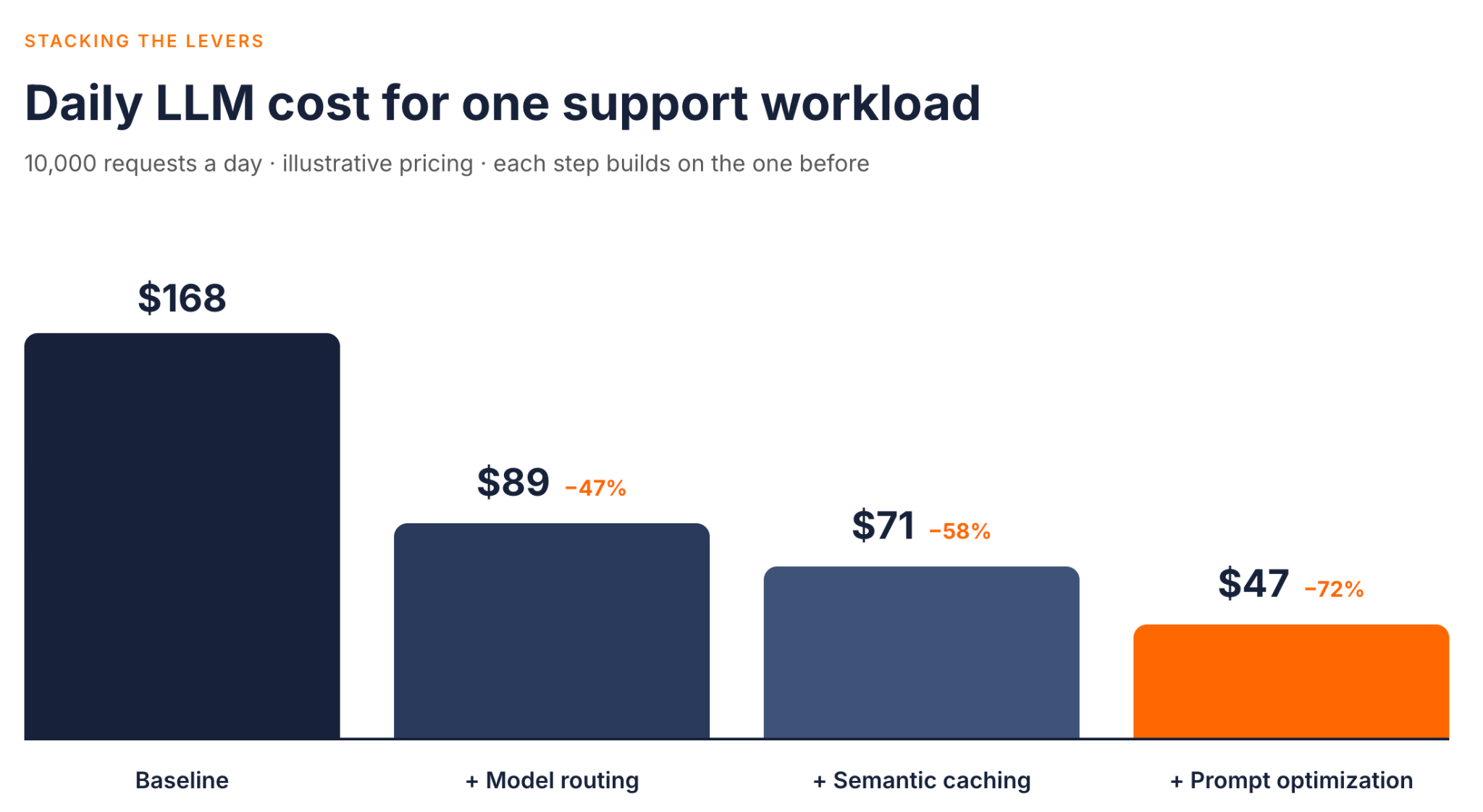
Illustrative model API cost for the support workload described in the stacking section. Classifier output tokens, vector-store hosting, gateway operation, retrieval, and retry costs are excluded.
The savings ranges come from WSO2's guide to a broader LLM cost control framework, which this post expands into worked examples. The ranges are wide for a reason. A support bot answering the same fifty questions sits near the top of the caching range. A code-review agent with unique inputs sits near the bottom. These are vendor-reported figures for specific traffic patterns, not benchmarks for typical deployments. Treat each range as a hypothesis to test on your own workload, and use the worked example later in this post for the arithmetic.
The levers also stack in a specific way, because their effects multiply rather than add. A later section works through that with a single scenario.
Lever 1: Semantic Caching
Consider three ways to ask the same question:
- "What's the capital of France?"
- "Tell me the capital city of France"
- "Which city is the capital of France?"
An exact-match cache sees three different strings and sends three calls to the model. A semantic cache compares meaning instead, so the second and third prompts can be answered from the first response. Each of those cache hits skips the upstream call entirely, which saves both the tokens and the model round trip.
How it works
The mechanics are consistent across implementations. The cache turns the prompt into a vector using an embedding model and searches a vector store for a previously answered prompt above a similarity threshold. On a hit, it returns the stored response. On a miss, the request goes to the model and the new response is stored for next time.
In the WSO2 AI Gateway, this is the semantic-cache policy. It supports OpenAI, Mistral, and Azure OpenAI for embeddings, with Redis or Milvus as the vector store. It compares embeddings using cosine similarity, and higher configured thresholds require closer matches. In the v1 policy line, the threshold setting accepts values from 0.0 to 1.0. The semantic caching docs cover where the policy attaches and which settings it needs.
Implementation gotchas
Three decisions determine whether caching saves money or causes incidents.
-
Similarity threshold
Set it too loose and a user gets the answer to a different question. Set it too strict and almost nothing hits. The policy documentation suggests 0.85 to 0.95 for strict matching and 0.70 to 0.85 for more flexible matching. Start strict, then loosen the threshold only while watching for wrong answers.
-
What you embed
By default, the policy embeds the content of the last message. That fits single-turn questions well. In a multi-turn conversation, the same last message can need a different answer depending on earlier turns. Cache stateless request types rather than open-ended dialogue.
-
Freshness
Cached responses go stale when the underlying data changes. Entries in the WSO2 policy expire after one hour by default, and responses marked
no-store,private, orno-cacheare never stored. Only successful responses are stored, and by default a request with no resolvable caller identity bypasses the cache. Set the expiry to match how fast your source data changes.
The embedding model matters too, because different models place the same sentence in different parts of vector space. If you change embedding models, plan to rebuild the cache.
Measure the cache the way you would measure any other production dependency. Track the hit rate and the latency on hits, but treat them as signs that the cache is working, not that its answers are correct. Also sample hits and check whether the stored answer was actually right for the new question. A rising hit rate paired with rising complaints means the threshold is too loose.
Semantic caching and provider prompt caching are different tools
Provider-side prompt caching is often confused with semantic caching, but it solves a different problem. Anthropic's prompt caching, for example, stores a repeated prompt prefix such as a long system prompt. Later requests still call the model, but the cached prefix is billed at 0.1 times the base input price on most Claude models in Anthropic's pricing table. Writing that prefix to a 5-minute cache costs 1.25 times the base price.
Prefix caching lowers the cost of the fixed part of every call, while semantic caching removes some calls altogether. Many workloads benefit from both.
Lever 2: Model Routing
Not every request needs your frontier model. An intent check, a tag, or a short extraction rarely benefits from the most expensive model you can call. Model selection should follow the task, not whichever default your SDK shipped with.
A simple routing matrix makes the decision explicit:
| Task difficulty | Examples | Model tier |
|---|---|---|
| Easy | Intent detection, tagging, yes or no checks | Small, low-cost model |
| Medium | Summaries, templated replies, field extraction | Mid-tier model |
| Hard | Multi-step reasoning, code generation, planning | Frontier model |
The goal is not the cheapest model everywhere. The goal is the cheapest model that holds output quality for each task class. You can only answer that with an evaluation set built from real prompts in each class, scored the same way you would score the frontier model. Rerun it whenever a provider updates a model, because a tier assignment that held last quarter may not hold today.
A workable evaluation set does not need to be large. Pull a few hundred real prompts per task class from your logs, with sensitive data removed. Record the frontier model's answers as candidate labels, not ground truth. Have domain reviewers check a sample of them, or test them against task-specific acceptance rules. Then score each candidate model against the validated set using the same rubric. The rubric can be as simple as pass or fail on correctness and format. What matters is that the same test runs every time, so a routing change is backed by evidence rather than a hunch.
Where the routing decision lives
Routing has two parts. Something must classify the request, and something must send it to the chosen model. Those two parts can live in different places.
- The application classifies: The application already knows the task type, so it names the target provider in a request header. The gateway's header routing policy then selects that provider.
- The gateway classifies: The Policy Hub includes content-aware routing policies. Semantic model routing matches the prompt against example phrases using embeddings, while intelligent model routing asks a small LLM to classify the request. Both are currently at version 0.9 and are not in the default AI Gateway 1.2.0 build. Test them against your own traffic before you depend on them.
Classification is not free. An LLM classifier adds a small call to every request, and the stacking example later in this post accounts for it. Embedding-based routing costs less per request, but it depends on well-chosen example phrases.
The gateway also handles distribution and failover. Weighted round robin splits traffic across a pool of models in proportion to weights you set, which suits pools whose models differ in cost. When a model returns a 5xx or 429, the policy suspends it for a set time and sends traffic to the rest of the pool. It does not retry the request that failed. Throughout, the application keeps one OpenAI-compatible endpoint and one request format. For the wider set of patterns, see these LLM routing strategies.
Lever 3: Prompt and Context Optimization
The cheapest token is the one you never send. Prompt optimization is less visible than routing, but it lowers the cost of every request that still reaches a model, including routed ones.
Four changes usually carry most of the token reduction:
- Trim the system prompt: Remove duplicated rules, stale examples, and instructions the model already follows without being told.
- Cut few-shot examples: Two strong examples often do the work of six, and your evaluation set will show whether the extra four earn their tokens.
- Ask for structured output: Constrain the answer to a compact schema with only the fields you need. That often uses fewer output tokens than free-form prose, but field names and brackets add tokens too, so measure both shapes on real requests. The difference matters because output tokens are the expensive ones.
- Compact long contexts: In long agent sessions, summarize older turns instead of replaying them word for word into the context window.
Cap output length as well, and be clear about which control does what. The model's own maximum-output parameter, set per request type in the application, is what stops a single answer at a given length. A gateway token limit works differently. The WSO2 token-based rate limit policy counts prompt and completion tokens from each response after it completes, then rejects later requests once a quota is used up. That protects a shared budget from a runaway feature, but it cannot shorten an answer that is already being generated.
The lean system prompt, in numbers
Go back to the 200-call session from the first section and cut the system prompt from 2,000 tokens to 800. That removes 1,200 input tokens per call, or 240,000 tokens across the session. At $3 per million input tokens, the saving is $0.72 per session, which looks small until you multiply it by sessions per day. The history is the bigger target, since it makes up 92% of the input tokens in that session. Summarizing older turns attacks that share directly.
Compression at the gateway
The WSO2 AI Gateway includes a Prompt Compressor policy that compresses a chosen prompt field before the request goes upstream. Its rules key off the estimated token count, so long prompts can be compressed harder than short ones. You can also wrap only the safe regions, such as retrieved documents, in compression tags. Instructions and user questions then stay word for word.
Compression trades tokens for fidelity. Check output quality on your evaluation set before you enable it for production traffic.
Some work does not need an answer in seconds, such as nightly classification or bulk summarization. For that work, provider batch endpoints are worth evaluating. OpenAI's Batch API, for example, launched with a 50% discount in exchange for results within 24 hours. Batching does not help interactive traffic, which is where the three levers above apply.
Stacking the Levers: What Combined Savings Actually Look Like
Reported percentages are hard to reason about in isolation, so here is one workload with every assumption stated.
The scenario. An internal support assistant handles 10,000 single-turn requests a day. Each request carries a 2,000-token system prompt, 1,500 tokens of retrieved context, and a 100-token question, and each answer is 400 tokens of prose. The frontier model costs $3 per million input tokens and $15 per million output tokens, and the smaller model costs $0.60 and $3.00. These are illustrative rates, so check them against your own provider's pricing page.
| Step | What changes | Illustrative daily model API cost | Reduction vs. baseline |
|---|---|---|---|
| Baseline | Every request goes to the frontier model | $168.00 | None |
| + Model routing | 60% of requests move to the smaller model, plus a 300-token classifier call on the smaller model | $89.16 | 47% |
| + Semantic caching | 20% of requests become cache hits, checked before the classifier runs | $71.35 | 58% |
| + Prompt optimization | System prompt cut to 800 tokens, answers assumed to be 250 tokens of structured output | $47.01 | 72% |
Three details in this table are easy to miss.
- The levers multiply. Routing cut the bill by 47%, and caching then removed 20% of what was left, not 20% of the original. That is why the steps do not simply add up.
- Order matters. Check the cache before a classifier-based router runs, so that a cache hit never pays for a classification call. In the WSO2 AI Gateway, policies in a chain run in the order you list them on the request path. Attach both to the same proxy and list the cache first.
- Overheads are real but small. The classifier cost about $1.80 a day before caching. That figure counts only its 300 input tokens and leaves out the few output tokens a classification returns. Embedding each question for the cache cost about two cents at an illustrative embedding rate. Both belong in the model, even when they round to almost nothing. The figures exclude vector-store hosting, gateway operation, retrieval, and retry costs, so read them as illustrative model API cost, not total system cost.
The assumption that moves the result most is the share of routable traffic. If only 30% of requests can move to the smaller model, the same three steps end at about $68 a day, a 60% reduction instead of 72%. That is still a large saving, but it changes which lever deserves attention first.
The table also leaves two savings out on purpose. Provider prefix caching could discount the system prompt on every cache miss, and prompt compression could shrink the 1,500 tokens of retrieved context. Both would push the final figure lower. They are left out so that each row stays easy to check by hand, which matters more here than a bigger headline number.
Meter before you manage
Your numbers will differ from these, and the only way to find the real ones is to measure. Before you tune anything, instrument request volume and token usage per application, per model, and per request type. The most expensive mistake in this work is optimizing the wrong thing. Start by metering LLM spend at the point where all model traffic already passes.
Enforcing Cost Control at the Gateway, Not Per-Application
Every lever above can be built inside each application, and that works for a single team. It breaks down when five teams building generative AI features each write their own cache. Each team then picks its own thresholds and tracks spend in its own spreadsheet.
The alternative is to enforce shared policies once, in the gateway data plane that model traffic already passes through, managed from a common control plane. The WSO2 AI Gateway fills that role for traffic to large language models. The request flow looks like this:
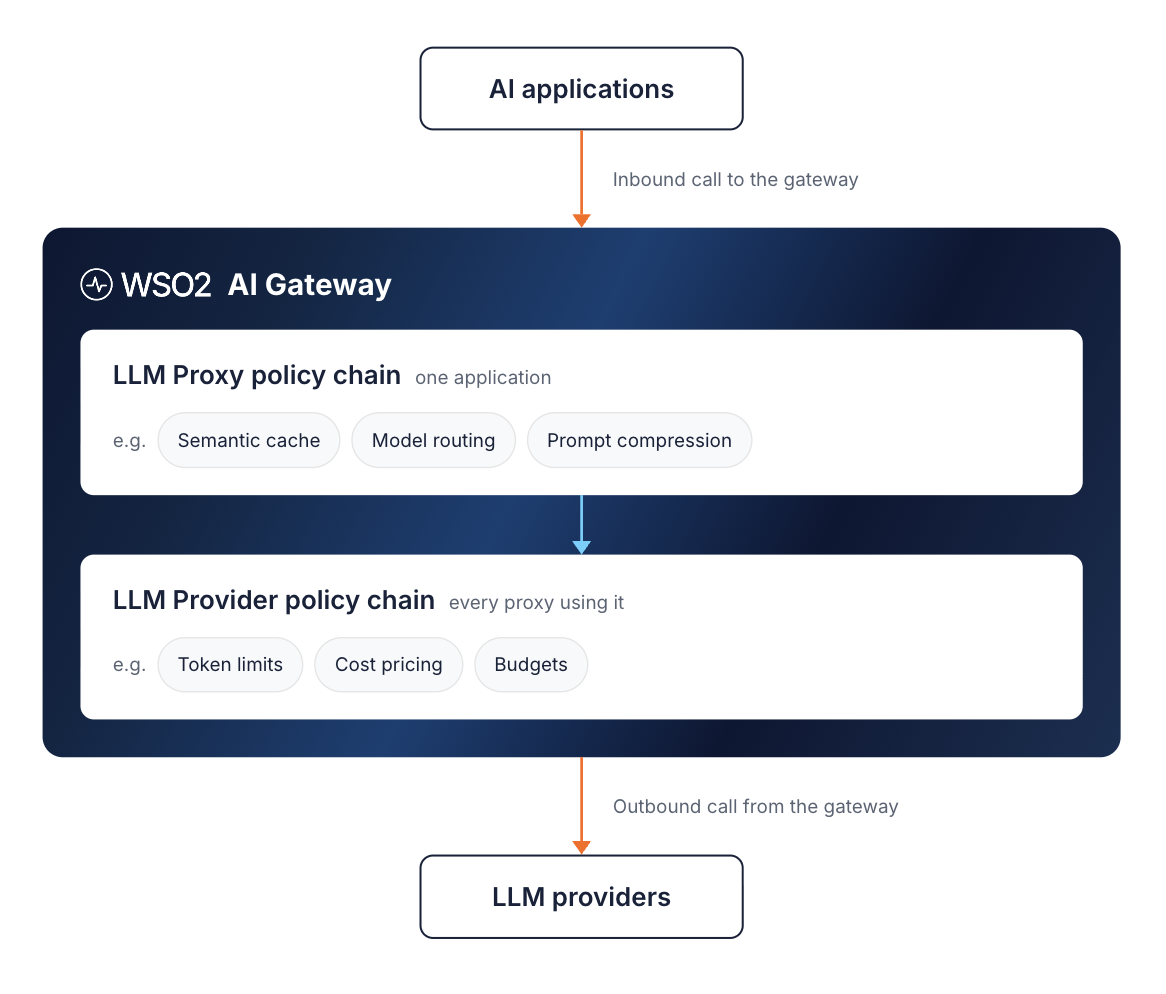
The application calls an LLM Proxy. The request runs the proxy's policy chain, then the provider's chain, and leaves through the provider connection. These policies are steps inside one gateway, not separate services, and a cache hit ends the request before any call leaves for the model. The embedding service and vector store sit beside the cache rather than in the path to the model. Many of these policies, including the cache, token limits, and budgets, can attach at either level. The choice depends on whether a policy should cover one application or every application.
The gateway's four cost levers
- Token-based rate limiting: Caps consumption by the tokens a model actually processed, rather than by the number of calls. Usage is counted from each response, so the limit blocks later requests rather than cutting off the current one.
- Budgets and chargeback: One policy prices each call, and a second rejects traffic once a budget in currency is spent. The call that exhausts the budget completes, and the next one is rejected. Per-team API keys feed analytics that attribute cost by team and by model.
- Semantic caching: Attached to a provider, it covers every proxy that consumes it, with no application code changes. Cache entries stay isolated per authenticated caller, so a response cached for one application is not served to another.
- Multi-model routing: Weighted distribution, header-based selection, and failover across LLM providers, all behind one endpoint.
Cost is not the only concern at this layer. The same gateway applies resilience patterns like fallback and retries alongside content guardrails. It also governs MCP traffic through MCP proxies, which route agent tool calls to MCP servers on their own path, separate from model calls. LLM consumption and MCP tool access therefore share one control plane, each with its own policies.
Policy as code
Each of these levers is configuration. A token budget or a cache threshold lives in a versioned definition that you review, deploy, and audit like any other infrastructure. The example below attaches a semantic cache and a daily token limit at the provider level, so both apply to every proxy that uses this provider:
apiVersion: gateway.api-platform.wso2.com/v1
kind: LlmProvider
metadata:
  name: openai-provider
spec:
  displayName: OpenAI Provider
  version: v1.0
  context: /openai
  template: openai
  upstream:
    url: https://api.openai.com/v1
    auth:
      type: api-key
      header: Authorization
      value: Bearer ${OPENAI_API_KEY}
  accessControl:
    mode: deny_all
    exceptions:
      - path: /chat/completions
        methods: [POST]
  operationPolicies:
    - name: semantic-cache
      version: v1
      paths:
        - path: /chat/completions
          methods: [POST]
          params:
            similarityThreshold: 0.9
    - name: token-based-ratelimit
      version: v1
      paths:
        - path: /chat/completions
          methods: [POST]
          params:
            totalTokenLimits:
              - count: 500000
                duration: "24h"
The cache also needs an embedding provider and a vector store in the gateway configuration, and the policy documentation covers those settings. The example targets AI Gateway 1.2.0 with semantic-cache v1 and token-based-ratelimit v1, so check field names against the Policy Hub reference for your version before you deploy it.
When gateway enforcement is worth it
The trigger is rarely a spend figure. It is usually one of these operational problems:
- Multiple models or providers. Without a gateway, routing and failover logic gets copied into every application.
- Spend attribution. Finance needs cost by team, product, or tenant rather than one combined invoice.
- Regulated data in prompts. Prompts need masking or inspection before they leave your network.
- Production scale. Several applications share model quotas and need consistent, enforceable limits.
If one of these applies, a shared gateway is usually cheaper to operate than per-application code. LLM cost optimization then becomes a property of the platform rather than a project each team repeats. The WSO2 API Platform is open source and can run self-hosted, in a hybrid model, or as a managed service.
Conclusion
LLM spend rarely gets out of hand because of one bad decision. It grows through small defaults: a long system prompt, a frontier model on every request, and a history that nobody trims. Each of those defaults is fixable, and the fixes compound when you apply them together.
The order of work matters more than the choice of tools. Measure first, so you know which requests drive the bill. Then route simple traffic to smaller models, cache the questions users repeat, and cut the tokens that add nothing. Check output quality at every step, because a cheaper answer that is wrong costs more in the end.
Once more than one team is doing this work, move the controls to a shared gateway. Budgets, caches, and routing rules then live in one reviewed configuration rather than in every codebase. To try that setup, start with the guide to set up a governed multi-model LLM proxy with cost controls. It walks through model round robin, semantic caching, and per-team keys on a live provider.
Frequently Asked Questions
What is the most effective way to reduce LLM API costs?
For many workloads, model routing gives the largest reduction for the effort involved. It works best when a large share of requests are simple enough for a smaller model. If most traffic is repeated questions, semantic caching may save more.
How does semantic caching differ from traditional caching?
Traditional caching needs an exact match on the request. Semantic caching compares the meaning of prompts using embeddings, so a reworded question can still return a cached answer.
How much can model routing actually save on LLM spend?
It depends on how much traffic can move to a cheaper model without losing quality, and on the price gap between the two models. Savings on the total bill are lower than savings on routed traffic, because only part of the traffic moves.
Can I control LLM costs without changing my application code?
Yes, if the controls sit in a gateway that all model traffic passes through. Caching, routing, token limits, and budgets then apply as configuration, and the application only needs to call the gateway endpoint.
Does caching or routing save more money?
Neither wins everywhere. Caching wins when users repeat the same questions, and routing wins when many requests are simple. Most production workloads benefit from both, with the cache checked first.

