API Design Tools: Choosing the Right Stack for API-First Teams
A backend team and a frontend team agree on an endpoint in a meeting, then spend the next two weeks building against two different ideas of what it returns. Nobody wrote anything down that either side could check their code against. That gap, not a missing feature, is what an API design tool exists to close: a single spec both sides can read, mock and test against.
This guide compares Stoplight, Postman, Insomnia, SwaggerHub, and Apicurio across the parts of the job that actually differ: design, mocking, linting, documentation, and collaboration. It also covers where these tools sit in the broader API tools, management, and gateways category, since a design tool is only one stage of an API's life.
What Are API Design Tools?
API design tools are where a team writes and reviews the contract for an API, usually in OpenAPI or AsyncAPI, before backend code exists to fulfill it. That distinguishes them from runtime tools like gateways, which enforce a contract that already exists in production. A design tool's job is to make the contract itself good: consistent naming, complete schemas, realistic examples, and a shape the intended consumers can actually work with.
Most teams reach for one of these tools at a specific moment. An API-first initiative starts. A partner integration needs a stable contract before either side has written code. Or a growing catalog of APIs needs a shared style, so each one doesn't look like it came from a different company. The five tools below cover that job with different trade-offs in collaboration model, hosting, and how much of the surrounding lifecycle they try to own.
What to Look For in an API Design Tool
Feature lists look similar across this category. The differences that actually matter show up in daily use.
OpenAPI and AsyncAPI version support: The OpenAPI Initiative shipped OpenAPI 3.2 as a backward-compatible update to 3.1, adding a QUERY method for complex filtering, native streaming media types, and an expanded tag system. None of that breaks an existing 3.1 spec, but tool support for the newest additions rolls out at different speeds across vendors. Check a tool's current spec support directly rather than assuming parity across the category.
Mocking: A mock server that returns realistic, spec-accurate responses lets a frontend team start building the moment a design is agreed on, instead of waiting on a working backend.
Linting and style guides: This is what keeps ten APIs from ten teams looking like ten different products. Look for a tool that can enforce a shared ruleset (naming conventions, required fields, security schemes). It should be able to fail a build in CI/CD when a spec violates that ruleset, not just flag issues in an editor nobody reopens.
Collaboration: Design is a group activity: product, backend, and frontend all need to comment on and approve the same document. Git-based version control, in-line comments, and role-based access separate tools built for solo editing from ones built for teams.
Developer portal integration: A spec that only lives in the design tool has limited value. Look at how cleanly a tool's output feeds a developer portal or downstream documentation site, since that's where most consumers actually read the API.
The Top API Design Tools, Compared
Five tools consistently come up in an API-first team's shortlist for this job. Each is described here on its own terms, not against a fixed scorecard.
Stoplight
Stoplight is a design-first platform built around a visual OpenAPI and JSON Schema editor, alongside a code-based view for teams that prefer to work in raw YAML.
Key features:
- Visual and code-based OpenAPI/JSON Schema editing with schema reuse across specs
- Local and automatic mock servers generated straight from the spec
- Style guides that can be shared and enforced across every project in a workspace
- Git sync with GitHub, GitLab, Azure DevOps, or Bitbucket
- Auto-generated, themeable API documentation
Pricing model: A single-project free plan, then per-user paid tiers (Basic, Startup, Pro Team) that add mocking, projects, teams, and governance features, with a custom Enterprise plan at the top.
Best for: Teams that want the visual editor, mocking, docs, and governance in one product rather than stitched from separate tools.
Postman
Postman's Spec Hub is the design layer inside a much larger API platform most teams already have installed for API testing.
Key features:
- Design in OpenAPI, AsyncAPI, protobuf, GraphQL, or Smithy from the same interface
- Live governance linting and a documentation preview as you edit
- Generate a request collection directly from a spec, or a spec from an existing collection
- Unlimited mock servers on every current plan
Pricing model: Free for individuals, then a single-user Solo plan and per-user Team and Enterprise plans that add collaboration, RBAC, and governance controls.
Best for: Teams already living in Postman for testing who want design to sit in the same workspace instead of a separate tool.
Insomnia
Insomnia is Kong's open-source API client and design tool, built around a design-first workflow that plugs directly into Kong's runtime tooling.
Key features:
- An OpenAPI spec editor with a live rendered preview alongside the raw source
- Real-time linting plus custom lint rules defined by your team
- The Inso CLI, for running the same governance checks in a CI/CD pipeline that you run locally
- A path from OpenAPI spec straight into Kong Gateway configuration via decK, which can also detect drift between a declared gateway configuration and what's actually deployed
Pricing model: A generous free Essentials tier, then per-user Pro and Enterprise plans that add unlimited organizations, RBAC, and SSO.
Best for: Teams already on or evaluating Kong, where a straight line from spec to gateway config matters more than a standalone design product.
SwaggerHub (now Swagger Studio)
The tool most people still call SwaggerHub was renamed Swagger Studio as SmartBear consolidated its tools under the Swagger brand. It's still the same collaborative design product behind the name change.
Key features:
- A code editor and a no-code Form Editor for the same OpenAPI or AsyncAPI spec
- Style validators and reusable domains for enforcing design standards across a portfolio
- Real-time commenting so reviewers can weigh in without leaving the spec
- Support for defining APIs via the MCP specification alongside OpenAPI and AsyncAPI
Pricing model: Tiered per-user SaaS plans (Individual, Team, Enterprise), quoted directly through SmartBear's current pricing page.
Best for: Teams that grew up on the original Swagger tools and want governance and portfolio-wide consistency layered onto that familiar editor.
Apicurio
Apicurio is worth a specific correction before comparing it to the other four: the standalone visual design tool, Apicurio Studio, is now fully deprecated. Red Hat, which backs the project, folded its editing capabilities into Apicurio Registry as an opt-in feature in late 2025. Studio no longer continues as a separate product. A team evaluating "Apicurio" as a standalone design tool today is evaluating something that no longer ships as one.
Key features:
- Apicurio Registry stores and versions OpenAPI, AsyncAPI, Avro, JSON Schema, and Protobuf artifacts with compatibility checking
- Editing capabilities formerly in Apicurio Studio are available inside the Registry UI as an opt-in feature
- Fully open source under the Apache 2.0 license, backed by Red Hat
- REST API for schema and spec management, suited to teams that want design artifacts managed alongside runtime schemas
Pricing model: Free and self-hosted, with no vendor SaaS tier.
Best for: Teams already running Apicurio Registry for schema governance who want design folded into that same system, not a standalone product.
Design-First vs. Code-First: Which Workflow Do You Need?
Every tool above is built around a design-first workflow: write the OpenAPI spec, agree on it, then implement against it. A few, like Postman, can also generate a spec from an existing implementation when a team works the other way around, but design-first is still the default path each one is optimized for. That's not the only way teams build APIs, and the choice matters more than which tool you pick.
Design-first means the spec is the source of truth. It gets written and reviewed before implementation starts. Consumers can build against a mock while the backend is still in progress, and a linter can reject a bad spec before anyone writes code against it. The cost is discipline: someone has to keep the spec current as the API evolves, or it drifts from the real implementation and stops being trustworthy.
Code-first means the implementation comes first and the spec gets generated from it, often via framework annotations or reflection. This is faster for a single team building an internal service with no external consumers to coordinate with. It's a weaker fit once other teams or partners need to build against your API before it exists. There's nothing for them to build against yet.
Most API-first organizations land on a mix. Design-first suits public and partner-facing APIs, where the coordination cost of getting the contract wrong is high. Code-first suits internal services, where a single team owns both sides. The diagram below shows where each stage of a design-first workflow sits and which of the tools above cover it.
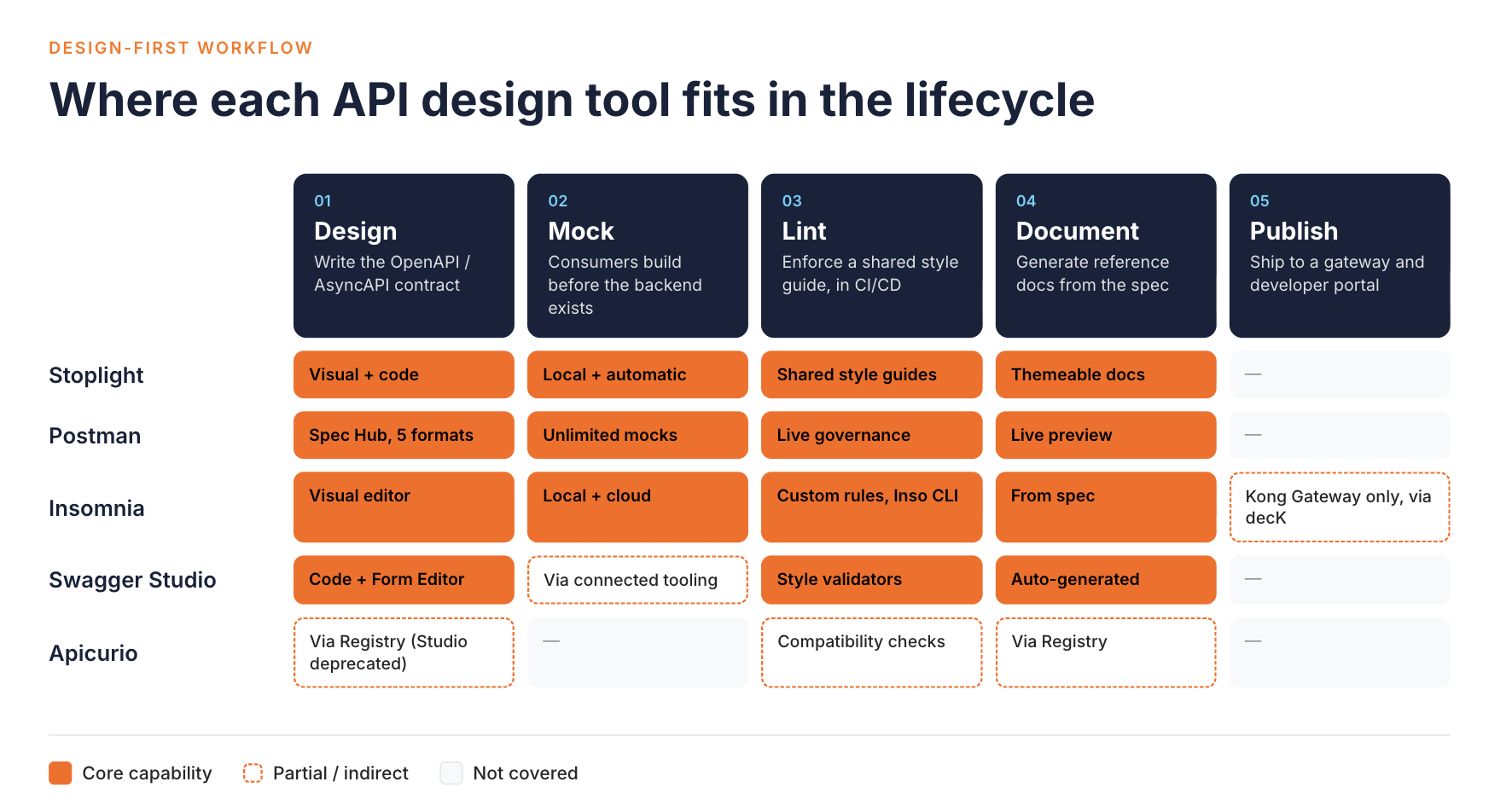
Feature Comparison Table
| Tool | Design | Mocking | Linting | Documentation | Collaboration | Pricing |
|---|---|---|---|---|---|---|
| Stoplight | Visual + code, OpenAPI/JSON Schema | Local + automatic | Shared style guides | Auto-generated, themeable | Git sync, comments | Free tier, per-user paid tiers |
| Postman | Spec Hub, OpenAPI/AsyncAPI/GraphQL/protobuf/Smithy | Unlimited on all plans | Live governance linting | Live preview from spec | Workspaces, RBAC | Free tier, per-user paid tiers |
| Insomnia | Visual OpenAPI editor with live preview | Local + cloud | Real-time + custom rules, Inso CLI for CI/CD | Generated from spec | Git sync, orgs on paid tiers | Free tier, per-user paid tiers |
| Swagger Studio (ex-SwaggerHub) | Code + no-code Form Editor, OpenAPI/AsyncAPI/MCP | Via connected tooling | Style validators, shared domains | Auto-generated | Real-time comments | Tiered per-user SaaS |
| Apicurio (Studio deprecated) | Via Registry | Not a core focus | Compatibility checking | Via Registry | REST API, no built-in review flow | Free, open source, self-hosted |
How WSO2 Fits In
The five tools above are built to stand alone: install one, point it at a spec, and start designing. That's the right call for a team whose only need is the design step itself.
That changes once an organization runs enough APIs that design-time governance can't stay separate from everything downstream. That includes security review, AI readiness, and the style rules a gateway will eventually enforce at runtime. WSO2's answer is API Designer, part of the WSO2 API Platform. API Designer is a Visual Studio Code extension for designing and improving OpenAPI specifications. It supports AI-assisted editing through GitHub Copilot.
API Designer adds a visual design view next to the raw spec in your editor. It runs governance checks against three bundled Spectral rulesets. These are the WSO2 REST API Design Guidelines, the WSO2 REST API AI Readiness Guidelines, and the OWASP API Security Top 10. Teams can point it at their own ruleset folder to override or replace those rules. It also scores a spec for AI readiness and explains why each failure matters for agents. These design-time checks run separately from the policies a gateway enforces at runtime. The point isn't that API Designer replaces a dedicated design tool feature for feature. It's that design sits inside the same platform the organization uses to deploy, govern, and monitor its APIs.
Conclusion
There isn't a single best API design tool. There's a best fit for how your team already works. Stoplight and Swagger Studio suit teams that want design, mocking, linting, and docs bundled into one dedicated product. Postman and Insomnia suit teams that would rather keep design in a tool they already use for testing or gateway configuration. Apicurio Registry suits teams that want design artifacts managed alongside runtime schemas rather than in a separate system.
Your team may be past the point where a standalone design tool can stay disconnected from how APIs are governed and secured. If so, look at how the WSO2 API Platform handles design as one stage of a lifecycle it manages end to end.
Frequently Asked Questions
What's the difference between an API design tool and an API gateway?
A design tool is where a spec gets written and reviewed before an API exists in production. A gateway enforces a contract that's already live, handling routing, authentication, and rate limiting for real traffic. Some platforms cover both stages, but the two jobs are distinct.
Do I need a separate API design tool if my organization already runs an API gateway or management platform?
Not necessarily. If your platform includes a design-time editor with mocking and linting, evaluate whether it covers your team's workflow before adding a second, disconnected tool for the same job.
Is Apicurio still a good choice for API design?
Apicurio Registry, the schema and API registry component, is actively maintained. Apicurio Studio, the standalone visual design tool, is fully deprecated, with its editing features now available as an opt-in feature inside Registry instead.
Does OpenAPI 3.2 break my existing specs?
OpenAPI 3.2 is a backward-compatible update to 3.1, so existing 3.1 documents work unchanged after a version bump. Tool support for the newest 3.2-specific features varies by vendor and is worth checking directly.

