Building LLM-Backed APIs: A Practical Architecture Guide
The first call to an LLM API takes a few minutes to write. You send a prompt in an HTTP POST, wait a moment, and read the text that comes back. For a prototype, that is the whole integration.
Then real traffic arrives. A reasoning model working through a long answer can keep a request open for more than a minute. Every call costs a different amount, and a provider starts returning 429 errors during a traffic spike. Somewhere along the way, a stream dies halfway through an answer that a user was reading.
None of that is a problem with the model call itself. It comes from everything around the call. That includes how the request is built, how the response travels back, what happens when the provider fails, and who pays for each token. This guide covers that surrounding layer. It walks through request design, streaming, retries and fallback chains, caching, cost controls, and rate limiting. It closes with the decision that ties them together, which is whether each pattern lives in application code or in a shared gateway.
What Makes an LLM API Different from a Traditional API?
An LLM API is an HTTP interface to a hosted language model. The client sends a JSON body with a model identifier, a list of messages, and generation parameters. The provider runs inference and returns generated text along with a count of the tokens it processed.
That request-response loop looks like any REST integration, but the behavior inside it does not.
- Latency is measured in seconds. Generation time grows with output length. A long completion can outlast the request timeouts that proxies and load balancers apply to ordinary API traffic.
- Output is non-deterministic. The same prompt can produce different answers on different calls. That changes how you test, how you cache, and what a correct response means.
- Cost is metered per token. Providers count input and output tokens, so two requests to the same endpoint can differ widely in cost.
- Failures take new shapes. Beyond ordinary 5xx errors, you will see rate limits and capacity errors such as Anthropic's 529
overloaded_error. You will also see spend caps that no retry will clear, and errors that arrive after a stream has already returned 200.
Model lifecycle adds one more difference. Providers retire and change models on their own schedule, so a model name hardcoded today becomes a migration task later.
These differences are why LLM traffic benefits from dedicated handling in the platform. WSO2's write-up on the AI mediation layer makes that case in depth. The rest of this guide focuses on the patterns themselves.
Designing the Request Shape
A request that works in a notebook usually needs three changes before it is ready for production. The model becomes a parameter, the payload becomes provider-aware, and token usage gets counted before the call rather than after the bill.
Treat the model as configuration
Hardcoding a model name ties every deployment to one provider and one version. Read the model identifier from configuration, and set it per environment or per feature. A summarization endpoint and a reasoning-heavy agent step rarely need the same model. Keeping the model configurable also leaves room for routing decisions later, whether you make them in code or at a gateway.
Know where each provider puts things
Chat-style APIs share a common idea: a conversation is a list of messages, and each message has a role such as system, user, or assistant. The wire formats still differ between providers. Here is a request for an OpenAI-compatible Chat Completions endpoint. It assumes a model that accepts temperature and streaming:
{
  "model": "<openai-model-id>",
  "messages": [
    {"role": "system", "content": "You are a billing support assistant."},
    {"role": "user", "content": "Why did my invoice change this month?"}
  ],
  "temperature": 0.2,
  "stream": true
}
Here is the same request for Anthropic's Messages API endpoint, again assuming a model that accepts these parameters:
{
  "model": "<anthropic-model-id>",
  "max_tokens": 1024,
  "system": "You are a billing support assistant.",
  "messages": [
    {"role": "user", "content": "Why did my invoice change this month?"}
  ],
  "temperature": 0.2,
  "stream": true
}
On Anthropic, the opening system prompt goes in a top-level system field rather than in messages, and max_tokens is required. Differences like these look minor in a single integration. They matter most during fallback, when a request built for one provider is sent to another.
Parameter support also varies by model. Some models, including some reasoning models, reject or restrict sampling settings such as temperature. Check the model's documentation before you swap one model for another.
Set the parameters that affect operations
A few parameters matter more for operations than for output quality.
- Temperature. Lower values reduce variation between responses on models that support the setting. That helps with testing, but it does not make an answer correct or a cached answer valid in another context.
- Output cap. An output-token cap bounds one component of request cost. It does not limit input tokens, tool charges, or retries, and how it treats reasoning tokens depends on the model and endpoint. Pair it with input limits, tool budgets, and retry limits to bound total spend. Set it too low and answers get cut off, yet the call still succeeds. Check the stop reason on each response to tell a finished answer from a truncated one.
- Stop sequences. Custom stop strings end generation when the model produces a delimiter you define. They help keep answers short, but they do not enforce a format. When you need a specific structure, use the provider's structured-output features where available and validate the response in your application.
Count tokens on the way in
Input tokens are billed too, and they grow in ways that are easy to miss. Each turn in a conversation resends the history. A retrieval-augmented request adds document chunks to every prompt. Estimate the input size before you send the request, and trim history or reject oversized inputs at that point. Counting after the response arrives only tells you what the call already cost.
Streaming Responses
Waiting for a complete answer feels broken when generation takes several seconds. Watching the first words appear almost at once feels responsive, even when the total time is the same. Streaming is how most interactive LLM apps deliver output in real time.
How streaming works
OpenAI-compatible providers and Anthropic both stream over Server-Sent Events (SSE). You set "stream": true in the request, and the response arrives with the text/event-stream content type. Each event carries a chunk of generated output in a data: line.
The SSE specification also defines an id field for events. When a browser's EventSource reconnects after a dropped connection, it sends the last ID it received in a Last-Event-ID header. The server can then resume from that point.
There is a catch for LLM clients, though. The EventSource constructor accepts only a URL and a credentials option, so it cannot send the POST body that a chat completion needs. Most LLM front ends therefore read the stream with fetch and parse events themselves. In that setup, the built-in reconnection behavior does not apply, and you have to implement it.
The durability problem
In the simplest design, the client connection and the generation are the same thing. Your server opens a stream to the provider and pipes each chunk straight to the user. When the user's connection drops, the pipe breaks. Depending on how your server handles the disconnect, the upstream generation is either cancelled or finishes with nowhere to go. Either way, the client has to send the request again, and the tokens generated before the drop get paid for twice.
The fix is architectural: separate generating the response from delivering it.
- A generator calls the provider and appends each chunk to a buffer keyed by a stream ID. Each chunk gets a sequence number. The generator keeps running whether or not a client is connected.
- A consumer endpoint reads from that buffer starting at an offset. It streams chunks to the client as SSE events and uses the sequence number as the event
id. - A reconnecting client sends the last ID it saw, and the consumer resumes from the next chunk.
On the wire, the consumer's events look like this:
id: 41
data: {"stream_id": "resp_7f3a", "delta": "Your invoice changed because"}

id: 42
data: {"stream_id": "resp_7f3a", "delta": " a new seat was added on the 12th."}
This design adds a store and some bookkeeping, and not every feature needs it. It earns its place when answers are long, users are on unreliable networks, or regenerating a response is expensive.
Two streaming failure modes to plan for:
- Timeouts along the path. Every proxy between the client and the provider has its own timeouts. A route timeout shorter than your longest generation cuts the answer off mid-stream. An idle timeout shorter than the longest pause between chunks does the same. Set both on every hop, with your slowest model in mind.
- Errors after a 200. With streaming, the provider can return a success status and then fail partway through. Anthropic's error documentation notes that these mid-stream errors do not follow the standard HTTP error handling. Your client needs to handle an error event inside a stream that has already started. It should show the user something better than a half-finished sentence.
Retries, Circuit Breakers, and Fallback Chains
Three resilience patterns often get discussed as if they were interchangeable. They solve different problems, and mixing them up is how a team ends up retrying a provider that is fully down. WSO2's guide to LLM fallback strategies draws the distinction clearly, and this section builds on it.
| Pattern | Where the next attempt goes | Helps with | Causes harm when |
|---|---|---|---|
| Retry | The same model at the same provider | Transient errors, such as a dropped connection | The provider is hard down, so each retry adds cost and delay |
| Circuit breaker | Nowhere, for a cooldown period | Sustained failure at one target | Thresholds are set badly and trip too early or too late |
| Fallback | A different model or provider | Outages, throttling, and model deprecation | The backup behaves differently or costs more |
Retries: brief, classified, and owned by one layer
Retry transient failures with exponential backoff, and add random jitter so many clients do not retry in lockstep. Honor a retry-after header when the provider sends one.
Classify errors before retrying. A timeout or a 5xx is worth another attempt, but a 400 for a malformed payload is not. Some 429 errors are not transient either. Anthropic documents that a 429 caused by a usage tier's spend cap has no retry-after header and keeps failing until access resumes.
Check what your SDK already does before adding your own logic. Anthropic's official SDKs retry transient failures twice by default, with exponential backoff. If you wrap that client in your own retry loop, each of your attempts can trigger its own SDK retries. Decide which layer owns retries, and turn them off everywhere else. Log failed requests with their cause so you can see which errors actually recover on retry.
Retries are only safe when the call has no side effects. Repeating pure text generation does not repeat a business-system side effect. It can still add cost and return a different answer, and the first response may already have been stored or partly delivered. Repeating an agent step that triggered a tool call, such as issuing a refund, is not safe unless that tool is idempotent.
Circuit breakers: stop sending to a failing target
When a target keeps failing, a circuit breaker stops sending it traffic for a cooldown period. Requests stop waiting on a target that will not answer, which protects your latency budget. The provider also gets room to recover instead of absorbing a retry storm. The hard part is tuning, because the failure threshold and the cooldown need to reflect how your provider actually fails. Your failure logs are the input for that tuning.
Fallback chains: cross failure domains
Fallback sends the request somewhere else entirely. Of the three patterns, it is the only one that helps when a whole provider is down or throttling you.
The design principle that matters most is that a fallback chain must cross failure domains. Falling back from one model to another at the same provider does little when the provider itself is having an outage. A resilient chain might run a primary model on Provider A, a secondary on Provider B, and a self-hosted model as the last resort.
Payload adaptation is where hand-rolled fallback code tends to break. The two request shapes shown earlier are not interchangeable. A fallback that redirects an OpenAI-format request to an Anthropic endpoint without translating it simply fails a second time. The response needs translating back as well, so downstream code always sees one consistent shape.
Fallback also interacts with streaming, because a provider switch is only invisible before the first chunk reaches the user. After tokens are on screen, a switch means restarting the answer, possibly in a different style from a different model. A practical rule is to fail over only before the first chunk is sent. After that point, surface an error and offer the user a retry.
Putting the three together
A production setup combines all three patterns. Each attempt runs with a timeout. Transient errors get a short retry with exponential backoff. When failures continue past a threshold, the circuit breaker opens for that target. While it is open, traffic goes to the next entry in a cross-provider fallback chain.
Cost Controls and Caching
Token spend is often the line item that grows fastest and gets noticed last. Two levers do most of the work: knowing exactly where tokens go, and not paying twice for the same answer.
Account for every token
Providers report token usage on each response. Record input and output tokens per request, and tag each record with the team, feature, and model that generated it. Without that attribution, a spike in spend is a single number that nobody owns. With it, you can see that one feature's prompt template doubled in size last week. Attribution is also the prerequisite for budgets, alerts, and chargeback. WSO2's guide to reducing LLM API costs covers those levers, including model routing, in more detail.
Set realistic caching expectations
A cache hit avoids the model call entirely, which saves both the tokens and the time of a full generation. How much caching saves depends on how repetitive your traffic is. Treat any single headline hit rate with caution.
Academic research gives one useful reference point. In the MeanCache study, researchers analyzed more than 27,000 queries from 20 ChatGPT users and found that about 31% were similar to earlier queries. That figure describes repetition in one group of users. It is not a hit rate you should plan around. A support bot that answers the same policy questions all day will see more repetition. A coding assistant working on unique codebases will see less. The same study adds a warning. Queries that look alike can need different answers when their conversation context differs, and caches that ignore context return false hits as a result.
Layer exact-match and semantic caching
A practical design uses two layers.
- Exact-match cache first. Hash the full normalized request, including the model name and generation parameters, and look it up. This layer is fast and avoids paraphrase matching. A hit is still only valid if the entry is fresh, the caller is allowed to see it, and normalization did not strip a detail that changes the answer.
- Semantic cache second. Convert the prompt to an embedding and run a vector search for a previously answered prompt above a similarity threshold. This layer catches paraphrases, such as "how do I reset my password" and "I forgot my password, what now".
Semantic caching is where the risk sits. With a threshold that is too loose, a user receives an answer that was cached for a different question. With one that is too strict, the cache rarely hits. Tune the threshold per use case, and monitor user corrections along with the hit rate.
Plan invalidation from the start, and give entries a time-to-live that matches how quickly the underlying facts change. Include the model version in the cache key, so a model upgrade does not serve answers generated by its predecessor. Make tenant scope a required part of the key for any workload whose answers contain customer data or depend on the caller.
Use provider-side levers as well
Response caching is not the only saving available. Some providers support prompt caching for repeated prompt prefixes, such as a long system prompt shared across calls. Anthropic's Messages API exposes this through a cache_control marker. Unlike response caching, the model still runs on every call. For work that does not need a real-time answer, such as overnight classification, batch processing is another option to evaluate with your provider.
Rate Limiting and Quota Management
Provider rate limits usually apply to your organization or API key as a whole. Anthropic, for example, returns a 429 when your organization hits a rate limit. Without internal quotas, one busy feature can consume the allowance that every other feature depends on. Internal rate limiting divides that allowance on purpose.
- Count tokens, not just requests: A request-based limit treats a one-line question and a long document the same way. A token-based limit caps what each consumer actually uses, which tracks cost and provider quota more closely. Keep a request-based limit alongside it to stop clients that send floods of small calls.
- Expect some overshoot: Token counts are only known once the model responds. A limiter that reads usage from the response cannot stop the request that crosses the threshold. Under concurrency, every request already in flight can also complete, so the overshoot can exceed one request. Size limits with that overshoot in mind, especially for consumers that send very large prompts.
- Scope limits to the unit you manage: Per-user limits protect against abuse, while per-feature and per-team limits protect the shared budget. When the models behind an endpoint differ widely in price, a limit expressed in currency is easier to reason about than one expressed in tokens.
- Fail clearly: When you reject a request, return a 429 with a
retry-aftervalue. Your own clients can then back off the same way you back off from providers. WSO2's documentation on LLM rate limiting shows how token-based limits attach to an LLM proxy or an LLM provider.
Where This Belongs: Application Code vs. the Gateway
Every pattern in this guide can live in application code. For one application calling one provider, it probably should. The picture changes when several teams build LLM features. Each team writes its own retry loop, its own cache, and its own token accounting. The implementations drift apart, provider keys spread across codebases, and nobody has a single view of spend or failures.
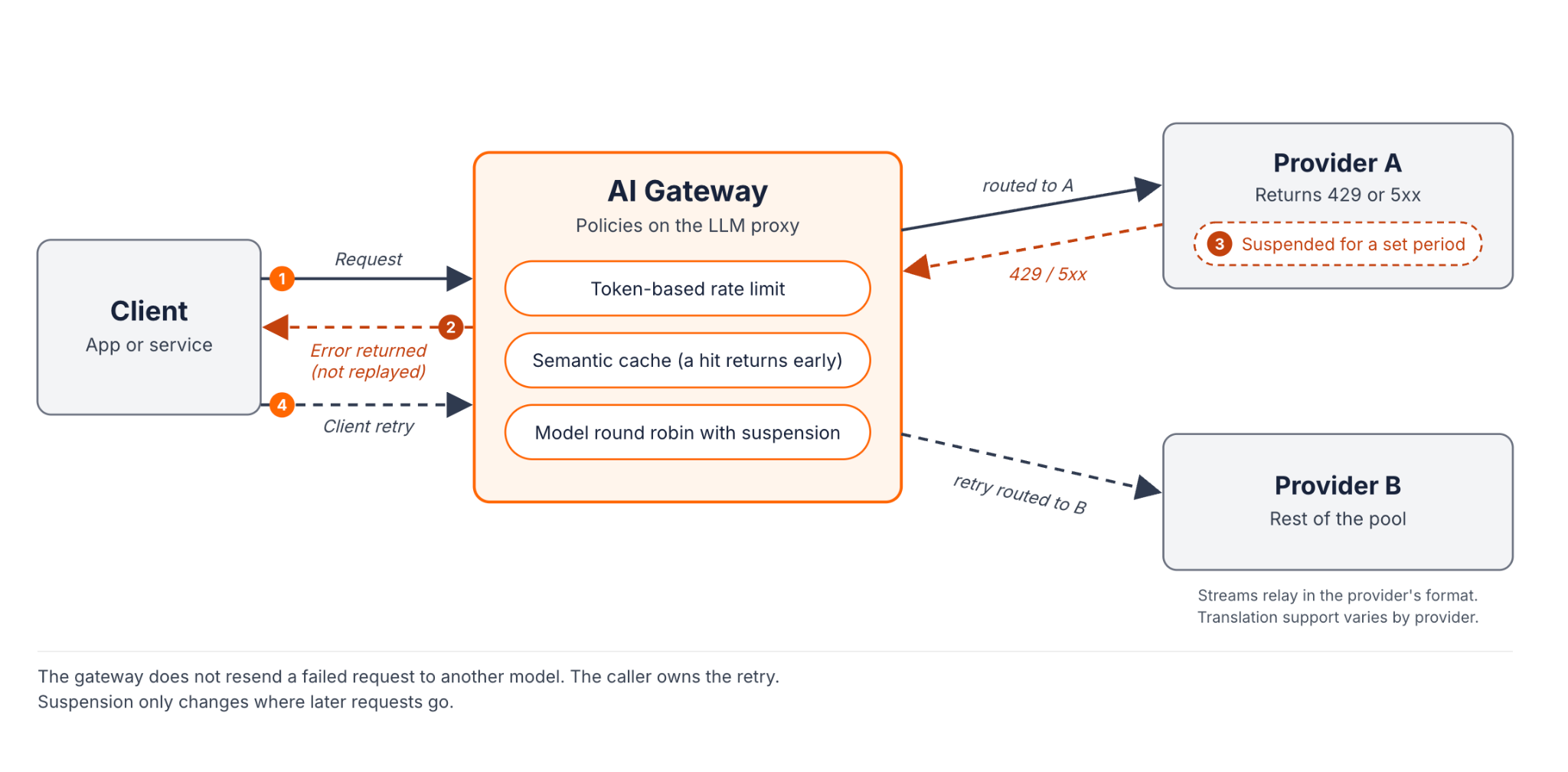
The alternative is to move the shared concerns into a gateway layer. Retries, fallback routing, caching, token limits, and usage tracking become configuration. Every application behind the gateway inherits them without writing the code again.
Separate the inbound and outbound legs
Getting the traffic flow right matters here, because an LLM-backed API has two distinct legs with different controls.
- The inbound leg carries calls from your clients to your API. It needs authentication, request-level rate limits, and standard API controls. An API gateway governs this leg.
- The outbound leg carries calls from your service to LLM providers. It needs provider credentials, token accounting, caching, and routing across models. An AI gateway governs this leg.
The two legs are independent. An internal batch job might call the AI gateway with no inbound leg at all. An API endpoint that never calls a model uses only the API gateway. Neither gateway is a mandatory hop for the other. What connects them is a shared control plane, which keeps policy, credentials, and analytics consistent across both.
What stays in the application
A gateway does not remove application responsibilities. Prompt design, output validation, and the user experience of a failed stream all stay in your code. So do idempotent tool calls and the durable stream buffer, if you need resumable responses. A gateway can relay a stream, but relaying does not make that stream resumable after the client disconnects.
When to make the move
Adoption should follow operational need rather than traffic volume alone. These triggers tend to justify a gateway layer:
- Multiple models or providers. You route across models for cost or capability, or you need a cross-provider fallback chain.
- Spend attribution. Finance or platform teams need to know which team, feature, or customer generated each token.
- Regulated data in prompts. Prompts may carry personal, financial, or health data that needs masking and an audit trail before it leaves your network.
- Production scale. Features serve external users, several teams share provider quotas, and unmanaged provider keys have become a reliability and security risk.
If you run a single application against one provider, or you are still proving out a concept, application code is a reasonable place to start.
How WSO2 Approaches LLM-Backed API Architecture
WSO2 splits the work along the same two legs. The API Gateway handles REST, GraphQL, and other API traffic. The WSO2 AI Gateway handles traffic to LLM providers. Both are governed from one control plane, which provides one place to author policy, one governance model, and one analytics view. The gateways themselves stay separate and can run close to the workloads they serve.
Inside the AI Gateway, an administrator defines an LLM provider once, with the upstream credential and organization-wide policies. Each application gets an LLM proxy that consumes that provider, inherits its policies, and adds its own. Applications call the proxy with a key that the gateway issues, and they never hold the provider's key.
Here is how the patterns in this guide map onto the AI Gateway.
Streaming
The gateway relays streamed responses chunk by chunk as they arrive. No streaming-specific configuration is needed, as long as no response-body policy on the route requires buffering. If one does, the gateway buffers the full response and sends it in one piece. See WSO2's streaming documentation for how policies affect streaming. It streams whenever the upstream service streams. The default route timeout is 60 seconds. WSO2's guide to tuning the gateway for AI traffic recommends raising the route and idle timeouts for long completions.
Routing and failover
Round robin and weighted round robin policies spread traffic across a pool of models, and pool entries can point at different providers. When a model returns a 5xx or a 429, the policy suspends it for a configurable period. Traffic goes to the rest of the pool in the meantime. That behaves much like a circuit breaker scoped to one model and provider pair. The policy does not retry the failed request on another target, so a short client-side retry still has a job to do. For payload adaptation, multi-provider routing exposes one OpenAI-compatible endpoint and applies a transformer for each provider that uses a different format. Non-streaming responses are normalized where supported, and streaming compatibility varies by provider.
Caching
The Semantic Cache policy uses an embedding provider and a vector store, with a similarity threshold that you set. You can attach it to one application's proxy, or to a provider so that it covers every proxy consuming that provider.
Quotas and cost
Token-based rate limits attach at the proxy or provider level. A separate cost-based rate limit policy enforces monetary budgets, and request-based limits cover call volume.
Regulated data
Guardrail policies such as PII masking redact sensitive values from prompts before the gateway forwards them to the provider.
Because every call passes through the proxy, token usage and cost per request come from the enforcement layer itself. That is the connecting idea across this guide. Resilience, caching, and cost control stop being code that each team maintains, and they become policy that the platform applies.
Conclusion
Calling an LLM API is easy. Running an LLM-backed API in production is an architecture decision. It needs streams that survive the network and failover that crosses providers. It also needs caching that saves money without serving wrong answers, and quotas that keep one feature from starving the rest. You can build each of these into every application, and for a single app that is often the right call. Once several teams, models, or compliance requirements are involved, the patterns belong in a shared layer. To see how that layer works across API and AI traffic, explore the WSO2 API Platform.
Frequently Asked Questions
What is an LLM API?
An LLM API is an HTTP interface to a large language model. You send a model identifier, messages, and parameters, and you receive generated text along with token usage.
What are LLM APIs?
They are the HTTP endpoints that model providers expose for inference. Teams use them to add generation, summarization, and chat features without hosting a model.
How do you reduce LLM API latency?
Stream responses so users see output early, and cache repeated requests. Route simple tasks to smaller models and keep prompts lean. Make sure every proxy's timeouts allow for long generations.
What is the cheapest LLM API?
It depends on your workload. Per-token prices vary by model and change often. Compare the total cost of your real traffic, including caching and routing, rather than list prices alone.
How do you build an LLM API for production?
Start with a configurable model parameter and a streaming client. Then add classified retries, a cross-provider fallback, caching, token accounting, and per-consumer quotas, either in code or at a gateway.
Do you need an AI gateway for a single application?
Usually not at first. A gateway becomes worthwhile once you use several providers, need spend attribution, handle regulated data, or share provider quotas across teams.

