REST API vs MCP: Which Do AI Agents Actually Need?
Hand an AI agent the OpenAPI description of your order service and ask whether a customer qualifies for a refund. It has to pick the right endpoints out of dozens, call them in the right order, and stitch the answers together. A developer would read the docs once and write that logic. If the integration hands the agent raw endpoints rather than a few task-level tools, it weighs many candidate calls every time it gets the task, and every wrong pick costs a round trip and more context.
The Model Context Protocol (MCP) exists to close that gap. That is also why "REST API vs MCP" is the wrong framing for most teams. This guide covers what each does well and where REST falls short for agents. It then walks through MCP discovery and authorization in the current spec, and how to run both without two governance stacks. It is part of the WSO2 series on agent-ready APIs.
REST and MCP Aren't Competing Standards. They Solve Different Problems.
REST is a general-purpose architectural style that exposes resource-oriented interfaces over HTTP. MCP is a protocol that standardizes how compatible AI hosts list and invoke capabilities at runtime. In most deployments, an MCP server sits alongside an existing REST API and calls it, rather than replacing it.
Put another way, REST describes your system to a developer, and MCP describes a curated set of capabilities to a model. The REST API keeps serving web, mobile, and partner clients, and the MCP server becomes a second, agent-facing interface over the same business logic.
What REST APIs Do Well
REST earned its place through constraints that make large systems predictable. Roy Fielding's stateless constraint requires each request to carry all the information needed to understand it (Fielding, section 5.1.3). That single rule is a large part of why REST services scale behind ordinary load balancers and caches.
Decades of tooling sit on that foundation. The OpenAPI Specification gives humans and machines a standard description of an HTTP API's capabilities. API gateways, SDK generators, mock servers, and contract tests all build on it.
Most REST integrations are built for a consumer who knows what it wants. A mobile developer reads the docs, picks GET /orders/{id}, and hard-codes the call. In that pattern, the interface rarely has to explain itself at runtime because a person already did that work. For clients like that, REST is hard to beat, and the arrival of AI agents doesn't change it.
Where REST Falls Short for AI Agents
The friction starts when the consumer is a model that has to work out what to call. Four gaps show up repeatedly.
- No shared capability-listing call: REST supports self-descriptive messages and hypermedia links, and an OpenAPI description can be fetched, filtered, and cached at runtime. What REST lacks is one agreed call that every agent host uses to list capabilities for the current user. Each agent integration picks its own approach, such as OpenAPI, hypermedia, curated tool definitions, or a wrapper.
- Every integration is bespoke: Each API brings its own auth scheme, pagination style, and error format. Connecting several agents to several APIs means one adapter per pairing, which practitioners call the M×N problem.
- Endpoint granularity doesn't match tasks: REST resources are shaped for data access. Answering "can this customer get a refund?" might need an order lookup, a customer lookup, and a policy check. If each endpoint becomes its own tool, the model has to weigh every candidate definition and plan the sequence itself, which costs tokens and adds chances to choose wrongly.
- Authorization varies per API: One service takes an API key, another expects a client-credentials token, and a third uses mTLS. Recording which agent acted on whose behalf is possible over plain HTTP, for example with the actor (
act) claim from OAuth token exchange (RFC 8693). Whether it happens depends on each API's identity design and token validation, so results vary.
Statelessness is missing from that list on purpose. Earlier MCP revisions held a protocol session open, which made state look like MCP's advantage over REST. The current specification dropped protocol sessions as well.
What MCP Adds
MCP is an open protocol, introduced by Anthropic in November 2024, that standardizes how AI applications connect to external tools and data. It uses JSON-RPC 2.0 messages between three roles: the host (the AI application), the client (a connector inside the host), and the server (the service exposing capabilities).
The common shorthand is "USB-C for AI": one connector shape that works across many devices. The analogy holds only so far. A shared protocol turns M×N custom adapters into roughly M clients plus N servers, provided both sides support compatible versions, transports, capabilities, and authorization. Each server still needs backend wrappers and domain logic.
The biggest recent change concerns state. The 2026-07-28 specification retired the initialize handshake and the Mcp-Session-Id header, which makes MCP a stateless request/response protocol at the protocol layer. A server that needs continuity across calls mints an explicit handle and returns it from a tool, and the model passes that handle back as an argument. Requests over streamable HTTP also carry an Mcp-Method header. Tool calls, prompt fetches, and resource reads add an Mcp-Name header. A gateway can use these to route and rate-limit without parsing JSON bodies.
The Three MCP Primitives
An MCP server exposes three kinds of capability. What separates them is who decides when each one is used.
- Tools are model-controlled: The model discovers and invokes them based on the task and the user's prompt. Actions with side effects, such as
create_ticketorissue_refund, belong here. - Resources are application-driven: The host application decides how to bring them into context. A database schema, a refund policy document, or a file the user attached are typical examples. They supply context rather than perform actions.
- Prompts are user-controlled: They are templates the user selects explicitly, usually through a command in the host's interface. A "summarize this incident" prompt packages instructions the user would otherwise retype.
This split matters for governance. A tool that issues a refund deserves a stricter policy than a resource that returns the refund policy. A REST API has no standard way to express that difference to its caller.
How Discovery Actually Works
In a typical REST integration, discovery happens at design time, when a developer reads the OpenAPI description and writes code against it. Agent integrations can fetch OpenAPI or follow hypermedia at runtime too, but each one does it its own way. With MCP, discovery happens at runtime, through the same server the agent uses to act.
The client sends tools/list. The server responds with the tools available to that caller, each with a name, a description, and a JSON Schema inputSchema.
Request:
{ "jsonrpc": "2.0", "id": 1, "method": "tools/list" }
Response:
{
  "jsonrpc": "2.0",
  "id": 1,
  "result": {
    "tools": [
      {
        "name": "check_refund_eligibility",
        "description": "Checks whether an order qualifies for a refund under current policy and returns the reason.",
        "inputSchema": {
          "type": "object",
          "properties": { "order_id": { "type": "string" } },
          "required": ["order_id"]
        }
      }
    ]
  }
}
The agent then picks a tool and sends tools/call. Under the 2026-07-28 spec, a call over streamable HTTP carries routing headers alongside the JSON-RPC body.
POST /mcp HTTP/1.1
Content-Type: application/json
Authorization: Bearer <access-token>
MCP-Protocol-Version: 2026-07-28
Mcp-Method: tools/call
Mcp-Name: check_refund_eligibility

{"jsonrpc": "2.0", "id": 2, "method": "tools/call",
 "params": {"name": "check_refund_eligibility", "arguments": {"order_id": "ORD-1042"}}}
Behind that one tool, the server might call three REST endpoints and apply a policy rule. The agent sees one capability with one clear description. Both examples are abbreviated. They omit the _meta request metadata the spec requires, as the specification's own examples do, along with some transport headers.
Two details separate this from how most REST integrations describe themselves. First, the server can answer tools/list based on the authorization the request carries, so two agents with different scopes may see different tools from the same server. Filtering the list is not access control on its own, and the server must still authorize every tools/call. Second, servers can announce that their tool list changed, and list responses now carry cache hints (ttlMs and cacheScope) so clients know when to refetch. Clients should cache lists per authorization context and drop them when that context changes.
REST vs MCP at a Glance
The table below puts the MCP server vs REST API comparison side by side. Read it as two interfaces with different consumers rather than a ranking.
| Dimension | REST API | MCP |
|---|---|---|
| Architecture | Architectural style over HTTP, with resources identified by URLs | Protocol with host, client, and server roles |
| Integration pattern | Usually client code or a wrapper per API, written at design time | Compatible agent hosts connect through a standard client, subject to version, capability, and auth support |
| Discovery | OpenAPI or hypermedia, usually read at design time, with no single listing call shared by agent hosts | Runtime tools/list, resources/list, and prompts/list, filtered by the caller's authorization |
| Message format | JSON or other media types over HTTP methods | JSON-RPC 2.0 messages |
| Authentication | Any scheme the API chooses, such as API keys, bearer tokens, OAuth, or mTLS | Optional OAuth 2.1 profile for HTTP transports, with PKCE and audience-restricted tokens |
| State management | Stateless by constraint, with session state held by the client | Stateless protocol core since 2026-07-28, with explicit handles for continuity |
| Real-time updates | Not part of the style, so teams add webhooks, SSE, or polling | Opt-in subscription stream for list-change notifications |
Authentication: Why MCP Is More Opinionated Than REST
REST does not define authentication. Each API picks its own scheme, and every client inherits that variety. For a human-built integration, that is a one-time cost. For an agent that connects to many servers, it becomes a blocker.
MCP takes a position, although authorization is optional in the protocol. When an HTTP-based server adopts it, the MCP authorization specification treats a protected server as an OAuth 2.1 resource server. Local stdio servers take credentials from the environment instead. Four requirements do most of the work:
- Discovery is built in. Servers must publish OAuth 2.0 Protected Resource Metadata (RFC 9728), which tells the client which authorization server to use.
- PKCE is mandatory for the authorization code flow. Clients must implement PKCE and stop if the authorization server does not advertise support for it.
- Tokens are restricted to one server. Clients must send the RFC 8707
resourceparameter to name the MCP server a token is for. The authorization server must issue a token restricted to that audience, and the MCP server must validate it. - The 2026-07-28 revision tightened the flow. It added RFC 9207 issuer validation and deprecated Dynamic Client Registration in favor of Client ID Metadata Documents.
Audience binding matters most for agents. A server that validates the audience will reject a token minted for a different server. A token for your ticketing system is not a token for your payments system. Scopes still decide what the agent may do on each server, and that is where gateway policy takes over. For a walkthrough of this flow with per-tool scopes, see MCP server authentication with OAuth 2.1.
When to Use REST, When to Add MCP, and When You Need Both
The decision turns on who the consumer is and what it needs to do. Base it on operational triggers rather than on how new the protocol is.
Keep REST as the only interface when:
- The consumers are web or mobile clients rendering known screens.
- The workload is high-throughput data access, where caching and predictable payloads matter most.
- Third-party developers build against a published, versioned contract.
- The traffic is service-to-service inside your own architecture.
Add an MCP layer when:
- AI agents are a production consumer, and more than one agent host needs the same capabilities.
- Agent workflows span several calls or systems, and you want each outcome packaged as one tool.
- You need per-action authorization for non-human identities, separate from what human clients are granted.
- You want one integration that works across agent frameworks instead of an adapter for each.
Defer MCP when:
- A single internal agent calls a few endpoints and one team owns both sides. Direct function calling against your REST API is simpler until a second agent or a second team appears.
For most enterprises the realistic default is both, layered. The REST API keeps serving existing clients unchanged. An MCP server runs alongside it and calls the same endpoints or services internally. Business logic stays in one place, and the MCP server becomes a thin, agent-shaped layer that decides which capabilities agents see and how they are grouped.
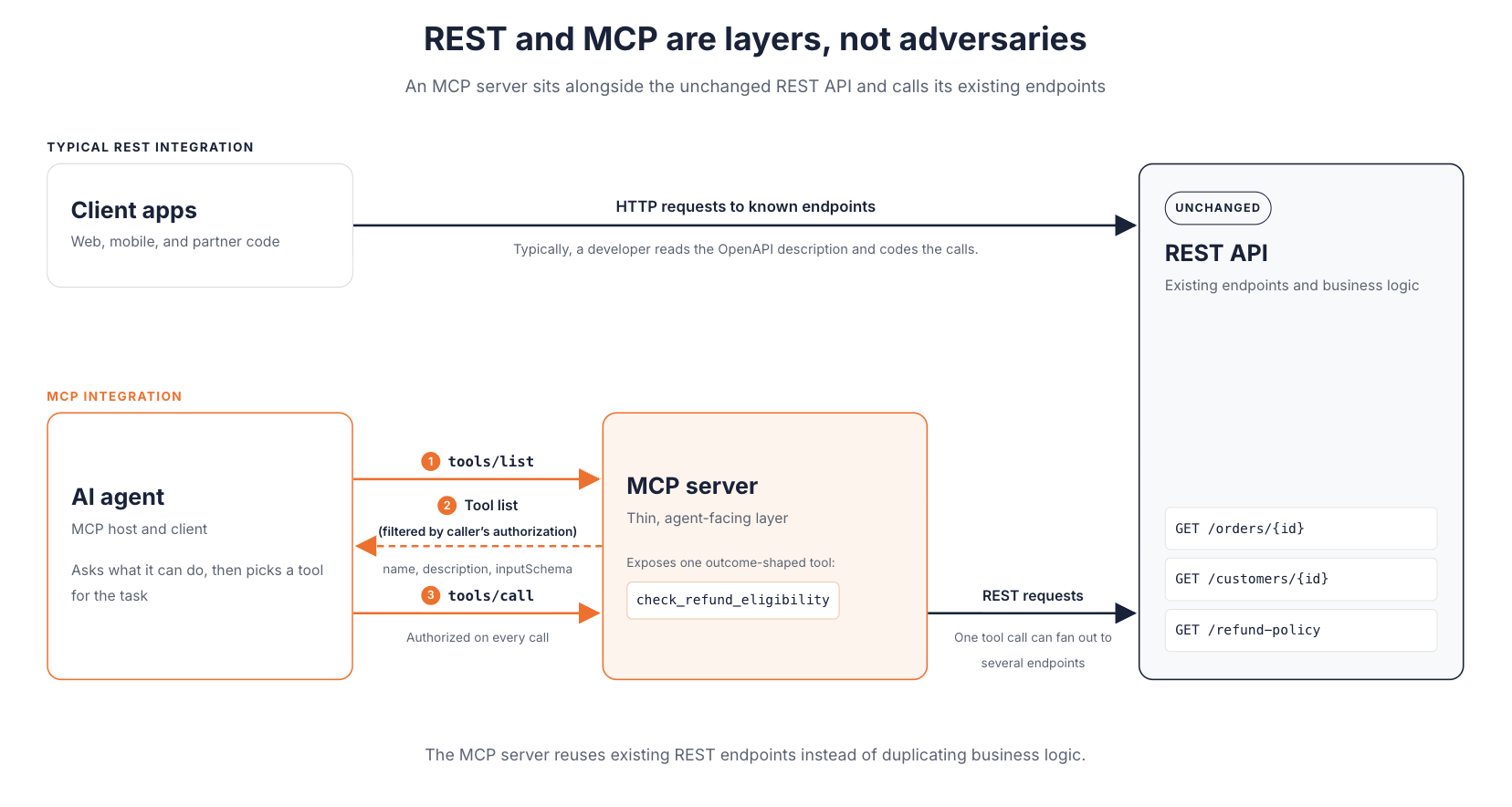
REST and MCP are layers, not adversaries. The MCP server reuses existing REST endpoints instead of duplicating business logic.
The Governance Problem This Creates, and How to Solve It Without Choosing Sides
Running both layers fixes the agent integration problem and creates an operational one. You now have two interfaces over the same systems, and each needs authentication, authorization, rate limits, and audit. If REST traffic runs through a managed gateway while MCP servers are deployed team by team, the agent side becomes the part nobody can see.
That blind spot is common. SailPoint's report AI agents: The new attack surface, released in May 2025, covers a survey of 353 IT and security professionals conducted by Dimensional Research. In it, 80% of companies said their AI agents had taken unintended actions, such as accessing unauthorized systems or sharing sensitive data.
The fix is not a second, separate governance stack. It is bringing agent traffic under the same control plane as API traffic, with policies that understand MCP.
This is the approach WSO2 AI Gateway takes. It governs inbound agent-to-tool traffic through MCP proxies and outbound application-to-model traffic through LLM proxies, as separate paths under one control plane. APIs, LLM traffic, and agent access share one governance model and one analytics view. The gateway can run standalone or connect to AI Workspace for centralized management.
On an MCP proxy, the policies map directly to agent-specific risks (MCP governance documentation):
- MCP Authentication secures traffic as the MCP specification's authorization profile describes, so OAuth enforcement doesn't depend on each server team.
- MCP Authorization checks access to individual tools, resources, and prompts using JWT claims or OAuth scopes. A support agent can read orders without being allowed to call
issue_refund. - MCP Access Control and MCP Rewrite limit which capabilities a caller can reach and give tools stable, user-facing names.
- MCP Rate Limit applies limits per tool, resource, prompt, or JSON-RPC method, which helps contain a runaway agent loop before it overloads a backend.
- Semantic Tool Filtering narrows the tool list to what is relevant to the query, which keeps the model's context small. Smarter AI traffic with Jev shows how the gateway applies this.
For audit, the Insights dashboards in AI Workspace report call volume per tool, agent sessions, and calling client runtimes for each MCP proxy. They also show latency and the error type behind each failure. Approved servers can be published to the MCP Hub, a catalog agent developers search instead of wiring up servers on their own. None of this replaces careful tool design or least-privilege scopes at your identity provider. It gives you one place to enforce and observe them.
Getting Started: A Practical Path from REST to Agent-Ready
MCP works best when you treat it as interface design rather than a translation exercise. A practical sequence looks like this:
- Start from agent tasks, not endpoints. List the few jobs agents actually need, such as checking refund eligibility or opening a ticket, and design one tool per outcome. Mapping each REST endpoint to its own tool recreates the granularity problem inside MCP.
- Reuse your existing business logic. Implement each tool as a call into the REST endpoints or services you already run. Don't fork logic into the MCP server. REST API to MCP server walks through this step by step.
- Match each capability to its interaction model. Use resources for context the host application loads, and tools for anything the model should call, including read-only queries. Give tools with side effects narrower scopes.
- Put OAuth 2.1 in front from the first deployment. Use your existing identity provider, require PKCE, and validate the audience on every token.
- Route through governance before production. Place the server behind an MCP proxy, attach authorization and rate-limit policies, and confirm the traffic appears in your dashboards.
- Test with real MCP clients. Watch which tools the model picks, then refine names and descriptions where it chooses wrongly.
REST remains the interface for software that knows what it wants. MCP is the interface for agents that have to work it out. Most teams need both, and the work that decides success is tool design and governance rather than the protocol choice. When you are ready to build, follow a step-by-step guide to implementing MCP, which ends with a running server placed behind an MCP proxy on WSO2 AI Gateway.
Conclusion
REST and MCP answer different questions. REST serves software that already knows what it wants. MCP lets an agent discover what it can do, then act within the limits you set. Since the 2026-07-28 specification made MCP stateless at the protocol layer, the two also run on similar infrastructure, which makes layering them easier.
The protocol choice is rarely the hard part. What decides whether agents are safe in production is tool design and governance. That means shaping tools around outcomes, binding tokens to the right server, and seeing every agent call alongside your API traffic.
Start with one agent task. Build one outcome-shaped tool over your existing REST logic, and put it behind policy before it reaches production. To see how one control plane governs both agent-to-tool and application-to-model traffic, explore WSO2 AI Gateway.
Frequently Asked Questions
Is MCP just a REST API?
No. MCP is a JSON-RPC protocol with its own discovery and authorization rules. An MCP server often calls REST APIs internally, but agents interact with it through MCP messages rather than resource URLs.
How is an MCP server different from a REST API?
A REST API exposes resources to clients that already know what to request. An MCP server exposes a curated set of tools, resources, and prompts that an agent lists and invokes at runtime.
What is the difference between an API and an MCP?
An API is any interface one program offers another. MCP is a specific protocol for connecting AI applications to external capabilities, so an MCP server is one kind of API, built for model-driven consumers.
What is replacing REST APIs?
Nothing, for most workloads. MCP adds an agent-facing layer over existing APIs, while web, mobile, partner, and service-to-service traffic continue to fit REST.
Is MCP stateful?
Not at the protocol level since the 2026-07-28 specification. Every request stands alone. When a workflow needs continuity, the server issues an identifier that travels as an ordinary tool argument.
Do I need MCP if my agent already uses function calling?
Not always. Function calling suits one agent and a small set of endpoints. MCP becomes worth it when several agent hosts share capabilities or when you need central authorization and audit.

