API Management Platforms: Cloud vs. Self-Hosted (2026)
Most comparisons of API management platforms start with a feature checklist. That's the wrong place to start. Before you compare rate limiting policies or developer portal templates, you need to answer a more basic question: who runs the infrastructure, and what does that decision actually cost?
The choice between cloud and self-hosted API management is a deployment decision first and a feature decision second. Self-hosted platforms give you full control of the gateway and its data, in exchange for owning every patch, upgrade, and 2 a.m. incident. Cloud-managed platforms shift most of that infrastructure burden to the provider, in exchange for usage-based pricing and a closer coupling to one vendor's ecosystem. Configuration, access policy, quotas, and how your APIs actually behave still stay your team's responsibility either way. Neither is a universal answer. The right one depends on your compliance requirements, your existing operations capacity, and how your traffic is distributed.
This piece breaks down the total cost of ownership behind each deployment model, where the real trade-offs sit, and how to decide without treating it as a self-hosted-wins-or-cloud-wins argument. It's part of WSO2's broader library on API tools, management & gateways, and it deliberately doesn't rank individual products against each other. If you're looking for that kind of rundown instead, feature by feature, our guide to comparing API management tools covers that ground. This piece is about the deployment decision that comes before any of those product comparisons matter.
The Three Deployment Models
Rather than comparing individual products first, it helps to separate two things that are easy to conflate: who's responsible for running the gateway, and where it physically runs. The first, hosting responsibility, drives most of the cost and operational trade-offs in this piece. The options are self-hosted (your team runs it), cloud-vendor managed (a cloud provider runs it), or hybrid, which splits the difference. The second, placement, is a separate axis. A gateway can run in a single region, across several regions, or distributed to many edge locations at once, and that choice can apply to a self-hosted or a cloud-vendor gateway alike. The "edge-native" pattern covered below is really a placement characteristic that a subset of vendors have paired with a managed hosting model, not a fourth hosting option that excludes the other two. Hybrid API management is covered in more detail later in this piece.
Self-Hosted
Self-hosted gateways are software you download and run on your own infrastructure, whether that's on-premises servers, virtual machines, or a Kubernetes cluster in your own cloud account. You own the full stack: the data plane that handles traffic, the control plane that distributes configuration, and the supporting infrastructure around it, including load balancers, TLS certificate management, and log aggregation.
The common self-hosted options illustrate how different "self-hosted" can look in practice:
- Kong Gateway (OSS) is built on NGINX and OpenResty, extended with Lua plugins. It requires PostgreSQL for its datastore in traditional mode, or it can run database-less with declarative configuration files.
- Tyk Gateway (OSS) is a Go-based gateway with Redis as a required dependency. Its dashboard and advanced analytics sit behind a commercial license.
- KrakenD is a stateless, Go-based gateway that uses declarative JSON configuration with no external database dependency at all.
- The WSO2 API Platform takes a different shape again. Instead of a single gateway process, its self-hosted option covers the full API lifecycle: design, a developer portal, API and AI gateways, security, and analytics. The platform source is open under the Apache 2.0 license. Its components run independently, so you deploy only the ones you need. Analytics come through Moesif, and Moesif Basic is included at no additional cost with a WSO2 subscription. In a fully self-managed setup, AI Workspace is a separate purchase.
The common thread is that self-hosted means you own patching, scaling, high availability, and the database layer underneath the gateway, if there is one.
Cloud-Vendor Managed
Cloud-vendor managed gateways are fully hosted services from a major cloud provider, tightly integrated into that provider's ecosystem.
- AWS API Gateway supports REST, HTTP, and WebSocket APIs, priced per request, from $1.00 per million calls for HTTP APIs up to $3.50 per million for REST APIs, plus data transfer.
- Azure API Management (APIM) offers a Consumption tier priced around $3.50 per million calls, with the first million free. That tier includes no developer portal or virtual network support. At the top, the Premium tier costs roughly $2,800 per month per unit and supports multi-region deployment.
- Google Apigee is an enterprise API management platform with a developer portal, analytics, and monetization built in. It publishes pay-as-you-go rates (a per-call charge plus a per-region environment fee), alongside a separate subscription tier that is quote-based.
The provider manages compute, scaling, and patching. In exchange, your configuration lives inside that provider's tooling, your architecture references provider-specific resources like IAM roles or Lambda ARNs, and moving to a different cloud later means significant rework on those integrations. How much depends on the artifact. API specifications and policy definitions often port over with edits rather than a rewrite, while identity bindings, analytics wiring, and deployment automation tied to the old provider's services typically need to be rebuilt and revalidated.
Edge-Native Managed
A newer category of gateway deploys to hundreds of edge locations at once instead of one or two cloud regions. Requests are processed close to the user rather than routed back to a single origin. That's a placement choice more than a hosting one. The vendors in this category still run the gateway for you, so in hosting-responsibility terms they're a variant of cloud-vendor managed, distinguished by where the vendor puts the infrastructure rather than by who runs it. Providers in this category, such as Zuplo, bundle the gateway, developer portal, API key management, and analytics into one subscription. It's a different cost model from self-hosting or a single-region cloud-vendor deployment. It's worth knowing about even if it doesn't fit every compliance profile. Some workloads still need the data residency guarantees that come with self-hosting.
What Self-Hosting Actually Costs
The license for an open-source gateway is free. The total cost of ownership of running it in production is not, and this is where most build-vs-buy comparisons go wrong by looking only at the license line.
Cost estimates vary by source and by team, so treat any single number as a starting point, not a budget. Per Gravitee's published TCO analysis, self-hosting an API gateway can run $50,000 or more per year once infrastructure and engineering time are included. Gravitee doesn't publish the exact request volume, team size, or region behind that figure, so use it as a directional signal of scale rather than a number to budget against directly. It's driven by four categories that recur across every self-hosted deployment:
- Infrastructure: compute, storage, load balancers, and (for gateways like Kong or Tyk) a managed database instance
- DevOps labor: ongoing patching, scaling, and incident response, which one industry estimate puts at 10 to 20 hours of senior engineering time per month for a production deployment
- Monitoring tooling: observability platforms for the gateway infrastructure itself, layered on top of whatever you already run for your applications
- Incident response: when the gateway goes down, your on-call engineer handles it, not a vendor's support desk
That last point matters more than it looks. A gateway sits in front of every API call your organization makes. So a poorly-run one can turn a single incident into a wide outage, and how wide depends on how the deployment is built. A single instance with no replicas is a single point of failure, while replicas, regional segmentation, and traffic isolation between teams all narrow the blast radius. Self-hosting means your team owns building that resilience in, rather than getting it by default. Gravitee also notes that the average enterprise now manages more than 15,000 APIs in production, a figure worth keeping in mind. API sprawl compounds every one of the costs above, since more APIs behind a self-hosted gateway generally means more configuration, more traffic patterns to monitor, and more surface area for an incident.
None of this is an argument against self-hosting. Organizations with air-gapped environments, or an existing platform engineering team that already runs Kubernetes clusters, can absorb these costs as a normal part of their operating model. Data sovereignty is a more specific case worth unpacking rather than assuming. The requirement is usually about where data is physically located, who can access it, and where it's processed, not an automatic mandate for full self-hosting. A region-locked cloud deployment, or a hybrid setup, can satisfy some sovereignty requirements on its own, depending on exactly what's specified. The point is that "the software is free" and "self-hosting is free" are two different claims, and only the first one is true.
What Cloud-Managed Actually Costs
Cloud-vendor managed gateways trade the infrastructure and staffing costs above for usage-based pricing, which introduces a different kind of cost risk: predictability.
At moderate volume, per-request pricing looks manageable, though the rate isn't flat. AWS publishes tiered pricing for REST APIs in most regions. The first 333 million requests a month cost $3.50 per million. The next tier, up to 1 billion, costs $2.80 per million. The rate steps down further at higher volumes. At 100 million requests a month, that works out to roughly $350 for the gateway alone. At a billion requests a month, the tiered math comes to about $3,033 (333M × $3.50 + 667M × $2.80). That is before data transfer fees. It also excludes supporting services like a developer portal or custom key management, none of which are bundled in. HTTP and WebSocket APIs are priced on entirely different schedules, so these figures apply to REST APIs specifically.
Hybrid and multi-region deployments add a second layer of cost that a simple per-request calculation misses. Azure APIM's self-hosted gateway option, for organizations that need a data plane on-premises or in a specific region, is tied to specific tiers. Per Microsoft's own feature comparison, it's included free (single-instance only) on the classic Developer tier and available as a paid add-on on the classic Premium tier. It is not available on any of the newer v2 tiers (Basic v2, Standard v2, or Premium v2), including for organizations paying for Premium v2. The exact add-on price is region- and deployment-specific, so get a quote from Azure's own pricing page rather than relying on a flat figure. Apigee follows a different but also-published model. Pay-as-you-go pricing charges per API call plus a fixed monthly fee per environment per region, and that per-environment fee alone can run up to roughly $3,431 per month for the highest ("Comprehensive") environment tier. That figure is a base fee, not an all-in ceiling. API call volume and any additional proxy deployments are billed on top of it. These figures vary by vendor, contract, and region, so treat them as directional rather than a quote.
The other cost that doesn't show up on an invoice is lock-in. A cloud-vendor gateway's configuration typically references that provider's other services directly, authentication tied to their identity platform, routing tied to their serverless compute, logging tied to their observability stack. Moving to a different cloud later means substantial rework on all of it, not just redeploying the gateway. Some artifacts, like API specs and policy logic, carry over more easily. Others, like identity bindings and deployment automation, don't. For organizations that expect to run workloads across more than one cloud, it becomes a migration project waiting to happen.
Comparing the Operational Model
Cost estimates answer "what will this take to run." The chart below puts three deployment models side by side at the same traffic volume, comparing equivalent feature sets rather than just the gateway's sticker price.
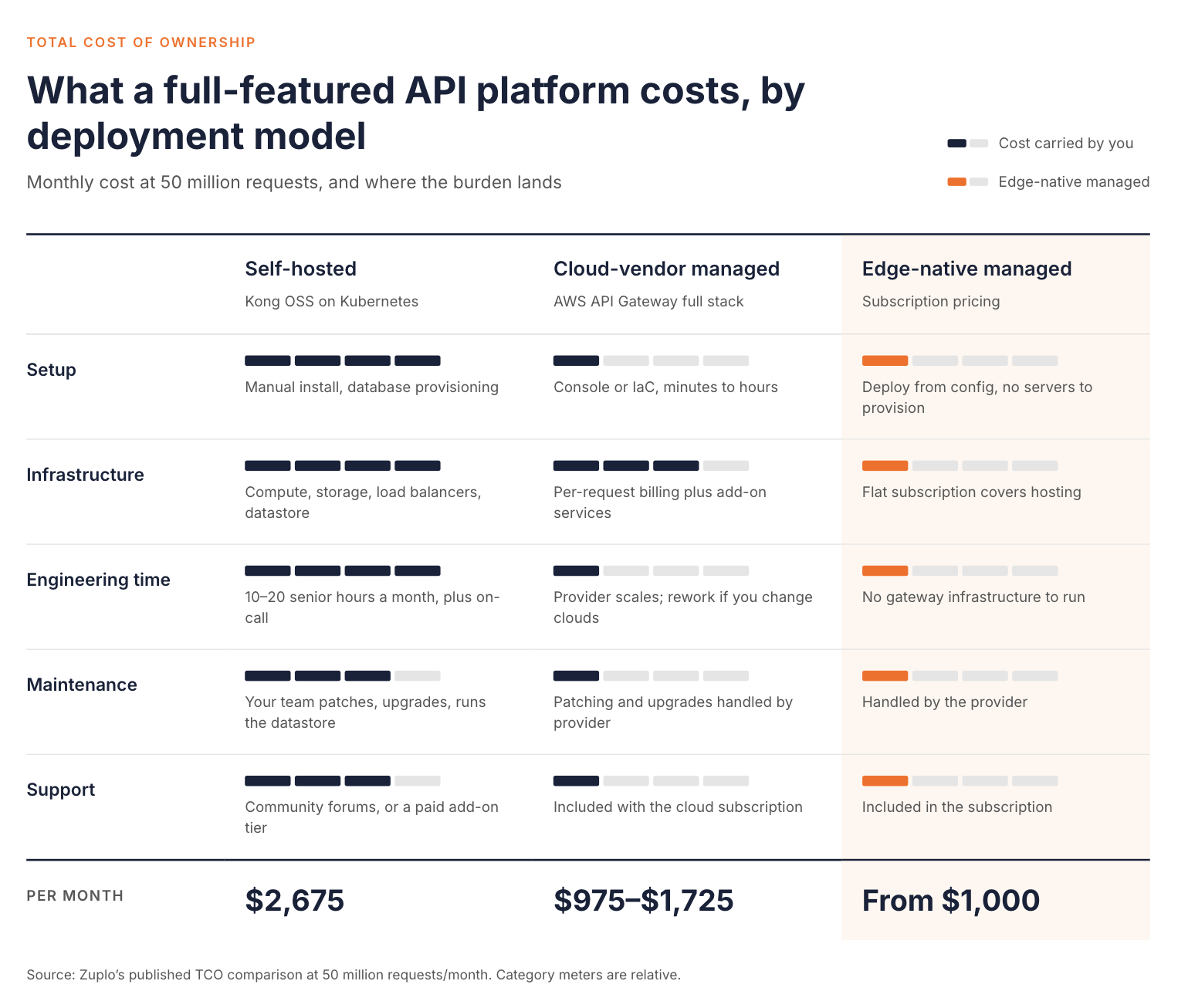
The table below answers a related but different question: who does the work, day to day, under each model. The two columns describe the neutral deployment models themselves, not any specific vendor.
| Self-Hosted (Kong OSS, Tyk OSS, KrakenD) | Cloud-Vendor Managed (Azure APIM, Apigee, AWS) | |
|---|---|---|
| Setup time | Manual install, database provisioning, and configuration | Console or IaC setup, minutes to hours for a basic deployment |
| Maintenance | Your team patches, upgrades, and maintains the datastore | Provider handles infrastructure patching and version upgrades |
| Scaling | Manual or semi-automated, your team configures auto-scaling | Automatic within the provider's published limits |
| Security updates | Your team applies patches on your own timeline | Infrastructure patches applied by the provider. Access policy and credential rotation remain your responsibility |
| Monitoring | Set up separately, usually a third-party observability tool | Built-in, scoped to that provider's ecosystem |
| Support | Community forums, or a paid tier if the vendor offers one | Typically bundled with the subscription, though scope and response times vary by plan |
Some vendors span more than one of these rows with separate products rather than one platform. Kong and Tyk both pair a self-hosted open-source gateway with a separately licensed, separately priced cloud or SaaS tier. That's still two distinct products to choose between. In most cases, customers also migrate across them if their needs change. WSO2 takes a different approach. The WSO2 API Platform offers Cloud, Hybrid, and self-managed options on the same gateway runtime. In Cloud, WSO2 handles maintenance, scaling, and support. In the other two, your team runs the gateways. That flexibility is worth understanding before you lock in a deployment model, and it's what the rest of this piece is about.
How to Decide: A Framework, Not a Verdict
There isn't a universal answer to cloud versus self-hosted, and any post that gives you one is skipping the parts of your situation that actually matter. Instead, work through these constraints in order, starting with the one you can't negotiate around.
Start with what you can't negotiate
If your data has to stay within a specific jurisdiction, in an air-gapped network, or under a compliance regime that restricts third-party infrastructure, self-hosted or hybrid deployment usually isn't a preference. It's a requirement, and it settles the deployment-model question before any of the other factors below get a vote. If none of that applies to your organization, you have more room to optimize for operational simplicity instead.
Look honestly at your existing operations capacity
A team that already runs Kubernetes clusters with an on-call rotation and established runbooks can absorb a self-hosted gateway as one more workload with a manageable increase in infrastructure management overhead. A team without dedicated platform engineers will find that a self-hosted gateway pulls application developers into infrastructure work instead, which slows down the API delivery it was supposed to speed up. Be honest about which team you actually are, not which team you'd like to be in twelve months.
Factor in where your spend attribution needs to go
Organizations running multiple teams or business units on the same gateway often need cost and usage broken out by team, not just by total traffic. Finance and engineering can then answer a simple question. Which team's APIs are driving this bill, and is that spend proportional to the value those APIs generate?
Consider your cloud strategy, not just your current infrastructure
If you're committed to one cloud provider with no multi-cloud plans, a cloud-vendor gateway integrates tightly with the rest of your stack, and that tight integration is a genuine advantage rather than a trap. Multi-cloud may already be on your roadmap, or your backends may already span more than one provider. Then a vendor-specific gateway becomes a bottleneck you'll have to work around, usually at the least convenient moment.
Match the model to where your traffic actually lives
Concentrated, single-region traffic is well served by a gateway in that region, whether self-hosted or cloud-managed. Globally distributed users add a latency consideration that a single-region deployment has to solve for separately, typically through additional regional deployments and the multi-region orchestration that comes with them.
None of these constraints point to a single winner, and most organizations land somewhere in between. That's why the deployment model, not the product name, is the first decision worth making. A broader API ecosystem strategy also has to account for more than one team's answer to these five questions.
Where a Single Control Plane Changes the Calculus
The cloud-versus-self-hosted framing above assumes a binary choice, and for a lot of gateways, it genuinely is one. Some self-hosted options only offer a separate, differently-licensed SaaS tier if you want a managed option later. Some cloud-vendor gateways only run on that vendor's infrastructure, full stop.
WSO2 approaches this differently, because the binary in this post's title isn't forced. You don't have to choose a deployment model once and live with it. The WSO2 API Platform runs as Cloud (fully managed SaaS), Hybrid, or self-managed, and all three use the same gateway runtime.
In self-managed mode, your data plane and control plane both run in your own infrastructure. That can be on-premises, in a private cloud, in Kubernetes, or on bare metal. Hybrid mode follows what's sometimes called hybrid API management. The gateways, which process API traffic, stay in your own network. That keeps latency low and API traffic inside your perimeter. The management console, developer portal, and analytics run in the WSO2-managed cloud, so your team doesn't maintain a separate on-premises console. The cloud control plane still receives configuration and telemetry metadata from the gateway. Hybrid keeps live traffic local, but it isn't automatically a complete answer to every sovereignty requirement. Check what the specific requirement covers before assuming hybrid satisfies it. In Cloud mode, WSO2 runs both planes and you manage neither.
The practical effect is that the decision framework in the previous section doesn't have to be a one-time, irreversible choice. The WSO2 docs note that you can start with Cloud and move to Hybrid or self-managed later without rearchitecting. You can also start with a standalone gateway and attach it to a control plane later. Moving between modes still involves some reconfiguration and validation. It isn't a one-click switch. Teams weighing that kind of move can look at WSO2's migration paths for a sense of what the transition involves. The same control plane also extends to gateways you don't run at all. WSO2 can manage WSO2, Kong, AWS, Azure, and Envoy gateways from one interface. That matters for organizations with a sprawling API ecosystem that want one place to see and govern all of it.
This doesn't make the deployment-model question irrelevant. Compliance constraints, existing infrastructure, and traffic patterns still determine which mode makes sense for a given API or team. What it changes is the cost of choosing wrong the first time. It also lowers the cost of your requirements changing six months into the project. A pure feature comparison never captures either cost.
Conclusion
Cloud versus self-hosted API management isn't a question with one right answer, and the vendors on either side of that argument both have a reason to want you to think it is. Self-hosted platforms trade a free license for real infrastructure and staffing costs. Cloud-vendor platforms trade that operational burden for usage-based pricing and a tighter coupling to one provider's ecosystem. Edge-native platforms offer a third cost model worth knowing about, even where it doesn't fit every compliance profile. None of the three is automatically cheaper or automatically safer once you account for the whole picture, not just the license fee or the sticker price.
The right model for your team comes down to the constraints in the decision framework above. These are your compliance limits, your operations capacity, where spend attribution needs to go, your cloud strategy, and where your traffic actually lives. Work through those in order before you compare a single feature across products.
The deployment model doesn't have to be permanent, either. Some platforms run self-hosted, hybrid, and managed SaaS on the same technology. With them, the choice you make today doesn't lock you in if your compliance requirements, team size, or infrastructure change later. That flexibility, not a feature checklist, is the real total-cost-of-ownership question behind "cloud vs. self-hosted API management platforms."
Frequently Asked Questions
What's the difference between cloud and self-hosted API management?
Self-hosted API management runs on your own infrastructure and puts your team in charge of provisioning, patching, and scaling the gateway. Cloud-managed API management runs on a provider's infrastructure, billed on usage, with the provider handling operations in exchange for tighter coupling to that provider's ecosystem.
Is self-hosted API management cheaper than cloud-managed?
Not necessarily. The software license is free, but infrastructure, monitoring, and the engineering time to run it reliably add up. Vendor estimates put realistic self-hosted costs in the tens of thousands of dollars per year for a production deployment. Once labor is counted, that can match or exceed a comparable managed subscription.
What is hybrid API management?
Hybrid API management splits the platform across two locations. The gateway that processes live API traffic stays on-premises or in a private network for latency and compliance reasons. The management console, developer portal, and analytics run in the cloud for easier access and lower maintenance.
Which API management platforms handle both self-hosted and cloud deployment?
Most platforms specialize in one deployment model and offer the other only as a separate product tier. A smaller number, including WSO2, use the same gateway runtime across self-hosted, hybrid, and managed SaaS deployment. They don't split the product line by deployment mode.
How many engineers does a self-hosted API gateway need?
Vendor estimates suggest a production self-hosted deployment needs at least one platform or DevOps engineer for part of their time. The commonly cited figure is 10 to 20 hours a month for patching, scaling, and incident response. That is on top of the initial setup work.

