API Management Tools: A Complete Buyer's Guide for 2026
Choosing an API management tool used to mean comparing gateways, developer portals, and rate limiting policies. That list has grown. In 2026, a buyer's guide also has to cover something newer: how each platform treats large language model traffic and AI agents calling your services through the Model Context Protocol. That sits alongside the traditional lifecycle work of versioning, governance, and access control.
This guide compares eight platforms teams evaluate most often: Kong, Apigee, MuleSoft, Tyk, Gravitee, Azure API Management, AWS API Gateway, and WSO2. Each entry covers what the tool is built for, its core features, how it prices, and where it falls short. A feature matrix and a decision framework follow, so you can match a tool to your team's actual constraints rather than a generic ranking.
What Is an API Management Tool?
An API management tool is software that lets organizations publish, secure, monitor, and control access to their APIs. It combines a gateway that sits in the traffic path between API consumers and backend services. It enforces authentication, rate limits, and usage policies on every request, with a developer portal, policy engine, and lifecycle tooling that operate outside that request path to support design, publishing, and governance.
Quick Picks: Best API Management Tools by Use Case
| Tool | Best for |
|---|---|
| Kong | Kubernetes-native teams that want a plugin-driven, high-throughput gateway |
| Apigee | Enterprises already standardized on Google Cloud who need deep API monetization |
| MuleSoft | Large enterprises with heavy legacy system integration and Salesforce ties |
| Tyk | Teams that want an open-source, Go-based gateway with native GraphQL support |
| Gravitee | Organizations managing both REST APIs and event streams (Kafka, MQTT) from one place |
| Azure API Management | Teams already running their stack on Azure who want native Entra ID integration |
| AWS API Gateway | Serverless architectures built around Lambda, with no infrastructure to manage |
| WSO2 | Enterprises that want APIs, LLM traffic, and MCP traffic governed under one open-source control plane |
This list draws on each vendor's own documentation and pricing pages, along with independent cost analyses and review aggregators, checked during the writing of this guide rather than pulled from memory. Pricing figures change often, so treat the numbers below as a starting point for your own quote request rather than a final number.
What to Look For: Core Evaluation Criteria
Every established platform in this category converges on a similar short list of capabilities. This guide evaluates each tool against four foundational criteria widely used across API management category definitions, including Gartner's: gateway enforcement, developer portal, policy management, and lifecycle governance. A fifth criterion, AI and MCP readiness, has emerged fast enough in 2026 that most vendors now treat it as a standard checklist item rather than an experimental add-on.
API Gateway
The gateway is the runtime component that sits in front of your backend services. It handles routing, authentication, throttling, and request transformation on every call. This is the part of the stack most exposed to production traffic, so throughput, latency overhead, and deployment flexibility (cloud, on-premises, hybrid, Kubernetes) matter as much as the feature list.
Developer Portal
A developer portal lets internal or external consumers discover your APIs, read documentation, and self-serve API keys without filing a ticket. The gap between a good and a mediocre portal shows up in onboarding time: a well-built one turns "email the platform team" into "sign up and get a key in minutes."
Policy Management
Policy management covers the rules applied at the gateway: rate limiting, authentication schemes, request and response mediation, and quota enforcement. Teams with regulatory obligations also look for how granular these policies can get, down to the level of a single consumer or a single endpoint.
Full Lifecycle Governance
Lifecycle governance covers an API's full path from design and development through what happens after it ships: versioning, deprecation workflows, access control changes, and audit trails. Tools that only handle design and runtime enforcement, without a structured way to retire or version an API, tend to accumulate governance debt as an API portfolio grows. This becomes especially visible during audits. A platform team may need to reconstruct who had access to a given API version at a given point in time, and whether that access followed an approval workflow or was granted ad hoc.
AI and MCP Readiness
Every vendor in this category has published guidance on governing LLM traffic and MCP-based agent access in the past year. What varies is whether that governance sits inside the same control plane as the rest of an organization's APIs, or whether it requires a second, separate product with its own policies and audit trail. Kong, Tyk, MuleSoft, Azure, and WSO2 each now offer some form of native MCP handling at the gateway or control-plane level. The depth, licensing terms, and maturity differ by vendor. Check them against current vendor documentation rather than assuming. Whether that distinction matters to your team depends on how much AI and agent traffic you expect to manage over the next year, not on hitting a specific volume target.
The Top API Management Tools for 2026, Compared
Kong
Best for: Kubernetes-native teams that need a fast, plugin-extensible gateway and are comfortable managing their own data plane.
Key features:
- Core gateway built on NGINX/OpenResty, tuned for high throughput and low latency
- Plugin architecture covering authentication, rate limiting, transformations, and observability
- Kong Konnect adds a hosted control plane, developer portal, service catalog, and an AI Gateway layer for LLM traffic
- Kong Mesh for service mesh use cases, and Kong Insomnia as a standalone API client
Pricing: Kong Gateway's open-source core is free to self-host. Kong Konnect Plus bills per control plane rather than a flat per-service rate. It lists $25 a month for a Serverless Gateway control plane or $200 a month for a Hybrid Gateway control plane. The first million API requests are included, and each additional million costs about $200. Each AI Gateway model proxied beyond the first five adds $100 a month. Konnect Enterprise is a custom annual contract, and mid-sized deployments commonly land between $50,000 and $120,000 a year according to third-party benchmarking.
Pros: High performance, a mature plugin ecosystem, and flexible hybrid deployment where Kong hosts the control plane and you run the data plane.
Cons: Konnect's per-control-plane and per-model billing can get expensive for architectures running many gateway control planes or proxying many distinct LLM models, since costs scale with both dimensions independently. Advanced governance and analytics features sit behind paid tiers.
Kong started as an internal gateway at an API marketplace company before being open-sourced in 2015, and that gateway-first history still shows in the product. Teams already running Kubernetes tend to find the deployment model familiar, since the data plane runs the same way any other containerized workload does. The trade-off is that a lot of what feels like "core" functionality on other platforms, such as advanced rate limiting or OIDC authentication, arrives through plugins that may sit behind a paid tier.
Apigee
Best for: Enterprises already standardized on Google Cloud that need strong API monetization and analytics as a core requirement, not an afterthought.
Key features:
- API proxy layer supporting REST, gRPC, SOAP, and GraphQL
- Built-in analytics, quota management, and monetization tooling
- Three deployment models: fully managed Cloud, Hybrid (runtime under customer control, management plane in Google Cloud), and on-premises
- Deep integration with the wider Google Cloud and Gemini ecosystem
Pricing: Apigee offers a 60-day free evaluation, then pay-as-you-go pricing billed on two dimensions at once. The first is an environment fee per region: Base at roughly $365/month, Intermediate at roughly $1,460/month, or Comprehensive at roughly $3,431/month. The second is a per-call rate that depends on proxy type. Standard API proxy calls start at $20/million, and Extensible API proxy calls start at $100/million, with lower rates at higher volumes. Quote-based Standard, Enterprise, and Enterprise Plus subscriptions are also available. Google is winding down the legacy Apigee Edge product in favor of Apigee X and Apigee hybrid. It has already retired the Classic UI, and the final Private Cloud version is scheduled for end of life in 2027. New deployments should plan around X or hybrid rather than Edge.
Pros: Mature monetization and analytics, strong multi-protocol support, and a straightforward path for teams already inside Google Cloud.
Cons: Pricing is opaque above the pay-as-you-go tier, and several independent cost analyses place Apigee well above Kong or AWS on a per-call basis once environment fees are included.
Apigee's cost model has two independent variables, not one. The environment type (Base, Intermediate, or Comprehensive) sets a fixed monthly fee and a feature ceiling. The proxy type (Standard or Extensible) sets the per-call rate. Extensible proxies cost five times as much per call as Standard ones. Comparing an Apigee quote against a competitor's flat rate means mapping out both dimensions for the specific proxies in question, not just picking the cheapest environment tier. That extra step is worth taking before assuming Apigee is simply "the expensive option" or "the cheap option," since the answer depends heavily on how many of an organization's proxies actually need Extensible-tier capabilities.
MuleSoft
Best for: Large enterprises with extensive legacy system integration needs, particularly organizations already invested in the Salesforce ecosystem.
Key features:
- Anypoint Platform combines API management with a broader integration and iPaaS toolset
- Anypoint API Manager for governance, plus Anypoint Monitoring and Anypoint Security as add-on modules
- An MCP Support policy on Omni Gateway, formerly Flex Gateway (from gateway version 1.9.3), that lets the gateway front MCP server instances directly. A separate AI Gateway product covers broader LLM traffic governance
- A large library of pre-built connectors for legacy and SaaS systems
- DataWeave, MuleSoft's own transformation language, for mapping data between systems
Pricing: MuleSoft packages now start at $2,000 a month, billed annually. Each package includes Mule Credits, a shared unit of consumption across integration, API management, automation, and agent features. Enterprise pricing is still quote-based. Industry benchmarking puts median annual contracts in the tens of thousands of dollars, and large deployments cost well beyond that.
Pros: Extensive connector breadth for legacy and enterprise system integration, and a single platform that covers both integration and API management.
Cons: No public list pricing, a steep learning curve tied to DataWeave, and a cost structure that multiple independent analyses flag as one of the most expensive in this category.
MuleSoft is best understood as an integration platform that includes API management, rather than an API gateway that grew integration features. That framing matters for evaluation. If your core need is exposing and governing APIs, MuleSoft's broader iPaaS capabilities (event processing, B2B connectors, legacy protocol support) may be more platform than you need. If you're already untangling a large number of point-to-point integrations across legacy and SaaS systems, that same breadth is the reason MuleSoft shows up on enterprise shortlists in the first place.
Tyk
Best for: Teams that want an open-source, high-performance gateway with native GraphQL federation and full control over their infrastructure.
Key features:
- Gateway written in Go, running as a single binary backed by Redis
- Native GraphQL support in the open-source gateway, plus a separately licensed Universal Data Graph component that federates REST, GraphQL, and gRPC backends into one endpoint
- An open-source MCP gateway capability, including converting OpenAPI specs into MCP tools and proxying remote MCP servers through the same policy and analytics engine as REST traffic
- Available as Cloud, Hybrid, or fully self-managed deployments
- Dashboard, developer portal, and advanced analytics available in paid tiers
Pricing: The Tyk gateway itself is open source under MPL 2.0 and free to self-host. Commercial plans (Core, Professional, and Enterprise) are quote-based across Cloud, Hybrid, and Self-Managed deployments, with no published list prices.
Pros: Strong raw performance from its Go architecture, genuine multi-protocol support, and a licensing model that keeps the core gateway free.
Cons: The management dashboard, developer portal, Universal Data Graph, and advanced analytics are closed-source and require a license key to run, even self-hosted. Commercial pricing is not public, which makes upfront budgeting harder.
The split between Tyk's open-source gateway and its closed-source management layer is worth understanding before you commit to a self-hosted evaluation. A team can run the gateway itself for free indefinitely, but the moment you need role-based access control, a polished developer portal, or usage analytics beyond basic logs, you're evaluating a commercial plan anyway. That's a reasonable trade for many teams. But it means the "free and open source" pitch applies more narrowly than it does for a platform like the WSO2 API Platform, which publishes its gateways, control plane, and portal source under Apache 2.0.
Gravitee
Best for: Organizations that need to manage REST APIs and event-streaming protocols like Kafka and MQTT from a single platform.
Key features:
- Event-native gateway supporting REST, GraphQL, WebSocket, and native event broker protocols
- API Designer with AsyncAPI specification support across the full API lifecycle
- Fine-grained authorization policies enforced at the gateway, including MCP tool access controls
- Flat, node-based pricing rather than per-request billing
Pricing: Gravitee uses flat pricing tiers it names Planet, Galaxy, and Universe, which include unlimited API calls and events per plan rather than charging per request. Gravitee publishes an entry price of $2,500 a month for Planet. Galaxy and Universe are quote-based, so confirm current rates in your own quote.
Pros: One of the few platforms with genuine event-broker support alongside standard API management, and predictable flat-rate billing that avoids consumption-based surprises.
Cons: Full event-native capabilities, including Kafka integration, sit behind the paid Enterprise license, and the smaller ecosystem means fewer third-party integrations than Kong or Apigee.
Gravitee's positioning as an "event-native" platform is a real architectural difference, not just marketing language. Most gateways on this list treat WebSocket or webhook support as an addition to a fundamentally request-response design. Gravitee built its gateway to treat synchronous REST calls and asynchronous event streams as first-class citizens from the start. You can see it in how naturally it exposes a Kafka topic as a WebSocket or webhook endpoint. Teams without an event-streaming component in their architecture won't get much marginal value from this, and should weigh Gravitee mainly on its conventional API management strengths instead.
Azure API Management
Best for: Teams already running their infrastructure on Azure who want native Entra ID integration and don't need multi-cloud gateway federation.
Key features:
- Classic tiers (Developer, Basic, Standard, Premium) and newer v2 tiers (Basic v2, Standard v2, Premium v2) with different billing models
- A serverless Consumption tier that scales to zero and bills per call
- Native integration with Microsoft Entra ID for developer portal authentication
- Self-hosted gateway option, available on classic Premium tier, for hybrid deployments
Pricing: Azure API Management offers a Consumption tier that's free at low call volumes and billed per call above that. For evaluation, it also offers a low-cost Developer tier. That is a paid, non-production SKU with no SLA, not a free tier. The v2 tiers bundle a monthly request allowance into a per-unit price. They run from roughly $150 a month for Basic v2 up into the thousands for Premium v2. Premium v2 adds virtual network injection. Multi-region deployment and the self-hosted gateway remain classic-Premium-only features.
Pros: Deep Azure ecosystem integration, a Consumption tier that costs nothing at low call volumes, and clear published pricing compared to several competitors on this list.
Cons: The self-hosted gateway and multi-region deployment are still classic-tier-only features, so teams on the newer v2 tiers give those up. Costs climb quickly once you need Premium-tier networking features.
The classic-versus-v2 tier split is a common source of confusion during evaluation. Microsoft introduced the v2 tiers to simplify pricing by bundling a monthly request allowance into the unit cost. It did so without full feature parity to the classic tiers, and there's no automated migration path between the two. Teams should pick a tier family at creation time based on whether they'll eventually need a self-hosted gateway or multi-region failover, since switching later means a rebuild rather than an upgrade.
AWS API Gateway
Best for: Serverless architectures, especially teams building on Lambda who want a managed gateway with no infrastructure to run.
Key features:
- Three API types: REST APIs (full feature set), HTTP APIs (lighter and cheaper), and WebSocket APIs for real-time connections
- Native integration with Lambda, IAM, and Cognito for auth
- Usage plans, API keys, and per-stage caching available on REST APIs
- Pay-as-you-go pricing with no minimum commitment
Pricing: AWS API Gateway charges $1.00 per million requests for HTTP APIs and $3.50 per million for REST APIs, plus data transfer charges. WebSocket APIs bill at $1.00 per million messages plus $0.25 per million connection minutes. There are no gateway instance fees, since the core request pricing is pay-per-call, though optional features like REST API response caching, custom domain certificates, and data transfer can accrue costs independently of request volume.
Pros: No infrastructure to manage, transparent published pricing, and tight integration with the rest of the AWS ecosystem.
Cons: Governance and lifecycle features are thinner than dedicated API management platforms. Teams outside AWS, or running a genuinely multi-cloud estate, gain little from its deepest integrations.
Choosing between AWS API Gateway's REST and HTTP API types is itself a meaningful decision, not just a pricing footnote. HTTP APIs cost less per request and cover most Lambda-backed workloads, but they skip built-in caching, API keys, and usage plans, features that REST APIs include. Teams that assume they need the REST API type "for the features" sometimes discover otherwise during a cost review. They were only ever using it as a plain proxy, at more than three times the price of the HTTP API equivalent.
WSO2
Best for: Enterprises that want a single, open-source control plane spanning REST, GraphQL, and WebSocket APIs, LLM traffic, and MCP-based agent access, without stitching together separate tools for each.
Key features:
- A unified control plane that can manage WSO2's own gateway alongside federated third-party gateways, including Kong, AWS, Azure, and Envoy deployments
- An AI Gateway that governs LLM calls (through LLM proxies) and MCP tool access (through MCP proxies). It runs on the same runtime and policy engine as the API Gateway, so AI governance isn't a separate product
- Moesif-powered analytics and monetization, covering API and AI usage in one reporting layer (analytics depth varies by plan)
- Flexible deployment across SaaS, self-hosted, and hybrid models, with the open-source core licensed under Apache 2.0
Pricing: The WSO2 API Platform source is open under Apache 2.0. Moesif Basic analytics are included at no additional cost with a WSO2 subscription. Cloud, Hybrid, and self-managed deployments are priced separately. In self-managed deployments, AI Workspace is a separate purchase. Check current pricing with WSO2 directly.
Pros: APIs, LLM proxies, and MCP servers are governed through the same control plane and policy model. That avoids the overhead of running a separate AI gateway product next to a conventional API gateway. The gateways, control plane, and developer portal are all published as open source, not only the proxy.
Cons: WSO2's third-party plugin and integration marketplace is smaller than Kong's, so teams with a large existing investment in Kong-specific plugins may find fewer drop-in equivalents.
WSO2 designed its control plane so that conventional APIs, LLM proxies, and MCP servers are managed as artifacts under one set of policies from the outset, rather than adding AI governance as a later layer. Its federation model also means you don't have to replace a gateway you already run. An existing Kong deployment, for example, can be registered under WSO2's control plane for central visibility. AI and MCP workloads can be decided on separately. Whether any of this matters to an evaluation depends on how much of a team's near-term roadmap involves exposing internal systems to AI agents, not on any specific feature checkbox.
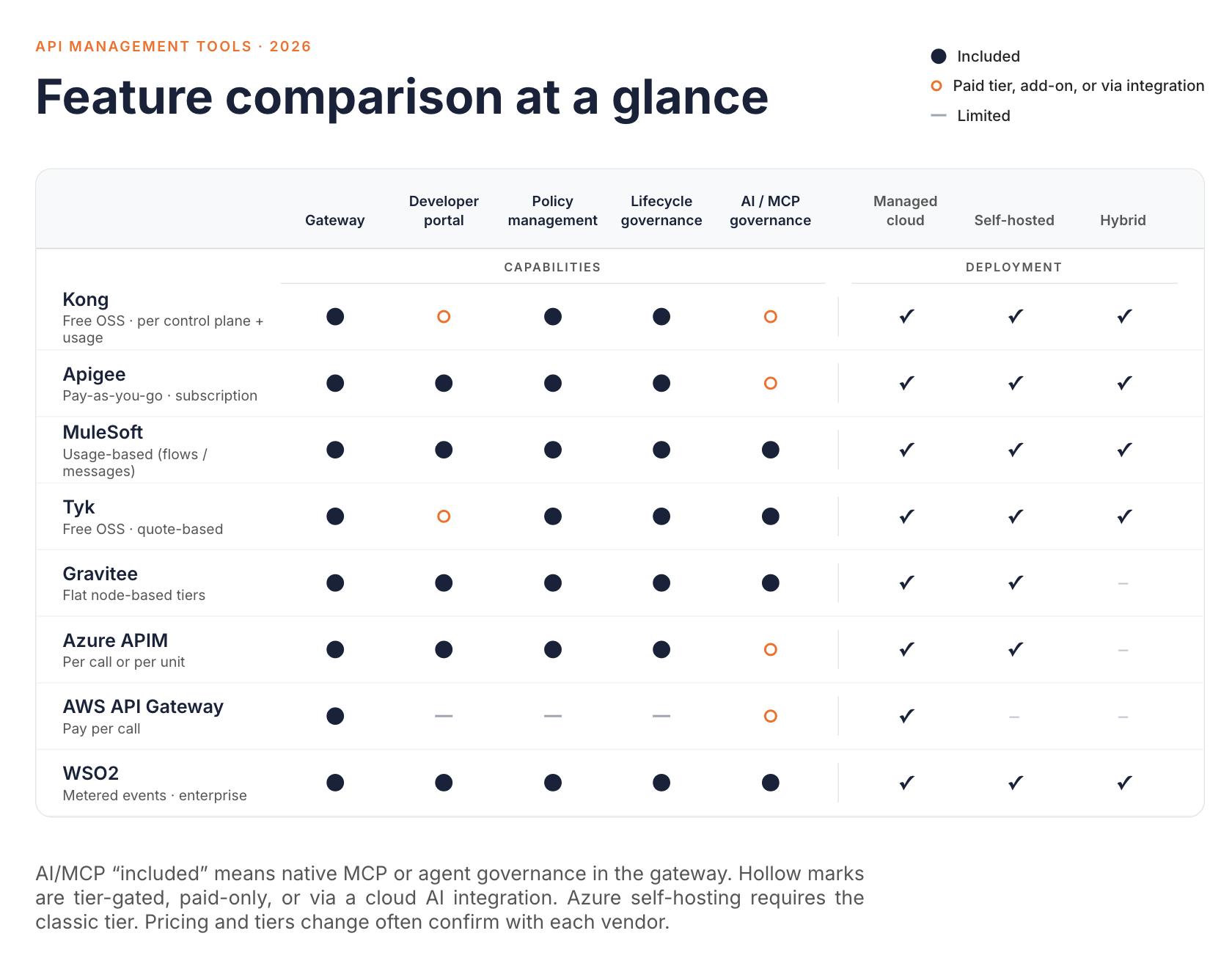
Feature Comparison Matrix
| Tool | Gateway | Dev Portal | Policy Mgmt | Lifecycle Governance | AI/MCP Readiness | Deployment | Pricing Model |
|---|---|---|---|---|---|---|---|
| Kong | Yes (OSS core) | Konnect only | Yes | Yes (Konnect) | AI Gateway | Self-hosted, Konnect SaaS, hybrid | Free OSS / per-control-plane + usage |
| Apigee | Yes | Yes | Yes | Yes | Gemini/Vertex integration | Cloud, hybrid, on-prem | Pay-as-you-go / subscription |
| MuleSoft | Yes | Yes | Yes | Yes | Native MCP policy (Flex/Omni Gateway) + AI Gateway | CloudHub, Runtime Fabric | Usage-based (Flows/Messages) |
| Tyk | Yes (OSS core) | Paid tiers | Yes | Yes | Native MCP gateway (OSS core) | Cloud, hybrid, self-managed | Free OSS / quote-based |
| Gravitee | Yes | Yes | Yes | Yes | MCP and agent auth policies | Cloud, self-hosted | Flat, node-based tiers |
| Azure API Management | Yes | Yes | Yes | Yes | Multi-provider LLM + native MCP/A2A (tier-gated) | Azure-managed, self-hosted (classic tier) | Per-call or per-unit tiers |
| AWS API Gateway | Yes | Limited | Basic | Limited | Via Bedrock integration | AWS-managed only | Pay-per-call |
| WSO2 | Yes | Yes | Yes | Yes | Native, same control plane | SaaS, self-hosted, hybrid | Metered events / enterprise agreement |
How to Choose the Right Tool for Your Team
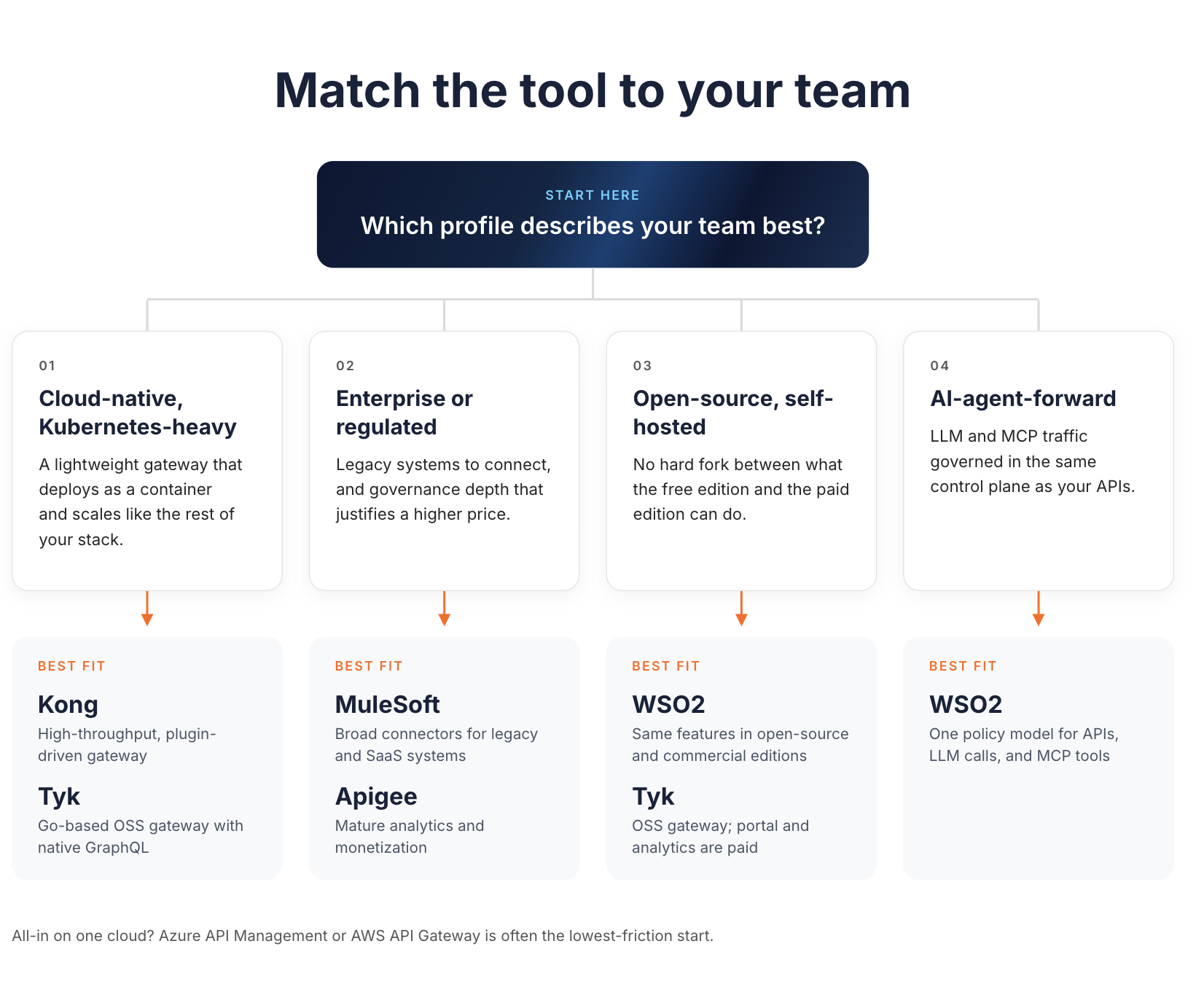
The right fit depends more on your team's operating constraints than on any single feature list. A few real-world triggers matter more than a scorecard:
- Cloud-native, Kubernetes-heavy teams tend to gravitate toward Kong or Tyk, since both are built around a lightweight gateway that deploys as a container and scales the way the rest of a Kubernetes stack does.
- Regulated or enterprise environments with existing legacy systems often lean toward MuleSoft or Apigee, where the broader integration tooling and governance depth offset a higher price tag.
- Open-source-first teams that want to avoid a hard fork between free and paid feature sets should look closely at how each vendor splits functionality between community and commercial editions. Tyk's gateway is open source but its portal and analytics are not. WSO2 publishes the API Platform's gateways, control plane, and portal source under Apache 2.0.
- AI-agent-forward teams are those where LLM and MCP traffic is becoming a meaningful share of API traffic. They should check whether AI governance lives in the same control plane as conventional API governance. The alternative is standing up and maintaining a second tool. That question matters more than any specific traffic volume, since the operational cost of running two governance systems shows up regardless of scale.
- Some teams are fully committed to one cloud provider, with no near-term multi-cloud plans. They often find the native option (Azure API Management or AWS API Gateway) is the lowest-friction start. That works if they're comfortable with a tighter feature set than dedicated API management platforms offer.
None of these signals require hitting a specific request volume or token count before a decision makes sense. The better questions are architectural. How many gateways will you actually run? How much of your traffic is AI and agent-driven today? How much governance debt are you willing to carry as your API portfolio grows?
It's also worth separating the evaluation into two questions that get conflated often: what the gateway can technically do, and what your team can operationally sustain. A platform with a longer feature list isn't automatically right for a three-person platform team that needs to move fast. In the same way, a lean, developer-friendly gateway isn't automatically right for an organization that needs detailed audit trails across every API and AI interaction. Matching the platform's operating model to your team's actual size and governance requirements tends to predict satisfaction better than a side-by-side feature count.
How WSO2 Fits In
Most platforms on this list added AI and MCP support as a layer on top of an existing API gateway. WSO2's approach is to route LLM and MCP traffic through its AI Gateway. The AI Gateway runs on the same runtime and policy engine as the API Gateway. It uses the same kinds of authentication, rate limiting, and observability controls, rather than a parallel product with its own rules. WSO2 was named a Leader in the 2026 Gartner® Magic Quadrant™ for API Management.
In practice, an AI agent calling an internal tool through MCP gets the same kind of access control and audit trail as a REST API call. It isn't handled by a separate system. The traffic flows are architecturally distinct. An inbound call from a client application to the gateway is a separate flow from an outbound call the gateway makes to an LLM provider. WSO2's documentation treats them that way. It doesn't chain them into a single mandatory sequence. Platform teams get one place to see cost, usage, and security posture across both.
This isn't a complete picture without a trade-off. WSO2's plugin marketplace is smaller than Kong's, so teams with deep existing investment in Kong-specific extensions may need to build custom integrations rather than find a drop-in equivalent. WSO2 also spans a broader set of capabilities, including multi-gateway federation and monetization. Teams that only need a narrow, single-purpose gateway may find the platform wider than they need. They can run the API Gateway or AI Gateway standalone instead. For teams actively consolidating separate API, LLM, and MCP tooling, though, a single control plane with a consistent policy model is the more defensible long-term architecture than maintaining three.
The other practical detail worth naming plainly: WSO2's federation model doesn't require replacing a gateway your team already runs. A team standardized on Kong for conventional API traffic can register that gateway under WSO2's control plane and manage governance centrally. It can then decide separately whether new AI and MCP workloads should route through WSO2's own AI Gateway or through additional federated gateways. That's a different migration story than a rip-and-replace evaluation. A platform team can consolidate visibility first and consolidate infrastructure later, on its own timeline.
Conclusion
There's no single best API management tool for 2026, only a best fit for a given team's traffic, infrastructure, and governance obligations. Kubernetes-native teams and enterprises with heavy legacy integration needs are pulled toward different ends of this list for good reasons, and those reasons rarely change based on which vendor has the longer feature page.
The one shift worth carrying into any evaluation this year is the AI and MCP question. It used to be reasonable to pick an API gateway and handle LLM or agent traffic separately, later, with a different tool. That's a harder case to make now that agent-driven traffic is a normal part of many API programs rather than an edge case. You may land on WSO2, one of the cloud-native gateways, or one of the enterprise integration platforms above. Either way, make one decision deliberately. Will AI governance sit inside the same control plane as everything else, or in a second system your platform team has to keep in sync?
Frequently Asked Questions
What is the difference between an API gateway and an API management platform?
An API gateway is the runtime component that routes and enforces policies on live traffic. An API management platform includes the gateway plus a developer portal, analytics, and lifecycle governance tools built around it.
Do I need a separate tool for managing AI and MCP traffic?
Not necessarily. Some platforms, including WSO2, apply the same gateway and policy engine to LLM and MCP traffic that they apply to REST APIs. Others require a separate AI-specific gateway product alongside the conventional one.
Is open-source API management free to run in production?
The gateway itself is often free, but production readiness usually requires features like a management dashboard, developer portal, or advanced analytics, which several vendors reserve for paid tiers. Check what's included in the open-source edition specifically, not just whether one exists.
How is API management pricing typically structured?
Common models include per-request billing, per-gateway or per-service subscription fees, flat-rate node pricing, and metered event pricing. Many vendors combine two or more of these, which is why total cost of ownership is harder to estimate than a headline price suggests.
What should I evaluate beyond features and pricing?
Three signals tend to matter more over time than an initial feature checklist. The first is deployment flexibility (cloud, self-hosted, hybrid). The second is how cleanly the platform separates free and paid functionality. The third is whether AI and API governance share a single control plane.
Should traffic to an LLM provider be treated the same as traffic from a client to your API?
No. A client calling your API is an inbound request your gateway receives and authenticates. A call your gateway makes to an LLM provider on the application's behalf is a separate, outbound flow with its own latency, cost, and failure characteristics. Platforms that govern both well apply consistent policy models to each without collapsing them into a single mandatory chain.

